WPC Free Shipping Bar 2.0.0 Not Showing in Cart or Mini-Cart

Comparison showing WPC Free Shipping Bar 1.5.4 working in the WooCommerce mini-cart, cart and checkout while version 2.0.0 is missing from the cart and mini-cart.

WPC Free Shipping Bar for WooCommerce 2.0.0 can fail to display the shipping progress bar in the cart and mini-cart even though the same bar still appears at checkout. When the same site works normally after rolling back from 2.0.0 to 1.5.4 without changing any plugin settings, that is strong evidence of a version-specific regression … Read more

Smart Tabs “Non Active” Tab Still Shows on the Front End

Smart Tabs Non Active setting showing a disabled Gallery tab still visible beside an example where the tab is completely hidden.

Marking a tab as Non Active in Smart Tabs can leave the tab title visible on the front end while preventing visitors from clicking it. That behavior is better understood as disabling the tab rather than hiding it. The distinction matters: If your goal is to temporarily remove a tab from visitors while keeping its … Read more

Smart Tabs “Non Active” Tab Still Visible on the Front End

Smart Tabs Non Active setting showing a disabled tab still visible on the WordPress front end beside an example of a completely hidden tab.

If a tab in Smart Tabs is marked Non Active but remains visible on the front end as an unclickable tab, the setting is behaving more like a disabled state than a hidden state. Those two behaviors are technically different: If your intention is to temporarily remove a tab from public view, disabling it is … Read more

How to Fix the PageLayer “pagelayer/pl-btn” Block Error in WordPress

WordPress Gutenberg editor showing an unsupported PageLayer pagelayer/pl-btn block while the same button still works in the website preview.

When the WordPress editor displays: Your site doesn’t include support for the “pagelayer/pl-btn” block. You can leave it as-is or remove it. but the PageLayer button still appears correctly on the published page and in Preview, the content itself is usually not the immediate problem. The message means the block editor found saved content belonging … Read more

Wordfence Plugin Keeps Disappearing After a WordPress Hack

WordPress plugins screen showing the Wordfence plugin disappearing while a terminal checks the Wordfence plugin directory.

If Wordfence is installed after cleaning a hacked WordPress site and then disappears again hours later, treat the site as still compromised until you can prove otherwise. A normal plugin or theme conflict might deactivate a plugin, but it should not normally delete or rename the entire wp-content/plugins/wordfence/ directory. Malware can do exactly that. Wordfence … Read more

Product Feed PRO: “Skipping Scheduled Feed Generation: Previous Run Is Still Processing”

Product Feed PRO warning that scheduled feed generation was skipped because a previous run is still processing, showing how to identify a stale WooCommerce Action Scheduler batch and safely reset the feed.

After updating Product Feed PRO for WooCommerce by AdTribes, you may start seeing this warning every day: The wording sounds alarming, but the message itself is actually a safety check. Product Feed PRO uses WooCommerce’s Action Scheduler to refresh feeds in batches. If a new scheduled refresh begins while the plugin believes the previous refresh … Read more

Matomo Shows Yesterday’s Stats but No Reports for Today

Matomo for WordPress 5.12.1 showing today’s visits in Real-time but no current-day aggregated reports because scheduled archiving may be creating only partial plugin archives while yesterday’s reports work normally.

A particularly confusing Matomo for WordPress problem occurs when tracking is clearly working, historical reports look normal, but the current day’s aggregated reports remain empty. The environment may look perfectly healthy: Meanwhile: That distinction is extremely important. This is almost certainly an archiving/report-generation problem, not a tracking problem. Matomo itself recommends using Visits Log or … Read more

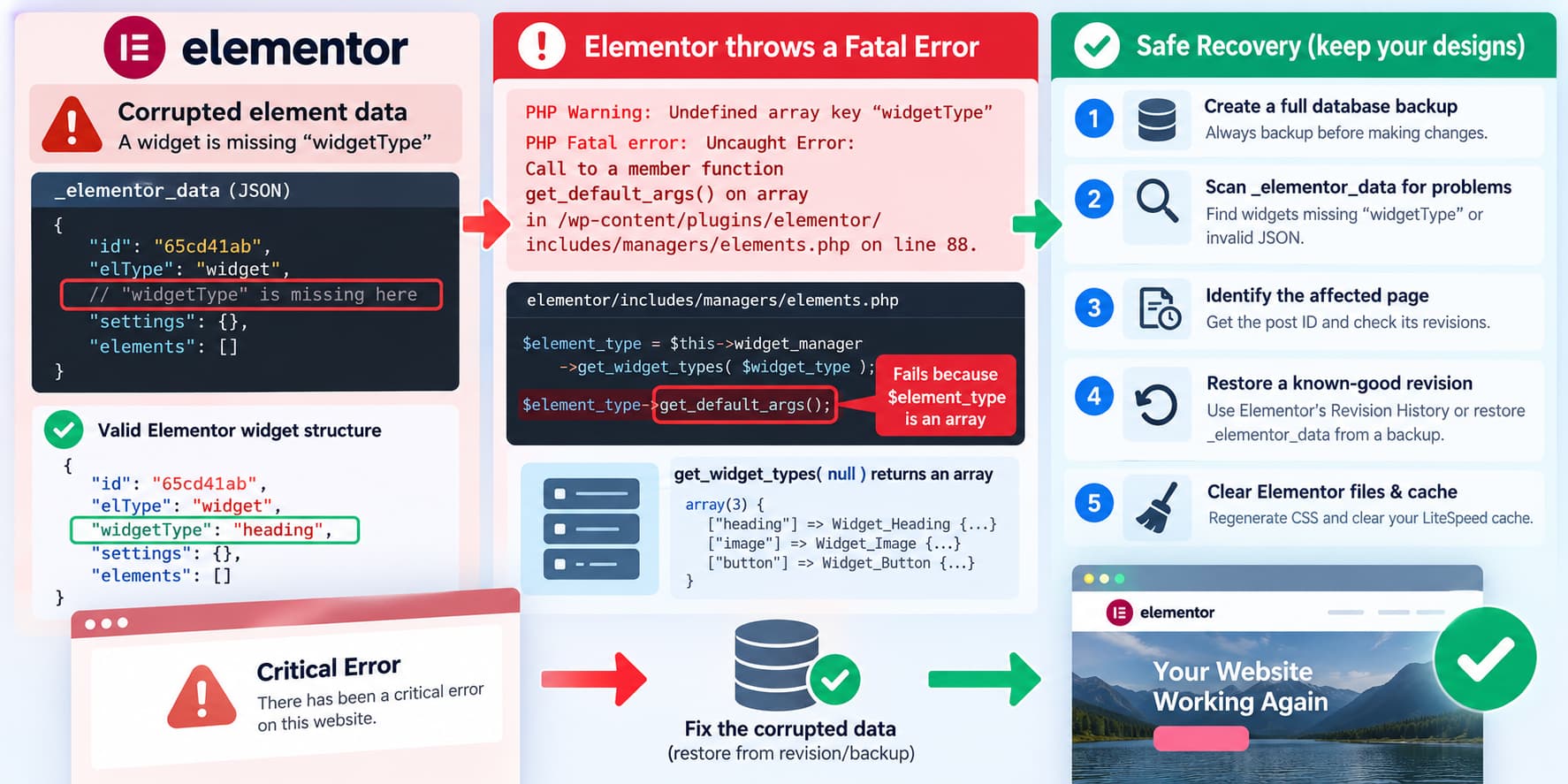
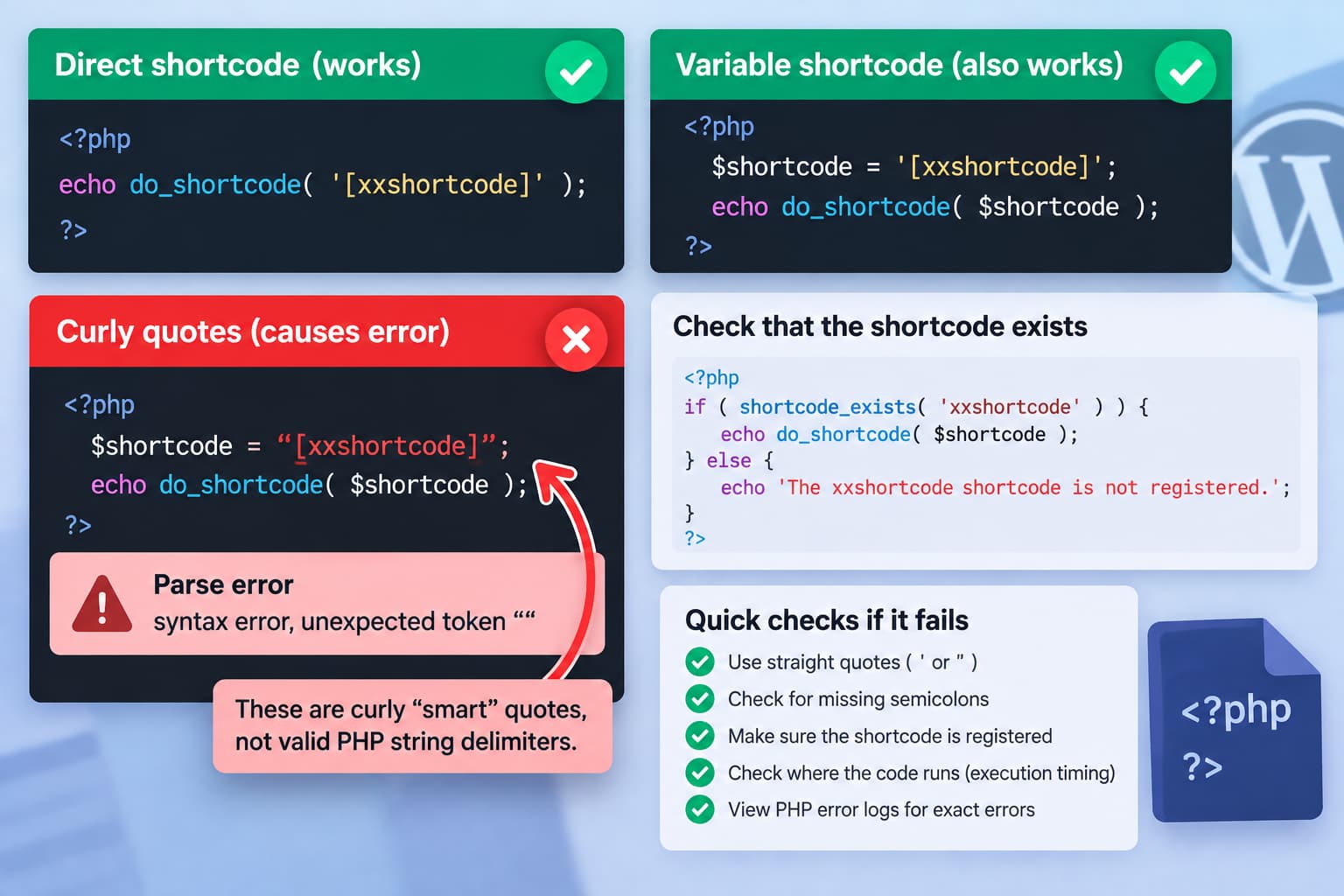
WordPress Recovery Mode Says “Not Initialized” After Query Monitor Shows a Fatal Error

Query Monitor intercepting a WordPress PHP fatal error for a logged-in administrator while a logged-out request triggers WordPress Recovery Mode, showing the QM_DISABLE_ERROR_HANDLER fix and recovery token requirements.

An unusual WordPress debugging situation can look like this: But when the same broken page is opened from another browser where nobody is logged in: Then clicking the link from that email produces: This behavior can make it appear that Query Monitor is interfering with WordPress Recovery Mode. There is actually a technical reason why … Read more

PayPal Advanced Credit and Debit Card Payments Not Showing in WooCommerce Sandbox

WooCommerce PayPal Payments sandbox redirecting customers to PayPal login instead of displaying Advanced Credit and Debit Card fields because the sandbox business merchant may not be fully onboarded for Advanced Card Processing.

When testing WooCommerce PayPal Payments in Sandbox mode, you may enable: inside your PayPal sandbox app and expect checkout to display card fields such as: directly on the WooCommerce checkout page. Instead, you may only see: and clicking it opens or redirects to PayPal, where the buyer is expected to log into a PayPal account. … Read more

Contact Form 7 Shows a Weird Empty Box Above the Name Field

Contact Form 7 empty box above the Name field caused by the hidden-fields-container fieldset receiving theme border and padding styles, with the scoped CSS fix.

If a Contact Form 7 form suddenly has an empty rectangular box immediately above the first field, such as: the box is very likely not another form field and it is not something you accidentally added to the Contact Form 7 form editor. It is probably this element: Contact Form 7 introduced this hidden-fields-container structure … Read more