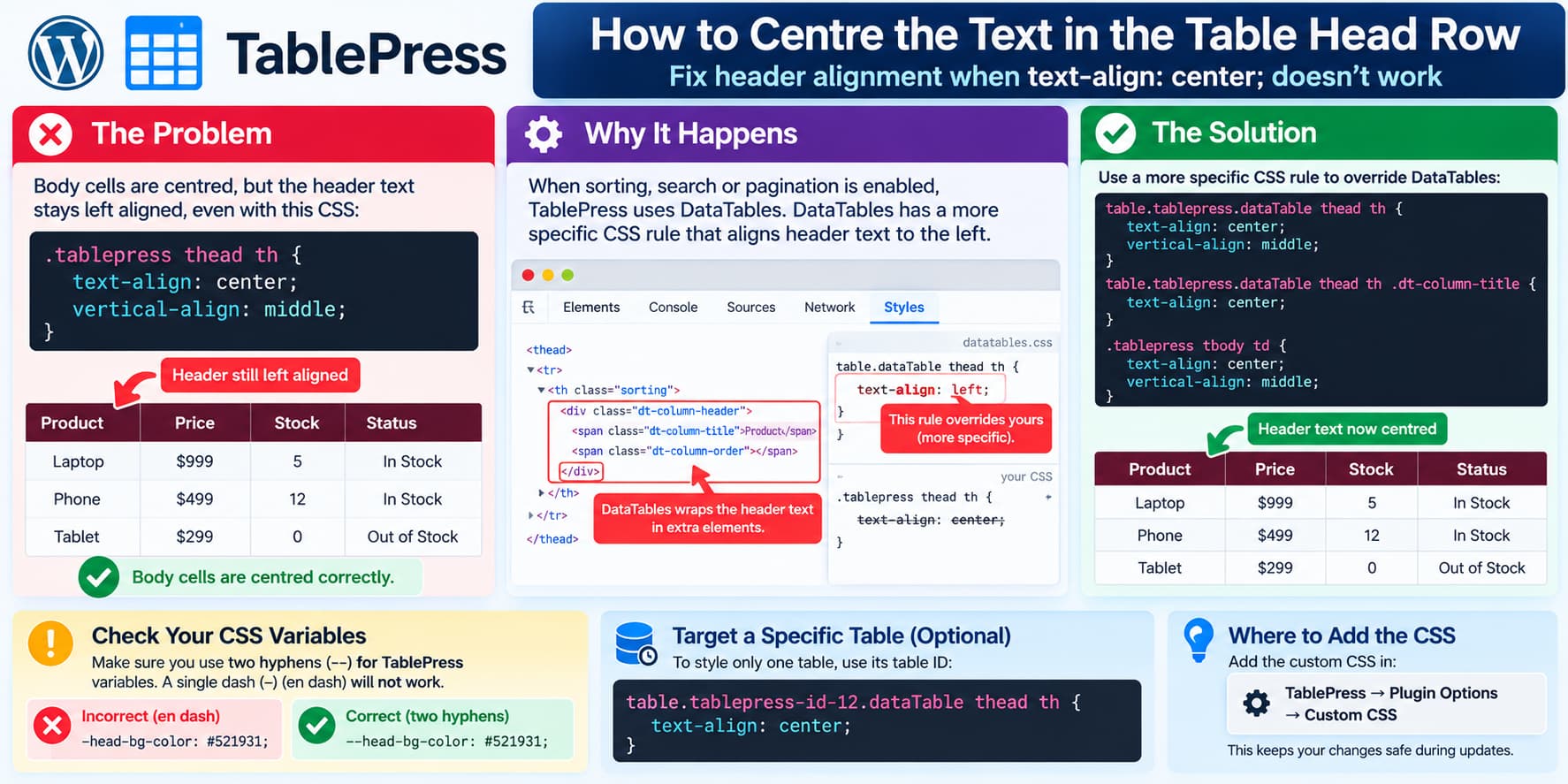
A common TablePress styling problem looks like this:
.tablepress thead th {
    text-align: center;
    vertical-align: middle;
}

.tablepress tbody td {
    text-align: center;
    vertical-align: middle;
}
The body cells center correctly, but the header text remains left aligned.
At first glance that is confusing because .tablepress thead th is the selector TablePress itself has traditionally recommended for centering a table’s header cells. TablePress’s support documentation still shows that approach for normal header rows.
If the table has Table Features for Site Visitors enabled, however, DataTables also styles the header. Its CSS can be more specific than the custom TablePress rule, so the DataTables alignment wins.
Current DataTables versions also add extra markup around sortable column headings, which can make header alignment slightly different from ordinary table cells.
Try This CSS First
Replace the header alignment rule with:
table.tablepress.dataTable thead th {
    text-align: center;
    vertical-align: middle;
}
Keep the body rule:
.tablepress tbody td {
    text-align: center;
    vertical-align: middle;
}
Together:
table.tablepress.dataTable thead th {
    text-align: center;
    vertical-align: middle;
}

.tablepress tbody td {
    text-align: center;
    vertical-align: middle;
}
Add this under:
TablePress → Plugin Options → Custom CSS
TablePress recommends placing custom CSS there rather than changing the plugin’s stylesheet directly, because direct plugin-file edits are lost during updates.
Why the Original Header Rule Can Lose
The original selector is:
.tablepress thead thDataTables can apply a rule similar to:
table.dataTable thead thDataTables’ selector is slightly more specific.
Therefore, even if your custom rule says:
text-align: center;the browser can still choose the DataTables alignment rule.
This explains why:
.tablepress tbody tdmay work perfectly while the equivalent thead th rule does not.
A DataTables support discussion specifically documents this situation: its stylesheet sets alignment on table.dataTable thead th, and using an equally or more specific selector overrides it.
Using:
table.tablepress.dataTable thead thadds enough specificity to target a TablePress table that has DataTables enabled.
If Sorting Is Enabled and the Heading Still Looks Off-Center
Modern DataTables versions add an internal wrapper to sortable headers.
The markup is conceptually similar to:
<th>
    <div class="dt-column-header">
        <span class="dt-column-title">Column Name</span>
        <span class="dt-column-order"></span>
    </div>
</th>
DataTables 2.3 uses:
div.dt-column-header {
    display: flex;
    justify-content: space-between;
}
and the title receives its own .dt-column-title element.
If the cell itself is centered but the visible heading still seems offset because of the sorting icon, add:
table.tablepress.dataTable thead th .dt-column-title {
    text-align: center;
}
A practical full rule is:
table.tablepress.dataTable thead th {
    text-align: center;
    vertical-align: middle;
}

table.tablepress.dataTable thead th .dt-column-title {
    text-align: center;
}

.tablepress tbody td {
    text-align: center;
    vertical-align: middle;
}
This keeps the normal DataTables sorting functionality while explicitly centering the title.
If Table Features Are Disabled
If sorting, pagination, search, and the other visitor features are disabled, the simpler TablePress rule should normally be sufficient:
.tablepress thead th {
    text-align: center;
    vertical-align: middle;
}
TablePress places a configured header row inside:
<thead>and uses <th> elements for its cells, which is why that selector is normally correct.
If it still does not work with DataTables disabled, another theme or plugin stylesheet is probably overriding it.
Check One More Important Detail: Your CSS Dashes
The CSS shown in the question includes lines that appear as:
–head-text-color: #ffffff;
–head-bg-color: #521931;
TablePress’s variables actually require two ordinary hyphen-minus characters:
--head-text-color: #ffffff;
--head-bg-color: #521931;
--head-active-text-color: #ffffff;
--head-active-bg-color: #521931;
The correct complete block is:
.tablepress {
    --head-text-color: #ffffff;
    --head-bg-color: #521931;
    --head-active-text-color: #ffffff;
    --head-active-bg-color: #521931;
}
TablePress’s current documentation confirms these exact CSS variable names.
If the characters in the original code are literal typographic en dashes:
–instead of:
--the browser will not recognize them as CSS custom properties.
This might simply be forum formatting, but it is worth checking in the actual CSS editor.
Recommended Final CSS
For a TablePress table with sorting or other visitor features enabled, use:
.tablepress {
    --head-text-color: #ffffff;
    --head-bg-color: #521931;
    --head-active-text-color: #ffffff;
    --head-active-bg-color: #521931;
}

table.tablepress.dataTable thead th {
    text-align: center;
    vertical-align: middle;
}

table.tablepress.dataTable thead th .dt-column-title {
    text-align: center;
}

.tablepress tbody td {
    text-align: center;
    vertical-align: middle;
}
If the table does not use DataTables features, you can simplify the header rule to:
.tablepress thead th {
    text-align: center;
    vertical-align: middle;
}
Apply the CSS to Only One Table
If you do not want every TablePress table on the site to change, target its table ID.
For example, for TablePress table 12:
table.tablepress-id-12.dataTable thead th {
    text-align: center;
    vertical-align: middle;
}

table.tablepress-id-12.dataTable thead th .dt-column-title {
    text-align: center;
}

.tablepress-id-12 tbody td {
    text-align: center;
    vertical-align: middle;
}
TablePress officially documents .tablepress-id-N as the selector for styling an individual table.
Replace:
12with your actual TablePress table ID.
Avoid Using !important Unless Necessary
You might find suggestions such as:
.tablepress thead th {
    text-align: center !important;
}
That can work, but increasing selector specificity is usually cleaner.
Try:
table.tablepress.dataTable thead thfirst.
Use !important only if the site’s theme or another stylesheet still wins after the more specific selector.
For example:
table.tablepress.dataTable thead th {
    text-align: center !important;
}
Before adding it, use the browser Inspector to identify which CSS declaration is overriding your rule.
Use Browser Inspector to Confirm the Cause
Right-click one of the column headings and select:
Inspect
Locate its <th> element.
In the Styles panel, search for:
text-alignYou may see something like:
.tablepress thead th {
    text-align: center;
}
crossed out, while:
table.dataTable thead th {
    text-align: left;
}
is active.
That confirms a specificity issue.
Also expand the <th> element.
If you see:
<div class="dt-column-header">and:
<span class="dt-column-title">then the table is using the newer DataTables header structure.
DataTables documents the .dt-column-title wrapper, and DataTables 2.3 introduced the flex-based .dt-column-header structure.
Do Not Edit TablePress Plugin Files
Avoid changing CSS directly inside:
wp-content/plugins/tablepress/Even if the change works, the next TablePress update can overwrite it.
Use:
TablePress → Plugin Options → Custom CSS
instead.
That is the location recommended by TablePress itself.
Quick Diagnosis
If:
.tablepress tbody td {
    text-align: center;
}
works, but:
.tablepress thead th {
    text-align: center;
}
does not, check whether the table has sorting/search/pagination enabled.
If it does, use:
table.tablepress.dataTable thead th {
    text-align: center;
}
If the heading remains visually offset because of the sorting control, additionally use:
table.tablepress.dataTable thead th .dt-column-title {
    text-align: center;
}
And make sure the TablePress color variables begin with two ordinary hyphens:
--head-text-colornot a typographic dash.
In most cases, the problem is not that text-align: center is unsupported. It is simply being overridden by the more specific DataTables header styling.
