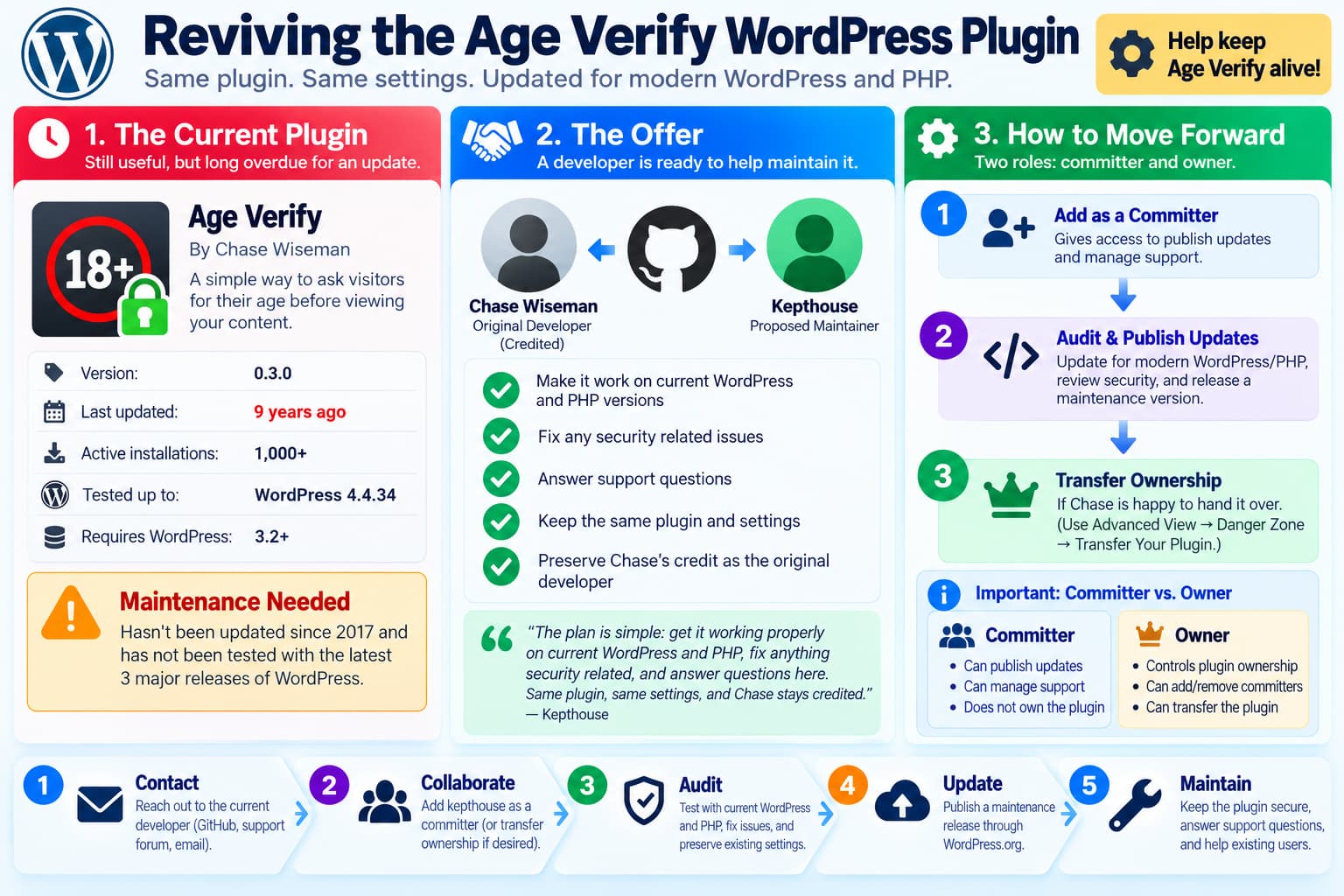
The Age Verify WordPress plugin has gone almost a decade without a release, but it is still installed on more than 1,000 websites.
A new developer, Kepthouse, has now publicly offered to take over ongoing maintenance while preserving the original plugin, its settings, and credit to original author Chase Wiseman.
The proposal is straightforward:
- update Age Verify for modern WordPress and PHP;
- review and repair security issues;
- answer support requests;
- preserve the existing plugin rather than replacing it with an unrelated product;
- continue crediting Chase as the original developer.
That is exactly the sort of situation WordPress.org’s official abandoned-plugin adoption process is designed to support.
There is, however, one important correction to the proposal:
Adding Kepthouse as a committer would provide the ability to publish updates, but it would not by itself transfer official ownership of the plugin.
WordPress.org treats Committer and Owner as separate roles. (developer.wordpress.org)
Current State of Age Verify
The WordPress.org listing currently identifies:
Age Verify
Version: 0.3.0
Author: Chase Wiseman
Active installations: 1,000+
WordPress.org also reports:
Last updated: 9 years ago
Requires WordPress: 3.2+
Tested up to: WordPress 4.4.34
and displays the standard warning:
This plugin hasn’t been tested with the latest 3 major releases of WordPress.
That compatibility gap is now very large.
The current stable WordPress release is 7.1.3, released October 6, 2026. (wordpress.org)
So Age Verify’s declared compatibility effectively spans:
Tested:
WordPress 4.4.x

Current:
WordPress 7.1.x
That does not automatically mean the plugin is broken, but it does mean users have no recent maintainer verification that it behaves correctly with modern WordPress or PHP.
The Original GitHub Repository Is Still Online
The original repository remains available as:
ChaseWiseman/age-verifyThe repository has not been archived, but its most recent code push was on:
August 18, 2017It currently has several open issues and multiple forks.
Kepthouse opened a GitHub issue on October 14, 2026 offering to maintain the plugin.
The proposal says:
Get it working cleanly on current WordPress and PHP, fix anything security related, and answer people on the support forum.
It also explicitly says that Chase should remain credited as the original author.
Two near-identical maintenance-request issues currently exist in the repository, #16 and #17. Keeping one open and closing the accidental duplicate would make the discussion easier to follow.
Is Adding kepthouse as a Committer Enough?
It depends on what Chase wants to do.
If Chase Wants to Remain the Owner
Then yes, adding Kepthouse as a Committer is enough to let Kepthouse maintain the WordPress.org release.
WordPress.org states that a committer can:
- publish new versions through the plugin SVN repository;
- manage plugin support;
- make official requests concerning the plugin.
Chase would remain the official owner.
The arrangement would effectively be:
Owner:
Chase Wiseman

Committer / Maintainer:
Kepthouse
That may actually be the simplest first step.
If Chase Wants to Fully Hand Over the Plugin
A complete ownership transfer requires another step.
Because Age Verify has fewer than 10,000 active installations, WordPress.org’s documented process is:
- Add the new developer as a committer.
- Open the plugin’s Advanced View.
- Scroll to the Danger Zone.
- Use Transfer Your Plugin.
- Select the new owner.
So the full transition would be:
Step 1
Add kepthouse as Committer

        ↓

Step 2
Transfer plugin ownership to kepthouse
through Advanced → Danger Zone
The first step alone does not change the official owner.
Chase Does Not Have to Transfer Ownership Immediately
A sensible transition could be gradual.
For example:
Phase 1

Chase = Owner
Kepthouse = Committer
Kepthouse could then:
- audit the code;
- prepare compatibility fixes;
- respond to support topics;
- demonstrate responsible stewardship.
Once both parties are comfortable:
Phase 2

Kepthouse = Owner
Chase = credited original developer
That avoids making a permanent ownership decision before the new maintainer has actually worked with the project.
What Happens If Chase Does Not Reply?
WordPress.org has a formal process for adopting abandoned plugins.
Its current Plugin Handbook specifically says prospective maintainers should first attempt to reach the original author using channels such as:
- email;
- the WordPress support forum;
- GitHub issues.
Opening the GitHub issue therefore satisfies one of the recommended contact methods. (developer.wordpress.org)
If the developer does not respond after 30 days, the prospective maintainer can continue through the adoption process.
WordPress.org does not automatically hand over the plugin after 30 days.
Instead, the applicant is expected to prepare the plugin and demonstrate that they are capable of responsibly maintaining it.
WordPress.org’s Abandoned Plugin Adoption Process
The official process is broadly:
1. Check the plugin’s status
Determine whether it is:
- still active;
- closed;
- abandoned;
- under security review;
- affected by licensing or trademark issues.
Age Verify is currently still available in the Plugin Directory rather than being closed.
2. Contact the original developer
Kepthouse has already attempted this through GitHub and the WordPress support forum.
3. Review and update the code
WordPress says the prospective adopter should examine the plugin from the top down, bringing it up to current security and directory standards.
4. Submit the updated code for review
The Plugin Review Team then evaluates whether the proposed maintainer and code are suitable.
5. WordPress contacts the current developer
The Plugin Team also attempts to contact the existing owner.
6. Allow time for a response
The current adoption documentation provides the original developer approximately 30 days to respond.
7. Transfer and publish
If adoption is approved, WordPress.org temporarily closes the plugin while the new maintainer publishes the reviewed update, after which the directory listing can be reopened. (developer.wordpress.org)
Importantly:
Adoption is not guaranteed.
The Plugin Review Team considers the requesting developer’s experience, reputation, the plugin’s risk profile, legal issues and the original developer’s wishes.
Chase’s Credit Should Remain
Kepthouse specifically offered to keep Chase credited.
That aligns with WordPress.org’s own guidance.
When adopting an abandoned plugin, the new maintainer should:
- retain previous contributor copyright information;
- add their own copyright information rather than replacing the old one;
- document the ownership change in
readme.txt; - preferably keep previous contributors acknowledged.
WordPress explains that copyright is additive.
A new maintainer should not simply erase the original author’s attribution. (developer.wordpress.org)
For example:
Original plugin:
Chase Wiseman

Current maintenance:
Kepthouse
would be much more appropriate than rewriting the project history.
The First Release Should Probably Be a Maintenance Release
A nine-year-old plugin should not immediately receive a major redesign.
A responsible first release would focus on:
Compatibility
Security
Bug fixes
Code modernization
Documentation
while keeping user-visible behavior as stable as possible.
That is especially important because approximately 1,000 existing WordPress sites may receive the update automatically.
A large behavioral change could unexpectedly break those websites.
What Should Be Audited Before a New Release?
The entire plugin should be reviewed rather than merely changing:
Tested up to: 7.1in readme.txt.
At minimum, a new maintainer should review the following areas.
PHP Compatibility
Test against supported PHP 8.x releases.
Watch for:
- deprecated PHP behavior;
- undefined variables and array keys;
- invalid function arguments;
- old constructor patterns;
- strict typing issues;
- fatal errors triggered only on particular settings.
Current WordPress APIs
Check for:
- deprecated WordPress functions;
- changed hooks;
- old admin APIs;
- obsolete script/style registration;
- current internationalization requirements.
Capability Checks
Every administrative action should confirm that the current user has the appropriate capability.
For example:
current_user_can( 'manage_options' )where appropriate.
Nonces
Settings-changing and state-changing requests should use proper WordPress nonce protection.
Age Verify’s changelog shows that nonce security was introduced historically in version 0.2, but the implementation should still be reviewed against current standards. (wordpress.org)
Sanitization
Incoming values should be sanitized before storage.
Examples include:
sanitize_text_field()
absint()
sanitize_key()
depending on the type of value.
Escaping
Output should be escaped according to context using functions such as:
esc_html()
esc_attr()
esc_url()
Redirect Handling
Redirect destinations should be validated carefully.
This deserves particular attention because Age Verify previously fixed:
add/remove_query_arg XSS vulnerabilityin version 0.2.9. (wordpress.org)
That historical vulnerability was fixed, but it reinforces why security should be part of the adoption audit rather than assuming old code is safe simply because it currently runs.
Do Not Claim That a New Security Problem Exists Without an Audit
The plugin’s age is a reason to review it.
It is not proof that the current version contains an exploitable security vulnerability.
A maintenance announcement should therefore say:
We will audit and fix security issues we find.rather than:
Age Verify currently contains security vulnerabilities.unless a vulnerability has actually been verified.
That distinction avoids unnecessarily alarming existing users.
Caching Deserves Special Attention
Age Verify historically performs its gate using server-side/PHP logic and cookies.
Its WordPress.org reviews contain reports that caching systems could interfere with the expected behavior.
For example, users reported issues when combining the plugin with:
- W3 Total Cache;
- full-page caching;
- WP Engine caching.
A modern maintenance release should therefore test:
No page cache
Standard WordPress cache
LiteSpeed Cache
Cloudflare/full-page caching
Common managed WordPress caching
This may be just as important to existing users as PHP compatibility.
Preserve Existing Settings During Modernization
Kepthouse’s proposal specifically promises:
Same plugin, same settings.
That is a good migration principle.
Users upgrading from 0.3.0 should not suddenly lose:
- minimum age configuration;
- cookie duration;
- restricted-content settings;
- styling configuration;
- existing behavior.
If database option structures need to change, use a migration routine that preserves old values.
For example:
Old installation
       ↓
Plugin update
       ↓
Migrate stored settings
       ↓
Existing age gate still behaves the same
Do not solve compatibility problems by deleting old plugin options.
WordPress.org SVN Still Matters
Even though development may happen on GitHub, WordPress.org plugin releases are still published through the directory’s SVN repository.
Giving someone access to:
ChaseWiseman/age-verifyon GitHub does not automatically give them permission to publish:
wordpress.org/plugins/age-verify/Similarly, adding kepthouse as a GitHub collaborator is not equivalent to adding them as a WordPress.org Committer.
These are separate systems:
GitHub
→ development collaboration

WordPress.org Committer
→ official plugin releases
The WordPress.org role is the critical one for delivering updates to existing users.
Use Individual Accounts
WordPress.org’s current security guidance says each person with plugin access should use their own individual account.
Committer access should only be granted to developers who actually need to publish releases.
WordPress also recommends enabling stronger release security controls such as Release Confirmation where appropriate. (make.wordpress.org)
That is especially important when reviving a plugin with an established user base.
An attacker gaining access to a dormant plugin’s release credentials could distribute malicious code automatically to existing installations.
The Plugin Should Remain the Same Product
WordPress.org expects adopted plugins to preserve their original purpose.
Age Verify is described as:
A simple way to ask visitors for their age before viewing your content.
A takeover should therefore not suddenly convert the plugin into:
- an unrelated SaaS product;
- an advertising platform;
- a tracking system;
- an affiliate marketing tool;
- a completely different plugin.
Modernizing how the gate works is reasonable.
Replacing the plugin’s purpose is not.
This is one reason the Plugin Review Team evaluates takeover requests carefully.
A Simple “Are You Old Enough?” Gate Is Not Automatically Legal Age Verification
There is also an important product distinction.
Age Verify asks visitors to confirm their age.
That is an age gate.
It should not automatically be marketed as legally sufficient identity or age verification in every jurisdiction.
Regulatory requirements vary substantially by:
- country;
- state;
- product;
- content type;
- service.
A future maintainer should be careful with claims such as:
Fully legally compliant age verificationunless the plugin’s mechanism has actually been assessed against the relevant requirements.
The safest product description remains focused on what the plugin technically does:
asks visitors to confirm their age before viewing contentwhich is how the existing WordPress.org page describes it.
Current GitHub Maintenance Request
As of October 14, 2026, the original GitHub repository contains an open maintenance proposal from Kepthouse.
The request offers to:
Maintain current WordPress/PHP compatibility
Review security
Answer support requests
Keep the existing plugin
Preserve Chase's credit
That is a reasonable starting point.
The next action is now primarily with Chase.
If Chase agrees to collaborative maintenance
Add:
kepthouseas a WordPress.org Committer.
If Chase wants to hand over ownership
Add Kepthouse as a committer first, then use:
Advanced View
→ Danger Zone
→ Transfer Your PluginIf Chase does not respond
After the required outreach period, Kepthouse can follow WordPress.org’s abandoned-plugin adoption process.
Recommended Transition Plan
A safe transition would look like this:
1. Chase replies
        ↓
2. Add Kepthouse as Committer
        ↓
3. Fork / branch current 0.3.0
        ↓
4. Full compatibility and security audit
        ↓
5. Test WordPress 7.1.x + modern PHP
        ↓
6. Preserve existing settings
        ↓
7. Publish maintenance release
        ↓
8. Monitor support forum
        ↓
9. Transfer ownership if desired
This gives users a maintained plugin without unnecessarily changing the product they installed years ago.
Final Assessment
The offer to maintain Age Verify is timely.
The plugin still has more than 1,000 active installations, while its current directory release:
0.3.0was last updated roughly nine years ago and is officially tested only through WordPress 4.4.x. (wordpress.org)
The proposal also follows the first step in WordPress.org’s official adoption guidance: attempt to contact the existing author before asking the Plugin Review Team to intervene. (developer.wordpress.org)
The only technical correction is that:
“adding kepthouse as a committer is all it takes”
is true for giving maintenance/release access, but not for a complete ownership transfer.
A full transfer requires:
Add Committer
       +
Transfer Ownership
If Chase prefers to remain the owner, simply granting committer access is perfectly valid.
If Chase no longer wants responsibility for the project, WordPress.org provides a formal ownership-transfer mechanism.
Either way, preserving the original plugin, protecting existing users and keeping Chase properly credited would be the right way to revive Age Verify.
