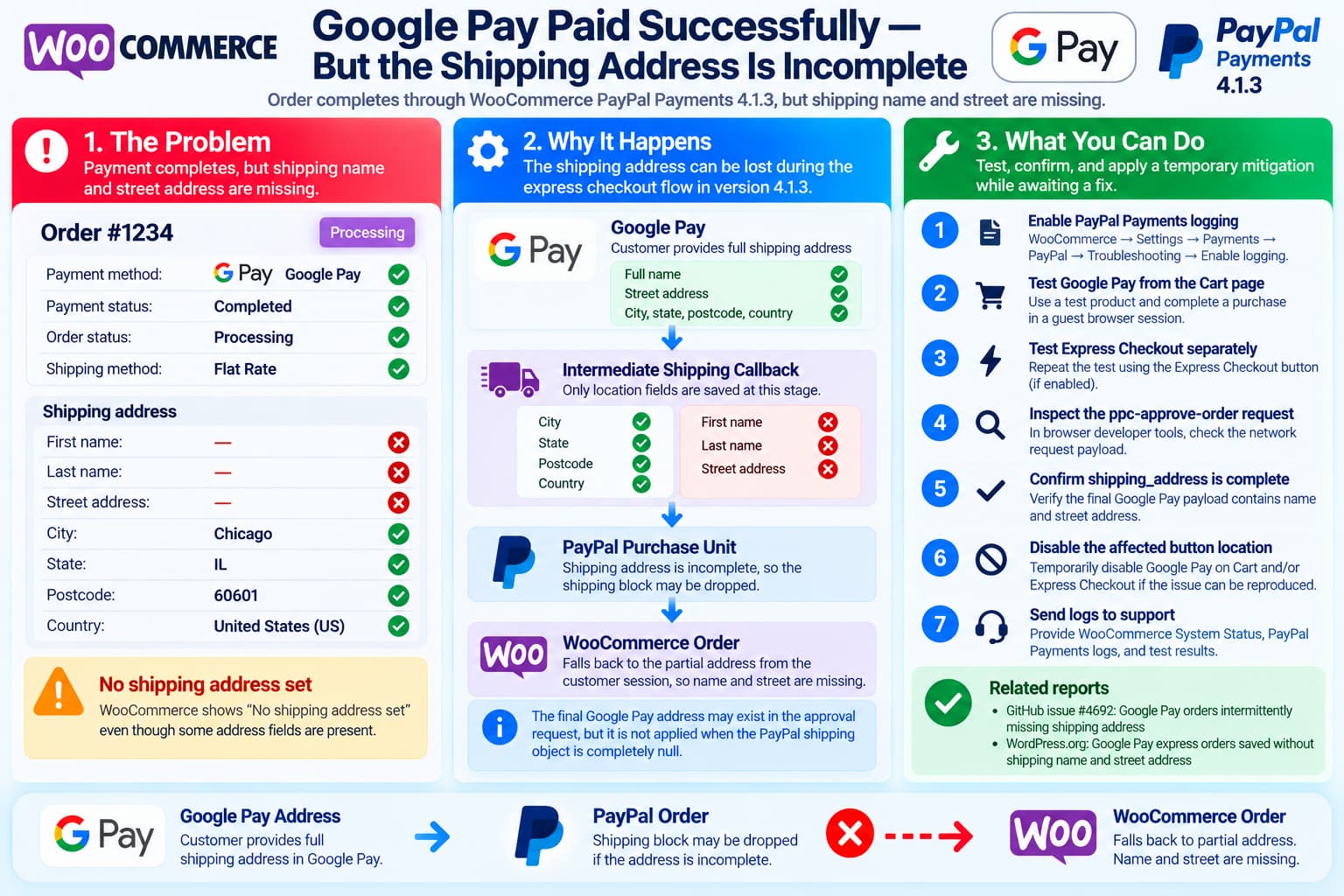
A WooCommerce order paid successfully through Google Pay via WooCommerce PayPal Payments 4.1.3 can, under a particular express-checkout path, end up with an incomplete shipping address.
The order may show:
Payment: Completed
Order status: Processing
Shipping method: Present

Shipping first name: Empty
Shipping last name: Empty
Shipping street: Empty

Shipping city: Present
Shipping state: Present
Shipping postcode: Present
Shipping country: Present
WooCommerce then displays:
No shipping address seteven though enough partial address information exists to calculate shipping.
This exact field pattern is significant.
A review of WooCommerce PayPal Payments 4.1.3 shows a plausible failure path that can produce precisely this result when Google Pay is used from an express/cart context.
There are also now multiple public reports of Google Pay payments completing while shipping information is missing. GitHub issue #4692 describes successful Google Pay payments whose shipping address does not reliably reach the WooCommerce order. That issue was closed as a support case without a confirmed root cause or published fix.
A newer WordPress.org support report goes further and documents the same combination of missing shipping name and street while city, state, postcode and country survive. Its testing attributes the problem to the Google Pay cart-page express order-creation path.
This Is Not Simply a Missing Google Pay Setting
The current Google Pay documentation explains how to enable Google Pay and where its button appears, but it does not document a separate Require Shipping Address setting that merchants are expected to enable.
Google Pay appears in the enabled PayPal Smart Button locations and collects the appropriate information through the wallet/payment flow.
Therefore, the absence of a separate:
Require shipping addresscheckbox in the WooCommerce PayPal Payments settings is not, by itself, evidence of incorrect configuration.
Likewise, WooCommerce’s:
Force shipping to the customer billing addresssetting should not normally be required simply to make Google Pay save a physical-product shipping address.
Why the Missing Fields Form a Recognizable Pattern
The unusual part of this problem is that the entire shipping address is not missing.
Instead:
| Shipping field | Result |
|---|---|
| First name | Missing |
| Last name | Missing |
| Address line 1 | Missing |
| Address line 2 | Usually missing |
| City | Present |
| State | Present |
| Postcode | Present |
| Country | Present |
That pattern closely matches what WooCommerce PayPal Payments 4.1.3 stores during Google Pay’s intermediate shipping-address callback.
In the plugin’s Google Pay UpdatePaymentDataEndpoint, the temporary WooCommerce customer receives:
postcode
country
state
city
from the Google Pay shipping callback.
It does not populate the customer’s:
shipping first name
shipping last name
shipping address line 1
during that intermediate calculation.
This makes sense for shipping-rate calculation: Google Pay can initially provide enough location information to calculate shipping methods without yet treating that intermediate callback as the final order address.
The problem occurs if that partial customer address later becomes the fallback used to create the actual WooCommerce order.
How WooCommerce PayPal Payments 4.1.3 Can Reach That State
The relevant flow can be summarized as:
Customer opens Google Pay
        ↓
Google Pay supplies shipping location
        ↓
Plugin stores city/state/postcode/country
in WC customer session
        ↓
Plugin creates PayPal purchase unit
        ↓
Street address is incomplete at that stage
        ↓
PayPal shipping block is omitted
        ↓
Final Google Pay response contains full address
        ↓
WooCommerce order creator receives it
        ↓
But fallback logic does not use it when
the PayPal shipping object itself is null
        ↓
Order falls back to partial WC customer address
        ↓
City/state/postcode/country survive
Name/street remain empty
This is more than speculation based only on the order screen.
The 4.1.3 source contains the specific conditions needed for this sequence.
The First Important Condition: Incomplete Shipping Can Be Dropped
When WooCommerce PayPal Payments builds a PayPal purchase unit from the cart, it checks whether the available shipping address is complete enough to send to PayPal.
The plugin’s PurchaseUnitFactory requires, among other things, a usable:
address_line_1for most normal physical shipping addresses.
If the shipping address does not contain the required street information, that shipping object can be dropped rather than sent as an incomplete PayPal shipping block.
That is generally sensible because PayPal’s Orders API expects valid address data.
The trouble is what happens later when Google Pay supplies a more complete final address.
The Second Important Condition: The Final Google Pay Address Is Available
The Google Pay JavaScript in 4.1.3 constructs a final shipping object from the wallet response.
It maps information including:
full name
address line 1
address line 2
city
state
postcode
country
and passes that information into the server-side approval process.
So the plugin is capable of receiving a complete Google Pay address at the final payment stage.
This aligns with the newer public support report, where browser Network inspection showed that the full shipping_address was included in the ppc-approve-order request.
The problem is therefore not necessarily that Google Pay failed to provide the customer’s street address.
It can occur later, while converting the PayPal/Google Pay transaction into a WooCommerce order.
The Critical 4.1.3 Order-Creation Condition
WooCommerce PayPal Payments uses WooCommerceOrderCreator::get_shipping() when creating the WooCommerce order.
In 4.1.3, the final posted Google Pay shipping_address is used as a fallback only under a particular condition:
A PayPal shipping object already exists
        AND
that shipping object has no address
Conceptually:
if shipping exists
and shipping address is null
and Google Pay posted shipping_address exists
    rebuild shipping from Google Pay data
But consider the failure path:
$shipping = nullbecause the earlier incomplete shipping address was completely removed.
In that case, the fallback condition is never entered.
The full Google Pay shipping address can be sitting in the approval request, but the order creator does not rebuild $shipping from it because there is no existing shipping object.
The newer WordPress.org report independently identified this same condition while debugging its affected cart-page payment.
Why the Order Still Gets City, State, Country and Postcode
The next step makes the final symptom especially understandable.
When the order creator has no usable PayPal shipping object but the cart requires shipping, WooCommerce PayPal Payments falls back to:
WC()->customerfor shipping information.
But recall what Google Pay’s earlier shipping callback saved into that customer:
city
state
postcode
country
while leaving:
first name
last name
street
unset.
The resulting WooCommerce order therefore inherits the exact partial address seen in the report.
That makes this particular pattern much more consistent with an order-creation bug than with the customer simply omitting their address.
Why a Shipping Method Can Still Exist
An order having:
Shipping method: Free Shipping / Flat Rate / etc.does not prove that WooCommerce had the customer’s complete street address.
Shipping zones frequently calculate rates from some combination of:
country
state
postcode
city
Those are exactly the fields retained by Google Pay’s intermediate shipping callback.
So WooCommerce can successfully determine:
Shipping Method = $10 Flat Ratewhile still lacking:
123 Example Street
John Smith
when the final order record is created.
There is no contradiction between having a shipping method and having an unusable fulfillment address.
Why GitHub Issue #4692 Is Relevant but Not Conclusive
Issue #4692 was opened on September 7, 2026 under the title:
Google Pay orders intermittently missing
shipping address in WooCommerce
The reporter described completed Google Pay transactions where the selected shipping address did not consistently make it into WooCommerce.
However, the PayPal Payments team did not establish a technical cause in that GitHub issue.
Support requested a WooCommerce System Status Report and moved the investigation to its support channel.
The issue was then closed as a support case.
Therefore, it would be inaccurate to say:
GitHub #4692 proves this exact 4.1.3 bug.It does not.
A more accurate conclusion is:
#4692 confirms that similar Google Pay
shipping-address loss has been reported.

The newer cart-page report plus the 4.1.3
source provides a much more specific
technical explanation.
Can We Prove This Particular Order Used That Bug?
Not yet.
The affected transaction has two important limitations:
Logging was disabledand:
The exact Google Pay button location is unknownThe order could have originated from:
Cart
Express Checkout
another enabled wallet location
Without the original request/logs, it is impossible to establish retrospectively which path generated this particular order.
So the strongest responsible diagnosis is:
The order’s exact missing-field pattern is highly consistent with the known Google Pay express/cart order-creation path in WooCommerce PayPal Payments 4.1.3, but the specific transaction cannot be conclusively attributed to that bug without logs or reproduction.
Version 4.1.3 Is Currently the Published Release
WooCommerce currently lists WooCommerce PayPal Payments 4.1.3 as the latest published extension version.
The 4.1.3 release introduced substantial PayPal SDK v6 work for new store setups, including changes affecting PayPal buttons, Apple Pay and Google Pay, but its published release notes do not identify a fix for this particular missing shipping-name/street issue.
So simply updating from 4.1.3 is not presently an available resolution if the store is already on that version.
Enable Logging Before the Next Test
WooCommerce’s PayPal Payments documentation specifically recommends enabling logging while troubleshooting unexpected transaction behavior.
Enable:
WooCommerce
→ Settings
→ Payments
→ PayPal
→ Troubleshooting / Expert Settings
→ Logging
Then reproduce a new transaction.
An important limitation is that enabling logging now will not reconstruct the old transaction.
WooCommerce confirms that payment logs capture new transactions after logging has been enabled.
Reproduce the Cart and Express Paths Separately
The next test should deliberately identify the button location.
Use a guest browser session and the same type of physical product.
A useful controlled test matrix is:
| Test | Google Pay location | Result to inspect |
|---|---|---|
| A | Cart | Shipping name + street |
| B | Express Checkout | Shipping name + street |
| C | Normal checkout/payment context | Shipping name + street |
For each transaction, record:
WooCommerce order number
PayPal order ID
button location
Pay Now enabled/disabled
shipping method
shipping address result
This immediately answers the question that cannot be answered for the original customer order.
Inspect the ppc-approve-order Request
During the controlled Cart test, open the browser’s Developer Tools:
Networkand locate the PayPal Payments approval request, typically involving:
ppc-approve-orderInspect the request payload.
The important question is whether it contains something structurally equivalent to:
shipping_address
    name
        full_name

    address
        address_line_1
        city/admin_area_2
        state/admin_area_1
        postal_code
        country_code
Do not publish the real customer’s address when sharing diagnostic screenshots.
Redact all personally identifiable information.
If the request contains a complete street address and name but the resulting WooCommerce order does not, that is strong evidence that the information is being lost between the approval request and WooCommerce order creation.
Compare the PayPal Order With the Approval Payload
The most useful evidence would establish these three stages:
1. Google Pay final response
   Full shipping address ✓

2. PayPal purchase unit
   Shipping block absent or incomplete

3. WooCommerce order
   City/state/postcode/country only
That would reproduce the suspected 4.1.3 path almost exactly.
Temporarily Disable Google Pay on the Cart Page
For a store shipping physical merchandise, continuing to accept potentially affected orders creates a fulfillment problem.
Until the issue is reproduced or fixed, a conservative temporary mitigation is to disable Google Pay specifically at the Cart location if your configuration allows payment-method/location control.
The current PayPal Payments settings support selecting where smart payment methods appear, including Cart, Classic Checkout and Express Checkout contexts.
You can then retain Google Pay only in the location you have verified correctly populates the order.
Do not assume Express Checkout is safe merely because Cart is suspected.
Test it first.
Another Temporary Option: Disable Pay Now
WooCommerce PayPal Payments’ Pay Now Experience allows buyers to skip the WooCommerce order-review page and complete payment more directly.
The public reproduction of the missing-address problem specifically involved a cart-page express payment with Pay Now enabled.
Therefore, temporarily disabling Pay Now so buyers pass through the review/checkout stage may reduce exposure to the problematic direct order-creation path.
This should be treated as a mitigation to test, not as a confirmed official fix.
Do Not Manually Invent the Customer’s Shipping Address
For the already-paid order, do not assume:
Billing address = Shipping addressunless the customer confirms it.
The fact that billing information is complete does not prove they intended the physical product to be shipped there.
The safest fulfillment action is to contact the customer and confirm the complete delivery address before dispatching the order.
Once confirmed, update the WooCommerce shipping address manually and leave an internal order note explaining why it was changed.
A Community Workaround Exists, but Use It Carefully
The newer WordPress.org report includes a PHP workaround that captures the final Google Pay shipping_address passed to the order creator and writes it into the WooCommerce order if the order’s shipping street was left empty.
That workaround targets the identified failure path directly.
However, payment-processing code should not be pasted blindly into a live store.
Before adopting it:
Review the code
        ↓
Test on staging
        ↓
Use PayPal Sandbox / controlled test payment
        ↓
Verify tax and shipping calculations
        ↓
Verify names containing multiple words
        ↓
Verify international addresses
        ↓
Confirm no unrelated gateways are affected
The safer production mitigation is usually to disable the affected Google Pay location while awaiting an official fix.
Why Name Splitting Also Deserves Attention
Google Pay supplies a shipping full name.
When converting that into WooCommerce’s:
first_name
last_name
fields, simplistic splitting logic can produce unexpected results for:
- compound surnames;
- multiple given names;
- cultures where family name precedes given name;
- single-word names.
That issue is separate from the completely missing name problem, but it is another reason an official plugin-level fix is preferable to a long-term custom workaround.
What to Send WooCommerce PayPal Payments Support
The plugin team already asked the reporter in GitHub #4692 to contact support with a WooCommerce System Status Report.
The newer WordPress.org support response similarly asks for PayPal Payments logs from an affected Google Pay transaction.
A strong support package should contain one controlled reproduction plus:
WooCommerce PayPal Payments: 4.1.3
WooCommerce version:
WordPress version:
PHP version:

Product:
Physical / requires shipping

Button location:
Cart / Express Checkout / Checkout

Pay Now:
Enabled / Disabled

Google Pay final shipping payload:
Full address present? Yes / No

PayPal order purchase unit:
Shipping block present? Yes / No

WooCommerce order:
Shipping first name:
Shipping last name:
Shipping address_1:
Shipping city:
Shipping state:
Shipping postcode:
Shipping country:

PayPal Payments logs:
Attached

WooCommerce System Status Report:
Attached

Related reports:
GitHub #4692
WordPress.org Google Pay express shipping-address thread
Remove actual customer names, addresses, email addresses, payment tokens and other sensitive information before posting logs publicly.
Do Not Treat Issue #4692 as “Fixed”
Because GitHub #4692 is marked Closed, it would be easy to assume the defect was resolved.
That is not what happened.
The issue was closed because the maintainers requested that troubleshooting continue through support.
There is no linked pull request, fix commit, or resolution documented in that GitHub issue.
So:
Closed GitHub issuedoes not equal:
Bug fixed in released pluginin this case.
Recommended Diagnosis
For the symptoms described, the most likely technical explanation is:
Google Pay has the complete shipping address
        ↓
The intermediate callback stores only
location fields in the WC customer
        ↓
The initial PayPal purchase unit rejects/
omits incomplete shipping
        ↓
The final Google Pay address reaches
the approval request
        ↓
WooCommerceOrderCreator does not rebuild
shipping when $shipping is completely null
        ↓
The order falls back to the partial
WooCommerce customer address
        ↓
Name and street are lost
That explanation is consistent with:
- WooCommerce PayPal Payments 4.1.3 source behavior;
- the exact missing-versus-present field pattern;
- the newer reproducible WordPress.org report;
- and the broader intermittent shipping-address report in GitHub #4692.
But because the original order has no gateway logs and its button location is unknown, it should be described as a strongly suspected match, not conclusively proven for that transaction.
Recommended Action
For a physical-product store currently affected by this problem:
- Enable WooCommerce PayPal Payments logging now.
- Reproduce Google Pay from Cart and Express Checkout separately.
- Inspect whether the final
ppc-approve-orderrequest contains the complete address. - Record whether the PayPal order contains a shipping block.
- Check the resulting WooCommerce order fields.
- Temporarily disable Google Pay on any button location that reproduces the problem.
- Send the logs, System Status Report and test results to WooCommerce PayPal Payments support.
- Reference GitHub #4692 and the current WordPress.org support thread.
- Do not ship the existing affected order until its complete address is confirmed with the customer.
The important point is that the customer having a valid Google Pay address, the payment completing successfully and WooCommerce successfully calculating a shipping method do not guarantee that WooCommerce PayPal Payments 4.1.3 persisted the final full shipping address into the order.
In this particular code path, those operations occur at different stages.
