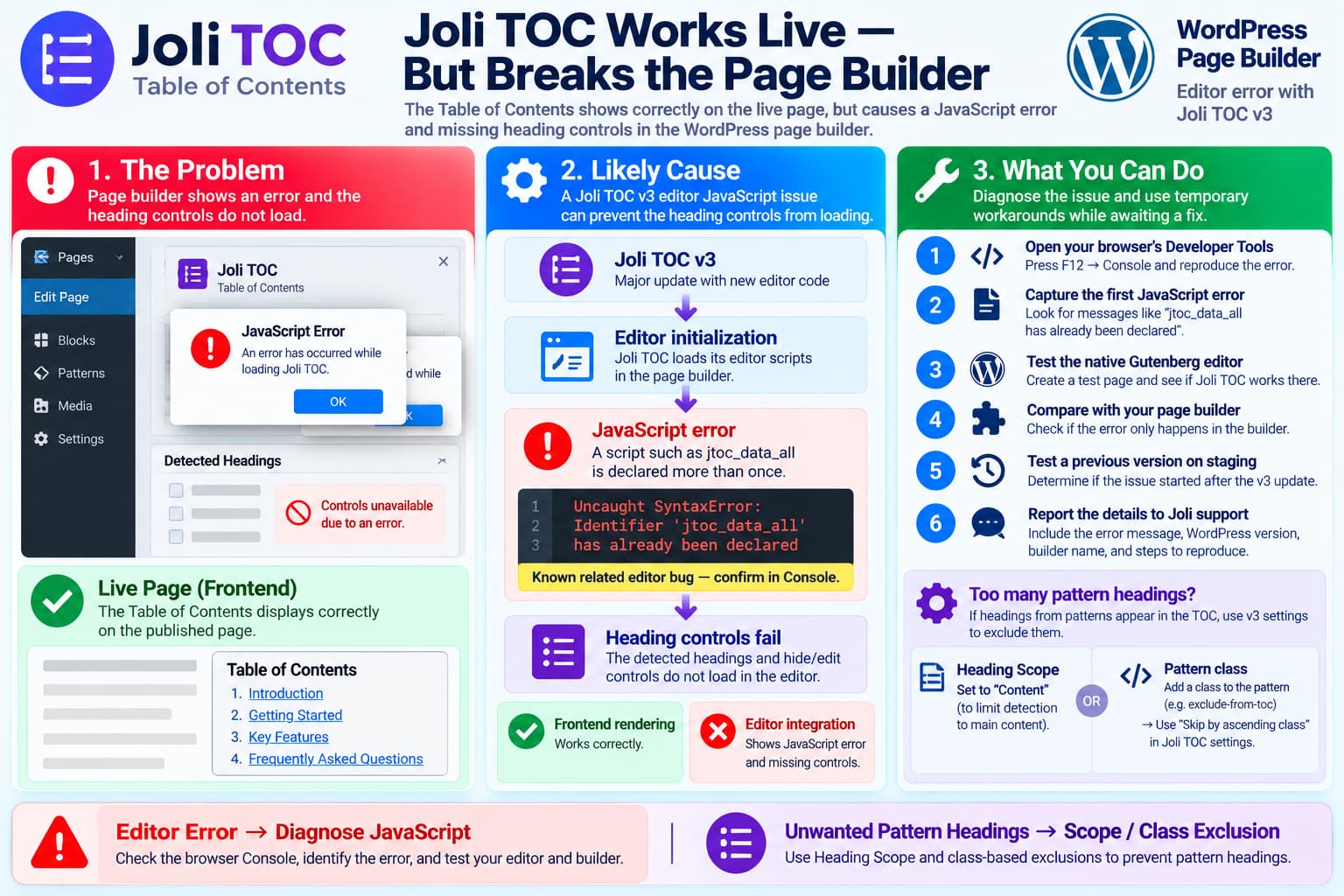
A recent Joli Table of Contents problem can look confusing because the plugin behaves differently in the WordPress editor and on the public site.
The symptoms are:
Open a page in the builder
        ↓
An error/alert box appears
        ↓
Click OK
        ↓
The error appears again
        ↓
Joli TOC heading controls do not load
while on the frontend:
Live page
        ↓
Table of contents renders normally
        ✓
This distinction is important.
If the table of contents still renders correctly on the public page, Joli’s core heading-processing and frontend rendering are probably still operating.
The failing part is more likely the editor-side JavaScript or page-builder integration responsible for inspecting headings and displaying the controls used to hide or edit them.
A new WordPress.org support report describes exactly this behavior and remains unresolved at the time of writing.
This Started Around Joli TOC v3
Joli Table of Contents recently went through a significant version 3 rewrite.
The plugin developer described v3 as a major update introducing:
- a redesigned settings interface;
- a new numbering system;
- new theme architecture;
- a color palette;
- additional heading-processing functionality.
The developer recommended exporting existing settings before making changes because of the scope of the update.
WordPress.org currently lists Joli Table of Contents 3.0.3, with support for current WordPress releases.
So this does not look like a general:
Old plugin vs. new WordPressproblem.
It is more likely an interaction between Joli’s newer editor code and the editor/page-builder environment.
There Is Already a Related Joli TOC JavaScript Bug Report
Another recent Joli support topic reports the following editor error:
Uncaught SyntaxError:
Identifier 'jtoc_data_all' has already been declared
The reporter was using Joli TOC 3.0.2.
According to that report, the error happens inside the WordPress editor while the public-facing TOC continues to work.
That is very similar to the current symptoms:
Editor: broken
Frontend: works
The reported JavaScript problem involves the variable:
jtoc_data_allbeing declared more than once.
JavaScript declarations using let or const cannot be declared twice in the same scope.
If the same Joli editor initialization code is printed or executed twice, the browser can stop that script with a SyntaxError.
Once that occurs, later Joli editor functions may never initialize.
That could explain why the page continues to render normally on the frontend while controls such as the detected-heading list disappear in the editor.
However, we cannot yet confirm that this installation has the same error, because the actual message shown in the popup or browser console has not been provided.
Why Deactivating Other Plugins Matters
The user has already performed an important test:
I have deactivated every other plugin on my site and the same thing happens.
That substantially reduces the likelihood that an unrelated WordPress plugin is causing the problem.
It does not completely isolate Joli, because these components are still involved:
WordPress
Theme
Page builder
Joli TOC
Browser
But if the error remains with all other plugins disabled, troubleshooting should focus first on:
Joli TOC
        ↕
Page builder / editor
rather than continuing to disable unrelated plugins.
The Live Page Working Is an Important Clue
Joli performs different work in different contexts.
Frontend
On the live page it:
- finds headings;
- adds/uses heading IDs;
- creates the TOC;
- handles scrolling and highlighting.
Editor
Inside the editor it may additionally:
- inspect the current document;
- build its editable heading list;
- show hide/edit controls;
- react to changes in the page content.
Joli’s documentation specifically says its Gutenberg block can display detected headings inside the editor and lets users hide individual headings with an eye control or edit their labels.
Therefore:
Frontend TOC worksdoes not prove:
Editor integration worksThey are related but separate pieces of functionality.
First Diagnostic: Check the Browser Console
Before changing Joli settings, reproduce the error while browser Developer Tools is open.
In Chrome or Edge:
Open page builder
→ Press F12
→ Console
→ Reload the editor
Look for a red error.
In particular, check for:
jtoc_data_allor:
Identifier ... has already been declaredAlso look for:
Uncaught TypeError
Uncaught ReferenceError
Uncaught SyntaxError
Copy the first error, including:
- error text;
- JavaScript filename;
- line number.
The first error is usually more useful than later errors because later failures may simply result from Joli not initializing correctly.
If You See jtoc_data_all Has Already Been Declared
If the console contains:
Uncaught SyntaxError:
Identifier 'jtoc_data_all' has already been declared
then there is already a matching unresolved report in the Joli support forum.
That would strongly suggest that the builder error is related to Joli’s editor script being initialized more than once.
In that situation, avoid attempting to fix the problem by editing the plugin’s JavaScript directly.
A change such as replacing:
let jtoc_data_allwith:
var jtoc_data_allmay suppress one error but could conceal the underlying duplicate initialization.
The correct plugin-level solution is normally to make sure the editor data/script is registered or initialized once.
Do Not Edit the Joli Plugin Files
Avoid modifying:
wp-content/plugins/joli-table-of-contents/directly.
Even if a JavaScript modification fixes the editor temporarily, the next plugin update will overwrite it.
It also makes support more difficult because the site’s Joli installation no longer matches the published release.
The better approach is to:
- capture the console error;
- identify the affected builder;
- provide the developer with a reproducible case;
- use a temporary configuration workaround where possible.
Test With the Native WordPress Editor
This is the most useful next isolation step.
Create a temporary test page using only the normal WordPress Block Editor.
Add:
Heading
Heading
Heading
Joli Table of Contents block
Then check whether Joli’s detected-heading controls work there.
Result A — Native editor works
If:
WordPress Block Editor ✓
Page Builder ✕
then the problem is specifically related to the page builder’s editing environment.
Report:
Joli works in Gutenberg
but fails inside [builder name].
That gives the Joli developer a much narrower compatibility case.
Result B — Native editor also fails
If both:
Block Editor ✕
Page Builder ✕
show the same JavaScript error, the problem is more likely inside Joli’s general editor implementation rather than builder-specific integration.
Page Builders Have Historically Required Special Handling
Joli has previously documented compatibility limitations with page builders.
For example, in an Oxygen Builder support discussion, the developer explained that Joli historically relied on WordPress’s normal:
the_content()context.
Content generated outside that context could behave differently.
Joli v3 now advertises improved detection of headings produced by third-party blocks and shortcodes, but the distinction between normal WordPress content and builder-generated content is still relevant.
So identifying the actual builder is important when reporting the bug.
Joli v3 Also Introduced a New Heading Scope
The second issue mentioned in the report is different:
One page includes many patterns with headings, and those headings should not appear in the TOC.
Joli v3 added a setting specifically related to this.
There are now two heading scopes:
Content
Extended
Content
Joli describes Content as the v3 default.
It limits detection primarily to the main post content and is intended to prevent unrelated headings from being accidentally included.
Extended
Extended scope also detects headings generated from other blocks, shortcodes or content outside the normal content area.
If the unwanted headings are coming from patterns or builder-generated areas outside the main article, check:
Joli TOC
→ Headings
→ Heading Scope
and try:
Contentinstead of:
ExtendedThis may solve the unwanted-pattern headings without individually disabling every heading.
You Can Also Exclude Headings by CSS Class
Joli has another useful option when the unwanted headings belong to specific page patterns.
It supports:
Skip by classand:
Skip by ascending classThe second option is particularly useful when an entire container should be excluded.
For example, suppose the pattern markup looks roughly like:
<div class="promo-pattern">

    <h2>Special Offer</h2>

    <h3>Learn More</h3>

</div>
Rather than hiding both headings individually, you can configure Joli to ignore headings whose ancestor has:
promo-patternJoli documents skip_h_by_ascending_class specifically as a way to ignore headings whose ancestor carries a given CSS class.
Conceptually:
Pattern container:
promo-pattern
       ↓
All headings inside it
       ↓
Ignored by Joli
This is often more reliable for reusable WordPress patterns.
Why “Skip by Ascending Class” Is Useful for Patterns
Patterns frequently contain several nested headings:
Reusable Pattern
├── H2
├── paragraph
├── H3
└── H3
Hiding each heading separately creates maintenance work.
If the pattern is reused 20 times, it becomes much worse.
Instead:
Pattern wrapper class:
exclude-from-toc
can be applied once.
Then configure Joli to skip headings under:
exclude-from-tocThe same pattern can be reused throughout the website while remaining excluded from the TOC.
Individual Heading Hiding Is Also Supported
When the editor integration is working, Joli’s block provides an eye icon beside detected headings.
Clicking it hides that heading from the final TOC.
Joli documents this behavior directly.
The expected workflow is:
Joli TOC block
        ↓
Detected headings
        ↓
Click eye icon
        ↓
Heading becomes hidden
        ↓
Heading does not appear in frontend TOC
That is likely the control the user says is no longer appearing.
If those controls disappeared at the same time as the editor error began, both symptoms may have the same JavaScript cause.
Do Not Hide the Joli Error With CSS
The popup/error itself should not simply be hidden.
If JavaScript initialization is failing, suppressing the visible error will not restore:
- heading detection;
- heading controls;
- editor synchronization.
The underlying JavaScript failure needs to be identified first.
Check Whether the Problem Started With the v3 Upgrade
The timing can provide valuable evidence.
Check:
Plugins
→ Joli Table of Contents
→ Version
WordPress.org currently lists version 3.0.3.
Then determine whether the site previously used a 2.x release.
If the sequence was:
Joli 2.x
Editor worked
        ↓
Upgrade to Joli 3.x
        ↓
Editor errors began
include that information in the support report.
Joli itself describes v3 as a major update rather than a small maintenance release.
That does not prove v3 caused the bug, but it makes the upgrade boundary relevant.
Do Not Downgrade Production Blindly
Rolling back to an older version can be a useful diagnostic on staging.
It should not be the first permanent solution.
If testing a downgrade:
- back up the database;
- export Joli settings;
- use staging;
- install the last known working version;
- open the same page in the builder;
- check whether the error disappears.
Joli explicitly recommends exporting settings before making significant v3-related changes.
If:
3.x = error
2.x = no error
on the exact same staging environment, that is strong regression evidence for the developer.
What to Send Joli Support
A useful bug report should include:
Joli TOC version:
WordPress version:
PHP version:
Page builder name/version:
Theme:

Other plugins disabled:
Yes

Frontend TOC:
Works

Builder:
Error appears twice

Heading controls:
Missing

Browser:
Chrome / Firefox / Safari

Console error:
[exact first red error]
Did problem begin after Joli v3 update? Yes / No / Unknown
Also include a screenshot of:
DevTools → Consolerather than only a screenshot of the alert box.
If the console shows:
jtoc_data_all has already been declaredlink the existing unresolved report as well.
The Current Support Topic Is Still Unresolved
The exact report:
“Joli TOC causes error on loading Page Builder”
was posted on WordPress.org and currently has no developer reply.
That means there is not yet an official confirmed fix for this specific case.
It would therefore be premature to claim:
Upgrade to version X and it will be fixed.No such fix has currently been documented for this report.
Recommended Troubleshooting Order
Use this sequence:
1. Confirm current Joli version
        ↓
2. Open browser Console
        ↓
3. Capture first JavaScript error
        ↓
4. Test native Gutenberg editor
        ↓
5. Compare with page builder
        ↓
6. Test on staging with previous Joli version
        ↓
7. Report reproduction to Joli developer
For the unwanted pattern headings:
1. Try Heading Scope = Content
        ↓
2. Add a CSS class to the pattern wrapper
        ↓
3. Use Skip by ascending class
That solves the pattern problem without depending on the currently broken per-heading editor controls.
Most Likely Diagnosis
Based on the currently available evidence:
Live TOC works
+
Builder shows errors
+
Joli heading controls fail
+
Other plugins were disabled
+
Joli recently had a major v3 update
+
Another unresolved Joli editor JavaScript bug exists
the strongest current diagnosis is:
An editor-side Joli TOC JavaScript or page-builder compatibility problem, potentially related to the v3 editor changes.
The known:
Identifier 'jtoc_data_all' has already been declaredbug is particularly relevant because it can break Joli inside the editor without breaking the frontend.
But the current installation should not be declared affected by that exact bug until its browser console shows the same error.
Recommended Temporary Solution
Until the editor error is fixed:
- Do not remove Joli if the frontend TOC is otherwise working.
- Capture the browser console error and provide it to the plugin developer.
- For pages containing unwanted pattern headings, switch heading scope to Content if appropriate.
- If those headings remain, add a class such as:
exclude-from-tocto the pattern’s outer container.
- Configure Joli’s:
Skip by ascending classto exclude:
exclude-from-tocThis avoids relying on the editor’s individual heading toggle controls while they are broken.
The two problems should be treated separately:
Builder popup + missing heading controls
→ editor JavaScript/compatibility issue

Unwanted headings from patterns
→ heading-scope/exclusion configuration
That distinction makes troubleshooting much easier and allows the live page to continue functioning while the editor bug is investigated.
