WPC Composite Products Components Disappear After Updating a Product
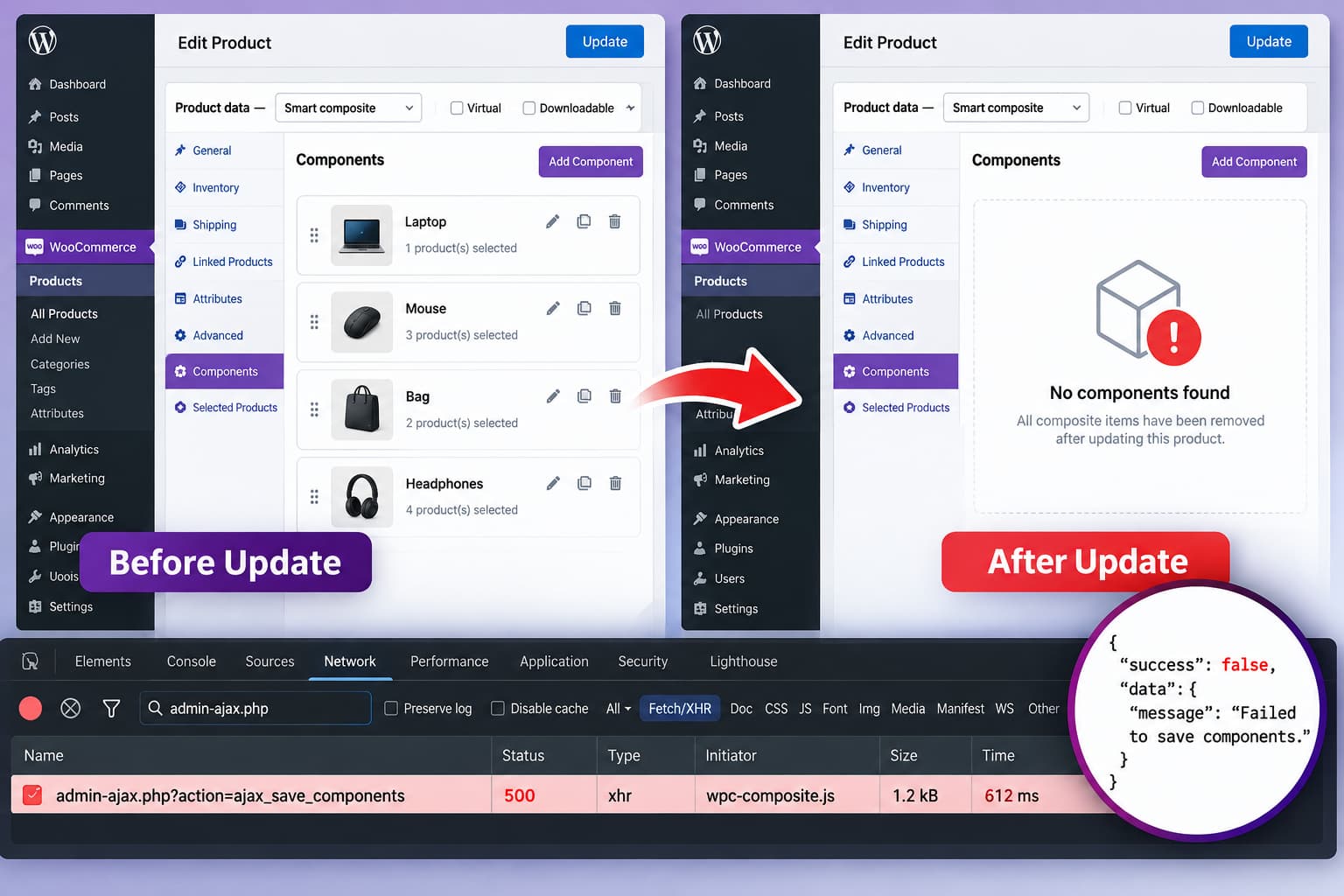
WooCommerce WPC Composite Products editor showing configured components disappearing after the product is updated.

When the components of a WPC Composite Products for WooCommerce product disappear immediately after clicking Update, treat the problem as a data-saving issue before rebuilding the composite. This is potentially destructive because another product update can overwrite a valid component configuration with an empty or incomplete one. The first priorities are therefore: WPC Composite Products … Read more
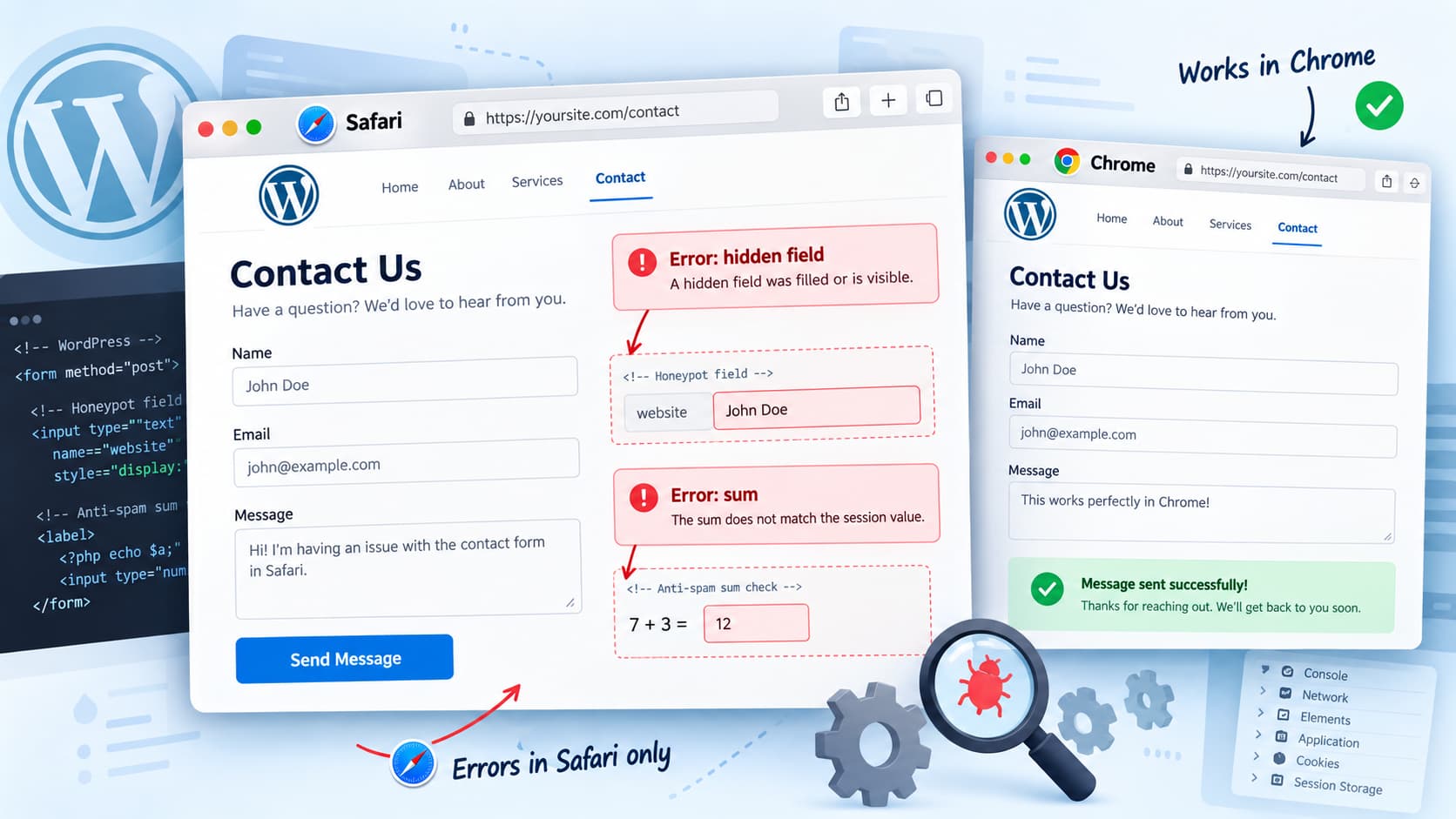
How to Fix VS Contact Form “Error: hidden field” and “Error: sum” in Safari

WordPress VS Contact Form in Safari showing hidden-field and sum validation errors while the same form works in Chrome.

A VS Contact Form that works in Chrome but fails in Safari with: is most likely failing one or more of the plugin’s anti-spam checks rather than its email delivery process. The hidden field error is especially useful diagnostically. VS Contact Form uses hidden honeypot fields that must remain empty. Browser AutoFill can sometimes put … Read more

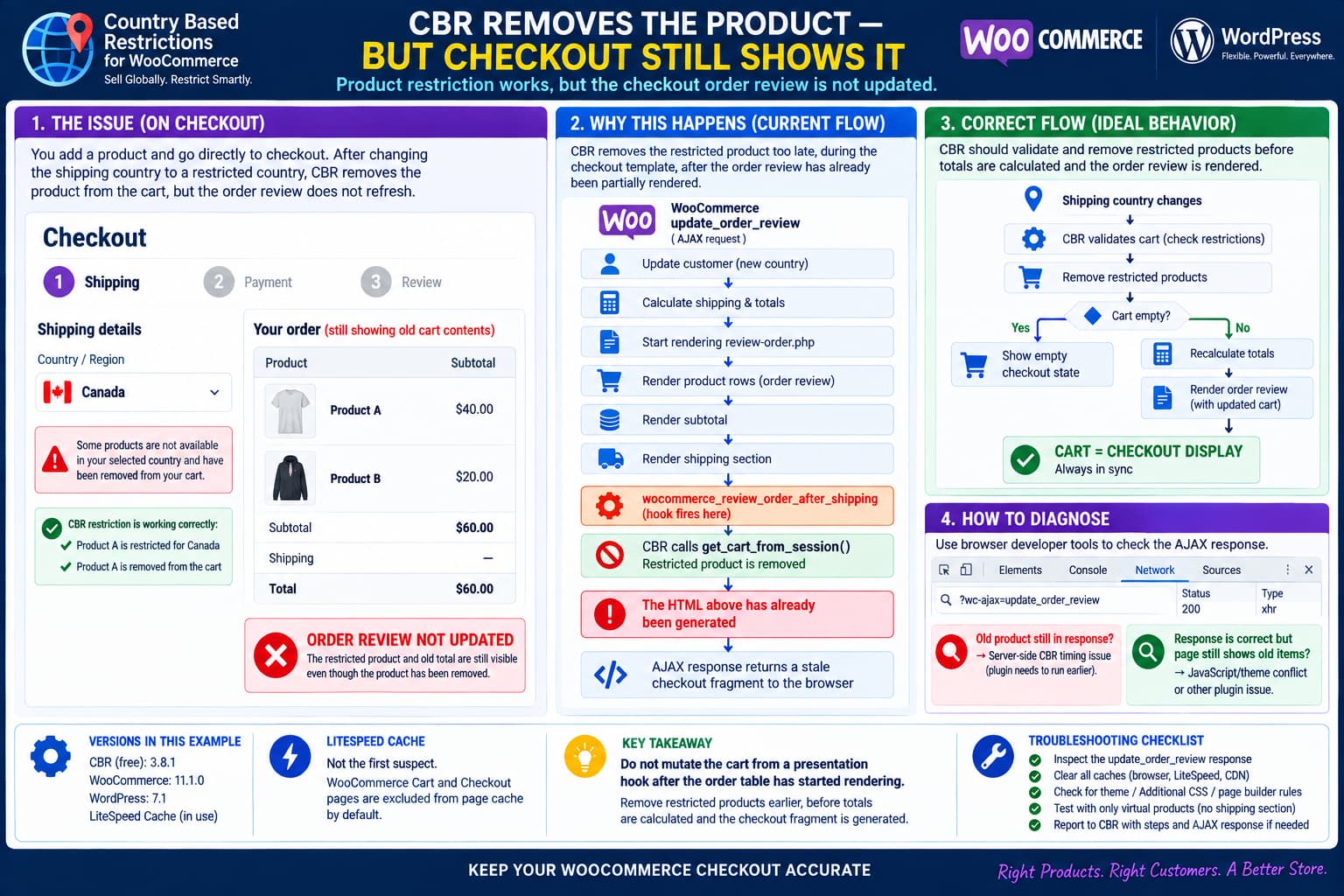
Country Based Restrictions Removes the Product but WooCommerce Checkout Still Shows the Old Cart

Country Based Restrictions for WooCommerce removes a restricted product after the shipping country changes, but the checkout order review still displays the old product and total because CBR reloads the cart during the woocommerce_review_order_after_shipping template hook.

A WooCommerce checkout can end up displaying products and totals that no longer match the actual cart when Country Based Restrictions for WooCommerce (CBR) removes an item after the customer changes their shipping country. The restriction logic itself may be working correctly: but the checkout interface can still display: This is more than a cosmetic … Read more

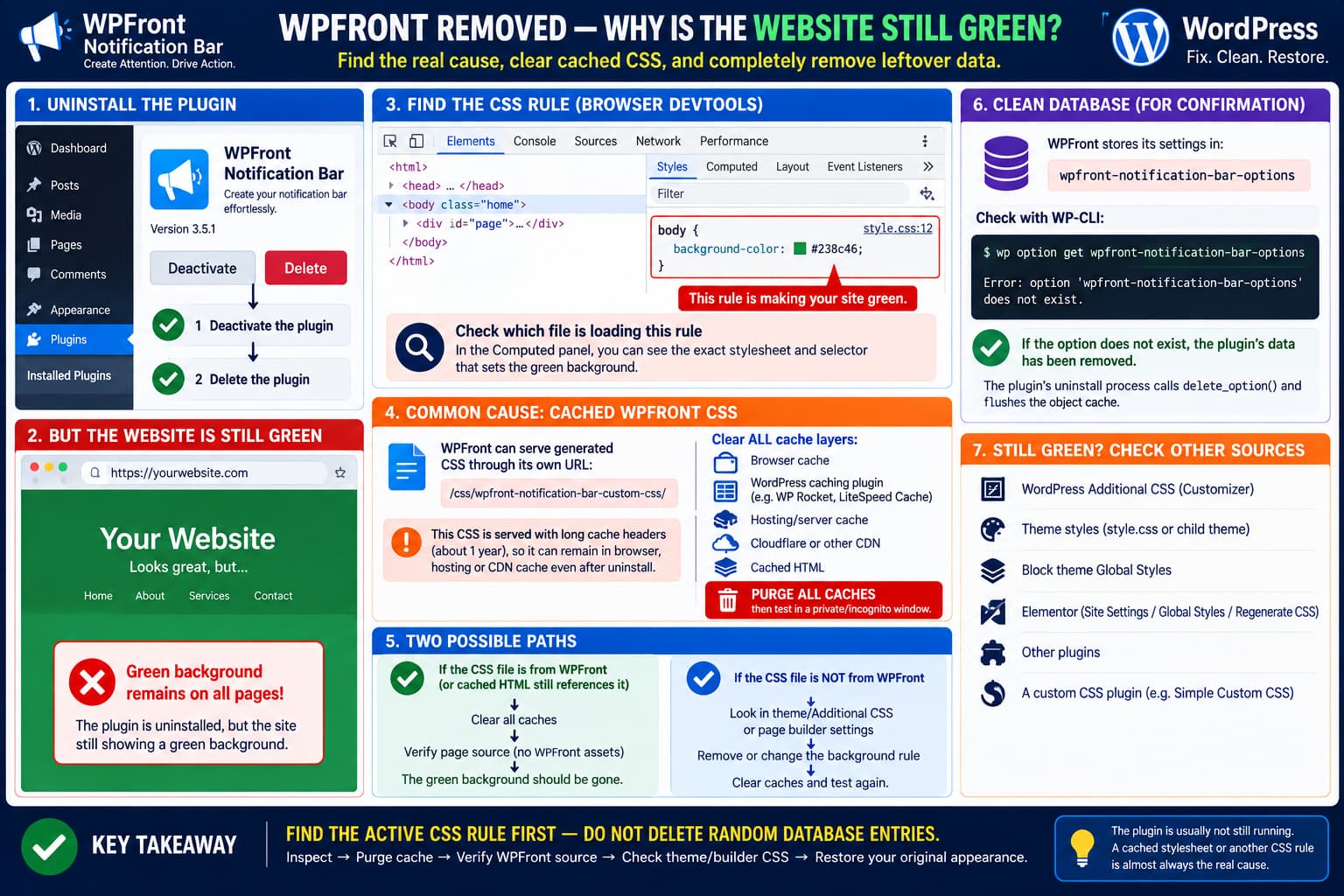
WPFront Notification Bar Leaves a Green Background After Uninstall: What to Check

WordPress site staying green after WPFront Notification Bar is uninstalled, showing how cached WPFront custom CSS, page cache, theme CSS or page-builder styles can remain and how to verify the plugin database option has been removed.

If uninstalling WPFront Notification Bar leaves every page of a WordPress site with a green background, reinstalling the plugin repeatedly is unlikely to fix the real cause. The first thing to establish is whether WPFront is actually still contributing CSS to the page. A deleted WordPress plugin cannot normally continue executing PHP and injecting new … Read more

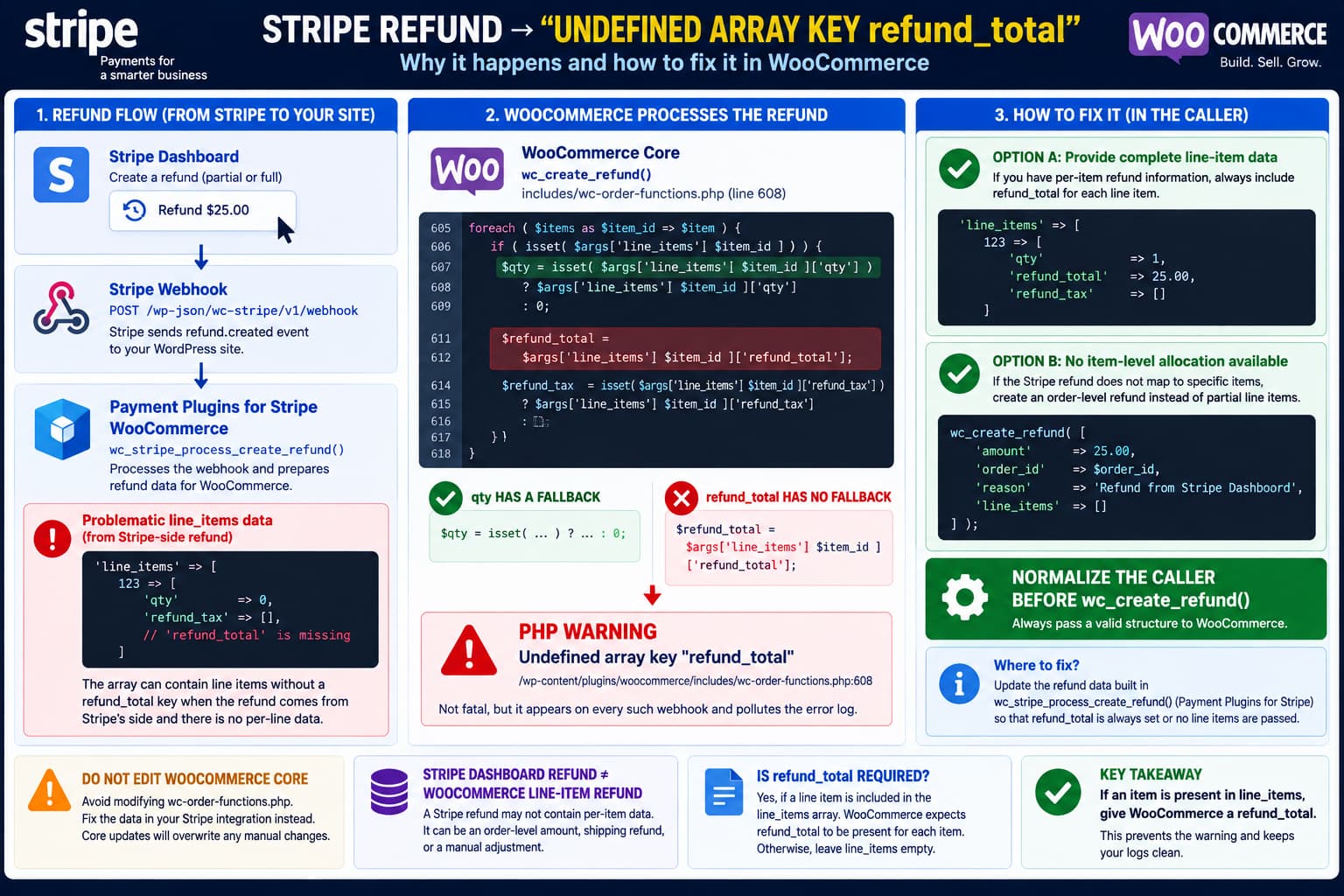
Stripe Dashboard Refunds Trigger “Undefined Array Key refund_total” in WooCommerce

Stripe Dashboard refund webhook reaching Payment Plugins for Stripe WooCommerce with a line item missing refund_total, causing WooCommerce wc_create_refund() to generate an Undefined array key warning, with valid caller-side fixes shown.

A Stripe refund can successfully reach a WooCommerce site while still triggering this PHP warning: When the stack leads through: the most likely issue is not that WooCommerce cannot process refunds. It is that the Stripe integration is passing a partially populated line_items array into WooCommerce’s refund API. The distinction matters because wc_create_refund() currently treats … Read more

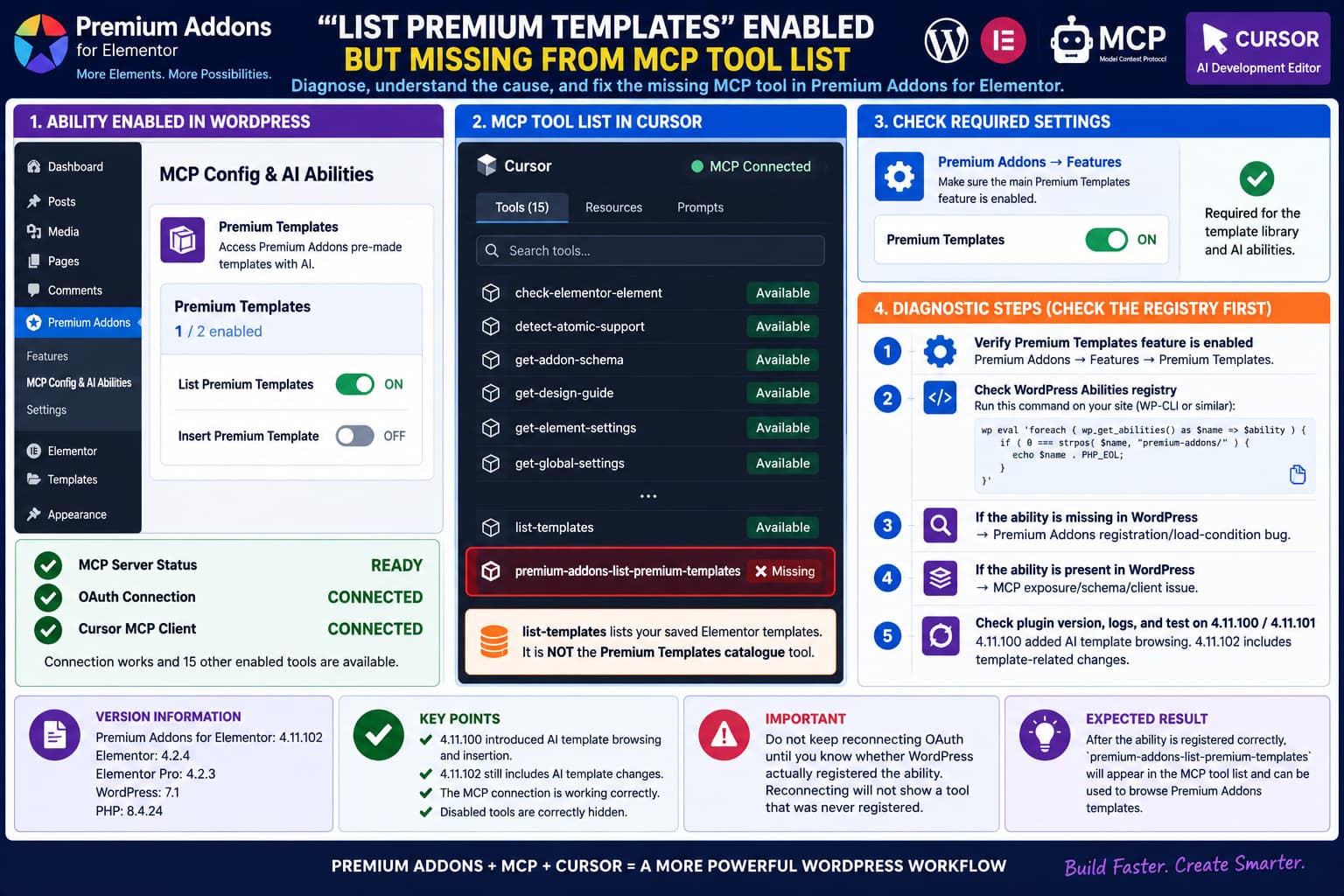
Premium Addons “List Premium Templates” Is Enabled but Missing From the MCP Tool List

Premium Addons List Premium Templates enabled in WordPress but missing from Cursor's MCP tool list, showing how to check the separate Premium Templates feature and WordPress Abilities registry to determine whether the ability failed to register.

Premium Addons for Elementor can expose its WordPress functionality to AI clients such as Cursor through the WordPress Abilities API and Model Context Protocol. A confusing failure can occur where: looks correct in WordPress, but the expected Premium Templates listing tool never appears in the MCP client’s tool list. Meanwhile: This is a fundamentally different … Read more

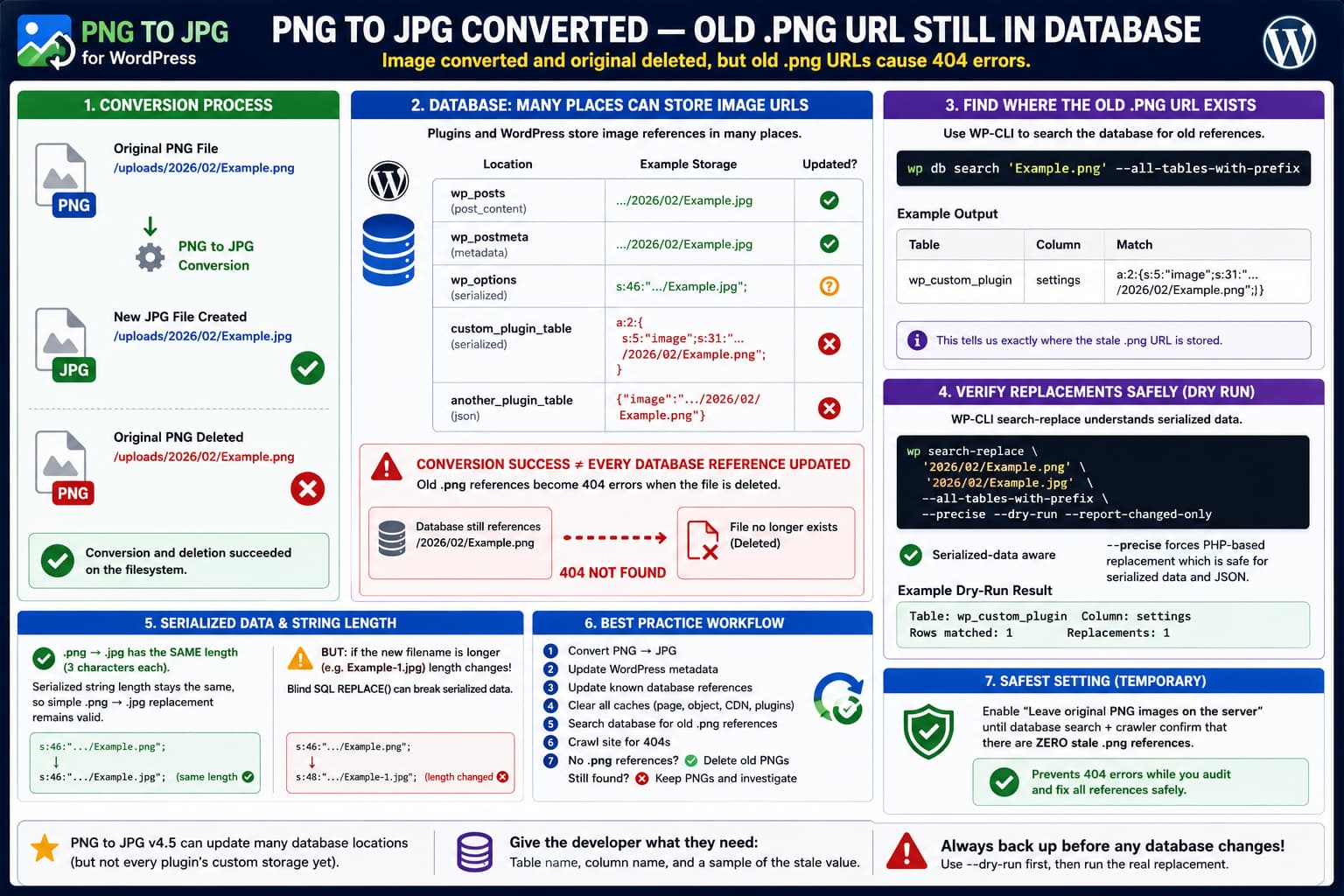
PNG to JPG Converts the Image but Leaves Old .png URLs in the Database

PNG to JPG converts and deletes a WordPress PNG file while a serialized or custom database table still references the old .png URL, causing a 404 and requiring a WP-CLI database search.

The PNG to JPG WordPress plugin can convert an uploaded image from: to: and, when configured to remove the original, delete: from disk. If the database still contains references to the deleted .png file, however, those references become real 404 URLs. The resulting state looks like this: This is particularly easy to discover with a … Read more

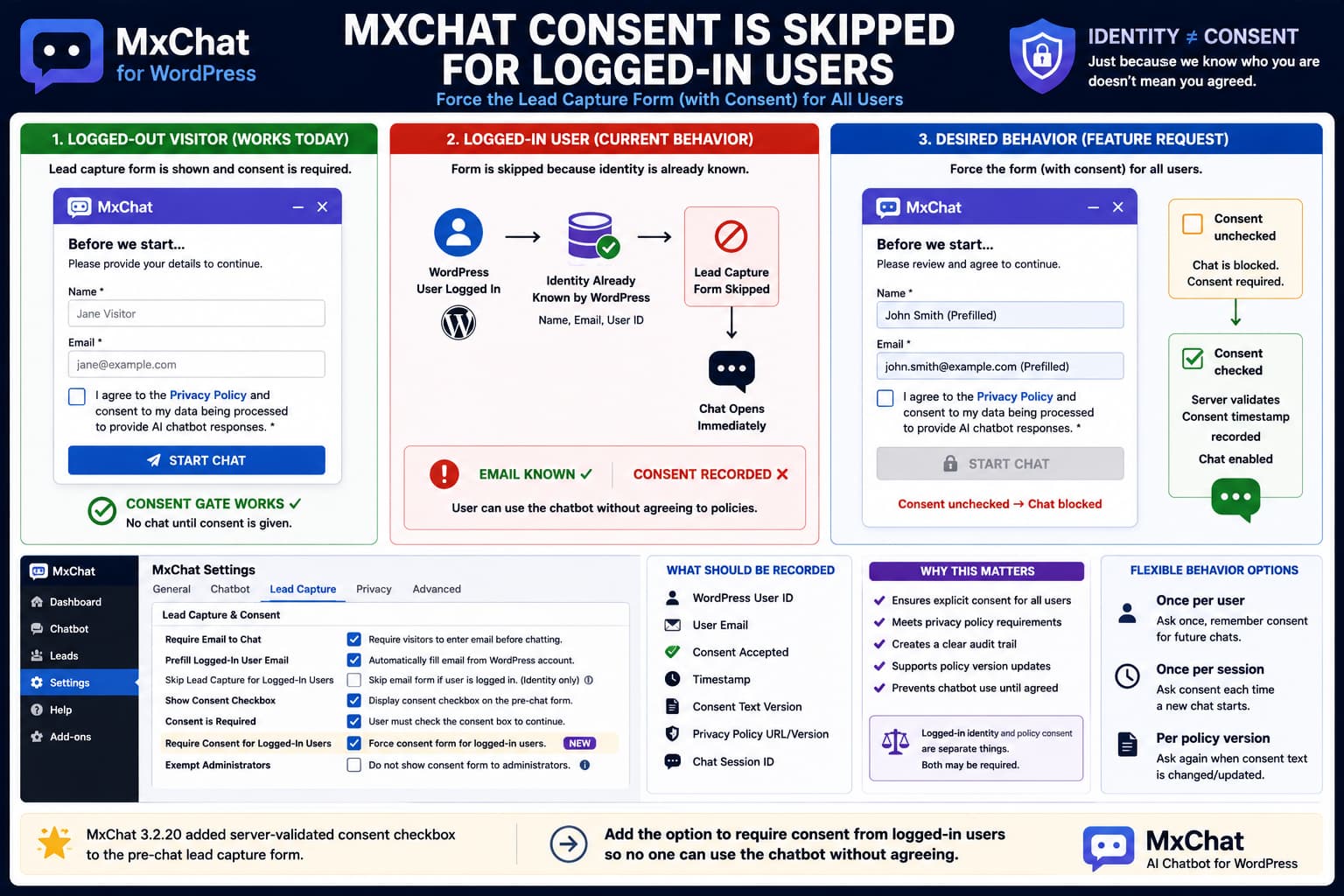
MxChat Lead Capture Form Is Skipped for Logged-In Users

MxChat lead capture form showing required consent for guests but being skipped for logged-in WordPress users, with a proposed workflow that prefills their email while still requiring an unchecked consent checkbox before chat.

MxChat’s Require Email to Chat feature can place a form in front of the chatbot so anonymous visitors provide their identity before beginning a conversation. Version 3.2.20 also added an important privacy feature: the pre-chat email form can now display a configurable consent checkbox, make that checkbox required, link to a Privacy Policy, validate the … Read more

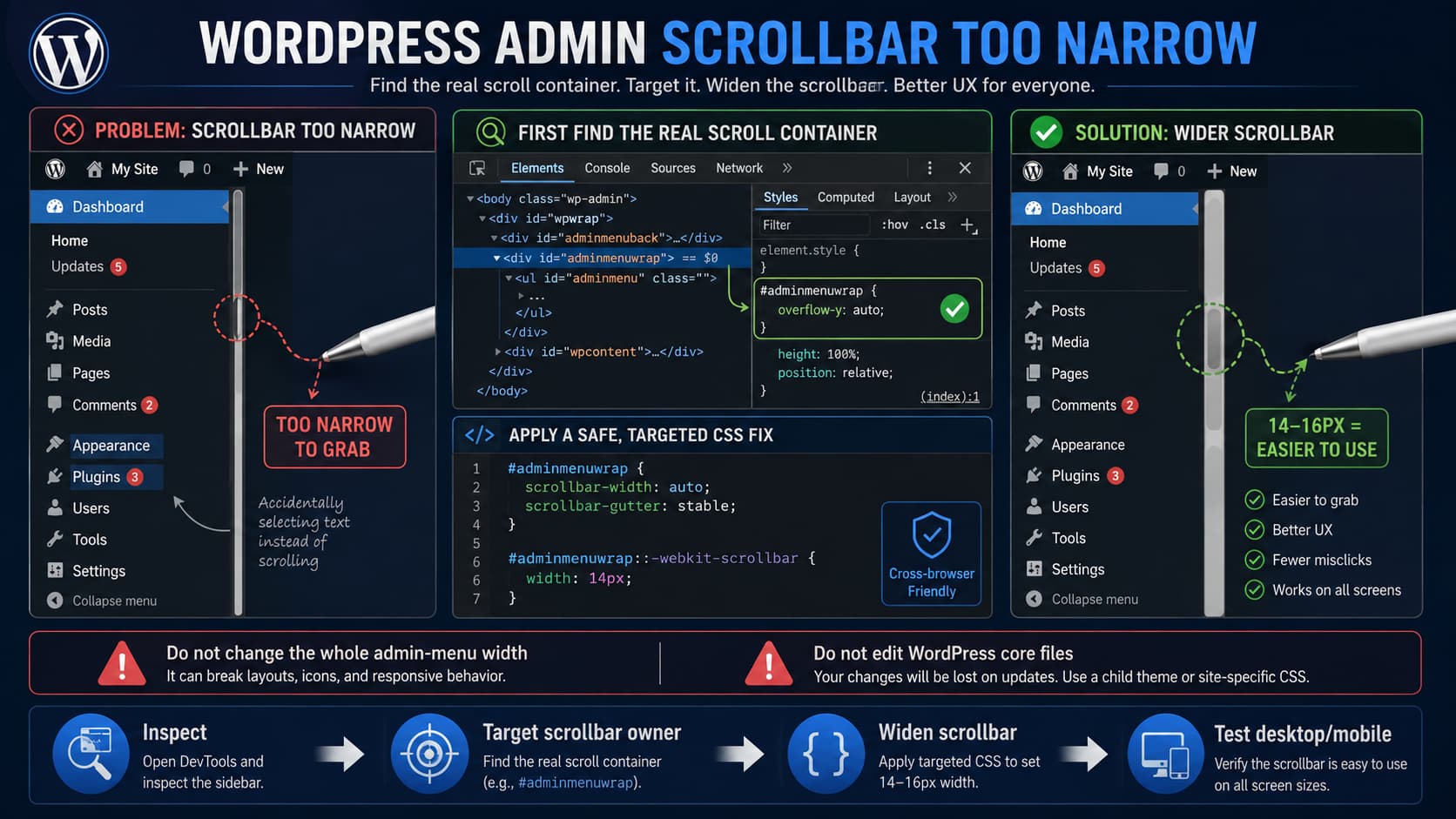
How to Make the WordPress Admin Left Menu Scrollbar Wider

WordPress admin sidebar with a narrow scrollbar being widened to 14 pixels using CSS after identifying the correct scrolling element in Developer Tools.

A very narrow scrollbar in the WordPress admin sidebar can be frustrating when using a pen mouse, stylus, or other precision pointing device. Missing the scrollbar by only a few pixels can result in clicking menu entries or dragging across nearby content instead. A small CSS adjustment can make the scrollbar easier to grab. There … Read more

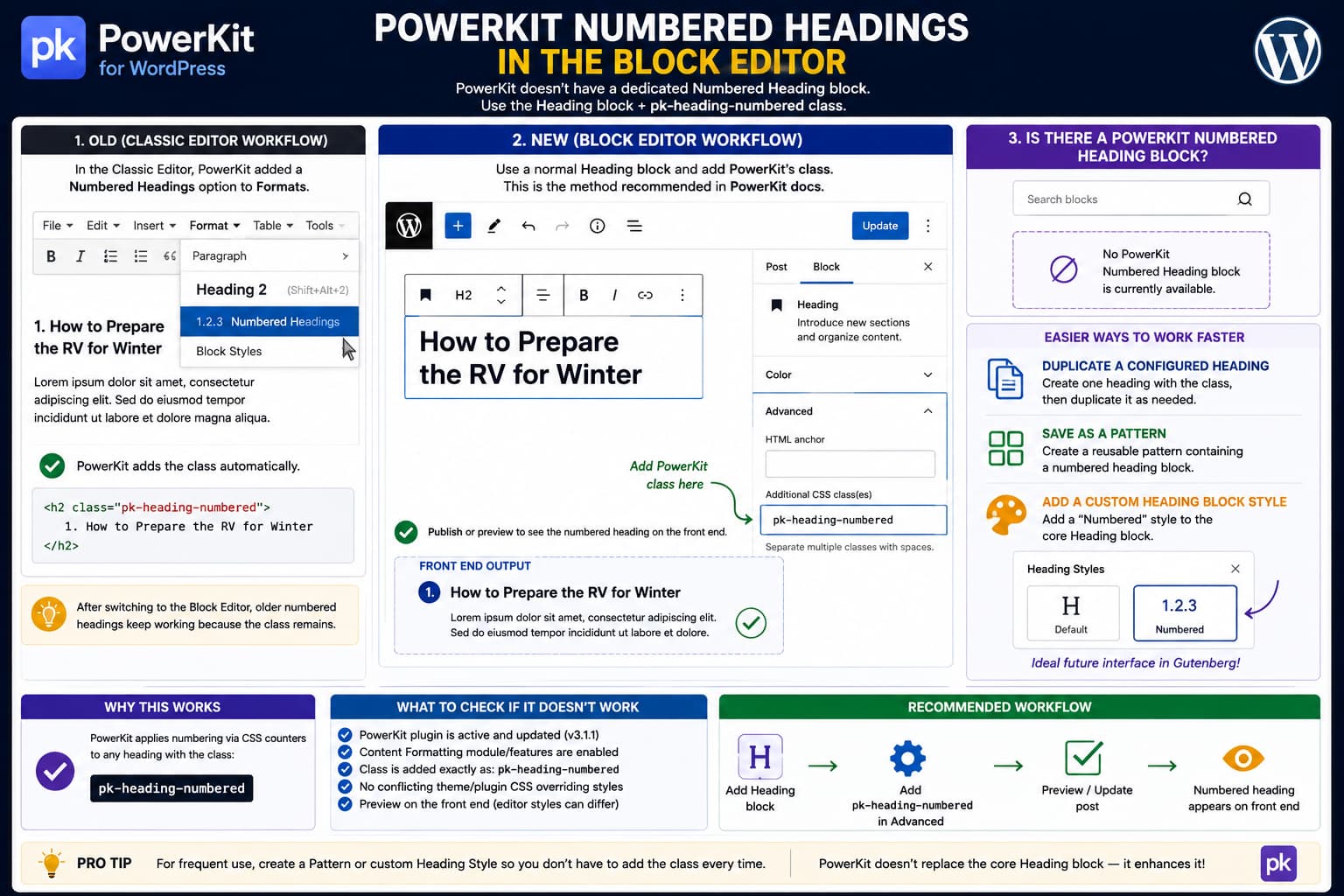
How to Use PowerKit Numbered Headings With the WordPress Block Editor

PowerKit numbered heading in the WordPress Block Editor showing pk-heading-numbered added under the Heading block's Additional CSS Class field, with Classic Editor and reusable Gutenberg workflow comparisons.

After switching from the Classic Editor to the WordPress Block Editor, PowerKit’s Numbered Headings feature can appear to have disappeared. In the Classic Editor, PowerKit added its formatting options to the editor’s Formats menu. You could select a heading and choose Numbered Headings without knowing which CSS class PowerKit used internally. The Block Editor works … Read more