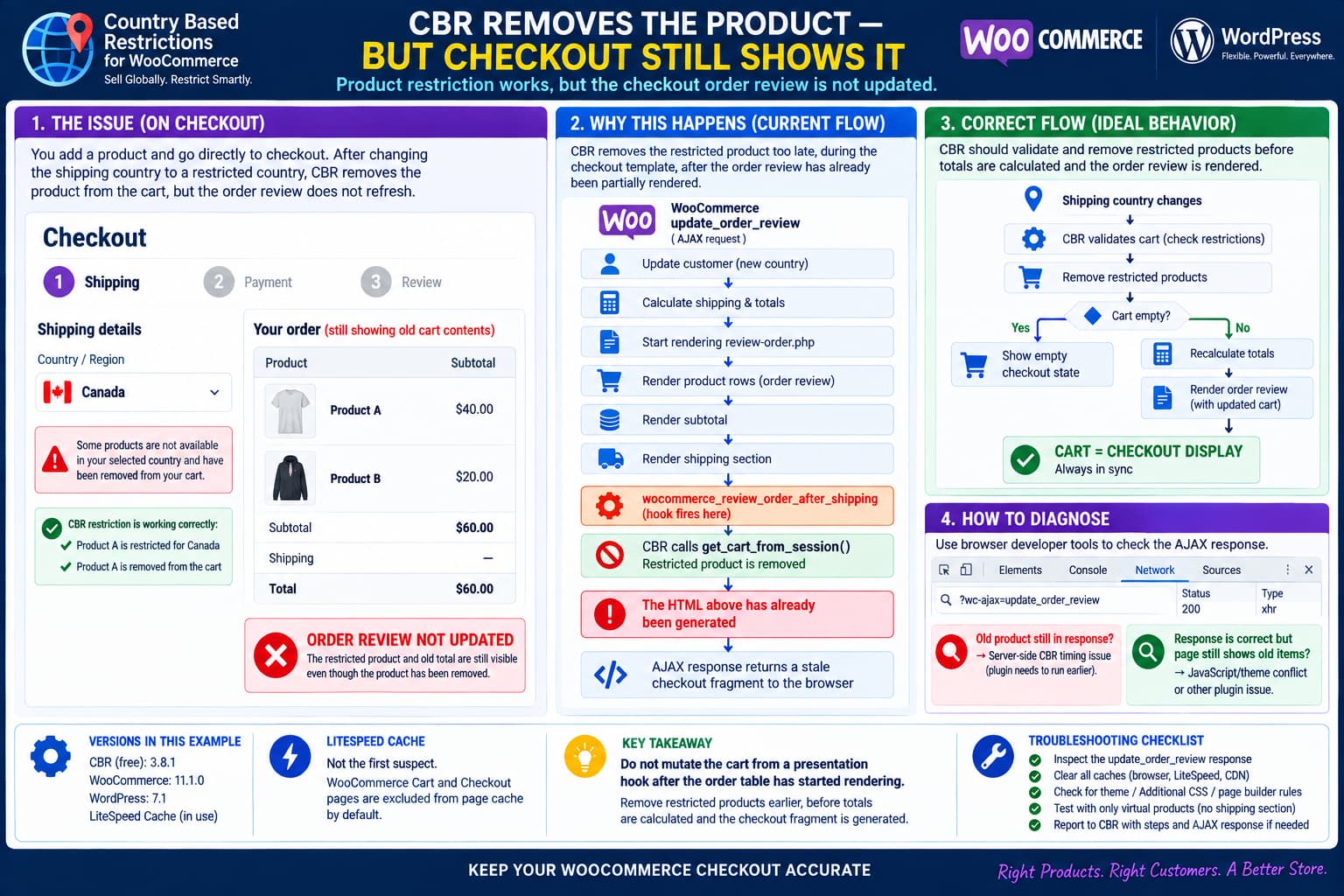
A WooCommerce checkout can end up displaying products and totals that no longer match the actual cart when Country Based Restrictions for WooCommerce (CBR) removes an item after the customer changes their shipping country.
The restriction logic itself may be working correctly:
Shipping country changes
        ↓
CBR detects restricted product
        ↓
Product becomes non-purchasable
        ↓
Product is removed from cart
but the checkout interface can still display:
Old product rows
Old subtotal
Old order total
This is more than a cosmetic inconvenience.
The customer is being shown an order summary that no longer represents the cart WooCommerce will actually use.
A review of the plugin’s public source reveals a likely timing problem in the classic checkout integration.
How CBR Determines the Customer’s Country
Country Based Restrictions uses the customer’s WooCommerce shipping country when one is available, falling back to WooCommerce geolocation when necessary. Its WordPress.org documentation explicitly describes this behavior.
That makes a checkout country change an important event.
For example:
Initial country:
Netherlands

Product:
Allowed

Customer changes shipping country:
Canada

Product:
Restricted
CBR needs to do more than alter whether the product is purchasable.
If that product is already inside the cart, CBR also needs to bring the cart and checkout display back into sync.
What the CBR Source Currently Does
In the plugin’s public upstream source, CBR registers this callback for checkout:
add_action(
    'woocommerce_review_order_after_shipping',
    array( $this, 'update_cart_and_checkout_items' ),
    10
);
The callback itself is extremely small:
public function update_cart_and_checkout_items() {
    global $woocommerce;
    $woocommerce->cart->get_cart_from_session();
}
That explains how a restricted product can disappear.
CBR also filters WooCommerce’s product purchasability.
When WooCommerce subsequently reloads the cart from the session, its cart-session code checks whether every product is still purchasable.
If a product is no longer purchasable, WooCommerce treats it as invalid for the cart and generates the familiar message that the product has been removed because it can no longer be purchased. WooCommerce’s current WC_Cart_Session::get_cart_from_session() explicitly performs that check.
Conceptually:
CBR:
Product is restricted
        ↓
woocommerce_is_purchasable = false
        ↓
CBR calls get_cart_from_session()
        ↓
WooCommerce checks is_purchasable()
        ↓
Restricted product removed
So the removal itself is understandable.
The problem is where CBR performs it.
woocommerce_review_order_after_shipping Is Too Late to Mutate the Cart
WooCommerce’s classic checkout order-review template renders content in this general order:
Product rows
        ↓
Subtotal
        ↓
Coupons
        ↓
Shipping
        ↓
woocommerce_review_order_after_shipping
        ↓
Fees
        ↓
Tax
        ↓
Order total
WooCommerce’s current review-order.php confirms that the woocommerce_review_order_after_shipping hook fires after the product rows, subtotal and shipping section have already been output.
That means CBR is effectively doing this:
Start building checkout HTML

Render Product A
Render Product B

Render subtotal

Render shipping

        ↓

CBR runs here
CBR removes Product A

        ↓

Continue building checkout response
By the time the cart changes, some of the HTML being returned to the browser already describes the old cart.
That is a poor place to perform cart mutation.
Why WooCommerce Does Not Automatically Start the Template Again
Changing the cart does not rewind PHP output.
Imagine the buffer already contains:
<tr class="cart_item">
    <td>Restricted Product</td>
    <td>$50.00</td>
</tr>

<tr class="cart-subtotal">
    <td>$50.00</td>
</tr>
Then CBR removes that item.
The PHP output buffer does not automatically erase those rows and run the template again.
WooCommerce simply continues processing.
So it is possible to end the request with:
Real WC cart:
Product removed

Generated HTML fragment:
Product still present
That neatly explains the apparent contradiction.
WooCommerce Calculates the Checkout Before Rendering the Fragment
The classic WooCommerce checkout refresh uses:
wc-ajax=update_order_reviewWooCommerce’s current WC_AJAX::update_order_review() performs the checkout update roughly like this:
Receive changed address
        ↓
Update WC customer
        ↓
Calculate shipping
        ↓
Calculate cart totals
        ↓
Render checkout/review-order.php
        ↓
Return rendered HTML fragment
The response contains a fragment for:
.woocommerce-checkout-review-order-tablewhich replaces the order-review table in the browser.
The problem is that CBR’s checkout callback runs during the rendering stage, rather than before the totals and fragment are generated.
So the sequence can become:
WooCommerce calculates cart
        ↓
WooCommerce starts rendering old cart
        ↓
CBR removes restricted item halfway through rendering
        ↓
WooCommerce finishes response
        ↓
Browser receives stale fragment
This Explains the Mixed-Cart Case
Consider:
Product A
Restricted in Canada
$40

Product B
Allowed in Canada
$20
Before changing country:
Product A  $40
Product B  $20
Subtotal   $60
After Canada is selected, the actual desired result is:
Product B  $20
Subtotal   $20
But if CBR removes Product A only after the product rows and subtotal have already been rendered, the outgoing checkout fragment can still contain:
Product A
Product B
Subtotal $60
even though the session/cart is already moving toward:
Product B onlyThis is why manually visiting another cart-aware page afterward can make the discrepancy suddenly disappear.
A new request starts from the updated cart state.
The Empty-Cart Case Is Even More Important
WooCommerce’s update_order_review() checks whether the cart is empty near the beginning of the AJAX request.
If it is already empty, WooCommerce can return its session-expired/return-to-shop behavior.
But consider this sequence:
AJAX request starts

Cart contains Product A
→ cart is NOT empty

WooCommerce passes initial empty-cart check

Customer country is processed

Checkout review begins rendering

CBR discovers Product A is restricted

CBR removes Product A

Cart becomes empty
The earlier empty-cart check has already happened.
WooCommerce does not automatically jump back to the top of update_order_review() and perform that test again.
So CBR needs to handle this transition deliberately.
Otherwise the browser can remain on a normal-looking checkout even though there is no longer anything valid to purchase.
Why Triggering Another Refresh Can Appear to Fix It
If a second checkout refresh occurs after the first one completes, that new request starts with the modified cart.
The flow then becomes:
First AJAX request
→ removes restricted product too late
→ stale fragment returned

Second AJAX request
→ starts with correct cart
→ correct fragment rendered
This is why triggering another:
jQuery( document.body ).trigger( 'update_checkout' );can appear to fix the UI.
WooCommerce uses the update_checkout / updated_checkout event cycle for classic checkout refreshes.
However, forcing an extra request from JavaScript is not the ideal architectural solution.
It creates:
- another AJAX request;
- additional latency;
- possible race conditions;
- potential refresh loops;
- more complexity with payment and shipping plugins.
The better solution is to change the cart before WooCommerce generates the first order-review fragment.
Better Fix: Remove Restricted Items Before Totals Are Calculated
CBR should ideally validate/remove restricted cart items at a stage where:
- the customer’s newly selected country is already available;
- the checkout fragment has not started rendering;
- WooCommerce has not finalized totals yet.
In the classic checkout flow, the cart should be normalized before:
WC()->cart->calculate_totals();and certainly before:
woocommerce_order_review();Conceptually:
Country changed
        ↓
WooCommerce updates WC_Customer
        ↓
CBR validates cart
        ↓
Remove restricted items
        ↓
WooCommerce calculates totals
        ↓
WooCommerce renders order review
        ↓
Browser receives correct HTML
That produces one internally consistent transaction.
A Purpose-Built Cart Validation Method Would Be Safer
CBR currently relies on:
get_cart_from_session();to indirectly make WooCommerce remove non-purchasable products.
That function is primarily designed to populate a cart from session data.
It is not a dedicated:
revalidate this already-loaded checkout cart because the customer's country changedAPI.
A cleaner implementation would iterate over the current cart and explicitly remove products that CBR itself considers restricted.
Conceptually:
foreach ( WC()->cart->get_cart() as $cart_item_key => $cart_item ) {

    $product = $cart_item['data'];

    if ( $this->is_restricted( $product ) ) {
        WC()->cart->remove_cart_item( $cart_item_key );

        // Add the CBR restriction/removal notice once.
    }
}
This is an architectural example, not a drop-in patch for production.
The plugin developer would need to account for:
- variations;
- subscriptions;
- custom
cbr_is_restrictedfilters; - duplicate notices;
- repeated total calculations;
- persistent carts;
- empty carts.
But it would make the intent much clearer than reloading the session in the middle of a template.
Be Careful With woocommerce_before_calculate_totals
A logical place for this type of validation is around WooCommerce’s pre-total calculation stage.
For example:
woocommerce_before_calculate_totalsfires before totals are produced.
At checkout, WooCommerce’s customer country has already been updated by the time the main calculate_totals() call occurs.
That makes it a much better timing point than:
woocommerce_review_order_after_shippingfor country-dependent cart validation.
However, CBR should not simply move its existing get_cart_from_session() call there without testing it.
WooCommerce’s session loader can itself recalculate totals when it detects changed cart contents.
Calling that from a totals hook risks nested total calculations or recursion.
The developer should instead implement a dedicated cart-validation/removal method.
The Checkout-Update Hook Needs Care Too
Another tempting hook is:
woocommerce_checkout_update_order_reviewbecause WooCommerce fires it at the beginning of the checkout AJAX update.
But there is an important ordering detail.
WooCommerce fires that hook before it sets the new posted country/address values on WC()->customer.
So if CBR simply moved:
$this->get_country();there unchanged, it might see the previous country.
Using that hook safely would require CBR to parse the submitted checkout data itself or otherwise synchronize the new country first.
That is why a post-customer-update/pre-total stage is preferable.
Empty Cart Should Trigger a Proper Checkout State
After restrictions are applied, CBR should explicitly test:
WC()->cart->is_empty()If items remain:
Recalculate totals
Render remaining items normally
If nothing remains:
Do not return a normal stale checkout tableA clean implementation can signal WooCommerce to reload the checkout or replace the checkout state appropriately.
The important result is:
Restricted item was the only cart item
        ↓
Cart becomes empty
        ↓
Customer sees an empty-cart / return-to-shop state
rather than:
Cart empty internally
        ↓
Old product still displayed
        ↓
Place-order interface remains visible
How to Prove Whether the Bug Is Server-Side or Browser-Side
Chrome/Edge Developer Tools can settle this quickly.
Open:
F12 → Network
Change the shipping country.
Find the request resembling:
?wc-ajax=update_order_reviewOpen its Response.
WooCommerce returns JSON containing fragments.
Inspect:
.woocommerce-checkout-review-order-tableIf the AJAX response itself contains the old product
Then the stale HTML was generated by PHP.
That strongly supports the CBR hook-timing diagnosis.
The browser is simply displaying what WooCommerce returned.
If the AJAX response contains the correct cart
but the visible checkout still shows the old one, then investigate:
- JavaScript errors;
- theme checkout overrides;
- DOM replacement conflicts;
- checkout customization plugins.
This is one of the most valuable tests for this issue.
Check the Console at the Same Time
Open:
Developer Tools → Console
and reproduce the country change.
Look for:
Uncaught TypeError
ReferenceError
jQuery error
checkout.js
blockUI
update_checkout
updated_checkout
If the network response is correct but a JavaScript exception occurs before WooCommerce replaces the fragment, the problem could be client-side.
If the response already contains stale markup, a JavaScript workaround is not the primary fix.
LiteSpeed Cache Is Probably Not the Main Cause
LiteSpeed Cache deserves a quick test because it is installed on the site, but it is not the strongest suspect here.
LiteSpeed’s official documentation states that WooCommerce:
Cart
Checkout
My Account
pages are automatically excluded from page caching by default.
LiteSpeed also states that its plugin respects WooCommerce’s own cacheability rules.
Therefore, with a standard configuration:
Checkout HTML should not be served from full-page cacheand the update_order_review request is dynamic.
Still, temporarily disabling LiteSpeed optimization/cache on staging is a useful isolation test.
If the behavior remains unchanged, that is further evidence that CBR/WooCommerce timing is the issue.
Verify That Checkout Really Is Not Cached
Open:
Developer Tools → Network
click the main Checkout document and inspect response headers.
For a non-cacheable LiteSpeed page you should see behavior equivalent to:
X-LiteSpeed-Cache-Control: no-cacherather than a normal public cache hit. LiteSpeed documents this method for verifying excluded pages.
If checkout has somehow been manually configured as cacheable, fix that separately.
But page cache still would not explain why CBR detects the newly selected country and removes the product during the AJAX lifecycle.
That evidence indicates dynamic PHP execution is occurring.
Test With LiteSpeed Disabled Once
For a staging test:
1. Disable LiteSpeed Cache
2. Clear browser cache
3. Add restricted product
4. Open checkout directly
5. Change shipping country
If:
Bug still occursremove LiteSpeed from the investigation.
If:
Bug disappearsthen inspect JS optimization features such as:
- JS Delay;
- JS Defer;
- Combine JS;
- guest optimization.
But test the Network response before concluding this is optimization-related.
Check for a Theme Checkout Override
The standard WooCommerce template places:
woocommerce_review_order_after_shippingafter the cart contents and subtotal.
A theme can override:
woocommerce/checkout/review-order.phpand alter that order.
Check:
WooCommerce → Status → Templates
Look for:
checkout/review-order.phpIf overridden, compare it with current WooCommerce.
However, even with a customized template, using a presentation hook to mutate cart state remains fragile.
Classic Checkout vs Checkout Block
This article primarily concerns classic WooCommerce checkout.
That distinction matters because WooCommerce’s current block-development documentation says:
woocommerce_review_order_after_shippingis not supported by the Checkout Block.
So if the Checkout page contains the modern Checkout Block rather than the classic shortcode:
[woocommerce_checkout]CBR needs a different integration path.
If CBR is relying on classic PHP checkout hooks for a Block Checkout site, the problem is broader than a missing refresh.
Verify the checkout type before applying any workaround.
CBR Has Had Checkout Country-Change Fixes Before
The CBR changelog shows that version 3.2 included:
Fix – bug on checkout when billing country changeThat does not prove the present issue is the same bug.
But it does show that dynamic country changes during checkout have historically required plugin-specific handling.
The current symptom is another variant of the same broader integration challenge:
Country changes after cart was already built
        ↓
Restrictions must be reapplied
        ↓
Cart and checkout fragment must remain synchronized
What Version 3.8.1 Changed
WordPress.org currently lists CBR 3.8.1 and its changelog contains only:
WP tested up to 7.1
WooCommerce compatibility added up to 11.1.0
There is no checkout-refresh fix listed for 3.8.1.
The public upstream GitHub source I could inspect still identifies itself as 3.8.0, so the exact distributed 3.8.1 PHP package should be checked by the plugin developer before attributing a specific source line to 3.8.1.
However, the 3.8.1 changelog does not advertise a functional checkout change, and the observed behavior is consistent with the publicly visible checkout implementation.
A Strong Reproduction Test
Use a simple store setup first.
Test A: One restricted product
Product A
Allowed: Netherlands
Restricted: Canada
Steps:
1. Add Product A
2. Skip Cart
3. Go directly to Checkout
4. Confirm Product A is displayed
5. Change Shipping Country to Canada
Expected:
Restriction notice
Product removed
Checkout becomes empty
Record:
Actual WC cart state:
...

AJAX order-review fragment:
...

Visible checkout:
...
Test B: Mixed cart
Use:
Product A
Restricted in Canada
$40

Product B
Allowed everywhere
$20
Expected after Canada selection:
Product B only
Subtotal $20
Correct shipping
Correct tax
Correct total
Again compare:
Server AJAX fragment
vs
Browser DOM
Test Physical and Virtual Products Separately
This is useful because CBR currently attaches the checkout reload to:
woocommerce_review_order_after_shippingwhich lives inside WooCommerce’s shipping section.
WooCommerce only renders that section when:
WC()->cart->needs_shipping()
&&
WC()->cart->show_shipping()
That creates another potential edge case.
For a cart containing only virtual/non-shipping products, the shipping block may not render at all.
If it does not render, then:
woocommerce_review_order_after_shippingdoes not fire.
That means CBR’s checkout refresh logic may not run through that hook.
A proper fix should not depend on whether the restricted product requires shipping.
Country restrictions can apply to digital products too.
This Is Another Reason the Hook Is Architecturally Weak
The current relationship is effectively:
Need to validate country restriction
        ↓
Wait until SHIPPING DISPLAY hook
Those two responsibilities are not inherently related.
A checkout restriction check should work whether the cart contains:
Physical products
Virtual products
Downloadable products
Mixed products
and whether shipping is displayed or not.
Moving cart validation out of a shipping-template hook would improve correctness beyond this particular stale-fragment problem.
Developer-Level Recommended Fix
The plugin developer should consider replacing the checkout portion of:
add_action(
    'woocommerce_review_order_after_shipping',
    array( $this, 'update_cart_and_checkout_items' )
);
with a checkout-validation mechanism that runs:
After new address/country is known

Before cart totals are finalized

Before checkout fragments are rendered
The callback should directly validate existing cart contents rather than using a template hook as the trigger for get_cart_from_session().
After removals:
if ( WC()->cart->is_empty() ) {
    // Signal checkout to reload/show the empty-cart state.
}
Otherwise let the same WooCommerce request calculate totals normally.
The result should require only one checkout refresh.
Temporary JavaScript Workaround
If an immediate workaround is required before a plugin update, a second checkout refresh can sometimes resynchronize the UI:
jQuery(function ($) {
    $(document.body).on('updated_checkout', function () {
        // Only trigger another update when your own
        // one-shot condition proves CBR changed the cart.
        $(document.body).trigger('update_checkout');
    });
});
Do not use that code exactly as written.
Without a one-shot guard it can create an infinite loop:
updated_checkout
→ update_checkout
→ updated_checkout
→ update_checkout
→ ...
A production workaround would need a reliable flag proving that CBR removed an item during the preceding response.
For that reason, a server-side fix is preferable.
Do Not Refresh the Entire Browser Page Unconditionally
A crude workaround such as:
location.reload();after every country change would hide the problem but degrade checkout significantly.
It can:
- lose entered field state;
- disrupt payment elements;
- cause unnecessary requests;
- create poor mobile UX;
- make third-party checkout integrations fragile.
Use WooCommerce’s normal fragment refresh model whenever possible.
What to Send CBR Support
A useful bug report should include:
CBR:
3.8.1 Free

WooCommerce:
11.1.0

WordPress:
7.1

Checkout:
Classic / Block

Theme:
...

LiteSpeed:
...

Shipping product:
Yes / No
Then provide one failing request from:
?wc-ajax=update_order_reviewand state whether its returned:
.woocommerce-checkout-review-order-tablefragment already contains the removed product.
That one detail separates:
CBR / PHP fragment-generation bugfrom:
browser / JavaScript fragment replacement bugSuggested Technical Summary for the Developer
The underlying concern can be summarized as:
CBR makes restricted products non-purchasable correctly.

CBR then reloads the cart from session from
woocommerce_review_order_after_shipping.

That hook executes while checkout/review-order.php
is already being rendered.

Product rows and subtotal have already been output
before the callback runs.

The cart can therefore change after part of the
checkout fragment has already been generated.

The same request is not restarted/re-rendered,
leaving the returned order-review fragment stale.
The fix should ensure that cart mutation happens before order-review rendering, and that the empty-cart transition is explicitly handled.
Practical Conclusion
This issue does not look like a failure of CBR’s country restriction detection.
The stronger evidence points to checkout lifecycle timing.
CBR correctly makes restricted products non-purchasable, and WooCommerce’s cart-session loader can remove such products.
But the public CBR implementation triggers its checkout cart reload on:
woocommerce_review_order_after_shippingand only then calls:
$woocommerce->cart->get_cart_from_session();WooCommerce’s checkout template fires that hook only after product rows, subtotal and shipping output have already begun.
That is too late for reliably changing the contents of the cart represented by the same fragment.
The correct sequence should instead be:
Customer changes country
        ↓
WooCommerce updates customer country
        ↓
CBR removes restricted products
        ↓
If empty → show/reload empty-cart state
        ↓
Otherwise calculate totals
        ↓
Render checkout once
        ↓
Return matching order-review fragment
LiteSpeed Cache should still be ruled out once, but LiteSpeed officially excludes WooCommerce Checkout and Cart pages from cache by default, so it is unlikely to explain a stale update_order_review fragment generated during a live country-change request.
The highest-value next diagnostic is therefore to inspect the actual update_order_review AJAX response.
If the removed product is already present in the returned HTML, the bug is server-side and the CBR checkout hook should be moved/redesigned.
