Fix WholesaleX Wallet Disappearing When BTCPay Is Activated

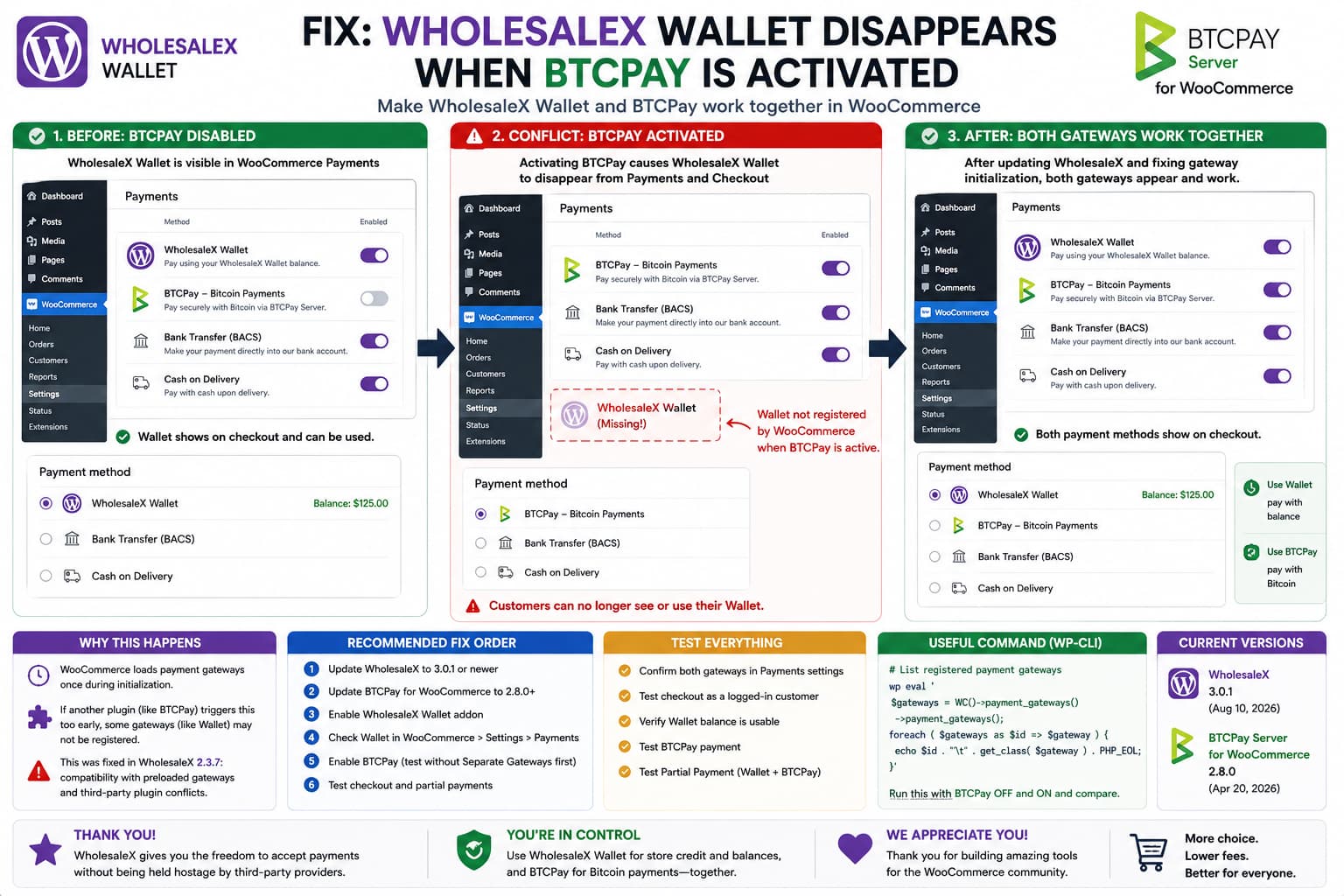
WholesaleX Wallet disappearing when BTCPay is activated in WooCommerce, then both payment gateways working after fixing the gateway initialization conflict.

If WholesaleX Wallet works normally until BTCPay Server for WooCommerce is activated, then disappears from both: WooCommerce → Settings → Payments and the customer checkout, this is more specific than an ordinary “payment method not available” problem. The important symptom is that the Wallet disappears from the WooCommerce Payments administration screen itself. That means WooCommerce … Read more

Customer Failed Order Email Missing From WooCommerce Email Customizer?

WooCommerce Customer Failed Order enabled but missing from ThemeHigh Email Customizer until customer_failed_order support is available.

If WooCommerce has Customer Failed Order enabled but your email customizer only lets you edit or preview the shop-owner Failed Order email, the problem may not be your WooCommerce email settings at all. WooCommerce now has two different Failed Order notifications: WooCommerce’s current documentation explicitly describes both notifications under Failed Order. Internally, however, they are … Read more

How to Prevent WooCommerce Product Bundles From Being Cleared When Using BrikPanel

WooCommerce Product Bundle losing bundled items after being saved through the BrikPanel simplified editor because bundle fields were not submitted.

A simplified WooCommerce product editor can become dangerous when it saves a product type that it does not completely understand. The problem is not necessarily that the editor directly deletes bundle data. A more subtle failure can occur when the editor fires WooCommerce’s normal product-save hooks without submitting the fields belonging to another extension. A … Read more

How to Fix Meta for WooCommerce Variations Using the Store Name Instead of the Product Brand

Meta WooCommerce Variations Using Wrong Brand

When a variable WooCommerce product has the correct brand in Meta but its individual variations show the website or store name instead, the problem is usually not the Meta catalog itself. It happens when Meta for WooCommerce cannot resolve a valid brand for the variation and falls back to the store name. Current Meta for … Read more

How to Fix “Meow Lightbox PS: No Images Found” in the Chrome Console

Meow Gallery console message

If you use the Meow Lightbox plugin on WordPress, you may notice the following red message when inspecting your website with Chrome DevTools: The message usually appears on pages that do not contain an image gallery. On pages with a Meow Gallery, you may instead see a message similar to this: This can be confusing … Read more

How to Show WooCommerce Variations on Shop and Category Pages

WooCommerce Variations on Shop and Category Pages

Variable products in WooCommerce normally display a Select options or View product button on shop and category pages. Customers must open the individual product page, choose attributes such as size or color, and then click Add to cart. For stores with many variable products, this creates unnecessary steps in the purchasing process. A more convenient … Read more

How to Change the Subscribe Button to “Notify Me” in WooCommerce

WooCommerce Button Change Guide

A WooCommerce store owner may change the button shown on an out-of-stock product from Subscribe to Notify Me, only to discover that the popup form still displays a Subscribe button. The customer experience then looks like this: Although both buttons perform related actions, using different labels can confuse customers. A visitor may wonder whether they … Read more

How to Fix the YITH Delivery Date “Not of Type String” Checkout Error in WooCommerce

YITH WooCommerce Delivery Date error

A WooCommerce customer may encounter a confusing technical error when attempting to place an order without selecting a required delivery or collection date: This message is not helpful to customers. Instead of explaining what information is missing, it exposes an internal field name belonging to YITH WooCommerce Delivery Date. A much clearer checkout message would … Read more

How to Safely Clean wp_wt_sc_coupon_lookup Zero-Value Coupons in WooCommerce

Safely Clean wp_wt_sc_coupon_lookup Zero-Value Coupons

A WooCommerce website may unexpectedly accumulate hundreds of thousands of records in the following database table: Many of these records may contain values similar to: Once the table becomes large, queries involving it may take several seconds to complete. This can slow down the WordPress dashboard, coupon validation, cart requests, checkout processing, scheduled jobs, or … Read more

How to Fix the Meow Mailer Icon Disappearing in ASE Admin Menu Organizer

Meow Apps icon disappeared

The Admin Menu Organizer module in the Admin and Site Enhancements plugin allows WordPress administrators to reorder, rename, and hide dashboard menu items. However, a compatibility issue can occur when the Meow Apps menu, used by Meow Mailer, is marked as hidden. After saving the Admin Menu Organizer settings, the Meow Apps menu may return … Read more