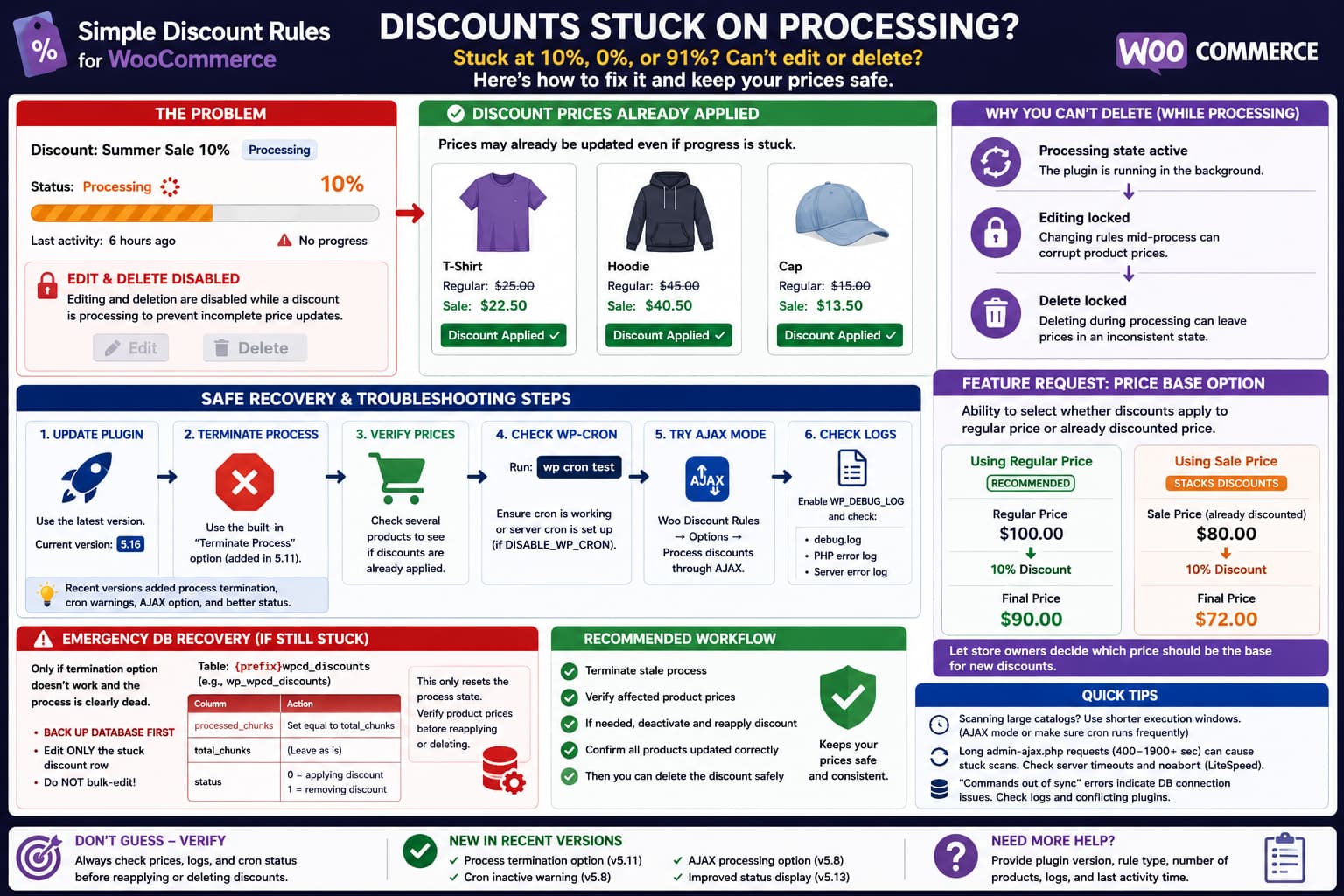
When a discount in Simple Discount Rules for WooCommerce remains stuck at 10%, 0%, 91%, or another percentage indefinitely, the displayed percentage does not necessarily reflect the actual prices currently stored on the products.
The rule may already have changed some or all matching product prices while its internal progress record never reached the completed state.
That creates an awkward situation:
Discount prices applied
        ↓
Background process does not finish
        ↓
Status remains "Processing"
        ↓
Editing and deletion remain locked
The inability to delete the rule while it is processing is not accidental. The plugin deliberately disables editing and deletion during active processing to avoid interrupting a price update halfway through. The problem occurs when the processing state itself becomes stale. (wordpress.org)
Current releases provide a process-termination mechanism, so use that before manually modifying the database.
Update Simple Discount Rules First
Go to:
Plugins → Installed Plugins
and check Simple Discount Rules for WooCommerce.
At the time of writing, WordPress.org lists version 5.16 as the current release. (wordpress.org)
This matters because several recent versions changed the plugin’s processing system.
Version 5.8 added:
- a notice when WP-Cron is not active;
- discount activity information;
- active/inactive controls;
- an option to process discounts through AJAX instead of cron;
- protection against deleting active discounts.
Version 5.11 then added a process termination option.
Version 5.13 improved the status UI for cron-based discount processing. (wordpress.org)
If you are using an older release, back up the site and update before performing database-level recovery.
Try the Built-In Process Termination Option
Since version 5.11, Simple Discount Rules has included a process termination option. (wordpress.org)
When a discount remains stuck in Processing, inspect the discount’s progress/status interface for the termination control.
Use that before altering the plugin database.
The purpose is to break the stale processing state so that the rule can return to a manageable state.
After terminating it:
- Reload the discount list.
- Check whether the Processing status disappears.
- Verify the affected product prices.
- Decide whether the discount should remain active, be reapplied, or be removed.
Do not immediately restart the same discount until you know what prices were already changed.
A failed process can potentially have completed part of its work before becoming stuck.
Check Whether the Discount Actually Applied
A 10% progress indicator does not prove that only 10% of the products were discounted.
Open several products from different parts of the rule’s target set.
Check their:
- Regular price;
- Sale price;
- frontend displayed price.
For example, if the discount targets 1,000 products, inspect products that would likely occur near the beginning, middle, and end of the selection.
You are trying to distinguish:
Processing UI stuck
but product updates completed
from:
Processing genuinely stopped
after only part of the catalog was updated
This distinction is critical before restarting the rule.
A blind restart could recalculate products that have already been modified.
Why Discounts Can Get Stuck
Simple Discount Rules has used both AJAX-based and WP-Cron-based processing during its development.
The plugin originally introduced AJAX-based discount application to handle large product catalogs efficiently. More recent versions also support cron-based processing and provide an option to choose AJAX processing instead. (wordpress.org)
That means a stuck discount can potentially involve:
- WP-Cron not spawning;
- a scheduled task no longer running;
- an interrupted AJAX request;
- a PHP fatal error;
- a database error;
- a server request timeout;
- a stale process record;
- an incomplete plugin database upgrade.
The progress percentage itself does not identify which one occurred.
Check WP-Cron
Version 5.8 specifically added a warning when cron is inactive, which confirms that WP-Cron is important to current discount processing. (wordpress.org)
If you have SSH and WP-CLI, run:
wp cron testA healthy site should return something similar to:
Success: WP-Cron spawning is working as expected.The official WP-CLI command tests whether WordPress can spawn cron over HTTP and also detects configurations such as DISABLE_WP_CRON. (developer.wordpress.org)
Then inspect scheduled events:
wp cron event listWP-CLI lists each scheduled hook, its next execution time, and recurrence. (developer.wordpress.org)
You can narrow the output:
wp cron event list | grep -i discountand:
wp cron event list | grep -i wpcdThe exact hook names can change between plugin releases, so inspect what is actually registered rather than assuming a hook name.
Check DISABLE_WP_CRON
Inspect:
wp-config.phpfor:
define( 'DISABLE_WP_CRON', true );This is not automatically wrong.
Many production WooCommerce sites intentionally disable visitor-triggered WP-Cron and replace it with a real server cron.
If this constant exists, confirm that the hosting account has a scheduled task invoking WordPress cron.
Do not simply delete the constant if a proper server cron is already configured.
The correct question is whether scheduled WordPress tasks are actually running.
Try AJAX Processing as a Diagnostic
Version 5.8 introduced an option to process discounts through AJAX instead of cron. (wordpress.org)
If the plugin provides that setting in your installed version, it is useful as an A/B test.
For example:
Cron processing
→ rule gets stuck
then:
AJAX processing
→ same type of rule completes
strongly suggests that the problem lies in WordPress cron or scheduled processing.
The reverse is also useful:
AJAX processing fails
Cron processing succeeds
which points toward HTTP request interruption rather than WP-Cron itself.
Change one processing option at a time and test with a small temporary rule before applying another storewide discount.
Check the PHP Error Log
Enable WordPress logging temporarily if necessary.
In wp-config.php:
define( 'WP_DEBUG', true );
define( 'WP_DEBUG_LOG', true );
define( 'WP_DEBUG_DISPLAY', false );
Place these before:
/* That's all, stop editing! Happy publishing. */Then reproduce the problem with a controlled discount.
Check:
wp-content/debug.logAlso inspect the hosting PHP error log.
Look around the exact time when the progress stopped for:
PHP Fatal error
Allowed memory size exhausted
Maximum execution time
WordPress database error
Uncaught TypeError
Uncaught Error
Do not leave WP_DEBUG enabled unnecessarily on production after troubleshooting.
Test a Small Discount Rule
Do not diagnose a background-processing problem using a storewide promotion involving tens of thousands of products if a smaller test can reproduce it.
Create a temporary category containing perhaps a few products.
Apply a small test discount.
If:
5 products → completesbut:
10,000 products → gets stuckthe issue is more likely related to chunking, cron execution, server limits, or request continuity.
If even a five-product rule hangs at 0%, investigate the processing mechanism itself rather than catalog size.
Check the “Last Activity” Information
Version 5.8 added taxonomy details and last activity information to the discount listing. (wordpress.org)
This is useful for separating a slow process from a dead process.
For example:
Progress: 10%
Last activity: 20 seconds ago
may still be running.
But:
Progress: 10%
Last activity: 6 hours ago
strongly suggests that the process has stopped while the database status remains Processing.
At that point, waiting longer is unlikely to fix the rule.
If the Process Is Permanently Stuck
There is an official developer-provided database recovery procedure for older stuck processes.
In a support case where a discount remained at 91% and could no longer be edited or deleted, the plugin developer instructed the user to open:
{wordpress_table_prefix}wpcd_discountsand adjust the stuck discount’s processing information. (wordpress.org)
Back up the database before doing this.
Do not modify the table while a discount process is still genuinely running.
First use View Progress in the plugin and identify the affected process/rule ID from the URL, as recommended by the developer.
Then open the table in phpMyAdmin or another database-management tool:
{prefix}wpcd_discountsFor example, a site using the standard WordPress prefix could have:
wp_wpcd_discountsbut never assume the site uses wp_.
Locate only the stuck row.
The developer’s documented recovery was to set:
processed_chunks = total_chunksand then set the status depending on what operation had become stuck:
status = 0when the plugin was applying the discount, or:
status = 1when it was removing the discount. (wordpress.org)
This should be treated as an emergency state-recovery operation, not routine maintenance.
Do not bulk-edit every row in the table.
Verify Product Prices Before Database Recovery
The database procedure above changes the plugin’s understanding of whether the process finished.
It does not magically replay product updates that never happened.
Therefore, before marking a stuck process as completed, verify whether its discount actually reached all expected products.
For example:
Rule should affect:
Category A – 500 products
Check a representative group.
If some products are discounted and some are not, merely marking the process completed can leave inconsistent prices.
In that situation, after clearing the stale state you may need to deactivate and reapply the rule so the plugin performs a fresh complete calculation.
Do this first on staging if the promotion affects many products.
Why the Plugin Prevents Deleting Processing Discounts
The inability to delete a processing discount can feel like a bug, but the protection itself has a reason.
Version 5.4 explicitly introduced:
Disable editing and deleting while discount is in progress.Version 5.8 also states:
Deletion is not allowed when the discount is active.Imagine deleting a rule while it has updated only half of 20,000 products.
The rule definition would be gone, but thousands of products could retain modified prices.
So allowing unconditional deletion during a live processing operation would be dangerous.
The real UX problem is that a dead process can remain indistinguishable from an active process.
That is why a safe Terminate / Reset Processing control is preferable to simply enabling Delete.
A Better Recovery Workflow
For a robust discount-management interface, the safest workflow would be:
Processing
    ↓
No activity for defined period
    ↓
Process considered stale
    ↓
Terminate / Reset button enabled
    ↓
Verify affected products
    ↓
Retry or Delete
A simple Refresh button can update the displayed progress, but restarting a price-changing operation automatically is riskier.
The plugin needs to know whether the previous chunk actually finished before replaying it.
A better feature would therefore be:
Refresh Status
for re-reading current progress, and:
Terminate / Reset Process
for intentionally abandoning a stale operation.
The current plugin already moved in this direction by adding a process-termination option in version 5.11. (wordpress.org)
Current Version Still Has Stuck-Processing Reports
The issue should not be dismissed as a one-off browser problem.
The plugin’s support history contains multiple reports involving processing that does not finish, including rules stuck at 0%, 91%, and Processing. (wordpress.org)
The current support report about discounts remaining around 10% is still unresolved.
This does not prove that every case has the same root cause.
Different installations may fail because of:
- WP-Cron;
- AJAX;
- hosting limits;
- database state;
- plugin conflict;
- old schema data.
But it does show that a stale-processing recovery path is useful.
What About Deleting a Stuck Discount?
If version 5.11 or later successfully terminates the process, deletion should be attempted only after checking the product prices.
The safe order is:
Terminate stale processing
        ↓
Verify prices
        ↓
Deactivate/remove discount correctly
        ↓
Verify prices restored
        ↓
Delete rule
Do not delete the database row first unless you understand exactly how the plugin stores and reverses modified prices.
The discount rule may contain information needed to restore products to their previous state.
Regular Price vs. Already Discounted Price
The request for a setting to choose whether a new discount is calculated from the regular price or an already discounted price is separate from the stuck-processing issue.
The current plugin changelog provides an important clue.
Version 5.3 changed the calculation to:
Calculated discount using regular price instead of already discounted price.That indicates the plugin intentionally moved toward using the WooCommerce regular price as its calculation base rather than stacking the new percentage onto an already reduced price.
For example:
Regular price: $100
Existing sale price: $80
Rule: 10%
Using regular price gives:
$100 - 10% = $90Using the existing discounted price would give:
$80 - 10% = $72These produce very different promotions.
Is There Currently a Price-Base Selector?
The current public Simple Discount Rules feature list and changelog do not document a general setting that lets the administrator choose between:
Regular priceand:
Current / already discounted pricefor this calculation.
Instead, the changelog explicitly says the calculation was changed to use the regular price in version 5.3. (wordpress.org)
Therefore, the requested selector should be treated as a feature request, not as an existing setting that the user simply cannot find.
Do not assume another discount plugin’s “regular vs sale price” setting exists in Simple Discount Rules.
Be Careful With Stacked Discounts
There are several different meanings of “discounted price” in WooCommerce:
- WooCommerce sale price;
- another Simple Discount Rules rule;
- cart-value discount;
- coupon;
- role-based pricing;
- another dynamic-pricing plugin.
A future price-base selector would need to define exactly which one it means.
For example:
Apply discount from:
○ WooCommerce regular price
○ WooCommerce current sale price
is much clearer than:
Apply to discounted pricebecause multiple plugins can alter the effective cart price.
Any implementation should also define how multiple matching Simple Discount Rules interact.
How to Verify the Problem Is Fixed
After recovering a stuck discount, create a small test rule and confirm the entire processing lifecycle.
Check that:
- Progress advances beyond the previous stuck percentage.
- Last activity continues updating.
- Processing reaches 100%.
- Status leaves Processing.
- Editing becomes available again.
- The rule can be deactivated normally.
- Product prices return correctly after removal.
- The rule can then be deleted.
- No PHP or database errors appear.
- The next cron-based discount also completes.
If AJAX mode works while cron mode repeatedly stalls, troubleshoot WP-Cron.
If both modes stall at random points, inspect PHP/database logs and plugin conflicts.
What to Report to the Developer
A useful report should include:
Simple Discount Rules version:
WordPress version:
WooCommerce version:
PHP version:

Processing method:
Cron / AJAX

Rule type:
Category / Tag / Storewide / Cart / Other

Products affected:
Approximate count

Progress stopped at:
10%

Last activity:
Exact value/time
Also include:
- whether the process termination option works;
- result of
wp cron test; - relevant PHP error-log entries;
- whether a small test rule completes;
- whether prices were already applied despite the stuck progress;
- whether changing from cron to AJAX changes the result.
If View Progress exposes the process ID, include that ID in a private support message, not unrelated customer information.
Practical Recovery Order
For a Simple Discount Rules rule that appears permanently stuck:
- Back up the database.
- Update to the current plugin release.
- Verify whether the built-in process termination option can stop the stale process.
- Check whether the discount already reached the affected products.
- Test WP-Cron with
wp cron test. - Compare cron processing with AJAX processing.
- Check PHP and database logs.
- Only if the rule remains locked, use the developer-documented
{prefix}wpcd_discountsrecovery procedure for that specific stuck process. - Reapply or remove the rule cleanly if product prices are inconsistent.
Do not solve the problem by simply deleting the rule’s database row.
A proper recovery needs both the plugin’s process state and the WooCommerce product prices to agree.
