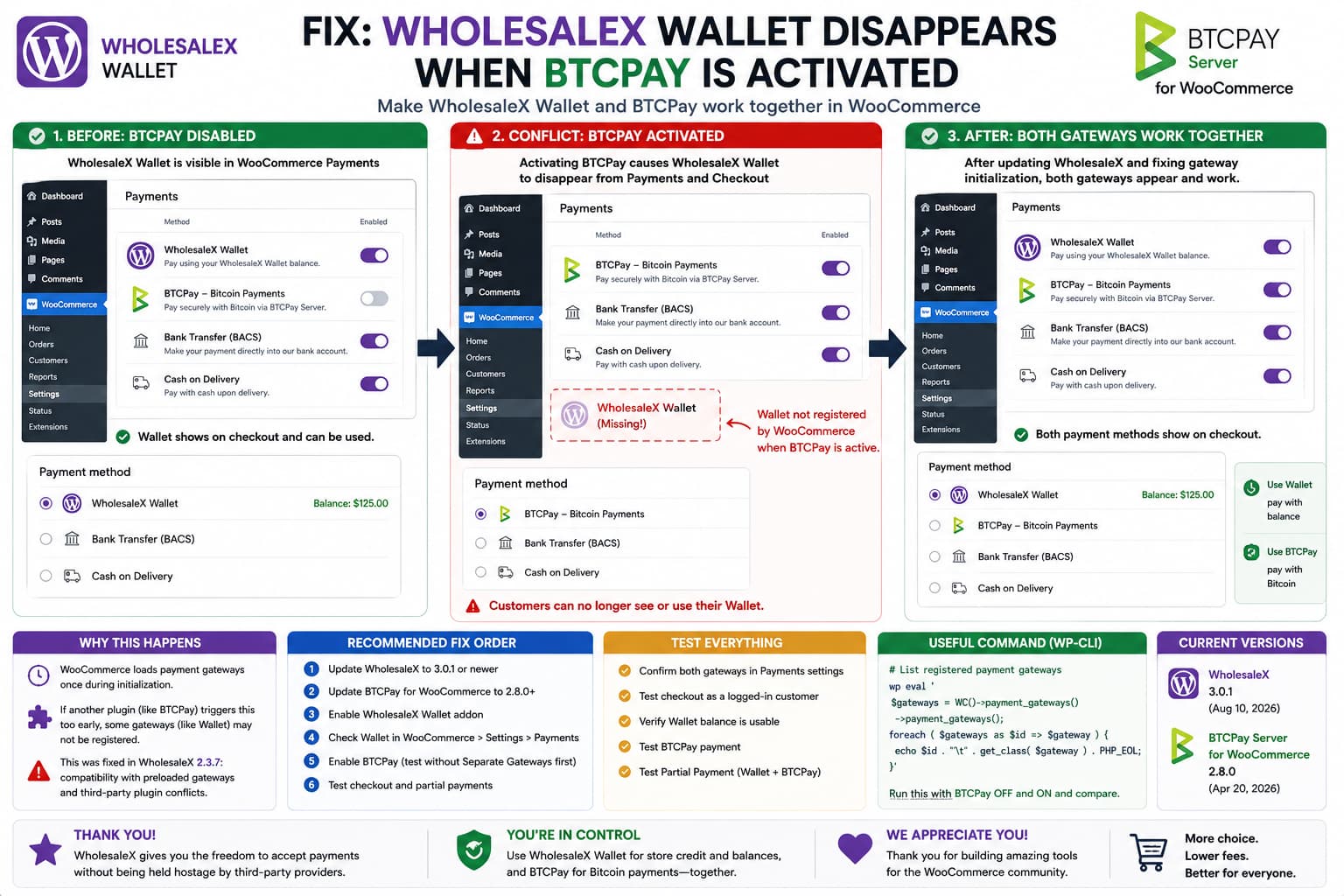
If WholesaleX Wallet works normally until BTCPay Server for WooCommerce is activated, then disappears from both:
WooCommerce → Settings → Payments
and the customer checkout, this is more specific than an ordinary “payment method not available” problem.
The important symptom is that the Wallet disappears from the WooCommerce Payments administration screen itself.
That means WooCommerce may not be registering the WholesaleX Wallet gateway at all during that request, rather than merely deciding that it is unavailable for one customer’s checkout.
WholesaleX’s own changelog provides an especially relevant clue: version 2.3.7, released May 6, 2026, specifically fixed compatibility problems involving preloaded payment gateways and third-party plugin conflicts.
So the first fix is straightforward: update WholesaleX before adding custom compatibility code.
As of August 17, 2026, WordPress.org lists WholesaleX 3.0.1 as the current version.
Why This Kind of Conflict Can Make a Gateway Disappear Completely
WooCommerce collects payment gateways using:
woocommerce_payment_gateways
when its WC_Payment_Gateways singleton initializes.
WooCommerce’s current source shows that the class is instantiated once, then calls:
$load_gateways = apply_filters( 'woocommerce_payment_gateways', $load_gateways);
and builds its internal gateway collection from the result.
This creates an important timing requirement.
Conceptually:
Plugin A registers gateway ↓Plugin B registers gateway ↓WooCommerce initializes payment gateways ↓Both appear
But if something forces WooCommerce to initialize the gateway manager too early:
Plugin A registers gateway ↓WC_Payment_Gateways initializes ↓Gateway list is built ↓Plugin B registers its filter afterward ↓Too late for that initialized instance
then Plugin B’s gateway can be absent from that request.
That is why WholesaleX’s May 2026 changelog entry mentioning preload payment gateways caused by third-party plugin conflicts is highly relevant to this exact class of problem.
I cannot confirm from the currently published source that BTCPay was the specific third-party plugin involved in that WholesaleX fix, so it would be inaccurate to claim that version 2.3.7 was a BTCPay-specific patch.
But the architecture and symptom match closely enough that updating WholesaleX is the correct first step.
BTCPay Uses WooCommerce’s Normal Gateway Registration Filter
The current BTCPay Server WooCommerce plugin registers itself through:
add_filter( 'woocommerce_payment_gateways', [ 'BTCPayServerWCPlugin', 'initPaymentGateways' ]);
Its callback adds the normal BTCPay gateway and, when configured, can add additional dynamically generated gateways for individual BTCPay payment methods.
That is normal WooCommerce behavior.
BTCPay does not need to replace WholesaleX Wallet in order to register Bitcoin payments.
WooCommerce is designed to hold multiple gateways.
Therefore:
WholesaleX Wallet+BTCPay
should be a valid configuration.
The two payment methods should not be mutually exclusive merely because both use the woocommerce_payment_gateways filter.
Update WholesaleX First
Check:
Plugins → Installed Plugins → WholesaleX
If your version is older than:
2.3.7
update it.
The current public release is:
WholesaleX 3.0.1
released August 10, 2026.
WholesaleX 2.3.7 specifically included:
a fix for compatibility issues with preloaded payment gateways caused by third-party plugin conflicts.
That is far more relevant to this problem than reinstalling WooCommerce or manually recreating the Wallet.
After updating:
- Clear any persistent object cache.
- Log out of wp-admin.
- Log back in.
- Open WholesaleX → Addons.
- Confirm Wallet is enabled.
- Open WooCommerce → Settings → Payments.
- Check whether WholesaleX Wallet appears.
- Enable BTCPay and test again.
Also Update BTCPay
At the time of verification, WordPress.org lists BTCPay Server for WooCommerce 2.8.0, released April 20, 2026.
BTCPay 2.8.0 includes further WooCommerce Blocks payment-gateway work, including support for separate BTCPay gateways in block checkout.
Use current releases of both plugins before diagnosing a compatibility problem that may already have been addressed.
A sensible baseline is therefore:
WooCommerceCurrent compatible releaseWholesaleX3.0.1 or newerBTCPay Server for WooCommerce2.8.0 or newer
Do this on staging first for a production store.
Confirm the WholesaleX Wallet Add-on Is Still Enabled
WholesaleX Wallet has two levels that need to be enabled.
WholesaleX’s official documentation says you must first enable:
WholesaleX → Addons → Wallet
and then enable the resulting gateway under:
WooCommerce → Settings → Payments
Therefore, after any upgrade, verify both.
If BTCPay is disabled and Wallet returns immediately, the Wallet add-on is clearly capable of loading, but checking the add-on state still eliminates a separate configuration problem.
Why This Is Not Just a Checkout Availability Rule
WooCommerce makes a distinction between:
registered gateways
and:
available gateways
The first list contains the gateway classes WooCommerce knows about.
The second applies rules such as:
$gateway->is_available()
and the:
woocommerce_available_payment_gateways
filter to determine what a particular customer can actually use at checkout. WooCommerce documents that difference directly in its payment-gateway implementation.
This distinction matters because the reported Wallet is missing from:
WooCommerce → Settings → Payments
as well.
That points earlier in the lifecycle.
The likely problem is:
Wallet not registered
rather than merely:
Wallet registered but unavailable for this cart
Verify Which Gateways WooCommerce Actually Registered
Developers can check this using WP-CLI.
Run:
wp eval '$gateways = WC()->payment_gateways()->payment_gateways();foreach ( $gateways as $id => $gateway ) { echo $id . "\t" . get_class( $gateway ) . PHP_EOL;}'
Run it first with:
WholesaleX ONBTCPay OFF
Save the output.
Then run it with:
WholesaleX ONBTCPay ON
If the WholesaleX Wallet gateway disappears from the second output, you have confirmed that the problem occurs during gateway registration/initialization.
That is much stronger evidence than simply saying it does not appear at checkout.
Compare the Registration Result
The output might conceptually look like:
BTCPay disabled:bacschequecodwholesalex_wallet
and then:
BTCPay enabled:bacschequecodbtcpaygf
The exact WholesaleX Wallet gateway ID should be taken from your installation rather than assumed from this example.
The relevant observation is:
Wallet class present without BTCPayWallet class absent with BTCPay
If so, send both outputs to WholesaleX support.
Log the woocommerce_payment_gateways Filter Result
You can also inspect the classes passing through the registration filter.
Temporarily add this as an mu-plugin on staging:
<?php/** * Plugin Name: Payment Gateway Registration Debug */add_filter('woocommerce_payment_gateways',function ( $gateways ) {error_log('[Woo Gateways] '.print_r( $gateways, true ) );return$gateways; }, PHP_INT_MAX);
Then load:
WooCommerce → Settings → Payments
and inspect:
/wp-content/debug.log
Remove the snippet after testing.
If the WholesaleX Wallet class reaches the filter array but does not appear in WooCommerce afterward, investigate class loading or gateway instantiation.
If the class never reaches the filter array while BTCPay is active, investigate initialization timing.
Check Whether WooCommerce Has Already Initialized the Gateway Singleton Too Early
Because WooCommerce creates only one WC_Payment_Gateways instance, another useful developer diagnostic is recording when initialization happens.
WooCommerce fires:
wc_payment_gateways_initialized
after its payment gateways have been created.
You can temporarily log:
add_action( 'wc_payment_gateways_initialized', function () { error_log( 'Payment gateways initialized at: ' . wp_debug_backtrace_summary() ); });
If the trace shows gateway initialization happening unusually early during another plugin’s bootstrap process, you have a strong lead.
This is much safer than randomly changing hook priorities without knowing which plugin is causing the premature initialization.
Do Not Hard-Code the WholesaleX Wallet Class Yet
A tempting workaround is:
add_filter( 'woocommerce_payment_gateways', function ( $gateways ) { $gateways[] = 'Some_WholesaleX_Wallet_Class'; return $gateways; });
Do not copy such a fix from another site unless you have confirmed:
- the exact class name,
- that WholesaleX has loaded the class,
- its required dependencies,
- its expected initialization sequence,
- and whether the Pro/add-on loader normally performs additional setup.
Simply forcing a class into WooCommerce’s array can make the Wallet appear while bypassing other WholesaleX hooks that actually manage balances, refunds, or partial payments.
Fix the registration timing instead.
Test BTCPay’s Separate Payment Gateways Option
BTCPay can operate in two modes.
Its documentation says the plugin always provides its primary gateway, while the Separate Payment Gateways option can dynamically create one WooCommerce gateway for each supported BTCPay payment method.
For diagnosis, temporarily disable:
BTCPay → Separate Payment Gateways
and use only the standard BTCPay gateway.
Then reload:
WooCommerce → Settings → Payments
If WholesaleX Wallet returns, you have narrowed the conflict to BTCPay’s dynamic multi-gateway path.
If Wallet remains missing, the conflict is more fundamental and unrelated to the separate-gateway option.
This is a diagnostic test, not a confirmed permanent fix.
Classic Checkout vs Block Checkout
Also determine which checkout implementation your store uses.
BTCPay 2.8.0 explicitly added support for its separate payment gateways in WooCommerce Blocks checkout.
WholesaleX also has a history of updating compatibility with WooCommerce block-based cart/checkout behavior, including previous fixes around block checkout restrictions.
Test both if practical:
Classic Checkout shortcode[woocommerce_checkout]
and:
WooCommerce Checkout block
However, remember that if Wallet is missing from WooCommerce Settings → Payments, you already have a registration-level issue before checkout rendering becomes relevant.
Check WholesaleX Role Payment Restrictions After Registration Is Fixed
WholesaleX lets administrators restrict available payment methods by user role.
Its documentation says that enabled WooCommerce gateways can then be selected or restricted independently for individual WholesaleX roles and users.
So once Wallet appears again in WooCommerce Payments, inspect:
WholesaleX → User Roles→ affected role→ Payment Methods
Make sure both:
WholesaleX WalletBTCPay
are allowed for the customer’s role.
Also check any user-level payment-method override.
This cannot explain Wallet vanishing from WooCommerce Settings, but it can explain a second problem where the admin gateway returns yet the customer still cannot see it during checkout.
Test With a Customer Who Has Wallet Balance
WholesaleX documents that registered customers can add funds to the Wallet and then use that balance as a WooCommerce payment method.
When testing:
- Use a logged-in customer.
- Confirm the customer has a positive Wallet balance.
- Add a normal product to the cart.
- Open checkout.
- Check Wallet and BTCPay.
- Complete a low-value Wallet test order.
- Complete a BTCPay test order separately.
Do not test only while logged in as Administrator because user-role restrictions can produce a different list of payment options.
If You Use WholesaleX Partial Payment
WholesaleX also supports partial Wallet payment.
For example:
Wallet balance: $100Order total: $150Wallet: $100BTCPay: remaining $50
WholesaleX’s official Partial Payment documentation says customers can deduct their Wallet balance and pay the remainder using another available payment method.
That means the ideal compatibility target is not merely:
Wallet OR BTCPay
It can legitimately be:
WholesaleX Wallet+BTCPay for remaining balance
This makes proper coexistence especially important.
Once both gateways are visible, specifically test Partial Payment with BTCPay as the remaining gateway.
Do Not Edit BTCPay’s Core Plugin File
BTCPay currently registers its gateways normally with:
woocommerce_payment_gateways
and returns the incoming array after appending its own gateway classes.
Do not change:
btcpay-greenfield-for-woocommerce.php
to manually remove BTCPay’s registration code.
Likewise, do not edit the WholesaleX Wallet implementation directly as the first fix.
Plugin updates would overwrite the changes, and a payment gateway is not a good place for an undocumented patch.
WooCommerce’s Gateway Singleton Explains Why Timing Matters So Much
WooCommerce’s implementation is worth understanding.
WC_Payment_Gateways::instance() effectively does:
if ( is_null( self::$_instance ) ) { self::$_instance = new self();}return self::$_instance;
and the constructor then initializes the gateway list once.
This means that prematurely calling something equivalent to:
WC()->payment_gateways();
can have consequences if another plugin has not yet attached its:
woocommerce_payment_gateways
callback.
This is why payment plugins should generally register gateway callbacks before forcing the gateway manager to instantiate.
It also explains WholesaleX’s changelog wording around fixing compatibility with “preload payment gateways.”
Why the WholesaleX 2.3.7 Fix Is So Relevant
WholesaleX version 2.3.7 says:
Fix:Resolved compatibility issues with preload payment gatewayscaused by third-party plugin conflicts.
That is unusually close to the reported behavior.
Therefore, if the issue came from an installation using WholesaleX older than 2.3.7, do not create a custom BTCPay compatibility patch first.
Update WholesaleX and retest.
The current 3.0.1 release includes all earlier fixes.
If the Conflict Still Exists in WholesaleX 3.0.1 + BTCPay 2.8.0
At that point it deserves a fresh compatibility report.
Use a staging site containing only:
WooCommerceWholesaleXWholesaleX Pro if required for WalletBTCPay Server for WooCommerce
Then reproduce:
1. Enable WholesaleX Wallet.2. Confirm it appears in WooCommerce Payments.3. Disable BTCPay.4. Confirm Wallet remains present.5. Activate BTCPay.6. Reload WooCommerce Payments.7. Confirm Wallet disappears.8. Disable BTCPay.9. Confirm Wallet returns.
That is an excellent plugin-conflict reproduction.
WooCommerce’s own troubleshooting documentation recommends conflict isolation when a payment method is missing or incorrectly displayed.
What to Send WholesaleX Support
Send:
- WholesaleX version
- WholesaleX Pro version, if applicable
- WooCommerce version
- BTCPay plugin version
- WordPress version
- PHP version
- classic or block checkout
- whether BTCPay Separate Payment Gateways is enabled
- screenshot of WooCommerce Payments with BTCPay disabled
- screenshot with BTCPay enabled
- output from
WC()->payment_gateways()->payment_gateways() - confirmation that disabling BTCPay immediately restores Wallet
Mention WholesaleX’s own 2.3.7 preload-payment-gateway compatibility fix because the symptom appears related to that class of issue.
What to Send BTCPay Support
BTCPay’s current plugin is open source and its GitHub repository accepts issues and pull requests.
Provide the same reproduction and emphasize:
Activating BTCPay changes WooCommerce's registeredgateway list and causes the WholesaleX gateway to disappear.
Also state whether disabling:
Separate Payment Gateways
changes the result.
That helps determine whether the conflict is caused by BTCPay’s primary gateway registration or its dynamically generated gateways.
Most Likely Fix Order
For this particular symptom, I would troubleshoot in this order:
1. Update WholesaleX to 3.0.1+ ↓2. Update BTCPay to 2.8.0+ ↓3. Verify WholesaleX Wallet addon is enabled ↓4. Verify Wallet appears under WooCommerce Payments ↓5. Enable BTCPay ↓6. Test BTCPay without Separate Payment Gateways ↓7. Compare registered gateway IDs with WP-CLI ↓8. Check WholesaleX role/user payment restrictions ↓9. Test classic and block checkout ↓10. Report a reproducible conflict if Wallet still disappears
The key point is not to choose between BTCPay and WholesaleX Wallet.
WooCommerce supports multiple registered payment gateways, WholesaleX explicitly provides Wallet as a WooCommerce payment method, and BTCPay registers itself using WooCommerce’s standard gateway filter.
Both should be able to coexist.
How to Verify the Fix
After updating or applying a developer-provided compatibility patch:
- Activate WholesaleX.
- Activate the Wallet add-on.
- Activate BTCPay.
- Open WooCommerce → Settings → Payments.
- Confirm WholesaleX Wallet appears.
- Confirm BTCPay appears.
- Enable both.
- Log in as a customer with Wallet balance.
- Open checkout.
- Confirm both payment methods appear.
- Complete a Wallet order.
- Complete a BTCPay order.
- If Partial Payment is enabled, use Wallet for part of an order and BTCPay for the remainder.
- Repeat after clearing the WooCommerce session.
The expected result is:
WooCommerce Payments:✓ WholesaleX Wallet✓ BTCPayCheckout:✓ WholesaleX Wallet✓ BTCPay
rather than one gateway replacing the other.
