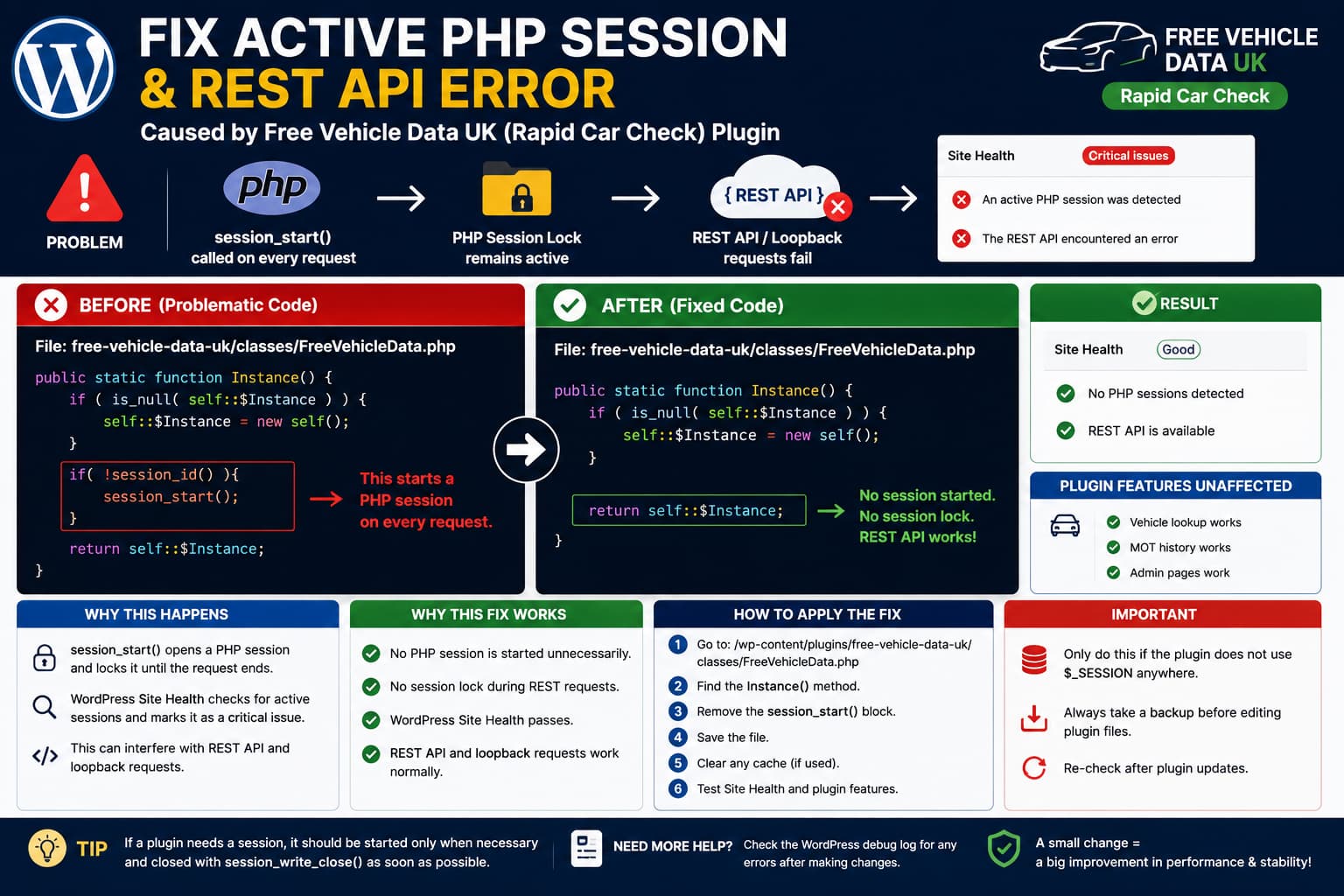
WordPress Site Health may report two apparently separate critical issues:
An active PHP session was detected
and:
The REST API encountered an error
If you are using the Free Vehicle Data UK / Rapid Car Check plugin, an unnecessary session_start() call inside the plugin can be the common cause.
WordPress specifically checks whether a PHP session is still active while Site Health runs. If session_status() returns PHP_SESSION_ACTIVE, WordPress marks the test as critical and warns that the session can interfere with REST API and loopback requests.
In the affected plugin code, the session is started every time the plugin’s singleton Instance() method runs:
public static function Instance() { if ( is_null( self::$Instance ) ) { self::$Instance = new self(); } if ( ! session_id() ) { session_start(); } return self::$Instance;}
If the plugin does not actually need a PHP session for its vehicle-search functionality, the simplest fix is to stop opening one.
The Fix
Open:
/wp-content/plugins/free-vehicle-data-uk/classes/FreeVehicleData.php
Locate:
public static function Instance() { if ( is_null( self::$Instance ) ) { self::$Instance = new self(); } if( !session_id() ){ session_start(); } return self::$Instance;}
Replace it with:
public static function Instance() { if ( is_null( self::$Instance ) ) { self::$Instance = new self(); } return self::$Instance;}
Save the file.
Then return to:
Tools→ Site Health
and run the tests again.
If the PHP session was the cause, the following warning should disappear:
An active PHP session was detected
and the related REST API or loopback failure may disappear with it.
Why session_start() Causes the Site Health Warning
PHP sessions are stateful.
When PHP executes:
session_start();
it creates or resumes a session and makes the session data available through:
$_SESSION
PHP’s normal file-based session handler also locks that session while it is open. Another request using the same session can have to wait until the first request ends or explicitly releases the session lock. PHP’s own documentation warns that this can become particularly noticeable with concurrent AJAX requests.
That architecture does not fit especially well with modern WordPress requests involving:
- REST API calls,
- AJAX,
- loopback requests,
- the block editor,
- scheduled actions,
- background requests.
WordPress therefore explicitly checks for open sessions in Site Health.
Why the REST API Error Can Appear at the Same Time
The REST API warning may look unrelated:
The REST API encountered an error
but WordPress’s Site Health REST test performs an HTTP request back to the site itself.
The test requests a REST endpoint equivalent to:
/wp-json/wp/v2/types/post?context=edit
using WordPress’s HTTP API.
An unnecessarily open PHP session can interfere with this kind of concurrent request because the first PHP process may still hold the session lock while the REST request attempts to run.
This is why WordPress’s own Site Health message specifically says an active PHP session can interfere with REST API and loopback requests.
You might therefore see both:
Active PHP session
and:
REST API encountered an error
even though there is only one underlying problem.
This Issue Has Been Reported for This Exact Plugin
A WordPress.org support report for Free Vehicle Data UK identified the same code inside:
free-vehicle-data-uk/classes/FreeVehicleData.php
and traced the Site Health warning back to the plugin’s session_start() call.
That report proposed changing the session to:
if ( session_status() == PHP_SESSION_NONE ) { session_start( [ 'cookie_lifetime' => 86400, 'read_and_close' => true, ] );}
PHP officially supports the read_and_close option, which opens the session, reads it and then immediately closes it to avoid holding the normal session lock.
However, that workaround still creates a PHP session.
If the plugin does not need session data at all, removing the unnecessary session_start() call is cleaner than opening a session simply to close it again.
Why read_and_close Is Not Always the Best Fix
This:
session_start( [ 'read_and_close' => true, ]);
is useful when an application genuinely needs to read:
$_SESSION
but does not need to modify it.
PHP documents this option specifically as a way to avoid unnecessary session locking.
But there is an important question:
Does this plugin actually need a PHP session in this method?
If the answer is no, the better code is simply:
return self::$Instance;
without creating a session at all.
That avoids:
session cookie creationsession file creationsession lockingSite Health session detectionunnecessary state
rather than trying to manage an unnecessary session more carefully.
Do Not Remove Sessions Blindly From Other Plugins
This specific modification should not be turned into a generic WordPress fix such as:
Search every plugin for
session_start()and delete it.
Some plugins legitimately use PHP sessions.
For example, a plugin might store temporary state such as:
$_SESSION['something']
and removing its session initialization would break functionality.
Before removing a session from another plugin, search its code for:
$_SESSIONsession_startsession_write_closesession_destroysession_regenerate_id
and determine how that state is used.
For this particular reported Free Vehicle Data UK case, the proposed change is narrowly targeted at its Instance() method.
How to Search the Plugin for Session Usage
If you have SSH access, run:
grep-Rni"\$_SESSION\|session_start\|session_write_close" \wp-content/plugins/free-vehicle-data-uk/
If only the session_start() inside FreeVehicleData.php appears and there are no meaningful $_SESSION reads or writes elsewhere, that is strong evidence the global session initialization is unnecessary.
You can also use an IDE such as VS Code and search the plugin directory for:
$_SESSION
before applying the change.
Make a Backup Before Editing
Before modifying the plugin file, save a copy:
FreeVehicleData.php→ FreeVehicleData.php.bak
or back up the entire plugin directory.
Then change only the session-related section.
Do not replace the entire class file from an old forum post because other plugin code may have changed between releases.
Test the Vehicle Lookup After Removing the Session
A green Site Health report is not enough.
After changing the function, test the actual plugin.
Verify:
- Open the vehicle-search page.
- Enter a valid UK registration.
- Submit the lookup.
- Confirm vehicle details return.
- Test another registration.
- Check any MOT/history output you use.
- Check plugin administration screens.
- Review the browser console.
- Review
debug.logif debugging is enabled.
If everything works without the PHP session, there is little reason for the singleton accessor to open one globally.
Verify the Site Health Fix
Open:
Tools→ Site Health→ Status
Before the fix you may have:
Critical issue:An active PHP session was detected
After the change, the PHP-session test should instead pass.
WordPress considers the session test healthy when there is no PHP_SESSION_ACTIVE session during the check.
Then inspect the REST API result.
You should no longer see a timeout or related failure if the session lock was responsible.
Test the REST API Directly
While logged into WordPress, open:
https://example.com/wp-json/
You should receive JSON rather than an error page.
For a more relevant Site Health-style test, WordPress itself checks a REST URL based on:
/wp-json/wp/v2/types/post?context=edit
with authenticated cookies.
You can also test from WP-CLI:
wp eval '$response = wp_remote_get( rest_url( "wp/v2/types/post" ) );if ( is_wp_error( $response ) ) { echo $response->get_error_message();} else { echo wp_remote_retrieve_response_code( $response );}'
Note that authentication requirements can affect direct REST tests, so Site Health remains the better final check.
If the REST API Error Remains
If:
Active PHP session✓ fixed
but:
REST API encountered an error✗ remains
then the REST issue has another cause.
Check the exact Site Health message.
Possible causes include:
- firewall rules,
- Basic Authentication,
- security plugins,
- Cloudflare/WAF rules,
- REST API blocking,
- DNS problems,
- SSL verification errors,
- server timeouts,
- loopback restrictions.
Do not continue modifying PHP session code once WordPress reports:
No PHP sessions detected
At that point the remaining REST failure needs its own diagnosis.
Why Calling session_write_close() Is Another Possible Fix
WordPress’s own warning recommends:
session_write_close();
before making HTTP requests.
PHP describes this function as writing the current session data and ending the active session, thereby releasing its lock.
So if a plugin genuinely needs to update $_SESSION, a valid pattern can be:
session_start();/* Read or update required session data here. */session_write_close();
The important difference is that the session stays open only while actually needed.
What should generally be avoided is:
session_start();/* * Hundreds of lines of WordPress execution, * API calls, AJAX, HTTP requests, etc. *//* Session finally closes at PHP shutdown. */
That unnecessarily extends the lock across the request.
The Better Plugin-Level Fix
Editing:
/wp-content/plugins/free-vehicle-data-uk/classes/FreeVehicleData.php
works as a local workaround, but plugin files are not a permanent customization location.
A future plugin update can restore:
session_start();
and the Site Health warning can return.
The permanent fix should come from the plugin developer.
If the session is unused, the plugin should remove it.
If it is required for a narrow function, the plugin should start it only where necessary and close it immediately after the required session operation.
Keep a Note of the Modification
If you must use the manual fix, keep a maintenance note such as:
Plugin:Rapid Car Check / Free Vehicle Data UKFile:classes/FreeVehicleData.phpModification:Removed session_start() from FreeVehicleData::Instance()Reason:WordPress Site Health active PHP session / REST API errorsVerified:Vehicle lookup working after modification
After every plugin update, confirm the file has not reverted.
A version-control diff is even better if the site is maintained through Git.
Current Plugin Status
The WordPress.org directory currently identifies the plugin as Rapid Car Check, slug:
free-vehicle-data-uk
and shows version 2.1.3. The directory page also currently states that the plugin was temporarily closed on May 27, 2026 pending a full review.
The published 2.1.3 changelog focuses on security hardening, including capability and nonce checks, output escaping, TLS verification, and a CVE fix. It does not mention an active PHP-session/Site Health correction.
Because plugin status and code can change, check the current official listing before installing or updating it.
Do Not Confuse This With Changing the PHP Version
An active PHP session warning is not fixed by upgrading:
PHP 8.2 → 8.3
or:
PHP 8.3 → 8.4
if the plugin continues calling:
session_start();
The Site Health test checks whether a session is active, not whether PHP itself is old.
Update PHP for security and compatibility reasons when appropriate, but diagnose the session warning separately.
Do Not Disable the REST API
The REST API warning is the symptom, not the feature causing the problem.
WordPress relies heavily on REST requests, including for editor functionality and application communication. The Site Health REST test exists specifically to verify that the endpoint is reachable.
Blocking /wp-json/ to hide the warning will only create more problems.
Final Corrected Function
For the reported case, the corrected method is:
public static function Instance() { if ( is_null( self::$Instance ) ) { self::$Instance = new self(); } return self::$Instance;}
The change removes only:
if ( ! session_id() ) { session_start();}
and leaves the singleton behavior intact.
The method still:
creates the class instance when necessary↓returns the existing instance
without opening a PHP session on every request.
How to Verify the Fix
After changing the code:
1. Clear any PHP/server cache if applicable.2. Reload wp-admin.3. Go to Tools → Site Health.4. Confirm "Active PHP session" is gone.5. Confirm the REST API test passes.6. Test frontend vehicle searches.7. Test the plugin admin page.8. Check debug.log for PHP errors.
The expected Site Health result is:
No PHP sessions detected
rather than:
An active PHP session was detected
and the associated REST API test should work normally if session locking was its cause.
