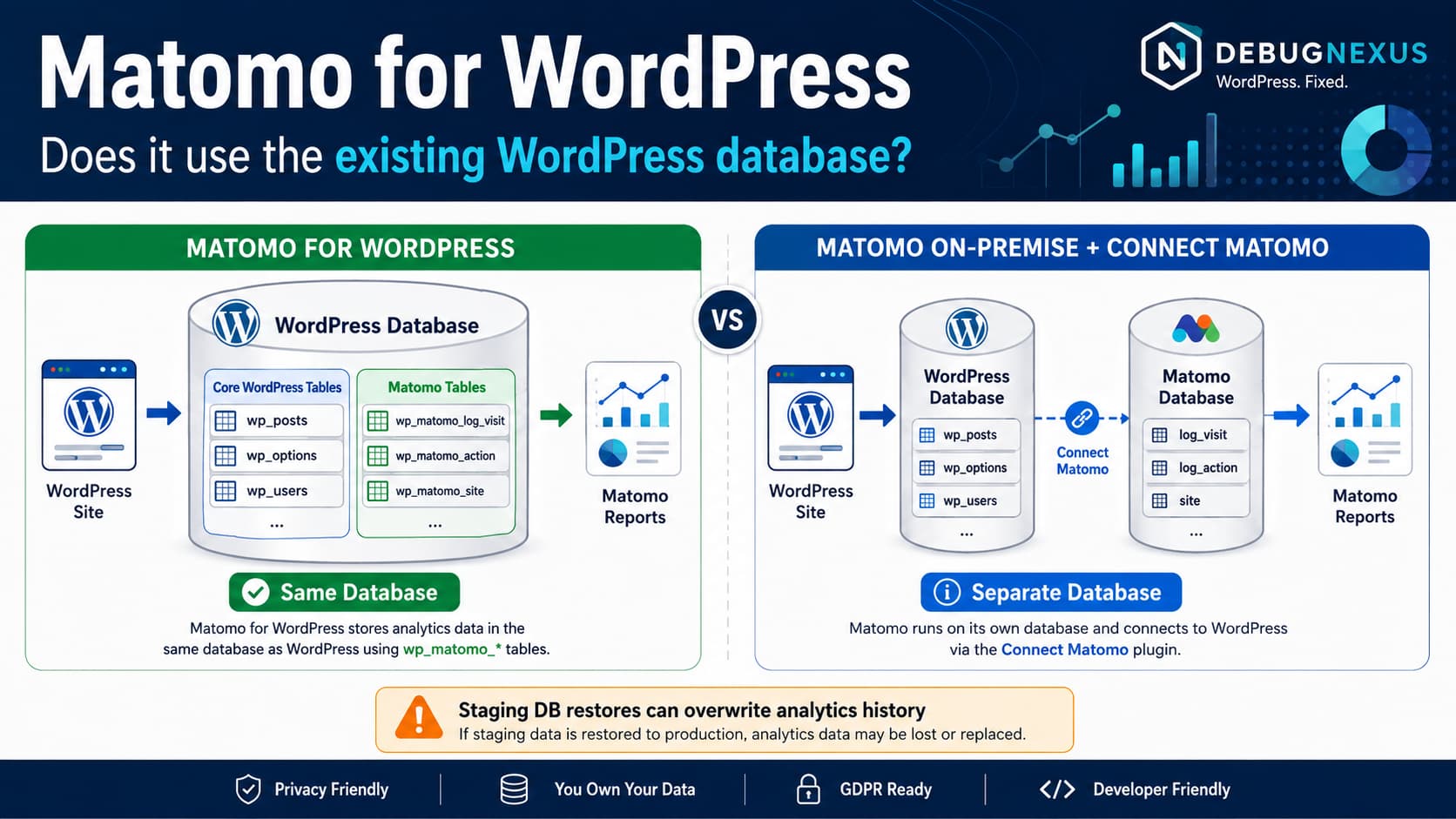
If you install the Matomo Analytics for WordPress plugin, it uses the same MySQL or MariaDB database that WordPress already uses. It does not normally require you to create a second database. Matomo’s official documentation explicitly describes the WordPress version as installing Matomo on the same server and using the same database as the WordPress website.
However, Matomo does not mix analytics records into tables such as:
wp_postswp_postmetawp_users
Instead, it creates its own Matomo tables inside that database.
A typical installation therefore looks conceptually like:
wordpress_databasewp_postswp_postmetawp_optionswp_userswp_usermetawp_matomo_log_visitwp_matomo_log_link_visit_actionwp_matomo_log_actionwp_matomo_sitewp_matomo_archive_numeric_...wp_matomo_archive_blob_......
Matomo’s WordPress developer API confirms that Matomo table names receive both the normal WordPress prefix and a Matomo prefix. Its example shows a table such as site becoming wp_matomo_site.
You Do Not Normally Create Another Database
When using:
Plugins→ Add New→ Matomo Analytics
you do not go through the separate Matomo database-configuration wizard used by a standalone Matomo installation.
The plugin embeds a complete Matomo installation into WordPress and uses WordPress’s existing database connection. Matomo also states that all data is stored within the WordPress installation rather than being sent to a third party.
So if your WordPress database is:
example_wp
Matomo Analytics for WordPress normally adds its analytics tables to:
example_wp
rather than creating:
example_matomo
as a second database.
How to Find the Matomo Tables
Open phpMyAdmin, Adminer, your hosting database manager, or MySQL CLI and inspect the same database configured in:
wp-config.php
For a standard WordPress installation using:
$table_prefix = 'wp_';
look for tables beginning with:
wp_matomo_
Matomo’s own support guidance uses this naming pattern, including wp_matomo_* for the main site.
If your WordPress prefix is:
abc123_
expect Matomo tables resembling:
abc123_matomo_log_visitabc123_matomo_siteabc123_matomo_archive_numeric_...
rather than wp_matomo_*.
Check Matomo Tables With WP-CLI
If you have SSH access, you can quickly list them:
wp db tables '$(wp db prefix)matomo_*'
Or use MySQL directly:
SHOW TABLES LIKE'%matomo%';
You can also inspect their sizes:
SELECT table_name, ROUND( (data_length + index_length) /1024/1024,2 ) AS size_mbFROM information_schema.tablesWHERE table_schema = DATABASE()AND table_name LIKE'%matomo%'ORDERBY (data_length + index_length) DESC;
Matomo provides similar database-size queries in its official troubleshooting documentation because analytics tables can become substantial as tracking history grows.
Your WordPress Database Backup Includes Matomo Analytics
Because the Matomo tables live in the WordPress database, a full database backup normally includes both:
WordPress content/configuration+Matomo analytics history
That is useful because restoring the database can restore your analytics tables as well.
But it also has an important consequence for staging and migration workflows.
Suppose you:
Production database→ copy to staging
The staging database receives a copy of the Matomo analytics tables too.
Later, if you overwrite production using the staging database:
Staging database→ replace production database
you can overwrite newer production analytics data with the older copy that existed when staging was created.
Matomo support has specifically confirmed this limitation for Matomo for WordPress and recommends a standalone Matomo deployment when analytics need to remain independent of WordPress database deployments.
This Matters for Staging Sites
Consider this timeline:
August 1Production cloned to staging.August 1–10Production keeps collecting analytics.August 10Entire staging database pushed to production.
If the Matomo tables are included in that database replacement, the August 1–10 production analytics can potentially be replaced by the older staging copy.
For development workflows that frequently synchronize databases, exclude the Matomo tables from destructive database pushes when appropriate.
The tables will normally be identifiable by their:
*_matomo_*
prefix.
Before excluding or restoring tables manually, take a full backup and understand how your deployment system handles database synchronization.
Does Matomo for WordPress Support a Separate Database?
Not as its normal architecture.
Matomo’s official comparison says Matomo for WordPress uses the same WordPress database. If you want Matomo analytics to live independently, the supported architecture is generally Matomo On-Premise or Matomo Cloud, combined with the Connect Matomo WordPress plugin.
In other words:
Matomo Analytics for WordPressWordPress DB└── WordPress tables└── Matomo tables
versus:
WordPressWordPress DB +Matomo On-PremiseSeparate Matomo DB
That second model isolates the analytics database from WordPress database migrations.
What Is Connect Matomo?
There are two WordPress plugins that are easy to confuse.
Matomo Analytics for WordPress
This plugin:
installs Matomo inside WordPressstores analytics in the WordPress databaseruns tracking/reporting from the WordPress server
Connect Matomo
This plugin:
connects WordPress to an existing Matomo installation
That existing installation can be:
Matomo On-Premise
or:
Matomo Cloud
Matomo’s official documentation specifically says existing On-Premise or Cloud users should use Connect Matomo rather than installing the embedded Matomo Analytics plugin.
When a Separate Matomo Database Makes More Sense
Using the WordPress database is convenient for smaller and medium sites because there is almost no infrastructure setup.
However, separating analytics becomes attractive when:
- the WordPress database is frequently cloned between staging and production,
- analytics history is becoming very large,
- database backups are becoming slow,
- the site receives substantial traffic,
- WordPress already has high database load,
- you want analytics failures isolated from WordPress,
- or multiple sites need to report into a central Matomo installation.
Matomo currently suggests that sites exceeding roughly 50,000 page views per month may want to consider Matomo On-Premise plus Connect Matomo, although it explicitly describes that figure as an estimate because server capacity varies greatly.
Matomo Can Increase the Size of the WordPress Database
Because analytics are stored locally, every tracked visit and action eventually contributes to database growth.
Matomo notes that MySQL performance is a major factor in analytics performance and provides a rough On-Premise estimate of about 1 GB of database storage per 5 million page views, though actual usage depends heavily on configuration, URLs, events, retention, and features.
Therefore a WordPress database that originally contains:
500 MB
can eventually become several gigabytes if the Matomo analytics tables grow substantially.
That is normal for a self-hosted analytics system, but it should be included in hosting, backup, and retention planning.
Check How Much Space Matomo Uses
You can measure only the Matomo tables with:
SELECT ROUND( SUM(data_length + index_length) /1024/1024,2 ) AS matomo_size_mbFROM information_schema.tablesWHERE table_schema = DATABASE()AND table_name LIKE'%_matomo_%';
For a database using the normal wp_ prefix, a stricter query would be:
SELECT table_name, ROUND( (data_length + index_length) /1024/1024,2 ) AS size_mbFROM information_schema.tablesWHERE table_schema = DATABASE()AND table_name LIKE'wp_matomo_%'ORDERBY (data_length + index_length) DESC;
This lets you separate:
WordPress content database usage
from:
Matomo analytics database usage
even though both reside inside the same MySQL database.
Do Not Delete wp_matomo_* Tables Just to Reduce Database Size
The Matomo tables contain the analytics installation’s data and reports.
Deleting them manually can destroy analytics history or break the embedded Matomo installation.
If database size is becoming a concern, use Matomo’s retention and data-deletion features rather than manually dropping tables.
Matomo’s own performance documentation emphasizes that data retention affects database size and recommends actively monitoring database growth on larger installations.
What Happens When Matomo for WordPress Is Removed?
Removing the plugin files and removing the analytics database tables are not necessarily the same operation.
If you are trying to completely uninstall Matomo and reclaim database space, verify what the plugin’s uninstall workflow removes rather than simply deleting:
/wp-content/plugins/matomo/
Matomo support has previously provided manual removal guidance involving the wp_matomo_* tables when complete cleanup was required.
Take a database backup before dropping any Matomo table manually.
Does Matomo Send Analytics Data Somewhere Else?
With the embedded Matomo Analytics for WordPress plugin, the core design is self-hosted data ownership. WordPress.org states that analytics data is stored with the WordPress installation rather than being sent to a third party.
Where the database physically resides therefore depends on your WordPress hosting provider.
If WordPress runs on a server in Germany, for example, the embedded Matomo database is hosted there as well. Matomo’s data-sovereignty documentation explicitly says Matomo for WordPress stores data wherever the WordPress database server is located.
Multisite Uses the Same Database Too
WordPress Multisite does not normally create a completely separate MySQL database for every site.
Matomo follows the WordPress table-prefix model.
Matomo support explains that on multisite the main site’s tables may use:
wp_matomo_*
while another site can use:
wp_2_matomo_*wp_3_matomo_*
and so on, all within the same WordPress database.
This can create a large number of Matomo tables on a large multisite network.
Matomo therefore also recommends considering On-Premise or Cloud for installations managing many WordPress sites.
Current Matomo for WordPress Version
As of August 17, 2026, WordPress.org lists Matomo Analytics for WordPress 5.12.0 as the current public release, with 100,000+ active installations. The plugin page continues to describe the product as self-hosted inside WordPress and explicitly notes that all analytics data remains within the WordPress installation.
The database architecture therefore remains:
WordPress MySQL/MariaDB database │ ├── WordPress tables │ └── Matomo analytics tables
not a separate automatically created Matomo database.
Which Setup Should You Choose?
For a normal WordPress website where ease of installation is the priority:
Matomo Analytics for WordPress
is usually the simpler option.
You install one plugin, and Matomo creates the additional tables it needs inside the existing WordPress database.
For a high-traffic site or a deployment workflow where production WordPress databases are regularly replaced:
Matomo On-Premise+Connect Matomo
is generally a cleaner architecture because the analytics database can remain independent from WordPress. Matomo explicitly recommends considering this setup for heavier traffic and resource requirements.
Quick Answer
If the question is simply:
Does Matomo for WordPress use my existing WordPress database?
The answer is:
Yes.
It creates dedicated Matomo tables inside the same MySQL/MariaDB database that WordPress already uses. You do not normally need to create another database.
If you specifically want Matomo analytics stored in a separate database, use a standalone Matomo On-Premise installation and connect WordPress to it with Connect Matomo, rather than using the embedded Matomo Analytics for WordPress plugin.
