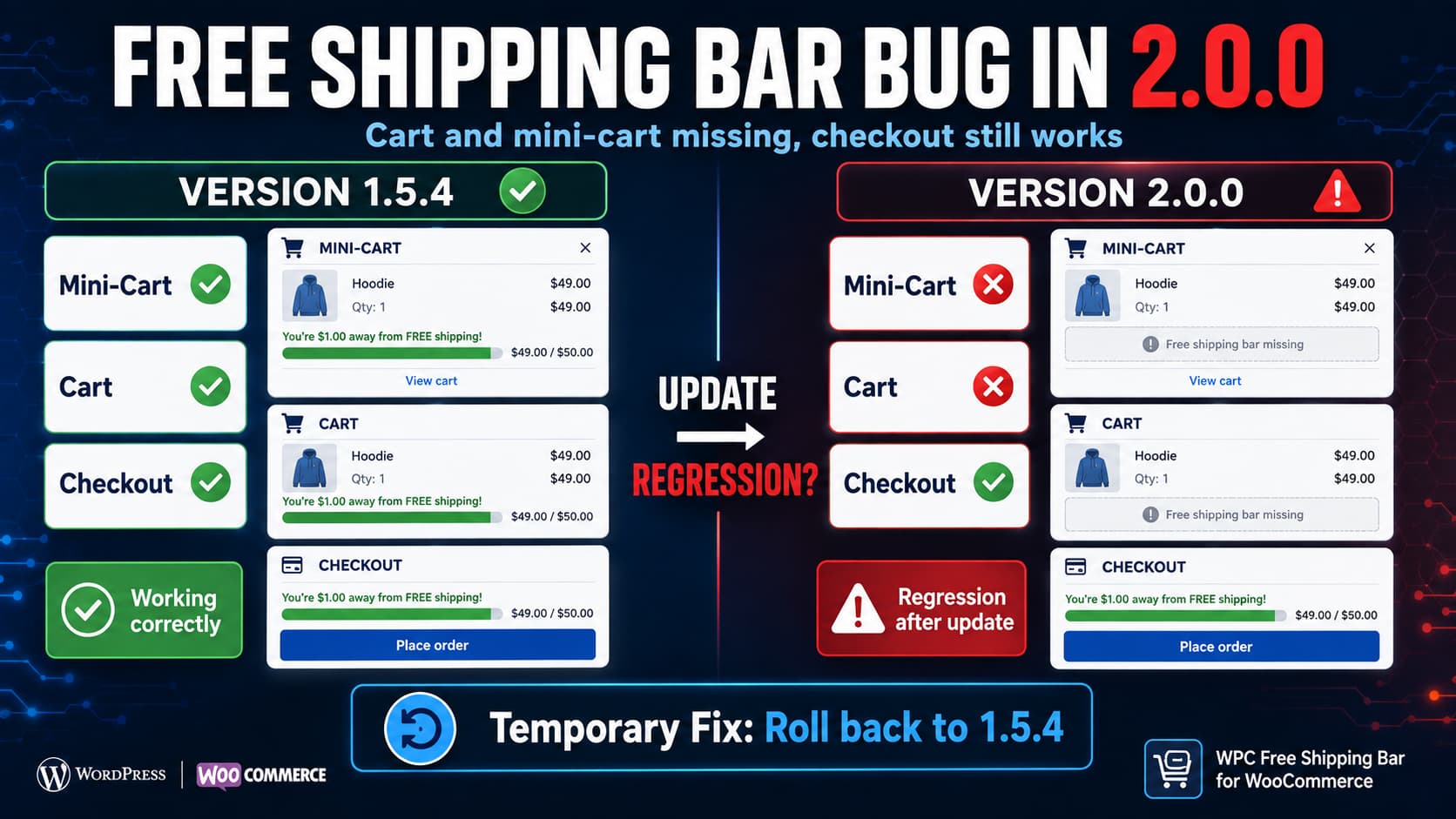
WPC Free Shipping Bar for WooCommerce 2.0.0 can fail to display the shipping progress bar in the cart and mini-cart even though the same bar still appears at checkout.
When the same site works normally after rolling back from 2.0.0 to 1.5.4 without changing any plugin settings, that is strong evidence of a version-specific regression rather than a missing display setting, theme configuration, or incorrectly configured free-shipping threshold.
WPClever still lists the mini-cart widget, cart, and checkout as supported display locations for the plugin. Version 2.0.0 therefore should not intentionally remove those locations.
Until a corrected release is available, the safest practical workaround on an affected production store is to back up the site and temporarily return to 1.5.4.
What Changed in WPC Free Shipping Bar 2.0.0?
WPClever released version 2.0.0 on August 27, 2026. The official changelog lists two changes:
- optimized code;
- compatibility updates for WordPress 7.1 and WooCommerce 11.0.
It does not document the removal of cart or mini-cart support. The plugin’s current feature list continues to state that the bar can be displayed in the mini-cart widget, cart, and checkout pages.
That is important because the missing output should not be treated as an intentional feature change unless WPClever documents otherwise.
The exact code change responsible for the problem has not been identified in the published changelog. It would therefore be premature to claim that a particular WooCommerce hook or function is definitely broken.
However, this pattern strongly suggests that something in the 2.0.0 code optimization affected how one or more display locations are registered or rendered:
Version 1.5.4
Mini-cart  ✓
Cart       ✓
Checkout   ✓

Version 2.0.0
Mini-cart  ✗
Cart       ✗
Checkout   ✓
Because checkout continues working, the plugin itself is still capable of calculating and rendering the free-shipping bar. The failure appears narrower than a complete plugin failure.
First Confirm the Display Settings
Before downgrading, verify that the expected locations are still enabled.
Go to:
WPClever → Free Shipping Bar
Check the options for:
- mini-cart;
- cart;
- checkout.
WPClever’s own support guidance has previously instructed users with display problems to confirm that Show on mini-cart widget is enabled and to try different cart/checkout display positions.
Do not reset all plugin settings just to troubleshoot this problem.
If the exact same configuration worked in 1.5.4 and stopped working immediately after installing 2.0.0, changing unrelated settings can make the regression harder to isolate.
Use a Controlled Version Test
The most useful diagnostic is an A/B version test on the same WordPress installation.
Before testing, take a database and file backup.
Test version 2.0.0
With 2.0.0 active:
- Add a product that has not yet reached the free-shipping threshold.
- Open the mini-cart.
- Check the main WooCommerce cart.
- Open checkout.
- Record where the bar appears.
For the reported regression, the result is:
Mini-cart: missing
Cart:      missing
Checkout:  visible
Test version 1.5.4
Install 1.5.4 without changing the Free Shipping Bar settings.
Repeat the same cart using the same products and shipping destination.
If the result changes to:
Mini-cart: visible
Cart:      visible
Checkout:  visible
the version change has isolated the problem considerably.
A theme conflict, caching configuration, shipping-zone setup, or another plugin could still interact with 2.0.0 differently, but when all of those variables remain unchanged and only the WPC Free Shipping Bar version changes, 2.0.0 becomes the leading cause.
Safest Temporary Fix: Roll Back to 1.5.4
If this regression affects a live WooCommerce store, retaining the working version is usually preferable to modifying plugin source code.
Take a full backup first.
Then install the previous working release, 1.5.4.
If you have WP-CLI access, WordPress officially supports installing a specific plugin version using the --version option.
Run this from the WordPress installation directory:
wp plugin install wpc-free-shipping-bar --version=1.5.4 --forceThe --force option allows WP-CLI to overwrite the currently installed version. WordPress’s WP-CLI documentation confirms that wp plugin install supports both --version=<version> and --force.
After the rollback:
wp plugin status wpc-free-shipping-barThen check the plugin version in:
Plugins → Installed Plugins
Do not assume the rollback worked simply because the command completed.
Temporarily Disable Automatic Updates for This Plugin
If automatic plugin updates are enabled, WordPress may reinstall 2.0.0 and restore the problem.
While waiting for a patched release, disable automatic updates specifically for WPC Free Shipping Bar.
Do not disable updates permanently.
The objective is only to prevent the known problematic version from immediately replacing the working release while you monitor the plugin changelog.
Once WPClever publishes a version that addresses the cart/mini-cart issue, test that version on staging before enabling automatic updates again.
Verify the Rollback Properly
Do not check only whether the bar exists visually.
Test its actual behavior.
Mini-cart
Add a product and open the mini-cart.
Confirm that:
- the bar appears;
- the remaining amount is correct;
- adding another product refreshes the progress;
- removing an item updates it again.
Cart
Open the normal WooCommerce cart and confirm that the bar appears in the configured location.
Change the quantity of an item and verify that the progress is recalculated.
Checkout
Make sure checkout continues working as before.
Reach the free-shipping threshold
Add enough products to qualify for free shipping.
Confirm that the progress state or qualifying message changes correctly.
Test below the threshold again
Remove an item and verify that the bar returns to the expected incomplete state.
This catches cases where the HTML appears but AJAX updates are no longer working.
Clear Caches After Changing Plugin Versions
After either upgrading or downgrading, clear any relevant:
- WordPress page cache;
- server cache;
- CDN cache;
- object cache;
- browser cache.
Then test in an incognito/private browser window.
WooCommerce cart fragments and AJAX responses can make an old version of the mini-cart output remain visible temporarily.
However, cache should not be considered the primary explanation when a controlled downgrade consistently changes the result with no settings changes.
Try the [wpcfb] Shortcode as a Cart Workaround
WPC Free Shipping Bar also provides a shortcode.
WPClever support has previously recommended inserting:
[wpcfb]on the cart page when the automatic cart position does not display correctly.
This can be useful if you need to remain on 2.0.0 temporarily.
For example, place a Shortcode block on the WooCommerce cart page containing:
[wpcfb]Then test the cart.
There are two limitations.
First, this does not repair the underlying automatic display problem.
Second, adding a shortcode to the cart page does not automatically solve a missing mini-cart bar.
For a production store where both locations stopped working only after 2.0.0, returning to the known-working plugin release is cleaner than building several workarounds around the regression.
Do Not Edit the Plugin’s PHP Files as the First Fix
It may be possible to compare 1.5.4 and 2.0.0 and manually restore a missing action or rendering call.
That is useful for debugging, but editing:
wp-content/plugins/wpc-free-shipping-bar/is a poor permanent solution.
Any future update can overwrite those modifications.
More importantly, without identifying the exact regression first, manually adding WooCommerce hooks could create:
- duplicate shipping bars;
- incorrect positions;
- duplicate AJAX fragments;
- unexpected mini-cart updates;
- compatibility problems after the official fix arrives.
For a version regression with a known working release, rollback is safer than modifying third-party plugin code.
Check Whether You Use the Classic Mini-Cart or a Custom Cart
WPC Free Shipping Bar’s feature description specifically refers to the mini-cart widget.
WooCommerce sites can now use several different cart interfaces, including:
- traditional WooCommerce cart templates;
- Mini-Cart blocks;
- Cart blocks;
- theme-specific side carts;
- AJAX drawer carts;
- WPC Fly Cart;
- third-party cart plugins.
Normally this distinction should be investigated when the shipping bar has never worked.
It is less convincing as the primary explanation when:
- the site uses exactly the same cart interface;
- version 1.5.4 displays correctly;
- version 2.0.0 does not;
- no other settings change.
In that situation, do not rebuild your cart template just because 2.0.0 stopped displaying the bar.
The plugin version should be investigated first.
WPC Fly Cart Users Should Check Both Plugins
WPC Free Shipping Bar is officially designed to integrate with WPC Fly Cart, and WPClever describes it as an add-on that can display free-shipping progress inside the Fly Cart popup.
If the affected mini-cart is actually WPC Fly Cart:
- verify that WPC Free Shipping Bar is enabled in the Fly Cart settings;
- verify its own mini-cart setting;
- clear caches;
- compare 1.5.4 with 2.0.0.
Again, if the integration returns immediately after downgrading, that points toward a version regression rather than a disabled Fly Cart setting.
How to Report the Regression Usefully
If you report the issue to WPClever, include enough information for the developer to reproduce the exact version difference.
Useful details include:
WPC Free Shipping Bar:
Working version: 1.5.4
Broken version: 2.0.0

2.0.0:
Mini-cart: No
Cart: No
Checkout: Yes

1.5.4:
Mini-cart: Yes
Cart: Yes
Checkout: Yes
Also include:
- WordPress version;
- WooCommerce version;
- PHP version;
- active theme;
- whether the cart is classic or block-based;
- whether the mini-cart is WooCommerce, theme-provided, or WPC Fly Cart;
- selected WPC Free Shipping Bar positions;
- whether
[wpcfb]works under 2.0.0; - browser console errors, if any;
- PHP error log entries, if any.
The most important detail is that no plugin settings changed between the two version tests.
That is much more actionable than simply reporting that the bar is missing.
Should You Stay on 1.5.4?
Temporarily, yes, if 1.5.4 is the version that restores required cart functionality on your store and you have confirmed the problem after updating to 2.0.0.
But treat rollback as a temporary compatibility measure, not a permanent update strategy.
As of August 29, 2026, WordPress.org still lists 2.0.0 as the current WPC Free Shipping Bar release, and its changelog does not yet list a follow-up fix for this cart/mini-cart regression.
Monitor the official changelog for a release after 2.0.0.
When one appears:
- clone the production site to staging;
- update WPC Free Shipping Bar;
- test mini-cart, cart, and checkout;
- test cart quantity and AJAX updates;
- test below and above the free-shipping threshold;
- deploy the update only after all three locations work.
The controlled downgrade already provides the most useful diagnostic clue: when 1.5.4 restores the cart and mini-cart immediately while 2.0.0 fails with the same settings, troubleshooting should focus on the plugin update rather than rebuilding the WooCommerce configuration.
