WebToffee Users & Customers Import Says “Invalid File Type” for an Exported CSV
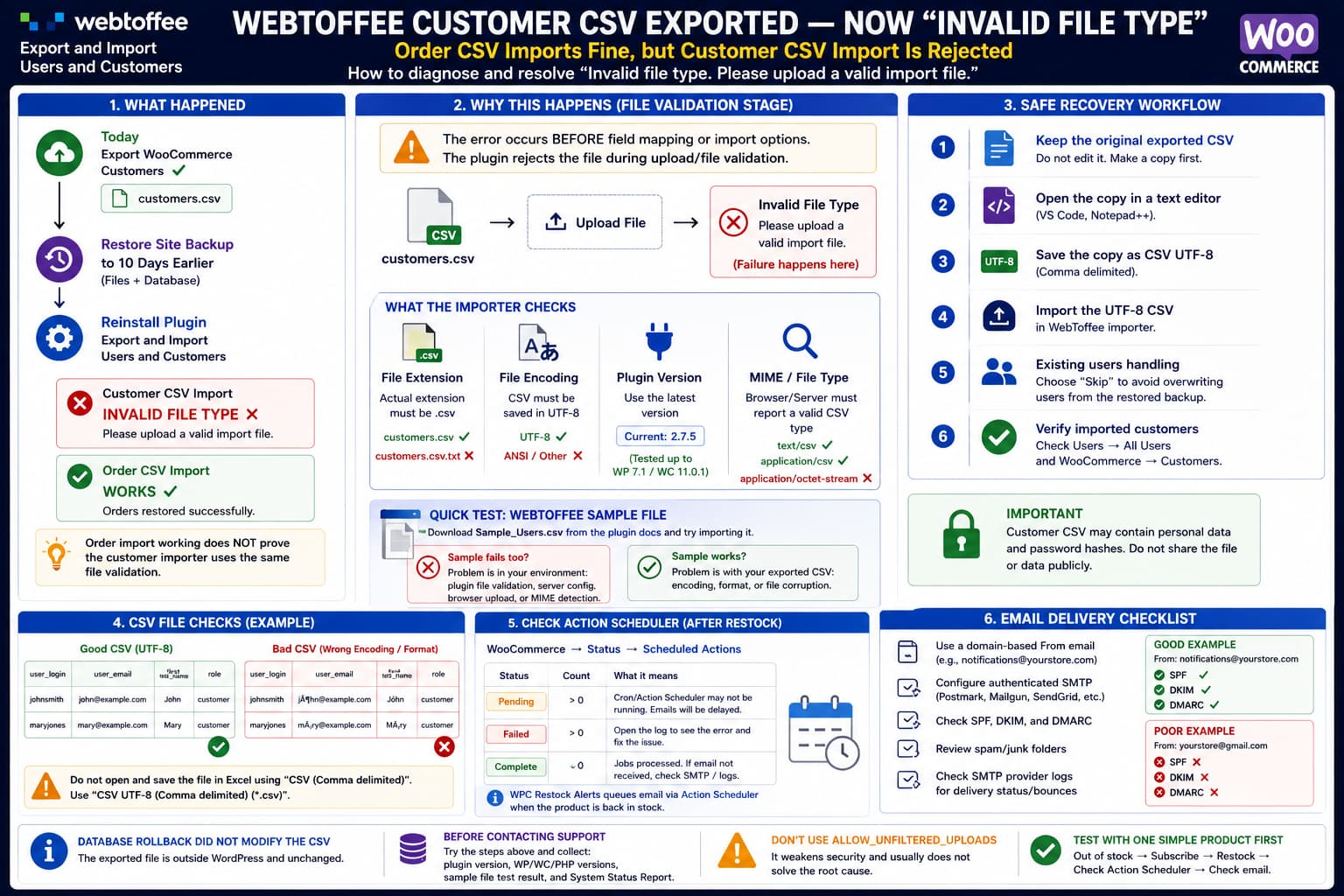
WebToffee Users and Customers importer rejecting a previously exported customer CSV as an invalid file type after a WordPress rollback, while the order CSV works, with UTF-8, MIME validation and safe recovery checks shown.

If you export WooCommerce customers using WebToffee Export and Import Users and Customers, restore the WordPress site to an earlier backup, reinstall the same plugin and then receive: when importing the CSV that the plugin itself generated, the database rollback is unlikely to be what made the file invalid. The more important clue is when … Read more
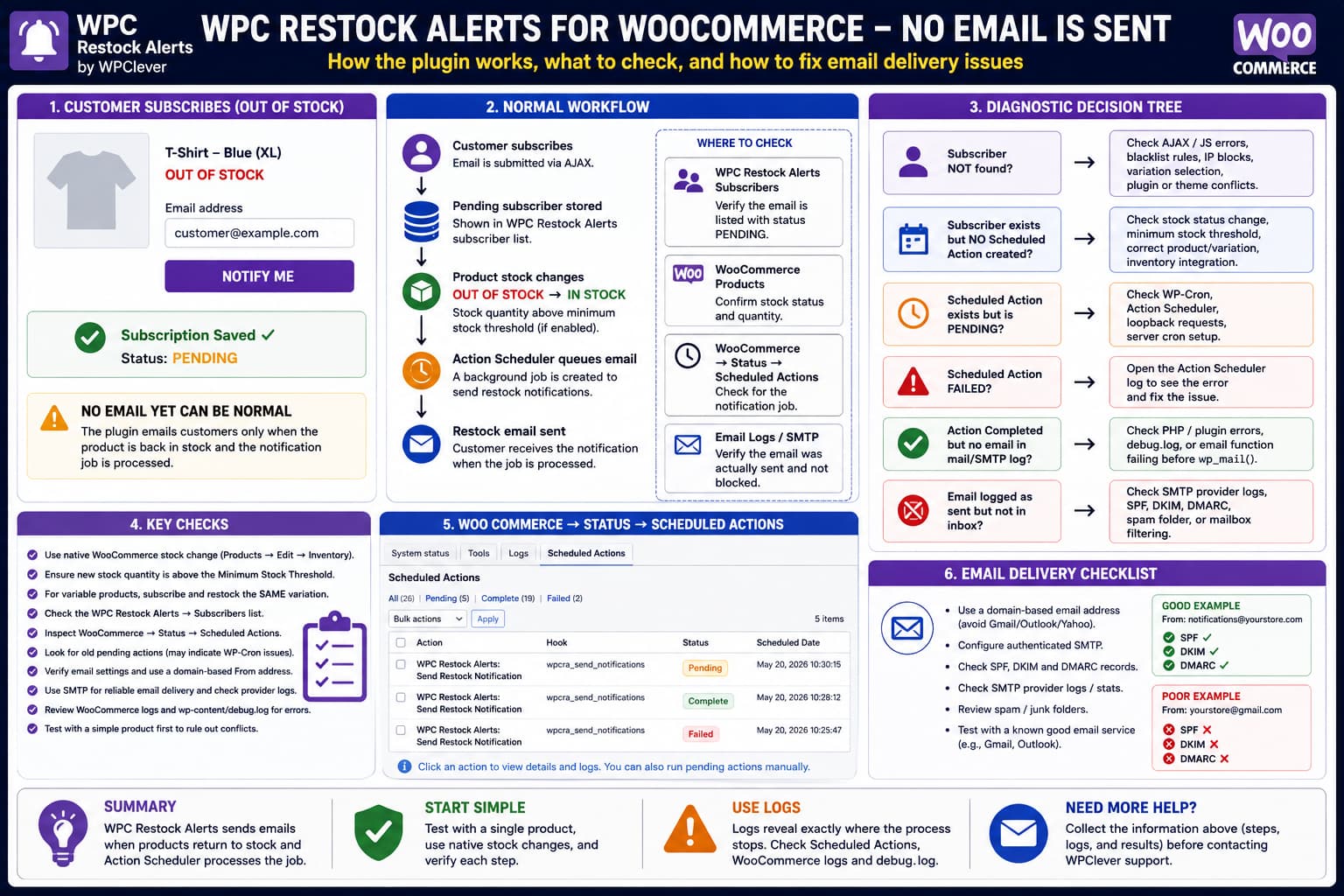
WPC Restock Alerts for WooCommerce Is Not Sending Emails

WPC Restock Alerts for WooCommerce troubleshooting flow showing a pending subscriber, out-of-stock to in-stock transition, Action Scheduler processing and SMTP checks when the restock email is not received.

If WPC Restock Alerts for WooCommerce accepts a customer’s email address but neither the customer nor the administrator receives an email immediately afterward, first verify what event you are actually testing. WPClever describes the plugin’s workflow as: The plugin’s official product documentation states that subscriptions are recorded with a lifecycle beginning at pending, and that … Read more

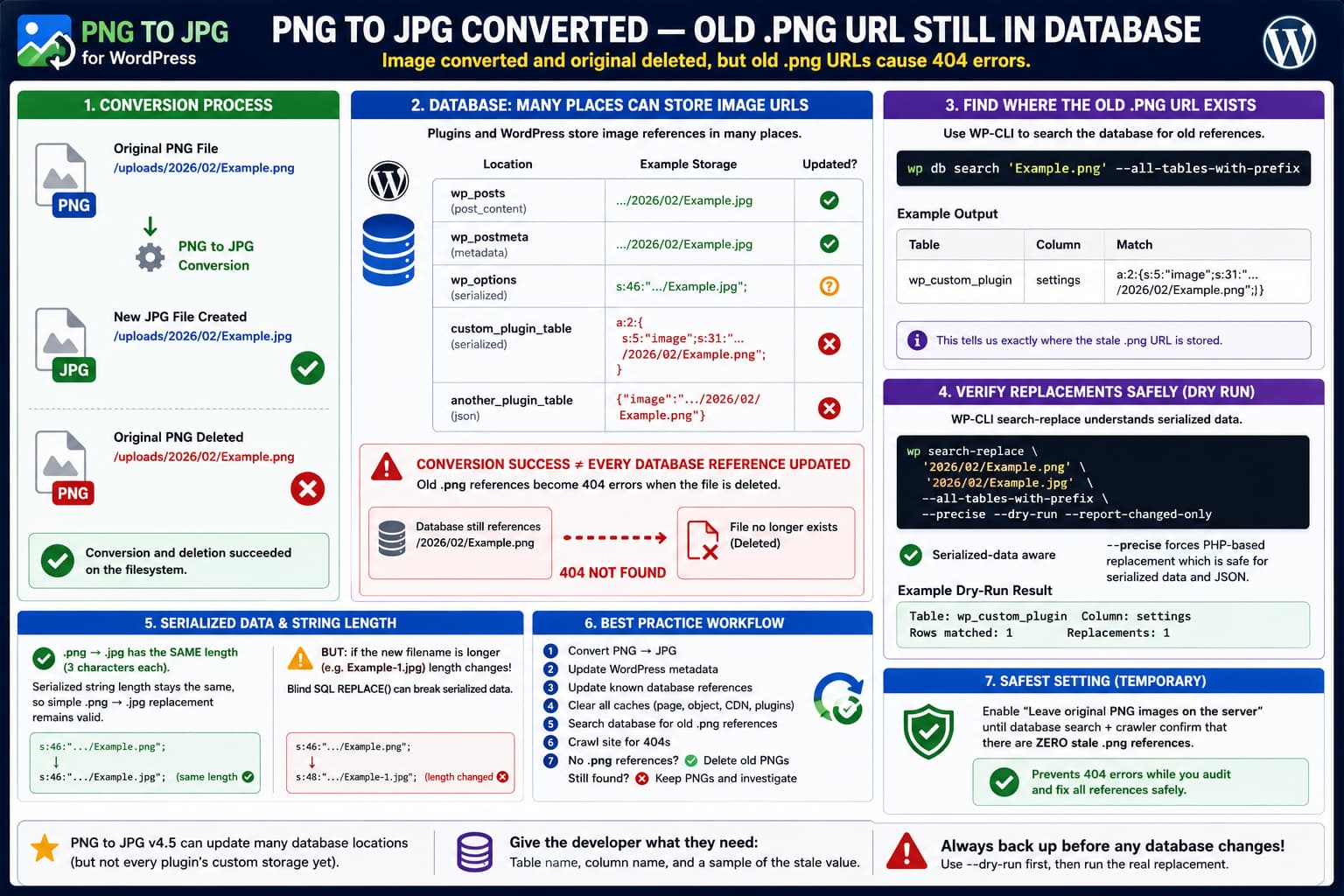
PNG to JPG Converts the Image but Leaves Old .png URLs in the Database

PNG to JPG converts and deletes a WordPress PNG file while a serialized or custom database table still references the old .png URL, causing a 404 and requiring a WP-CLI database search.

The PNG to JPG WordPress plugin can convert an uploaded image from: to: and, when configured to remove the original, delete: from disk. If the database still contains references to the deleted .png file, however, those references become real 404 URLs. The resulting state looks like this: This is particularly easy to discover with a … Read more

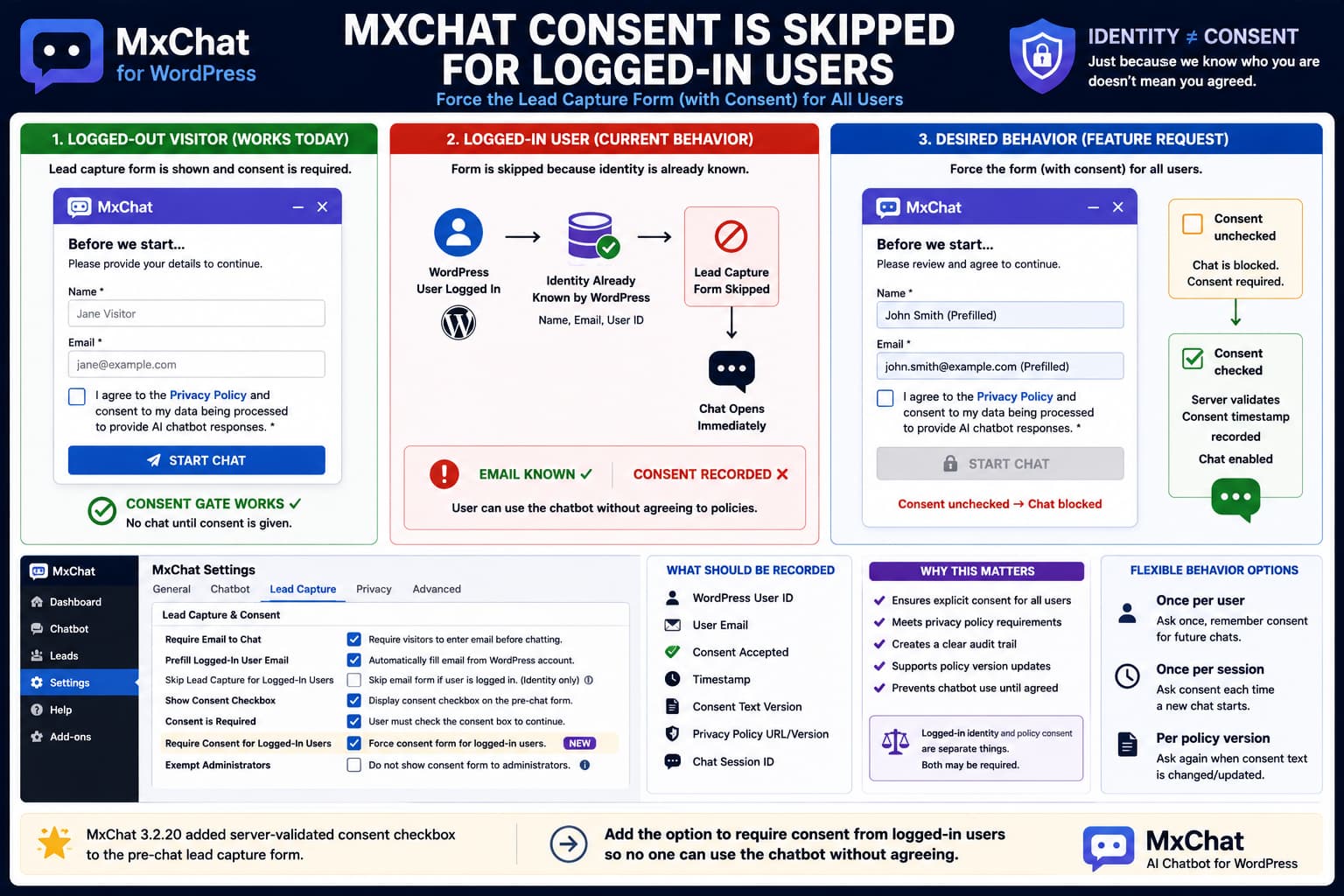
MxChat Lead Capture Form Is Skipped for Logged-In Users

MxChat lead capture form showing required consent for guests but being skipped for logged-in WordPress users, with a proposed workflow that prefills their email while still requiring an unchecked consent checkbox before chat.

MxChat’s Require Email to Chat feature can place a form in front of the chatbot so anonymous visitors provide their identity before beginning a conversation. Version 3.2.20 also added an important privacy feature: the pre-chat email form can now display a configurable consent checkbox, make that checkbox required, link to a Privacy Policy, validate the … Read more

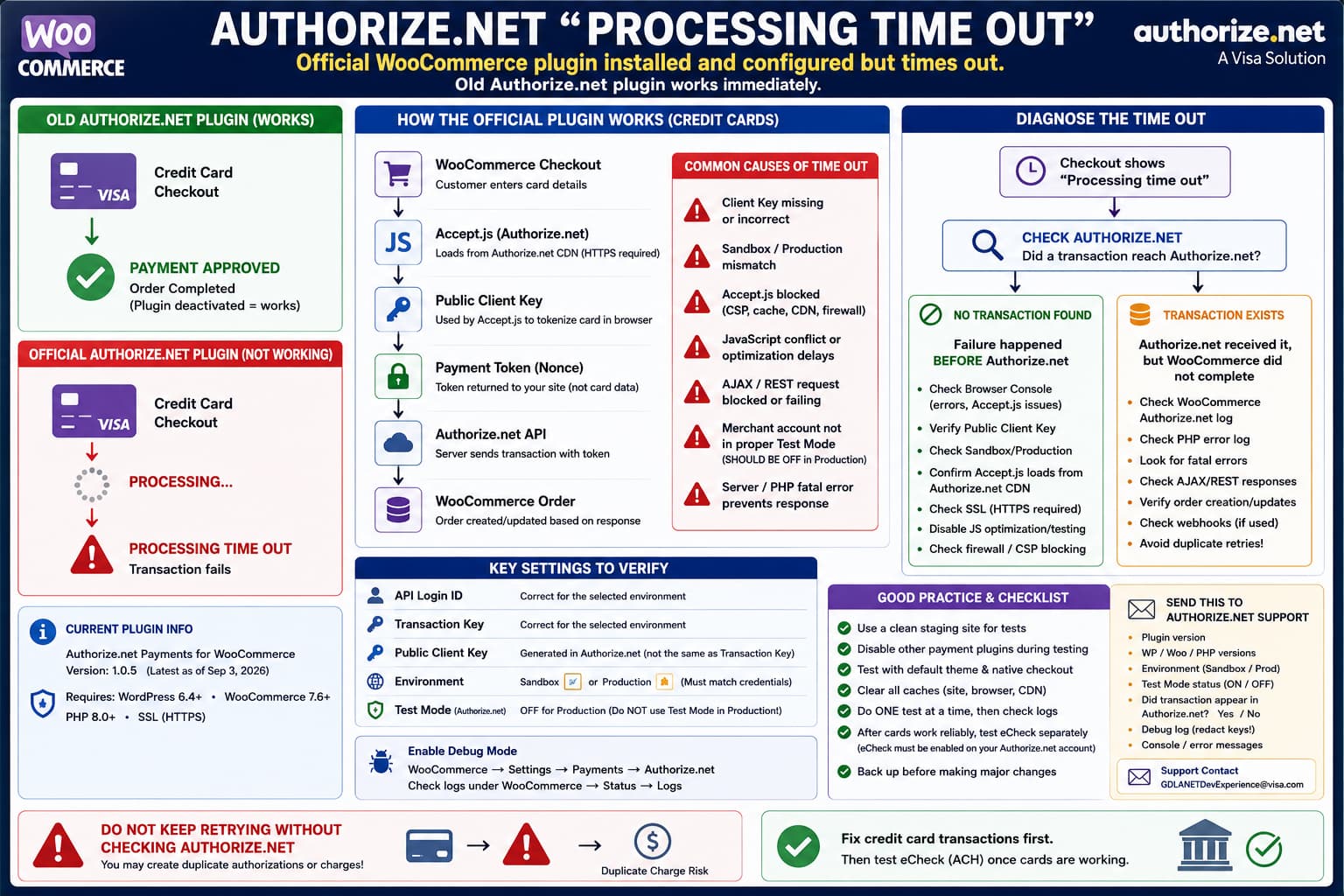
Official Authorize.net WooCommerce Plugin Shows “Processing Time Out” While the Old Gateway Works

Official Authorize.net WooCommerce plugin showing a Processing time out while an older gateway works, with Accept.js, Public Client Key, Sandbox/Production, logs, and transaction checks used to diagnose the failure.

If the official Authorize.net Payments for WooCommerce plugin is installed and configured but checkout ends with: while an older Authorize.net gateway works immediately after being reactivated, do not start by assuming the Authorize.net merchant account itself is broken. The comparison is diagnostically useful: Both integrations ultimately communicate with the same payment processor, but they do … Read more

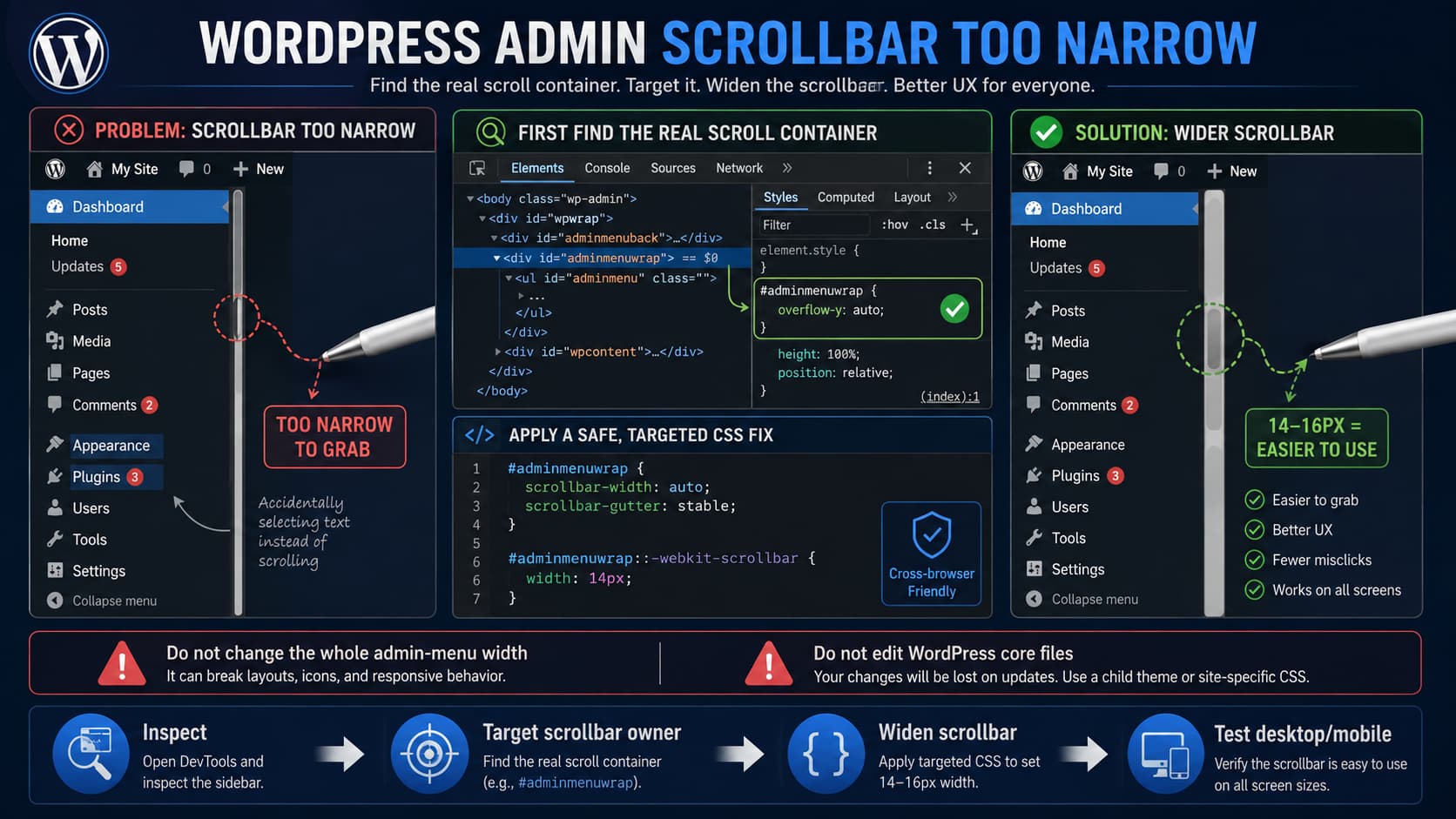
How to Make the WordPress Admin Left Menu Scrollbar Wider

WordPress admin sidebar with a narrow scrollbar being widened to 14 pixels using CSS after identifying the correct scrolling element in Developer Tools.

A very narrow scrollbar in the WordPress admin sidebar can be frustrating when using a pen mouse, stylus, or other precision pointing device. Missing the scrollbar by only a few pixels can result in clicking menu entries or dragging across nearby content instead. A small CSS adjustment can make the scrollbar easier to grab. There … Read more

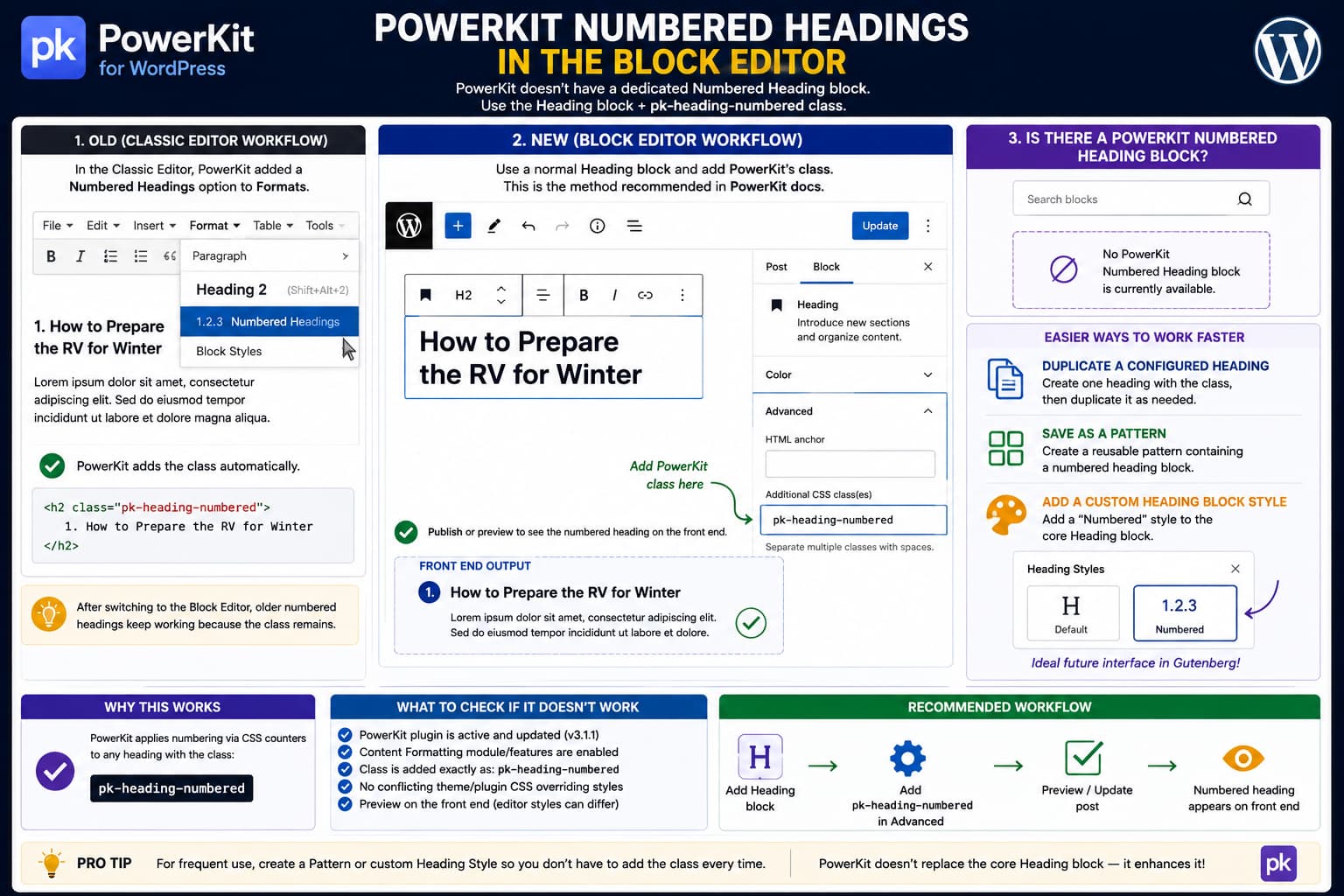
How to Use PowerKit Numbered Headings With the WordPress Block Editor

PowerKit numbered heading in the WordPress Block Editor showing pk-heading-numbered added under the Heading block's Additional CSS Class field, with Classic Editor and reusable Gutenberg workflow comparisons.

After switching from the Classic Editor to the WordPress Block Editor, PowerKit’s Numbered Headings feature can appear to have disappeared. In the Classic Editor, PowerKit added its formatting options to the editor’s Formats menu. You could select a heading and choose Numbered Headings without knowing which CSS class PowerKit used internally. The Block Editor works … Read more

EventKoi “Selected Dates” Calendar Links Open a Single Date Instead of the Parent Event

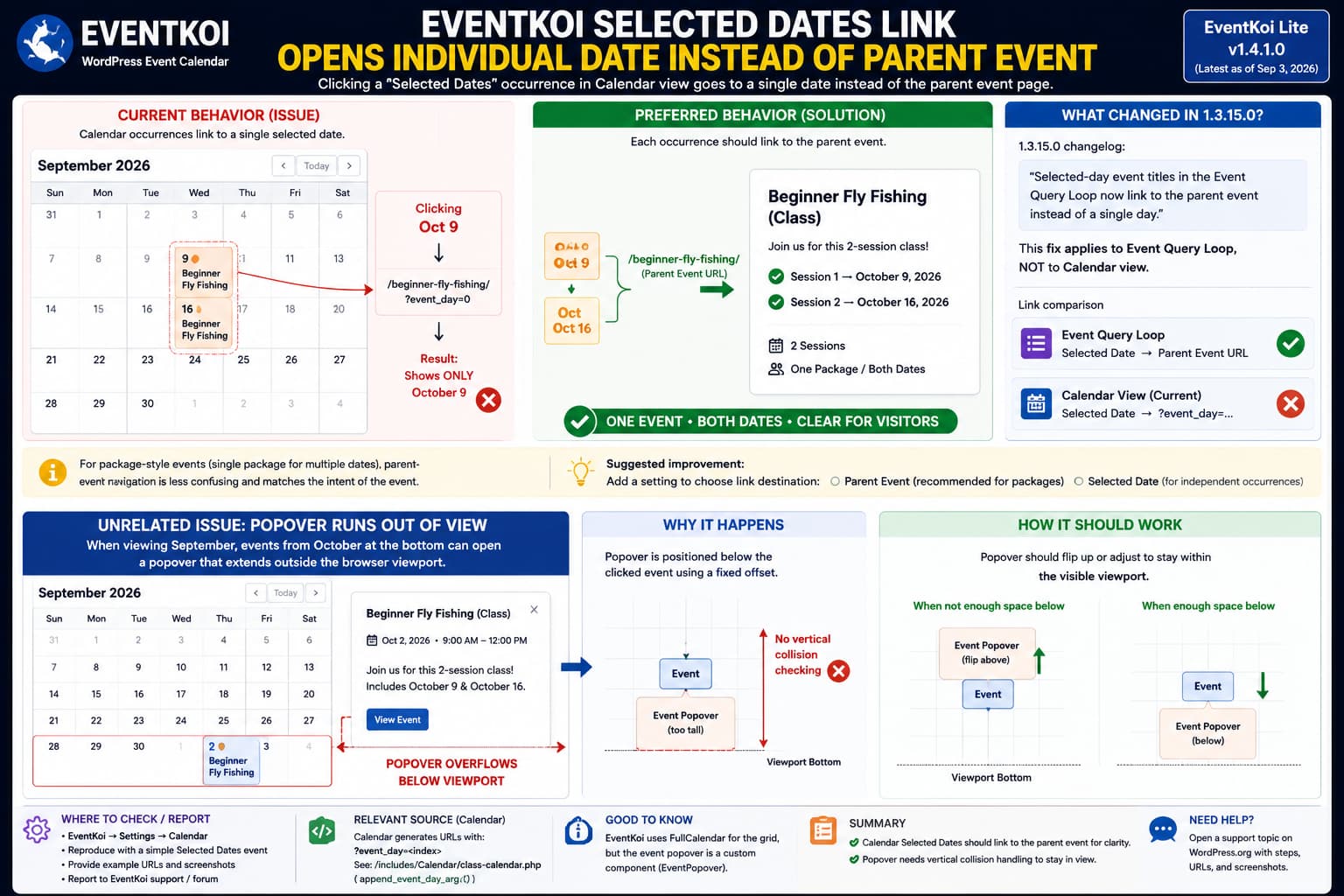
EventKoi Selected Dates calendar showing individual event_day links instead of the parent event and an event popover extending beyond the browser viewport.

When an EventKoi event uses Selected Dates, clicking one of those dates in Calendar view can take the visitor into that specific occurrence rather than the parent event page that presents the complete set of dates. This is particularly confusing when the dates form one package or class and visitors cannot actually attend or purchase … Read more

Email Encoder tel: Protection Breaks the Phone Icon in a WordPress Team Block

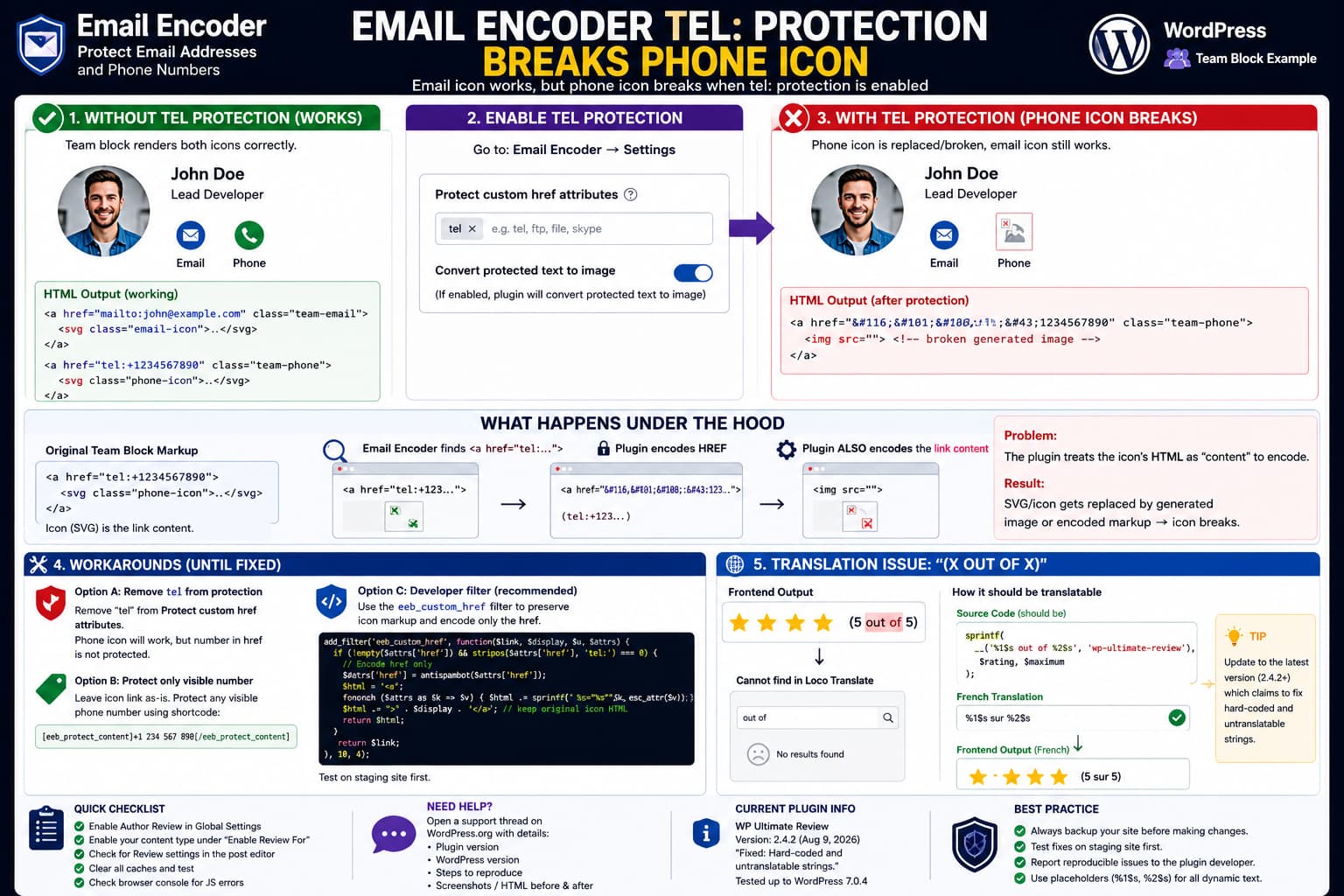
Email Encoder tel: protection breaking a WordPress Team block phone icon because the telephone link's SVG markup is transformed instead of preserving the icon while encoding only the href.

If a WordPress Team block contains email and telephone social icons and the phone icon breaks only after enabling tel: protection in Email Encoder – Protect Email Addresses and Phone Numbers, the problem is likely caused by how the plugin processes custom link attributes. This distinction is important: That points away from the Team block’s … Read more

WP Ultimate Review Author Review Settings Missing From the Post Editor

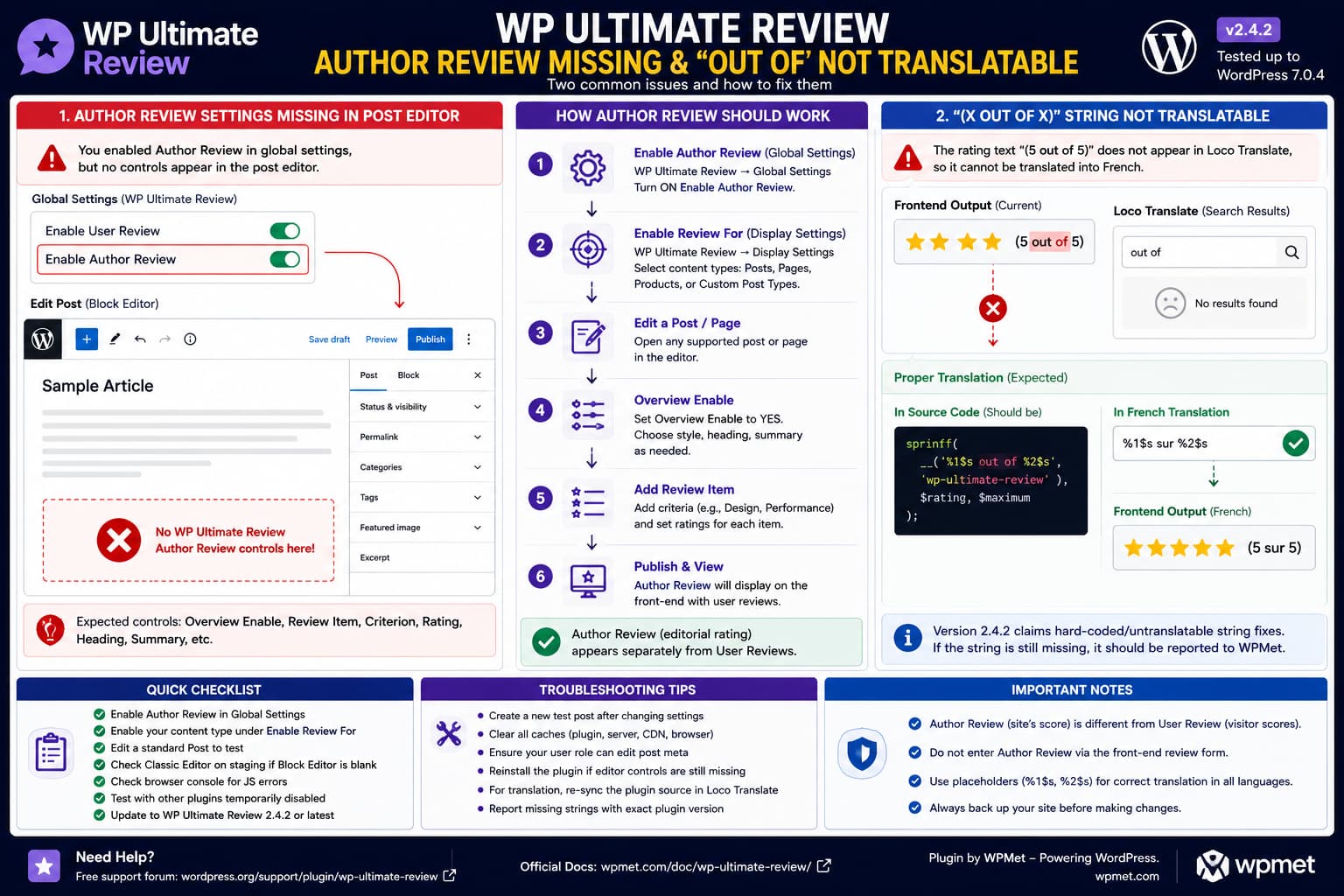
WP Ultimate Review showing missing Author Review controls in the WordPress post editor and an “out of” rating string that cannot be found in Loco Translate.

If WP Ultimate Review allows visitors to submit User Reviews but provides no way to enter an Author Review from the WordPress post editor, enabling “Author Review” globally is not supposed to be the end of the setup. According to WPMet’s own documentation, editing an individual supported post or page should expose review-specific controls including … Read more