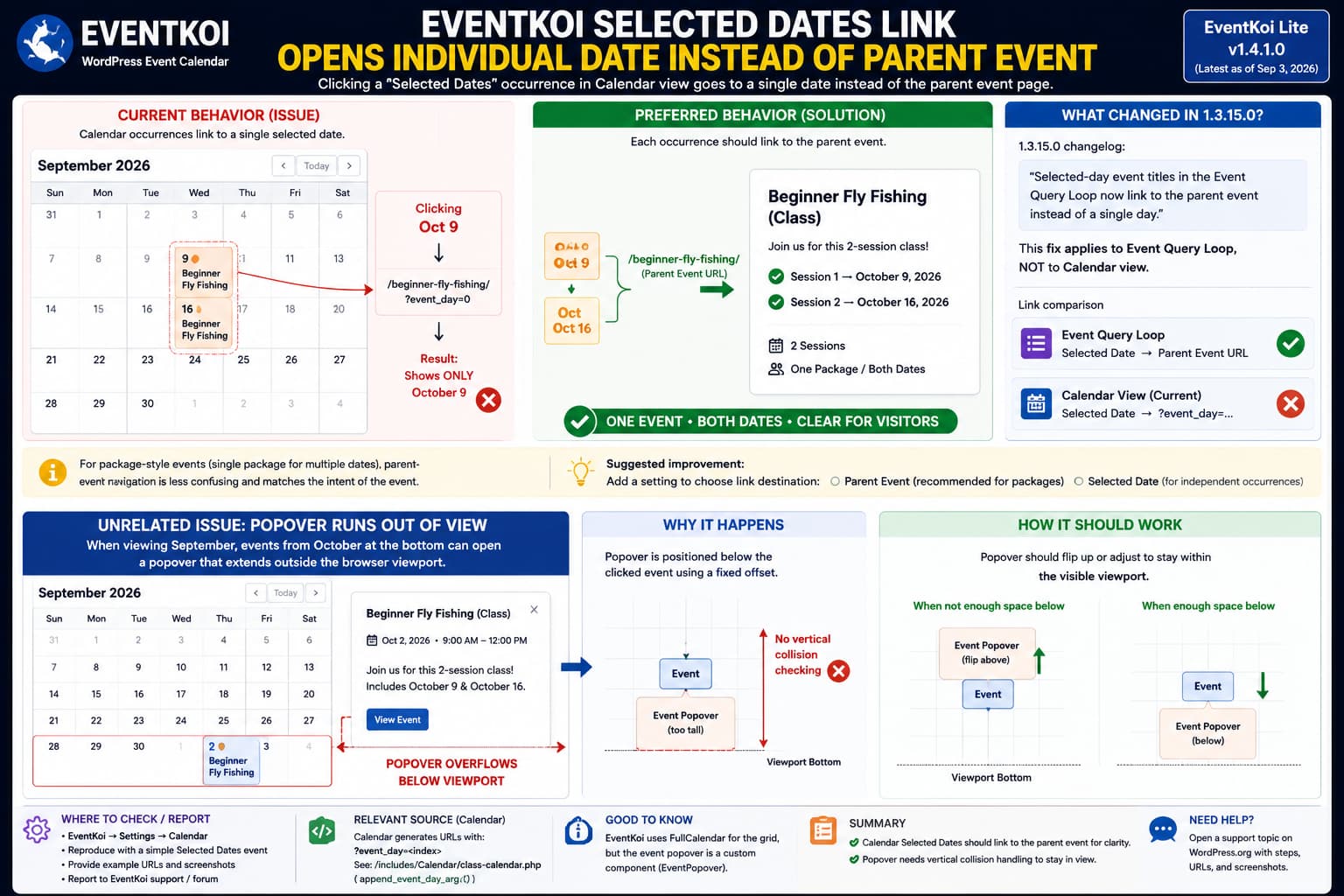
When an EventKoi event uses Selected Dates, clicking one of those dates in Calendar view can take the visitor into that specific occurrence rather than the parent event page that presents the complete set of dates.
This is particularly confusing when the dates form one package or class and visitors cannot actually attend or purchase only one occurrence.
The behavior may appear inconsistent with EventKoi 1.3.15.0 because that release included this fix:
Selected-day event titles in the Event Query Loop now link to the parent event instead of a single day.
However, that changelog entry specifically refers to the Event Query Loop. It does not say Calendar view was changed.
The current EventKoi source confirms that distinction.
For Selected Dates expanded in the interactive calendar, EventKoi currently generates an individual record for every date and appends an event_day query parameter to its event URL.
So this is currently possible:
Parent event:

/events/beginner-fly-fishing/

Calendar occurrence:

/events/beginner-fly-fishing/?event_day=1
The second URL can make the event page render in the context of one selected date even though both URLs belong to the same underlying WordPress event.
This May Not Actually Be a Separate WordPress Event
The phrase “individual event” can be misleading in this case.
EventKoi does not necessarily need to create a completely separate WordPress post for each Selected Date.
Its current calendar code creates an expanded calendar record resembling:
Event ID:        123-day1
Parent event ID: 123
Event day:       1
URL:             parent permalink + ?event_day=1
The relevant source explicitly builds IDs such as:
<event-id>-day<index>and assigns:
event_day = <index>before generating the URL with the same selected-day value.
So the structure is closer to:
One WordPress Event
      ↓
Selected Dates
      ↓
Date #0
Date #1
Date #2
      ↓
Calendar creates one visible occurrence per date
The problem is the destination context, not necessarily duplicate WordPress posts.
Why Removing event_day Changes the Result
EventKoi has a dedicated helper whose documented purpose is:
Preserve the selected standard event-day row on occurrence links.That helper adds:
?event_day=<number>to the event URL.
The interactive calendar then uses that URL when it generates the individual Selected Dates occurrences.
This explains why a useful diagnostic is simply to compare the URLs.
If clicking October 9 produces:
https://example.com/events/beginner-fly-fishing/?event_day=1try manually opening:
https://example.com/events/beginner-fly-fishing/If the second URL shows all of the event’s dates together, the issue is confirmed:
Calendar link contains event_day
        ↓
Single-date context

Parent permalink without event_day
        ↓
Whole event / all selected dates
No permalink reset or event recreation is necessary to prove this.
What Version 1.3.15.0 Actually Fixed
EventKoi 1.3.15.0 was released on June 15, 2026.
Its changelog specifically says:
Fix: Selected-day event titles in the Event Query Loop
now link to the parent event instead of a single day.
The important words are:
Event Query Loop
EventKoi has several independent front-end presentation systems:
Interactive Calendar
Event Query Loop
Calendar List view
Event Data blocks
Page-builder integrations
Changing how the Query Loop generates its permalink does not automatically change the event data sent to the React Calendar.
That appears to be exactly what happened here.
The Query Loop and Calendar Use Different Link Logic
EventKoi’s current calendar data generator intentionally creates each selected day as its own calendar record.
For an expanded Selected Dates event, the URL is currently constructed using the equivalent of:
$url = append_event_day_arg(
    event_url,
    $day_index
);
The result includes:
event_day=0
event_day=1
event_day=2
for the different dates.
By comparison, the 1.3.15.0 Query Loop fix intentionally removed that single-day navigation behavior from Query Loop title links.
So the plugin currently has inconsistent behavior between the two display components:
Event Query Loop
Selected Date → Parent event ✓

Interactive Calendar
Selected Date → Selected-day context
That inconsistency is the real issue.
A Later Update Reinforces the Parent-Link Intention
Version 1.3.24.0 included another related fix:
Event images in the Query Loop now link to the event page itself for multi-day events, matching the title link, instead of one highlighted date.
Again, the change was specifically applied to Query Loop output.
This makes the requested behavior entirely reasonable:
If Selected Dates represent one event,
calendar occurrence
        ↓
parent event
        ↓
visitor sees every date
But the existing changelog does not establish that Calendar view is already supposed to do this.
Why This Matters More for Package Events
EventKoi 1.3.18.0 added:
A single-package toggle for multi-day,
selected-date events
so the entire set of dates can be treated as one package.
That creates a particularly strong UX argument for parent navigation.
Imagine a class held on:
October 9
October 16
where purchasing the class includes both sessions.
The calendar naturally needs to display an entry on both days.
But clicking October 9 and arriving at a page visually emphasizing only October 9 can imply:
I am registering for the October 9 session.
when the actual product is:
One class consisting of October 9 AND October 16.
For package-style events, parent navigation is generally less ambiguous.
Should This Be a Toggle or the Default?
There are legitimate arguments for both approaches.
Parent event as the default
This makes sense when Selected Dates means:
One event
with several required dates
The calendar still displays every occurrence for discoverability, but every occurrence leads to the same complete event description.
Conceptually:
October 9 ─┐
           ├─→ Beginner Fly Fishing
October 16 ┘     October 9 + October 16
Individual date navigation
This is useful when each occurrence can operate independently.
For example:
October 9 → registration for October 9
October 16 → registration for October 16
EventKoi already has occurrence-specific functionality elsewhere, including date-specific iCal behavior and recurrence data.
Therefore, a configurable option would be the most flexible design:
Selected Date link destination:

○ Parent event
○ Selected occurrence
For events configured as a single package, automatically selecting Parent event would also be reasonable.
There Is No Documented Calendar-Link Toggle Yet
The current EventKoi documentation and current public changelog do not document an administrator setting that changes Selected Dates Calendar clicks between:
Parent eventand:
Individual selected dayEventKoi currently provides substantial calendar configuration, including Month, Week and List views, calendar selection, timezone handling, and recurrence expansion, but this particular destination setting is not documented.
Therefore, do not spend time looking for a hidden “parent link” option unless a future release adds one.
Check the Current EventKoi Version
As of September 3, 2026, EventKoi’s official Lite changelog lists:
EventKoi Lite 1.4.1.0as the newest release.
Its current release notes concern plugin-field panel visibility.
The releases after 1.3.15.0 contain many calendar improvements, but the published changelog does not list a later fix changing Selected Dates Calendar clicks to parent-event navigation.
Updating is still recommended because EventKoi has shipped numerous calendar, timezone, security, editor and compatibility fixes since 1.3.15.0.
But based on the current source, updating alone should not be presented as a verified fix for this particular behavior.
A Useful Reproduction Test
Create a test event:
Title:
Selected Dates Test

Date type:
Selected Dates

Dates:
October 9
October 16
Display it in:
- EventKoi Calendar view.
- EventKoi Event Query Loop.
Then inspect the destination URLs.
Calendar
You may find something equivalent to:
/events/selected-dates-test/?event_day=0and:
/events/selected-dates-test/?event_day=1Event Query Loop
After the 1.3.15.0 fix, the title should resolve to the parent event instead of a selected-day URL.
If that is exactly what happens, you have a minimal reproduction showing the inconsistency between the two EventKoi front-end components.
What the Plugin-Side Fix Would Look Like
The current calendar generator deliberately does this for each selected day:
event URL
    +
event_day query parameter
For parent navigation, the calendar record should instead retain:
event URLwithout adding event_day to the page destination.
Conceptually:
CURRENT

Selected date
→ /event/example/?event_day=1
would become:
PARENT-LINK MODE

Selected date
→ /event/example/
The calendar occurrence itself should still retain its internal:
event_daymetadata.
That distinction matters because EventKoi can still use the selected-day index for date-specific actions without forcing the visitor’s main event-page link into single-day context.
For example, EventKoi’s current iCalendar generation separately determines the selected day and adds event_day when generating the calendar-export URL.
So these two concepts do not need to be tied together:
Page destination → Parent event

Add to Calendar → Specific occurrence
That is a cleaner architecture for package-style Selected Dates events.
Do Not Edit class-calendar.php Directly
The offending URL behavior can be identified in EventKoi’s source, which makes it tempting to modify the plugin directly.
Do not permanently edit:
wp-content/plugins/eventkoi-lite/A future EventKoi update will overwrite those changes.
The proper fix should either be:
- implemented upstream;
- exposed through a dedicated filter;
- or offered as a documented calendar setting.
At present, the cleanest route is to provide EventKoi with a minimal reproduction showing that Calendar view still appends event_day while Query Loop deliberately links to the parent.
Temporary Workaround
If parent-event navigation is essential and using the month calendar is not mandatory, an Event Query Loop is currently the safer EventKoi display for this requirement because version 1.3.15.0 explicitly changed Selected Dates title links there to resolve to the parent event.
That does not replicate a month calendar visually, so it is only practical when the site design allows a list/grid presentation.
Avoid JavaScript that blindly strips event_day from every EventKoi URL.
Occurrence-specific links can legitimately use that parameter for things such as exports or other date-sensitive actions.
The Calendar Popover Running Out of View Is a Separate Bug
The second reported problem is technically independent.
When September is displayed, EventKoi’s month grid can also show trailing days from October.
Clicking an October event near the bottom or edge of the visible calendar can open a popover that extends beyond the viewport.
This is not simply a limitation of FullCalendar.
EventKoi does use FullCalendar for its month/week calendar. The current frontend imports FullCalendar’s React, DayGrid, TimeGrid, List and Luxon integrations.
However, the event-details popup itself is an EventKoi custom React component named:
EventPopoverrather than FullCalendar’s built-in popover.
That makes the positioning behavior primarily an EventKoi implementation issue.
How EventKoi Positions the Popover
When an event is clicked, EventKoi reads:
eventEl.getBoundingClientRect()and the calendar’s own bounding rectangle.
It then uses a fixed width:
370pxand adjusts the horizontal position if that width would overflow the calendar.
Conceptually:
Will popup exceed right edge?
        ↓
Yes → move it left
No  → align with event
This is good horizontal collision handling.
But vertical positioning is different.
The Y coordinate is currently calculated roughly as:
clicked Y position
        +
14px
or the event element’s bottom.
The resulting popover is then rendered with:
position: absolute
top: calculated Y
width: 370px
There is no equivalent calculation shown in the current code that asks:
Will popover bottom extend beyond viewport bottom?and then flips it above the clicked event.
Why Events Near the Bottom Can Overflow
Assume:
Browser viewport bottom: 900px

Clicked event position: 760px

Popover height: 350px
The current behavior can effectively produce:
Popover top:    ~774px
Popover bottom: ~1124px
Viewport bottom: 900px
Result:
224px outside viewportHorizontal placement is corrected.
Vertical placement is not.
This explains why an October event displayed on the bottom row of September’s calendar can expose the problem more easily than an event near the top.
The Popover Is Portaled Into the Calendar
EventKoi renders EventPopover using a React portal.
Its current target is:
calendarContainer || document.bodywhere calendarContainer is the .fc FullCalendar element.
The popover itself is:
absoluterelative to that environment.
This reinforces why viewport collision detection needs to be handled explicitly.
Simply increasing z-index will not help.
An element can have:
z-index: 999999;and still be physically positioned below the browser viewport.
CSS Alone Is Not the Ideal Popover Fix
A temporary rule such as:
[data-event-popover] {
    max-height: 80vh;
    overflow-y: auto;
}
could make an oversized popover itself scrollable.
But it does not correct a popover whose starting position is already too low.
For example:
top: 850px
height: 80vh
is still mostly below a 900px viewport.
A complete solution needs position collision detection.
What the Popover Fix Should Do
After measuring the popup, EventKoi should calculate whether there is enough room below the clicked event.
Conceptually:
Space below event
        ↓
Enough?
   ↙          ↘
 Yes          No
 ↓             ↓
Open below   Open above
It should then clamp the result to the visible browser area.
For example:
preferred top = clickY + offset

if preferred top + popover height > viewport bottom:
    top = event top - popover height - offset

if top < viewport top:
    top = viewport top + safe margin
That would make the popup behave predictably for:
- first calendar row;
- last calendar row;
- trailing next-month dates;
- small laptop screens;
- zoomed browsers;
- narrow embedded calendars.
A positioning library with built-in collision detection could also handle this, but EventKoi’s existing custom positioning can be corrected without replacing the entire calendar.
How to Reproduce the Popover Bug
A useful report should describe the viewport condition rather than simply saying “popover is cut off.”
For example:
Calendar view:
Month

Displayed month:
September

Visible trailing dates:
October

Steps:
1. Open September.
2. Click an October event in the bottom calendar row.
3. EventKoi opens its event-detail popover.
4. Bottom of popover extends beyond browser viewport.
Then repeat with:
- browser zoom 100%;
- no browser sidebar;
- desktop viewport dimensions recorded.
If it happens consistently, include a screenshot showing both the clicked calendar tile and the viewport edge.
Current Support Status
The WordPress.org report describing this Selected Dates navigation behavior and popover issue is currently unresolved and has not yet received a developer response.
The code currently supports the reported behavior:
- Selected Dates occurrences receive
event_dayURLs in Calendar view. - The Calendar popover uses EventKoi’s custom manual positioning.
- Horizontal overflow receives adjustment.
- Equivalent vertical viewport clamping is not present in the current positioning logic shown in the source.
These should therefore be reported as two separate EventKoi issues.
What to Send EventKoi
For the Selected Dates link:
EventKoi version:
1.4.1.0

Event type:
Standard → Selected Dates

Dates:
October 9
October 16

Expected:
Click either calendar occurrence
→ parent event showing both dates

Actual:
October 9
→ parent permalink + ?event_day=<index>
→ page shown in individual-date context

Relevant previous changelog:
1.3.15.0 changed Event Query Loop selected-day
titles to parent-event links.
For the popover:
View:
Month

Displayed:
September

Clicked event:
October date shown in trailing calendar row

Expected:
Popover remains inside visible viewport

Actual:
Popover extends beyond bottom of screen
Keeping these separate is useful because one concerns:
calendar event URL generationwhile the other concerns:
popover collision positioningThey are implemented in different parts of EventKoi.
Practical Conclusion
The Selected Dates behavior is not explained by a missing setting.
EventKoi’s current Calendar code explicitly gives each expanded selected date a URL containing:
?event_day=<index>while version 1.3.15.0 only changed Event Query Loop title links to point to the parent event.
That makes the current behavior an inconsistency between EventKoi’s Calendar and Query Loop rather than proof that the 1.3.15.0 fix itself has regressed.
For events where several selected dates make up one class or package, linking calendar occurrences to the parent event would provide a clearer experience. A configurable Parent event / Selected date destination setting would support both use cases.
The overflow issue is separate. EventKoi uses FullCalendar to render the grid, but the event-details popover is EventKoi’s own custom React component. Its current code adjusts horizontal positioning but does not perform equivalent vertical viewport collision handling, which explains why events near the bottom of a calendar can produce popovers that run out of view.
