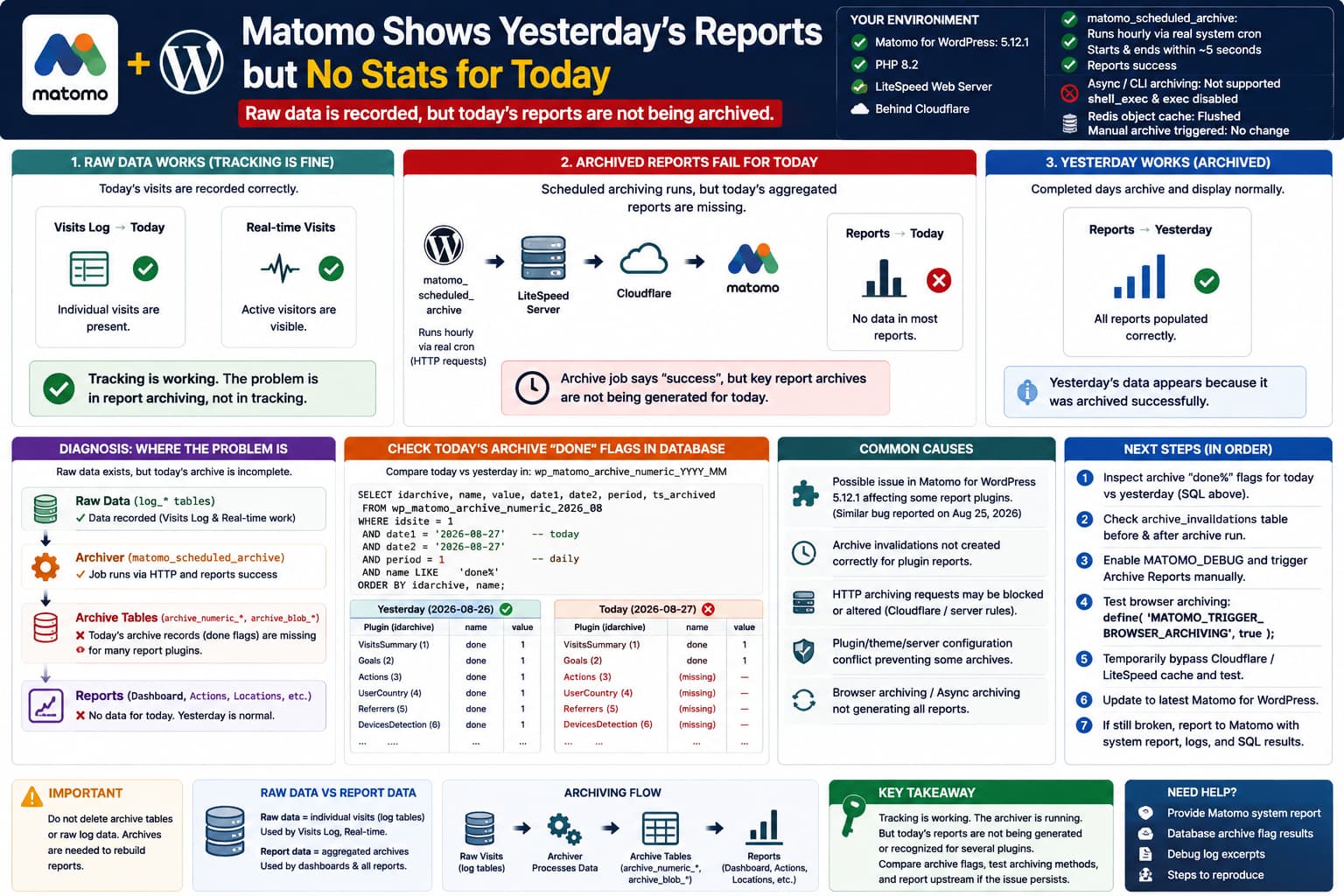
A particularly confusing Matomo for WordPress problem occurs when tracking is clearly working, historical reports look normal, but the current day’s aggregated reports remain empty.
The environment may look perfectly healthy:
Matomo for WordPress: 5.12.1
PHP: 8.2
Web server: LiteSpeed
CDN/proxy: Cloudflare

matomo_scheduled_archive:
Runs hourly
Starts normally
Ends within ~5 seconds
Reports success

WP-Cron:
Triggered by real system cron
DISABLE_WP_CRON = true

Async/CLI archiving:
Unavailable
shell_exec disabled
exec disabled

Archiving method:
HTTP/web requests
Meanwhile:
Visitors → Visits Log → Today
✓ current visits visible

Visitors → Real-time
✓ current visits visible

Normal reports → Today
✗ no data

Normal reports → Yesterday
✓ populated
That distinction is extremely important.
This is almost certainly an archiving/report-generation problem, not a tracking problem.
Matomo itself recommends using Visits Log or Real-time to distinguish these two cases. If raw visits exist there but normal reports do not, Matomo says the problem is likely in report archiving.
Why Visits Log Works While the Dashboard Does Not
Matomo stores two fundamentally different types of analytics data.
The first is raw data.
That includes individual:
visits
page views
events
actions
referrers
and is what powers:
Visits Log
Real-time Visits
Matomo documents those reports as reading raw tracking information directly.
Most of the rest of Matomo does not query those raw tables directly.
Instead Matomo periodically transforms raw data into archive data.
Conceptually:
Visitor
↓
matomo_log_visit / log_link_visit_action
↓
RAW DATA
↓
Matomo archiver
↓
archive_numeric_YYYY_MM
archive_blob_YYYY_MM
↓
REPORT DATA
↓
Dashboard / Actions / Locations / Referrers / etc.
Matomo’s database documentation confirms that numeric report data is stored in monthly:
archive_numeric_YYYY_MMtables and tabular reports in:
archive_blob_YYYY_MMtables.
So this symptom:
Real-time today
✓

Aggregated today
✗
means:
The visits reached Matomo’s raw tables, but the archive required by the reporting UI was not successfully created or recognized.
“Yesterday Works” Is an Important Diagnostic Clue
Matomo is supposed to reprocess an incomplete period such as today repeatedly.
For an on-premise Matomo installation, today’s archive normally has a limited lifetime and gets regenerated so current reports stay reasonably fresh. Matomo’s default configuration uses:
time_before_today_archive_considered_outdated = 900which is 15 minutes.
With scheduled archiving configured hourly, today’s data can reasonably be up to roughly an hour behind, depending on the configuration.
But:
Today:
always empty

Tomorrow:
yesterday suddenly correct
is not the expected normal delay.
Matomo’s archiving documentation specifically says that automatic archiving run several times per day should re-archive today’s reports as well as periods containing today.
So a site that has never produced today’s aggregated data since installation warrants deeper investigation.
There Is a Very Recent Matomo 5.12.1 Report With an Extremely Similar Failure
This is particularly relevant.
On August 25, 2026, a Matomo user reported a fresh Matomo for WordPress 5.12.1 installation where:
Visits Log
✓ working

Scheduled matomo_scheduled_archive
✓ runs

VisitsSummary
✓ archived

Goals
✓ archived

Actions
✗ never archived

UserCountry
✗ never archived

other plugin reports
✗ never archived
Direct inspection of the archive database reportedly showed that the scheduled job was only creating plugin-specific archive completion flags for VisitsSummary and Goals. No corresponding archives were being generated for Actions, UserCountry, and other reporting plugins.
That report also tested several things highly relevant here:
LiteSpeed disabled
→ problem remained

MATOMO_SUPPORT_ASYNC_ARCHIVING=false
→ problem remained

Browser archiving enabled
→ problem remained

Manual invalidation + core:archive
→ data was generated
→ UI still did not recognize it correctly
This does not yet prove that Matomo 5.12.1 has a confirmed general regression. The report is extremely recent and I could not verify an official Matomo developer resolution yet.
But the overlap with the current symptom is strong enough that I would investigate this path before spending more time flushing Redis or changing WP-Cron.
Matomo Archives Reports by Plugin
This helps explain why one part of Matomo can work while others remain empty.
Matomo’s archiver groups reports by plugin.
For example:
VisitsSummary
→ visitor totals

Actions
→ page URLs, page titles, entry/exit pages

UserCountry
→ countries, regions, cities

Referrers
→ search engines, websites, campaigns

DevicesDetection
→ devices, browsers, operating systems
Matomo’s developer documentation explicitly says that archiving logic belongs to individual plugins and that the reports defined by a plugin are archived together.
This means an archive run can theoretically produce:
VisitsSummary
✓
while still failing to provide:
Actions
UserCountry
Referrers
DevicesDetection
which is much more subtle than a completely failed cron job.
A “Successful” WordPress Cron Does Not Prove Every Matomo Report Was Archived
This is another important point.
You currently have:
matomo_scheduled_archive
Last started: ...
Last ended: ...
Status: successful
That proves WordPress executed the scheduled callback and it returned.
It does not automatically prove that every Matomo reporting plugin generated a usable archive for today.
Matomo’s archive status is ultimately represented inside the archive tables themselves.
The documentation says completion status is stored in archive_numeric_* as records whose names begin with:
doneand modern archives can have plugin-specific done markers.
That database evidence is much more valuable than the WP-Cron status.
The Best Next Test: Inspect Today’s done Flags
If you have phpMyAdmin access, this is the most useful diagnostic.
Find the current month’s table.
For August 2026 it will normally be something resembling:
wp_matomo_archive_numeric_2026_08Your actual WordPress table prefix may be different.
Run:
SELECT
    idarchive,
    name,
    value,
    date1,
    date2,
    period,
    ts_archived
FROM wp_matomo_archive_numeric_2026_08
WHERE idsite = 1
  AND date1 = '2026-08-27'
  AND date2 = '2026-08-27'
  AND period = 1
  AND name LIKE 'done%'
ORDER BY idarchive, name;
Replace:
wp_with your database prefix and use the date Matomo considers today, based on the site’s configured timezone.
Matomo documents:
period = 1as a daily archive.
Healthy-ish Result
You may see multiple plugin-specific completion records corresponding to the reports being generated.
Exact names can vary by Matomo version, segment and archive state.
Suspicious Result
If you see completion records only corresponding to:
VisitsSummary
Goals
while:
Actions
UserCountry
Referrers
DevicesDetection
never receive a valid current-day archive, you have a very strong match for the newly reported 5.12.1 behavior.
Compare Today With Yesterday
This makes the evidence much stronger.
Run the equivalent query for yesterday:
SELECT
    idarchive,
    name,
    value,
    date1,
    date2,
    period,
    ts_archived
FROM wp_matomo_archive_numeric_2026_08
WHERE idsite = 1
  AND date1 = '2026-08-26'
  AND date2 = '2026-08-26'
  AND period = 1
  AND name LIKE 'done%'
ORDER BY idarchive, name;
Then compare:
August 26
many/useful report archives
✓

August 27
only partial archive state
✗
That would explain perfectly why the dashboard becomes correct only once the date moves into the past.
Also Look for Actions and UserCountry Archive Records
You can inspect the current day’s archive names more generally:
SELECT
    idarchive,
    name,
    value,
    ts_archived
FROM wp_matomo_archive_numeric_2026_08
WHERE idsite = 1
  AND date1 = '2026-08-27'
  AND date2 = '2026-08-27'
  AND period = 1
ORDER BY idarchive, name;
And remember that many tabular reports live in:
wp_matomo_archive_blob_2026_08rather than the numeric table. Matomo documents this numeric/blob split explicitly.
Do not modify or delete those records while diagnosing.
Just inspect them.
Check archive_invalidations
Matomo uses invalidations to tell the archiver that particular report data needs to be regenerated.
The very recent 5.12.1 report found:
archive_invalidations
empty
even though report plugins such as Actions and UserCountry were never receiving usable current-day archives.
If your Matomo database contains a table resembling:
wp_matomo_archive_invalidationsinspect it before and immediately after running the scheduled archive.
Even a simple:
SELECT *
FROM wp_matomo_archive_invalidations
LIMIT 100;
can be useful.
Do not treat an empty table alone as proof of a bug, since successful processing can consume invalidations.
The interesting case is:
required report archives absent
+
no relevant invalidations ever appear
+
scheduled job repeatedly says success
Redis Is Unlikely to Be the Root Cause
Flushing Redis was a reasonable test, but it does not directly regenerate Matomo report archives.
The important data here lives in MySQL tables such as:
matomo_log_*
matomo_archive_numeric_*
matomo_archive_blob_*
Matomo’s own architecture separates raw and archived analytics data this way.
So:
Flush Redis
↓
Matomo archive rows still absent
would be expected.
I would stop repeatedly clearing object cache unless you have separate evidence of stale WordPress state.
Your Disabled shell_exec and exec Are Also Probably Not the Main Problem Now
Matomo for WordPress can normally use CLI/async processing where the hosting environment permits it.
When CLI-related functionality is unavailable or misconfigured, Matomo officially recommends:
define( 'MATOMO_SUPPORT_ASYNC_ARCHIVING', false );which forces report generation through web requests instead.
In this case you already know:
Supports Async Archiving:
No

Archiving:
HTTP requests
so continuing to troubleshoot the missing shell functions is unlikely to explain why only today remains missing while completed days eventually work.
You can define the constant explicitly if you want deterministic behavior:
define( 'MATOMO_SUPPORT_ASYNC_ARCHIVING', false );but do not expect that alone to fix this specific symptom.
Cloudflare Still Deserves One Controlled Test
Because HTTP archiving goes through web requests, the request path can involve:
WordPress
↓
public hostname
↓
Cloudflare
↓
LiteSpeed
↓
Matomo app endpoint
That gives a proxy/WAF/cache layer an opportunity to alter or block the response.
Matomo’s troubleshooting documentation specifically notes that Matomo’s web endpoints must remain reachable and that firewalls/security configurations can break requests to:
wp-content/plugins/matomo/app/index.php
wp-content/plugins/matomo/app/matomo.php
However, I would not immediately blame Cloudflare because:
raw tracking works
completed days archive
cron reports success
and the very recent 5.12.1 report reproduced its deeper archiving problem even with LiteSpeed disabled.
Use Cloudflare only as an isolation test.
Temporarily bypass caching/security for the Matomo endpoint or put the site into a controlled development/bypass state, trigger an archive, and compare the database.
If nothing changes, restore Cloudflare normally.
Test Browser-Triggered Archiving
Matomo for WordPress provides a documented fallback:
define( 'MATOMO_TRIGGER_BROWSER_ARCHIVING', true );This allows viewing reports to trigger archiving.
For a low-traffic test site, temporarily add:
define( 'MATOMO_TRIGGER_BROWSER_ARCHIVING', true );Then:
Matomo Analytics
→ Reporting
→ select Today
→ Locations / Pages / Referrers
Wait for the report request to finish and recheck the database.
The result is diagnostically useful.
Browser archiving populates Today
→ scheduled HTTP archive path is suspect
versus:
Browser archiving also fails
→ deeper current-day/plugin archive problem
The recent 5.12.1 report says enabling browser archiving did not resolve its issue, so if yours behaves the same way, the similarity becomes stronger.
Enable Matomo Debug Logging
Add temporarily:
define( 'WP_DEBUG', true );
define( 'WP_DEBUG_LOG', true );
define( 'WP_DEBUG_DISPLAY', false );
define( 'MATOMO_DEBUG', true );
Matomo officially documents MATOMO_DEBUG for getting more detailed plugin logging and recommends checking both WordPress and server/PHP error logs when archiving fails.
Then manually trigger:
Matomo Analytics
→ Diagnostics
→ Troubleshooting
→ Archive Reports
and inspect:
/wp-content/debug.logSearch for:
Matomo
archive
archiveReports
invalidate
Actions
UserCountry
VisitsSummary
403
500
invalid response
If the archive wrapper ends without warnings but the database still shows only partial plugin archives, that is particularly useful evidence for an upstream report.
A Five-Second Archive Run Is Worth Noticing, but It Is Not Proof
An archive finishing in:
~5 secondscould be perfectly reasonable on a new, low-traffic site.
But if Matomo is supposedly processing:
day
week
month
year
Actions
Locations
Referrers
Devices
Goals
VisitsSummary
from substantial raw data and consistently finishes almost immediately while most current-day archives never appear, the short runtime becomes another clue.
Do not use runtime alone to diagnose it.
Use the database done% records.
Do Not Truncate the Archive Tables
It is tempting to delete:
archive_numeric_2026_08
archive_blob_2026_08
and make Matomo rebuild everything.
I would not do that here.
Matomo’s own reprocessing documentation treats deleting archive tables as a non-recommended method and prefers proper invalidation/reprocessing instead.
Since historical reports are already correct, destroying known-good archived data adds unnecessary risk.
Do Not Delete the Raw Logs Either
The raw logs are currently the most valuable thing you have because they prove tracking is healthy and can be used to rebuild reports later.
Matomo warns that report reprocessing requires the original raw visitor log data to still exist.
So until this is resolved:
Keep raw data
Keep working historical archives
Avoid destructive database cleanup
Is LiteSpeed Cache the Cause?
Possibly for some Matomo HTTP/UI behavior, but the evidence does not currently support declaring LiteSpeed the cause of this specific current-day archiving failure.
The very recent Matomo 5.12.1 report uncovered a separate LiteSpeed-related issue around the manual Archive Reports request, but the author says the missing plugin archives continued even with LiteSpeed Cache completely disabled.
So:
LiteSpeed
= worth testing
but:
LiteSpeed
= proven root cause
would be inaccurate.
Is Cloudflare the Cause?
The same applies.
Cloudflare can absolutely interfere with HTTP callbacks if WAF, caching, Bot protection, Access, or other rules affect Matomo’s endpoints.
But the pattern:
today missing
yesterday works
raw data intact
scheduled task executes
is more specific than a typical blanket Cloudflare block.
If Cloudflare were completely blocking Matomo’s internal HTTP API, I would expect more consistent archiving failures and likely explicit invalid-response errors.
Test it once, then move on if the behavior does not change.
The Strongest Current Hypothesis
Given:
Matomo for WordPress 5.12.1

raw today data:
✓ present

Real-time:
✓ present

historical archive:
✓ works

today archive:
✗ never populates

scheduled archive:
✓ repeatedly executes

async CLI:
not used

manual cache flushing:
no effect
and the new August 25 report showing Matomo 5.12.1 scheduled archiving producing only a subset of plugin archives, my leading hypothesis is:
The current-day Matomo archive is either not invalidating/generating all required plugin reports, or Matomo’s reporting layer is failing to recognize the archives created for those plugins.
That is significantly more plausible than a tracking failure.
There is not yet enough evidence to label this a confirmed Matomo 5.12.1 bug for all installations.
What I Would Do Next
Use this exact sequence:
- Do not change tracking. Visits Log proves tracking is working.
- Run the SQL query for today’s
done%archive flags. - Run the same query for yesterday and compare them.
- Check whether Actions/UserCountry/etc. records exist for today.
- Inspect
archive_invalidations. - Enable
MATOMO_DEBUGand trigger Archive Reports manually. - Temporarily test
MATOMO_TRIGGER_BROWSER_ARCHIVING. - Do one Cloudflare/LiteSpeed bypass test and compare the database.
- If today’s archive repeatedly contains only VisitsSummary/Goals or another partial set, capture that SQL output.
- Send Matomo the system report, debug log, archive flags for today vs yesterday, and reference the current 5.12.1 report describing the same plugin-specific archive behavior.
That gives the developers evidence of the actual archive state rather than just “the dashboard is empty.”
What to Include in a Matomo Bug Report
A strong reproduction would look like:
Matomo for WordPress: 5.12.1
Matomo core: 5.12.0
PHP: 8.2
Web server: LiteSpeed
Cloudflare: Yes
WP-Cron: Real system cron
DISABLE_WP_CRON: true
Async archiving: unsupported
HTTP archiving: active

Today:
Visits Log / Real-time = correct
Normal reports = empty

Yesterday:
Normal reports = correct

matomo_scheduled_archive:
runs hourly
returns successfully
Then include the output from:
SELECT idarchive, name, value, date1, date2, period, ts_archived
FROM YOURPREFIX_matomo_archive_numeric_2026_08
WHERE idsite = 1
AND date1 = 'TODAY'
AND date2 = 'TODAY'
AND period = 1
AND name LIKE 'done%'
ORDER BY idarchive, name;
and the equivalent query for yesterday.
That would be substantially more actionable than another cache purge.
Should You Downgrade Matomo?
I would not downgrade production yet.
Matomo for WordPress 5.12.1 is currently the public WordPress.org version, and WordPress.org explicitly notes that releases from 5.11.1 onward contain an important security-related fix.
There also is not yet evidence proving that this behavior was introduced specifically in 5.12.1.
If you want to investigate version regression, do it on staging:
clone site
↓
preserve database
↓
test known earlier secure release
↓
compare today’s archive behavior
Do not use an old version permanently just to avoid a reporting bug.
Direct Answer
This does not look like a tracking problem.
Because today’s visits are already visible in Visits Log and Real-time, Matomo is collecting raw data correctly. The failure occurs between:
RAW visitor data
↓
archiving
↓
aggregated report data
Matomo’s own troubleshooting documentation identifies this exact distinction.
More importantly, there is a very recent August 25, 2026 report involving Matomo for WordPress 5.12.1 where matomo_scheduled_archive repeatedly generates only VisitsSummary and Goals archives while Actions, UserCountry, and other reporting plugins never receive usable current-day archives. That report also says disabling LiteSpeed and forcing HTTP instead of async archiving did not solve it.
I would therefore make the next test the database itself.
Check today’s:
archive_numeric_2026_08for:
name LIKE 'done%'and compare it with yesterday.
If today’s archive contains only a small subset of plugin completion markers while yesterday has the expected report data, you have strong evidence of the same current-day/plugin archiving failure rather than a cron, Redis, tracking, or cache problem.
At that point I would report it upstream rather than keep changing server settings.
