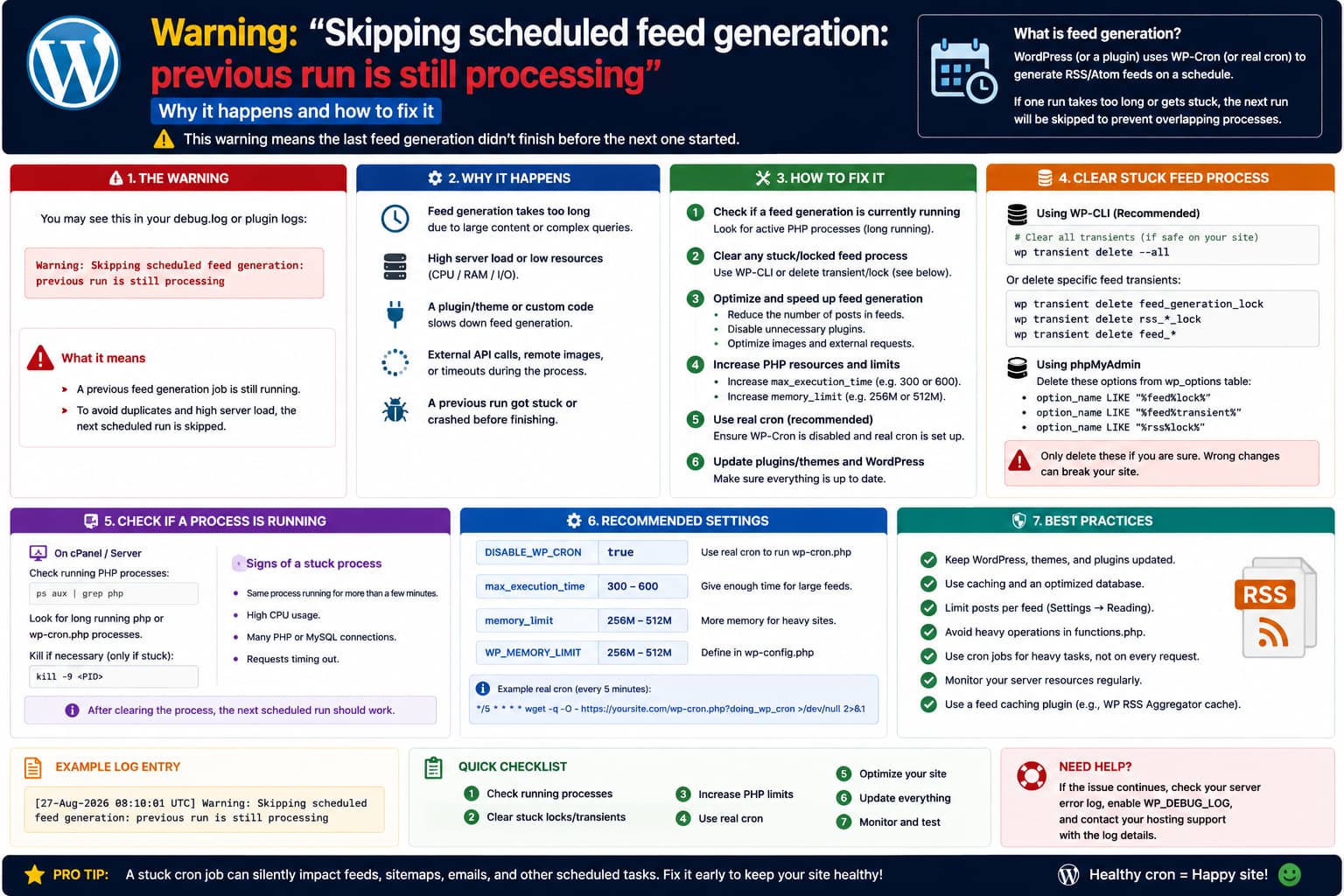
After updating Product Feed PRO for WooCommerce by AdTribes, you may start seeing this warning every day:
Skipping scheduled feed generation:
previous run is still processing
The wording sounds alarming, but the message itself is actually a safety check.
Product Feed PRO uses WooCommerce’s Action Scheduler to refresh feeds in batches. If a new scheduled refresh begins while the plugin believes the previous refresh is still active, it now refuses to start another generation at the same time.
Conceptually:
Scheduled feed refresh starts
↓
Plugin checks feed status
↓
Previous run = Processing
↓
Do NOT start another run
↓
"Skipping scheduled feed generation:
previous run is still processing"
This protection is important because overlapping feed generations have previously caused duplicated and even missing products.
Product Feed PRO 13.5.7 specifically includes a fix for a stuck-feed guard incorrectly interacting with in-flight batches and causing duplicate or dropped products during scheduled generation.
So seeing the warning once can be completely legitimate.
Seeing it every day, however, deserves investigation.
Why This Warning Appeared After the Update
The current WordPress.org release is:
Product Feed PRO for WooCommerce
Version 13.5.7
and its August 4, 2026 changelog contains this particularly relevant fix:
Stuck-feed guard misfires against in-flight batches, producing duplicate (and dropped) products in scheduled feed generation.
Before that fix, two processes could overlap.
For example:
Run A
Batch 1
↓
Batch 2 still processing

Scheduled Run B starts
↓
Plugin wrongly assumes Run A is stuck
↓
Run B starts again
↓
Both write to feed
AdTribes publicly reproduced a case where this resulted in a feed with roughly:
200 products
+
200 duplicated products
+
200 more products
=
600
instead of about 500 products.
The safer behavior is now:
Run A still active
↓
Run B arrives
↓
Skip Run B
That is much better than allowing two processes to modify the same feed.
When the Warning Is Harmless
Suppose a large feed takes 15 minutes to generate.
Your schedule triggers another generation while the current one genuinely has not finished.
Then this:
Skipping scheduled feed generation:
previous run is still processing
is doing exactly what it should.
After the original run finishes, the feed should return to:
Completedand the next scheduled refresh should run normally.
In that situation, no fix is required.
When It Is a Problem
The message becomes suspicious when all of these are true:
Warning appears every day
+
feed generation should have finished long ago
+
feed's Last Updated time stops changing
or:
Manage Feeds still shows Processing
for hours/days
That usually means the plugin is seeing a stale processing state or an unfinished Action Scheduler job.
The flow becomes:
Old feed generation starts
↓
Something interrupts it
↓
Feed remains marked "Processing"
↓
No batch is actually completing it
↓
Tomorrow's scheduled run checks status
↓
"Previous run is still processing"
↓
New run skipped
↓
Same thing happens again tomorrow
Now the overlap protection itself is working, but the old run never clears.
First Check Whether the Feed Is Actually Updating
Go to:
Product Feed
→ Manage Feeds
Check the affected feed.
Look at:
Status
Last Updated
Refresh Interval
Product count
There are two important possibilities.
Situation A
Status:
Completed

Last Updated:
today
The warning may simply have occurred while another legitimate generation was running.
If the feed continues updating normally, this is mostly informational.
Situation B
Status:
Processing

Last Updated:
yesterday / several days ago
That is a genuinely stuck feed.
Continue with the Action Scheduler checks below.
Check WooCommerce Scheduled Actions
Product Feed PRO has used WooCommerce Action Scheduler for scheduled feed processing since the 13.3.x generation of the plugin. AdTribes states that feed refreshes now run through Action Scheduler rather than relying directly on normal visitor-triggered WP-Cron.
Go to:
WooCommerce
→ Status
→ Scheduled Actions
Check:
In-progress
Failed
Pending
Complete
Search for:
adt_pfp_as_generate_product_feedand:
adt_pfp_as_generate_product_feed_batchAdTribes specifically documents the batch hook:
adt_pfp_as_generate_product_feed_batchwhen troubleshooting stuck feeds.
What a Healthy Queue Looks Like
During an active generation you might briefly see:
adt_pfp_as_generate_product_feed_batch
Status: In-progress
followed by another pending batch.
Eventually they should move to:
Completeand disappear from the active queue.
That is normal.
What a Broken Queue Looks Like
You might instead find:
In-progress
adt_pfp_as_generate_product_feed_batch
started many hours ago
or several:
Failed
adt_pfp_as_generate_product_feed_batch
for the same feed ID.
That explains why tomorrow’s generation says:
previous run is still processingThe plugin is correctly refusing to stack another generation on top of a run that never reached completion.
Check the Feed ID
Open the scheduled action details.
Look for an argument similar to:
feed_id => 123Make sure it matches the feed that is producing the warning.
AdTribes’ Action Scheduler documentation shows scheduled feed actions carrying the feed ID in their arguments.
This matters when you have several feeds.
For example:
Google Shopping feed
ID 42
✓ healthy

Meta feed
ID 78
✗ stuck
You do not want to reset the wrong feed.
Check WooCommerce Logs
Now go to:
WooCommerce
→ Status
→ Logs
Look for a log source related to:
woo-product-feed-proAlso inspect:
fatal-errorsAdTribes recommends checking both when feeds fail or become stuck.
Search around the time the feed first stopped updating for:
previous run
processing
scheduled feed
batch
stuck
fatal
memory
timeout
A Particularly Important Older Log Message
If the problem began before upgrading to 13.5.7, you might find:
Feed appears stuck
(processing with no pending batches),
allowing reset
AdTribes confirmed this log message was part of the overlap bug that could cause duplicated feed products in 13.5.6.
If you find that message, make sure the plugin is genuinely on:
13.5.7or newer.
Version 13.5.7 was specifically released with a fix for that stuck-feed guard problem.
If There Are Failed Batch Actions
Open one of the failed actions and read the failure message.
Common causes include:
PHP execution timeout
memory exhaustion
plugin/theme fatal error
server process terminated
database error
AdTribes says stuck batches are often connected to server execution limits and recommends checking for failed:
adt_pfp_as_generate_product_feed_batchactions.
Do not simply clear the processing state if the underlying batch crashes every time.
Otherwise you’ll get:
Reset
↓
Refresh
↓
Crash
↓
Processing stuck
↓
Tomorrow's run skipped
again.
Safest Way to Clear a Stuck Feed
If:
feed says Processingbut:
no legitimate batch is currently runninguse the plugin’s own interface.
AdTribes recommends:
Stop the feed
↓
Manually refresh it
for stuck-feed situations.
Go to:
Product Feed
→ Manage Feeds
and use the available:
Stop / Cancelaction for the affected feed.
Then trigger:
Refreshmanually.
A successful full manual refresh should return the feed to a clean completed state.
Why I Prefer “Stop” Over Deleting Database Options
You may find suggestions online telling you to delete:
processing options
feed locks
transients
cron options
directly from the WordPress database.
I would not start there.
The current Product Feed PRO implementation maintains:
feed state
scheduled actions
batch offsets
feed statistics
that are intended to be coordinated.
Using the plugin’s own Stop/Cancel operation allows it to reset its internal state correctly.
Its current developer documentation even exposes hooks specifically around the official cancel process:
adt_before_cancel_product_feed
adt_after_cancel_product_feed
confirming that cancellation performs intentional state-management work.
Then Run One Manual Refresh
After stopping the stale run:
Refresh Feedand leave it alone until it finishes.
Do not:
click Refresh repeatedlyor keep multiple Product Feed admin tabs open.
The older overlap bug demonstrated exactly why parallel feed generation is undesirable.
You want:
One feed
↓
One generation process
↓
Completed
Keep the Product Feed Admin Page Closed During the Test
This is surprisingly relevant.
During investigation of the duplicate-generation bug, AdTribes found that leaving the Product Feed page open could create another processing route because the page itself could continue triggering batches through HTTP while a scheduled generation started at the same time.
For a clean test:
1. Start manual refresh
2. Confirm generation began
3. Avoid repeatedly reloading/opening multiple Product Feed tabs
4. Let the server finish
This removes one variable.
Check the Batch Size
If the previous generation gets stuck because a batch is too heavy, adjust:
Product Feed
→ Settings
→ General
→ Change products per batch number
AdTribes recommends lowering the batch size when feeds:
time out
consume excessive resources
fail scheduled actions
Their current troubleshooting guide suggests beginning around:
300for resource-constrained environments.
Their more detailed batch guide suggests roughly:
100–300when a server has strict memory or execution constraints.
Do not automatically increase it.
Larger Batch vs Smaller Batch
There is a tradeoff.
Smaller batch
100 productsmeans:
less memory per request
less execution time
more separate batch actions
Good for constrained servers.
Larger batch
750 / 1000 productsmeans:
fewer batch actions
higher memory requirement
longer individual requests
Good only when the server can comfortably handle them.
The correct number depends on:
catalog size
variations
feed rules
server memory
execution time
plugin integrations
Version 13.5.7 Also Introduced Adaptive Batch Sizing
Current Product Feed PRO developer documentation says 13.5.7 includes adaptive batch sizing.
The plugin can adjust future batch sizes based on:
execution time
memory usage
unless the administrator manually pins a fixed batch size.
So if you have not deliberately configured a manual batch limit, I would initially leave adaptive sizing enabled.
Only force a fixed value if logs show:
timeout
memory exhaustion
repeated batch failure
Try “Disable HTTP Feed Generation Requests” if Feeds Keep Freezing
Product Feed PRO provides:
Product Feed
→ Settings
→ General
→ Disable HTTP feed generation requests
AdTribes recommends this setting specifically for feeds that:
freeze
never complete
time out
When enabled, feed batches are handled through background scheduling/server processing rather than being driven by browser HTTP requests.
This can help when the problem is caused by:
admin browser request ends
reverse proxy timeout
Cloudflare
host HTTP restriction
browser-driven batch collisions
But Make Sure Action Scheduler Is Actually Running
If you disable HTTP feed generation, the site becomes more dependent on:
Action Scheduler
server cron
to continue background processing.
So check:
WooCommerce
→ Status
→ Scheduled Actions
after enabling it.
You should see Product Feed actions progressing through:
Pending
→ In-progress
→ Complete
If hundreds of WooCommerce scheduled actions are backed up globally, the feed problem may be downstream of a larger Action Scheduler issue.
Re-Save the Feed Schedule
If the feed itself is healthy after a manual refresh but the next scheduled refresh never starts correctly, edit the feed and re-save its:
Refresh intervalAdTribes’ scheduling documentation recommends re-saving the feed when:
schedule doesn't run
multiple schedules exist
because doing so rebuilds the expected scheduler configuration.
For example:
Daily
↓
Save
Then check:
WooCommerce
→ Status
→ Scheduled Actions
and confirm there is one appropriate future:
adt_pfp_as_generate_product_feedaction for that feed.
Product Feed PRO Has a Scheduler Recovery Feature
Version 13.5.6 added:
Regenerate Action Schedulersspecifically to recover broken feed refresh schedules. The current plugin changelog documents that feature.
If your installed Product Feed settings expose the Regenerate Action Schedulers utility, it is appropriate when:
manual feed generation works
but scheduled refresh actions are missing/broken
It is not the first thing I would use while a legitimate feed process is currently running.
First determine whether the old run is really active.
Check for Duplicate Scheduled Actions
You should also make sure there aren’t several scheduled parent actions for the same feed.
For example:
adt_pfp_as_generate_product_feed
feed_id = 88
Pending

adt_pfp_as_generate_product_feed
feed_id = 88
Pending

adt_pfp_as_generate_product_feed
feed_id = 88
Pending
That could create repeated attempts to launch the same feed.
Product Feed PRO has had previous fixes relating to duplicate Action Scheduler registrations, including one in 13.5.3.
If you find duplicate schedules, update first and re-save/regenerate the schedules through the plugin rather than manually creating more.
Don’t Cancel an Actually Running Batch
One warning:
If you see:
In-progress
started 30 seconds ago
and feed processing is visibly advancing, don’t cancel it just because you saw the warning.
The warning means:
new generation was preventednot necessarily:
current generation failedGive the genuine current run a chance to finish.
The suspicious scenario is more like:
In-progress
started 8 hours ago
with:
no progress
no pending next batch
feed file unchanged
Check the Final Feed File
After the manual recovery completes, inspect:
Product count
Last updated timestamp
feed URL
Then spot-check the actual feed for:
duplicate products
missing products
This is especially important because AdTribes confirmed the older overlapping-generation bug could cause both duplicates and dropped items.
Do not assume that:
feed generation says Completeautomatically proves the file is correct.
Recommended Troubleshooting Order
I would use this sequence:
- Confirm Product Feed PRO is 13.5.7 or newer.
- Check whether the affected feed is genuinely still Processing.
- Check its Last Updated timestamp.
- Open WooCommerce → Status → Scheduled Actions.
- Search for
adt_pfp_as_generate_product_feed. - Search for
adt_pfp_as_generate_product_feed_batch. - Inspect In-progress and Failed actions for the affected feed ID.
- Review
woo-product-feed-proandfatal-errorslogs. - If no batch is genuinely active, Stop/Cancel the feed from Manage Feeds.
- Run one manual refresh.
- Confirm the manual run completes.
- Re-save the feed refresh interval.
- If scheduling remains broken, use the plugin’s scheduler-regeneration feature where available.
- If batches crash, lower the batch size.
- If HTTP/browser generation is involved, enable Disable HTTP feed generation requests and verify Action Scheduler/server cron works.
- Confirm the next scheduled refresh completes without the warning repeating.
Most Likely Explanation
Because the warning appeared specifically after the latest update, it is probably related to Product Feed PRO’s stronger overlap protection.
Version 13.5.7 fixed a confirmed issue where the old stuck-feed logic could mistakenly reset a generation that was actually still running, allowing two builds to overlap and producing duplicate or missing products.
The new safer behavior is essentially:
Feed says Processing
↓
scheduled refresh arrives
↓
do not risk overlapping generation
↓
skip this refresh
That part is good.
But if it happens every single day, the likely underlying problem is:
The previous feed generation is never clearing its Processing state, or one of its Action Scheduler batches is failing/stuck.
So the warning itself should not be removed.
The cause of the stale run should be fixed.
Direct Answer
The warning:
Skipping scheduled feed generation:
previous run is still processing
means Product Feed PRO believes the feed already has a generation in progress and is refusing to launch a second one.
That safety behavior is particularly relevant after 13.5.7, which fixed an overlapping-generation bug that could duplicate or drop products.
If the warning happens occasionally while a large feed is genuinely generating, you can ignore it.
If it appears every day, check:
WooCommerce
→ Status
→ Scheduled Actions
for:
adt_pfp_as_generate_product_feed
adt_pfp_as_generate_product_feed_batch
and look for stale In-progress or Failed actions matching the affected feed.
Also check:
WooCommerce
→ Status
→ Logs
for Product Feed PRO and fatal errors.
If the feed is marked Processing but no legitimate batch is still running, use:
Product Feed
→ Manage Feeds
→ Stop/Cancel
→ Refresh
and let one manual generation finish completely. AdTribes recommends stopping and manually refreshing a stuck feed as part of its official troubleshooting procedure.
If it gets stuck again, troubleshoot the batch failure rather than simply resetting it repeatedly. Lower the batch size if necessary, and consider Disable HTTP feed generation requests if browser/HTTP processing is causing the feed to stall.
