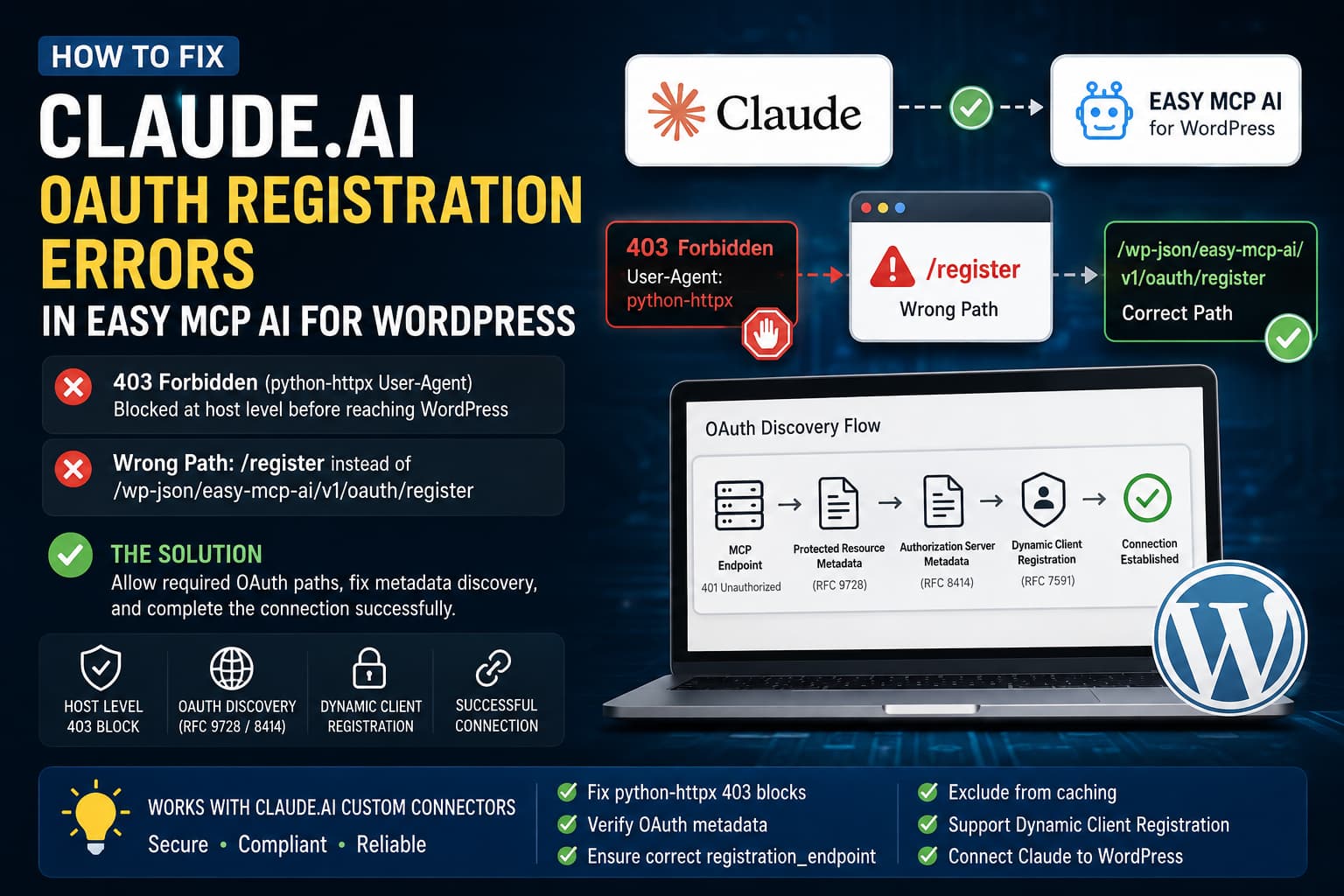
When Claude.ai cannot connect to Easy MCP AI and reports “Unable to register with the connector’s access service”, first check whether the MCP or OAuth discovery requests are receiving a hosting-level 403 Forbidden. A request to /register can be a fallback symptom when Claude cannot read the OAuth metadata that advertises the plugin’s actual registration endpoint.
Plugin compatibility information
Plugin: Easy MCP AI – Connect Claude to WordPress: MCP Server for ChatGPT & AI Agents
- Current version: 2.2.0
- WordPress.org last updated: October 15, 2026
- Minimum PHP version declared: 7.4 or higher
- Requires WordPress: 6.0 or higher
- Tested up to WordPress: 7.1.3
Source: official WordPress.org plugin listing.
Use this order:
- Test the MCP endpoint with the
python-httpxUser-Agent. - Inspect the
401response and follow the OAuth metadata URL advertised inWWW-Authenticate. - Compare the response with another User-Agent.
- If only the automated request receives
403, ask the host for a narrow exception covering the required MCP and OAuth paths.
A User-Agent is not an authentication mechanism and can be forged. Do not allow every python-httpx request across the website or disable security controls globally.
The error and its possible meaning
Connecting Claude.ai to WordPress through Easy MCP AI normally involves adding the MCP endpoint as a custom connector and completing the WordPress authorization process. The connection may instead fail with:
Unable to register with the connector’s access service
In Italian, the message may appear as:
Impossibile registrarsi con il servizio di accesso
Two symptoms can appear together:
- Requests using the
python-httpxUser-Agent receive403 Forbiddenbefore reaching WordPress. - Claude requests
/registerinstead of the registration endpoint advertised by Easy MCP AI’s OAuth metadata.
These symptoms do not, by themselves, prove that Easy MCP AI has a routing bug. They can indicate that Claude was unable to retrieve usable OAuth metadata because a firewall, WAF, CDN, anti-bot system, or cache returned a blocked, redirected, missing, or non-JSON response.
The Easy MCP AI endpoint
The main MCP endpoint shown in the article is:
https://example.com/wp-json/easy-mcp-ai/v1/mcpEasy MCP AI also provides a tokenized MCP URL format for Claude.ai:
https://example.com/wp-json/easy-mcp-ai/v1/mcp/YOUR_API_TOKENThe exact routes and OAuth metadata can vary by plugin release or site configuration. Treat the metadata returned by the installed site as authoritative rather than assuming that every installation exposes identical paths.
Why Claude may request /register
Seeing a request for:
https://example.com/registerdoes not necessarily mean that Claude received an incorrect registration_endpoint. It may mean that Claude did not receive usable OAuth metadata.
The expected discovery process is broadly:
- Claude contacts the MCP endpoint.
- The protected endpoint returns
401 Unauthorizedwith aWWW-Authenticateheader. - The header identifies the protected-resource metadata location.
- The protected-resource metadata identifies the authorization server.
- Claude retrieves the authorization-server metadata.
- The metadata provides the authorization, token, and client-registration endpoints.
- Claude sends Dynamic Client Registration to the published registration endpoint.
Older fallback behavior may use paths such as:
/register
/authorize
/token
Therefore, a request to /register can follow a 403, 404, redirect, HTML security page, cached error, missing registration_endpoint, or User-Agent-specific response during discovery.
Step 1: Update Easy MCP AI and clear stale state
Update Easy MCP AI to the newest available release before changing server rules. The supplied plugin metadata identifies version 1.7.13 as the listed release, while the reported installation used 1.7.10. Updating does not remove a host-level 403, but it avoids investigating an older plugin installation.
- Clear the website cache.
- Purge the server cache.
- Purge the CDN cache.
- Open Settings > Permalinks.
- Click Save Changes without changing the settings.
- Remove the failed connector from Claude.
- Do not reconnect it until the endpoint tests are complete.
Pretty permalinks must be enabled for the WordPress REST endpoint to work correctly.
Step 2: Test the MCP endpoint
Replace example.com with the site’s domain and run:
curl -i -X POST "https://example.com/wp-json/easy-mcp-ai/v1/mcp" \
  -H "User-Agent: python-httpx/0.28.1" \
  -H "Content-Type: application/json" \
  -H "Accept: application/json, text/event-stream" \
  --data '{
    "jsonrpc": "2.0",
    "id": 1,
    "method": "initialize",
    "params": {
      "protocolVersion": "2025-06-18",
      "capabilities": {},
      "clientInfo": {
        "name": "oauth-debug-test",
        "version": "1.0"
      }
    }
  }'
Without authentication, a protected MCP endpoint may return 401 Unauthorized. That response is not necessarily a failure. Examine the status, headers, and body:
- A hosting-generated
403suggests blocking before WordPress, but response headers or host security logs are needed to identify the responsible layer. - A
401indicates that the request reached an authentication layer. Check forWWW-Authenticate. - An HTML security page is not OAuth metadata.
- A redirect may prevent a client from reading the expected metadata.
- A
404means that the tested path is not available at that URL; follow the path advertised by the live response instead of assuming that another path is correct.
An example response may look similar to:
HTTP/2 401
Content-Type: application/json
WWW-Authenticate: Bearer resource_metadata="https://example.com/.well-known/oauth-protected-resource"
The metadata URL in the live WWW-Authenticate header should take precedence over an assumed well-known path.
Step 3: Compare User-Agents
Compare the same metadata request with different User-Agents. These tests are evidence about response filtering; they do not prove the identity of the remote client.
Test with python-httpx
curl -i "https://example.com/.well-known/oauth-authorization-server" \
  -H "User-Agent: python-httpx/0.28.1" \
  -H "Accept: application/json"
Test with Claude-User
curl -i "https://example.com/.well-known/oauth-authorization-server" \
  -H "User-Agent: Claude-User" \
  -H "Accept: application/json"
Test with a browser User-Agent
curl -i "https://example.com/.well-known/oauth-authorization-server" \
  -H "User-Agent: Mozilla/5.0" \
  -H "Accept: application/json"
If the first request returns 403 while another request returns JSON, that is evidence of User-Agent-based filtering at some layer. Confirm the layer using response headers or the hosting provider’s security logs where available. Repeat the comparison for the protected-resource metadata paths if the live MCP response or plugin documentation identifies them:
curl -i "https://example.com/.well-known/oauth-protected-resource" \
  -H "User-Agent: python-httpx/0.28.1"
curl -i "https://example.com/.well-known/oauth-protected-resource/wp-json/easy-mcp-ai/v1/mcp" \
-H "User-Agent: python-httpx/0.28.1"Step 4: Test Dynamic Client Registration carefully
Run registration tests only on a site you administer. A successful request may create persistent client-registration data, and request bodies or responses may be recorded in shell history, server logs, proxy logs, or support tickets. Review and revoke disposable registrations after testing, and do not paste real tokens or sensitive responses into public reports.
Create the payload used by the article:
cat > mcp-registration.json <<'JSON'
{
  "client_name": "Claude",
  "redirect_uris": [
    "https://claude.ai/api/mcp/auth_callback"
  ],
  "grant_types": [
    "authorization_code",
    "refresh_token"
  ],
  "response_types": [
    "code"
  ],
  "token_endpoint_auth_method": "none"
}
JSON
Test the registration route advertised by the site’s OAuth metadata. The following route is the route used in the source article:
curl -i -X POST \
  "https://example.com/wp-json/easy-mcp-ai/v1/oauth/register" \
  -H "User-Agent: python-httpx/0.28.1" \
  -H "Content-Type: application/json" \
  --data-binary @mcp-registration.json
Run the comparison with a browser User-Agent:
curl -i -X POST \
  "https://example.com/wp-json/easy-mcp-ai/v1/oauth/register" \
  -H "User-Agent: Mozilla/5.0" \
  -H "Content-Type: application/json" \
  --data-binary @mcp-registration.json
A successful Dynamic Client Registration response may return HTTP 201 Created and JSON containing a client_id, for example:
{
  "client_id": "generated-client-id",
  "redirect_uris": [
    "https://claude.ai/api/mcp/auth_callback"
  ],
  "grant_types": [
    "authorization_code",
    "refresh_token"
  ]
}
If one User-Agent receives 403 and another reaches the registration route, the difference is consistent with filtering outside the WordPress route. It does not, by itself, establish which firewall or proxy is responsible.
Step 5: Request a narrow hosting exception
The preferred remedy is a narrowly scoped exception at the firewall, WAF, anti-bot, or proxy layer that is returning the 403. User-Agent matching should not be the only security control because it is easy to forge. Preserve authentication, rate limits, abuse detection, and other applicable protections.
Ask the hosting provider to investigate requests using python-httpx for the routes required by the installed Easy MCP AI release. The source article lists these paths:
/.well-known/oauth-protected-resource*/.well-known/oauth-authorization-server*/wp-json/easy-mcp-ai/v1/mcp*/wp-json/easy-mcp-ai/v1/oauth/*
Also ask the provider to check whether requests containing ?easy_mcp_ai_oauth= are blocked. The exception should be limited to the required paths and methods and should continue to enforce authentication, rate limiting, request validation, and logging.
The responsible control may be described as bot protection, anti-DDoS protection, HTTP flood protection, bad-bot filtering, request-reputation filtering, Imunify360, WebShield, a server-level WAF, reverse-proxy filtering, Nginx security rules, or LiteSpeed security rules. The block may not appear in ModSecurity, cPanel, Wordfence, or WordPress logs if it occurs earlier in the request path.
Optional Cloudflare header rewrite
When the origin host blocks the request based on the User-Agent received at the origin, and Cloudflare is not blocking it first, Cloudflare Request Header Transform Rules may be able to change the header before forwarding the request. This is an optional workaround, not a substitute for a correctly scoped origin exception.
In Cloudflare, the source article identifies:
Rules > Transform Rules > Modify Request HeaderIts example expression is:
(
  starts_with(http.request.uri.path, "/.well-known/oauth-")
  or starts_with(http.request.uri.path, "/wp-json/easy-mcp-ai/v1/")
)
and lower(http.user_agent) contains "python-httpx"
The example sets:
Header name: User-Agent
Operation: Set static
Value: Claude-User
Do not use this approach unless the site administrator understands the logging, security, and provider-policy implications. Restrict the expression to the required paths, avoid treating the rewritten value as authentication, and repeat the endpoint tests after deployment.
Validate the OAuth metadata
After removing the suspected 403, inspect the authorization-server metadata:
curl -sS \
  "https://example.com/.well-known/oauth-authorization-server" \
  -H "Accept: application/json" | jq .
The live response should be valid JSON rather than HTML. The source article gives this illustrative shape:
{
  "issuer": "https://example.com",
  "authorization_endpoint": "https://example.com/?easy_mcp_ai_oauth=authorize",
  "token_endpoint": "https://example.com/wp-json/easy-mcp-ai/v1/oauth/token",
  "registration_endpoint": "https://example.com/wp-json/easy-mcp-ai/v1/oauth/register"
}
Confirm that the live metadata, not merely the example, contains the required absolute HTTPS URLs and that registration_endpoint points to the actual Dynamic Client Registration route. Check for staging or localhost URLs, redirects, injected HTML, login cookies, stale cached 403 responses, and an incorrect content type.
Exclude OAuth routes from caching
Exclude the relevant discovery, MCP, and OAuth routes from page caching. The source article lists:
/.well-known/oauth-protected-resource*
/.well-known/oauth-authorization-server*
/wp-json/easy-mcp-ai/v1/mcp*
/wp-json/easy-mcp-ai/v1/oauth/*
Check the WordPress cache plugin, LiteSpeed Cache, Varnish, Nginx FastCGI cache, Cloudflare Cache Rules, hosting page cache, and security proxy cache where applicable.
After changing exclusions, purge the relevant cache layers and test the live endpoints again. Restart PHP workers only when the hosting environment provides that option; a PHP restart cannot correct a block occurring before PHP.
Optional /register compatibility redirect
This is not the primary fix. OAuth discovery should publish the correct registration endpoint. A temporary redirect may help older clients that continue requesting /register, but it cannot repair blocked metadata.
Use HTTP 307 or 308 so that the POST method and JSON body can be preserved. The source article provides these examples.
Apache .htaccess
<IfModule mod_rewrite.c>
RewriteEngine On
RewriteRule ^register/?$ /wp-json/easy-mcp-ai/v1/oauth/register [R=307,L]
</IfModule>
Nginx
location = /register {
    return 307 /wp-json/easy-mcp-ai/v1/oauth/register;
}
Do not use a normal 301 or 302 redirect for a Dynamic Client Registration POST because some clients may change the redirected request to GET and discard the JSON body. The redirect also does not address later requests to /authorize or /token, so restoring reliable discovery remains the long-term solution.
Why a tokenized MCP URL may still fail
The tokenized URL may be:
https://example.com/wp-json/easy-mcp-ai/v1/mcp/YOUR_API_TOKENUsing this format may be appropriate when it is documented for the installed plugin release, but it does not bypass a host-level User-Agent block. Claude still has to contact the MCP URL. If the request is rejected before WordPress receives it, Easy MCP AI cannot read the token from the URL, and Claude may proceed to authentication or OAuth discovery instead.
For a manual token connection, create a new token rather than reusing one that may have appeared in logs, screenshots, support tickets, or browser history.
Reconnect Claude after the server response is corrected
- Open Claude.ai.
- Go to Settings > Connectors.
- Remove the failed WordPress connector.
- Open Easy MCP AI > API Token & OAuth in WordPress.
- Revoke incomplete or duplicate Claude registrations created during testing.
- Clear the applicable cache layers.
- Add the connector again using the main MCP URL:
https://example.com/wp-json/easy-mcp-ai/v1/mcp- Complete the WordPress login and consent screen.
- Grant only the permissions Claude needs.
Final verification checklist
- Easy MCP AI is updated.
- WordPress uses HTTPS and pretty permalinks.
- The MCP endpoint is reachable with the required request method.
- The relevant MCP and OAuth requests do not receive an unexplained edge
403. - The protected-resource and authorization-server metadata responses are valid JSON.
- The live
registration_endpointpoints to the installed plugin’s registration route. - Dynamic registration returns the expected response for that installation.
- The callback URL is accepted during the actual authorization flow.
- The authorization page opens and the token endpoint is reachable.
Authorizationheaders are not stripped.- OAuth and MCP routes are excluded from inappropriate page caching.
- Failed or disposable registrations have been revoked before reconnecting.
Frequently asked questions
Is /register definitely an Easy MCP AI bug?
No. It can be a fallback after OAuth discovery fails. Inspect the MCP response, its WWW-Authenticate header, and the metadata returned by the advertised URLs before changing plugin routes.
Why is nothing recorded in the WordPress debug log?
A hosting firewall or proxy may reject the request before PHP and WordPress execute. In that case, the WordPress logs cannot record the request.
Should ModSecurity or Wordfence be disabled?
Not as a first step. Identify which layer returns the 403 and apply the narrowest available exception. Wordfence cannot override a block at the hosting proxy, LiteSpeed, Nginx, or network edge.
Can the python-httpx User-Agent be allowed everywhere?
That is not recommended. User-Agent values are easy to forge. Restrict any exception to the required MCP and OAuth paths and retain authentication, rate limits, and abuse controls.
Why does the endpoint work in a browser but fail in Claude?
Browsers and remote connectors can use different User-Agents, network addresses, headers, methods, and content types. A security system may allow a browser request while blocking an automated JSON request.
Conclusion
When Claude.ai reports an Easy MCP AI registration error alongside a python-httpx 403 and a request to /register, the symptoms may be related. A blocked or malformed OAuth discovery response can prevent Claude from learning the plugin’s actual authorization and registration routes.
Test the live MCP and metadata responses, compare the relevant request behavior, identify the blocking layer where possible, and request a narrowly scoped host or proxy exception. Then clear stale caches, validate the live registration metadata, revoke failed test registrations, and recreate the Claude connector.
