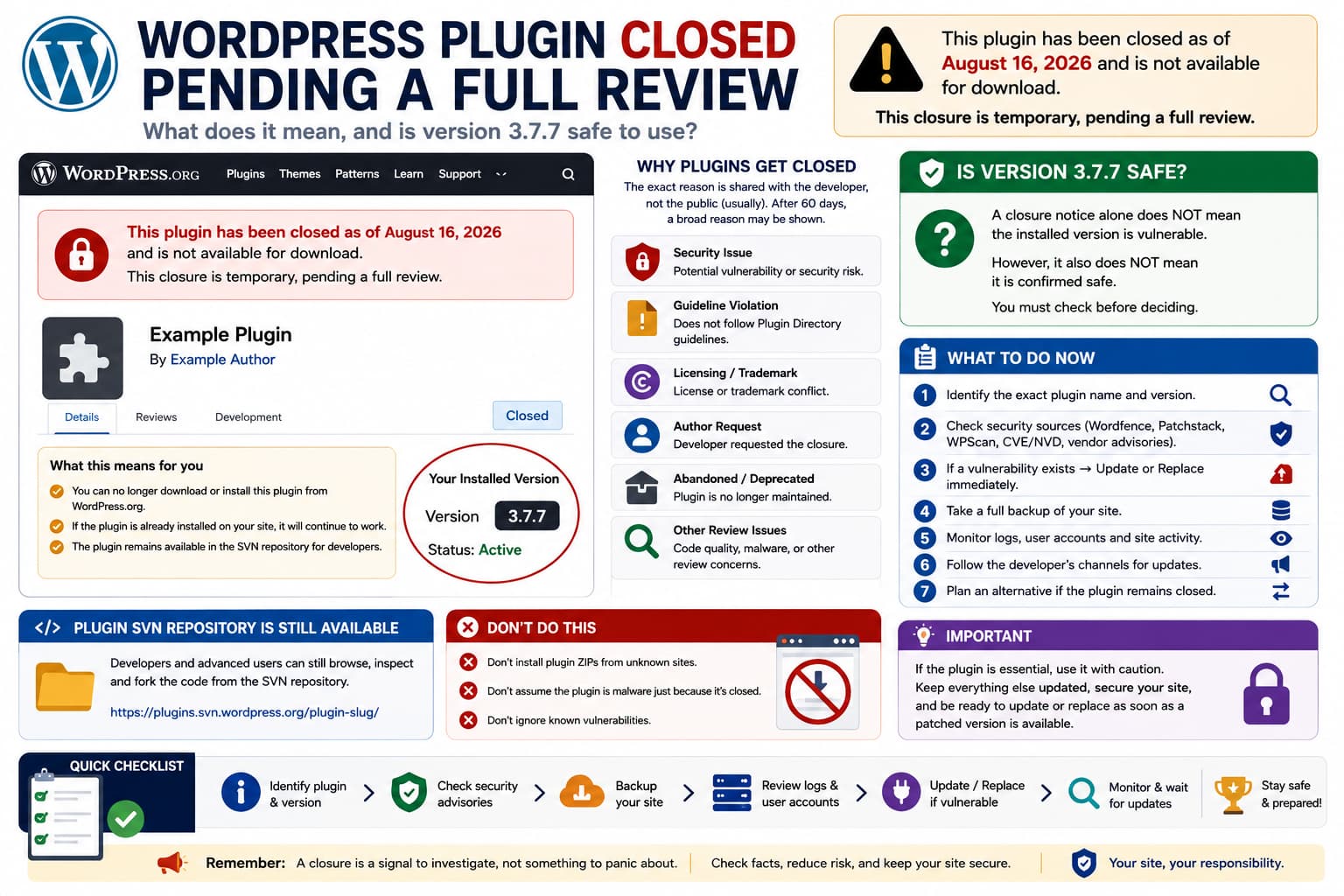
Seeing this warning on a WordPress.org plugin page can be alarming:
This plugin has been closed as of August 16, 2026and is not available for download.This closure is temporary, pending a full review.
Two questions immediately follow:
- When will the plugin become available again?
- Is the currently installed version, such as 3.7.7, safe to continue using?
Unfortunately, the closure banner by itself does not answer either question.
WordPress.org intentionally does not immediately disclose the exact reason for most plugin closures. According to the official Plugin Developer FAQ, plugins can be closed because of security problems, Plugin Directory guideline violations, licensing or trademark problems, an author request, abandonment, or other review issues.
So:
"Pending a full review"
does not automatically mean:
"This plugin contains a vulnerability."
But it also does not mean the installed version has been certified safe.
That distinction is important.
What Happens When WordPress.org Closes a Plugin?
WordPress.org’s documentation explains what closure actually does.
When a plugin is closed:
WordPress.org plugin page→ marked ClosedDownload ZIP→ unavailableWordPress admin new installation→ unavailablePlugin SVN repository→ remains accessible
If the plugin is already installed on your website, WordPress.org does not normally remotely deactivate it.
Your existing copy can therefore continue running:
Installed plugin→ still executesFrontend functionality→ can continue workingExisting settings/data→ remain
The problem is that you are now using software whose public distribution has been interrupted while the Plugin Review Team investigates something.
Why Doesn’t WordPress.org Tell Us the Reason Immediately?
This is intentional.
WordPress.org says the detailed reason for a closure is generally shared with the plugin’s committers rather than the public. After 60 days, the public closure notice may be updated with a broad category such as:
Security IssueGuideline ViolationAuthor RequestLicensing / Trademark Violation
but even then WordPress.org generally does not publish the detailed underlying issue.
This protects responsible disclosure when a security problem may be involved.
Therefore, on August 21, only five days after an August 16 closure, seeing only:
pending a full review
is normal.
How Long Does the Review Take?
There is no guaranteed reopening date.
The plugin developer first needs to address whatever prompted the closure, then the Plugin Review Team must review the corrected code.
The normal plugin-submission documentation says queued plugin reviews are generally targeted within 14 business days, but a closed existing plugin can involve a different and potentially more complicated remediation process.
A reopening could therefore take:
a few daysseveral weeksor considerably longer
depending on:
- how serious the issue is,
- whether the developer responds quickly,
- how many changes are required,
- whether security problems need remediation,
- whether licensing/guideline issues are involved,
- whether the plugin developer intends to continue maintaining it.
There is no reliable way for an end user to predict the date from the closure notice alone.
Does “Pending Full Review” Mean the Plugin Was Hacked?
No.
WordPress.org lists several possible reasons for plugin closure. Security is only one of them.
For example, a plugin could be closed because of:
incorrect licensingprohibited trackingdirectory guideline violationsdeveloper-requested closuresecurity issueabandoned/deprecated development
A real example documented by WordPress.org users involved a plugin temporarily closed for review where the developer later corrected the requested issues and resubmitted it.
So the banner alone cannot establish whether the problem is dangerous.
Is Version 3.7.7 Safe?
This is where you need to be careful.
There is no technically responsible way to say:
Version 3.7.7 is safe because it was working before the plugin was closed.
A plugin can work perfectly while containing a security vulnerability.
Likewise, the fact that the plugin was closed does not prove:
Version 3.7.7 is vulnerable.
The specific plugin name or slug is required to check:
- Wordfence vulnerability records,
- Patchstack,
- WPScan,
- CVE/NVD records,
- the plugin SVN history,
- the author’s repository,
- recent security advisories.
The source report provided here contains the version number 3.7.7, but it does not identify the plugin. Because several unrelated WordPress plugins have released a version numbered 3.7.7, attributing a particular vulnerability to this report without the plugin name would be guesswork.
Therefore the correct answer is:
Do not assume 3.7.7 is safe until the exact plugin and version have been checked against current vulnerability records.
Why the Exact Plugin Name Matters So Much
Version numbers are not globally unique.
For example, completely unrelated WordPress products have had releases numbered:
3.7.7
and some have even had security issues affecting that version.
One current example is Kadence Blocks: public vulnerability records show security issues affecting versions through 3.7.7, with fixes in later releases.
Another unrelated commercial WooCommerce plugin also has a vulnerability listed through version 3.7.7.
That does not mean either is the plugin described in this forum report.
It demonstrates why:
Version = 3.7.7
is not enough information to assess safety.
What I Would Do on a Production Site
If a plugin I depend on suddenly receives a WordPress.org closure notice, I would first avoid panic-deleting it.
Deleting a functional plugin immediately can break:
- forms,
- checkout,
- custom post types,
- shortcodes,
- blocks,
- stored metadata,
- integrations.
Instead, assess its risk.
First, identify the exact installed plugin
With WP-CLI:
wp plugin list
Then inspect the plugin:
wp plugin get plugin-slug
You should see information such as:
namestatusversion
Record:
Plugin:Exact nameSlug:plugin-folderInstalled version:3.7.7
The slug is particularly valuable when searching security databases because similarly named plugins can exist.
Check for a Known Security Advisory
Search the exact combination:
plugin-name 3.7.7 vulnerability
and:
plugin-slug CVE
Prioritize:
Wordfence Threat IntelligencePatchstackNVD/CVEWPScanvendor security advisories
If a trusted security source says:
Affected:<= 3.7.7Patched:3.7.8
then 3.7.7 should not be treated as safe even if WordPress.org currently prevents downloading the patched release.
For example, NVD records commonly specify an affected range and the first unaffected version.
If There Is a Known Unpatched Vulnerability
If the installed version is publicly known to be vulnerable and there is no safely obtainable patched release:
Plugin essential? ↓No→ deactivate/remove itYes→ isolate risk→ contact developer→ seek patched official build→ plan replacement
Do not download a replacement ZIP from an unknown plugin mirror.
A closed WordPress.org listing frequently causes unofficial download sites to appear in search results.
Those copies may be:
- outdated,
- modified,
- bundled with unwanted code,
- impossible to verify.
If the developer publishes a legitimate GitHub repository or official website, verify that it is actually controlled by the established plugin author before installing anything.
If No Known Vulnerability Is Published
This is more nuanced.
Suppose:
Plugin closed✓Security databases:No known vulnerabilityInstalled version:3.7.7Site:working normally
That does not prove the plugin is safe.
The directory could have closed it because a vulnerability is under responsible disclosure and not yet public.
WordPress.org specifically tells security researchers not to immediately disclose plugin vulnerabilities publicly, because doing so can increase exploitation before a fix is available.
Therefore, while review is pending, consider the plugin an elevated maintenance risk.
Lower the Risk While You Wait
If the plugin is essential and there is no published exploit, some sensible precautions are:
- take a verified full backup,
- ensure WordPress core and every other plugin are current,
- remove unused administrator/editor accounts,
- give users only the minimum required role,
- monitor server and security logs,
- keep a security scanner/WAF active,
- test an alternative plugin on staging,
- follow the plugin support forum and developer channels,
- check daily for a reopened/patched version.
A firewall is useful, but it is not a substitute for updating vulnerable PHP code.
Check Whether the Plugin Has an Official GitHub Repository
The WordPress.org SVN repository remains available even after closure. WordPress says this deliberately allows developers to inspect and fork the open-source code.
The developer may also maintain GitHub.
If they publish:
3.7.8Security fix
there before WordPress.org reopens the plugin, that is useful evidence.
However, make sure the repository belongs to the actual plugin author.
Do not install a fork solely because it has the same plugin name.
Why WordPress Leaves SVN Available
The closure primarily removes public distribution, not the open-source history.
That allows:
security researchersdevelopersplugin maintainerspotential adopters
to inspect what changed.
The WordPress Plugin Handbook even describes a process for adopting abandoned plugins. Closed plugins with security issues must have those issues corrected before WordPress.org will approve adoption.
This means closure is a distribution/review state, not an attempt to erase the software.
How to Check Whether Your Installed Files Were Modified
A closure does not automatically mean your individual site was compromised.
Still, if you are concerned, compare the installed files against a trusted copy of the same version.
WP-CLI provides plugin checksum verification for supported WordPress.org plugin releases:
wp plugin verify-checksums plugin-slug
If checksums are available, a healthy result looks like:
Success: Verified 1 of 1 plugins.
Unexpected differences deserve investigation.
Be aware that:
- some historical/closed releases may not have available checksum data,
- legitimate manual modifications also cause mismatches,
- a successful checksum only proves the files match that published version; it does not prove the published version itself has no vulnerability.
Do Not Confuse “No Malware” With “No Vulnerabilities”
These are different questions.
A plugin can contain:
no malwareno backdoorno suspicious domain
and still contain:
SQL injectionauthorization bypassstored XSSCSRFfile inclusionarbitrary file upload
So malware scanning alone cannot establish whether version 3.7.7 is secure.
Security advisories and code review matter too.
Do Existing Sites Still Receive Updates While the Plugin Is Closed?
Do not rely on normal update availability during the closure.
WordPress.org says that when a plugin is closed its download ZIPs are no longer generated and users cannot install it normally through WordPress.
Once it is reopened and a corrected release is published, normal update distribution can resume.
Until then, keep watching the plugin page and developer announcements.
What Does “Temporary” Really Mean?
It does not promise that the plugin will definitely return.
“Temporary, pending a full review” means the directory has not permanently marked the plugin as retired at that point.
Possible outcomes include:
Developer fixes issue→ plugin reopenedDeveloper does not respond→ plugin remains closedReview identifies more issues→ additional work requiredPlugin abandoned→ replacement eventually needed
So if the plugin performs an important business function, start evaluating alternatives even if you intend to keep using the existing copy temporarily.
When I Would Remove the Plugin Immediately
I would seriously consider deactivation or removal if any of these are true:
Known vulnerability affects installed versionPublic exploit existsVulnerability allows unauthenticated compromisePlugin is non-essentialDeveloper has abandoned the projectNo patched version is availableSecurity vendor specifically recommends removal
For a checkout, membership, file-upload, user-account, or administrator plugin, the risk deserves even more attention because those plugins often handle sensitive operations.
When Temporary Continued Use Can Be Reasonable
Continued short-term use may be reasonable when:
No known vulnerability has been identifiedPlugin is essentialRemoving it would break production functionalitySite access is tightly controlledBackups and monitoring are activeA replacement/migration is being prepared
This is a risk decision, not a declaration that the version is “safe.”
Should You Downgrade to Version 3.7.7?
Do not choose 3.7.7 merely because it was the version available before closure.
The correct version is the latest version proven not to contain known security issues.
For some plugins:
3.7.7→ safe
could be true.
For another plugin:
3.7.7→ known vulnerable3.7.8→ security fix
could be true.
Without identifying the plugin, recommending that version would be irresponsible.
What Plugin Authors Need to Do
If the plugin was closed by WordPress.org rather than voluntarily, the maintainers normally receive details directly from the Plugin Review Team. WordPress states that committers are contacted when active security or guideline problems result in closure.
The developer should therefore:
- review the WordPress.org email,
- correct every listed issue,
- review surrounding code for similar problems,
- update the plugin version,
- submit the corrected code,
- respond to the Plugin Review Team,
- wait for approval/reopening.
End users generally cannot speed up that process.
The Most Accurate Answer to the Original Question
If the repository currently says:
Closed August 16, 2026Temporary, pending a full review
there is no public reopening date yet.
WordPress.org’s standard closure notice does not disclose the exact cause during the first stage of review.
And regarding:
Is version 3.7.7 safe?
the closure notice alone cannot answer that.
The exact plugin name/slug must be checked against security advisories and the developer’s latest code.
Until then, the responsible interpretation is:
Plugin closed≠ confirmed vulnerablePlugin closed≠ confirmed safe
Treat it as a signal to investigate and prepare a fallback.
A Practical Checklist
For any temporarily closed WordPress plugin:
- Record the exact plugin name, slug, and version.
- Do not immediately delete an essential plugin from production.
- Check Wordfence, Patchstack, WPScan, NVD/CVE, and vendor advisories.
- If the installed version is known vulnerable, update or replace it immediately.
- Do not install plugin ZIPs from random mirror sites.
- Check the developer’s official GitHub/repository for status updates.
- Back up the site.
- Monitor user accounts and logs.
- Test an alternative plugin on staging.
- Recheck the WordPress.org page for a reopened/patched release.
