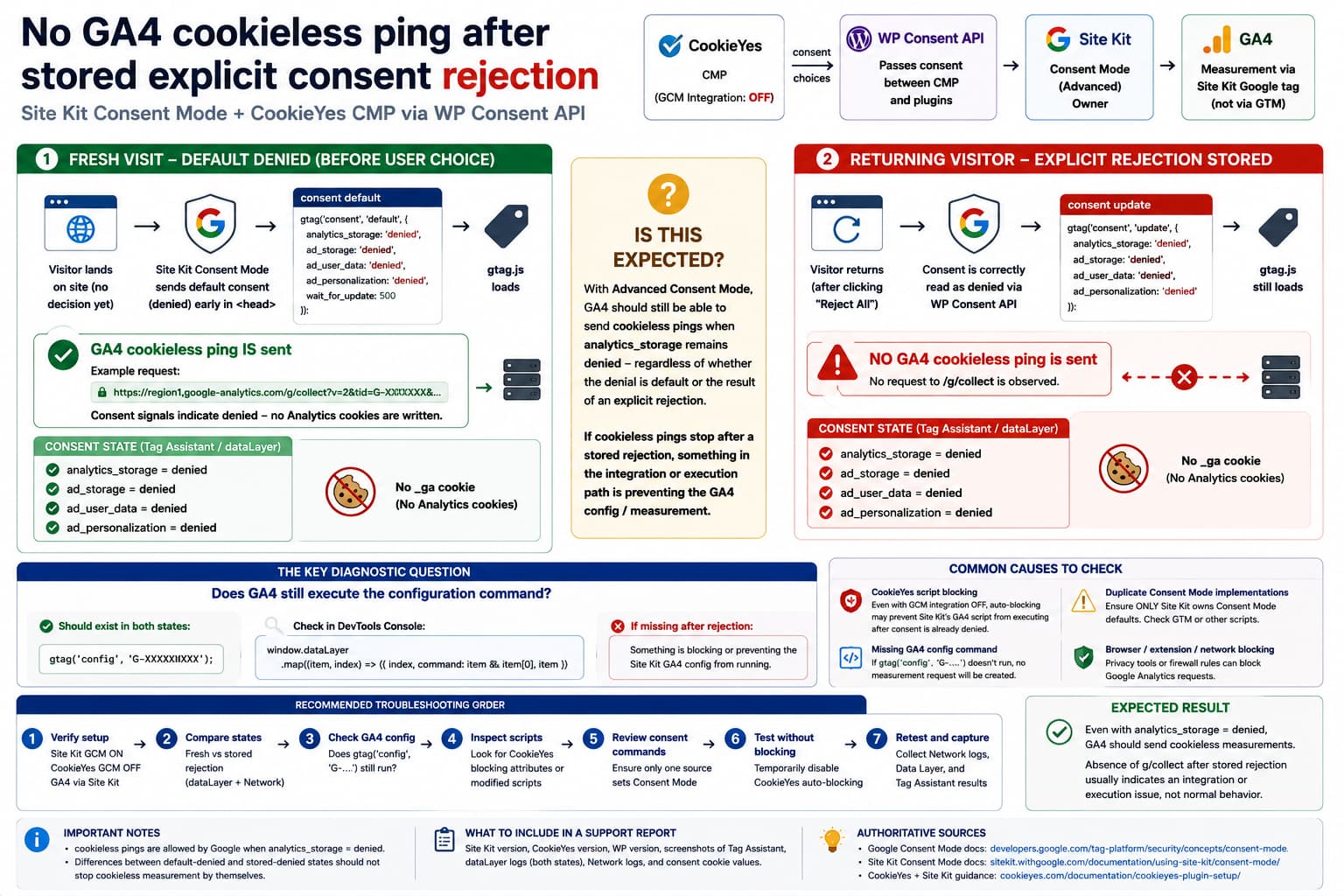
A Google Site Kit Consent Mode setup can produce a confusing difference between a visitor who has not made a consent choice yet and one who has already explicitly rejected analytics.
Consider this configuration:
Google Analytics 4→ installed through Site KitSite Kit Consent Mode→ enabledCookieYes→ CMPWP Consent API→ passes consent state between CookieYes and Site KitCookieYes Google Consent Mode integration→ disabledGoogle Tag Manager→ present for Google Ads, but not responsible for GA4
On a completely fresh visit, Site Kit starts with:
analytics_storage = deniedad_storage = deniedad_user_data = deniedad_personalization = denied
and the Site Kit Google tag can send a request such as:
https://region1.google-analytics.com/g/collect
without Analytics cookies.
That is normal Advanced Consent Mode behavior.
The confusing case is what happens after the visitor clicks:
Reject All
and reloads the page.
The consent values are still correctly:
analytics_storage = deniedad_storage = deniedad_user_data = deniedad_personalization = denied
and gtag.js still loads, but there is no corresponding GA4 g/collect request.
Based on Google’s Consent Mode documentation and Site Kit’s current implementation, the explicit rejection itself should not inherently stop cookieless measurement merely because analytics_storage is still denied.
That difference is worth investigating.
What Google Says Should Happen When analytics_storage Is Denied
Google’s current Consent Mode documentation is quite clear about Advanced Consent Mode.
When:
analytics_storage = denied
Google Analytics:
- must not read Analytics cookies,
- must not write Analytics cookies,
- but can send measurements without cookies for basic measurement and modeling.
Google describes these as measurements without third-party cookies, often referred to as cookieless pings.
That behavior is tied to the current consent state:
denied
not specifically to whether the denial came from:
default consent state
or:
an explicit Reject All click
Therefore, from Google’s Consent Mode perspective, both of these remain denied-state scenarios:
Fresh visitoranalytics_storage = denied
and:
Returning visitor who rejectedanalytics_storage = denied
If the Google Analytics tag executes normally in both cases, Advanced Consent Mode is designed to allow cookieless measurement in both.
Site Kit Uses Advanced Consent Mode
Site Kit support has explicitly described its Consent Mode implementation as Advanced Consent Mode.
With Site Kit managing Consent Mode, Google tags load before the visitor grants consent, while storage is initially denied. This allows limited cookieless measurement instead of completely blocking the Google tag.
That matches the first observed test:
Fresh browser↓Consent defaults denied↓gtag.js loads↓GA4 g/collect occurs↓No Analytics cookies
So that part of the setup is behaving consistently with Site Kit’s intended architecture.
Site Kit Sets Consent to Denied Before the Google Tag Runs
Current Site Kit source inserts a Consent Mode command very early in <head>.
Its default values include:
'ad_personalization' => 'denied','ad_storage' => 'denied','ad_user_data' => 'denied','analytics_storage' => 'denied','functionality_storage' => 'denied','security_storage' => 'denied','personalization_storage' => 'denied',
and:
'wait_for_update' => 500
Conceptually, Site Kit outputs:
gtag('consent', 'default', { analytics_storage: 'denied', ad_storage: 'denied', ad_user_data: 'denied', ad_personalization: 'denied', wait_for_update: 500});
before measurement commands.
Google itself recommends placing the consent default command before any command that sends measurement data.
How Site Kit Reads WP Consent API
Site Kit then listens for WP Consent API changes.
Its default mapping is:
WP Consent API: statistics→ analytics_storageWP Consent API: marketing→ ad_storage→ ad_user_data→ ad_personalization
When a consent-change event arrives, Site Kit maps:
allow→ granteddeny→ denied
and sends:
gtag('consent', 'update', ...)
This is exactly the kind of bridge expected between CookieYes, WP Consent API and Site Kit.
A Very Important Detail About Stored Consent
Site Kit’s current page-load logic is interesting.
When the page initially loads, it checks WP Consent API categories and explicitly sends an update for categories that currently return granted.
Its current JavaScript does not contain an equivalent branch saying:
If statistics was previously explicitly rejected,disable the Analytics tag.
Instead, the consent defaults have already been initialized as denied, so a stored denial does not need to be promoted to another state.
That means Site Kit itself does not appear to deliberately implement:
default denied→ allow cookieless Analyticsstored denied→ completely suppress Analytics
as two separate intended modes.
This is an important code-level clue.
Site Kit Still Loads the Analytics Google Tag
Site Kit’s Analytics implementation normally registers its GA4 configuration through its common Google tag infrastructure.
The Analytics web tag ultimately adds the configured Analytics tag ID:
$gtag->add_tag( $this->tag_id, $gtag_opt );
Site Kit’s Analytics tag guard checks whether:
useSnippet
and:
measurementID
exist. It does not contain a consent-based rule that says the tag should be disabled after a stored WP Consent API rejection.
So if:
gtag.js loads
but:
no GA4 collect request occurs
after a stored rejection, something else in the execution path deserves inspection.
Therefore: Is the Difference Expected?
For a normal Site Kit Advanced Consent Mode implementation, I would not treat the stored rejection itself as sufficient explanation for the disappearance of all GA4 cookieless requests.
Google’s documented denied-state behavior is:
analytics_storage = denied→ no Analytics cookies→ cookieless measurements can still be sent
Site Kit’s own current code:
- establishes denied defaults,
- keeps the Google tag infrastructure active,
- reads WP Consent API,
- updates granted consent when appropriate,
- and does not contain an obvious separate “explicit denial means block GA4 completely” path.
So the difference:
Default denied→ g/collectStored denied→ no g/collect
is something I would investigate as an integration or execution-order issue, rather than automatically labeling it normal Advanced Consent Mode behavior.
Loading gtag.js Does Not Prove That GA4 Actually Fired
This distinction is critical.
You can have:
https://www.googletagmanager.com/gtag/js
in the Network panel without producing:
/google-analytics.com/g/collect
Loading the Google tag library means only that the JavaScript library was downloaded.
GA4 still needs a command such as:
gtag('config', 'G-XXXXXXXXXX');
or another Analytics event command to actually generate measurement.
So compare the Data Layer between the two states.
Test the Data Layer Before and After Stored Rejection
On a fresh browser session, open DevTools Console and run:
window.dataLayer
Look for entries equivalent to:
consent defaultjsconfig G-XXXXXXXXXX
Now:
- click Reject All,
- reload,
- inspect
window.dataLayeragain.
The important comparison is whether the Analytics:
config
command still appears.
For easier inspection, use:
window.dataLayer.map((item, index) => ({ index, command: item&&item[0], item }));
You are looking for a difference like:
Fresh default-denied page:consentjsconfig G-XXXXXXXXXX
versus:
Stored rejected page:consentjs
If the GA4 config command is missing after rejection, then the absence of g/collect is expected for that page execution, but the real question becomes:
What removed or prevented the Site Kit Analytics config command?
If config Still Exists but No g/collect Appears
That is a different case.
Suppose after stored rejection you still have:
gtag('config', 'G-XXXXXXXXXX')
and:
analytics_storage = denied
but there is no Analytics request.
Then investigate:
- additional Consent Mode commands,
send_page_view: false,- another Google tag modifying the configuration,
- GTM interaction,
- browser/privacy blocking,
- CMP auto-blocking,
- JavaScript errors.
This test cleanly separates:
GA4 was never configured
from:
GA4 was configured but did not transmit
Check Whether CookieYes Is Still Auto-Blocking Analytics
Disabling CookieYes’ Google Consent Mode integration is correct when Site Kit is the Consent Mode owner.
CookieYes’ own WordPress documentation specifically tells Site Kit users:
If Google Consent Mode is enabled in Site Kit, disable Google Consent Mode in CookieYes.
That part of the reported setup is therefore correct.
However, CookieYes also provides prior-consent / script auto-blocking functionality independently of its Google Consent Mode implementation. Its documentation describes blocking third-party scripts based on consent categories.
This creates an important distinction:
CookieYes GCM integrationOFF
does not necessarily prove:
CookieYes is not blocking any Analytics-related code
after wp_consent_statistics = deny has been stored.
A Stored Rejection Could Change CookieYes’ Blocking Behavior
This is one plausible explanation worth testing.
On the first visit:
No stored decision↓Site Kit consent default = denied↓Site Kit Analytics config runs↓cookieless ping
After Reject All:
statistics = deny stored↓CookieYes/WP Consent state already known on page load↓some Analytics script or inline configuration is blocked↓gtag.js may still load↓no GA4 config/event↓no g/collect
This would produce exactly the observed discrepancy.
The key test is therefore not simply:
Does gtag.js load?
but:
Does Site Kit's GA4 config command still execute?
Check the Actual Script Elements
Inspect the page source and DevTools Elements panel after a stored rejection.
Search for:
Google Analytics snippet added by Site Kit
Site Kit deliberately prepends that comment to its Analytics script output.
Check whether the related script:
- exists normally,
- has been given a blocking
type, - has CookieYes attributes added,
- has been moved,
- is prevented from executing.
For example, look for unexpected markup such as:
type="text/plain"
or:
data-cookieyes="cookieyes-analytics"
CookieYes documents this style of script blocking for analytics scripts.
Compare Page Source, Not Only the Live DOM
The live DOM can be modified after JavaScript executes.
Use:
view-source:https://example.com/
for both test conditions if the server output itself can vary.
Normally, the server does not know a browser’s CookieYes JavaScript consent state in the same way client-side code does, but CMPs can also use stored cookies during page initialization.
Compare whether the Site Kit Analytics snippet exists in both page loads.
Inspect Every Consent Command
Run:
window.dataLayer.filter(item => item&&item[0] ==='consent');
A correct sequence may look like:
consent defaultanalytics_storage: denied...consent updateanalytics_storage: denied...
after the user rejected.
That is not inherently a problem.
The key question is whether another script later changes or manipulates Google tag execution.
You should have exactly one system owning Google Consent Mode defaults.
For this configuration, that should be Site Kit.
CookieYes confirms that Site Kit users should disable CookieYes’ own GCM implementation to avoid duplicating the setup.
Check GTM Carefully Even Though GA4 Is Not Deployed Through It
The presence of a GTM container still matters.
If GTM is used for Google Ads, it may load its own:
Google tagConsent InitializationConsent Mode template
or other Google tags.
Inspect GTM and make sure it does not also issue:
gtag('consent', 'default', ...)
through a CookieYes template or custom HTML tag.
The ideal ownership here is:
Site Kit→ GA4→ Consent Mode defaultsCookieYes→ visitor choice→ WP Consent APIWP Consent API→ communicates choice to Site KitGTM→ Ads tags that respect the resulting Google consent state
not:
Site Kit Consent Mode+CookieYes Consent Mode+GTM Consent Mode
all competing.
Google’s Advanced Mode Does Not Mean Every Page Must Produce the Same Exact Request
One nuance is important.
Consent Mode documentation describes the behavioral model, not a guarantee that every page load will always produce one specific:
region1.google-analytics.com/g/collect
request.
Google controls parts of the tag runtime and request behavior.
Therefore, absence of one specific hostname or one particular network request is not by itself enough to declare the implementation broken.
Search all of:
google-analytics.comregion1.google-analytics.comanalytics.google.comcollectg/collect
and inspect Tag Assistant.
But if repeated controlled tests consistently show:
fresh denied→ GA4 measurementstored denied→ zero Analytics measurement
while everything else is identical, that difference is meaningful.
Why the 500 ms wait_for_update Matters
Site Kit currently sets:
wait_for_update = 500
Google describes this setting as a way to give an asynchronously loading CMP a short window to supply the current consent state before measurements proceed.
That creates another timing difference between:
visitor with no saved consent
and:
visitor whose denial is already available immediately
On a fresh visit, the tag may reach the end of that waiting window while still operating under default denied.
With a returning rejected visitor, the CMP/WP Consent API may establish the stored denied state almost immediately.
That timing difference could expose a conflict in another script that conditionally blocks Analytics.
It does not, however, change Google’s documented meaning of:
analytics_storage = denied
into “Advanced Consent Mode disabled.”
Verify WP Consent API Values Directly
Run:
wp_has_consent('statistics')
after the page has loaded.
After Reject All, this should return:
false
You can also inspect the stored WP Consent API cookies.
CookieYes documents:
wp_consent_statisticswp_consent_marketingwp_consent_preferenceswp_consent_functional
as the cookies used for the integration.
For the rejected state, the relevant categories should correctly represent denial.
If the values are correct, the consent storage layer is working.
The next step is then to determine why Analytics execution differs.
Add a Temporary Consent Event Logger
For diagnosis, run this before changing consent:
document.addEventListener('wp_listen_for_consent_change',function (event) {console.log('WP Consent API change:',event.detail ); });
Then change CookieYes from Reject to Accept and back.
You should see events similar to:
statistics: allowmarketing: allow
or:
statistics: denymarketing: deny
Site Kit listens to this same WP Consent API event and converts the status into Google’s granted / denied values.
A Strong Four-State Test
Test the same page under four conditions.
Test 1: Completely Fresh Browser
No CookieYes choiceanalytics_storage = denied
Record:
gtag.js?GA4 config?g/collect?_ga cookie?
Test 2: Reject All Without Reloading
Immediately after clicking Reject All, record the same four values.
Test 3: Reload With Rejection Stored
Again record:
gtag.js?GA4 config?g/collect?_ga cookie?
Test 4: Accept Analytics and Reload
Expected:
analytics_storage = grantedGA4 measurement = yes_ga cookie = yes
This table makes the discrepancy much easier to report.
For example:
| State | gtag.js | GA4 config | g/collect | _ga |
|---|---|---|---|---|
| Fresh/default denied | Yes | Yes | Yes | No |
| Reject clicked | Yes | Yes | Yes/No | No |
| Reload/stored reject | Yes | No | No | No |
| Stored accept | Yes | Yes | Yes | Yes |
If the bolded difference appears, you have identified the missing stage.
Do Not Turn CookieYes Google Consent Mode Back On
This is not the correct solution.
CookieYes explicitly instructs WordPress Site Kit users to disable CookieYes’ own GCM support when Site Kit Consent Mode is enabled.
Turning both on can create:
duplicate default commandsconflicting update commandsordering problemsincorrect Tag Assistant diagnostics
Keep one Consent Mode owner.
Do Not Force a Manual g/collect Request
Do not try to fix the problem by manually sending requests to:
google-analytics.com/g/collect
Google’s tag needs to construct those requests according to the current consent state.
The correct fix is to ensure that the Site Kit-managed Analytics tag executes normally under the denied Consent Mode state.
Site Kit’s Current Version
As of August 2026, WordPress.org lists Site Kit 1.184.0 as the current public release.
The current public changelog does not identify a specific fix for:
cookieless ping disappears only after stored explicit denial
so I would not claim this is a known Site Kit bug that has already been fixed.
Test on the current release before reporting the behavior.
When This Becomes a Site Kit Bug Report
A strong Site Kit report would demonstrate all of the following:
Site Kit 1.184.0WP Consent API currentCookieYes currentCookieYes GCM = OFFSite Kit GCM = ONGA4 only via Site KitNo other GA4 tagFresh denied:GA4 config + cookieless g/collectStored denied:same consent valuessame Site Kit tagbut no measurement request
Then also show that disabling CookieYes script auto-blocking, or replacing CookieYes temporarily with a minimal WP Consent API test implementation, changes the result.
If the same behavior remains with a clean WP Consent API setup and no CMP-side blocking, the evidence points much more strongly toward Site Kit.
When It Is More Likely a CookieYes Integration Issue
It is more likely on the CMP side if:
Fresh denied→ GA4 config existsStored rejection→ GA4 config disappears
or Site Kit’s script receives CookieYes blocking attributes only after a consent cookie is present.
CookieYes’ GCM feature can be disabled while its normal script-blocking functionality still exists, so the two should be tested independently.
The Practical Conclusion
For Site Kit’s Advanced Consent Mode:
analytics_storage = denied
is designed to mean:
No Analytics cookies+limited cookieless Analytics measurement
not:
No Analytics JavaScript measurement at all
So a repeatable transition from:
Default denied→ cookieless ping
to:
Stored explicit denied→ no Analytics ping
is not something I would consider automatically expected merely because the user clicked Reject All.
The next diagnostic is to compare the GA4 config command, not merely whether gtag.js loads.
If config disappears after the saved rejection, look for CookieYes/WP Consent API script blocking or another integration suppressing the Site Kit Analytics command.
If config remains but no measurement is sent, investigate the Google tag runtime, duplicate consent commands, GTM interaction and browser/network errors.
Recommended Troubleshooting Order
- Update Site Kit, CookieYes and WP Consent API.
- Keep Site Kit Consent Mode enabled.
- Keep CookieYes Google Consent Mode disabled.
- Verify no GTM tag is issuing another Consent Mode default.
- Compare
window.dataLayerfresh vs stored rejection. - Confirm whether
gtag('config', 'G-...')exists in both cases. - Inspect the Site Kit Analytics script for CookieYes blocking attributes.
- Search Network for all GA4 collection hosts, not only
region1. - Confirm WP Consent API returns
falsefor Statistics after rejection. - Temporarily test without CookieYes auto-blocking on staging.
- If the difference persists in a clean integration, report it to Site Kit with both Data Layer and Network captures.
