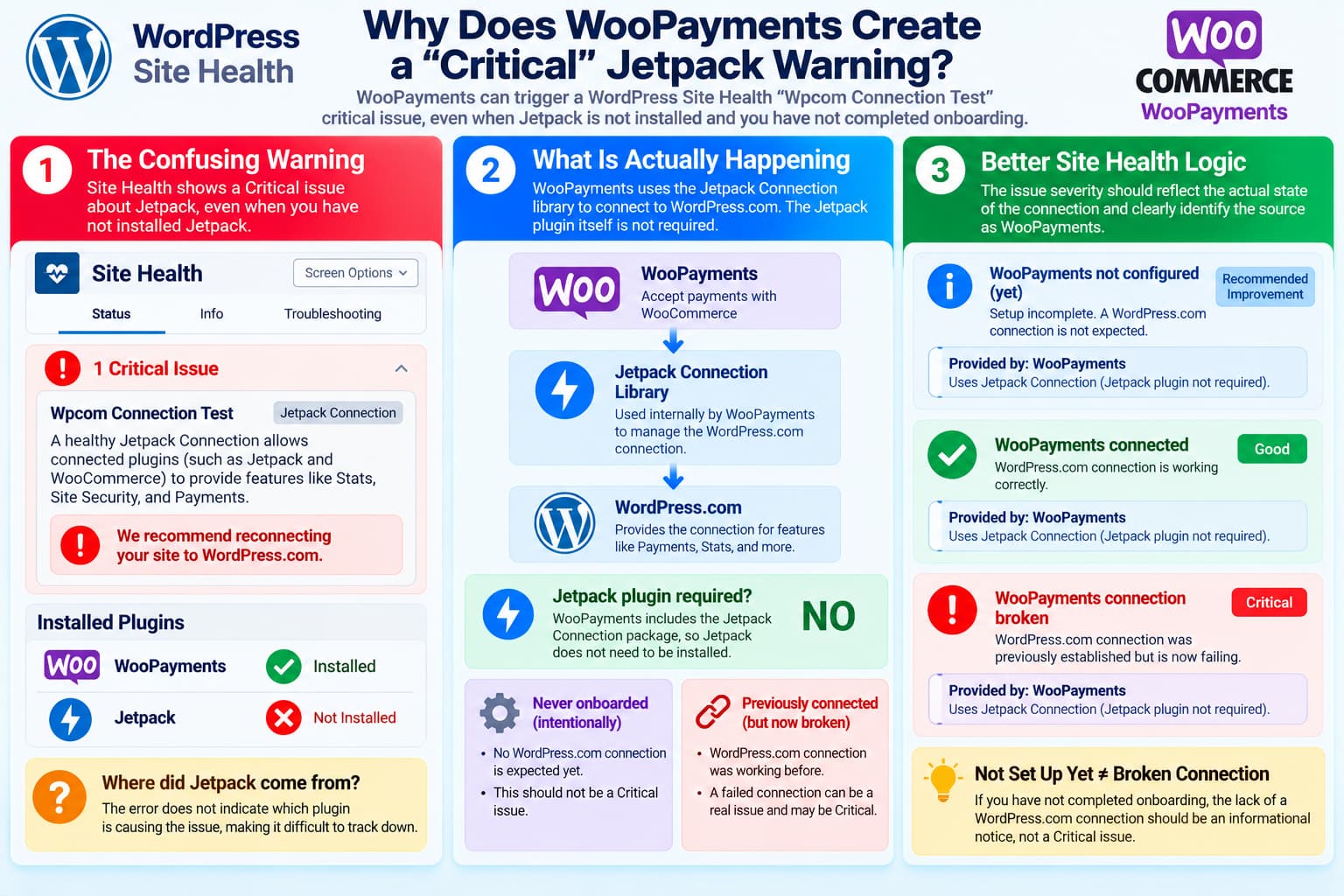
A confusing WordPress Site Health warning can appear after installing WooPayments, even on a website where the Jetpack plugin has never been installed.
The warning can look like:
Wpcom Connection Test
[Jetpack Connection]

A healthy Jetpack Connection allows connected plugins
(such as Jetpack and WooCommerce) to provide features
like Stats, Site Security, and Payments.

We recommend reconnecting your site to WordPress.com.
WordPress may classify it as:
Critical issueThat can be alarming when WooPayments was intentionally installed but not yet fully onboarded.
It can also be difficult to identify the source because the message says:
Jetpack Connectionrather than:
WooPaymentsThe first thing to understand is that the warning does not necessarily come from the Jetpack plugin.
WooPayments Uses Jetpack Connection Without Installing Jetpack
WooPayments requires a WordPress.com connection in order to function.
WooCommerce explains:
WooPayments requires a connection to WordPress.com in order to function properly.
That connection uses the same underlying technology as Jetpack, but WooCommerce explicitly notes that the Jetpack plugin itself is not required.
The architecture is roughly:
WooPayments
      ↓
Jetpack Connection package
      ↓
WordPress.com
      ↓
WooPayments services
So a website can have:
Jetpack plugin installed: NOwhile still loading:
Automattic Jetpack Connection code: YESthrough WooPayments.
This explains why the Site Health message mentions Jetpack even though the administrator never installed Jetpack.
WooPayments 11.2.0 Is the Current Public Release
WordPress.org currently lists:
WooPayments 11.2.0
Released: October 8, 2026
A source audit of that release shows that WooPayments 11.2.0 bundles:
automattic/jetpack-connection
version 9.1.2
The dependency is used directly by WooPayments to establish and manage the WordPress.com connection.
This matters because Jetpack Connection’s Site Health reporting has changed significantly during September and October 2026.
Why the Warning Says “Wpcom Connection Test”
The phrase:
Wpcom Connection Testis not a friendly product name.
It comes from the internal test method:
test__wpcom_connection_testOlder Jetpack Connection versions allowed WordPress Site Health to derive the visible heading from that internal method name.
That is why users see:
Wpcom Connection Testrather than something clearer such as:
WordPress.com Connectionor:
WooPayments requires a WordPress.com connectionAutomattic recognized this usability problem.
A Jetpack Connection update merged in September 2026 changed the Site Health headings to human-readable labels.
For example:
test__wpcom_connection_testbecame:
Requests from WordPress.comand:
test__check_if_connectedbecame:
WordPress.com ConnectionThe update specifically described the old “Wpcom Connection Test” heading as machine-generated and confusing.
WooPayments 11.2.0 Predates Those Package Improvements
This is an important version mismatch.
WooPayments 11.2.0 currently bundles:
Jetpack Connection 9.1.2released September 9, 2026.
But the clearer Site Health language was added to Jetpack Connection:
9.4.0
September 18, 2026
Later, Jetpack Connection:
9.9.0
October 5, 2026
also changed Site Health handling to stop reporting certain inconclusive connection checks as false Critical failures.
So WooPayments 11.2.0 can still expose behavior and wording from an older Jetpack Connection package even though upstream Jetpack has already improved it.
That helps explain why current Jetpack documentation may not exactly match what a WooPayments 11.2.0 installation displays.
Is the Lack of Onboarding Really a Critical Error?
It depends on the site’s actual connection state.
There are two fundamentally different situations.
Situation 1: WooPayments Has Never Been Connected
Imagine:
WooPayments installed
        ↓
Setup not started
        ↓
No WordPress.com connection
        ↓
No payments are expected to work yet
That is an intentional configuration state.
There is no broken production payment connection because one has never been established.
Calling this:
Criticalwould be misleading.
A better classification would be something like:
Recommended improvementor:
WooPayments setup is incompleteor the check could simply be skipped until onboarding begins.
Current Jetpack documentation says explicitly:
A skipped check is not a failure.
It also states that the WordPress.com connection test is skipped when the site is not communicating with WordPress.com.
That behavior is much more appropriate for a plugin that has intentionally not yet been configured.
Situation 2: WooPayments Was Connected and the Connection Broke
This situation is very different:
WooPayments fully configured
        ↓
Store accepts payments
        ↓
WordPress.com connection breaks
        ↓
WooPayments can no longer communicate normally
In that case:
Criticalis reasonable.
WooCommerce states that WooPayments requires the WordPress.com connection to operate and warns that disconnecting it prevents WooPayments from taking payments until the connection is restored.
So:
Never configuredand:
Previously configured but brokenshould ideally produce different levels of urgency.
That distinction is exactly what the original feature request is asking for.
Important Nuance: A Completely Fresh Site Should Normally Skip the Test
The Jetpack Connection 9.1.2 source used by WooPayments 11.2.0 already contains several protections for completely unconnected sites.
For example, its connection test first checks whether a site token exists.
If there is no token, it returns a skipped result rather than a failure.
Likewise, the wpcom_connection_test itself is skipped if the Jetpack Connection manager says the site is not connected.
Conceptually:
No WordPress.com site token
        ↓
Connection test skipped
        ↓
Not Critical
Therefore, if a supposedly never-onboarded site actually shows:
Wpcom Connection Test
Critical
there may be more connection state present than expected.
“Not Onboarded” and “Not Connected” Are Not Necessarily the Same Thing
WooPayments onboarding has several stages.
The current setup process includes:
Install WooPayments
        ↓
Choose payment methods
        ↓
Connect WordPress.com
        ↓
Create WooPayments account
        ↓
Provide business information
        ↓
Complete Stripe verification
Therefore a site can be:
WooPayments onboarding incompletewhile still already being:
Connected to WordPress.comFor example:
WordPress.com connection completed ✓
Business verification not completed ✕
That site is not fully onboarded, but a Jetpack Connection exists.
If that connection subsequently fails its round-trip test, the connection package may legitimately report a failure even though the WooPayments account itself has never reached full activation.
This distinction is worth checking before calling the report a false positive.
Check Whether a WordPress.com Connection Actually Exists
Open WooPayments and look at its setup stage.
If the screen still says:
Connect to WordPress.comthen the site may genuinely have no intended connection yet.
If it has progressed beyond that stage, some Jetpack Connection data may already exist.
WooCommerce’s onboarding documentation confirms that the WordPress.com connection occurs before the merchant proceeds through the full payment-account setup.
Other WooCommerce Plugins Can Also Use This Connection
WooPayments is not the only WooCommerce product using WordPress.com infrastructure.
WooCommerce documentation notes that the WordPress.com connection is also used by products such as:
WooPayments
WooCommerce Shipping
WooCommerce Tax
Google for WooCommerce
That means the presence of a Jetpack Connection does not automatically prove that Jetpack itself—or even WooPayments alone—created it.
A site owner may truthfully say:
I have never installed Jetpack.while the website still has WordPress.com connection information created through another Woo extension.
Why the Error Is So Hard to Trace
The criticism about attribution is particularly strong.
A Site Health item displaying:
Wpcom Connection Test
[Jetpack Connection]
does not tell the administrator:
Loaded by WooPaymentsThe average WooCommerce administrator has little reason to know that WooPayments embeds an Automattic package whose historical name is Jetpack Connection.
So troubleshooting often becomes:
Site Health says Jetpack
        ↓
Search Installed Plugins
        ↓
Jetpack isn't installed
        ↓
Confusion
        ↓
Deactivate plugins one-by-one
        ↓
Eventually discover WooPayments
That is unnecessary troubleshooting overhead.
The Badge Identifies the Library, Not the Host Plugin
The:
Jetpack Connectionbadge identifies the connection package generating the test.
It does not necessarily identify which WordPress plugin loaded that package.
That distinction matters because the same package can be bundled by several Automattic products.
A more useful Site Health interface could say something like:
WordPress.com Connection

Provided by:
WooPayments

WooPayments requires this connection
after its setup has been completed.
That would immediately tell the administrator why the check exists.
“Critical” in Site Health Does Not Mean the Website Is Crashing
There is another terminology issue.
WordPress Site Health uses:
Criticalfor tests considered important enough to require administrator attention.
It does not necessarily mean:
PHP fatal error
Website unavailable
Database damaged
Security breach
So this is not the same as WordPress displaying:
There has been a critical error on this website.Nevertheless, site owners understandably interpret a red:
Critical issueas something urgently wrong with the entire site.
That is why severity needs to reflect whether the feature is actually supposed to be operational.
Upstream Jetpack Has Already Improved This Area
Automattic has made several recent improvements to Jetpack Connection health reporting.
Current Jetpack documentation now clearly distinguishes:
- real connection failures;
- blocked WordPress.com requests;
- token errors;
- SSL problems;
- skipped checks;
- temporary/inconclusive results.
It specifically says:
A skipped check is not a failure.
The current documentation also uses clearer headings instead of the old:
Wpcom Connection Testwording.
So the direction of development already supports the underlying argument that Site Health diagnostics should be clear, actionable and proportionate.
A Sensible Severity Model
The ideal logic for WooPayments would be:
WooPayments installed
but setup never started
        ↓
No connection expected
        ↓
No Critical warning
Then:
WooPayments setup currently in progress
        ↓
Connection incomplete
        ↓
Recommended / informational
Then:
WooPayments fully onboarded
and connection healthy
        ↓
Passed
And finally:
WooPayments previously operational
but WordPress.com connection broke
        ↓
Critical
This preserves the value of Site Health without alarming administrators over an intentionally unused feature.
How the Plugin Could Determine This
WooPayments already knows a considerable amount about its onboarding state.
The Site Health integration could check whether the account was ever successfully configured before deciding how to expose the Jetpack Connection result.
Conceptually:
if ( ! $woopayments_has_been_onboarded ) {
    // Do not report absence of connection as Critical.
}
or:
if ( ! $woopayments_setup_started ) {
    // Hide or demote connection test.
}
The actual implementation would need to account for the fact that another installed plugin may also require the same shared WordPress.com connection.
The fix therefore may ultimately belong partly in the Jetpack Connection package rather than only WooPayments.
Do Not Suppress Genuine Connection Errors Globally
Administrators should avoid adding broad code that disables all Jetpack Connection Site Health checks.
The same diagnostics can detect genuine failures such as:
- invalid connection tokens;
- firewall blocks;
- XML-RPC blocks;
- SSL certificate failures;
- broken connection ownership.
For an operating WooPayments store, those problems can matter.
Jetpack’s current support documentation describes these checks and their corrective actions in detail.
The goal should be:
Correct severity + clear attributionrather than:
Disable connection diagnostics entirelyShould You Install Jetpack to Fix This?
Not simply because the message says:
Jetpack ConnectionWooCommerce explicitly says that Jetpack itself is not required for WooPayments.
Jetpack can be useful as a troubleshooting tool for an already configured WooPayments connection, but it should not be installed merely to make an intentionally unconfigured WooPayments installation appear healthy.
If WooPayments is not going to be used yet, deactivating WooPayments until setup is required is a perfectly reasonable operational choice.
Recommended Troubleshooting
If the warning appears before you believe onboarding has begun, check:
- WooPayments version.
- Current WooPayments setup step.
- Whether WordPress.com connection was already completed.
- Whether another WooCommerce plugin uses WordPress.com.
- Whether WooPayments disappears as the source when deactivated.
- Whether the Site Health warning returns immediately after reactivation.
If:
Deactivate WooPayments
→ warning disappears

Activate WooPayments
→ warning returns
that establishes which plugin loads the Site Health test, even though the visible badge only names Jetpack Connection.
A Useful Developer Fix Would Include Source Attribution
Even if the severity remains Critical in some cases, the diagnostic should ideally identify its source.
For example:
WordPress.com Connection
WooPayments

WooPayments uses Jetpack Connection internally.
Jetpack itself does not need to be installed.

WooPayments has not yet been configured.
Complete setup when you are ready to use payments.
Or for a genuinely broken live account:
WooPayments WordPress.com Connection

WooPayments was previously connected,
but the connection is no longer working.

Restore Connection
These messages communicate very different situations.
Current Upstream Behavior Is Already Moving in This Direction
There is a notable timing issue with the current WooPayments release.
WooPayments 11.2.0 was released on October 8, 2026.
Its public source still references Jetpack Connection 9.1.2.
Meanwhile, Jetpack Connection subsequently received several improvements, including:
9.4.0
Clearer Site Health headings and descriptions

9.9.0
Avoid false failures for inconclusive
WordPress.com connection tests

9.11.0
Further connection/retry improvements
So some of this problem may naturally improve when WooPayments updates the version of the Jetpack Connection dependency it ships.
That does not entirely solve the product-level question of whether pre-onboarding should ever be presented as Critical, but it should at least improve the confusing wording.
Final Assessment
The complaint raises two valid usability issues.
1. Severity
If WooPayments has deliberately never been configured and no WordPress.com connection is expected yet, Site Health should ideally not present that absence as a Critical site problem.
A recommended/informational state—or a skipped check—is more appropriate.
If WooPayments was already connected and that connection broke, however, Critical is justified because WooPayments depends on WordPress.com connectivity to function.
2. Attribution
A message labeled only:
Jetpack Connectionis confusing when Jetpack itself has never been installed.
The real explanation is:
WooPayments
      ↓
bundles Jetpack Connection
      ↓
Site Health displays the package name
WooCommerce’s documentation confirms that WooPayments uses Jetpack’s connection mechanism without requiring the Jetpack plugin.
So the Site Health result should ideally identify the plugin that activated the dependency.
The best design would distinguish:
Not configured yet
→ informational / skipped

Previously configured but broken
→ Critical
and clearly say:
This check is being provided by WooPayments.That would prevent administrators from spending time searching for a Jetpack installation that does not exist.
