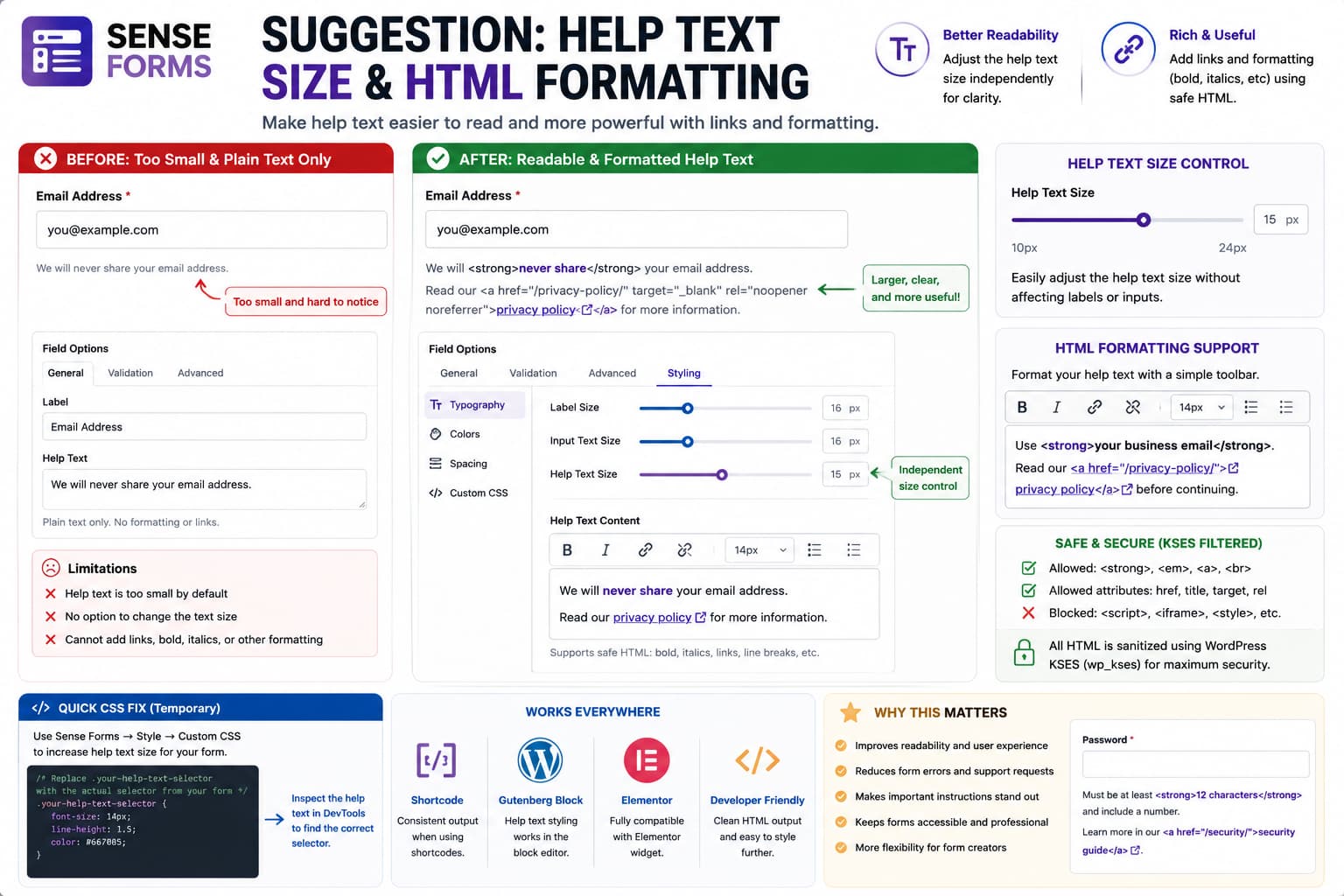
If the text displayed beneath a field is significantly smaller than the rest of the form, however, important instructions can become unnecessarily difficult to read.
There is a second limitation when the help-text field accepts only plain text. Sometimes a short instruction genuinely needs a link or simple emphasis:
Read our privacy policy before continuing.
would be more useful as:
Read our <ahref="/privacy-policy/">privacy policy</a> before continuing.
Likewise:
Use <strong>your business email address</strong>.
can communicate an important requirement more clearly than plain text.
Sense Forms already provides a Style tab with typography controls and per-form Custom CSS, but its current public styling documentation describes typography controls for labels and inputs, not a dedicated help-text font-size control.
The cleaner long-term improvement would therefore be:
Style → Typography → Help Text Size
plus restricted rich-text support for help text.
The Help Text Size Should Be Independently Adjustable
Form labels, entered values, placeholders, and help text do not necessarily need the same font size.
A useful typography section could expose:
Labels16pxInput text16pxHelp text14pxError text14px
or, preferably, equivalent relative units internally.
The important part is that the administrator can increase help text without having to enlarge every input and label at the same time.
Sense Forms currently advertises structured styling controls including typography, colours, field treatments, spacing, and other visual settings. Adding help-text typography would fit naturally into that existing Style workflow.
Why Help Text Should Not Be Extremely Small
Help text is often where forms explain:
- required formats,
- why information is requested,
- password requirements,
- privacy implications,
- accepted file formats,
- date formats,
- important exceptions.
It is secondary content visually, but that does not mean it is unimportant.
For example:
Date of birth[ ]Use DD/MM/YYYY
If Use DD/MM/YYYY is rendered at an extremely small size, a user can easily overlook the exact instruction they need to complete the field correctly.
A better hierarchy is:
Field label↓Input↓Slightly smaller but clearly readable help text
rather than making help text so visually subdued that it is difficult to use.
Temporary Fix: Increase Help Text With Sense Forms Custom CSS
Sense Forms already provides a Custom CSS box in each form’s Style tab. Its official documentation states that the CSS applies only to that form, which makes it a useful temporary way to adjust help text without changing your theme globally.
First open the page containing the form and inspect the help text:
Right-click help text→ Inspect
Find the class applied to that element.
Suppose DevTools shows something conceptually like:
<divclass="your-help-text-selector"> We will never share your email.</div>
You could then add:
.your-help-text-selector { font-size: 14px; line-height: 1.5;}
to:
Sense Forms→ Edit Form→ Style→ Custom CSS
Do not use your-help-text-selector literally.
Replace it with the actual class shown by your installed Sense Forms version.
Sense Forms’ documentation demonstrates this same per-form CSS approach using selectors inside the form wrapper.
Why a Built-In Slider Is Better Than Custom CSS
Custom CSS works, but ordinary form administrators should not need DevTools just to make instructional text readable.
A dedicated control could be as simple as:
Help Text Size12 ─────────●───────── 20 15px
with separate responsive values if Sense Forms eventually wants to support them.
An even cleaner configuration could expose:
SmallNormalLargeCustom
while still allowing a numeric slider for users who need precise control.
The builder could immediately reflect the change in its live preview.
Help Text Should Support Some HTML, but Not Arbitrary HTML
The second request needs more care.
Allowing:
<strong><em><a>
inside field help text is useful.
Allowing completely unrestricted HTML would not be.
For example, this should never be accepted:
<script>stealSomething();</script>
Nor should a help-text setting allow arbitrary dangerous attributes.
WordPress already provides the correct mechanism for solving this problem: KSES HTML filtering.
wp_kses() allows developers to specify exactly which HTML elements and attributes should survive sanitization while stripping elements that are not permitted.
So Sense Forms does not need to choose between:
Strip all HTML
and:
Allow everything
There is a safer middle ground.
Recommended HTML Allowlist
Help text generally needs only a very small set of formatting elements.
For example:
$allowed_html = [ 'a' => [ 'href' => true, 'title' => true, 'target' => true, 'rel' => true, ], 'strong' => [], 'b' => [], 'em' => [], 'i' => [], 'br' => [],];
Then sanitize with:
$safe_help_text = wp_kses( $help_text, $allowed_html);
WordPress documents wp_kses() specifically as filtering content so that only explicitly allowed elements, attributes, values, and entities remain.
That provides links and basic formatting without turning help text into unrestricted HTML.
Example of What Should Work
An administrator could enter:
Use your <strong>work email address</strong>.Read our <ahref="/privacy-policy/">privacy policy</a>for more information.
The frontend could render:
Use your work email address.
Read our privacy policy for more information.
Meanwhile, something unsafe such as:
<script>alert('test');</script>
would be removed by the sanitizer.
WordPress Already Has a Broader Sanitizer Too
Another possible implementation is:
wp_kses_post( $help_text );
WordPress documents wp_kses_post() as preserving HTML allowed in normal post content while stripping unsupported markup.
For a field’s short help message, however, I would prefer a smaller custom allowlist.
Help text generally does not need:
headingstablescomplex containersimagesiframesembedded media
Keeping the allowed markup intentionally limited makes the feature easier to secure and style.
Do Not Solve It With htmlspecialchars_decode()
A dangerous shortcut would be to take escaped help text and simply decode it:
echo htmlspecialchars_decode( $help_text );
That does not answer the important security question:
Which markup is actually safe to output?
Likewise, developers should not simply change:
echo esc_html( $help_text );
to:
echo $help_text;
esc_html() intentionally escapes strings for display as plain text.
Removing output escaping without replacing it with deliberate sanitization could create an XSS vulnerability.
The correct model is:
Receive help text↓Sanitize against a strict allowlist↓Store/render the safe result
Links Need Special Handling
If <a> is supported, Sense Forms should also handle external links sensibly.
For example:
<ahref="https://example.com/help/"target="_blank"rel="noopener noreferrer"> Learn more</a>
The builder could even avoid exposing raw HTML entirely by offering a tiny formatting toolbar:
[B] [I] [Link]
This would give nontechnical users the requested functionality without requiring them to type tags manually.
A Mini Rich-Text Toolbar Would Be Better Than Raw HTML
From a usability perspective, this:
Help Text┌─────────────────────────────────┐│ [B] [I] [🔗] ││ Enter your business email... │└─────────────────────────────────┘
would be preferable to expecting everyone to write:
Enter your <strong>business email</strong>.
Internally, Sense Forms could still store sanitized HTML.
The toolbar would simply generate the small approved markup set.
That gives users:
- bold,
- italics,
- links,
- line breaks,
without turning the Help Text property into a complete HTML editor.
Sense Forms Already Includes a Custom HTML Field
Sense Forms currently advertises Custom HTML as one of its 19 available field types.
That can serve as a temporary alternative when you need a larger block of formatted explanatory content.
For example:
Email[________________]Custom HTML:Read our privacy policy before submitting.
However, this is not an ideal substitute for field help text.
Help text belongs semantically and visually to one particular input:
Email[________________]Help specifically for Email
A standalone Custom HTML block is a separate content element.
So Custom HTML is useful for:
section instructionslong explanationsintroductory textlegal information
while Help Text should remain appropriate for short field-specific guidance.
Suggested Style Panel
A logical Sense Forms Style section could eventually look like:
TYPOGRAPHYLabel Size[ 16px ]Input Size[ 16px ]Help Text Size[ 14px ]Error Text Size[ 14px ]Help Text Colour[ #667085 ]
Sense Forms’ current documentation already identifies its Style tab as the location for typography and per-form styling.
So this would extend an existing system rather than create a separate settings screen.
Suggested Field Properties UI
The selected field could expose:
HELP TEXT[B] [I] [Link]┌─────────────────────────────────────┐│ We'll use this only to contact you. │└─────────────────────────────────────┘
with an optional advanced mode:
<> Edit HTML
if raw HTML is considered useful.
Only approved tags should survive save/rendering regardless of which editing interface is used.
Preserve Links in the Live Preview Too
If HTML support is added, the builder preview and frontend need to use the same sanitization/rendering rules.
Otherwise administrators could see:
Builder:privacy policy✓ clickable
but publish:
Frontend:<a href="/privacy/">privacy policy</a>
as literal text.
Or the opposite could occur.
A single rendering function for Help Text would help prevent discrepancies between:
builder previewfrontend shortcodeGutenberg blockElementor widget
Sense Forms currently supports shortcode embedding plus dedicated Gutenberg and Elementor integrations, so consistent rendering across those outputs matters.
Existing Custom CSS Is Still Useful After a Native Control Exists
Even if Sense Forms adds a Help Text Size slider, its existing Custom CSS option should remain available.
The official documentation says Custom CSS is sanitized and scoped to the individual form, giving advanced users control beyond the built-in settings.
That allows designers to add refinements such as:
/* Example only - use the actual help-text selector. */.your-help-text-selector { margin-top: 6px; font-style: italic;}
without requiring the core Style panel to expose every possible CSS property.
Keep Help Text Distinct From Placeholder Text
Help text should also remain visible after the user starts typing.
For example:
Password[________________________]At least 12 characters.
is more useful for an important requirement than putting:
At least 12 characters
only inside the input as placeholder text.
Once the user starts typing, placeholder content disappears.
The purpose of help text is to provide persistent field-specific guidance.
Current Sense Forms Version
As of August 15, 2026, WordPress.org lists Sense Forms 1.7.8 as the current public release, with WordPress 6.2+ and PHP 7.4+ requirements. The public changelog currently identifies 1.7.8 as the initial public release and describes structured typography/styling controls, but does not document a dedicated Help Text Size setting or rich-text help-text editor.
The official styling documentation likewise lists built-in font sizing and weight controls for labels and inputs, alongside per-form Custom CSS. It does not currently document a separate help-text typography control.
Therefore this is best treated as a Sense Forms feature request, with Custom CSS as the immediate size workaround.
Recommended Implementation
The cleanest implementation would combine both requests:
Field Properties→ Help Text→ simple rich-text editor - Bold - Italic - LinkStyle→ Typography→ Help Text Size
Internally:
Help text HTML↓wp_kses() with small allowlist↓safe formatted content↓same rendering in preview and frontend
That gives form owners more control while maintaining the security boundary expected in WordPress.
How to Verify the Feature
If this is added in a future Sense Forms release, test:
- Add help text to a field.
- Increase Help Text Size.
- Confirm the builder preview changes immediately.
- Add
<strong>or use the Bold button. - Add italic text.
- Add an internal link.
- Add an external link.
- Save the form.
- Reload the builder.
- Confirm formatting remains.
- View the frontend.
- Confirm the same formatting appears there.
- Test Gutenberg and Elementor embedding.
- Attempt to enter
<script>alert(1)</script>. - Confirm unsafe HTML is stripped rather than executed.
The expected behavior should be:
<strong>✓ allowed<em>✓ allowed<a href="">✓ allowed<script>✗ removed
That provides the requested flexibility without weakening the plugin’s security.
