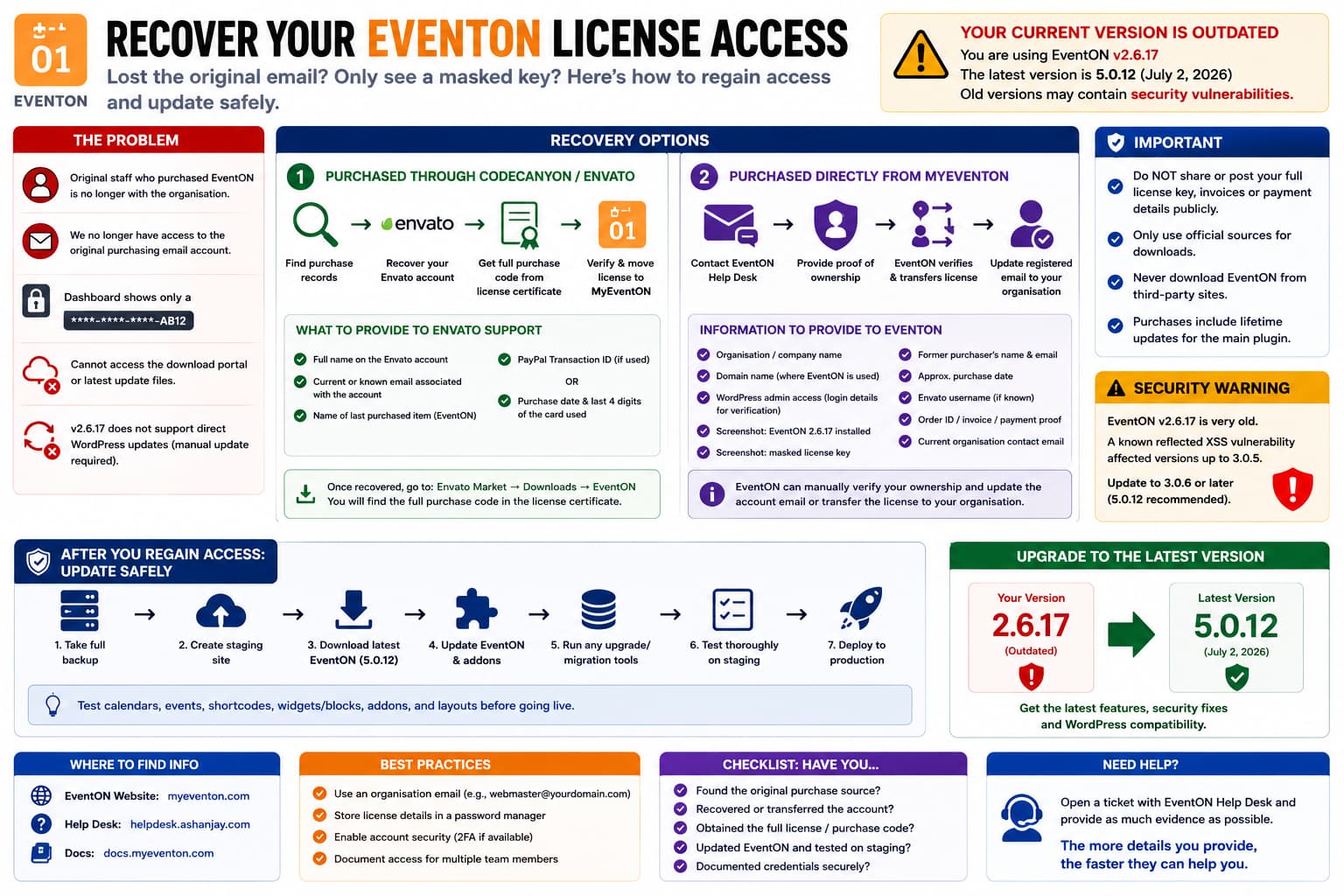
Losing access to a premium WordPress plugin account is particularly difficult when the person who originally bought the license has left the organisation.
With EventON, you may end up in this situation:
EventON is installed and working↓Original employee has left↓Original purchasing email is inaccessible↓WordPress shows only a masked purchase/license key↓EventON account/download portal cannot be accessed↓Plugin cannot be safely updated
If the installed EventON version is 2.6.17, this should be treated as more than an administrative inconvenience.
EventON’s current Full version is 5.0.12, last updated July 2, 2026. EventON currently includes lifetime updates with its main plugin license and specifically provides a route for customers who originally purchased through CodeCanyon to verify and move their license into the current EventON system.
So the correct solution is to recover or transfer legitimate ownership of the existing purchase, rather than continuing indefinitely with version 2.6.17.
Do Not Try to Reconstruct the Masked License Key
An EventON dashboard may display something resembling:
License:xxxx-xxxx-xxxx-AB12
or otherwise hide most of the purchase code.
That display is intentionally not the complete credential.
Trying to infer the missing characters is not a useful recovery method. The authoritative license information lives with the original purchase account, such as:
Envato / CodeCanyon account
or:
MyEventON account
depending on where and when the software was purchased.
The first task is therefore identifying the original purchase channel.
Step 1: Determine Whether EventON Was Purchased Through CodeCanyon
EventON was historically sold through CodeCanyon, and its current site still provides a specific path for customers who purchased there:
Already purchased eventON from codecanyon?Verify, move your license over and get latest version.
Look through your organisation’s records for:
CodeCanyonEnvato MarketAshanJayEventONmyeventon.com
Search:
- old invoices,
- accounting records,
- company PayPal history,
- company credit-card statements,
- password-manager entries,
- old emails belonging to the departed employee,
- IT documentation,
- WordPress maintenance notes.
If you discover that the purchase came from CodeCanyon, recovering the Envato account is probably the strongest route.
Step 2: Recover the Envato Account Even Without the Old Email
Envato explicitly supports account recovery when the original registered email address is no longer accessible.
Their current recovery guidance asks customers to contact Envato support and provide information such as:
- full name on the Envato account,
- current email address associated with it, if known,
- name of the last purchased item,
- PayPal transaction ID if PayPal was used,
- or the exact payment date and last four digits of the credit card used.
For an organisational EventON purchase, useful evidence might therefore include:
Item:EventON – WordPress Virtual Event Calendar PluginPurchaser:Former employee's nameCompany:Your organisationApproximate purchase date:[date/year]Payment:Company card ending 1234Domain where license was used:example.org
If Envato verifies the account, you can regain access even though the original employee’s mailbox is gone.
Once Envato Access Is Recovered
Go to:
Envato Market→ Downloads→ EventON→ Download→ License certificate & purchase code
Envato confirms that the full purchase code is contained in the license certificate available from the Downloads page.
You should then have the actual purchase code required to validate ownership.
Step 3: Move the CodeCanyon License Into MyEventON
EventON currently encourages legacy CodeCanyon buyers to verify their purchase and move the license into its current system.
That is preferable to maintaining an old disconnected installation.
Once the Envato purchase code has been recovered, use EventON’s:
Verify Codecanyon Purchase
workflow.
The goal is eventually to have the organisation control:
Current organisation email↓MyEventON account↓EventON license↓Current plugin download/update access
rather than depending on an email account belonging to a former staff member.
What If the Purchase Was Made Directly Through MyEventON?
Then the situation is slightly different.
The EventON support system currently expects customers registering or validating an account to supply a valid EventON license key and asks for the email address used to purchase the software.
That means the normal self-service registration process may not work when you have:
Full license key:UnavailableOriginal purchase email:Unavailable
In that case you need manual support intervention.
Can EventON Transfer Licenses Between Accounts?
There is evidence that EventON support can manually transfer licenses in appropriate circumstances.
EventON’s current license-transfer procedure for addons explicitly instructs customers to submit a helpdesk ticket containing account emails and order IDs so EventON can verify the information and transfer licenses to another account.
That procedure is specifically documented for addon-license transfers, so it should not be interpreted as a guarantee that domain ownership alone will recover a main EventON license.
However, it establishes that EventON has an internal process for manually verifying ownership and changing license/account associations.
Is Domain Ownership Enough to Recover the Account?
I could not find an official EventON document stating:
If you prove control of the licensed domain, we will automatically transfer the license.
So do not rely on domain ownership by itself.
Instead, provide EventON with as many independent ownership signals as possible.
For example:
Organisation nameDomain nameCurrent WordPress administrator accessScreenshot showing EventON 2.6.17 activeScreenshot showing the masked licenseApproximate purchase dateOld purchaser's nameOld purchaser's email addressAccounting invoiceEnvato username, if knownOrder number, if availablePayment transaction detailsCurrent organisation contact email
The more information you can provide, the easier it is for EventON to distinguish a legitimate organisational ownership change from someone attempting to take control of another customer’s license.
A Good EventON Recovery Request
You can send something along these lines:
Our organisation owns the website and EventON installation currently registered with this license. The employee who originally purchased EventON has left the organisation, and we no longer have access to the email address associated with the original purchase.
The website is currently running EventON 2.6.17. WordPress displays only the masked purchase key, so we cannot obtain the complete key or access the download account to update the plugin.
We can provide proof of organisation/domain ownership, WordPress administrator access, the masked license screenshot, the former purchaser’s details, and any available billing or transaction records.
Could you please advise what information you require to verify ownership and either update the registered email address or transfer the EventON license to our current organisation account?
Do not publish the complete purchase code, invoices containing sensitive billing information, or payment details in a public support thread.
Send sensitive verification information only through EventON’s private support process.
EventON Support Normally Requires a Valid Purchase
EventON’s official CodeCanyon support page states that an EventON purchase is required to access its support system and directs customers to the EventON helpdesk.
The helpdesk’s registration form likewise requests:
EventON license keyProduct purchasedEmail used for purchaseEnvato username
That is why recovering the underlying Envato account first is preferable when the original purchase was made through CodeCanyon.
Version 2.6.17 Is Far Too Old to Leave Installed
The current EventON Full release is:
5.0.12
while the affected installation is:
2.6.17
This is not a normal one- or two-release delay.
It spans years of:
- WordPress compatibility changes,
- PHP changes,
- security fixes,
- EventON architecture changes,
- bug fixes.
More importantly, there are documented security vulnerabilities affecting old EventON releases.
For example, Wordfence records a reflected cross-site scripting vulnerability affecting EventON versions through 3.0.5, with remediation listed as updating to 3.0.6 or later.
Since:
2.6.17 < 3.0.5
the installed version falls inside that documented affected range.
So I would not consider EventON 2.6.17 safe to continue using indefinitely.
EventON Has Had Numerous Later Security Fixes Too
Security databases currently list multiple EventON vulnerabilities affecting later 4.x and 5.x releases as well.
This reinforces the general rule:
A premium WordPress plugin should not remain frozen on a many-years-old release simply because the license account was lost.
Recovering update access should be treated as a security-maintenance task.
Do Not Update 2.6.17 Directly on Production Without Testing
There is another important risk.
Going from:
2.6.17
to:
5.0.12
is a very large version jump.
Do not upload the newest ZIP directly to a critical production site without testing.
Create a staging copy first.
Back up:
Databasewp-content/uploadsEventON pluginEventON addonsTheme/custom code
Then update EventON on staging.
Test:
- calendar rendering,
- event pages,
- event metadata,
- event locations,
- organisers,
- repeating events,
- EventON shortcodes,
- widgets/blocks,
- custom templates,
- custom CSS,
- EventON addons,
- ticketing/RSVP if used,
- AJAX filters,
- mobile layouts.
Only deploy after confirming the migration succeeds.
EventON Updates Have Historically Sometimes Required Manual Installation
The source request mentions that version 2.6.17 does not provide a working direct WordPress update.
That is plausible.
EventON’s own support desk contains reports from customers who have had to update EventON manually even when the plugin was activated, and EventON support has acknowledged cases where its update authentication can fail because the site’s saved validation data is rejected.
So:
No one-click update
does not necessarily mean the plugin installation is counterfeit or corrupted.
It may simply mean the legacy updater can no longer authenticate correctly.
Once you regain legitimate download access, a manual update is acceptable.
Safe Manual Update Procedure
Once you receive an official current EventON ZIP:
- Take a full backup.
- Clone the site to staging.
- Record all installed EventON addon versions.
- Download EventON only from the authenticated EventON/Envato account.
- Temporarily deactivate EventON on staging if the installation instructions require it.
- Replace/update the plugin using WordPress’s plugin uploader or SFTP.
- Do not delete EventON database data.
- Run any EventON upgrade/migration process presented in wp-admin.
- Update compatible EventON addons.
- Clear page/object/CDN caches.
- Thoroughly test the calendar.
Current EventON purchases include lifetime main-plugin updates, according to EventON’s product page.
Do Not Download EventON From Unofficial GPL Sites
When account access is lost, searching:
EventON latest version download
may produce third-party copies.
Avoid them.
EventON’s own current product pages explicitly warn against unauthorized third-party distribution and state that official purchases provide updates and support.
For a plugin that executes PHP inside WordPress, an unknown ZIP is not worth the risk.
Use only:
MyEventONEnvato/CodeCanyon
or a file directly supplied by verified EventON support.
If You Cannot Recover the Original Purchase at All
There may eventually be a point where the administrative cost of reconstructing an old purchase exceeds the price of obtaining a new license.
EventON Full is currently advertised at $50 for one site.
Therefore, if:
No Envato account can be identifiedNo billing information existsNo purchase key can be recoveredEventON cannot verify ownership
purchasing a fresh organisational license may be the most reliable way to restore:
Current account ownershipCurrent downloadsCurrent supportFuture updates
You can then document the credentials in an organisation-controlled password manager rather than tying the plugin to one employee.
This should be the fallback, not the first step, because an existing legitimate license may already entitle the organisation to ongoing main-plugin updates.
Fix the Ownership Process After Recovery
Once access is restored, avoid repeating the same problem.
Use an organisational address such as:
webmaster@example.orgwebteam@example.orgit@example.org
rather than:
employee.name@example.org
Store in your password manager:
Vendor:EventONAccount email:webteam@example.orgPurchase channel:MyEventON / EnvatoOrder ID:...License/purchase code:...Licensed domain:example.orgPurchase date:...Renewal details:...
Also enable available account security features and make sure more than one authorised staff member knows where the records are stored.
Most Likely Recovery Path
For an organisation running EventON 2.6.17 with only a masked key, I would follow this sequence:
- Search accounting and email archives to determine whether the original purchase came from CodeCanyon/Envato or MyEventON.
- If CodeCanyon, submit an Envato account recovery request using the former purchaser’s name plus organisational transaction/payment evidence. Envato explicitly supports recovery where the original email is inaccessible.
- Recover the full purchase code from the Envato license certificate.
- Use EventON’s current Verify Codecanyon Purchase process to move the legacy license into MyEventON.
- If purchased directly from EventON, contact the EventON Help Desk and request manual ownership/email verification.
- Supply organisation/domain evidence plus any purchase, order, and payment details available.
- Download the official current release.
- Upgrade a staging clone first.
- Move the recovered account to an organisation-controlled email.
Is the Old EventON Installation Safe While Account Recovery Is Pending?
I would minimise the time spent on 2.6.17.
A known reflected XSS vulnerability affected EventON through version 3.0.5, and version 3.0.6 or later was required for that specific fix.
So version 2.6.17 is not simply “old but probably fine.”
At minimum, while recovering the account:
Keep WordPress and other plugins currentMaintain backupsUse a WAF/security layerRestrict WordPress accountsMonitor logsAvoid unnecessary EventON admin accessPrioritise the EventON upgrade
Those steps reduce risk, but they do not replace updating the vulnerable plugin.
Direct Answer
Yes, recovering the EventON account should be possible if your organisation can provide enough evidence of the legitimate purchase.
If it was purchased through CodeCanyon, Envato has a documented recovery process for accounts whose original email is no longer accessible, and once recovered you can retrieve the full purchase code from the license certificate.
EventON currently also provides a dedicated process for legacy CodeCanyon buyers to verify and move their licenses into MyEventON.
If it was purchased directly through EventON, the normal helpdesk registration requires the license key and original purchase email, so a case where both are unavailable will likely require manual support verification.
I could not find a published EventON policy guaranteeing recovery solely through domain ownership, so include domain control as supporting evidence alongside billing, order, old account, and WordPress installation details.
Most importantly, do not leave EventON 2.6.17 running longer than necessary. Current EventON is 5.0.12, and 2.6.17 falls within at least one publicly documented vulnerable EventON version range.
