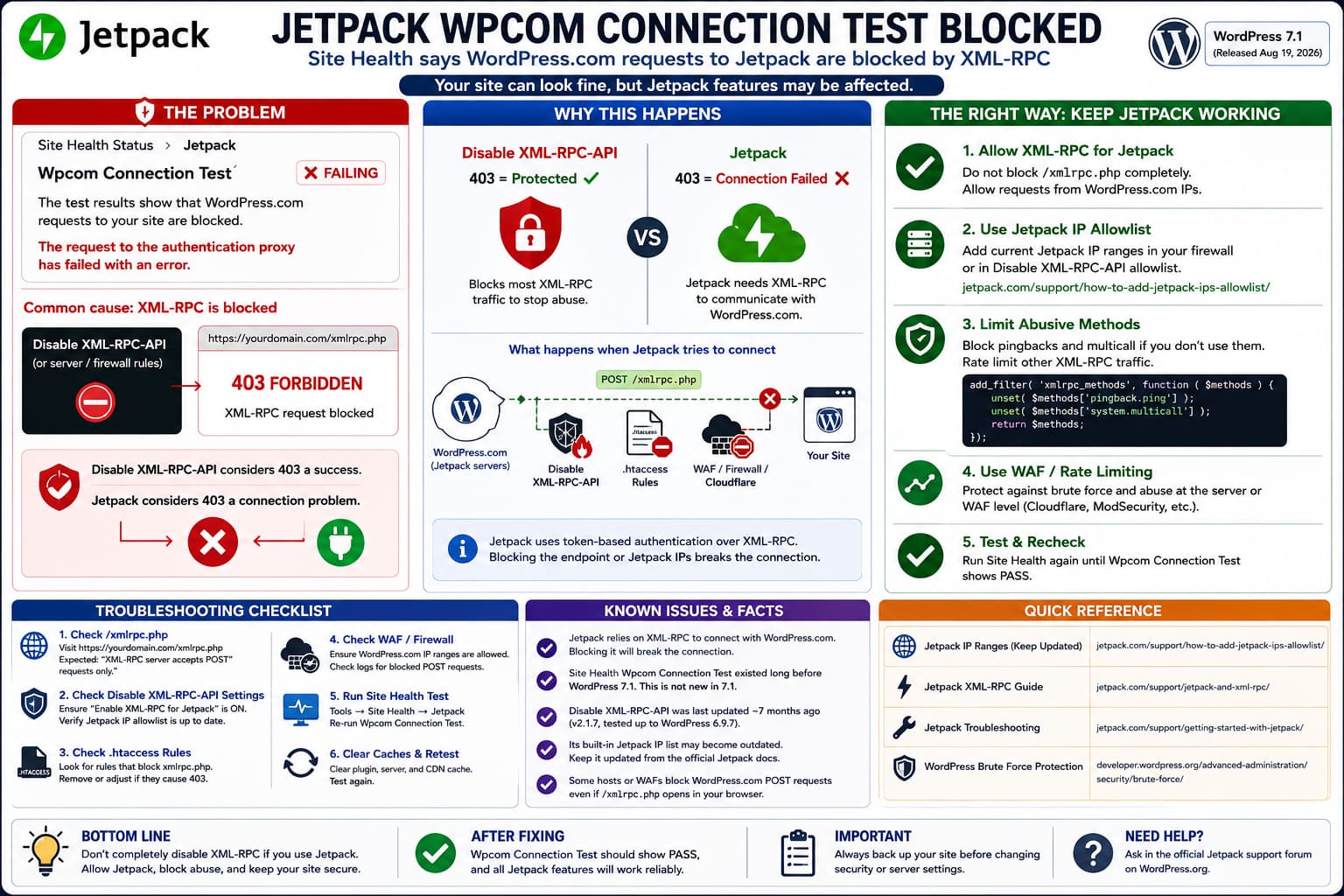
If WordPress Site Health reports that WordPress.com requests to Jetpack are being blocked while the site otherwise appears to work, do not assume this is merely a new WordPress 7.1 diagnostic warning.
The Wpcom Connection Test is provided by Jetpack and has existed before WordPress 7.1. Jetpack still relies on inbound requests through xmlrpc.php for its WordPress.com connection, and its documentation explicitly warns that plugins or server rules blocking XML-RPC can break that connection. (jetpack.com)
If Disable XML-RPC-API is active, check its XML-RPC blocking and Jetpack allowlist settings first.
Why the Site Can Look Fine Even When Site Health Reports a Problem
A Jetpack connection problem does not necessarily make the entire WordPress site stop working.
The public site can continue loading normally, and some Jetpack functionality may continue appearing to work.
Jetpack itself documents that different features have different connection requirements. Some depend heavily on the WordPress.com connection, while others have fewer requirements. (jetpack.com)
That means this is possible:
WordPress site: working
Jetpack dashboard: appears connected
Some Jetpack features: working
Wpcom Connection Test: failing
The warning still deserves investigation because features involving synchronization, remote management, Social, Activity Log, backups, or other WordPress.com services may fail later or only partially.
Jetpack Still Requires XML-RPC
Jetpack’s current documentation is explicit:
Jetpack relies on the XML-RPC file to communicate with WordPress.com.
If access to:
/xmlrpc.phpis blocked, Jetpack says its connection will not work properly. (jetpack.com)
This is not the same as saying every XML-RPC request on the internet should be unrestricted.
The important distinction is:
Block abusive XML-RPC traffic
            ✓

Block every request to xmlrpc.php
            ✗ if you use Jetpack
WordPress’s own security documentation similarly notes that XML-RPC is frequently attacked, particularly through system.multicall, but recommends restricting or rate-limiting it when services such as Jetpack still require XML-RPC. (developer.wordpress.org)
Check /xmlrpc.php First
Open:
https://example.com/xmlrpc.phpusing your real domain.
For a normally reachable WordPress XML-RPC endpoint, Jetpack expects a response similar to:
XML-RPC server accepts POST requests only.Jetpack uses this as a basic connectivity check. (jetpack.com)
If you instead receive:
403 ForbiddenAccess forbiddenXML-RPC services are disabled on this siteor another security block, something is intentionally preventing XML-RPC access.
Interestingly, Disable XML-RPC-API itself considers a 403 response evidence that its blocking feature is working. (wordpress.org)
That creates a direct conflict:
Disable XML-RPC-API:
403 = success

Jetpack:
403 = connection problem
You cannot fully block xmlrpc.php and simultaneously expect Jetpack’s XML-RPC connection to remain healthy.
A Browser Test Is Not Enough
Seeing:
XML-RPC server accepts POST requests only.in your browser is useful, but it does not prove that Jetpack can actually communicate with the site.
A browser normally makes a GET request.
Jetpack needs to send authenticated POST requests.
A configuration can therefore behave like this:
GET /xmlrpc.php
→ allowed

POST /xmlrpc.php from WordPress.com
→ 403 Forbidden
Jetpack support has diagnosed exactly this type of failure on sites where the XML-RPC page appeared reachable but WordPress.com POST requests were blocked by a hosting firewall or WAF. (wordpress.org)
The Site Health connection test can therefore reveal a real problem that a simple browser test misses.
Check Disable XML-RPC-API’s Jetpack Settings
Disable XML-RPC-API includes features for:
- blocking
xmlrpc.phpthrough.htaccess; - IP allowlisting;
- IP blacklisting;
- selectively disabling XML-RPC methods;
- allowing Jetpack-related access.
Its changelog also shows that the plugin has previously had to update its built-in Jetpack IP list. Version 2.1.4.9 specifically included:
Update Jetpack default whitelist IPsand version 2.1.6 added VaultPress IPs to its Jetpack allowlist. (wordpress.org)
This history matters.
There has already been a support case where the plugin’s Enable XML-RPC for Jetpack option was enabled but Jetpack still failed. Manually adding the current Jetpack IP ranges fixed the connection, and the plugin developer subsequently updated its built-in list. (wordpress.org)
So check:
XML-RPC Security → Jetpack / Whitelist settings
and make sure the current official Jetpack ranges are actually permitted.
Do not copy an old IP list from an outdated blog post.
Jetpack publishes its current ranges here:
Jetpack IP allowlist documentation
Jetpack notes that the ranges can change.
Disable XML-RPC-API Is Not Currently Tested With WordPress 7.1
At the time of writing, WordPress.org lists:
Disable XML-RPC-API: 2.1.7
Last updated: about 7 months ago
Tested up to WordPress: 6.9.7WordPress 7.1 was released on August 19, 2026. (wordpress.org)
That means the plugin’s published compatibility metadata has not yet been updated for WordPress 7.1.
However, that does not prove WordPress 7.1 broke the plugin.
The Jetpack Wpcom Connection Test was already reporting XML-RPC/firewall problems on older WordPress versions. Reports of this diagnostic exist years before WordPress 7.1.
The more accurate conclusion is:
Plugin is not yet marked tested with WP 7.1
                +
Jetpack XML-RPC conflict is already known
                ≠
WordPress 7.1 introduced the problem
Does Disable XML-RPC-API Need an Update?
Possibly, but there is not enough evidence to say that a WordPress 7.1 compatibility update alone will fix the warning.
An update would be useful if:
- the plugin’s bundled Jetpack IP list is outdated;
- its Jetpack exemption does not cover current WordPress.com requests;
- its
.htaccesslogic blocks Jetpack before WordPress can process the request; - WordPress 7.1 exposes a compatibility issue that has not yet been documented.
But Jetpack’s own guidance is broader: plugins that restrict access to xmlrpc.php are known to cause Jetpack connection problems. (jetpack.com)
The current support report for this exact Disable XML-RPC-API / WordPress 7.1 situation is still unresolved, so there is no verified plugin update that can currently be recommended as the fix.
Why Other Sites With the Same Plugins May Not Show the Warning
Two sites can have the same plugins installed and still handle XML-RPC differently.
Differences can include:
- Disable XML-RPC-API options;
- an older or newer saved Jetpack IP allowlist;
.htaccesscontents;- Apache vs. Nginx vs. LiteSpeed;
- Cloudflare rules;
- hosting WAF rules;
- country blocking;
- ModSecurity;
- whether another security plugin also changes XML-RPC;
- Jetpack connection state.
For example:
Site A
Disable XML-RPC-API + current allowlist
→ Jetpack request allowed

Site B
Disable XML-RPC-API + stale allowlist
→ Jetpack request blocked
The installed plugin list alone does not prove the network behavior is identical.
Be Careful With the Suggested xmlrpc_methods Code
A commonly suggested alternative is:
add_filter( 'xmlrpc_methods', function ( $methods ) {
    unset( $methods['pingback.ping'] );
    unset( $methods['system.multicall'] );

    return $methods;
} );
This does something very different from completely disabling XML-RPC.
It removes two methods:
pingback.ping
system.multicall
while leaving the other registered XML-RPC methods available.
That can reduce exposure to two commonly abused XML-RPC mechanisms while still allowing other XML-RPC functionality to operate.
However, describing this code as:
XML-RPC remains open exclusively for token-authorized requests like Jetpack
would be inaccurate.
The filter does not make the remaining XML-RPC API exclusive to Jetpack.
It simply removes two methods.
Other registered XML-RPC methods remain available according to their own authentication requirements.
The PHP Filter Cannot Override an .htaccess Block
This is particularly important with Disable XML-RPC-API.
If the plugin creates a server rule that rejects:
/xmlrpc.phpbefore WordPress executes, then this:
add_filter( 'xmlrpc_methods', ... );will never get a chance to run.
The request flow would be:
WordPress.com
      ↓
Apache / LiteSpeed / Nginx
      ↓
403 Forbidden
      ✗
WordPress never loads
      ✗
xmlrpc_methods filter never runs
So before adding PHP code, verify whether the current block happens:
- inside WordPress;
- inside
.htaccess; - in Nginx;
- at Cloudflare;
- in ModSecurity;
- in the hosting WAF.
If /xmlrpc.php already returns 403 before WordPress executes, fix the server-level rule first.
A Safer Configuration When You Need Jetpack
If Jetpack is actively used, the cleanest approach is usually not to completely disable XML-RPC.
Instead:
- Keep
xmlrpc.phpreachable for Jetpack. - Rate-limit abusive XML-RPC traffic.
- Disable pingbacks if you do not use them.
- Consider disabling unnecessary XML-RPC methods.
- Use a WAF or server-level protection against brute-force attacks.
WordPress’s security documentation specifically recommends edge/server rate limiting rather than relying solely on PHP-level blocking for high-volume attacks. (developer.wordpress.org)
Jetpack itself uses signed token-based authentication rather than transmitting a WordPress username and password with its XML-RPC calls. (jetpack.com)
That is why a selective security policy is preferable when Jetpack is required.
Test by Temporarily Disabling the XML-RPC Block
On a staging site or during a controlled maintenance window:
- Temporarily deactivate Disable XML-RPC-API.
- Clear any server/CDN cache.
- Re-run:
Tools → Site Health
- Check the Jetpack
Wpcom Connection Test.
If the warning disappears, you have isolated the conflict.
Do not stop there.
Reactivate the plugin and determine which specific feature causes the block.
Test:
Full XML-RPC block OFF
Jetpack allowlist ON
rather than immediately abandoning all XML-RPC protection.
Check .htaccess
Because Disable XML-RPC-API can modify .htaccess, deactivating the plugin alone may not always prove that every server rule was removed correctly.
Back up .htaccess.
Then search for rules involving:
xmlrpc.phpFor example:
<Files xmlrpc.php>
    Order Deny,Allow
    Deny from all
</Files>
or Apache 2.4-style rules such as:
<Files "xmlrpc.php">
    Require all denied
</Files>
Do not blindly delete unfamiliar security rules.
Identify which plugin or hosting layer created them first.
The Disable XML-RPC-API plugin has previously shipped fixes relating to .htaccess, so stale rules are worth checking. (wordpress.org)
Check Cloudflare or the Hosting Firewall
If /xmlrpc.php is allowed in WordPress but Site Health still reports that WordPress.com is blocked, inspect external security layers.
Possible places include:
Cloudflare WAF
Hosting firewall
ModSecurity
Nginx rules
LiteSpeed security
Country blocking
Bot protection
Jetpack requires requests originating from WordPress.com to reach the WordPress installation.
Jetpack publishes current IP ranges that can be allowlisted when a strict firewall requires it. (jetpack.com)
One resolved Jetpack case found that direct XML-RPC tests succeeded but the WordPress.com connection test still returned HTTP 403 because a hosting-level WAF was blocking the specific WordPress.com POST request. (wordpress.org)
So a successful browser test does not rule out the host.
Check the Actual Site Health Error Code
Under:
Tools → Site Health
expand the Jetpack connection error.
If available, note the exact HTTP result.
For example:
HTTP 403strongly suggests:
Firewall / security rule / XML-RPC blockerwhile a different code may point elsewhere.
Jetpack’s Wpcom Connection Test has also exposed errors such as:
HTTP 413
HTTP 503
timeouts
on sites where xmlrpc.php itself appeared to work.
The exact status code is more useful than the generic statement that Jetpack cannot connect.
Test Jetpack’s External Debugger
Jetpack provides a connection debugger.
Use:
https://jptools.wordpress.com/debug/with your site.
If it reports that XML-RPC cannot be reached, investigate the XML-RPC blocker or host.
If the debugger succeeds but Site Health fails, capture both results before making more changes.
This helps distinguish:
Public XML-RPC endpoint problemfrom:
Specific WordPress.com connection-test problemReconnect Jetpack After Fixing the Block
Once Jetpack’s requests are no longer blocked, reconnect the site if necessary.
Check:
Jetpack → Dashboard → Connection
or the relevant Jetpack connection interface.
Do not repeatedly disconnect/reconnect before fixing the XML-RPC restriction.
A new connection cannot remain healthy if every authenticated WordPress.com request continues receiving a 403 response.
How to Verify the Fix
After adjusting the XML-RPC rule:
- Visit:
https://example.com/xmlrpc.phpand confirm the normal POST-only response.
- Run the Jetpack external debugger.
- Open:
Tools → Site Health
and rerun the Jetpack connection test.
- Verify that
Wpcom Connection Testpasses. - Check Jetpack features you actually use, especially:
- Stats;
- Social;
- Activity Log;
- remote management;
- backups/security services where applicable.
- Review your firewall/security logs and confirm abusive XML-RPC requests are still being restricted or rate-limited.
The desired result is not simply:
XML-RPC completely openIt is:
Jetpack communication works
        +
unnecessary/abusive traffic remains controlled
The Practical Fix
If you actively use Jetpack, completely blocking xmlrpc.php is incompatible with Jetpack’s documented connection architecture.
The fact that Site Health only began reporting the problem after WordPress 7.1 does not prove WordPress 7.1 created it. Jetpack’s Wpcom Connection Test existed well before 7.1, and similar warnings have been diagnosed on older WordPress releases.
With Disable XML-RPC-API, check the plugin’s Enable XML-RPC for Jetpack and IP allowlist configuration first. Its own history shows that Jetpack IP lists have needed updating before.
If the plugin or .htaccess still returns HTTP 403 to Jetpack, either update its allowlist using Jetpack’s current official IP ranges or remove the hard XML-RPC block and use selective method blocking plus WAF/rate limiting instead.
The suggested xmlrpc_methods snippet can remove pingback.ping and system.multicall, but it does not make XML-RPC “Jetpack-only,” and it cannot override a server-level 403 rule.
