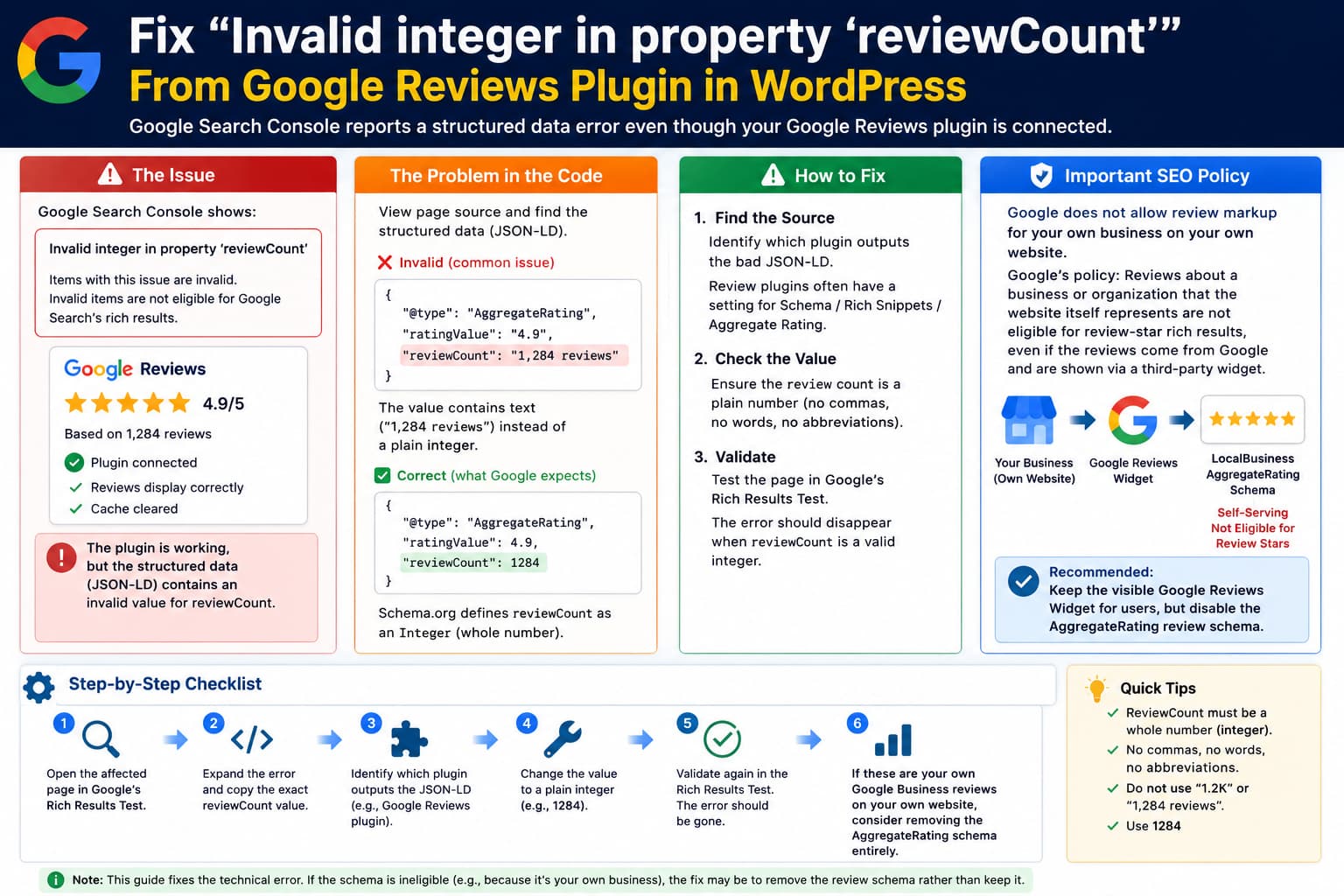
Fix “Invalid integer in property ‘reviewCount’” From a Google Reviews WordPress Plugin:
Invalid integer in property 'reviewCount'

Items with this issue are invalid.
Invalid items are not eligible for Google Search's rich results.
on a WordPress page where a Google Reviews plugin or widget is embedded.
It is natural to check:
Google Reviews connection
✓ active

Plugin still showing reviews
✓

Cache cleared
✓
and wonder why the error remains.
The reason is that these are separate systems.
A plugin can successfully retrieve and display your Google reviews while simultaneously generating invalid structured data for Google Search.
The important thing to inspect is not whether the widget is connected, but what the plugin outputs inside:
"aggregateRating"and specifically:
"reviewCount"What reviewCount Is Supposed to Contain
Schema.org defines reviewCount as the total number of reviews and expects an Integer value.
A clean JSON-LD example would be:
{
  "@type": "AggregateRating",
  "ratingValue": 4.8,
  "reviewCount": 247
}
The important part is:
"reviewCount": 247It is a whole numeric count.
Google’s current Review Snippet documentation similarly defines reviewCount as the number of people who provided reviews and requires at least one of reviewCount or ratingCount for an aggregate rating.
What Causes “Invalid integer”
The plugin may instead be outputting something like:
"reviewCount": "247 reviews"or:
"reviewCount": "1,247"or:
"reviewCount": "1.2K"or:
"reviewCount": ""or:
"reviewCount": nullor even:
"reviewCount": "247.0"Those are not clean integer values.
The safest output is simply:
"reviewCount": 1247without:
- commas,
- spaces,
- words,
- abbreviations,
- decimal formatting,
- thousands separators.
A Very Plausible Plugin Bug
Suppose the widget visually displays:
4.9 ★
1,247 Google reviews
That is fine for humans.
But the plugin must not reuse:
1,247as the structured-data value.
It needs to convert it to:
1247before generating JSON-LD.
Likewise, if the frontend shows:
1.2K reviewsthe schema cannot use:
"reviewCount": "1.2K"It must use the actual count.
Clearing Cache Will Not Fix Bad Schema Generation
If the plugin’s PHP or JavaScript generates:
"reviewCount": "1,247 reviews"every time the page loads, clearing the cache simply produces a fresh page containing the same invalid value.
The flow is:
Purge cache
↓
WordPress regenerates page
↓
Reviews plugin runs
↓
Plugin outputs malformed reviewCount again
↓
Google still sees invalid schema
So repeated cache purging is not the solution.
First Find the Exact reviewCount Value
Open the affected page.
Then:
Right-click
→ View Page Source
Search for:
reviewCountYou may find something like:
"aggregateRating": {
    "@type": "AggregateRating",
    "ratingValue": "4.9",
    "reviewCount": "1,283"
}
The problem is immediately visible:
"1,283"contains formatting rather than a plain integer.
The corrected version should be:
"aggregateRating": {
    "@type": "AggregateRating",
    "ratingValue": 4.9,
    "reviewCount": 1283
}
Search for Every Occurrence, Not Just the First
This is important on WordPress.
A page can contain structured data from:
Google Reviews plugin
+
Yoast / Rank Math
+
theme
+
WooCommerce
+
another schema plugin
Search for:
reviewCountand:
AggregateRatingmultiple times.
You may discover:
Schema #1
reviewCount: 286
✓ valid
and:
Schema #2
reviewCount: "286 Google reviews"
✗ invalid
In that case the first valid schema does not cancel the second invalid one.
You need to identify which plugin owns the malformed block.
Use Google’s Rich Results Test
Run the affected URL through Google’s current Rich Results Test.
Google recommends validating structured data with the Rich Results Test before asking Search Console to recrawl a corrected page.
Open the affected structured-data item and locate:
aggregateRating
→ reviewCount
The test will show the actual value Google parsed.
That is more useful than relying only on Search Console’s historical report.
Important Distinction
If the Rich Results Test now says:
Validbut Search Console still reports the error, the page may already be fixed.
Search Console does not update instantly.
Google has to recrawl and reprocess the URL.
In that case use:
Search Console
→ URL Inspection
→ Test Live URL
and confirm the live version is clean.
Only then start:
Validate FixIf Rich Results Test Still Shows the Error
Then the invalid markup is still on the live page.
At that point, connection status and caches are irrelevant.
You need to locate the component generating it.
Check Whether the Review Plugin Has a Schema Option
Many Google review plugins include a setting such as:
Rich Snippet
Schema
Structured Data
SEO Schema
Aggregate Rating
Google Rich Snippets
If so, temporarily turn that feature off.
Then rerun the Rich Results Test.
If:
Schema enabled
→ Invalid reviewCount
and:
Schema disabled
→ Error disappears
you have definitively identified the source.
You can then report the bug to the plugin developer.
A Developer-Level Fix
If you maintain the plugin or have an appropriate filter available, the count should be normalized before being used.
For example, conceptually:
$review_count = absint( $review_count );and the JSON structure should contain:
'aggregateRating' => array(
    '@type'       => 'AggregateRating',
    'ratingValue' => (float) $rating,
    'reviewCount' => (int) $review_count,
),
not:
'reviewCount' => number_format( $review_count ),because:
number_format( 1247 )produces:
1,247which is display formatting, not a raw integer.
Another Common Mistake
This is fine for the visible widget:
printf(
    '%s reviews',
    number_format_i18n( $count )
);
But that formatted result should never be copied into JSON-LD.
Structured data should use the underlying value:
(int) $countinstead.
Check Locale Formatting Too
This bug can become more obvious on non-English sites.
Depending on locale, a human-readable count might be displayed as:
1,234or:
1.234or:
1 234All are reasonable display formats.
But structured data should still receive:
1234The review plugin should separate:
Display valuefrom:
Machine-readable schema valueIf the Count Is Empty
You may instead find:
"reviewCount": ""That points toward a different failure.
The plugin may:
successfully retrieve individual reviewsbut fail to retrieve or save:
total review countThose values may come from different API data.
So:
“The widget is still connected to Google Reviews.”
does not prove the schema’s aggregate count is populated correctly.
Look inside the plugin’s review synchronization/cache/database area and verify whether the total review count itself exists.
If the Plugin Shows the Correct Count but Schema Is Wrong
For example:
Widget:
Based on 428 reviews
✓
but page source says:
"reviewCount": "428 reviews"then this is almost certainly a plugin serialization/formatting bug.
A useful support report would be:
Google Search Console and Google’s Rich Results Test report
Invalid integer in property reviewCount. The visual widget correctly displays 428 reviews, but the plugin’s JSON-LD outputs"reviewCount":"428 reviews"instead of a numeric value such as"reviewCount":428. The Google connection is active and the review data itself is current. Could you please sanitize/cast the schema value separately from the display-formatted count?
Include the actual JSON-LD block.
That gives the developer something directly reproducible.
But There Is a Bigger SEO Question With Google Reviews Widgets
If these are Google Business reviews about your own business, there is another important issue.
Google currently says that review markup for:
LocalBusinessor:
Organizationis not eligible for review stars when the business being reviewed controls the page.
This includes reviews inserted through an embedded third-party widget.
Google explicitly gives examples such as:
Google Business reviews widget
Facebook reviews widget
on the business’s own website.
So if your situation is:
Your company's website
↓
Google Reviews plugin
↓
reviews of your own company
↓
LocalBusiness AggregateRating
then fixing reviewCount may make the schema technically valid, but it still will not make that page eligible for Google’s organic review-star rich result.
Google’s Self-Serving Review Rule
Google’s current guideline is essentially:
Business A
↓
controls website A
↓
embeds reviews about Business A
↓
LocalBusiness / Organization review markup
↓
not eligible for review stars
This applies even if:
reviews genuinely came from Googleand even if:
the widget is third-partybecause the business controls the decision to place those reviews on its own page.
Google specifically says third-party widgets do not bypass this rule.
Therefore the Best Fix May Be to Remove the Review Schema
If this plugin is displaying your own Google Business reviews on your own business website, I would seriously consider:
Keep the visible reviews
✓

Disable the plugin's AggregateRating/Review schema
✓
You can still show:
Google rating
review count
individual reviews
to visitors.
You simply stop telling Google Search that the page qualifies for a LocalBusiness review rich result that Google says is ineligible anyway.
This also eliminates the Search Console reviewCount error if that plugin’s schema block is the source.
Visible Reviews and Structured Data Are Different
This is worth emphasizing.
You can have:
Google Reviews Widget
★★★★★
4.9 from 428 reviews
on your website without:
"aggregateRating": {
    ...
}
structured data.
The widget exists for users.
Schema exists for machines.
Disabling bad/ineligible schema does not mean you need to remove the review widget.
When AggregateRating Is Appropriate
Google still supports review snippets for eligible reviewed items, such as:
Product
Recipe
SoftwareApplication
Book
Course
Event
and for LocalBusiness/Organization when the site is genuinely reviewing other businesses or organizations.
For example:
Independent directory
↓
reviews Restaurant A
↓
Restaurant A does not control directory
↓
AggregateRating can be appropriate
That is very different from:
Restaurant A's website
↓
embeds Restaurant A's Google reviews
Don’t Replace reviewCount With a Fake Number
Do not “fix” the error by hardcoding:
"reviewCount": 1or:
"reviewCount": 100unless that value is genuinely correct.
Structured data must accurately represent what users can see on the page.
Google’s current review guidelines require marked-up review content to be visible to users and describe the actual item being reviewed.
The correct choices are:
use the real countor:
remove the property/schemanot invent a number.
A Good Diagnostic Sequence
I would troubleshoot this in this order:
- Open the affected URL in Google’s Rich Results Test.
- Expand the invalid item.
- Copy the exact
reviewCountvalue. - View the page source.
- Search every occurrence of
reviewCount. - Identify which plugin/script outputs the malformed block.
- Check whether the value contains commas, words, decimals, abbreviations, or is blank.
- Disable only that plugin’s schema/rich-snippet option.
- Rerun Rich Results Test.
- If the error disappears, report the formatting bug upstream.
- If the reviews are Google reviews of your own business, consider leaving that review schema disabled permanently.
- Once the live test is valid, use Search Console’s Validate Fix.
Example of the Exact Problem
Invalid
{
  "@context": "https://schema.org",
  "@type": "LocalBusiness",
  "name": "Example Company",
  "aggregateRating": {
    "@type": "AggregateRating",
    "ratingValue": "4.9",
    "reviewCount": "1,284 reviews"
  }
}
The problem:
1,284 reviewsis not an integer.
Technically formatted correctly
{
  "@context": "https://schema.org",
  "@type": "LocalBusiness",
  "name": "Example Company",
  "aggregateRating": {
    "@type": "AggregateRating",
    "ratingValue": 4.9,
    "reviewCount": 1284
  }
}
But if these are the company’s own Google reviews displayed on its own website, Google still considers the LocalBusiness review markup self-serving and does not make it eligible for review stars.
So in that situation the cleaner result may actually be:
{
  "@context": "https://schema.org",
  "@type": "LocalBusiness",
  "name": "Example Company"
}
while continuing to display the Google reviews visually without AggregateRating markup.
Most Likely Cause
Based on:
Google review connection still active
✓

Reviews still displayed
✓

Cache cleared
✓

Search Console:
Invalid integer in reviewCount
✗
the most likely problem is not connectivity.
It is that the plugin’s structured-data generator is feeding Google a formatted or otherwise non-numeric review count.
Typical examples would be:
"328 reviews"
"1,328"
"1.3K"
""
instead of:
1328Direct Answer
The first thing to do is open the affected page in Google’s Rich Results Test and inspect:
aggregateRating
→ reviewCount
Your Google Reviews connection can be perfectly healthy while the plugin outputs malformed JSON-LD.
Schema.org defines reviewCount as an Integer, so the safest value is a plain whole number such as:
"reviewCount": 428not:
"reviewCount": "428 reviews"or:
"reviewCount": "1,428"If disabling the review plugin’s Schema / Rich Snippets / Aggregate Rating option removes the error, you have identified the source.
And if these are your own Google Business reviews embedded on your own company’s website, disabling that review schema may actually be the correct permanent solution: Google’s current guidelines say self-serving LocalBusiness/Organization review markup is not eligible for review-star rich results, including when the reviews come through an embedded third-party Google reviews widget.
Keep the visual reviews if they are useful to visitors. Just avoid emitting malformed or ineligible AggregateRating markup.
