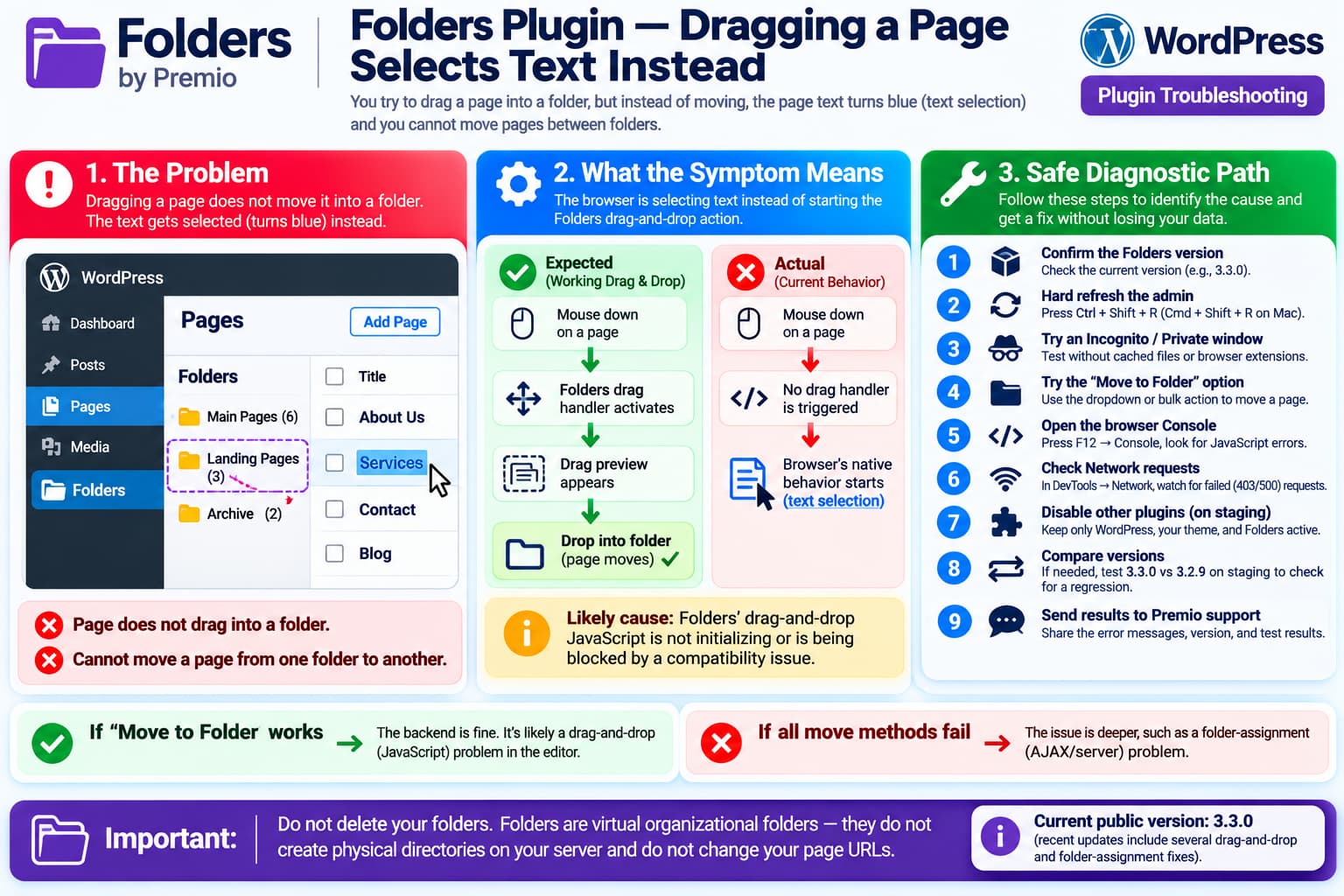
A current issue with Folders – Unlimited Folders to Organize Media Library Folder, Pages, Posts, File Manager can prevent pages from being moved into folders.
The unusual symptom is:
Try to drag a page
        ↓
Page does not move
        ↓
Browser begins selecting text
        ↓
Text turns blue
The user also cannot move a page from one existing folder into another.
That blue text-selection behavior is an important clue.
Normally, when the Folders plugin’s JavaScript recognizes a page as draggable, it intercepts the mouse or pointer movement and starts the drag operation.
If that interaction never initializes, the browser falls back to its normal behavior:
Mouse down
+
mouse movement
        ↓
Select text
So the symptom is much more consistent with a drag-and-drop JavaScript/UI problem than with the destination folder simply rejecting the page.
Which Plugin Is This?
The report belongs to:
Folders – Unlimited Folders to Organize Media Library Folder, Pages, Posts, File Manager
by Premio.
The plugin officially advertises drag-and-drop organization for:
- Pages
- Posts
- Media
- custom post types
and specifically says users can drag items into directories or use a dropdown alternative to move them.
WordPress.org currently lists:
Folders version: 3.3.0
Last updated: about 1 week ago
Active installations: 90,000+
Tested up to: WordPress 7.1.4
There Is Another Very Recent Report About Pages Not Moving
This does not appear to be an isolated historical problem.
Another recent support topic titled:
Unable to move pages
describes a site where Folders had worked for around six months, then suddenly stopped allowing pages to move between folders.
That user reported that the problem affected:
Quick links
Bulk actions
Page editing
and said they were using the latest Folders and WordPress versions. Premio support responded that they wanted to investigate and first asked the user to test for plugin conflicts.
That report is not identical to the current one.
However, the timing and affected functionality are close enough that they should be considered related until proven otherwise.
Recent Folders Releases Changed a Lot of Admin UI Behavior
The Folders plugin has received a rapid series of updates recently.
Version 3.2.1 introduced a refreshed interface with changes to interactions, permissions, scrolling, and media handling.
Subsequent releases fixed a number of regressions involving:
- Posts and Pages layouts
- media-library layout
- Elementor drag-and-drop
- Divi
- folder selection
- gallery controls
- scrolling
- folder assignment
Version 3.2.4 specifically fixed an unwanted drag-and-drop column that had appeared on Pages and other WordPress admin screens.
Version 3.2.7 included another drag-and-drop fix.
Version 3.3.0 then added another folder-assignment fix for newly created pages and posts.
That recent change history does not prove the current bug was introduced by one particular release.
It does show, however, that the plugin’s admin interaction and drag/drop system has been actively changing.
Why Blue Text Selection Matters
Suppose the page list contains:
About Us
Contact
Services
Blog
and you try to drag:
Servicesinto:
Website PagesWith working drag-and-drop, the plugin should detect the pointer action immediately.
Instead, if you get:
About Us
Contact
SERVICES
Blog
^^^^^^^^
blue browser selection
the browser has probably never entered a plugin-controlled drag state.
That can happen when:
- the drag JavaScript did not load;
- JavaScript crashed before initialization;
- the draggable selector no longer matches the page row;
- another script replaced the relevant DOM after initialization;
- CSS/pointer-event changes prevent the drag handle from receiving events;
- a plugin conflict intercepts the same mouse events.
This is different from a server-side failure after the drop.
First Test: Does the Non-Drag Method Work?
Folders officially provides an alternative to dragging.
Its WordPress.org description says pages and other elements can also be moved using the plugin’s folder dropdown rather than drag-and-drop.
Try selecting a page and using:
Move to Folderor the relevant bulk action/dropdown.
There are two useful outcomes.
If the Dropdown Works
If:
Drag and drop ✕
Move to Folder ✓
then the folder-assignment backend is probably functioning.
The fault is concentrated in:
browser
↓
Folders JavaScript
↓
drag initialization
That is strong evidence of a frontend regression.
If the Dropdown Also Fails
If:
Drag and drop ✕
Bulk move ✕
Quick action ✕
the problem is broader.
This would resemble the separate recent “Unable to move pages” report, where several movement methods failed simultaneously.
In that case, investigate the request/AJAX layer as well as drag-and-drop.
Check the Browser Console
This is the most useful next test for the blue-selection symptom.
Open:
Pages → All Pagesthen press:
F12and open:
ConsoleReload the page.
Try dragging a page into a folder.
Look for the first red error, especially anything mentioning:
folders
jquery
sortable
draggable
droppable
TypeError
ReferenceError
A JavaScript exception during page initialization can prevent drag-and-drop from being registered at all.
Later errors may simply be consequences of the first one, so capture the earliest error.
Check Whether Folders JavaScript Loaded
In DevTools, open:
Networkreload the Pages screen, and filter for:
JSLook for Folders plugin assets.
Any relevant asset returning:
404
403
500
would explain why the UI appears but drag behavior is absent.
A partially loaded plugin interface can still display folders because PHP generated the HTML while the JavaScript needed for interaction failed separately.
Test a Hard Refresh
Because the Folders plugin has been updated frequently, stale assets are worth ruling out.
Use:
Windows/Linux
Ctrl + Shift + RmacOS
Cmd + Shift + RThen test again.
Also clear:
- browser cache;
- WordPress cache;
- CDN cache;
- optimization/minification cache.
Do not clear the database or delete folders.
Try an Incognito Window
Open a private browser session and sign into WordPress.
Then test:
Pages
→ drag page
→ folder
This rules out:
- stale browser JavaScript;
- browser extensions;
- cached admin assets;
- unusual local storage/session data.
If Incognito works while the normal browser does not, the WordPress database is probably not the source of the problem.
Test Another Browser
Try one controlled test in another browser.
For example:
Chrome ✕
Firefox ?
If Firefox works, investigate browser extensions, cached scripts, or a browser-specific event issue.
If both fail identically, a plugin-side regression becomes more likely.
Test for Plugin Conflicts
Premio’s own response to the other recent page-movement problem was to ask whether another plugin had recently been installed or updated and to test by deactivating other plugins individually.
Use a staging site if possible.
Keep:
WordPress
Theme
Folders
active.
Temporarily disable other plugins.
Then test the page drag operation again.
Do not do this casually on a busy production WooCommerce or membership site.
Do Not Forget MU Plugins
WordPress’s normal Plugins screen does not include every possible source of JavaScript.
Also check:
wp-content/mu-plugins/and host-provided functionality such as:
- caching;
- security;
- admin customizations;
- optimization;
- white-label admin tools.
A test that disables normal plugins but leaves an MU plugin active is not a complete plugin-conflict test.
Recent Plugin Conflicts Have Been Confirmed
Recent support threads demonstrate that the new Folders interface has had real compatibility problems.
For example, users reported problems after the recent UI updates involving other plugins, and at least one media-modal issue was narrowed down to a conflict with Advanced Custom Fields Pro.
That does not mean ACF is responsible for this page-drag problem.
It does mean a JavaScript compatibility test is worthwhile.
Check Whether the Problem Started After 3.3.0
The current public release is 3.3.0, published roughly a week ago.
Its changelog includes:
Improved Folder Assignment:
Fixed an issue where newly created pages and posts
were not automatically assigned to the selected folder.
If the site’s timing is:
Folders 3.2.9
Drag worked
        ↓
Update
        ↓
Folders 3.3.0
Drag stopped
that is useful regression evidence.
Do not assume that is the sequence unless you verify the site’s update history.
A Staging Version Test Can Confirm a Regression
If the site is on 3.3.0, create or use a staging copy.
Test:
Folders 3.3.0with the same page.
Then temporarily test:
Folders 3.2.9on staging.
Keep everything else identical.
If:
3.3.0
drag selects text ✕

3.2.9
drag works ✓
that is strong evidence of a 3.3.0 regression.
Do not downgrade production before making a backup and confirming that the older version is appropriate for your environment.
Inspect the Network Request When Using “Move to Folder”
If the drag feature is broken but the dropdown exists, DevTools can also determine whether folder assignment itself is failing.
Open:
DevTools
→ Network
then use:
Move to FolderWatch for:
admin-ajax.phpor another WordPress request.
Check its HTTP status.
200 Response
A 200 response with no visible folder change could indicate:
- unexpected response content;
- UI refresh bug;
- request accepted but state not updated correctly.
403 Response
A 403 suggests:
- nonce failure;
- capability/permission issue;
- security plugin;
- WAF.
500 Response
A 500 indicates a server-side PHP failure.
Check:
WooCommerce/WordPress logs
PHP error log
wp-content/debug.log
if logging is enabled.
Should You Change WordPress File Permissions?
Probably not.
This plugin uses virtual folders.
Premio explicitly states that moving a page/post/image into a folder does not create real directories on the server and does not change the item’s URL.
Therefore, this is not normally a problem with:
755 folders
644 files
or filesystem write permissions.
Changing server filesystem permissions would be unrelated to a page dragging into a virtual WordPress folder in most cases.
Your Pages Are Not Being Physically Moved
This is also reassuring.
Folders says its directories are virtual and do not alter the actual URL of a page, post, or media item.
So a failed drag operation should not itself damage:
- page URLs;
- page content;
- menus;
- SEO URLs.
The problem is primarily organizational metadata inside WordPress.
Avoid Deleting and Re-Creating Folders
Do not try to fix the problem by deleting the existing folders.
If the drag JavaScript is broken, recreating:
Folder A
Folder B
Folder C
will not restore the missing drag handler.
It creates unnecessary work and could remove the organizational structure you are trying to preserve.
Do Not Edit Plugin JavaScript Directly
Even if Developer Tools identifies the failing file, avoid changing:
wp-content/plugins/folders/directly on production.
Any manual edit will be overwritten by the next update.
It also makes the installation differ from the version Premio is trying to debug.
A clean reproducible case is more useful.
What to Send Premio Support
A good bug report would contain:
Folders version:
3.3.0 / other

WordPress version:

PHP version:

Browser:
Chrome / Firefox / Safari

Pages affected:
All pages / specific pages

Drag result:
Text becomes selected blue

Page → folder:
Fails

Folder → folder:
Fails / works

Move to Folder dropdown:
Works / fails

Bulk action:
Works / fails

Incognito:
Works / fails

Other plugins disabled:
Yes / No

Console first error:
[exact message]
Network status: 200 / 403 / 500 / no request Last known working Folders version: 3.2.9 / unknown
A short screen recording would also be particularly useful because the blue text-selection behavior is visually distinctive.
Premio is currently directing users with difficult Folders cases to its support forum, email, or live support when additional reproduction information is required.
Most Likely Diagnosis
Based on the current evidence:
Folders normally supports drag/drop ✓
        +
dragging now selects browser text
        +
page cannot be moved
        +
another current page-movement report exists
        +
recent Folders versions changed admin UI/drag behavior
the leading diagnosis is:
The Folders drag-and-drop interaction is not initializing or is being interrupted on the WordPress Pages screen.
The browser selecting text strongly indicates the drag event is not taking control of the pointer interaction.
What remains unknown is whether that is caused by:
Folders regressionor:
JavaScript conflict with another plugin/admin scriptThe Console plus a clean plugin-conflict test will distinguish those possibilities.
Recommended Troubleshooting Order
Use this order:
1. Confirm Folders version
        ↓
2. Hard-refresh WordPress admin
        ↓
3. Test Incognito / another browser
        ↓
4. Try Move to Folder dropdown
        ↓
5. Open DevTools Console
        ↓
6. Capture first JavaScript error
        ↓
7. Check Network requests
        ↓
8. Test other plugins disabled
        ↓
9. Test 3.3.0 vs 3.2.9 on staging
        ↓
10. Send results to Premio
This avoids unnecessary changes to the database or folders themselves.
Final Answer
The fact that dragging a page causes its text to turn blue is the most useful clue.
That means the browser appears to be performing native text selection instead of the Folders plugin initiating its drag-and-drop behavior.
This is therefore unlikely to be caused simply by:
the page being lockedor:
the folder not accepting the pageThe current Folders release is 3.3.0, and there is also a very recent separate report from a latest-version user who suddenly became unable to move pages between folders using several different methods.
The correct next step is to check the browser Console and test the non-drag Move to Folder method.
If Move to Folder works but drag selects text, focus on the plugin’s JavaScript drag initialization.
If all movement methods fail, investigate the folder-assignment/AJAX path as well.
At this point there is no published Premio fix specifically for the new “Cannot add to folders” report, so it would be premature to claim a particular update or configuration change definitely solves it.
