A recent Easy Table of Contents update can cause a frustrating problem:
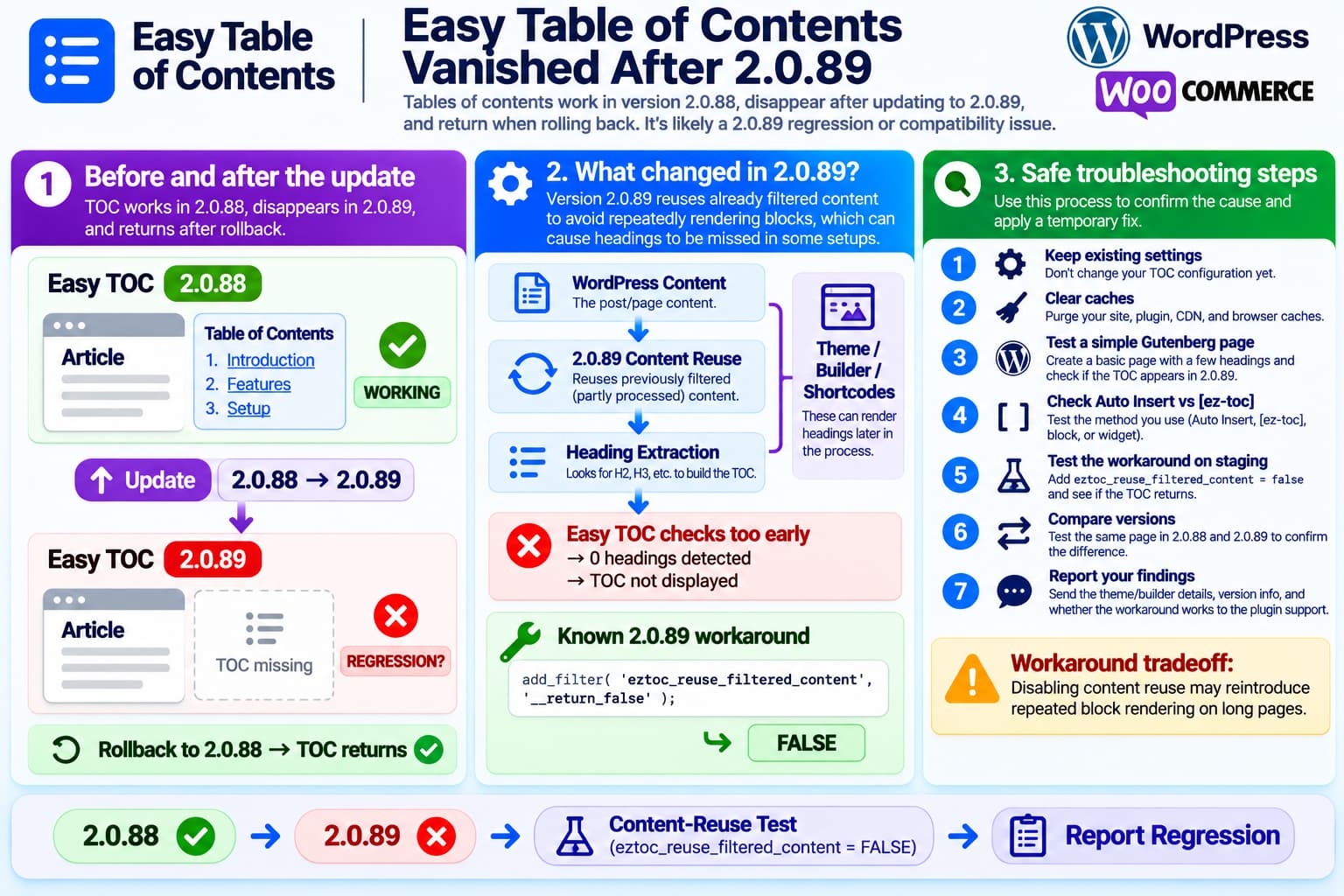
Version 2.0.88
Table of contents ✓

        ↓ update

Version 2.0.89
Table of contents missing ✕

        ↓ rollback

Version 2.0.88
Table of contents ✓
A user has now reported exactly this behavior:
All my tables of contents are gone since updating to version 2.0.89. When I rollback to 2.0.88, it’s all still there.
The report is currently unresolved in the Easy Table of Contents WordPress.org support forum.
The rollback result is an especially important clue.
If the same pages, headings, theme and Easy TOC settings work immediately after reverting to 2.0.88, it is unlikely that the site’s normal TOC configuration suddenly became invalid.
There is also another independent report in which Easy Table of Contents 2.0.89 makes the TOC disappear, and that reporter identified a temporary workaround involving a new content-reuse mechanism.
So this should currently be treated as a probable Easy Table of Contents 2.0.89 regression or theme/builder compatibility issue, rather than assuming the user has configured something incorrectly.
What Changed in Easy Table of Contents 2.0.89?
Easy Table of Contents 2.0.89 was released on October 15, 2026.
Its public changelog lists three fixes:
2.0.89

• Fix long posts timing out or producing fatal errors
• Fix Preserve Line Breaks regression
• Fix WoodMart + WPBakery stylesheet compatibility
The first change is particularly relevant.
According to the plugin changelog, versions since 2.0.87 could repeatedly render blocks while generating the TOC, potentially causing long posts to time out or fail. Version 2.0.89 changed this behavior to avoid repeatedly processing the content.
That performance fix altered the way Easy TOC obtains the HTML from which it extracts headings.
And that is exactly the kind of change that can make the TOC disappear on sites whose final headings are generated later by:
- page builders;
- theme shortcodes;
- reusable content;
- dynamic blocks;
- custom content filters.
The Important New Content-Reuse Logic
The 2.0.89 code introduced a different approach to heading extraction.
Rather than repeatedly processing the raw WordPress content through the full the_content pipeline, Easy TOC can reuse content that has already been processed.
The plugin exposes this behavior through the filter:
eztoc_reuse_filtered_contentBy default, reuse is enabled.
Conceptually, the new flow is:
WordPress content
        ↓
Content is partially/fully filtered
        ↓
Easy TOC reuses that result
        ↓
Extract headings
        ↓
Build TOC
This avoids expensive duplicate rendering.
That is good for performance.
But there is a potential compatibility problem.
Some themes and page builders do not produce their final headings until additional filters, shortcodes or builder rendering have completed.
In that situation, Easy TOC may inspect the content too early.
The result can be:
Content Easy TOC sees:
No usable headings

Final browser page:
H2 ✓
H3 ✓
H2 ✓
H3 ✓
Easy TOC therefore decides there is nothing from which to build a TOC even though the final page visibly contains headings.
Another 2.0.89 User Has Already Reproduced This
A separate current WordPress.org report describes Easy Table of Contents disappearing after upgrading to 2.0.89 on a site using Avada and Avada Builder.
That site inserts the TOC using:
[ez-toc]The reporter found:
Old version
[ez-toc] works ✓

2.0.89
[ez-toc] disappears ✕

2.0.89 + content-reuse disabled
[ez-toc] works ✓
The workaround was:
add_filter( 'eztoc_reuse_filtered_content', '__return_false' );That is strong evidence that the new content-reuse mechanism can cause TOC heading detection to fail in at least some rendering environments.
What the Workaround Does
This filter:
add_filter( 'eztoc_reuse_filtered_content', '__return_false' );tells Easy Table of Contents:
Do not reuse the previously filtered content.Instead, the plugin falls back toward its previous content-processing behavior.
Conceptually:
2.0.89 default

Already filtered content
        ↓
Reuse it
        ↓
No headings detected ✕
becomes:
2.0.89 + workaround

Original content
        ↓
Process content again
        ↓
Builder/shortcodes render
        ↓
Headings detected ✓
        ↓
TOC appears ✓
For the Avada report, that was enough to restore the TOC without rolling back the whole plugin.
Is This Workaround Safe?
It is a reasonable temporary diagnostic workaround, but it is important to understand the tradeoff.
Version 2.0.89 introduced its new behavior partly to solve a performance problem where Easy TOC could process blocks repeatedly.
The changelog specifically says the old behavior could cause:
Long single posts
        ↓
Blocks rendered repeatedly
        ↓
Timeout / fatal error
Disabling content reuse may therefore restore the same processing path that 2.0.89 was trying to avoid.
So do not treat:
add_filter( 'eztoc_reuse_filtered_content', '__return_false' );as a perfect permanent fix for every website.
It should be tested particularly carefully on:
- extremely long articles;
- block-heavy posts;
- pages containing many reusable blocks;
- complex page-builder layouts;
- lower-resource hosting.
Where to Put the Temporary Filter
Do not edit the Easy Table of Contents plugin files.
Plugin updates would overwrite the modification.
A safer temporary location is:
- a child theme’s
functions.php; - a small custom functionality plugin;
- a snippets plugin already used on the site.
The code itself is:
add_filter( 'eztoc_reuse_filtered_content', '__return_false' );After adding it:
Clear page cache
        ↓
Clear CDN/cache plugin if applicable
        ↓
Open an affected page
        ↓
Check whether TOC returns
If the TOC immediately returns on 2.0.89, that is valuable diagnostic evidence.
Do Not Change Several TOC Settings at the Same Time
Since 2.0.88 already proves that the existing settings can generate the TOC, avoid changing:
- minimum heading count;
- heading levels;
- auto insertion;
- post types;
- exclusion rules;
- visibility settings;
all at once.
Otherwise the clean regression test is lost.
The best comparison is:
Same database
Same page
Same theme
Same settings

Only variable:
2.0.88 vs. 2.0.89
That is much stronger evidence than changing a collection of settings until the TOC happens to reappear.
Check the Minimum Heading Count Anyway
There is one simple sanity check worth making.
Easy Table of Contents can be configured not to display until a page contains a minimum number of eligible headings.
Check:
Settings → Table of Contents → General
and verify the minimum number of headings.
For example:
Show when:
4 headings are present
A page containing only:
H2
H2
H3
would not display a TOC.
However, if those same pages display correctly under 2.0.88 without changing this setting, the heading-count setting cannot explain why every TOC disappeared only in 2.0.89.
Test a Simple Gutenberg Page
To determine whether the problem affects Easy TOC globally or only the site’s rendering system, create a temporary test page containing only standard WordPress blocks:
H2 — First heading

Paragraph

H2 — Second heading

H3 — Subheading

H2 — Third heading
Then insert:
[ez-toc]or enable automatic TOC insertion.
Test it under 2.0.89.
If the Gutenberg Test Works
If:
Simple Gutenberg page ✓

Existing site pages ✕
then 2.0.89 is probably conflicting with the site’s:
- theme;
- builder;
- shortcode rendering;
- dynamic-content system.
That would closely match the Avada report.
If Gutenberg Also Fails
If even a plain WordPress page loses its TOC under 2.0.89, the regression is broader and should be reported without framing it as a builder-specific compatibility issue.
Test Auto Insert and [ez-toc] Separately
Easy Table of Contents can be inserted in multiple ways.
For troubleshooting, determine whether the site uses:
Automatic insertionor:
[ez-toc]or a TOC block/widget.
Then perform one comparison.
For example:
Auto Insert
2.0.89 → missing
[ez-toc]
2.0.89 → works
would indicate a different failure path than:
Auto Insert → missing
[ez-toc] → missing
The other current 2.0.89 report specifically concerns the [ez-toc] shortcode, so knowing the insertion method is valuable.
Why Version 2.0.89 Was Changed in the First Place
It is worth understanding why the plugin developers changed this code.
There was already an unresolved support problem beginning around version 2.0.87 where some installations experienced:
A critical error has occurred on this websiteThe plugin team created GitHub issue #988 to investigate the problem.
Version 2.0.89’s changelog states that it addressed long posts timing out or fatally failing because the TOC was rendering blocks repeatedly.
So the progression appears to be:
2.0.87 / 2.0.88

Full content processing
        ↓
Works with more rendering environments
        ↓
But can process blocks repeatedly
        ↓
Performance / fatal-error risk

            ↓

2.0.89

Reuse rendered/filtered content
        ↓
Avoid expensive repeated block rendering
        ↓
Performance improved
        ↓
But some generated headings may be missed
That does not mean every site using 2.0.89 is broken.
It means the optimization appears capable of changing heading-detection behavior in particular rendering contexts.
Rolling Back to 2.0.88 Is Useful Evidence
The user’s rollback test is excellent troubleshooting evidence:
2.0.89 ✕
2.0.88 ✓
That demonstrates that:
- the headings still exist;
- the page content still exists;
- Easy TOC’s saved settings still exist;
- the TOCs were not deleted;
- the theme can still display them;
- the failure follows the plugin version.
So the tables of contents have almost certainly not been permanently lost.
They are simply not being generated/displayed under the 2.0.89 processing path.
Is Staying on 2.0.88 a Good Temporary Solution?
If 2.0.88 is working correctly on the affected website, remaining on it temporarily may be reasonable while the regression is investigated.
However, it should be regarded as temporary.
Version 2.0.89 was released partly because the prior content-processing implementation could cause performance problems or fatal errors on some long pages.
Therefore:
2.0.88should not automatically be recommended as a permanent solution for every site.
If using the rollback:
- make a database/site backup;
- keep a note explaining why automatic updates are paused;
- monitor Easy TOC releases;
- test the next maintenance release on staging before updating production.
Do Not Delete and Recreate Your TOCs
Because 2.0.88 restores them, the TOC configuration and content are clearly still there.
There is no reason to:
- recreate every shortcode;
- delete TOC blocks;
- rebuild page headings;
- rewrite articles;
- reset all Easy TOC settings.
Doing so could create unnecessary work and make the eventual plugin fix harder to verify.
Clear Caches After Every Version Test
After changing between:
2.0.88and:
2.0.89clear:
- page cache;
- object cache if applicable;
- CDN cache;
- optimization/minification cache;
- browser cache.
Otherwise an old generated page can make it appear that one version works or fails when you are actually viewing cached HTML.
Useful Developer Test
If you can safely use staging, compare these three cases:
A — 2.0.88
Expected: TOC visible

B — 2.0.89
Observed: TOC missing

C — 2.0.89 +
eztoc_reuse_filtered_content = false
If the results are:
A ✓
B ✕
C ✓
that is extremely strong evidence that the regression is connected to the content-reuse changes.
That information is much more actionable for the Easy TOC developers than simply saying:
The TOC disappeared.Information to Include in the Bug Report
Send the plugin team:
Easy Table of Contents:
2.0.89

Working version:
2.0.88

WordPress version:
PHP version:

Theme:
Theme version:

Page builder:
Gutenberg / Avada / Elementor / Divi /
WPBakery / other

TOC insertion:
Auto Insert / [ez-toc] / block / widget

2.0.89:
TOC missing

2.0.88:
TOC visible

2.0.89 with:
add_filter(
    'eztoc_reuse_filtered_content',
    '__return_false'
);

Result:
Works / still missing

Cache cleared:
Yes

Browser console errors:
Yes / No
If the workaround restores the TOC, explicitly mention the existing 2.0.89 Avada report.
This Is Not Currently an Officially Confirmed Universal Bug
The exact support report:
“My tables of contents are not being shown anymore”
currently has no developer response and remains unresolved.
So it would be too strong to say:
Easy Table of Contents 2.0.89 breaks TOCs on every WordPress site.
It clearly does not.
But there is now enough evidence to say:
Version 2.0.89 changed the content-processing path used for heading extraction, and at least one independently reported 2.0.89 compatibility case causes the TOC to disappear. Disabling the new filtered-content reuse restores it in that case.
Combined with:
2.0.88 = works
2.0.89 = fails
on the affected website, a plugin regression is currently the leading explanation.
Recommended Temporary Fix
The safest troubleshooting sequence is:
1. Back up the website
        ↓
2. Keep existing TOC settings unchanged
        ↓
3. Test 2.0.89 on staging
        ↓
4. Add:
   eztoc_reuse_filtered_content = false
        ↓
5. Clear all caches
        ↓
6. Check affected pages
Using actual PHP:
add_filter( 'eztoc_reuse_filtered_content', '__return_false' );If that restores the TOCs, send the result to the plugin developer.
If it does not:
Remove the workaround
        ↓
Stay temporarily on 2.0.88
        ↓
Report theme/builder + insertion method
        ↓
Wait for a tested maintenance release
Important Warning About the Workaround
Do not overlook why 2.0.89 introduced the changed processing behavior.
Turning filtered-content reuse off can potentially reintroduce the repeated content/block processing that caused:
Timeouts
Fatal errors
High processing cost
for some long posts.
Therefore the workaround should be:
Temporary
+
Tested
+
Monitored
rather than blindly added to every Easy TOC installation.
Final Answer
No, the evidence does not suggest that the user has done something obviously wrong.
The strongest clues are:
All TOCs worked in 2.0.88
        ↓
Upgrade to 2.0.89
        ↓
TOCs disappear
        ↓
Rollback to 2.0.88
        ↓
TOCs immediately return
Version 2.0.89 changed how Easy Table of Contents processes and reuses rendered content to avoid repeatedly rendering WordPress blocks.
There is already another current 2.0.89 report where that new behavior makes the TOC disappear, and disabling the content-reuse mechanism with:
add_filter( 'eztoc_reuse_filtered_content', '__return_false' );restores the TOC.
So the practical diagnosis is:
This is very likely a 2.0.89 regression or compatibility issue, particularly if the page’s headings are produced through a theme, builder, shortcode, reusable block or other filtered content.
The tables of contents themselves have not been lost.
For now, either keep the known-working 2.0.88 release temporarily or test the eztoc_reuse_filtered_content workaround on staging, while remembering that disabling content reuse may reintroduce the performance problem 2.0.89 was designed to solve.
