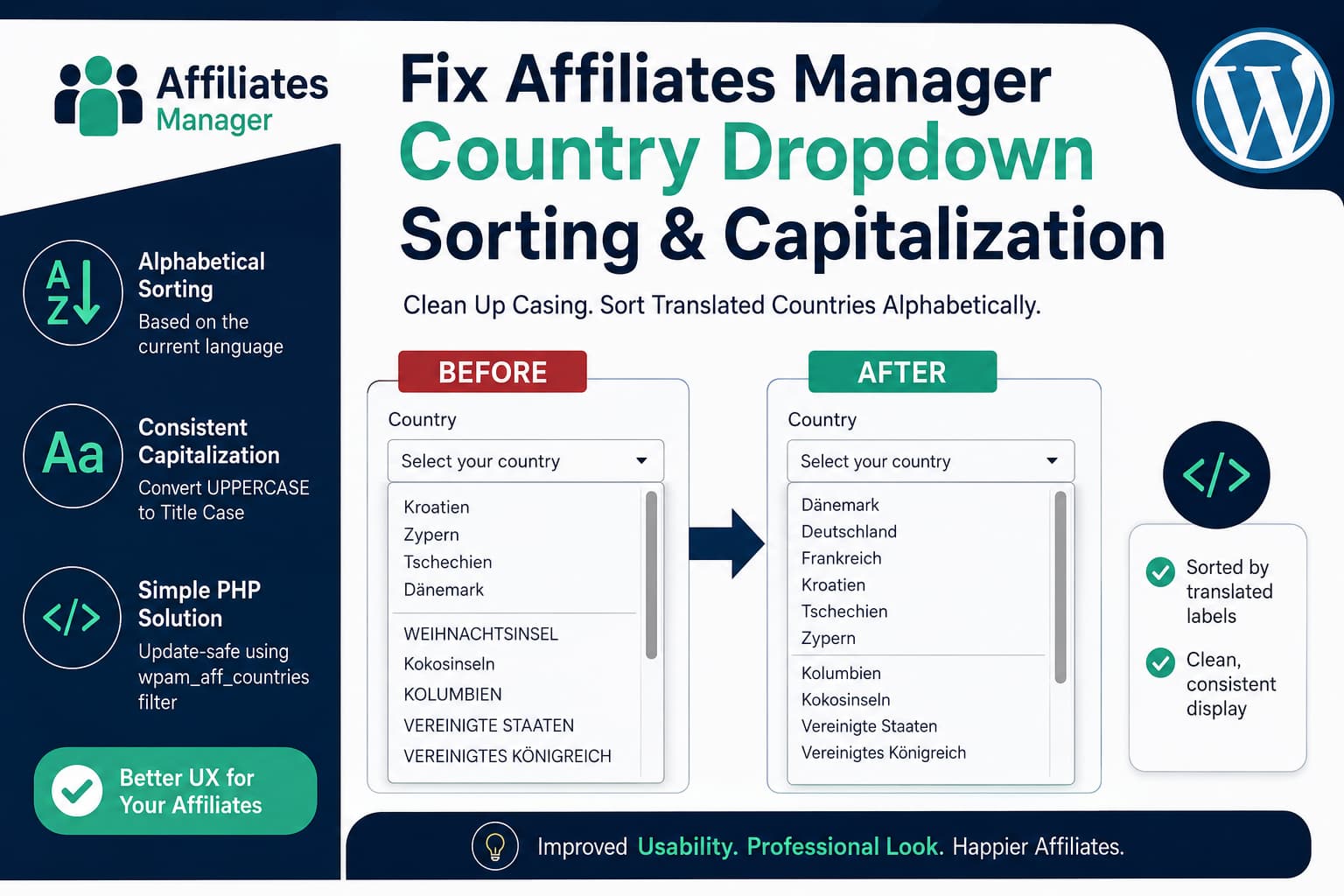
The Affiliates Manager plugin allows website owners to collect an affiliate’s country through the frontend affiliate registration form. On multilingual WordPress websites, however, the country dropdown can develop two noticeable usability problems:
- Translated countries are not sorted alphabetically in the displayed language.
- Country labels use inconsistent capitalization, with some names appearing normally and others appearing entirely in uppercase.
For example, a German affiliate registration form may display country names like this:
Kroatien
Zypern
Tschechien
Dänemark
The correct German alphabetical order should place Tschechien under “T” and Zypern under “Z,” rather than retaining their original English positions.
The same dropdown may also contain inconsistent labels such as:
WEIHNACHTSINSEL
Kokosinseln
KOLUMBIEN
This guide explains why the problem occurs and provides a complete, update-safe solution that cleans the capitalization and sorts the translated countries using the active WordPress locale.
Why the Country List Is Sorted Incorrectly
The problem is not usually caused by your theme, browser, or translation plugin.
Affiliates Manager stores its countries as an associative PHP array. Each ISO country code is paired with an English country name, and the original list is arranged according to those English names.
A simplified version looks like this:
array(
    'HR' => 'CROATIA',
    'CY' => 'CYPRUS',
    'CZ' => 'CZECH REPUBLIC',
    'DK' => 'DENMARK',
);
WordPress then translates each label:
CROATIA         → Kroatien
CYPRUS          → Zypern
CZECH REPUBLIC  → Tschechien
DENMARK         → Dänemark
Although the visible labels have changed, PHP does not automatically reorder the array. The original English order therefore remains:
Kroatien
Zypern
Tschechien
Dänemark
This is why translated country dropdowns can appear incorrectly sorted.
The capitalization issue has a related cause. The plugin’s source country names are stored in uppercase, while individual translations may use uppercase, title case, or normal language-specific capitalization. The resulting dropdown can therefore contain a mixture of styles.
The Correct Affiliates Manager Hook
Affiliates Manager includes the following filter:
wpam_aff_countriesThe plugin applies this filter immediately before generating the country <option> elements. It also preserves each two-letter ISO country code as the option value.
The current affiliate registration template calls the country-list helper when rendering a field with the countryCode type.
This gives us a safe place to:
- Normalize labels that are completely uppercase.
- Preserve labels that already have correct capitalization.
- Sort countries according to the current WordPress language.
- Keep the ISO country codes unchanged.
- Avoid modifying the plugin itself.
The wpam_aff_countries filter was added in Affiliates Manager version 2.9.41. Update the plugin before using the snippet if your website is running an older version.
Complete PHP Solution
Add the following code to a child theme’s functions.php file, a custom functionality plugin, or a code-snippet plugin such as WPCode.
/**
 * Normalize and alphabetically sort the translated country list
 * in the Affiliates Manager registration form.
 *
 * The country ISO codes are preserved. Only the visible labels
 * and their display order are changed.
 *
 * @param array $countries Country code => translated country label.
 * @return array
 */
function debugnexus_wpam_clean_and_sort_countries( $countries ) {

    if ( ! is_array( $countries ) || empty( $countries ) ) {
        return $countries;
    }

    /*
     * Normalize labels that are currently written entirely
     * in uppercase. Labels that already use mixed or correct
     * capitalization are left unchanged.
     */
    foreach ( $countries as $code => $label ) {
        $label = trim( wp_strip_all_tags( (string) $label ) );

        if (
            function_exists( 'mb_strtoupper' ) &&
            function_exists( 'mb_strtolower' ) &&
            function_exists( 'mb_convert_case' ) &&
            function_exists( 'mb_strlen' )
        ) {
            $uppercase_label = mb_strtoupper( $label, 'UTF-8' );

            /*
             * Do not modify short abbreviations such as UK,
             * USA, or UAE.
             */
            if (
                $label === $uppercase_label &&
                mb_strlen( $label, 'UTF-8' ) > 3
            ) {
                $label = mb_convert_case(
                    mb_strtolower( $label, 'UTF-8' ),
                    MB_CASE_TITLE,
                    'UTF-8'
                );
            }
        } elseif (
            $label === strtoupper( $label ) &&
            strlen( $label ) > 3
        ) {
            /*
             * Basic fallback when the PHP mbstring extension
             * is unavailable.
             */
            $label = ucwords( strtolower( $label ) );
        }

        $countries[ $code ] = $label;
    }

    /*
     * Use the active WordPress locale, for example:
     *
     * de_DE
     * en_US
     * fr_FR
     * es_ES
     */
    $locale = function_exists( 'determine_locale' )
        ? determine_locale()
        : get_locale();

    /*
     * PHP's Intl Collator provides the most accurate
     * language-aware alphabetical sorting.
     */
    if ( class_exists( 'Collator' ) ) {
        $collator = Collator::create( $locale );

        if ( $collator instanceof Collator ) {
            /*
             * Ignore capitalization differences while still
             * respecting language-specific characters.
             */
            $collator->setStrength( Collator::SECONDARY );

            uasort(
                $countries,
                static function ( $first, $second ) use ( $collator ) {
                    $result = $collator->compare( $first, $second );

                    return false === $result ? 0 : $result;
                }
            );

            return $countries;
        }
    }

    /*
     * Fallback for servers without the PHP Intl extension.
     * WordPress removes accents before comparing the labels.
     */
    uasort(
        $countries,
        static function ( $first, $second ) {
            return strcasecmp(
                remove_accents( $first ),
                remove_accents( $second )
            );
        }
    );

    return $countries;
}

add_filter(
    'wpam_aff_countries',
    'debugnexus_wpam_clean_and_sort_countries',
    20
);
What the Code Does
1. Receives the translated country array
Affiliates Manager passes its country array to the wpam_aff_countries filter:
add_filter(
    'wpam_aff_countries',
    'debugnexus_wpam_clean_and_sort_countries',
    20
);
Each item contains an ISO code and its translated label:
array(
    'DE' => 'DEUTSCHLAND',
    'CO' => 'KOLUMBIEN',
    'HR' => 'Kroatien',
);
The ISO codes are important because Affiliates Manager stores and validates the selected country using these values.
The snippet does not modify them.
2. Changes only fully uppercase labels
The snippet checks whether the complete label is uppercase:
$label === mb_strtoupper( $label, 'UTF-8' )If it is, the label is converted to title case.
For example:
WEIHNACHTSINSEL → Weihnachtsinsel
KOLUMBIEN       → Kolumbien
DEUTSCHLAND     → Deutschland
A label that is already correctly formatted remains unchanged:
Kokosinseln → Kokosinseln
Tschechien  → Tschechien
This is safer than forcing every translation through a capitalization function.
Short uppercase abbreviations with three or fewer characters are also preserved. Therefore, a translation such as USA will not become Usa.
3. Detects the active WordPress locale
The code obtains the locale currently being used by WordPress:
$locale = determine_locale();On a German page, this may return:
de_DEOn an English page, it may return:
en_USThis allows the same snippet to support multiple languages rather than hard-coding German sorting rules.
4. Uses locale-aware sorting
The preferred sorting method uses PHP’s Collator class:
$collator = Collator::create( $locale );Collator is provided by the PHP Intl extension and can compare words according to language-specific collation rules.
The code then runs:
uasort( $countries, ... );Unlike sort(), uasort() preserves the ISO country-code keys.
After sorting, the array can look like this:
array(
    'HR' => 'Kroatien',
    'CZ' => 'Tschechien',
    'CY' => 'Zypern',
);
The submitted values remain:
HR
CZ
CY
Only the visible order changes.
5. Provides a fallback without PHP Intl
Not every hosting server has the PHP Intl extension enabled.
When Collator is unavailable, the snippet falls back to:
strcasecmp(
    remove_accents( $first ),
    remove_accents( $second )
);
This is not as linguistically precise as Intl collation, but it still provides a much better alphabetical order than retaining the original English array order.
Recommended Installation Method
Do not place the code directly inside the Affiliates Manager plugin.
Editing plugin files is a temporary fix because the changes will be deleted the next time the plugin is updated.
Use one of these methods instead:
Method 1: Add It With WPCode
- Install and activate the WPCode plugin.
- Go to Code Snippets → Add Snippet.
- Select Add Your Custom Code.
- Choose PHP Snippet.
- Paste the complete code.
- Set the location to Run Everywhere.
- Save and activate the snippet.
- Clear all website and server caches.
- Open the affiliate registration page in a private browser window.
Do not include an opening <?php tag when WPCode already provides a PHP snippet editor.
Method 2: Use a Child Theme
Add the code to:
/wp-content/themes/your-child-theme/functions.phpAvoid adding it to the parent theme because a parent-theme update may overwrite the file.
Method 3: Create an MU Plugin
For a more permanent site-level solution, create this file:
/wp-content/mu-plugins/debugnexus-wpam-country-sorting.phpAdd the following header before the snippet:
<?php
/**
 * Plugin Name: DebugNexus Affiliates Manager Country Sorting
 * Description: Normalizes and sorts translated country names in Affiliates Manager.
 * Version: 1.0.0
 */
WordPress automatically loads files placed directly inside the mu-plugins directory.
Create the directory if it does not already exist.
How to Test the Fix
After activating the snippet, perform the following checks.
Check the German alphabetical order
Confirm that countries are now positioned according to their German labels.
For example:
Kroatien
Tschechien
Zypern
They should no longer follow the original English sequence:
Croatia
Cyprus
Czech Republic
Check capitalization
Look for country labels that previously appeared in uppercase.
Before:
WEIHNACHTSINSEL
KOLUMBIEN
DEUTSCHLAND
After:
Weihnachtsinsel
Kolumbien
Deutschland
Submit a test registration
Select a country and submit the affiliate registration form.
Confirm that:
- The form submits successfully.
- The selected country is saved.
- No validation error appears.
- The correct country is shown in the affiliate profile.
- The ISO country code has not changed.
Test every active language
On a multilingual website, switch between all available languages and inspect the dropdown separately.
The code sorts the list during each request, so the order should reflect the locale active on that page.
Troubleshooting
The Dropdown Has Not Changed
First, confirm that Affiliates Manager is version 2.9.41 or newer. Earlier versions do not provide the required country filter.
Then clear:
- WordPress page cache.
- Server cache.
- CDN cache.
- Object cache.
- Browser cache.
Also confirm that the snippet is active and configured to run on the frontend.
The Order Improved but Umlauts Are Not Perfect
The fallback sorter is probably being used because PHP Intl is unavailable.
Ask your hosting provider to enable the PHP Intl extension. Depending on the server, it may appear as:
php-intlor:
intlThe snippet will automatically begin using Collator after the extension is enabled.
Uppercase Labels Did Not Change
The server may not have the PHP mbstring extension enabled.
The snippet includes a basic fallback, but Unicode characters such as Ä, Ö, Ü, É, or Å are handled more reliably when mbstring is available.
Ask the host to enable:
php-mbstringA Country Name Is Translated Incorrectly
This snippet corrects capitalization and sorting. It does not replace an incorrect translation with a different country name.
To change the actual translation, use:
- The WordPress translation project.
- Loco Translate.
- Your multilingual plugin’s string-translation interface.
- A separate mapping inside the
wpam_aff_countriesfilter.
For example:
function debugnexus_wpam_correct_country_translation( $countries ) {
    $countries['CZ'] = 'Tschechien';

    return $countries;
}

add_filter(
    'wpam_aff_countries',
    'debugnexus_wpam_correct_country_translation',
    10
);
Use the correction filter at priority 10, allowing the sorting snippet at priority 20 to sort the corrected label afterward.
The Website Uses Browser-Side Automatic Translation
The PHP solution works when the translated labels are available before WordPress renders the form.
Some automatic translation services replace text with JavaScript after the page has loaded. In that situation, PHP may sort the original labels before the browser-side translation occurs.
A translation solution that loads the active WordPress locale and translated plugin strings on the server is preferable for this form. Otherwise, a separate JavaScript sorter may be required after the automatic translation process finishes.
Why CSS Cannot Fix This Problem
CSS can change how an option looks, but it cannot reliably:
- Reorder
<option>elements alphabetically. - Convert only uppercase option text.
- Apply locale-specific alphabetical rules.
- Preserve selected values while rebuilding the list.
The country labels and order should therefore be corrected in PHP before the HTML is sent to the browser.
Frequently Asked Questions
Will the fix be removed when Affiliates Manager updates?
No, provided the snippet is stored in WPCode, a child theme, a custom plugin, or an MU plugin.
Do not modify the Affiliates Manager plugin files directly.
Does the code change stored affiliate data?
No. It preserves the existing ISO country codes and changes only the visible labels and their order.
Can I use the snippet for languages other than German?
Yes. The snippet detects the active WordPress locale and attempts to sort the translated labels accordingly.
The quality of the sorting depends on whether the server has PHP Intl enabled.
Can I remove countries with the same filter?
Yes. Remove a country by unsetting its ISO code:
function debugnexus_wpam_remove_selected_countries( $countries ) {
    unset( $countries['XX'] );
    unset( $countries['YY'] );

    return $countries;
}

add_filter(
    'wpam_aff_countries',
    'debugnexus_wpam_remove_selected_countries',
    5
);
Replace XX and YY with the appropriate ISO country codes.
Can I show only one country?
Yes:
function debugnexus_wpam_show_only_germany( $countries ) {
    return array(
        'DE' => 'Deutschland',
    );
}

add_filter(
    'wpam_aff_countries',
    'debugnexus_wpam_show_only_germany',
    5
);
The sorting snippet can remain active, although sorting is unnecessary when only one country is available.
Final Result
The issue occurs because Affiliates Manager creates its country array in English order and translates the labels without alphabetically reordering the translated result.
The plugin’s wpam_aff_countries filter provides a clean solution.
The completed snippet:
- Preserves ISO country codes.
- Normalizes fully uppercase country labels.
- Protects short uppercase abbreviations.
- Sorts countries according to the active locale.
- Uses PHP Intl when available.
- Includes a fallback for servers without Intl.
- Works without editing the Affiliates Manager plugin.
- Remains in place after plugin updates.
After applying the fix, localized affiliate registration forms become cleaner, easier to navigate, and more consistent for international users.
