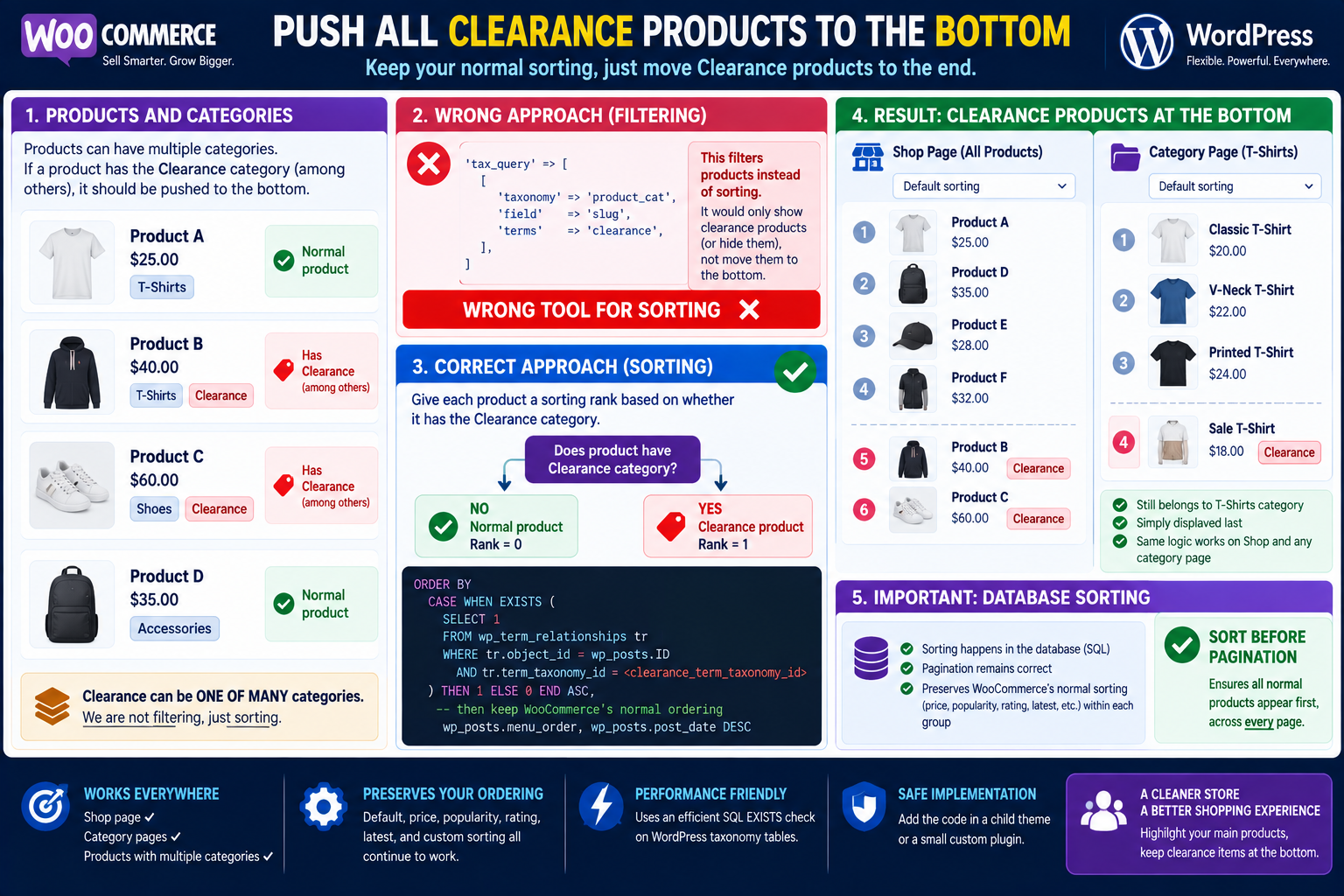
A common WooCommerce catalog requirement is:
Show all normal products first, then place every product assigned to the
clearancecategory at the bottom.
The important detail is that the product does not necessarily belong only to Clearance.
For example:
Product A
Categories:
- T-Shirts

Product B
Categories:
- T-Shirts
- Clearance

Product C
Categories:
- Shoes
- Clearance
The desired result on the Shop page is:
Product A
...
all other normal products
...
Product B
Product C
And on the T-Shirts category:
Normal T-Shirts
        ↓
Product B
because Product B includes Clearance
The correct test is therefore:
Does this product have the Clearance term?not:
Is Clearance the product's only category?Do Not Use tax_query to Solve the Ordering
A taxonomy query is mainly intended to determine which posts qualify for a query.
WordPress’s WP_Tax_Query generates SQL JOIN and WHERE clauses that filter results according to taxonomy relationships.
For example:
'tax_query' => [
    [
        'taxonomy' => 'product_cat',
        'field'    => 'slug',
        'terms'    => 'clearance',
    ],
]
means:
Return products belonging to ClearanceIt does not mean:
Return everything,
but put Clearance products last.
For this requirement, the original WooCommerce result set should remain intact.
Only the SQL ordering needs to change.
Recommended Solution
Add the following to a child theme’s functions.php or, preferably, a small custom plugin:
/**
 * Put products assigned to the "clearance" category
 * after all other products on Shop and product-category archives.
 */
add_action( 'woocommerce_product_query', 'dn_mark_clearance_products_for_bottom_sorting', 20 );

function dn_mark_clearance_products_for_bottom_sorting( $query ) {

    if ( is_admin() ) {
        return;
    }

    // Only affect the main WooCommerce Shop and category archives.
    if ( ! is_shop() && ! is_product_category() ) {
        return;
    }

    $term = get_term_by( 'slug', 'clearance', 'product_cat' );

    if ( ! $term || is_wp_error( $term ) ) {
        return;
    }

    // Store a marker on this particular WP_Query instance.
    $query->set(
        'dn_clearance_term_taxonomy_id',
        (int) $term->term_taxonomy_id
    );
}


/**
 * Prepend category membership to WooCommerce's normal ORDER BY.
 */
add_filter( 'posts_clauses', 'dn_sort_clearance_products_last', 999, 2 );

function dn_sort_clearance_products_last( $clauses, $query ) {

    $term_taxonomy_id = (int) $query->get(
        'dn_clearance_term_taxonomy_id'
    );

    // Ignore every unrelated WordPress query.
    if ( ! $term_taxonomy_id ) {
        return $clauses;
    }

    global $wpdb;

    $clearance_order = $wpdb->prepare(
        "CASE WHEN EXISTS (
            SELECT 1
            FROM {$wpdb->term_relationships} AS dn_clearance_relationship
            WHERE dn_clearance_relationship.object_id = {$wpdb->posts}.ID
              AND dn_clearance_relationship.term_taxonomy_id = %d
        )
        THEN 1
        ELSE 0
        END ASC",
        $term_taxonomy_id
    );

    // Clearance rank comes first.
    // WooCommerce's existing catalog ordering remains second.
    $clauses['orderby'] = $clearance_order
        . ( ! empty( $clauses['orderby'] )
            ? ', ' . $clauses['orderby']
            : ''
        );

    return $clauses;
}
Change:
'clearance'if the actual product-category slug is different.
How This Works
The important part is this SQL expression:
CASE WHEN EXISTS (
    ...
)
THEN 1
ELSE 0
END ASC
Every product receives an invisible sorting rank.
A product that does not belong to Clearance gets:
0A product that belongs to Clearance gets:
1Sorting ascending therefore produces:
0 → normal products
0 → normal products
0 → normal products
1 → clearance product
1 → clearance product
The product can belong to ten other categories as well.
As long as there is a taxonomy relationship to:
product_cat = clearanceit receives rank 1.
Multiple Categories Are Not a Problem
Consider:
Product:
Premium Cotton T-Shirt

Categories:
- Clothing
- T-Shirts
- Summer
- Clearance
The query asks whether the product has a relationship to the clearance term.
It does.
Therefore:
Clearance rank = 1The other category relationships do not matter.
This is exactly what is needed when the requirement is:
Clearance is among the product’s selected categories.
Why EXISTS Is Useful
WordPress stores taxonomy relationships separately from posts.
Conceptually:
wp_posts
Product #125
       ↓
wp_term_relationships
       ↓
product_cat: T-Shirts
product_cat: Clearance
product_cat: Summer
The SQL does not need to decide whether Clearance is the only category.
It simply asks:
Does a relationship to this term exist?That makes products with multiple categories behave correctly.
WordPress itself uses taxonomy relationship tables when constructing taxonomy queries.
Existing WooCommerce Sorting Is Preserved
A particularly important part of the snippet is:
$clauses['orderby'] = $clearance_order
    . ', '
    . $clauses['orderby'];
It does not replace WooCommerce’s existing order.
It prepends one additional rule.
Suppose WooCommerce currently orders products:
Price: low to highThe final logic becomes:
1. Non-clearance vs Clearance
2. Price low to high
So the result could be:
Normal Product       $10
Normal Product       $25
Normal Product       $50
-------------------------
Clearance Product     $5
Clearance Product    $15
Clearance Product    $40
The customer’s selected price ordering still applies inside each group.
The same principle applies to:
- default catalog order;
- popularity;
- rating;
- price ascending;
- price descending;
- other WooCommerce orderings.
WooCommerce’s current catalog query obtains its normal ordering arguments first, then fires the woocommerce_product_query action for additional query customization.
Why posts_clauses Is Used
WordPress provides the posts_clauses filter specifically for changing pieces of the SQL query, including:
WHERE
JOIN
GROUP BY
ORDER BY
DISTINCT
LIMIT
There is also a narrower:
posts_orderbyfilter.
For WooCommerce product archives, however, posts_clauses at a late priority is useful because WooCommerce itself can modify SQL clauses for product filtering and ordering.
Using:
999makes this sorting rule run after the normal WooCommerce product-query clause modifications.
Why We Mark the WooCommerce Query First
This line:
$query->set(
    'dn_clearance_term_taxonomy_id',
    $term->term_taxonomy_id
);
is also important.
Without it, a global posts_clauses filter could accidentally alter:
- menus;
- related posts;
- widgets;
- admin queries;
- blog posts;
- product sliders;
- secondary Elementor queries;
- unrelated WP_Query instances.
Instead:
WooCommerce product archive
        ↓
Mark this query
        ↓
posts_clauses sees marker
        ↓
Apply Clearance sorting
All other queries return unchanged.
Shop Page Example
Suppose Shop contains:
Product A
Categories: Electronics

Product B
Categories: Electronics, Clearance

Product C
Categories: Accessories

Product D
Categories: Clearance

Product E
Categories: Clothing, Summer
Instead of:
A
B
C
D
E
the query becomes:
A
C
E
B
D
assuming that is consistent with WooCommerce’s normal secondary ordering.
Both B and D are pushed down because both include:
ClearanceIt does not matter that B also belongs to Electronics.
Category Archive Example
Now visit:
/product-category/electronics/The normal category query contains:
Product A
Product B
Because Product B also has Clearance:
Product A
----------------
Product B
is produced.
The product is not removed from Electronics.
It simply receives a lower display priority.
That is usually exactly what stores want for clearance inventory.
What Happens on the Clearance Category Page?
If you visit:
/product-category/clearance/every returned product already belongs to Clearance.
Therefore every product receives:
rank = 1and WooCommerce’s normal secondary ordering determines their order.
So there is effectively no visible difference.
That is expected.
There are no non-clearance products on that archive to place ahead of them.
Why Sorting the PHP Results Afterwards Is a Bad Idea
Another possible solution might be:
usort( $products, ... );after WooCommerce retrieves the products.
Avoid doing that for paginated archives.
Suppose there are:
100 products
20 products per page
30 Clearance products
WordPress performs pagination in SQL.
If you reorder only the 20 products that happened to be returned for page 1, some Clearance products can remain on page 1 while normal products remain on page 2.
The desired global order is:
All 70 normal products
        ↓
All 30 clearance products
The database must apply that order before LIMIT and pagination.
Using SQL ORDER BY does exactly that.
Pagination Remains Correct
Because the CASE expression is part of the SQL query, WordPress effectively runs:
SELECT products
ORDER BY
    clearance_membership,
    normal_woocommerce_order
LIMIT ...
Pagination therefore happens after the Clearance ranking.
That means:
Page 1 → normal products
Page 2 → normal products
Page 3 → remaining normal products
Page 4 → clearance begins
Page 5 → clearance products
depending on the number of products.
This is much more reliable than reordering $query->posts after retrieval.
Do Not Use has_term() Inside the Main Query Loop to Build the Order
Something such as:
has_term( 'clearance', 'product_cat', $product_id )is useful when checking one product.
It is not the right mechanism for sorting an entire paginated catalog after WordPress has already queried the database.
Doing hundreds of individual PHP-level taxonomy checks can also create unnecessary work compared with letting SQL perform the membership test directly.
Optional: Apply It to Product Search Too
The supplied snippet deliberately affects only:
is_shop()
is_product_category()
because that is the stated requirement.
If Clearance products should also be pushed down in WooCommerce product search results, the scope can be expanded carefully.
For example:
if (
    ! is_shop()
    && ! is_product_category()
    && ! is_search()
) {
    return;
}
However, test search relevance before doing this.
WordPress search has its own relevance ordering, and the Clearance rank would intentionally become more important than relevance.
That may or may not be desirable.
Optional: Include Products in Child Categories of Clearance
The current snippet checks direct membership of:
ClearanceSuppose the structure is:
Clearance
├── Summer Clearance
└── Winter Clearance
and Product A belongs only to:
Summer Clearancebut is not directly assigned to the parent Clearance category.
The basic code will not rank Product A as Clearance because there is no direct relationship to the parent term.
If the requirement is:
Products in Clearance or any descendant category should be at the bottom
then collect the child term IDs as well and test all corresponding term_taxonomy_id values.
That is a slightly different requirement from checking whether Clearance itself is among the selected categories.
Make Sure You Use the Slug
This:
$term = get_term_by(
    'slug',
    'clearance',
    'product_cat'
);
expects the category slug.
In WordPress:
Name:
Clearance Products

Slug:
clearance
use:
'clearance'not:
'Clearance Products'unless the slug itself is actually that value.
Child Theme or Custom Plugin?
Avoid putting this directly into the parent theme.
A parent-theme update can erase it.
Use either:
Child theme functions.phpor preferably:
small site-specific pluginFor example:
/wp-content/plugins/custom-woocommerce-ordering/This behavior is store functionality rather than presentation, so a small custom plugin is generally the cleaner long-term location.
Test the Main Cases
After adding the code, create these test products:
Product A
Categories:
- Shirts

Product B
Categories:
- Shirts
- Clearance

Product C
Categories:
- Clearance

Product D
Categories:
- Shirts
Shop
Expected:
A / D
then
B / C
subject to the site’s normal WooCommerce ordering.
Shirts
Expected:
A
D
then
B
Clearance
Expected:
B
C
using normal WooCommerce sorting because every result belongs to Clearance.
Test WooCommerce Sorting Options
Also test:
Default sorting
Sort by popularity
Sort by average rating
Sort by latest
Price: low to high
Price: high to low
The intended behavior is always:
NON-CLEARANCE GROUP
→ selected WooCommerce ordering

then

CLEARANCE GROUP
→ selected WooCommerce ordering
If another product-ordering plugin completely replaces WooCommerce’s SQL after this filter runs, an integration-specific adjustment may be necessary.
Performance Considerations
For a normal WooCommerce catalog, the SQL EXISTS check is a reasonable way to implement the requirement.
It checks the existing WordPress taxonomy relationship table rather than introducing:
- custom product metadata;
- manual duplication of category state;
- scheduled synchronization jobs.
For extremely large stores with hundreds of thousands or millions of products and heavy catalog traffic, it may be worth benchmarking the resulting query.
At that scale, denormalizing the Clearance state into an indexed lookup value could outperform repeatedly evaluating taxonomy membership.
For typical WooCommerce stores, that extra architecture would usually be unnecessary.
Why Manual WooCommerce Ordering Is Different
WooCommerce also provides manual product sorting through:
Products → Sorting
and uses that ordering as the default catalog arrangement.
That is useful when individual products need manually controlled positions.
It is not ideal for this requirement because Clearance membership changes over time.
For example:
Product enters Clearance
→ should automatically move down

Product leaves Clearance
→ should automatically return to normal group
The SQL approach handles both cases immediately from the category relationship.
No manual reordering is required.
The Important Difference
The original thought process often becomes:
Find products in ClearanceBut that leads naturally toward filtering.
The actual requirement is:
Keep every normal WooCommerce product query
        ↓
For each returned product:
Is Clearance among its categories?
        ↓
No  → rank 0
Yes → rank 1
        ↓
Order rank 0 before rank 1
        ↓
Apply normal WooCommerce ordering inside each rank
That distinction is what makes products assigned to multiple categories work properly.
Practical Conclusion
Yes, products can be pushed to the bottom when clearance is simply one of several selected categories.
Do not require:
Categories = Clearance onlyInstead test whether the product has any taxonomy relationship to the Clearance term.
The most reliable implementation is an SQL ordering expression:
CASE WHEN EXISTS (...)
THEN 1
ELSE 0
END
added to WooCommerce’s existing catalog ORDER BY.
WordPress exposes posts_clauses specifically for modifying SQL clauses such as ORDER BY, and WooCommerce exposes the main product archive through woocommerce_product_query.
This approach has several important advantages:
✓ Works when Clearance is one of many categories
✓ Works on the Shop page
✓ Works on other product-category archives
✓ Does not remove products from their normal categories
✓ Preserves WooCommerce's selected sorting within each group
✓ Sorts before pagination
✓ Does not affect unrelated WordPress queries
The key is to rank by Clearance membership rather than filter by Clearance membership.
