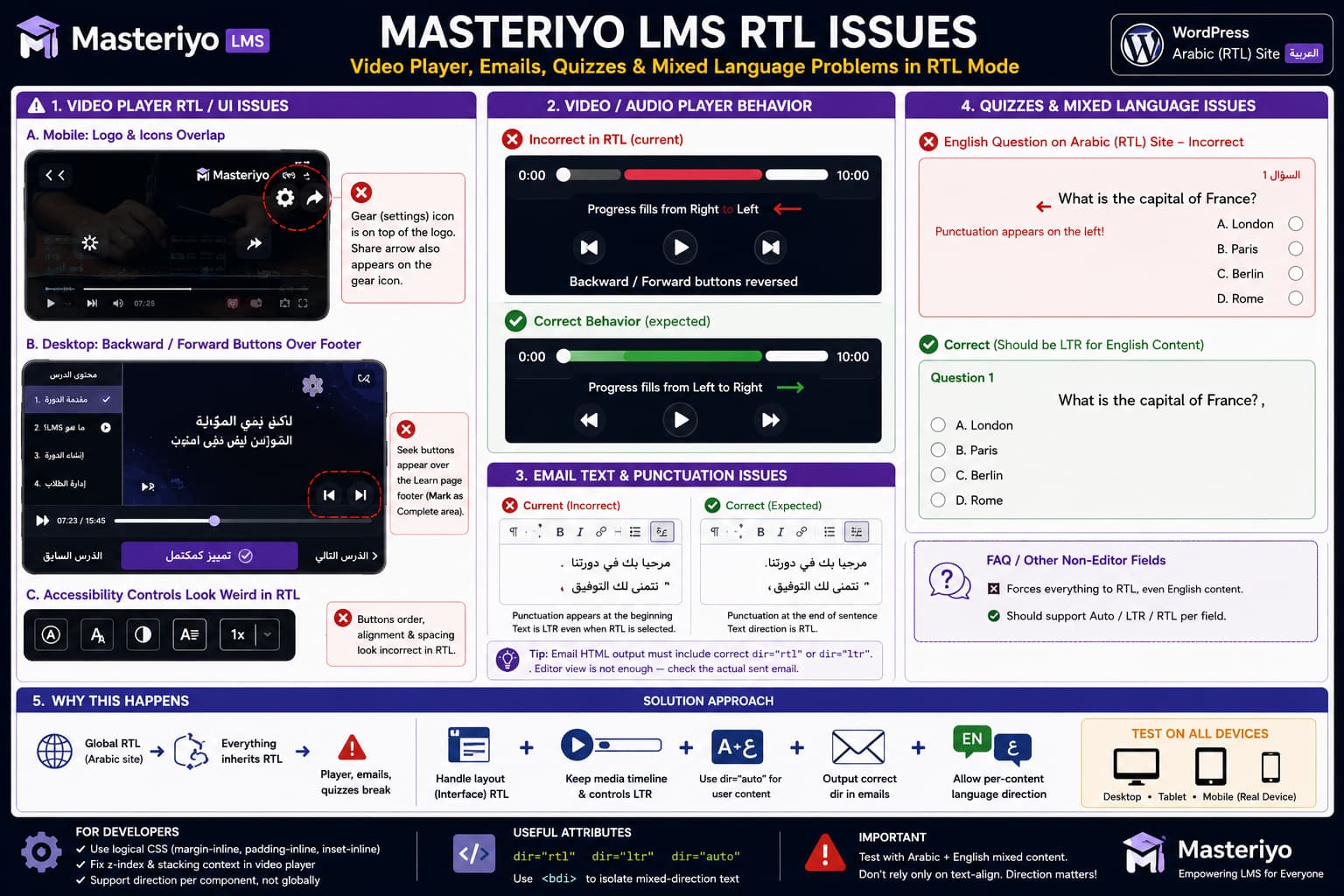
Masteriyo LMS can exhibit several different RTL problems when WordPress uses an Arabic or another right-to-left locale. These include overlapping video-player controls, reversed seek buttons, progress bars filling in the wrong direction, misplaced share/settings icons, incorrect punctuation in emails, and English quiz text being forced into RTL.
These symptoms have a common architectural cause: page direction, interface direction, media-control direction, and content direction are being treated as though they are the same thing.
They are not.
A WordPress site can correctly use:
<html dir="rtl">while individual components inside that page still need:
dir="ltr"or:
dir="auto"depending on what they contain.
Masteriyo has previously confirmed several RTL player/UI issues in its support forum and reported them to its development team. However, the current Masteriyo 2.3.3 changelog does not list fixes for the specific video-player, email-direction, or mixed-language quiz problems discussed here. (wordpress.org)
The RTL Problems Are Not All the Same Bug
It is useful to divide the symptoms into separate categories.
Layout and stacking problems
These include:
- the video logo overlapping the settings icon;
- the share arrow overlapping the settings control;
- video controls appearing above the Learn page footer;
- accessibility buttons becoming visually misaligned.
These are primarily layout, positioning, flex-direction, or z-index problems.
Media-control direction problems
These include:
- backward and forward controls swapping positions;
- video/audio progress filling from right to left;
- timestamps and player controls being mirrored with the page.
These occur when a media interface inherits direction: rtl even though the time axis and transport controls should remain logically left-to-right.
Bidirectional text problems
These include:
- Arabic email punctuation appearing on the wrong side;
- English quiz questions displaying RTL;
- English punctuation being reordered on an Arabic site;
- FAQ or quiz content inheriting the site’s direction even when its language differs.
These are Unicode bidirectional-text issues rather than normal CSS alignment problems.
Trying to solve all three categories with:
direction: rtl;or:
direction: ltr;globally will normally fix one area while breaking another.
Masteriyo Has Already Confirmed RTL Player Problems
The reversed Masteriyo video controls are not purely theoretical.
In an earlier support investigation, Masteriyo reproduced the problem where video-player forward/backward controls became misaligned in Arabic RTL mode. The support team stated that the issue had been reported to the development team and was planned for an upcoming update. (wordpress.org)
Another Masteriyo support thread covering the video and audio player reported the same class of problem:
- pause control positioning changes;
- forward/backward positions switch;
- accessibility controls look incorrect in RTL.
Masteriyo has also previously stated that it was working on RTL fixes with high priority after reproducing problems involving:
- video controls;
- audio controls;
- search positioning;
- review layouts;
- other Arabic RTL interface elements.
These reports establish that at least part of the behavior is in Masteriyo’s own RTL handling rather than automatically being caused by the active WordPress theme.
The Share Icon Overlap Is a Confirmed Stacking Issue
Masteriyo has separately reproduced a mobile problem where the video’s share control overlaps another part of the Learn page interface.
The developer explained that the share button had a higher visual priority than the lesson sidebar, causing it to remain above the sidebar on mobile.
Masteriyo described this as a code-priority problem and created a bug ticket for it. (wordpress.org)
That explanation is important because it suggests a problem with stacking order, such as:
z-indexand positioned elements, rather than text direction itself.
The correct architecture should keep video overlays inside the player’s own stacking context instead of allowing them to float over unrelated Learn page components.
Conceptually:
Learn page
│
├── Video player
│   ├── logo
│   ├── settings
│   └── share
│
├── lesson sidebar
│
└── course footer
Player controls should remain constrained within the player’s layer.
A control should not become:
positioned above everything on the pagemerely because the site is RTL.
Why the Logo, Gear and Share Controls Can Collide
RTL layouts frequently expose problems in interfaces that were built using physical CSS properties such as:
left: 10px;
right: 10px;
margin-left: 20px;
Modern RTL-aware interfaces are usually more robust when they use logical properties such as:
inset-inline-start
inset-inline-end
margin-inline-start
margin-inline-end
padding-inline-start
padding-inline-end
For example, instead of:
.settings {
    right: 15px;
}
an RTL-aware component may use:
.settings {
    inset-inline-end: 15px;
}
But even logical positioning will not solve the problem if three independently absolutely-positioned controls are all assigned the same logical edge.
The developer needs to check the player as a complete control group, not mirror each icon individually.
Why Video Controls Should Not Simply Reverse in RTL
An Arabic interface is read right-to-left, but media playback still represents time progressing from:
0:00 → durationFor many media interfaces, preserving an LTR control timeline is clearer even when surrounding labels and page navigation use RTL.
The player can therefore conceptually use:
<div class="masteriyo-player" dir="ltr">while Arabic labels outside the media controls remain RTL.
This prevents page direction from automatically reversing:
- seek-back;
- play/pause;
- seek-forward;
- elapsed time;
- duration;
- progress position.
Masteriyo’s support team has already acknowledged that its reversed seek controls can confuse RTL users and previously agreed that the buttons should behave similarly to their LTR positions. (wordpress.org)
Progress Bars Need Their Own Direction
The media progress bar is another example where the site’s language and the component’s progression direction should be separated.
If the entire player inherits:
direction: rtl;a progress component implemented using flexbox, transforms, or directional width calculations may visually fill from the right.
For a playback timeline intended to progress left-to-right, the time/progress component should be isolated.
Conceptually:
.media-time-axis {
    direction: ltr;
}
The exact Masteriyo selector should be taken from the installed plugin’s generated markup.
Do not copy a guessed CSS class into production.
This should ideally be fixed by Masteriyo itself because the plugin controls both the markup and its React/player state.
Why the Seek Buttons Can Cover the Learn Page Footer
The second player issue involves forward/backward controls remaining visible while the student scrolls down and then appearing above the sticky Learn page footer containing Mark as Complete.
That is another stacking-context problem.
Possible implementation causes include:
Player control uses position: fixedor:
Player overlay has a z-index higher than the sticky Learn footeror a transformed parent has created an unexpected stacking context.
The correct behavior should be:
Video controls
→ clipped/contained by player
while:
Learn footer
→ belongs to page interface
The transport controls should not continue floating independently after the player itself has scrolled away.
Do not solve this simply by assigning an enormous z-index to the Learn page footer.
That can create new problems with:
- modals;
- menus;
- quiz overlays;
- lesson sidebar;
- mobile navigation.
The player’s overlay should be corrected at its source.
Accessibility Controls Need Selective RTL Handling
Accessibility controls are another area where automatically applying:
flex-direction: row-reverse;can produce strange output.
Some controls have semantic relationships that should not be mirrored.
For example:
OFF [toggle] ONor playback-speed controls may need a deliberate logical order rather than inheriting whatever direction the surrounding page uses.
An RTL implementation should decide separately:
- text alignment;
- control order;
- icon direction;
- keyboard order;
- progress direction.
Mirroring the entire control bar is rarely sufficient.
Arabic Email Punctuation Is a Bidirectional-Text Problem
The email problem is different from the video-player layout issue.
Consider an Arabic sentence that ends with a period.
The letters are strongly RTL characters, but punctuation such as:
.
,
:
(
)
is generally neutral in the Unicode Bidirectional Algorithm.
Its displayed location can therefore depend on the element’s base direction.
MDN explains that neutral characters at the boundaries of text runs use the surrounding/base direction. If an Arabic sentence is rendered inside an LTR container, punctuation can consequently appear on the visually wrong side of the sentence. (developer.mozilla.org)
The solution is not simply:
text-align: right;Alignment controls where the line sits.
It does not define the Unicode base direction.
For Arabic content, the resulting HTML needs appropriate directionality, for example:
<p dir="rtl" lang="ar">
    هذا نص عربي.
</p>
For English:
<p dir="ltr" lang="en">
    This is an English sentence.
</p>
Why the Email Editor Can Look Correct but Output Incorrectly
There are two places direction has to survive:
Masteriyo email editor
        ↓
Saved email content
        ↓
Generated HTML email
If Masteriyo only changes the editor’s visual alignment but does not persist:
dir="rtl"into the final email markup, the editor may appear RTL while the actual email remains LTR.
The plugin should therefore verify both:
- how direction is stored;
- how it is output in email templates.
Testing only the admin editor is not enough.
Send the message to actual clients such as:
- Gmail;
- Outlook;
- Apple Mail.
Email rendering engines differ considerably from normal browsers.
Mixed Arabic and English Need Bidirectional Isolation
An Arabic LMS commonly contains English course names, technical terms, URLs, numbers, or questions.
The whole site should not decide the direction of every individual content string.
HTML provides:
dir="auto"for content whose direction is not known in advance.
MDN explains that dir="auto" determines the base direction from the first strongly directional character. This is particularly useful for user-generated content. (developer.mozilla.org)
For example:
<div dir="auto">
    What does this English sentence mean?
</div>
would resolve as LTR.
While:
<div dir="auto">
    ما معنى هذه الجملة؟
</div>
would resolve as RTL.
This is a much better model for quiz questions, answers, FAQs, reviews, and other content whose language can vary independently of the WordPress locale.
dir="auto" Can Fix Punctuation Problems Too
The reason dir="auto" matters is not merely alignment.
It sets the base direction used by the Unicode Bidirectional Algorithm.
This affects neutral punctuation at the beginning or end of the line.
W3C guidance similarly recommends dir="auto" for user-generated text where the authoring direction cannot be known ahead of time. (w3.org)
For reusable Masteriyo components containing arbitrary content, something like:
<div class="quiz-question" dir="auto">
    ...
</div>
is conceptually more appropriate than forcing every question to inherit:
dir="rtl"from WordPress.
English Quizzes on an Arabic Site Are Currently a Known Limitation
This particular problem now has a clear answer from Masteriyo support.
For an Arabic RTL WordPress site containing English quizzes, Masteriyo currently does not provide a per-quiz or per-course LTR switch.
Its support team has stated that quiz direction is inherited at the site level from the WordPress language setting and that there is currently no setting to mark an individual quiz/course as English and make only that content LTR. (wordpress.org)
That means this behavior:
WordPress language: Arabic
        ↓
Site direction: RTL
        ↓
English quiz inherits RTL
is currently a product limitation, not something users can reliably correct from the normal Masteriyo settings.
Masteriyo recommended treating a per-course/per-quiz language direction option as a feature request. (wordpress.org)
Why English Punctuation Looks Wrong in RTL Quizzes
The problem becomes particularly obvious with punctuation.
For example:
What is the correct answer?contains strongly LTR Latin characters but ends in the neutral:
?If its container has the wrong base direction, the bidirectional algorithm can position punctuation in surprising ways.
MDN specifically notes that punctuation at the boundaries of directional runs is affected by the element’s base direction. (developer.mozilla.org)
That is why:
text-align: left;alone is not a complete solution.
The content itself needs the correct dir.
FAQ and Other Non-Editor Fields Have the Same Architectural Problem
Gutenberg and the Classic Editor can sometimes let an author insert richer HTML or block-level formatting.
Masteriyo fields such as:
- FAQ questions;
- quiz questions;
- quiz choices;
- labels;
- custom form fields;
may not expose an equivalent direction control.
This means user-generated content becomes dependent on the site’s global direction.
A robust LMS intended for multilingual teaching should ideally support direction metadata at the content level:
Auto
LTR
RTL
for fields where either Arabic or English can be entered.
Auto should normally be the safest default for arbitrary user-created text.
Do Not Force All Masteriyo Content to LTR With CSS
A CSS workaround such as:
.masteriyo-container * {
    direction: ltr !important;
}
would fix some English quiz text while breaking genuine Arabic content.
Likewise:
.masteriyo-container * {
    direction: rtl !important;
}
can create the current media-player and mixed-English problems.
Direction should be applied by component purpose.
Conceptually:
Overall Arabic interface       → RTL
Arabic text                    → RTL
English text                   → LTR
Unknown user content           → AUTO
Video/audio timeline           → LTR
Navigation chevrons            → RTL-aware
That is the underlying design principle needed to solve these problems reliably.
Custom CSS Can Temporarily Fix Layout Bugs, but Use Specific Selectors
For overlap problems such as the share icon or footer controls, custom CSS may be acceptable as a temporary workaround.
However, Masteriyo itself has noted that some Learn page controls receive unique/generated classes, making a single universal selector difficult to provide. (wordpress.org)
Therefore:
- Inspect the affected element with browser Developer Tools.
- Identify a stable Masteriyo wrapper/class.
- Limit the rule to RTL pages.
- Limit it further to the Learn page/player.
- Test desktop, tablet, and mobile.
WordPress adds an RTL class/state that can often be used to scope fixes, but the exact Masteriyo selector must come from the current rendered page.
Avoid global rules such as:
[dir="rtl"] svg {
    transform: scaleX(-1);
}
because not every icon should be mirrored.
Play, pause, settings, fullscreen, and share symbols generally should not all be flipped merely because the language is Arabic.
Verify With a Mixed-Language Test Course
A proper RTL test should not contain only Arabic.
Create a staging course containing:
Arabic lesson
هذا درس تجريبي باللغة العربية.English lesson
This is an English lesson.Arabic quiz
ما هي الإجابة الصحيحة؟English quiz
Which answer is correct?Mixed content
افتح Settings ثم اختر Video Quality.Then test:
- punctuation;
- alignment;
- question direction;
- answer direction;
- timestamps;
- media timeline;
- player icons;
- accessibility controls.
A component that works with purely Arabic content can still fail badly once English and punctuation are mixed into the same page.
Test All Masteriyo Breakpoints
Several reported problems are device-specific.
Masteriyo previously confirmed that its share-button/sidebar overlap occurred specifically under a mobile interaction sequence. (wordpress.org)
Therefore test at minimum:
Desktop
Tablet
Real mobile device
Do not rely only on Chrome DevTools responsive emulation.
Touch interaction and native video behavior can differ on real devices.
For each device, test:
- start a video;
- enable/open video sharing;
- open player settings;
- open the lesson sidebar;
- scroll until the Learn footer appears;
- use backward/forward;
- enter fullscreen and exit;
- toggle accessibility options.
Check Dark Mode Separately
The footer overlap may become easier to notice in Learn page dark mode because light player controls contrast sharply against the footer.
Dark mode itself may not be the root cause.
Run the same interaction in both:
Light mode
Dark mode
If the physical position is identical in both modes and only visibility changes, the underlying problem is positioning/stacking rather than theme color.
Current Masteriyo Version and Fix Status
As of September 2, 2026, WordPress.org lists Masteriyo LMS 2.3.3, released August 12, 2026, as the current version. (wordpress.org)
Its 2.3.3 changelog contains security fixes for:
- description and instructor-content permissions;
- Course Builder REST access;
- instructor course approval/import.
The 2.3.2 and 2.3.1 releases also list numerous fixes, but the current published changelog does not specifically state that the player-direction, email punctuation, English quiz direction, or share/settings overlap problems described here have been fixed. (wordpress.org)
An older 2.1.5 release did contain an RTL fix for Account page content, showing that Masteriyo does ship RTL-specific corrections, but that should not be interpreted as fixing all Learn page and mixed-direction content issues. (wordpress.org)
Some RTL Issues Have Already Been Ticketed
Masteriyo has previously acknowledged or reproduced several relevant problems:
- reversed/misaligned video-player controls in Arabic;
- audio/video RTL interface issues;
- mobile share-control overlap;
- email direction/punctuation problems;
- other Learn page RTL UI issues.
In one email-related support discussion, the team stated that it had reproduced the reported RTL email-text problems and was working on improvements. (wordpress.org)
Earlier broader RTL reports were also passed to the development team for upcoming releases. (wordpress.org)
However, an issue being ticketed does not prove that the current 2.3.3 release contains the fix.
Always verify against the actual changelog and current behavior.
What Masteriyo Should Change
A complete fix should not simply apply more global RTL CSS.
The plugin needs component-level direction rules.
Learn page chrome
Use RTL-aware logical layout for:
- lesson navigation;
- sidebar;
- course menus;
- breadcrumbs;
- text controls.
Video/audio player
Keep time-based transport semantics stable:
seek backward
play
seek forward
timeline
timestamps
and prevent player overlays from escaping their player container.
User-generated text
Allow:
dir="auto"or explicit per-field:
Auto / LTR / RTLfor:
- quiz questions;
- answers;
- FAQs;
- reviews;
- email text;
- other free-form fields.
Email output
Persist semantic HTML direction:
dir="rtl"or:
dir="ltr"rather than only changing visual text alignment in the editor.
Mixed inline text
Use bidirectional isolation when a phrase has a different direction from its surrounding sentence.
HTML’s <bdi> element or a correctly scoped dir attribute can isolate that phrase from the surrounding bidirectional algorithm. MDN documents <bdi> specifically for this use case. (developer.mozilla.org)
How to Report These Issues Effectively
Because this report contains several technically independent bugs, submit them as separate reproduction cases where possible.
For the player overlap:
WordPress language: Arabic
Masteriyo version: 2.3.3
Page: Learn page
Lesson type: Video
Device: Real mobile

Steps:
1. Start video.
2. Enable/open sharing.
3. Open player settings/sidebar.
4. Observe overlapping controls.
For the footer issue:
1. Open video lesson.
2. Start playback.
3. Scroll down.
4. Reach sticky Mark as Complete footer.
5. Observe seek controls above footer.
For an English quiz:
WordPress language: Arabic
Question content: English
Expected: LTR
Actual: inherits RTL
For the email editor:
1. Enter Arabic sentence ending with punctuation.
2. Select RTL direction.
3. Save.
4. Send test email.
5. Compare editor and received email.
Screenshots or recordings should show both the current result and the expected direction.
How to Verify Future RTL Fixes
After a Masteriyo update claims RTL improvements, retest every component separately.
Confirm that:
- The logo, settings and share controls no longer overlap.
- Backward and forward controls stay logically correct.
- The timeline fills in the intended direction.
- Timestamps remain readable.
- Player controls do not overlay the Learn footer.
- Accessibility controls remain aligned.
- Arabic email text remains RTL after saving and sending.
- Arabic punctuation stays at the correct sentence edge.
- English quiz questions display LTR.
- Arabic quiz questions display RTL.
- Mixed-language FAQ content renders correctly.
- Mobile, tablet and desktop all behave consistently.
A successful fix should support bidirectional content, not merely make an Arabic-only screenshot look correct.
