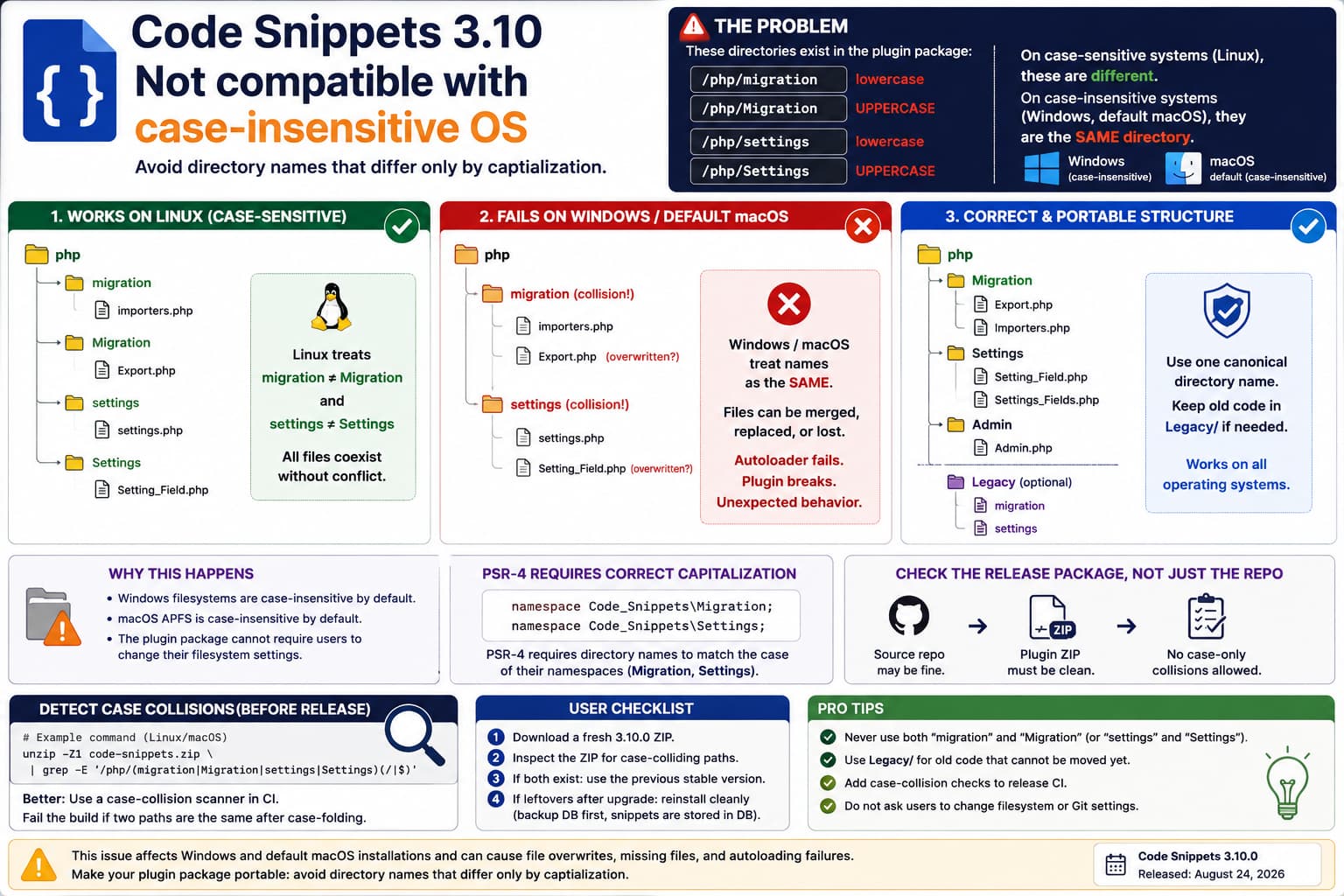
A WordPress plugin package should not contain directories whose names differ only by capitalization.
For example:
/php/migration
/php/Migration

/php/settings
/php/Settings
These are four different directory names on a typical case-sensitive Linux filesystem.
But that assumption does not hold across all environments.
On standard Windows filesystems:
Migration
migration
MIGRATION
are normally treated as the same directory.
Likewise, Apple’s APFS supports both modes, but the default macOS APFS format is case-insensitive. Apple explicitly states that APFS on macOS is available in case-sensitive and case-insensitive variants, with the case-insensitive form being the default.
So a plugin that requires both:
php/migrationand:
php/Migrationto coexist is not safely portable.
This Appears Relevant to Code Snippets 3.10
The directory names in the report match the Code Snippets plugin architecture.
Code Snippets 3.10.0 was released on August 24, 2026 and introduced a substantial internal/admin rewrite. Its development changelog specifically says the internal architecture was updated to a cleaner PSR-4 structure.
The current Code Snippets source repository now contains class-oriented paths such as:
src/php/Migration/Export/Export.phpand:
src/php/Settings/Setting_Field.php
src/php/Settings/Settings_Fields.php
which use uppercase namespace directories.
By contrast, installations from the previous architecture clearly contain lowercase directories such as:
php/migration/
php/settings/
and publicly indexed Code Snippets installations show those lowercase paths.
That makes the reported collision very plausible during the transition from the older layout to the new PSR-4 architecture.
Why This Works on Linux but Fails on Windows
On a normal Linux hosting environment:
migration
≠
Migration
So the filesystem can hold:
php/
├── migration/
└── Migration/
without complaint.
On normal Windows behavior:
migration
=
Migration
Microsoft explicitly documents that Windows normally treats filenames and directory names as case-insensitive. FOO.txt, foo.txt, and Foo.txt are ordinarily equivalent names.
Therefore an archive containing both directories may be interpreted roughly as:
php/
└── migration/
with files from both archive paths being placed into the same physical folder.
Depending on the archive/extraction tool, this can lead to:
- one file replacing another,
- files from two logical directories being merged,
- checkout failures,
- unexpected Git behavior,
- autoloader failures,
- incomplete installations,
- inconsistent behavior between development and production.
The same concern applies to:
php/settings
php/Settings
Default macOS Is Affected Too
This is not merely a Windows problem.
Apple states that standard APFS on macOS is case-insensitive by default. A special:
APFS (Case-sensitive)format must be chosen when separate names such as:
Settings
settings
need to coexist.
So a developer using a typical Mac can encounter the same collision.
This makes the problem particularly relevant to WordPress development because local environments commonly run on:
Windows
macOS
even when the final production server runs Linux.
Do Not Tell Users to Make Their Filesystem Case-Sensitive
Technically, Windows supports per-directory case-sensitive behavior in some circumstances, and macOS can use case-sensitive APFS.
That is not the appropriate fix for a WordPress plugin.
Microsoft itself warns that setting Git’s core.ignorecase incorrectly on a case-insensitive filesystem can cause confusing conflicts or duplicate-file behavior.
A WordPress plugin intended for general distribution should instead be packaged so it works normally on:
Linux
Windows
macOS
without requiring users to change filesystem semantics.
The fix belongs in the plugin package.
PSR-4 Does Require Correct Capitalization
There is one nuance here.
Moving to directories such as:
Migration
Settings
Admin
Integration
is perfectly reasonable for a PSR-4 architecture.
PSR-4 requires subdirectory names to match the case of their corresponding namespaces. The specification says the directory name must match the case of the sub-namespace name, and the class filename must likewise match its class name.
So if the namespace is:
namespace Code_Snippets\Migration;a directory such as:
Migration/is appropriate.
The problem is not the uppercase directory.
The problem is distributing both:
migration/and:
Migration/as separate directories in the same parent.
What the Plugin Package Should Look Like
A clean PSR-4 migration should ultimately produce one canonical tree.
For example:
php/
├── Migration/
│   ├── Export/
│   └── Import/
│
├── Settings/
│   ├── Setting_Field.php
│   └── Settings_Fields.php
│
├── Admin/
└── Integration/
and not:
php/
├── migration/
├── Migration/
├── settings/
└── Settings/
If some old procedural code still needs to remain during a transition, rename it to something unambiguous.
For example:
php/
├── Legacy_Migration/
├── Migration/
├── Legacy_Settings/
└── Settings/
or:
php/
├── legacy/
│   ├── migration/
│   └── settings/
│
├── Migration/
└── Settings/
Either approach is portable.
Why Simply Changing Includes Is Not Enough
Suppose code currently references:
require_once CODE_SNIPPETS_PATH . 'php/settings/settings.php';while new classes autoload from:
php/Settings/A developer might think these references are distinguishable because the paths differ by case.
On Linux:
php/settings/settings.php
php/Settings/settings.php
can indeed mean different objects.
On standard Windows/macOS they may resolve into the same directory.
So the solution needs to happen at the filesystem/package architecture level, not merely in PHP’s include statements.
Archive Extraction Is Where Things Can Go Wrong
Consider a ZIP containing:
code-snippets/php/settings/settings.php
code-snippets/php/Settings/Setting_Field.php

code-snippets/php/migration/importers/foo.php
code-snippets/php/Migration/Export/Export.php
On Linux, extracting it can produce exactly that structure.
On a case-insensitive volume, the extractor effectively sees:
settings
Settings
as the same destination.
It might therefore create:
php/settings/
├── settings.php
└── Setting_Field.php
instead.
The resulting installation no longer has the directory layout assumed by the autoloader.
That can manifest as:
Class not foundor:
Failed opening required fileeven though the ZIP itself seemed complete.
Why Git Can Hide or Complicate the Bug
Git knows about case-sensitive paths, but it also contains specific workarounds for case-insensitive filesystems.
The official Git documentation describes:
core.ignoreCaseas an internal compatibility mechanism for filesystems including:
APFS
HFS+
FAT
NTFS
that do not distinguish path case normally.
That means a repository designed on Linux can successfully contain:
settings/
Settings/
while a developer cloning it on Windows or standard macOS may encounter a very different working-tree experience.
This is exactly the kind of bug that can pass Linux CI while breaking developer machines.
How to Check a Plugin ZIP Before Extracting It
You do not actually need to extract the archive.
On Linux/macOS with unzip, run:
unzip -Z1 code-snippets.zip \
| grep -E '/php/(migration|Migration|settings|Settings)(/|$)'
If the package contains both variants, you may see:
code-snippets/php/migration/...
code-snippets/php/Migration/...
code-snippets/php/settings/...
code-snippets/php/Settings/...
That confirms the package itself contains the conflict.
Portable Case-Collision Scanner
A more general test is useful for any WordPress plugin release.
Save this as:
check-case-collisions.pyimport sys
import zipfile
from collections import defaultdict
archive = sys.argv[1]
paths = defaultdict(list)
with zipfile.ZipFile(archive) as z:
for filename in z.namelist():
paths[filename.casefold()].append(filename)
found = False
for variants in paths.values():
unique = sorted(set(variants))
if len(unique) > 1:
found = True
print("CASE COLLISION:")
for item in unique:
print(" ", item)
print()
if not found:
print("No case-only collisions found.")Run:
python check-case-collisions.py code-snippets.zipA problematic build could return:
CASE COLLISION:
  code-snippets/php/Migration/
  code-snippets/php/migration/

CASE COLLISION:
  code-snippets/php/Settings/
  code-snippets/php/settings/
This is an excellent release-CI check because it detects the problem before a WordPress user ever downloads the package.
Developers Should Add This to CI
The problem is easy to prevent automatically.
During release packaging:
Build plugin ZIP
↓
case-fold every archived path
↓
detect duplicates
↓
fail build if two paths collapse to the same value
The rule should be:
For every path:
lowercase/casefold(path) must be unique
For example:
php/Migration/Foo.phpand:
php/migration/Foo.phpwould cause the release pipeline to fail.
This is much safer than relying on developers to notice the collision manually.
Also Test the Release Package, Not Just the Source Repository
This is important for Code Snippets 3.10 because the release involved an architectural migration.
The source tree now clearly contains the new PSR-4 directories:
src/php/Migration/
src/php/Settings/
while the previous deployed plugin architecture used lowercase:
php/migration/
php/settings/
Even if the Git source is perfectly organized, a build script can accidentally:
copy new src/php/Migration
+
retain old php/migration
inside the generated WordPress.org ZIP.
Therefore the artifact that needs testing is:
final plugin ZIPnot only:
Git repositoryDistinguish a Bad ZIP From Leftover Upgrade Files
There are actually two possible causes.
Cause A: Both directories are inside the new ZIP
If inspection shows:
php/migration/
php/Migration/
inside a clean newly downloaded package, this is a release packaging bug.
The developer needs to fix the build.
Cause B: The ZIP only contains uppercase directories
But an existing installation contains:
php/migration/
php/Migration/
then the old lowercase folders may be leftovers from a previous/manual upgrade.
This can happen especially if someone updated by:
FTP upload
rsync
copy files over existing directory
without deleting files no longer present in the new release.
The correct repair in that case is usually:
backup
↓
deactivate plugin
↓
remove plugin files
↓
install clean current package
without deleting its database data.
Do not delete database tables or snippets merely to clean stale plugin files.
Test a Completely Fresh Installation
A simple way to distinguish these causes is:
1. Download Code Snippets 3.10.0 fresh.

2. Do not install it over an existing version.

3. Inspect the ZIP contents.

4. Extract to an empty temporary directory.

5. Check the php directory.
If a clean archive itself contains:
migration + Migration
settings + Settings
the issue is unquestionably upstream.
If a clean package contains only one version while an upgraded installation has both, investigate the update/deployment procedure instead.
Why This Is More Serious Than a Cosmetic Naming Issue
It may sound like:
Just capitalize the directory differently.
But case-only collisions can affect:
- WordPress plugin installation,
- plugin updates,
- Local/WAMP/XAMPP development,
- Windows servers,
- macOS development,
- Git checkouts,
- Docker bind mounts from Windows/macOS,
- CI systems,
- Composer/PSR-4 autoloading,
- SFTP deployments.
For a plugin with 1+ million active installations, portability across developer platforms matters. WordPress.org currently lists Code Snippets 3.10.0 with more than one million active installations.
The Best Upstream Fix
For Code Snippets, I would recommend completing the PSR-4 transition instead of trying to support two case variants.
Use one canonical path:
php/Migration/
php/Settings/
if those names correspond to the namespaces.
Move any legacy functionality into clearly different paths such as:
php/Legacy/Migration/
php/Legacy/Settings/
Then update all:
require
include
autoload
build scripts
tests
accordingly.
Finally ensure the release artifact contains no path pairs that differ only by case.
What Users Should Do Right Now
If a user encounters this on Windows/macOS:
- Do not change the operating system’s filesystem settings.
- Do not randomly rename one directory while the plugin is active.
- Back up the site’s snippets/database first.
- Inspect the clean plugin ZIP to determine whether the collision exists in the package.
- If the package is affected, use the previous known-good plugin release until an official corrected build is available.
- If only the existing installation contains both variants, reinstall the plugin files cleanly rather than overlaying them.
- Keep the
wp_snippetsdatabase table intact.
Code Snippets stores snippets separately from the plugin’s PHP files, so reinstalling plugin files is not equivalent to deleting the user’s snippets.
Is Changing core.ignorecase a Fix?
No.
You may encounter suggestions such as:
git config core.ignorecase falseMicrosoft specifically warns that forcing this on a case-insensitive filesystem can produce confusing errors, false conflicts, or duplicate files.
That can sometimes help a developer manipulate a repository in a controlled environment, but it does not make a WordPress release portable.
An end user installing a plugin should never need to adjust Git configuration.
Recommended Bug Report to the Plugin Developer
A concise report would be:
Code Snippets currently ships/creates paths that differ only in letter case:
/php/migrationand/php/Migration
/php/settingsand/php/SettingsThese cannot safely coexist on standard Windows filesystems or default case-insensitive macOS APFS volumes. Windows treats such names as equivalent, and macOS APFS is case-insensitive by default.
Since the new architecture uses PSR-4-style
MigrationandSettingsnamespaces, could the legacy lowercase directories be renamed/moved or excluded from the release package so every path remains unique after case folding?It would also be useful to add a case-collision check to the release CI against the final plugin ZIP.
That accurately describes the portability issue without blaming PHP itself.
Most Likely Explanation
Code Snippets 3.10.0 introduced a significant architectural modernization, including migration to a cleaner PSR-4 layout.
The current source uses:
Migration/
Settings/
while the previous plugin structure used:
migration/
settings/
That makes this look like a transition/build-artifact collision between legacy directory names and the new PSR-4 directory layout.
The directory names themselves are each valid.
They just must not coexist as siblings distinguished only by capitalization.
Direct Answer
Yes, this is a legitimate portability bug.
These pairs:
/php/migration
/php/Migration
and:
/php/settings
/php/Settings
cannot reliably coexist on case-insensitive filesystems.
Windows treats file and directory names as case-insensitive by default, while macOS APFS is also case-insensitive by default.
At the same time, Code Snippets’ new PSR-4 architecture legitimately uses capitalized namespace directories such as Migration and Settings, and PSR-4 requires their path casing to match their namespaces.
So the correct solution is not to lowercase the new PSR-4 directories.
The correct fix is to remove or rename the legacy case-colliding directories so the package contains only one canonical name for each path.
For example:
php/Migration/
php/Settings/
plus, if legacy code genuinely needs to remain:
php/Legacy/Migration/
php/Legacy/Settings/
A release-time case-collision scan against the final ZIP would prevent the problem from returning.
