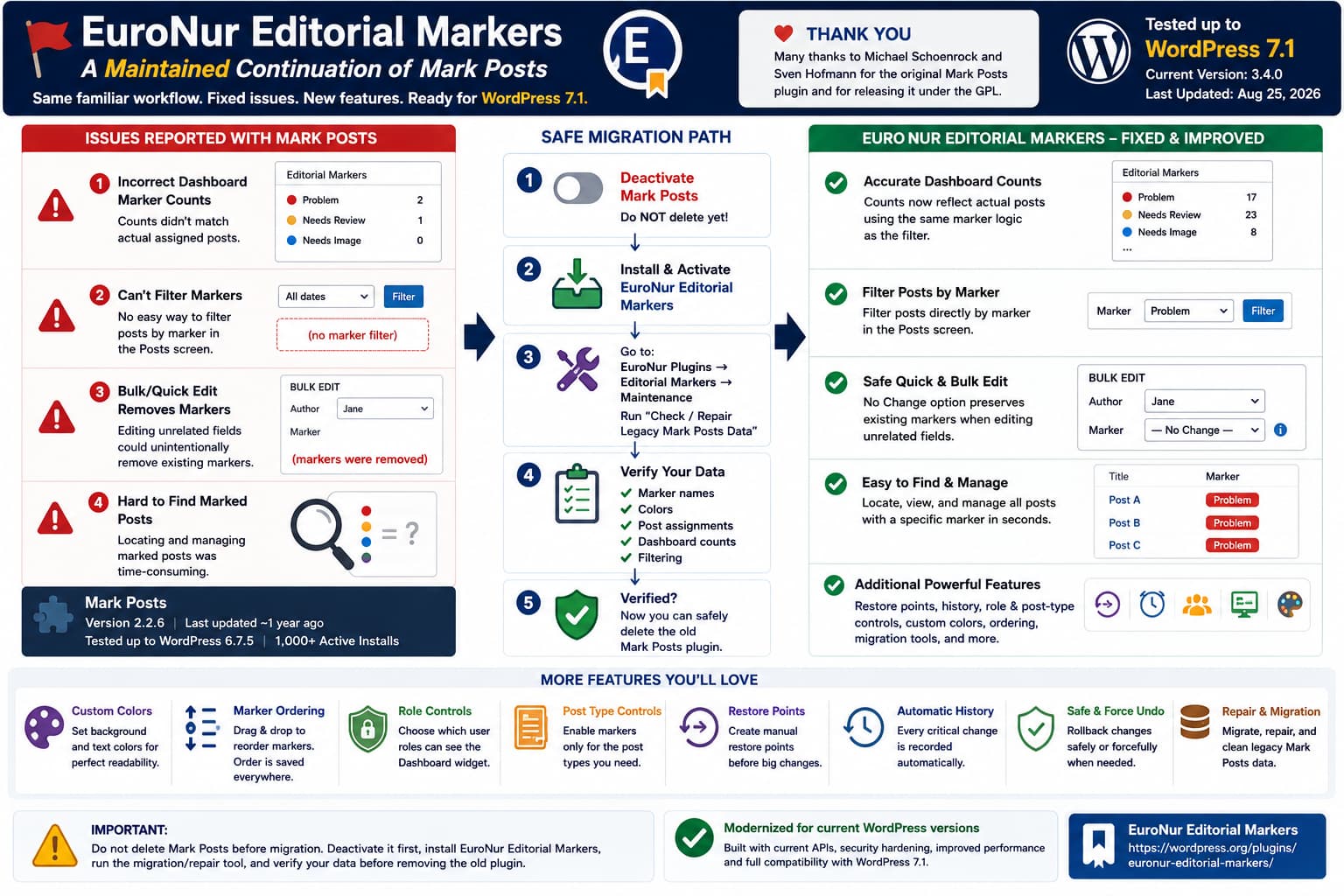
Users of the Mark Posts WordPress plugin now have a maintained continuation available in the official WordPress.org Plugin Directory: EuroNur Editorial Markers.
The new plugin preserves the familiar color-coded marker workflow and compatibility with existing Mark Posts data, while addressing several problems that made the original plugin difficult to rely on for larger editorial workflows.
The issues originally reported included:
- incorrect marker counts in the Dashboard widget,
- difficulty locating posts assigned to a particular marker,
- Quick Edit and Bulk Edit unexpectedly removing existing markers,
- and no practical marker filter in the WordPress Posts screen.
Those problems were documented in the Mark Posts support forum. One example described a marker assigned to roughly 500 posts while the Dashboard showed only two, along with markers disappearing after Bulk Edit was used to change an unrelated field such as the post author.
EuroNur Editorial Markers specifically addresses those behaviors and adds migration and recovery tools for existing Mark Posts installations.
EuroNur Editorial Markers on WordPress.org
What Was Wrong With the Original Mark Posts Workflow?
Mark Posts remains a useful concept.
It lets editors assign colored markers to:
Posts
Pages
Custom post types
so an editorial team can visually identify content requiring attention.
For example:
Needs Review
Needs Image
SEO Check
Problem
Ready
Archive Candidate
The original plugin provides marker categories, colors, Quick Edit, Bulk Edit, and a Dashboard widget.
But several practical problems become serious once a site contains hundreds or thousands of posts.
1. Dashboard Marker Counts Could Be Incorrect
The reported case showed:
Actual posts with marker:
~500

Dashboard count:
2
and clicking that Dashboard count also returned only those two posts rather than all posts carrying the marker.
That defeats one of the main purposes of an editorial marker system.
A Dashboard marker such as:
Problem: 12needs to reliably mean:
There are twelve posts currently assigned to Problem.
If the number cannot be trusted, editors must manually search through the content list.
EuroNur Editorial Markers’ 3.0.0 release reworked Dashboard counts to use the canonical marker taxonomy and the same query logic used for marker filtering.
2. Marked Posts Were Difficult to Find
The original Posts screen displayed marker information, but the reported workflow lacked a reliable dropdown to say:
Show only:
Problem
or:
Show only:
Needs Review
The original support report specifically called out the absence of marker filtering as a major limitation.
EuroNur Editorial Markers adds a marker dropdown to supported WordPress post-list screens.
The workflow becomes:
Posts
→ All Posts
→ Marker: Problem
→ Filter
and only posts carrying that marker are displayed.
The plugin’s WordPress.org changelog confirms that reliable marker filtering was added in the 3.0.x development series.
3. Bulk Edit Could Remove Markers When Editing Something Unrelated
This was arguably the most dangerous issue.
Imagine these ten posts already have different editorial markers:
Post A → Needs Review
Post B → Problem
Post C → Ready
Post D → Needs Image
...
You select all ten posts and use:
Bulk Edit
→ Author
→ Jane
→ Update
The expected result is:
Author changed
Markers untouched
But the reported Mark Posts behavior could instead result in:
Author changed
Markers removed
even though the marker field was never intentionally modified.
For an editorial workflow plugin, silently deleting state during an unrelated Bulk Edit is particularly risky because the loss may not be noticed immediately.
EuroNur Editorial Markers changes Bulk Edit to explicitly support:
No change
Remove marker
Specific marker
and preserves existing marker assignments when No change is selected. Its current changelog explicitly documents this fix.
4. Marker Data Could Become Difficult to Reconcile
Mark Posts historically stores marker relationships through a combination of taxonomy data and legacy metadata.
EuroNur’s migration system specifically recognizes existing:
mark_posts_term_idmetadata and synchronizes it with marker taxonomy relationships.
The plugin’s repair process can also normalize stale legacy metadata referring to marker terms that no longer exist.
This is especially useful on older sites where the plugin has been installed for years and data may no longer be perfectly synchronized.
Mark Posts Is Still Available, but Its Compatibility Metadata Is Old
One detail worth updating from the original announcement: the current WordPress.org listing for Mark Posts shows:
Version:
2.2.6

Last updated:
about 1 year ago

Tested up to:
WordPress 6.7.5

Active installations:
1,000+
So rather than saying it has definitely gone two full years without an update, the current directory metadata supports the more precise statement that it has not received a recent release and remains tested only through WordPress 6.7.5.
By comparison, EuroNur Editorial Markers 3.4.0 was published on August 25, 2026 and is currently marked as tested through WordPress 7.1.
What Is EuroNur Editorial Markers?
EuroNur Editorial Markers describes itself as:
a maintained continuation of Mark Posts.
It started from Mark Posts 2.2.6 by Michael Schoenrock and Sven Hofmann and preserves the existing marker workflow while expanding administration, migration, safety, and recovery features.
This means it is not simply an unrelated plugin that happens to offer colored labels.
Its compatibility strategy specifically targets existing Mark Posts users.
The plugin currently supports:
- colored editorial markers,
- separate marker text and background colors,
- post/page/custom-post-type assignment,
- Quick Edit,
- Bulk Edit,
- marker filtering,
- Dashboard usage counts,
- role visibility controls,
- post-type visibility controls,
- manual restore points,
- automatic operation history,
- Safe Undo and Force Undo,
- marker ordering,
- legacy Mark Posts migration and repair,
- optional cleanup during permanent uninstall.
Mark Posts vs EuroNur Editorial Markers
| Feature | Mark Posts | EuroNur Editorial Markers |
|---|---|---|
| Colored editorial markers | Yes | Yes |
| Existing Mark Posts workflow | Native | Preserved |
| Quick Edit | Yes | Yes |
| Bulk Edit | Yes | Yes, with explicit No change |
| Prevent unrelated Bulk Edit from deleting markers | Reported issue | Fixed |
| Dashboard marker counts | Available but reported inaccurate | Reworked |
| Filter Posts by marker | Missing in reported workflow | Yes |
| Background color | Yes | Yes |
| Separate text color | Limited/legacy | Yes |
| Post-type visibility controls | Supported through configuration | Built-in |
| Dashboard role controls | No comparable current UI | Yes |
| Manual restore points | No | Yes |
| Automatic history | No | Yes |
| Safe Undo | No | Yes |
| Migration/repair tools | No | Yes |
| Current WordPress compatibility metadata | Tested to 6.7.5 | Tested to 7.1 |
The reported Mark Posts behavior comes from the unresolved support thread, while EuroNur’s corresponding fixes and features are documented in its WordPress.org changelog.
Migration Is Designed to Preserve Existing Markers
This is probably the most important feature for existing Mark Posts users.
You should not need to manually recreate:
marker names
marker colors
post assignments
after moving.
EuroNur says it preserves existing Mark Posts marker taxonomy data, mark_posts_term_id metadata, colors, and settings for migration.
However, the order of migration is important.
Do Not Delete Mark Posts Before Migrating
The recommended migration process is:
1. Keep Mark Posts installed

2. Deactivate Mark Posts

3. Install EuroNur Editorial Markers

4. Activate EuroNur Editorial Markers

5. Go to:
   EuroNur Plugins
   → Editorial Markers
   → Maintenance

6. Run:
   Check / Repair Legacy Mark Posts Data

7. Verify:
   marker names
   colors
   post assignments
   Dashboard counts
   filtering

8. Only after verification:
   delete the inactive Mark Posts plugin
The WordPress.org documentation explicitly says to deactivate Mark Posts first but not delete it until after the legacy scan and verification are complete.
That warning is worth following even though EuroNur does not need the old plugin files once migration has been successfully verified.
Why Can’t Both Plugins Remain Active?
EuroNur originally inherited parts of the Mark Posts architecture.
Its current release now isolates EuroNur-specific classes, constants, and helpers to prevent collisions, and it includes a paused mode when old Mark Posts is still active.
Still, the intended migration flow is:
Mark Posts
→ deactivate
then:
EuroNur Editorial Markers
→ activate
rather than trying to operate both marker systems simultaneously.
The Repair Tool Is Not Required for New Installations
If the site has never used Mark Posts, you can ignore the legacy migration scan.
The plugin documentation says it is primarily a one-time migration/repair operation for existing installations.
For a new installation, the normal workflow is simply:
Install
→ Activate
→ Create markers
→ Select post types
→ Configure Dashboard roles
Restore Points Add a Safety Layer the Original Workflow Did Not Have
One of the more substantial additions is manual restore points.
A restore point captures:
marker structure
+
post-marker relationships
at a selected moment.
For example, before reorganizing hundreds of posts:
Create restore point
→ "Before Editorial Cleanup"
Then perform the changes.
If something goes wrong, you can compare or restore against that saved marker state.
This is particularly useful for sites with thousands of posts where an accidental bulk marker operation would otherwise be difficult to reverse.
EuroNur also optimizes restores so it rewrites only relationships that actually differ instead of blindly updating every post.
Automatic History Handles Critical Marker Operations
In addition to manual snapshots, EuroNur maintains automatic history around critical marker changes.
Its changelog describes automatic history for operations such as:
marker structural changes
assign-to-all operations
bulk marker changes
and provides both:
Safe Undo
Force Undo
Safe Undo
Safe Undo avoids overwriting posts whose markers were changed again after the recorded operation.
Conceptually:
Bulk change at 10:00
↓
Post A changed manually at 10:15
↓
Undo bulk action at 10:30
↓
Safe Undo skips Post A
This helps prevent an undo operation from destroying legitimate newer work.
Force Undo
Force Undo restores the recorded state even when newer marker changes exist.
That is more aggressive and should be used only when necessary.
The plugin documents both behaviors directly in its WordPress.org FAQ.
Dashboard Counts Now Use the Same Marker Logic as Filtering
This is an important architectural improvement.
Instead of having:
Dashboard count logic
≠
Posts filter logic
EuroNur’s 3.0.0 changes align Dashboard counts with the marker taxonomy used by the filter.
The desired relationship becomes:
Dashboard:
Problem = 17
then:
Posts
→ Marker: Problem
→ Filter
should return those same 17 assignments.
That consistency is critical for trusting an editorial workflow.
You Can Control Where Markers Appear
The continuation also expands visibility controls.
Markers can be enabled for selected post types rather than appearing everywhere.
For example:
Posts
✓

Pages
✓

Products
✗

Events
✓
You can also control which roles can see the Dashboard marker widget.
This is useful where:
Administrators
Editors
Authors
need editorial status visibility but:
Subscribers
Customers
do not.
Marker Text Colors Are Now Configurable
The original workflow focused primarily on marker background colors.
EuroNur adds independent:
Background Color
Text Color
and a contrast fallback for legacy markers that do not already have a stored text color.
For example:
Needs Review
Background: yellow
Text: dark gray
or:
Critical
Background: dark red
Text: white
This is a relatively small feature, but it makes markers much easier to keep readable across different colors.
Marker Ordering Is Also Persistent
Markers can be reordered through drag and drop.
The saved ordering is then reused in:
Dashboard
marker-selection UI
settings
rather than being displayed in an arbitrary order.
For an editorial workflow, that makes it possible to arrange statuses logically:
1. Draft
2. Needs Review
3. Needs Fix
4. Ready
5. Completed
rather than alphabetically.
Security Hardening Was Added Before the Public Release
The current changelog also documents a dedicated security review.
Version 3.3.0 introduced changes including:
- POST requests for destructive actions,
- administrator capability checks,
- WordPress nonces,
- marker-existence validation,
- stricter marker-name and color sanitization,
- additional output escaping,
- validation of roles/post types/marker IDs,
- and protection against lower-privilege users receiving administrator aggregate counts through shared cached data.
This is relevant because the continuation is not merely the old plugin with a few UI fixes layered on top.
The public release also includes modernization work around current WordPress APIs and Multisite initialization.
The Original Mark Posts Project Deserves Credit
The continuation explicitly preserves attribution to Michael Schoenrock and Sven Hofmann, and its WordPress.org page states that copyright and license notices from the original project remain in the source distribution.
Mark Posts itself is open-source software, and its WordPress.org listing credits flymke/Michael Schoenrock and Sven Hofmann as contributors.
That GPL foundation made a maintained continuation possible.
This is an important distinction from simply copying a proprietary plugin.
Should Existing Mark Posts Users Move Immediately?
There is no universal answer, but migration is worth evaluating if you rely heavily on markers and experience any of the reported issues.
I would especially consider moving if you need:
reliable Dashboard counts
marker filtering
safe Bulk Edit behavior
restore/undo capability
current WordPress compatibility
The safest approach is to test migration on staging first.
Use:
Production backup
↓
Staging clone
↓
Deactivate Mark Posts
↓
Install EuroNur
↓
Run migration/repair
↓
Compare markers/counts
↓
Test Quick Edit
↓
Test Bulk Edit
↓
Test filtering
Only migrate production after confirming the data matches.
Migration Verification Checklist
After running the legacy scan, verify several things before deleting Mark Posts:
- Count how many marker definitions exist.
- Compare their names.
- Compare their colors.
- Filter several known markers.
- Check known posts that had each marker.
- Compare Dashboard counts with filtered results.
- Test a Quick Edit on an unrelated field.
- Confirm the existing marker remains.
- Test Bulk Edit with No change.
- Confirm different markers remain assigned.
- Create a temporary marker and test assignment/removal.
- Create a restore point before making larger changes.
If those checks succeed, the inactive legacy plugin should no longer be needed.
One Correction to the Original Announcement
The broader maintenance concern is valid, but the current directory metadata is slightly different from the wording in the original post.
As of the current check:
Mark Posts:
Version 2.2.6
Last updated about 1 year ago
Tested through WordPress 6.7.5
Meanwhile:
EuroNur Editorial Markers:
Version 3.4.0
Last updated August 25, 2026
Tested through WordPress 7.1
PHP 7.4+
So for a published article, I would use those current verified values instead of saying Mark Posts has definitely gone two years without an update.
Direct Answer for Existing Mark Posts Users
If you use Mark Posts and have encountered:
incorrect Dashboard counts
markers disappearing after Bulk Edit
no practical marker filtering
difficulty locating marked posts
there is now an official WordPress.org continuation specifically built around those problems.
EuroNur Editorial Markers 3.4.0 preserves the Mark Posts workflow and legacy data while adding reliable filtering/counting, safer Quick/Bulk Edit behavior, migration/repair tools, history, restore points, role/post-type controls, custom text colors, and WordPress 7.1 compatibility.
The crucial migration rule is:
Deactivate Mark Posts, but do not delete it until EuroNur’s legacy Check / Repair process has completed and you have verified your existing markers and assignments.
That migration sequence is the one documented by EuroNur on WordPress.org.
