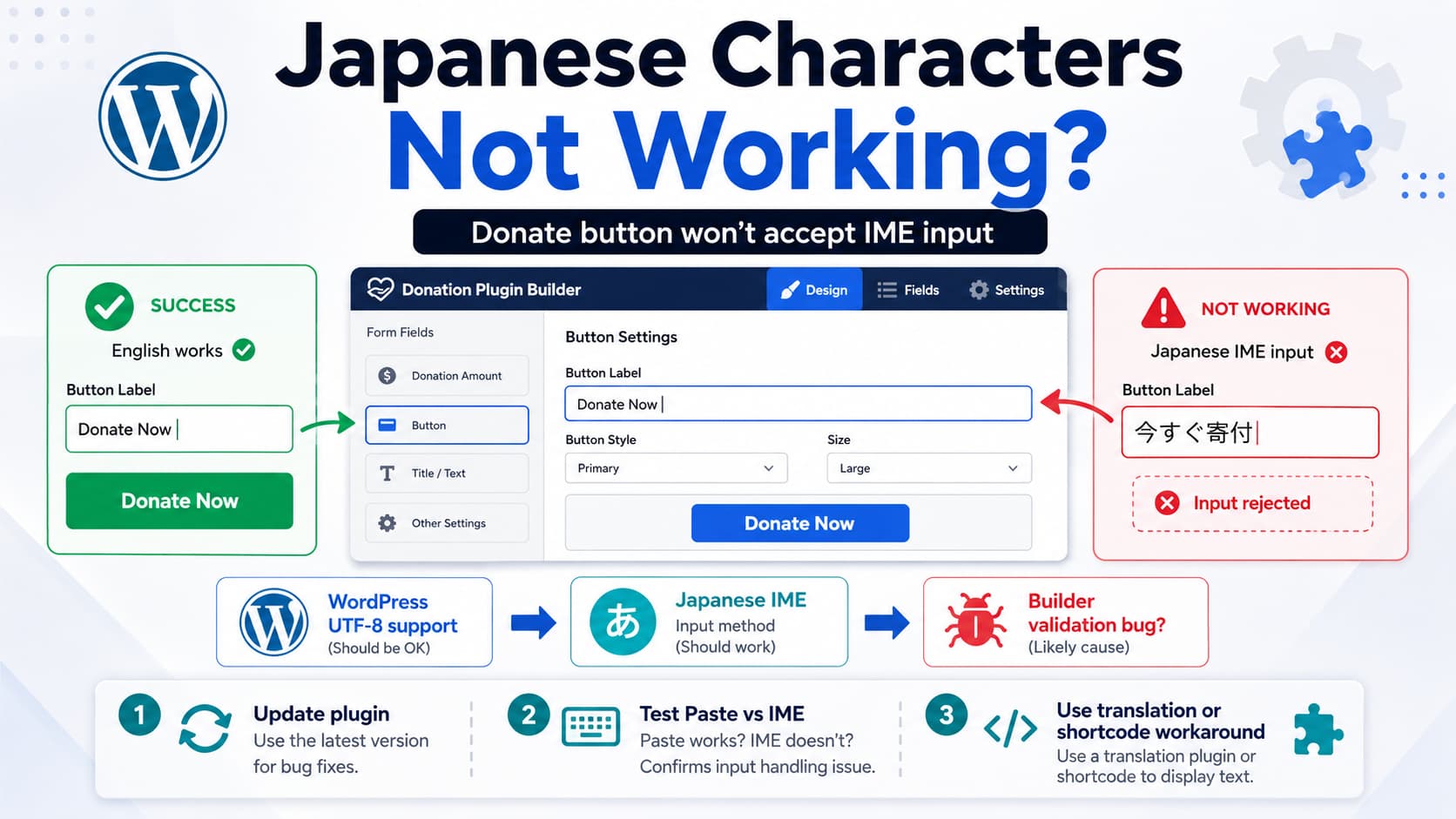
When editing a donation campaign in Charitable, you may find that normal English text works in the Campaign Visual Builder but Japanese characters cannot be entered into a field such as the Donate Now button label.
For example:
Donate Now
✓ works

今すぐ寄付
✗ cannot be entered
This should not require enabling a special “double-byte character” option in WordPress.
Modern WordPress uses Unicode/UTF-8 and is designed to store text in languages including Japanese. WordPress’s own database documentation says UTF-8 supports any language, and WordPress automatically prefers utf8mb4 where supported.
Charitable itself also officially supports translation and has a Japanese language package available on WordPress.org.
So if Japanese characters are being rejected while you type into the Campaign Builder, the likely issue is in the plugin’s admin-side input handling rather than something you need to enable in MySQL or WordPress.
This Looks Similar to a Previous Charitable Bug
There is particularly strong evidence for this.
A Charitable user previously reported that the Campaign Visual Builder would not accept Spanish characters such as:
ñ
á
The user reproduced the issue on three separate sites and suspected JavaScript.
Charitable support replied that version 1.8.9.5 should resolve it.
The official Charitable changelog confirms exactly what was fixed:
“Allow more international characters into campaign title fields in campaign visual builder.”
That previous bug concerned the campaign title field, not specifically the Donate button label, so we cannot claim it is exactly the same defect.
But it establishes something important:
Charitable Campaign Visual Builder
has previously rejected valid
international Unicode characters.
If Japanese is now rejected in another Campaign Builder text field, such as the button label, it may be the same class of validation bug applied to a different field.
First, Update Charitable
At the time of verification, WordPress.org lists Charitable 1.8.12.2 as the current free release.
So before modifying anything, update:
Dashboard
→ Plugins
→ Charitable
→ Update
Then clear the browser cache and reopen the Campaign Builder.
This matters because 1.8.9.5 already contained one international-character fix, and numerous Campaign Builder/UI changes have been released since then.
If you are using Charitable Pro, update both:
Charitable
+
Charitable Pro
so the two components are compatible.
Use a Simple Japanese Test String
After updating, try entering:
今すぐ寄付which is a reasonable Japanese equivalent of:
Donate NowNow pay close attention to when it fails.
There are three different possible behaviors.
Japanese cannot even be typed
You activate the Japanese IME, start composing text, but the characters disappear or the field refuses them immediately.
That strongly suggests a JavaScript/IME handling problem.
Japanese can be typed but disappears after Save
That points more toward:
REST request
server-side sanitization
saved campaign metadata
rather than keyboard handling.
Japanese saves correctly but frontend still shows “Donate Now”
That is a different issue involving:
template output
translation
cached campaign data
or the wrong button setting
Determining which stage fails is important.
Why Japanese IME Input Is Different
The term “double-byte character” is older terminology.
On a modern WordPress site, Japanese is normally represented as Unicode using UTF-8, where characters may consume multiple bytes.
More importantly, Japanese typing normally uses an IME, or Input Method Editor.
When someone types Japanese, the browser does not necessarily receive each key as a completed character immediately.
Instead, there is a composition sequence:
compositionstart
↓
compositionupdate
↓
user chooses/converts Japanese text
↓
compositionend
↓
final text committed
Browsers specifically expose compositionstart, compositionupdate, and compositionend events for this purpose. MDN notes that these events are used by IMEs for languages such as Chinese and other composition-based text input.
Japanese uses the same browser composition mechanism.
If a React/JavaScript builder validates the field on every:
keydown
keyup
input
without respecting the active composition state, it can accidentally remove the unfinished Japanese text before the IME commits it.
A Common Programming Mistake
Imagine the Campaign Builder performs validation similar to:
value.replace(/[^a-zA-Z0-9 ._-]/g, '');That would explicitly remove:
日
本
語
寄
付
because those characters are outside the ASCII range.
Another possibility is that the code modifies the input during IME composition.
A safer pattern for a JavaScript application is conceptually:
let composing = false;

input.addEventListener('compositionstart', () => {
    composing = true;
});

input.addEventListener('compositionend', (event) => {
    composing = false;
    updateValue(event.target.value);
});

input.addEventListener('input', (event) => {
    if (!composing && !event.isComposing) {
        updateValue(event.target.value);
    }
});
The plugin developer should also avoid restricting a normal text field to ASCII when there is no technical reason to do so.
WordPress Sanitization Does Not Normally Remove Japanese
This is another reason I would not start by modifying the database.
WordPress’s standard:
sanitize_text_field()checks for invalid UTF-8, strips HTML and unwanted whitespace, but does not intentionally restrict valid text to Latin/ASCII characters.
So:
sanitize_text_field( '今すぐ寄付' );should not inherently convert that into an empty string simply because it is Japanese.
If Charitable is stripping Japanese, the plugin is likely applying additional validation or sanitization somewhere.
Test Pasting Japanese Instead of Using the IME
This gives you another useful clue.
Copy:
今すぐ寄付from somewhere else.
Paste it directly into the Charitable button-label field.
If:
typing with Japanese IME
✗ fails

copy/paste Japanese
✓ works
then the problem is very likely IME composition handling.
If both:
typing
✗

pasting
✗
then the plugin may be using an ASCII-only validation rule or sanitizing the field’s value after every change.
If pasted text remains visible but disappears after Save, inspect the save request next.
Check the Browser Console
Open the Campaign Builder and press:
F12
→ Console
Then try entering Japanese.
Look for JavaScript errors.
You can also open:
F12
→ Network
→ Fetch/XHR
and save the campaign.
Inspect the request payload.
Find the field containing the Donate button text.
If the request already contains:
Donate Nowor an empty value instead of:
今すぐ寄付then the frontend Campaign Builder modified the value before it reached WordPress.
If the request contains:
今すぐ寄付but the saved campaign does not, the problem is server-side.
That distinction would be extremely useful to Charitable’s developers.
Charitable Is Designed to Support Translation
This is not a plugin where Japanese is fundamentally unsupported.
Charitable officially documents translation through:
- WordPress.org language packs
- Weglot
- TranslatePress
- Loco Translate
- Poedit
and uses the charitable text domain.
WordPress.org currently also lists Japanese among Charitable’s available languages.
Therefore a user-facing text field intended for labels should reasonably accept Japanese Unicode text.
Temporary Workaround 1: Translate the Default Button Text
If you simply need:
Donate Nowto become:
今すぐ寄付throughout the Japanese site, using Charitable’s translation system may be easier than fighting the broken Campaign Builder field.
Charitable’s documentation specifically recommends translation plugins such as TranslatePress and Loco Translate for altering translatable plugin text.
For example, in Loco Translate you can search the Charitable strings for:
Donate Nowand translate it to:
今すぐ寄付This is best when the same Japanese wording should be used everywhere.
It is less suitable if each campaign needs a different button label.
Temporary Workaround 2: Use the Modal Donate Button Shortcode
If the problem concerns Charitable’s separate Modal Donate Button, there is another useful workaround.
Charitable officially supports:
[charitable_modal_button]with a customizable text attribute.
For example:
[charitable_modal_button campaign_id="42" text="今すぐ寄付"]Replace:
42with the actual campaign ID.
This can also be a useful diagnostic.
If:
shortcode Japanese text
✓ works

Campaign Builder button field
✗ rejects Japanese
then you have even stronger evidence that the problem is specifically the Builder’s input control rather than Charitable’s frontend rendering or WordPress database encoding.
Do Not Change DB_CHARSET Just for This
Avoid changing:
define( 'DB_CHARSET', 'utf8' );to something else because Japanese characters cannot be entered into one plugin field.
WordPress specifically warns against casually changing DB_CHARSET on an existing installation because doing so can create database problems.
And if the browser refuses the characters before you even save the campaign, the database has not been involved yet.
So this:
Japanese cannot be typedis not evidence that your MySQL database lacks Japanese support.
Also Don’t Modify the Charitable Plugin Files
Avoid editing:
/wp-content/plugins/charitable/to remove whatever validation you find.
The next Charitable update will overwrite the modification.
Because Charitable previously fixed another international-character problem in the Campaign Visual Builder, this is the kind of compatibility issue that should ideally be fixed upstream.
What to Send Charitable Support
If the latest version still rejects Japanese, send a minimal reproduction containing:
- Charitable and Charitable Pro versions
- WordPress version
- browser and operating system
- language/IME being used
- exact affected Campaign Builder field
- test string
今すぐ寄付 - whether normal English works
- whether copy/paste works
- whether Japanese survives the Network request payload
- screenshot or short screen recording
The most important wording is:
The Campaign Visual Builder’s Donate button text field does not accept Japanese IME/Unicode input. English input works. Charitable previously fixed a similar international-character restriction in campaign title fields in 1.8.9.5. Could you check whether this button-label input is using separate ASCII validation or is not handling IME composition events?
That gives the developer a much clearer reproduction than simply saying “double-byte characters don’t work.”
Most Likely Cause
Based on the symptom and Charitable’s history, I would rank the likely causes as:
| Likelihood | Cause |
|---|---|
| High | Campaign Builder JavaScript validation rejects Japanese |
| High | Input handler does not correctly handle IME composition |
| Medium | Separate sanitization rule on button-label field |
| Lower | Server-side sanitization after save |
| Low | WordPress/MySQL cannot store Japanese |
The previous Charitable fix for Spanish characters in Campaign Builder titles makes a builder-side international-character restriction particularly plausible.
Direct Answer
You should not need to enable double-byte character support.
WordPress already supports Unicode/Japanese, and Charitable officially supports localization and Japanese translations.
First update Charitable to the latest available version and try:
今すぐ寄付again.
If the field still refuses Japanese while you are typing, especially if English works normally, this is most likely a Charitable Campaign Visual Builder input/IME bug, not a database configuration issue.
That possibility is reinforced by a previous Charitable bug where Spanish characters such as ñ and á were rejected in Campaign Builder titles; Charitable fixed that in version 1.8.9.5 by allowing more international characters.
Until the affected button field is fixed, the safest workarounds are to translate the default Donate Now string through Loco/TranslatePress, or, where applicable, use Charitable’s customizable button shortcode such as:
[charitable_modal_button campaign_id="42" text="今すぐ寄付"]rather than altering plugin core files.
