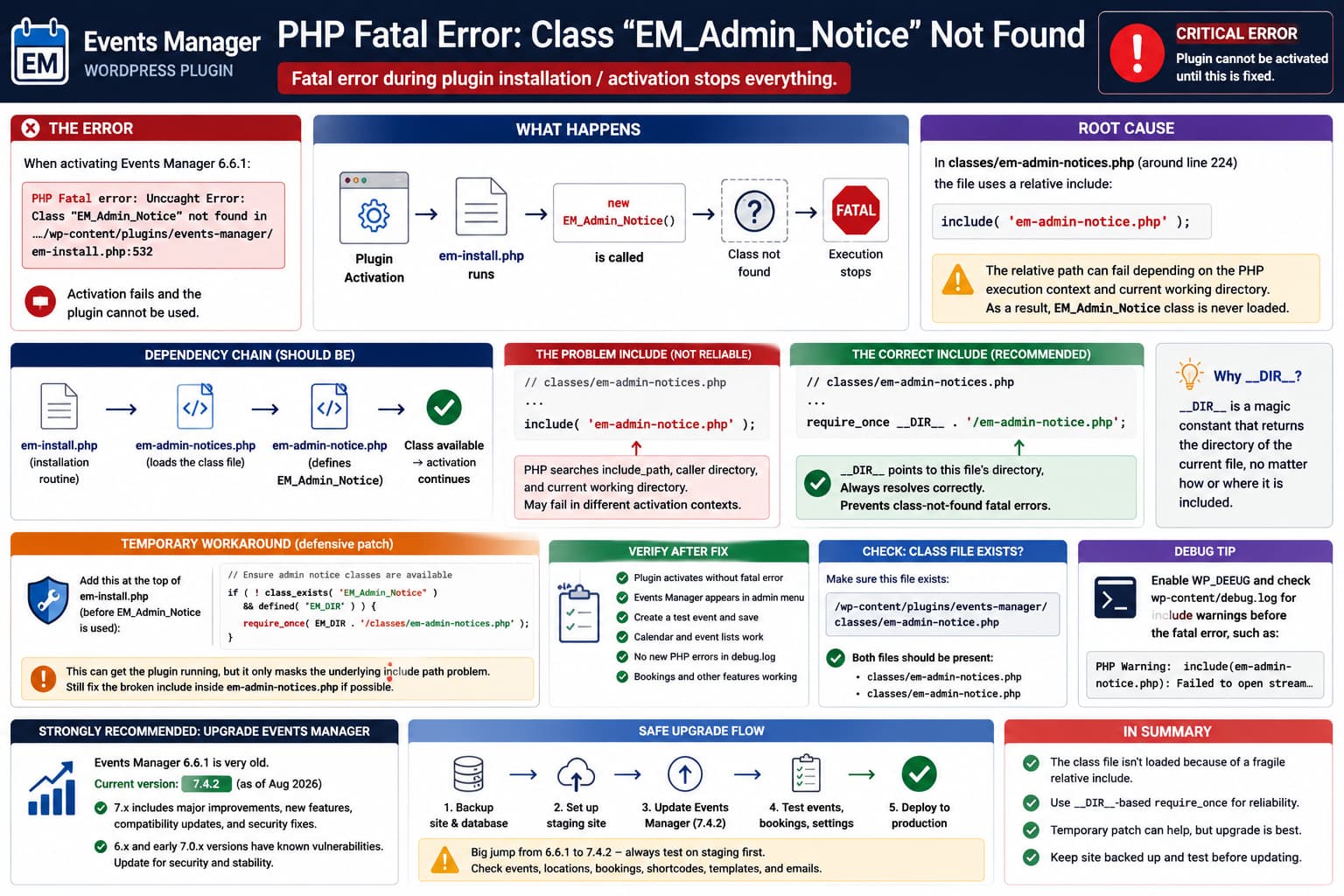
Events Manager can fail during installation or activation with a fatal PHP error similar to:
PHP Fatal error: Uncaught Error:
Class "EM_Admin_Notice" not found

in:
/wp-content/plugins/events-manager/em-install.php
One reported case occurs with:
Events Manager 6.6.1and references approximately:
em-install.php:532Because PHP cannot instantiate the required EM_Admin_Notice class, plugin installation or activation stops completely.
A temporary workaround can restore activation, but there is an important additional point:
Events Manager 6.6.1 is now very old. The current public release is Events Manager 7.4.2, so repairing 6.6.1 should generally be treated as an emergency recovery step, not a permanent upgrade strategy. WordPress.org currently lists 7.4.2 as the current version.
The Reported Error
The failure looks approximately like:
PHP Fatal error: Uncaught Error:
Class "EM_Admin_Notice" not found in
/var/web/site/public_html/wp-content/plugins/events-manager/em-install.php:532
The underlying sequence is:
Events Manager activation
        ↓
em-install.php runs
        ↓
installation code creates EM_Admin_Notice
        ↓
PHP cannot find the class
        ↓
Fatal Error
        ↓
plugin activation stops
This is not a database error.
It is a PHP dependency-loading error.
Why EM_Admin_Notice Must Be Loaded First
Before PHP can execute:
$notice = new EM_Admin_Notice();the class must already have been defined through something like:
include ...require ...or an autoloader.
If PHP reaches:
new EM_Admin_Notice()before the corresponding class file has been loaded, PHP throws:
Uncaught Error:
Class "EM_Admin_Notice" not found
and execution stops.
The Suspicious Include in Events Manager 6.6.1
The reported code inspection identifies this inside:
classes/em-admin-notices.phpapproximately around line 224:
include( 'em-admin-notice.php' );The potential problem is that this filename is not anchored to the directory containing em-admin-notices.php.
Compare:
include( 'em-admin-notice.php' );with:
require_once __DIR__ . '/em-admin-notice.php';The second version explicitly means:
Load
em-admin-notice.phpfrom the directory containing this PHP file.
That is substantially more deterministic.
PHP’s own documentation explains that when a bare filename is supplied to include, PHP checks its configured include_path, then the calling script’s directory and current working directory. Using an explicitly constructed path based on __DIR__ avoids relying on that runtime context.
Why It Can Work on One Server and Fail on Another
A relative include such as:
include( 'em-admin-notice.php' );may appear perfectly reliable during ordinary requests.
Then activation runs under a different entry point or execution context and suddenly fails.
Possible differences include:
normal frontend request

wp-admin plugin activation

WP-CLI

automatic plugin update

multisite activation

cron/update routines

different include_path configuration
If class loading depends on assumptions about PHP’s current path, those different execution paths can expose the problem.
That is why path-safe plugin code normally uses:
__DIR__or a previously defined absolute plugin-directory constant.
The More Direct Code Fix
If this really is the source of the failure, the most direct fix is not in em-install.php.
It is the problematic include itself.
Change:
include( 'em-admin-notice.php' );to:
require_once __DIR__ . '/em-admin-notice.php';This does three useful things.
First, it makes the location explicit:
classes/em-admin-notices.php
        ↓
classes/em-admin-notice.php
Second, require_once prevents accidental duplicate class loading.
Third, failure becomes explicit if the required class file genuinely does not exist.
PHP documents require_once as requiring the file while preventing it from being included repeatedly.
Why __DIR__ Is Better Here
Inside:
/wp-content/plugins/events-manager/classes/em-admin-notices.phpthis:
__DIR__evaluates to:
/wp-content/plugins/events-manager/classesso:
__DIR__ . '/em-admin-notice.php'resolves unambiguously to:
/wp-content/plugins/events-manager/classes/em-admin-notice.phpregardless of which WordPress file originally started the request. PHP explicitly documents that __DIR__ refers to the directory of the file in which it appears, including when that file itself was included.
The Temporary Workaround Used in em-install.php
The reported workaround was:
// Ensure admin notice classes are available
if (
    ! class_exists( 'EM_Admin_Notice' ) &&
    defined( 'EM_DIR' )
) {
    require_once(
        EM_DIR . '/classes/em-admin-notices.php'
    );
}
This is a reasonable defensive workaround because it asks:
Is EM_Admin_Notice already loaded?If not:
load Events Manager's admin notices loaderbefore installation proceeds.
It can prevent:
new EM_Admin_Notice();from executing while the class is unavailable.
But the Workaround Is Not the Same as Fixing the Root Include
There is an important difference.
This:
require_once(
    EM_DIR . '/classes/em-admin-notices.php'
);
makes loading em-admin-notices.php deterministic.
But if that file still contains:
include( 'em-admin-notice.php' );then the nested class include is still dependent on PHP’s include resolution.
Therefore, if code inspection confirms that this relative include is really what is failing, the cleaner correction is:
require_once __DIR__ . '/em-admin-notice.php';inside:
classes/em-admin-notices.phpThe defensive class_exists() check can still be useful, but it should not be necessary merely to compensate for an incorrect path.
Safer Temporary Patch
If you are forced to keep Events Manager 6.6.1 temporarily, I would use the smallest path correction possible.
Open:
/wp-content/plugins/events-manager/classes/em-admin-notices.phpFind:
include( 'em-admin-notice.php' );Replace it with:
require_once __DIR__ . '/em-admin-notice.php';Then verify:
class_exists( 'EM_Admin_Notice' )after the file loads.
This addresses the reported dependency directly.
Verify the Class File Exists Before Editing Anything
Before changing PHP, verify this file physically exists:
/wp-content/plugins/events-manager/classes/em-admin-notice.phpYou should therefore have both:
classes/
├── em-admin-notices.php
└── em-admin-notice.php
If:
em-admin-notice.phpis actually missing, changing the include path cannot solve the problem.
That would indicate:
incomplete plugin ZIP
failed update
missing deployment file
corrupt installation
instead.
In that situation, reinstall the plugin from a trusted official package.
Check for the Warning Before the Fatal Error
PHP include() normally emits a warning if the requested file cannot be located before PHP later reaches the missing class.
Look in:
wp-content/debug.logor the server PHP error log.
You may find something resembling:
PHP Warning:
include(em-admin-notice.php):
Failed to open stream:
No such file or directory
followed by:
PHP Warning:
include():
Failed opening 'em-admin-notice.php'
and finally:
PHP Fatal error:
Uncaught Error:
Class "EM_Admin_Notice" not found
That sequence is excellent confirmation that the include resolution actually caused the class failure.
If you see the fatal error without any failed-include warning, investigate the loading order too.
Enable WordPress Debug Logging Safely
Temporarily add to wp-config.php:
define( 'WP_DEBUG', true );
define( 'WP_DEBUG_LOG', true );
define( 'WP_DEBUG_DISPLAY', false );
Then trigger activation once.
Check:
/wp-content/debug.logSearch for:
EM_Admin_Notice
em-admin-notice.php
em-admin-notices.php
em-install.php
After troubleshooting production, disable unnecessary debug logging again.
Check the Current Working Directory
If you specifically want to prove a relative-path problem, temporarily log:
error_log(
    'CWD: ' . getcwd()
);
and:
error_log(
    '__DIR__: ' . __DIR__
);
inside:
em-admin-notices.phpIf the output shows something such as:
CWD:
/var/web/site/public_html/wp-admin

__DIR__:
/var/web/site/public_html/wp-content/plugins/events-manager/classes
you can immediately see why depending on runtime filesystem context is less robust than:
__DIR__Do not leave diagnostic logging permanently.
This Class Has Caused Similar Fatal Errors Historically
The EM_Admin_Notice class is not unique to this one reported activation scenario.
Publicly indexed WordPress errors show earlier cases where other Events Manager-related code attempted to use EM_Admin_Notice before it was available. For example, an Events Manager/WPML compatibility plugin previously generated the same:
Class 'EM_Admin_Notice' not foundfatal class of error.
There are also publicly indexed sites showing newer Events Manager code reaching a similar missing-class condition through:
classes/requirements-check.phpwhich reinforces that loading order around the administrative notice class is capable of becoming a fatal dependency when it is unavailable.
That does not prove all those cases share the same root cause, but it shows that EM_Admin_Notice dependency loading has surfaced in multiple execution paths.
Do Not Leave the Core Plugin Patched Indefinitely
Any edit inside:
/wp-content/plugins/events-manager/will normally be replaced the next time Events Manager updates.
So this:
require_once __DIR__ . '/em-admin-notice.php';should be considered:
temporary emergency patchnot a maintainable customization.
Record the modification before updating.
Once you install an official version where the problem no longer exists, remove any manual workaround.
The Bigger Problem: Version 6.6.1 Is Obsolete
This is now the most important part of the issue.
The original bug report concerns:
Events Manager 6.6.1but WordPress.org currently lists:
Events Manager 7.4.2as the latest release.
There have been major architectural and security changes since the 6.x branch.
The changelog includes:
7.0
major recurrence architecture

7.1
new archetypes architecture

7.2
multiple timeranges and timeslots

7.3
REST API and Gutenberg integration

7.4.x
additional fixes and security updates
and 7.4.2 itself contains a security fix for an XSS vulnerability.
So maintaining a hand-patched 6.6.1 installation is not the best long-term solution.
Older Events Manager Versions Also Fall Behind Security Fixes
This matters if someone finds this article while intentionally staying on 6.6.1.
Public vulnerability records show security issues affecting Events Manager releases through later 7.0.x versions. For example, MITRE’s CVE search lists multiple Events Manager vulnerabilities affecting versions through 7.0.3, including SQL injection and XSS issues.
Events Manager’s own changelog says:
7.0.4
Fixed 3 security vulnerabilities...
Update strongly advised.
Because 6.6.1 predates those fixes, staying on that branch solely to avoid an activation bug is not a sensible security strategy.
Preferred Fix: Update Events Manager
If possible, the recommended approach is:
Backup site
↓
Create staging clone
↓
Remove temporary 6.6.1 patch
↓
Update Events Manager
↓
Run database migrations
↓
Test events/bookings
↓
Deploy updated version
Because the jump from:
6.6.1to:
7.4.2is large, do not perform it blindly on an important production site.
Test the Upgrade on Staging
Before updating production, verify:
- existing events,
- repeating/recurring events,
- locations,
- event categories,
- booking forms,
- existing bookings,
- tickets,
- email notifications,
- shortcodes,
- calendar views,
- custom templates,
- Events Manager Pro if installed,
- payment gateways,
- custom PHP integrations.
Events Manager 7 introduced major recurrence and event architecture changes, so testing is warranted rather than simply replacing the plugin live.
Take a Database Backup Before Events Manager 7
Do not rely only on copying plugin files.
Events Manager stores substantial event and booking data in the database.
Back up:
WordPress database
wp-content
current Events Manager plugin
Events Manager Pro/addons
custom template overrides
before running the upgrade.
That gives you a real rollback route if a migration fails.
If You Cannot Access wp-admin Because Activation Crashes
Use SFTP, SSH, or your hosting file manager.
Rename:
/wp-content/plugins/events-manager/to:
/wp-content/plugins/events-manager-disabled/WordPress will stop loading the plugin.
Then:
- restore a backup, or
- obtain a clean official Events Manager package,
- test/update on staging,
- restore the correct plugin directory.
Do not repeatedly trigger a fatal activation on production while editing blindly.
WP-CLI Diagnostic
If SSH and WP-CLI are available:
wp plugin status events-managerThen inspect PHP:
php -vand verify files:
ls -la \
wp-content/plugins/events-manager/classes/em-admin-notice*.php
You should see both notice-related files if the installation is complete.
You can also search all references:
grep -Rni \
"EM_Admin_Notice" \
wp-content/plugins/events-manager/
and:
grep -Rni \
"em-admin-notice.php" \
wp-content/plugins/events-manager/
This tells you precisely:
where the class is declared
where it is included
where it is instantiated
instead of relying only on the final fatal-error line.
How to Confirm the Fix
After patching or updating:
Test 1: PHP class loading
Activation should complete without:
Class "EM_Admin_Notice" not foundTest 2: Plugin page
Open:
Pluginsand confirm Events Manager remains active.
Test 3: Events Manager admin
Open:
Events
→ Settings
and verify there are no notice-class errors.
Test 4: Create an event
Create a temporary event and save it.
Test 5: Frontend
Verify:
event listing
single event
calendar
still work.
Test 6: Logs
Search the PHP log again for:
EM_Admin_NoticeThere should be no new fatal error.
Which Temporary Fix Is Better?
Between these two:
Workaround A
Add to em-install.php:
if (
    ! class_exists( 'EM_Admin_Notice' ) &&
    defined( 'EM_DIR' )
) {
    require_once(
        EM_DIR . '/classes/em-admin-notices.php'
    );
}
Workaround B
Change the reported include:
include( 'em-admin-notice.php' );to:
require_once __DIR__ . '/em-admin-notice.php';If the failed relative include is confirmed in the log, Workaround B is the more direct correction.
It fixes the dependency at the location where the path is ambiguous.
Workaround A is useful as a defensive loading guard, but it patches the symptom farther downstream.
A Better Upstream Fix for the Plugin Developer
The plugin should make class dependencies deterministic.
Instead of:
include( 'em-admin-notice.php' );use:
require_once __DIR__ . '/em-admin-notice.php';or a plugin autoloader.
Then any file that relies on:
EM_Admin_Noticecan assume its dependency has been loaded correctly.
The desired flow is:
Events Manager loader
        ↓
em-admin-notices.php
        ↓
absolute/path-safe require
        ↓
em-admin-notice.php
        ↓
EM_Admin_Notice defined
        ↓
em-install.php safely instantiates class
rather than:
Activation context changes
        ↓
relative include resolution differs
        ↓
class file not loaded
        ↓
new EM_Admin_Notice()
        ↓
Fatal error
Most Likely Explanation
Based on the supplied bug report, the likely failure is:
EM_Admin_Noticeis instantiated during the Events Manager installation routine before PHP has successfully loaded the class definition. The reported bareinclude('em-admin-notice.php')is vulnerable to path-resolution differences, making an explicit__DIR__-based require the safer implementation.
PHP’s documented include-resolution rules support the concern that a bare filename can depend on include path/calling context.
However, before declaring that the definitive cause on a specific site, confirm the PHP log contains a failed include for:
em-admin-notice.phpbecause another loading-order problem or incomplete plugin installation could produce the same final Class not found fatal error.
Direct Answer
The temporary code added to em-install.php is understandable and can get the plugin running:
if (
    ! class_exists( 'EM_Admin_Notice' ) &&
    defined( 'EM_DIR' )
) {
    require_once(
        EM_DIR . '/classes/em-admin-notices.php'
    );
}
But if the reported code inspection is correct and:
include( 'em-admin-notice.php' );is actually failing, I would fix that line directly with:
require_once __DIR__ . '/em-admin-notice.php';PHP’s own documentation confirms that __DIR__ always represents the directory of the current file, avoiding dependency on runtime path resolution.
More importantly, do not treat a patched Events Manager 6.6.1 installation as the long-term solution. The current plugin release is 7.4.2, and numerous functionality and security fixes have shipped since 6.6.1.
The safest long-term approach is:
temporary patch if needed to regain access
↓
full backup
↓
staging site
↓
upgrade Events Manager
↓
test database/event migrations
↓
remove manual plugin edits