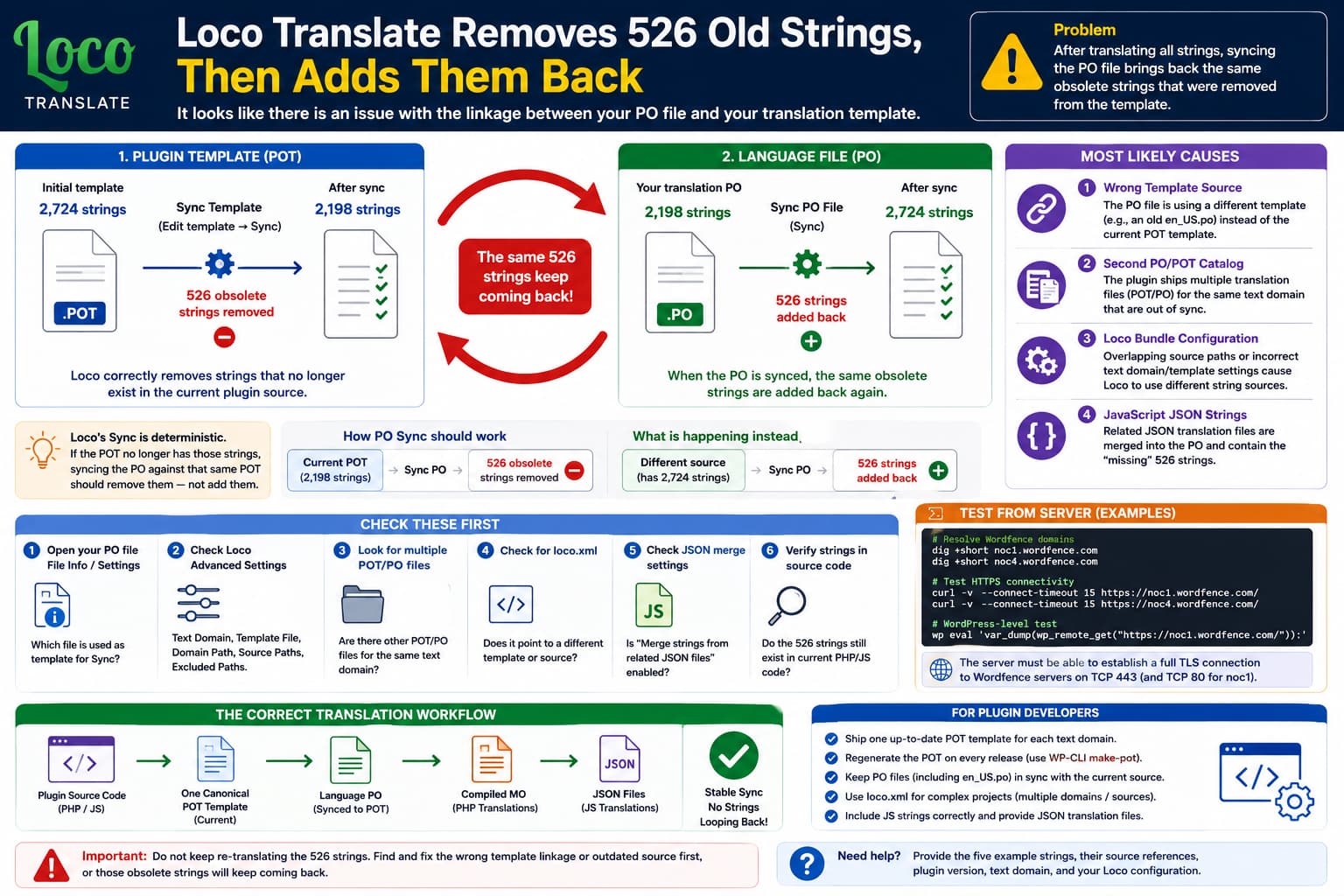
A WordPress plugin translation project may show something like:
Plugin translation template
2,724 strings
After translating all of them in Loco Translate, you update the template and Loco reports:
526 old strings removedSo far, that can be completely normal.
But then you open the language .po file, press Sync, and those same hundreds of strings appear again.
For example:
POT/template Sync
→ 526 obsolete strings removed

PO translation Sync
→ 526 strings added back
That is not a normal stable translation workflow.
Loco’s Sync operation is supposed to be deterministic. A PO translation should normally receive its source strings from its configured translation template. If the template no longer contains those 526 messages, syncing the PO against that same template should remove them, not restore them.
The strongest explanation is therefore:
The PO file is probably not syncing against the same POT/template that was just updated, or the plugin’s translation configuration contains overlapping/out-of-sync sources.
Understand the Difference Between POT and PO First
WordPress translations normally use three main file types:
POT
→ Translation template
→ English source strings only

PO
→ One language's editable translations

MO
→ Compiled file WordPress uses for PHP translations
For example:
my-plugin.pot

my-plugin-fr_FR.po
my-plugin-fr_FR.mo
The expected relationship is:
Plugin source code
        ↓
    my-plugin.pot
        ↓
my-plugin-fr_FR.po
        ↓
    compiled MO
Loco describes these as two different Sync operations:
- POT Sync: extract current strings from source code.
- PO Sync: merge the current template’s strings into a translation file.
That distinction is critical to this issue.
What Should Normally Happen?
Suppose the original template has:
2,724 stringsbut after scanning the current plugin code Loco finds that 526 no longer exist.
A template Sync may correctly produce:
2,724
- 526 obsolete
-------------
2,198 current strings
After saving that POT, syncing your translated PO against it should then also produce approximately:
526 obsolete strings removedfrom the PO.
It should not say:
526 new strings addedimmediately afterward.
If it does, your PO is getting those strings from somewhere else.
Most Likely Cause: The PO File Uses a Different Template
Loco lets individual translations remember which file should act as their template.
This is especially relevant if a language was originally created by copying an existing .po file.
Loco exposes an option called:
Use this file as template when running SyncIf enabled, that PO can continue using another PO as its synchronization source instead of the plugin’s normal POT file.
That can create exactly this behavior.
For example:
Plugin source
↓
my-plugin.pot
↓
2,198 strings after cleanup
but:
French PO
↓
configured to sync against old-en_US.po
↓
old-en_US.po still has 2,724 strings
Then:
Sync POT
→ removes 526

Sync French PO
→ reads old-en_US.po
→ adds the 526 back
The two operations are using different source catalogs.
Check the PO File’s Template Source
Open:
Loco Translate
→ Plugins
→ affected plugin
→ your language
Then open the translation’s:
File infoor the settings/cog associated with that file.
Look for the configured synchronization/template source.
You want the translation to ultimately follow the plugin’s actual canonical template, for example:
languages/plugin-text-domain.potIf instead it references:
languages/en_US.poor another legacy language file, that may be why removed strings keep returning.
Loco specifically warns that when syncing from another PO rather than a real template, that source PO itself must first be current. Otherwise you are simply merging against an outdated catalog.
Second Likely Cause: The Plugin Ships Multiple Templates for One Text Domain
Some plugins contain more than one translation catalog.
For example:
/languages/plugin.pot

/assets/languages/plugin.pot

/admin/languages/plugin-admin.pot

/languages/en_US.po
That is not automatically wrong.
But if two projects overlap and use the same text domain without being configured correctly, Loco may not know which catalog belongs to which source files.
Loco’s bundle configuration supports multiple projects and multiple translation sets, but it warns that overlapping source definitions can cause the same files or strings to belong to multiple sets.
A problematic setup might resemble:
Text domain:
my-plugin

Project 1 source:
/

Project 2 source:
/admin/
without excluding /admin/ from Project 1.
Then both projects can discover the same strings.
The template relationship becomes ambiguous.
Check Loco’s Advanced Bundle Configuration
Go to:
Loco Translate
→ Plugins
→ affected plugin
→ Advanced
Inspect:
Text Domain
File Prefix
Template File
Domain Path
Source Paths
Excluded Paths
Translation Sets
For a simple plugin, you generally want something conceptually like:
Text Domain:
my-plugin

File Prefix:
my-plugin

Template:
languages/my-plugin.pot

Domain Path:
languages

Source:
plugin root
Loco says the Text Domain is critical, and the Template File tells it which POT contains the canonical list of source strings.
If either points somewhere incorrect, Sync behavior can become confusing.
Check for a loco.xml File
Plugin developers can ship:
/loco.xmlto tell Loco exactly how their translation files are organized.
For complicated plugins, this is often the cleanest solution.
A loco.xml file can explicitly define:
- text domain,
- template file,
- source directories,
- target directories,
- separate translation projects,
- exclusions.
Loco recommends this particularly when a plugin contains multiple text domains or non-standard translation layouts.
If the plugin has a loco.xml, inspect whether it references the same POT you are editing.
If it does not, the apparent “template” inside Loco may not actually be the one your PO uses.
Third Likely Cause: The Plugin’s POT File Is Out of Date
There is another possible sequence.
Suppose the plugin ships:
plugin.pot
→ 2,724 strings
but the current source code really contains only:
2,198 stringsYou manually open:
Edit template
→ Sync
and Loco correctly removes:
526 old stringsThis indicates the developer’s shipped POT was stale.
Loco explicitly says this happens frequently: plugin authors sometimes release new source code without regenerating the provided template.
However, if the PO later pulls those 526 back from another shipped catalog, then two vendor translation resources are out of sync with each other.
For example:
plugin.pot
→ outdated

en_US.po
→ differently outdated

JSON language files
→ another string set
That becomes a plugin packaging problem rather than something the translator should have to reconcile manually.
Loco Actually Recommends Translators Not Sync the Author’s POT
This is important.
Although Loco provides an Edit template → Sync button, its documentation says that translators and normal site owners generally should not regenerate the plugin author’s POT file from source.
Template generation is principally a developer task.
The plugin developer should ship:
current source code
+
matching current POT
in every release.
Why?
Because extraction can involve:
- PHP,
- JavaScript,
- build directories,
- minified scripts,
- multiple text domains,
- excluded libraries,
- generated source,
- vendor directories.
A translator cannot reliably know which directories are intended to be included.
So if clicking Sync on the author’s POT produces:
526 old strings removedthat itself is useful evidence for the plugin developer.
Verify One of the 526 Strings Against the Source Code
Choose one string that Loco says is obsolete.
For example:
"Legacy Import Options"Open the POT’s:
Sourcetab.
Loco shows file references such as:
admin/settings.php:418or:
assets/js/admin.js:1027Click that reference.
Loco recommends using this technique to determine whether a translation template actually corresponds with the current plugin source.
There are three revealing outcomes.
Case A: The file/string no longer exists
For example:
POT says:
admin/legacy.php:55

But:
admin/legacy.php no longer exists
Then the template contains stale strings.
The plugin developer needs to regenerate the POT.
Case B: The string still exists in plugin code
Then Loco’s template extraction configuration may be excluding the directory containing that source.
For example:
actual string:
build/admin.js

Loco Source Paths:
includes/
admin/
The POT Sync removes it because Loco never scans build/.
But another translation source knows about the string and adds it back.
That points to an incorrect source-path configuration.
Case C: It exists only in JavaScript
Then JSON translations become relevant.
JavaScript Can Add Another Translation Source
Modern WordPress plugins often have a large React/Vue/JavaScript admin interface.
JavaScript translations use:
JSON language filesin addition to PO/MO.
Loco can merge related JSON strings into a PO translation when the translation was created with:
Merge strings from related JSON filesenabled.
So a plugin might have:
PHP/POT:
2,198 strings
plus:
related JS JSON:
526 strings
and a PO configured to merge both may end up at:
2,724This would not necessarily be a bug if those 526 messages are legitimate JavaScript-only strings.
However, the plugin’s canonical POT should ideally still represent the current source strings in a consistent way.
Loco recommends plugin authors use WordPress’s official string-extraction tools and ship an accurate POT, particularly for JavaScript-heavy projects.
Check Whether the 526 Strings Are JavaScript Strings
Inspect several of the repeatedly reappearing messages.
Look at their source references.
If most say:
src/
build/
assets/js/
dist/
then this may be a JavaScript catalog issue.
If they reference:
.jsonor appear only after enabling:
Merge strings from related JSON filesthen your PO may deliberately be getting additional strings from script translation packs.
This is especially plausible if the mysterious number is consistently:
526every time.
A fixed block of exactly the same 526 messages usually means a specific secondary catalog/source set is being merged repeatedly, rather than random corruption.
Do Not Translate All 526 Again Yet
Before spending hours retranslating them, determine whether they are actually still used.
Choose 5-10 examples.
Check:
Does the English string exist in current source?

Does it appear anywhere in the plugin UI?

Does its source reference point to a valid file?

Is it PHP or JavaScript?

Does the plugin's POT contain it?

Does an English PO contain it?

Does a JSON pack contain it?
If the strings are truly obsolete, do not maintain translations for them simply because Loco keeps restoring them.
Fix the synchronization source first.
Compare the Translation Files Directly
If you have filesystem access, inspect:
wp-content/plugins/plugin-name/languages/Look for files such as:
plugin-name.pot

plugin-name-en_US.po
plugin-name-fr_FR.po

plugin-name-fr_FR-xxxxxxxx.json
Then compare counts.
With WP-CLI/Gettext tools available:
msgattrib --no-obsolete plugin-name.pot |
grep '^msgid ' |
wc -l
and:
msgattrib --no-obsolete plugin-name-en_US.po |
grep '^msgid ' |
wc -l
You might discover:
plugin-name.pot
2,198

plugin-name-en_US.po
2,724
That immediately explains why syncing against one source produces a different result than another.
Search for One Reappearing Message Across the Plugin
For example:
grep -Rni \
'Legacy Import Options' \
wp-content/plugins/plugin-name/
If the only match is:
languages/old.poand it never appears in actual PHP/JS code, then the string is definitely stale translation data.
If it appears in:
build/admin.jsbut not the POT, the POT is incomplete.
This single test can tell you which side is wrong.
Plugin Developers Should Generate One Canonical POT
For a typical single-domain plugin, the developer should maintain one authoritative:
languages/plugin-domain.potLoco strongly encourages plugin authors to ship a correctly named POT for each text domain and to keep it synchronized with the released source code.
WordPress’s official WP-CLI tool can regenerate the template:
wp i18n make-pot \
wp-content/plugins/my-plugin \
wp-content/plugins/my-plugin/languages/my-plugin.pot \
--domain=my-plugin
WordPress documents wp i18n make-pot as its official mechanism for extracting translatable strings from PHP and JavaScript sources.
For a real production plugin, the developer may also need exclusions such as:
node_modules
vendor
build artifacts
tests
third-party libraries
depending on the project structure.
Developers Should Not Ship Contradictory PO/POT Catalogs
A release should not effectively contain:
plugin.pot
→ List A

en_US.po
→ List A + 526 obsolete strings

old language PO
→ another version

loco.xml
→ points PO sync to wrong catalog
because translators then get exactly the looping behavior described here.
The correct dependency should be clear:
Current plugin source
        ↓
Canonical POT
        ↓
All language PO files
not:
Source
↘
 POT A

Old PO B
↘
Translation PO

JSON C
↗
unless the additional projects are deliberately and correctly configured.
The Exact Same Sync Should Not Alternate Forever
Loco’s documentation describes Sync as:
current source/template
+
current translation
↓
deterministic merge
New messages get added; unavailable messages get removed.
Therefore this cycle:
Sync
→ remove 526

Sync again
→ add same 526

Sync
→ remove same 526

Sync
→ add same 526
is a strong sign that the two Sync operations are not using the same catalog/source definition.
It is not how a single stable PO/POT relationship is supposed to behave.
Recommended Troubleshooting Order
I would use this exact sequence:
- Back up the completed PO file immediately.
- Do not keep syncing/saving while investigating.
- Record the current number of strings in the plugin POT.
- Sync the POT once and note the 526 removed strings, but do not assume the resulting extraction is authoritative yet.
- Pick five of the removed strings and check their source references.
- Confirm whether those strings still exist in current PHP/JS code.
- Open the language PO’s File Info and determine which template it uses during Sync.
- Check Loco’s Advanced bundle configuration.
- Confirm the plugin’s Text Domain.
- Confirm the configured Template File.
- Check for multiple POT/PO files using the same text domain.
- Check whether Merge strings from related JSON files is enabled.
- Check for
loco.xml. - Compare the vendor POT against any English/source PO.
- If the template and translation genuinely use different catalogs, report the plugin’s translation package to the developer.
That should reveal where the 526 strings are coming from.
Protect Your Completed Translation
Because all 2,724 strings have already been translated, make a copy before any more experiments.
Loco’s Custom location normally stores translations under:
wp-content/languages/loco/plugins/which is safer from plugin and WordPress translation updates than editing files inside the plugin itself.
Also download the .po locally.
For example:
plugin-he_IL-backup.poor whichever locale you are translating.
This gives you a recoverable master even if Sync removes legitimate translations while the template problem is investigated.
What to Report to the Plugin Developer
A useful report would be:
The plugin currently exposes 2,724 translatable strings. After translating the complete PO file in Loco Translate, I opened the plugin’s translation template and ran Sync. Loco identified 526 strings as obsolete and removed them.
However, when I subsequently open my language PO file and run Sync, exactly those 526 strings are added back again.
This indicates that the language PO appears to be syncing from a different catalog or source definition than the POT I just updated, or that the plugin ships conflicting/out-of-sync translation catalogs.
Could you please verify the canonical POT file, text-domain configuration, any
loco.xmlsettings, JavaScript JSON catalogs, and the source template used by the PO files?
Also provide:
Plugin version
WordPress version
Loco Translate version
Locale
POT path
PO path
String count before/after
5 example strings from the 526
Their source references
Those five example strings are particularly valuable.
Most Likely Explanation
Based on the repeated, exact count:
526 removed
↓
same 526 added back
I would rank the likely causes as:
- The language PO is configured to sync against another PO/template rather than the POT you updated.
- The plugin contains two out-of-sync translation catalogs using the same text domain.
- Loco’s bundle configuration points different operations at different source sets.
- The 526 are JavaScript-only strings being merged from JSON translation files.
- The plugin’s shipped POT is stale or incomplete compared with the actual source.
This is much less likely to be caused by caching or an ordinary translation-file save problem.
Direct Answer
Yes, the behavior strongly suggests there is a template-linkage or translation-source mismatch.
Loco’s normal workflow is:
Plugin source
→ POT template
→ language PO
If syncing the POT removes 526 obsolete strings, then a PO synced against that same POT should also drop them.
It should not immediately add them back.
Loco explicitly says that a PO can use another PO as its synchronization template, and its bundle configuration can also define multiple source/template sets. Related JavaScript JSON translations can additionally be merged into a PO.
So the next step is not to translate those 526 strings again.
Instead, identify what exact file/source your language PO uses when you click Sync.
If that differs from the POT you just updated, you have found the cause.
If both are supposedly linked to the same POT yet the 526 still return, the plugin developer should inspect the supplied POT, loco.xml/bundle configuration, additional PO catalogs, and JavaScript translation files.
