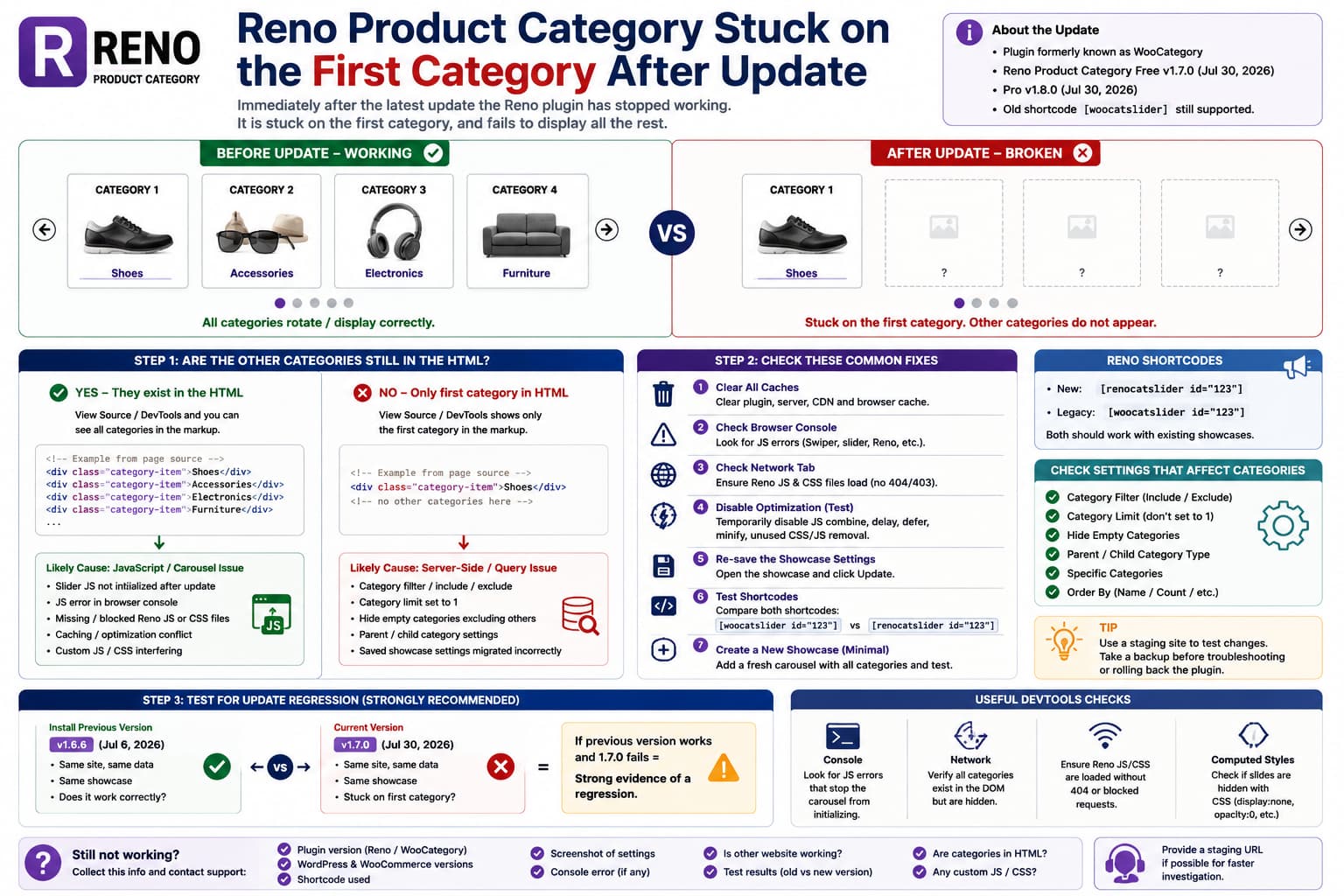
If Reno Product Category worked normally before an update but now remains stuck on the first WooCommerce category, the timing makes an update regression worth investigating.
A typical failure looks like:
Before update

Category 1
Category 2
Category 3
Category 4
✓ slider/carousel works
but afterward:
Category 1
✗ never advances
✗ remaining categories not visible
The plugin formerly known as WooCategory was recently renamed Reno Product Category. The current free version on WordPress.org is 1.7.0, released July 30, 2026. The corresponding Pro product was renamed in version 1.8.0, also released July 30.
Those releases are therefore the first thing to check if the problem began immediately after the recent Reno update.
What Changed in the Latest Reno Update?
The free 1.7.0 changelog lists primarily branding-related changes:
WooCategory
→ Reno Product Category
It also added:
[renocatslider]as the new shortcode and renamed the Gutenberg block and admin menu.
Importantly, the developer says the old:
[woocatslider]shortcode remains supported.
The Pro 1.8.0 update similarly introduced:
[renocatslider id="123"]and the new:
renocatslider()template function, while retaining the legacy shortcode and woocatslider() function.
So if an existing site still uses:
[woocatslider id="123"]you should not need to replace that shortcode simply because the plugin was renamed.
The published changelog does not specifically mention changing the category query or slider engine, and I could not find a current public WordPress.org support report confirming an acknowledged “stuck on first category” regression.
That means the update timing is significant, but it does not yet prove exactly which code path failed.
First Determine Whether the Missing Categories Exist in the HTML
This is the most useful diagnostic.
Open the broken page.
Then:
Right-click
→ View Page Source
or use:
F12
→ Elements
Search for the names of categories that are supposedly missing.
For example:
Shoes
Accessories
Electronics
Furniture
This separates two completely different failures.
Case A: All Categories Are Present in the HTML
For example, DevTools shows:
<div class="category-item">Shoes</div>
<div class="category-item">Accessories</div>
<div class="category-item">Electronics</div>
<div class="category-item">Furniture</div>
but the browser displays only:
ShoesThen WooCommerce successfully supplied the categories.
The likely failure is:
HTML generated correctly
↓
carousel JavaScript does not initialize
↓
only first slide remains visible
This is the strongest possibility when something is described as being “stuck on the first category.”
Case B: Only the First Category Exists in HTML
If source contains only:
<div class="category-item">Shoes</div>then the slider is not the main problem.
The plugin’s server-side category query or configuration produced only one item.
Focus on:
category filters
category hierarchy
empty-category settings
display limits
saved shortcode configuration
plugin option migration
instead.
That one test can save a lot of troubleshooting time.
If All Categories Exist, Check the Browser Console
Open:
F12
→ Console
then reload the page.
Look for red JavaScript errors.
Pay special attention to anything mentioning:
swiper
carousel
slider
reno
woo-category
woocatslider
jQuery
undefined
A typical slider initialization failure can look conceptually like:
Uncaught TypeError
Cannot read properties of undefined
or:
Swiper is not definedor:
... is not a functionIf a JavaScript error happens before Reno initializes its carousel, the browser can leave only the first slide visible.
That does not mean the other categories were deleted.
They may simply remain hidden by the slider’s CSS.
Check Network for Missing Reno JavaScript or CSS
Go to:
F12
→ Network
reload, and filter by:
JSand:
CSSLook for Reno/WooCategory frontend assets.
A missing file could appear as:
404
403
blocked
If the plugin’s CSS loads but its slider JavaScript fails, you can get exactly this symptom:
first slide visible
rest hidden
navigation does nothing
The plugin supports sliders/carousels with navigation, autoplay, looping and touch/swipe behavior, so its frontend JavaScript is essential for those layouts.
Clear Optimization Cache, Not Just Page Cache
If the update renamed asset files or changed their paths, an optimization plugin may still be serving HTML or combined files that reference the previous assets.
Temporarily disable:
JS combine
JS delay
JS defer
JS minification
unused-JS removal
in plugins such as:
WP Rocket
LiteSpeed Cache
Autoptimize
Perfmatters
FlyingPress
Cloudflare optimization
Then clear:
plugin cache
server cache
CDN cache
browser cache
and test again.
This test is particularly valuable after a plugin rebrand because URLs, handles or generated frontend data can potentially change even when the public changelog does not explicitly mention them.
Do not leave all optimization disabled permanently.
This is only an isolation test.
Purge the Shortcode’s Saved Settings
Open:
WordPress Dashboard
→ Product Category
→ Manage Category Showcases
or the equivalent Reno screen.
Edit the affected category slider.
Without changing anything significant, click:
UpdateThen purge caches and reload the frontend.
Why?
The recent Reno release changed:
plugin branding
menu labels
block name
shortcode name
translation resources
while retaining existing content.
Re-saving the showcase forces WordPress to serialize/save the current configuration through the new version’s code rather than relying entirely on settings written by the previous build.
Do Not Reset the Showcase Yet
Avoid:
Reset All
Delete slider
Recreate everything
until you know whether the existing saved configuration is damaged.
Export or screenshot the settings first.
Test a Brand-New Reno Category Slider
This is another high-value test.
Create:
Product Category
→ Add New
Configure the simplest possible slider:
Layout:
Carousel

Categories:
All

Columns:
3 or 4

Autoplay:
On

Loop:
On

No custom CSS
No custom JS
Then insert the new shortcode into a blank page.
For current versions that may look like:
[renocatslider id="123"]The plugin officially supports generating unlimited category sliders/grids using shortcodes.
Now compare:
Old showcase
✗ stuck
versus:
New showcase
✓ works
If a new one works, the update probably did not break Reno globally.
Instead, the old showcase may contain legacy configuration that no longer maps correctly.
If both fail, a broader frontend regression becomes more likely.
Test the Legacy and New Shortcodes
Because Reno 1.7.0 introduced the new shortcode:
[renocatslider]while retaining:
[woocatslider]you can perform a controlled test.
Do not replace the existing shortcode permanently.
Instead create two test pages.
Test A
[woocatslider id="123"]Test B
[renocatslider id="123"]The published changelog explicitly says the old shortcode remains fully supported, so both should continue working with the same existing showcase.
If:
old shortcode
✗

new shortcode
✓
that is useful evidence of a backward-compatibility regression despite the changelog’s compatibility claim.
If both fail identically, the shortcode alias itself is probably not the problem.
Check the Category Limit Setting
Reno includes controls for limiting the number of categories displayed and filtering categories.
Open the affected showcase and inspect:
General Settings
→ Category Filter
→ Category Limit
or equivalent options.
Confirm the limit did not become:
1after the update.
Also inspect:
Hide Empty Categories
Specific Categories
Exclude Categories
Parent Category selection
The Pro version adds more advanced hierarchy and filtering options, including parent/child/grandchild displays and category limits.
A migrated option accidentally resolving to one category could make the problem look like a broken slider when the query itself is actually returning one result.
Check Whether Categories Became “Empty”
WooCommerce considers a category empty when its product count does not satisfy the taxonomy query.
If:
Hide Empty Categories = ONcheck:
Products
→ Categories
and inspect the Count column.
For example:
| Category | Count |
|---|---|
| Shoes | 12 |
| Accessories | 0 |
| Furniture | 0 |
| Electronics | 0 |
With empty categories excluded, seeing only:
Shoescould be expected.
The plugin explicitly provides a Hide Empty Categories feature.
If the counts became incorrect after product imports or taxonomy changes, use WooCommerce’s database/status tools to recount terms before blaming the slider.
Check Parent vs Child Categories
The free Reno Product Category currently displays parent categories as its primary category-level capability, while Pro supports multi-level category structures.
Suppose your structure is:
Clothing
├── Men
├── Women
└── Children
and the affected slider is now configured to display only:
Parent categoriesthen:
Clothingmay be the only result.
This is especially worth checking after an update if the category type/filter option was saved differently.
Disable Reno’s Custom JS Temporarily
The plugin has supported a Custom JS option since earlier WooCategory versions.
If custom JavaScript was ever added under the showcase’s Advanced settings, temporarily remove or disable it.
An old customization could target former:
WooCategoryselectors or DOM structure and interfere with the newly branded version.
For example, custom code could initialize the old slider twice or manipulate the wrong selector.
Back up the code before removing it.
Check Custom CSS for Hidden Slides
Even when the slider JavaScript works, CSS can make every slide except the first invisible.
Search custom CSS for rules involving:
swiper
slide
woo-category
woocatslider
reno
category-item
Watch for:
display: none;opacity: 0;visibility: hidden;or fixed transforms.
The original report says the failure started immediately after an update, so a previously harmless selector may now collide with the new markup.
Check Whether Reno’s Slider Library Actually Initializes
Inspect the category carousel in DevTools.
Modern slider libraries typically add runtime classes or inline transforms after initialization.
For example, before initialization you might see static markup.
After initialization you usually see things such as:
swiper-initialized
swiper-slide
transform: translate3d(...)
The exact classes depend on Reno’s implementation/version, so don’t rely on a guessed selector.
Compare a working Reno demo or a new test slider with the broken one.
If the working slider receives runtime carousel classes while the broken one does not, initialization is failing.
Test With a Default Theme
If the problem remains after frontend optimization is disabled, temporarily test on staging with a standard WordPress theme.
For example:
Twenty Twenty-Sixor another current default theme.
Reno says it is compatible with popular page builders and general WooCommerce environments, but theme JavaScript can still interact with sliders.
Use this only as a diagnostic.
Do not switch the live store’s theme casually.
Test Reno With Only WooCommerce Active
On staging:
WooCommerce
✓

Reno Product Category
✓

Everything else
temporarily disabled
If the categories start working, reactivate plugins in groups.
Prioritize:
slider/carousel plugins
optimization plugins
WooCommerce enhancement plugins
page-builder addons
lazy-loading plugins
JavaScript optimization plugins
A historical Reno/WooCategory changelog shows that the plugin has previously required fixes for:
- carousel conflicts,
- lazy-loaded images,
- autoplay,
- Gutenberg preview loading,
- other slider plugins.
So interactions in this area are not unprecedented.
If It Broke Exactly With 1.7.0, Run a Controlled Rollback Test
For the free plugin, the current version is:
1.7.0
July 30, 2026
and the previous public release was:
1.6.6
July 6, 2026
For Pro, the current rebranded version is:
1.8.0with the previous listed release:
1.7.5If the production failure began immediately after those updates, create a staging copy and compare:
Current Reno release
✗ first category only
with:
Previous known-good release
✓ all categories work
If everything else is identical, that is strong regression evidence.
Use an Official Previous Package
Do not download an old Reno/WooCategory ZIP from an unknown “GPL download” website.
Use:
your backup
official WordPress.org previous version
official ShapedPlugin account/download
depending on whether you use Free or Pro.
And take a database/site backup before changing versions.
Don’t Immediately Downgrade Production Permanently
A rollback is extremely useful diagnostically.
But don’t make:
stay on old version foreverthe final solution.
Updates can contain:
security improvements
WooCommerce compatibility
WordPress compatibility
bug fixes
The previous free 1.6.6 release, for example, included additional security/capability hardening.
Use the old version temporarily to prove the regression and then provide that reproduction to the developer.
A Very Strong Bug Reproduction
The best report would be:
WordPress:[current version]
WooCommerce:
[current version]
Reno Product Category: 1.7.0 Showcase: Carousel 6 categories
Then:
1.6.6
✓ all six categories visible

1.7.0
✗ stuck on first category
Also include whether:
all categories exist in DOM:
Yes / No

Console error:
[copy exact error]
Legacy shortcode: works / fails New shortcode: works / fails Newly created showcase: works / fails
That gives ShapedPlugin a highly reproducible report.
What If All Six Categories Are in the DOM?
Then I would report the issue as:
Reno Product Category 1.7.0 outputs all category items, but the carousel frontend JavaScript no longer initializes, leaving only the first item visible.
Attach:
console error
affected URL
screenshot of DOM
version comparison
That points the developer straight toward:
frontend asset enqueueing
carousel initialization
JS selector changes
rebranding-related assets
rather than WooCommerce taxonomy querying.
What If Only One Category Is in the DOM?
Then report:
Reno Product Category 1.7.0 returns only one category from an existing showcase that returned multiple categories in the previous version.
Provide screenshots of:
category filter settings
category limit
WooCommerce category counts
parent/child structure
The developer should then inspect:
saved option migration
taxonomy query arguments
category include/exclude values
limit settings
rather than JavaScript.
Is the Rebranding Itself the Cause?
We cannot say that yet.
The free 1.7.0 changelog publicly describes the release primarily as a rebrand and says existing legacy shortcodes remain supported.
There is no published changelog entry saying:
changed category query
changed slider initialization
and I did not find a currently indexed support thread confirming the exact first-category regression.
Therefore it would be inaccurate to state:
Reno 1.7.0 definitely contains a known bug that breaks category sliders.
A safer conclusion is:
If the failure began immediately after the update and disappears when the previous version is restored under identical conditions, you have strong evidence of a regression even if it has not yet been publicly documented.
Recommended Troubleshooting Order
Use this sequence:
- Confirm your exact Reno Product Category version.
- Confirm WooCommerce and WordPress versions.
- View page source and determine whether all categories are present.
- Check DevTools Console for JavaScript errors.
- Check Network for missing Reno JS/CSS.
- Disable JS optimization temporarily.
- Re-save the existing Reno showcase.
- Confirm category limit/filter/hide-empty options.
- Create a brand-new minimal Reno carousel.
- Compare
[woocatslider]and[renocatslider]. - Test with only WooCommerce + Reno on staging.
- Test a default theme if necessary.
- Compare the current version with the previous known-good version.
- Send the exact reproduction to ShapedPlugin.
Most Likely Cause
Given only:
worked before update
↓
updated Reno
↓
stuck on first category
the strongest initial hypothesis is a carousel initialization problem, particularly if all the category markup still exists in the page.
The diagnostic fork is:
Are categories 2, 3, 4... in the HTML?Yes
Focus on:
JavaScript
slider initialization
asset loading
optimization
CSS
update regression
No
Focus on:
category filtering
saved configuration
query arguments
category counts
parent/child settings
update migration
That is the fastest way to isolate the issue.
Current Version Note
As of August 2026, WordPress.org lists Reno Product Category Free 1.7.0, released July 30, 2026, with approximately 9,000 active installations and compatibility tested through WordPress 7.0.4 and WooCommerce 10.9.4.
ShapedPlugin lists the current Pro edition as 1.8.0, also released July 30, with the WooCategory-to-Reno rebranding as the headline change.
So if this problem appeared immediately after the late-July Reno update, a controlled old-vs-new comparison is particularly worthwhile.
