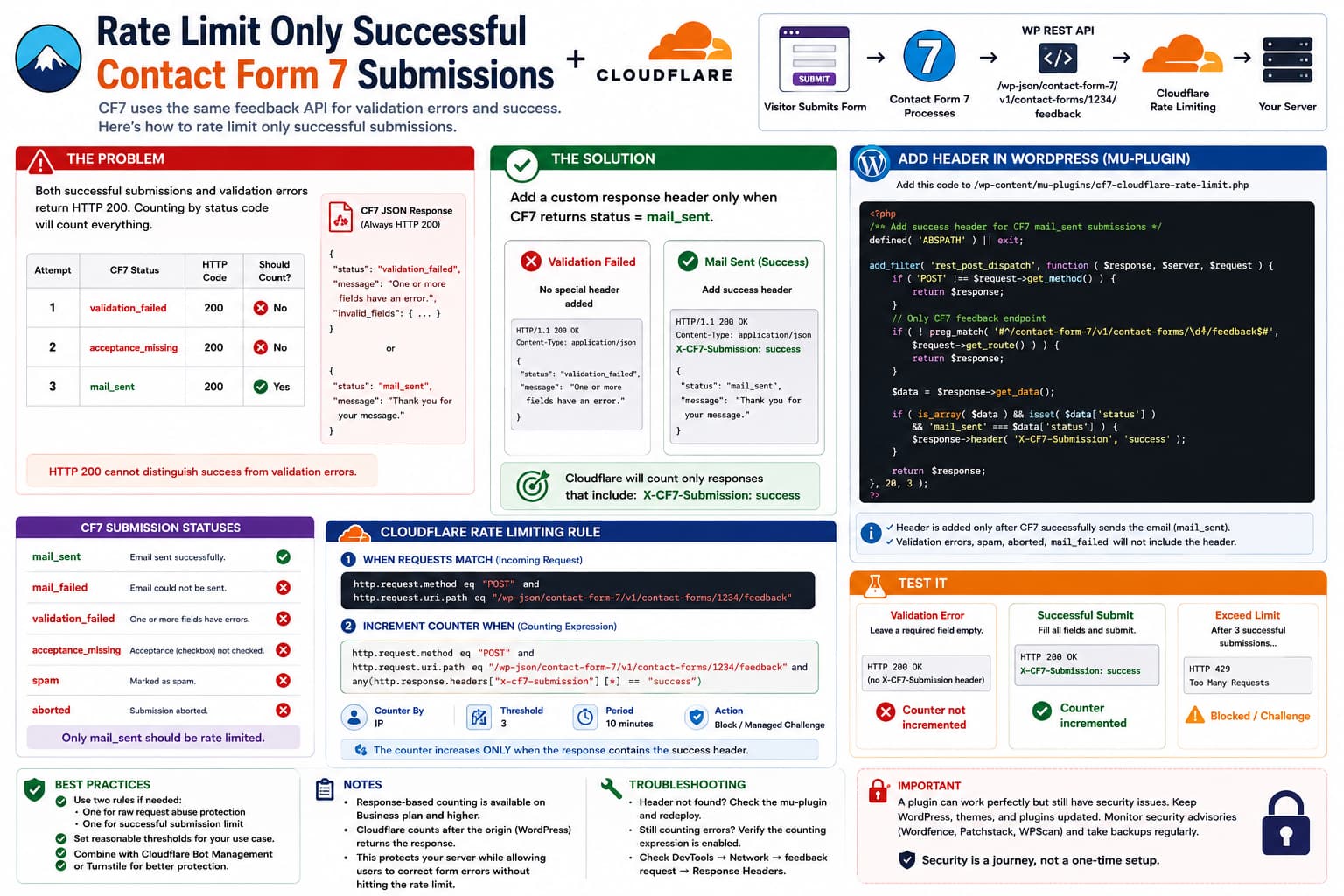
If Contact Form 7 submits through:
/wp-json/contact-form-7/v1/contact-forms/1234/feedback
it is tempting to create a Cloudflare rate-limiting rule such as:
POST requests to /feedback→ maximum 3 requests per 10 minutes
There is a problem.
Contact Form 7 uses the same REST endpoint for both:
Valid submission
and:
Validation failure
So a visitor who accidentally misses three required fields, corrects them one at a time, and finally submits successfully could consume the rate limit without ever sending three messages.
The key question is therefore:
Can Cloudflare increment the counter only when Contact Form 7 actually accepts and sends the form?
Yes, but not using Contact Form 7’s HTTP status code by itself.
The cleanest approach is to make WordPress add a small response header only when CF7 returns:
status: mail_sent
and then use a Cloudflare custom counting expression that increments only when that response header is present.
Why HTTP 200 Cannot Tell Success From Validation Failure
Current Contact Form 7 code registers its feedback route as a public POST endpoint:
/contact-forms/(?P<id>\d+)/feedback
and passes the result of the form submission into the JSON response.
CF7 uses result statuses including:
validation_failedacceptance_missingspamabortedmail_sentmail_failed
The current submission code sets mail_sent only after its mail process succeeds, while failed validation receives validation_failed.
The REST endpoint then does:
$result = $item->submit();...return rest_ensure_response( $response );
for those normal submission outcomes.
rest_ensure_response() creates a standard REST response whose default HTTP status is 200 unless another status was explicitly supplied.
So these can both be:
HTTP 200{ "status": "validation_failed"}
and:
HTTP 200{ "status": "mail_sent"}
That means this Cloudflare counting expression would not work:
http.response.code eq 200
because it would count both successful and validation-failed submissions.
Contact Form 7 Does Use Real 4xx Codes for API-Level Errors
There is an important distinction.
CF7 does return proper HTTP error statuses for malformed API requests.
For example, its current feedback controller can return:
415Unsupported media type404Contact form not found400Invalid/missing unit tag
But normal form-validation failures are application-level results inside a successful REST response.
So:
HTTP code
can distinguish:
Broken REST requestvsNormal CF7 request
but not:
Validation failurevsMessage successfully sent
Cloudflare Can Count Based on Response Information
Cloudflare’s current rate-limiting system supports a separate:
Increment counter when
or:
counting_expression
condition.
Unlike the initial request-matching expression, that counting expression can use HTTP response fields. Cloudflare specifically documents examples where an endpoint is matched on the incoming request but its counter increases only when the origin returns a particular response status.
Cloudflare also exposes response headers through:
http.response.headers
and allows expressions such as:
any(http.response.headers["server"][*] == "nginx")
Header keys are referenced in lowercase.
That gives us a clean solution.
Solution: Add a Success Header to CF7 Responses
We can make WordPress return:
X-CF7-Submission: success
only when CF7’s JSON response says:
status = mail_sent
Then Cloudflare counts only responses containing that header.
The flow becomes:
POST /feedback ↓Contact Form 7 ↓Validation failed ↓HTTP 200No X-CF7-Submission header ↓Cloudflare counter NOT incremented
versus:
POST /feedback ↓Contact Form 7 ↓Mail sent ↓HTTP 200X-CF7-Submission: success ↓Cloudflare counter +1
That is much closer to what we actually mean by “submission rate.”
Add the Header in WordPress
Do this through a small custom plugin or mu-plugin rather than editing Contact Form 7.
Create:
/wp-content/mu-plugins/cf7-cloudflare-rate-limit.php
If the mu-plugins directory does not exist, create it first.
Add:
<?php/** * Plugin Name: CF7 Cloudflare Successful Submission Header * Description: Adds a response header when a Contact Form 7 submission is successfully sent. */defined( 'ABSPATH' ) || exit;add_filter('rest_post_dispatch',function ( $response, $server, $request ) {if ( 'POST'!== $request->get_method() ) {return$response; }$route= $request->get_route();if (!preg_match('#^/contact-form-7/v1/contact-forms/\d+/feedback$#',$route ) ) {return$response; }$data= $response->get_data();if (is_array( $data ) &&isset( $data['status'] ) &&'mail_sent'===$data['status'] ) { $response->header('X-CF7-Submission','success' ); }return$response; },20,3);
WordPress officially provides the rest_post_dispatch filter specifically so code can modify a REST response before it is returned to the client.
And the WordPress HTTP response object provides:
$response->header()
for adding an HTTP response header.
Why Use rest_post_dispatch?
Contact Form 7 already exposes:
wpcf7_feedback_response
for modifying its JSON data.
But adding something like:
{ "status": "mail_sent", "cloudflare_success": true}
would not solve the Cloudflare rule.
Cloudflare rate-limiting expressions do not expose arbitrary JSON response-body fields in the same way they expose:
http.response.codehttp.response.headers
So a response header is much easier for Cloudflare to evaluate.
Test the Header Before Creating the Rate Limit
Submit the form successfully.
Open:
DevTools→ Network→ feedback→ Headers→ Response Headers
You should see:
x-cf7-submission: success
Now intentionally trigger validation.
For example, leave a required field blank.
The /feedback response should still return CF7 JSON, but it should not contain:
x-cf7-submission: success
That difference is exactly what Cloudflare needs.
Check the JSON Status Too
For a successful submission, DevTools should show something similar to:
{ "status": "mail_sent", "message": "Thank you for your message..."}
For invalid fields:
{ "status": "validation_failed", "message": "One or more fields have an error...", "invalid_fields": [...]}
Contact Form 7’s current source explicitly builds those submission statuses and adds invalid-field information to feedback responses.
Create the Cloudflare Rate Limiting Rule
Now create a Cloudflare WAF Rate Limiting Rule.
Use the actual URL shown in DevTools rather than assuming your site uses exactly the same REST path.
For form ID 1234, the incoming-request expression can be:
http.request.method eq "POST" andhttp.request.uri.path eq "/wp-json/contact-form-7/v1/contact-forms/1234/feedback"
This tells Cloudflare:
This is the endpoint where the mitigation should apply.
But do not use that same expression as the counter.
Enable:
Use custom counting expression
Cloudflare’s dashboard explicitly supports a separate custom counting expression where available.
Use:
http.request.method eq "POST" andhttp.request.uri.path eq "/wp-json/contact-form-7/v1/contact-forms/1234/feedback" andany(http.response.headers["x-cf7-submission"][*] == "success")
Cloudflare normalizes response-header map keys to lowercase, which is why:
x-cf7-submission
is lowercase in the expression even though WordPress sends:
X-CF7-Submission
Matching Expression vs Counting Expression
This distinction is extremely important.
When incoming requests match
POST+specific CF7 feedback URL
Increment counter when
POST+same feedback URL+response contains:X-CF7-Submission: success
Cloudflare explicitly warns that the custom counting expression does not automatically inherit the main matching expression. If you want the counter restricted to that route, include the route in the counting expression too.
Otherwise, an overly broad expression such as:
any(http.response.headers["x-cf7-submission"][*] == "success")
could theoretically count any other endpoint on the site that returns the same header.
What Should You Use as the Counting Characteristic?
For a normal public contact form:
IP
is the obvious starting point.
Conceptually:
With the same characteristics:IP
Then decide how many successful messages one IP should reasonably be able to send.
For example:
3 successful submissionsper 10 minutes
may be appropriate for a simple contact form.
For another application, such as:
support ticket formquote requestjob applicationmulti-user office network
that might be too restrictive.
There is no universally correct threshold.
Be Careful With IP-Only Limits
Many legitimate users can share a public IP.
Examples include:
office networksuniversitieshotelsmobile carrierscorporate VPNs
So this:
1 submission / 1 hour / IP
can easily block legitimate people.
A moderate threshold is safer.
Cloudflare lets you choose characteristics used to maintain separate counters for rate-limiting purposes.
What Exactly Counts as “Successful”?
The header above uses:
mail_sent
because that is CF7’s successful mail-processing state.
Contact Form 7 reaches that status after its mail function succeeds and fires:
wpcf7_mail_sent
This does not mean:
The recipient definitely received the email in their inbox.
It means CF7 successfully completed its configured sending process.
Delivery can still later fail because of:
SMTP rejectionspam filteringmailbox rejectionDNS/mail configuration
But for rate limiting contact-form submissions, mail_sent is normally the correct success definition.
These Responses Will Not Count
With the example header code:
validation_failedacceptance_missingspamabortedmail_failed
do not receive the success header.
Therefore they do not increment the Cloudflare success counter.
That is normally desirable if your goal is:
Allow only N successfully accepted messages.
Why Not Return HTTP 422 for Validation Errors?
You might think the simpler fix would be changing CF7 so that:
validation_failed→ HTTP 422
and:
mail_sent→ HTTP 200
Then Cloudflare could simply count 200.
I would not recommend changing Contact Form 7’s HTTP semantics just for Cloudflare.
The CF7 frontend JavaScript expects the plugin’s REST behavior. Turning a normal CF7 validation result into an HTTP-level error can alter the client-side fetch/error path and potentially result in a generic submission failure instead of proper inline field validation.
It also changes a core plugin behavior that may affect integrations.
Adding a harmless response header is much less invasive.
Do Not Edit Contact Form 7 Core Files
Do not modify:
/wp-content/plugins/contact-form-7/includes/rest-api.php
to add the header.
The next CF7 update will overwrite the modification.
As of August 21, 2026, WordPress.org lists Contact Form 7 6.1.7 as the current public version and tested through WordPress 7.1.
The small mu-plugin approach works independently of CF7’s plugin directory and is easier to maintain.
What If You Want This for Only One Form?
If you want to rate limit only:
Form ID 1234
you can make the WordPress snippet even stricter.
Use:
if ( '/contact-form-7/v1/contact-forms/1234/feedback' !== $request->get_route()) { return $response;}
Full version:
<?phpdefined( 'ABSPATH' ) || exit;add_filter('rest_post_dispatch',function ( $response, $server, $request ) {if ( 'POST'!== $request->get_method() ) {return$response; }if ('/contact-form-7/v1/contact-forms/1234/feedback'!== $request->get_route() ) {return$response; }$data= $response->get_data();if (is_array( $data ) &&'mail_sent'=== ( $data['status'] ??'' ) ) { $response->header('X-CF7-Submission','success' ); }return$response; },20,3);
That makes it impossible for other CF7 forms to receive the marker.
Multiple Forms
If you have:
123456789012
and want the same rule for all of them, either use the regex version in WordPress or create separate Cloudflare rules.
Separate rules can be useful if each form requires a different threshold.
For example:
General contact form5 / 10 minutesPassword-reset support form3 / 30 minutesApplication form2 / 1 hour
Cloudflare Plan Limitation
There is one important limitation.
Cloudflare notes that availability of HTTP response fields in rules depends on the specific Cloudflare product and plan.
Its current rate-limiting examples using custom response-based counting are identified as requiring Business plan or higher in those example configurations.
So before building this setup, check whether your Cloudflare plan exposes:
Use custom counting expression
and lets that expression use:
http.response.headers
If it does, the success-header solution works cleanly.
If it does not, Cloudflare cannot natively distinguish the two normal CF7 JSON responses using just the endpoint and HTTP status.
What If Your Cloudflare Plan Cannot Count Response Headers?
Then you have three realistic alternatives.
Option 1: Rate Limit All /feedback Requests
Use:
POST /feedback
as the rate limit, but make the threshold generous enough to accommodate user mistakes.
For example, if you want roughly:
3 real messages / 10 minutes
you might allow considerably more raw attempts.
The downside is obvious:
Validation errors→ consume quota
which is exactly the original problem.
Option 2: Rate Limit at WordPress Level After wpcf7_mail_sent
If you specifically need to count completed CF7 submissions, WordPress knows exactly when that occurs.
CF7 fires:
wpcf7_mail_sent
only after the mail stage succeeds.
A custom plugin could maintain a rate counter using:
IP + transient/object cache/database
at that point.
However, server-side rate limiting has more implementation complexity:
- detecting the real visitor IP behind Cloudflare,
- concurrency,
- persistent object cache behavior,
- cleanup,
- IPv6,
- NAT/shared IPs.
If Cloudflare can do the counting at the edge, I would prefer that.
Option 3: Use Cloudflare Protection Before the Submission
If the main goal is abuse prevention rather than strictly limiting successful messages, Cloudflare Turnstile or CF7’s existing spam protections may be more appropriate.
A bot that sends thousands of invalid submissions still costs:
PHP executionREST requestsCF7 validationorigin resources
even if your success-only counter never increments.
So a strong design can use:
Turnstile / anti-spam→ stop automation
plus:
successful-submission rate limit→ stop repeated legitimate-looking sends
They solve different problems.
A Success-Only Limit Does Not Protect the Endpoint From Flooding
This is important.
Suppose a bot sends:
10,000 invalid forms
and every response is:
validation_failed
With success-only counting:
Cloudflare success counter = 0
but your WordPress server still processed all 10,000 requests.
So if your security goal is DDoS or REST endpoint abuse protection, you may actually want two limits.
Rule A: Broad abuse protection
POST /feedback→ relatively high raw request limit→ Managed Challenge or block
Rule B: Business-rule protection
Successful CF7 messages→ lower limit based on success header
For example, conceptually:
Raw requests:30 / minute / IPSuccessful messages:3 / 10 minutes / IP
The first protects infrastructure.
The second prevents one visitor from repeatedly sending actual emails.
Those numbers are examples only; tune them for the site.
Cloudflare itself recommends combining different rate-limit tiers depending on the behavior being controlled.
Why the Header Approach Works Better Than Looking at the JSON
CF7 already gives us exactly the information we need:
"status": "mail_sent"
The only problem is where that information lives.
It lives in:
response body
while Cloudflare’s documented rate-limiting rule fields expose things such as:
http.response.codehttp.response.headers
So the WordPress code is not inventing a new concept.
It simply translates:
CF7 JSON:status = mail_sent
into:
HTTP response header:X-CF7-Submission = success
which Cloudflare can efficiently use.
Verify the Complete Setup
Test these four situations.
| Test | CF7 status | Success header | Counter |
|---|---|---|---|
| Blank required field | validation_failed | No | No increment |
| Acceptance box missing | acceptance_missing | No | No increment |
| Mail transport failure | mail_failed | No | No increment |
| Successful send | mail_sent | X-CF7-Submission: success | Increment |
Then deliberately exceed your success limit.
The next request matching the Cloudflare rule should receive the configured mitigation:
Block
or:
Managed Challenge
depending on the rule.
One Subtle Cloudflare Detail
When the counting expression contains a response field, Cloudflare has to wait for the origin response before it can decide whether that request increments the counter.
Cloudflare documents this explicitly: response-field counting occurs after the response is returned from the origin.
That is expected.
The request that crosses the threshold may therefore already have reached WordPress before the mitigation applies to subsequent matching requests.
Do not design the limit assuming Cloudflare can know the CF7 result before WordPress generates it.
Recommended Configuration
For this specific use case, I would use:
Cloudflare Rule 1Protect the CF7 endpoint from request floodsCount every POSTUse a relatively generous threshold
and:
Cloudflare Rule 2Limit actual successful messagesCount only:X-CF7-Submission: successUse a much lower threshold
This gives you both:
infrastructure protection+submission/business-rule protection
without punishing normal users for correcting validation errors.
The Direct Answer
If you simply rate limit:
/wp-json/contact-form-7/v1/contact-forms/1234/feedback
then yes, every matching feedback request counts by default, including validation attempts.
You cannot distinguish a normal CF7 validation failure from mail_sent using HTTP 200, because both are returned through a normal rest_ensure_response() response.
If your Cloudflare plan supports response-based custom counting expressions, the clean solution is:
CF7 mail_sent→ add X-CF7-Submission: success→ Cloudflare counts only that response header
That avoids counting ordinary validation mistakes while keeping the actual feedback endpoint protected.
