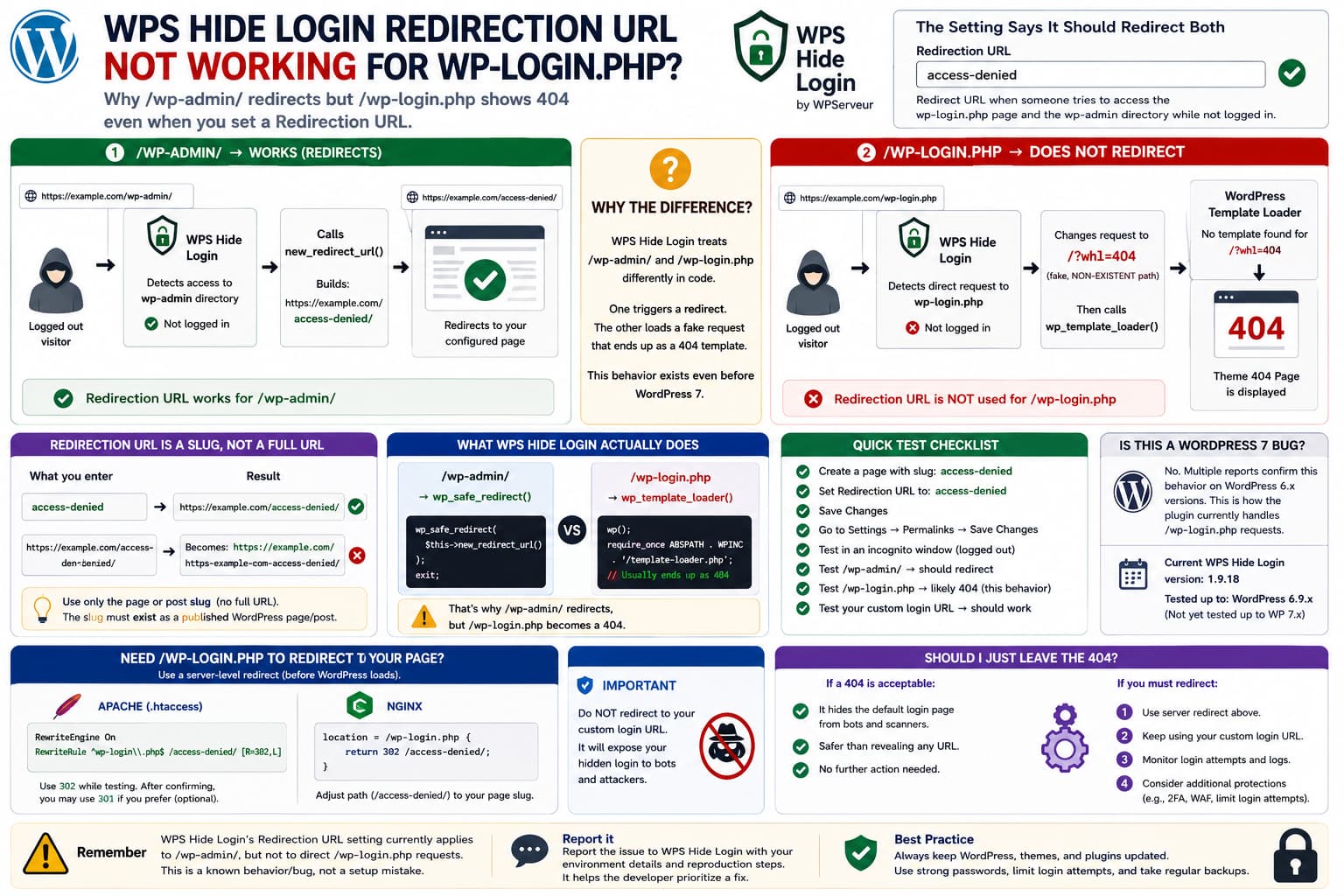
If you use WPS Hide Login and configure its Redirection URL setting, the description makes the expected behavior quite clear:
Redirect URL when someone tries to access the wp-login.phppage and the wp-admin directory while not logged in.
However, you may find that:
/wp-admin/→ redirects to your configured page
while:
/wp-login.php→ does not redirect to that page
and instead displays the site’s 404 page, leaves the browser on /wp-login.php, or otherwise behaves differently.
This is not simply a misunderstanding of the setting.
The current WPS Hide Login source contains that exact description for the whl_redirect_admin option, so the UI does indeed tell administrators that the configured destination applies to both wp-login.php and wp-admin.
But the plugin’s request-handling code treats those two URLs differently.
That difference explains why the feature can appear broken.
First: This Is WPS Hide Login
The wording in the reported setting matches WPS Hide Login.
WordPress.org describes WPS Hide Login as intercepting requests rather than renaming wp-login.php or adding rewrite rules. When enabled, the normal wp-login.php page and wp-admin directory become inaccessible to unauthenticated visitors.
The plugin stores the custom login slug separately from its redirection slug.
Its source currently identifies the settings as:
Login urlRedirection url
and stores the redirection destination under:
whl_redirect_admin
The UI text below that field explicitly mentions both wp-login.php and wp-admin.
The Redirection Field Is Really a Slug, Not an Arbitrary URL
Another important detail is hidden in the implementation.
Although the setting is labelled:
Redirection url
the plugin sanitizes the submitted value with:
sanitize_title_with_dashes()
and then constructs the final address by appending that value to the site’s home URL.
Conceptually:
Redirection field:access-deniedPlugin creates:https://example.com/access-denied/
Therefore, if your WordPress page is:
https://example.com/not-found/
enter:
not-found
rather than the entire URL.
Likewise, WPS Hide Login support has specifically stated that the field cannot be used to enter an arbitrary PHP filename such as login.php; it expects an existing WordPress slug instead.
Why /wp-admin/ Redirects Correctly
The plugin’s wp_loaded() method explicitly checks whether an unauthenticated visitor is inside the WordPress administration area.
When that condition is met, it does:
wp_safe_redirect( $this->new_redirect_url() );die();
So the path is effectively:
Visitor requests /wp-admin/ ↓Not logged in ↓WPS Hide Login ↓new_redirect_url() ↓/your-redirection-page/
That explains why the Redirection URL normally works perfectly for /wp-admin/.
But Direct /wp-login.php Requests Take a Different Code Path
This is where the behavior becomes interesting.
When WPS Hide Login detects a direct request containing:
wp-login.php
it marks the request internally as a hidden-login request and changes REQUEST_URI to an intentionally fake path.
Later, instead of calling:
wp_safe_redirect( $this->new_redirect_url() );
for that condition, the code reaches:
$this->wp_template_loader();
That helper invokes WordPress’s normal theme template loader:
wp();require_once ABSPATH . WPINC . '/template-loader.php';
Because the plugin previously replaced the incoming request with a fake, nonexistent path, WordPress normally resolves that request through the theme’s 404 handling.
So the effective flow can become:
/wp-login.php ↓WPS Hide Login detects default login path ↓Request URI changed to nonexistent path ↓WordPress template loader ↓Theme 404 page
rather than:
/wp-login.php ↓new_redirect_url() ↓configured page
That is the core reason the results for /wp-admin/ and /wp-login.php can be different.
This Behavior Predates WordPress 7
The timing may make this look like a WordPress 7 compatibility regression, but there are public WPS Hide Login reports documenting the same behavior on much older WordPress releases.
One report describes exactly:
/wp-admin/→ configured redirect works/wp-login.php→ 404 instead of configured redirect
while using WordPress 6.5.x.
Another earlier report says /wp-admin redirected to the desired page while /wp-login.php continued displaying the default 404 behavior.
In another support thread, the WPS Hide Login team explicitly replied that their developers were checking this difference and intended to address it in a future release.
Therefore, I would not describe this as a confirmed WordPress 7 bug.
WordPress 7 may expose or reproduce it on your installation, but the same underlying WPS Hide Login behavior existed years earlier.
Current WordPress 7 Compatibility Is Still Worth Noting
As of this verification, WordPress.org lists WPS Hide Login version 1.9.18, while the public compatibility metadata says it has been tested through WordPress 6.9.x, not WordPress 7.x.
Its recent changelog entries are mainly compatibility declarations and an early translation-loading fix. The published 1.9.18 changelog does not mention a correction for the wp-login.php Redirection URL discrepancy.
So WordPress 7 testing is still sensible, but the historical evidence strongly suggests that the redirection inconsistency itself is not new.
What the Setting Should Do According to Its Description
The expected configuration is straightforward.
Suppose you create this WordPress page:
https://example.com/access-denied/
Then configure:
Settings→ WPS Hide LoginLogin URL:private-loginRedirection URL:access-denied
A logged-out visitor would reasonably expect:
/wp-admin/→ /access-denied//wp-login.php→ /access-denied/
This interpretation is also reflected in third-party documentation for WPS Hide Login, which says attempts to visit the normal login URL or admin directory should be sent to the configured Redirection URL.
So if /wp-login.php displays the theme’s 404 page instead, the user’s expectation is reasonable.
Do This Test First
Before applying a workaround, isolate the behavior.
- Create a normal published WordPress page with a simple slug such as
access-denied. - Set WPS Hide Login’s Redirection URL to only
access-denied, not the full URL. - Go to Settings → Permalinks and click Save Changes once.
- Open a private/incognito browser window so you are definitely logged out.
- Test
/wp-admin/. - Test
/wp-login.php. - Test your secret login slug.
- Temporarily disable caching and security/redirection plugins if the behavior is inconsistent.
If the result is:
/wp-admin/→ /access-denied/
but:
/wp-login.php→ 404
you have reproduced the known WPS Hide Login path difference.
Why Saving Permalinks Can Matter
WPS Hide Login has historically included fixes involving rewrite-rule refreshing after its login URL is changed, and its own FAQ recommends checking .htaccess when login routing behaves unexpectedly.
So resaving permalinks is a useful first diagnostic.
But if /wp-admin/ works while /wp-login.php consistently renders a 404, rewriting .htaccess repeatedly is unlikely to solve the code-path difference described above.
A 404 Is Not Necessarily a Security Problem
From a security standpoint, sending direct probes for:
/wp-login.php
to a 404 page is perfectly reasonable.
In fact, WPS Hide Login’s fundamental purpose is to make the normal login endpoint unavailable. WordPress.org describes the plugin as intercepting requests so wp-login.php and wp-admin are inaccessible to unauthenticated visitors.
So if your only goal is:
Hide the default WordPress login endpoint from automated scanning
then the 404 behavior may actually be acceptable.
The problem is specifically that the UI offers a custom Redirection URL and describes it as handling wp-login.php as well.
If You Really Need /wp-login.php to Redirect to a Custom Page
If your requirement is:
/wp-login.php→ /access-denied/
rather than a 404, the cleanest temporary workaround is to perform that redirect before WordPress and WPS Hide Login handle the request.
For Apache, place an exact rule above the normal WordPress rewrite block:
RewriteEngine OnRewriteRule ^wp-login\.php$ /access-denied/ [R=302,L]
Use 302 while testing.
Once you are certain the behavior is correct and intentional, you could consider a permanent redirect, although leaving it temporary is usually fine for this purpose.
Your hidden login URL is unaffected because the browser does not actually request:
/wp-login.php
when using the secret WPS Hide Login slug.
For Nginx, the equivalent concept is:
location = /wp-login.php { return 302 /access-denied/;}
The exact server configuration depends on the hosting setup, so do not paste Nginx configuration into Apache hosting or vice versa.
Why a Server-Level Rule Works
WPS Hide Login says it does not rename WordPress core files and does not add rewrite rules itself; it intercepts the request after WordPress begins processing it.
A web-server rule runs earlier:
Browser↓Apache/Nginx↓WordPress↓Plugins
So:
/wp-login.php
can be redirected before WPS Hide Login converts it into the fake request that eventually reaches the 404 template.
Do Not Redirect to Your Secret Login URL
Avoid configuring:
/wp-login.php→ /my-secret-login/
That defeats a major part of the reason for hiding the default login address.
Anyone or any bot probing:
/wp-login.php
would immediately learn the secret login URL.
Instead redirect to something unrelated, such as:
/
or:
/access-denied/
or simply keep WPS Hide Login’s normal 404 behavior.
Do Not Edit WPS Hide Login Core Files
It may be tempting to change this section:
} elseif ( $this->wp_login_php ) { $this->wp_template_loader();}
into something resembling:
wp_safe_redirect( $this->new_redirect_url() );exit;
The source makes it apparent why that would change the behavior.
But editing:
/wp-content/plugins/wps-hide-login/
directly is not a durable solution.
A plugin update will overwrite the modification, and this code also contains exceptions for multisite activation, password-protected content, login actions, and other WordPress flows.
A narrowly scoped server rule is safer than maintaining a fork of the login-routing logic.
Check Plugin Conflicts Only if the Results Are Different
If you instead see:
/wp-admin/→ wrong page/wp-login.php→ actual WordPress login screen
or your hidden login slug stops working entirely, then test for conflicts.
WPS Hide Login support routinely recommends temporarily disabling other plugins when login routing behaves unexpectedly, particularly security, membership, redirect, cache, and login-customization plugins.
That is a different problem from the repeatable:
/wp-admin works/wp-login.php gives 404
pattern.
Most Likely Explanation for This Report
For the reported configuration:
WordPress 7Latest WPS Hide LoginRedirection URL configuredWordPress page used as target/wp-login.php→ does not redirect
the first thing I would verify is whether:
/wp-admin/
does redirect to the configured page.
If it does, the Redirection URL setting itself has been saved and resolved correctly.
The problem is then very likely the longstanding difference in how WPS Hide Login processes direct wp-login.php requests: /wp-admin/ explicitly calls new_redirect_url(), while hidden wp-login.php requests can be routed through WordPress’s template loader and therefore become a theme 404.
That makes this much more likely to be a WPS Hide Login behavior/bug than a mistake creating the WordPress destination page.
What to Send WPS Hide Login Support
A useful reproduction is:
WordPress: 7.xWPS Hide Login: 1.9.18Login URL:private-loginRedirection URL:access-deniedLogged out:/private-login/→ login page works/wp-admin/→ /access-denied/ works/wp-login.php→ 404 / does not use access-denied
Also include the permalink structure, web server type, whether WordPress is installed in a subdirectory, and whether the same behavior occurs with all other plugins disabled.
The most important point is that this should be reported as:
The configured Redirection URL works for
/wp-admin/, but the same setting is not applied to direct/wp-login.phprequests.
That matches historical WPS Hide Login reports and makes the difference very easy for the developer to reproduce.
Final Answer
No, you are probably not doing anything wrong if /wp-admin/ redirects correctly but /wp-login.php still displays a 404.
The WPS Hide Login settings explicitly say the Redirection URL applies to both locations, yet the plugin’s request-handling code routes them differently. /wp-admin/ is explicitly redirected to new_redirect_url(), while a direct hidden wp-login.php request can be handed to the WordPress template loader, producing the theme’s 404 page instead.
The issue also predates WordPress 7, so I would not attribute it solely to the WordPress upgrade.
If a 404 is acceptable, you can safely leave it as-is. If you specifically need /wp-login.php to reach your custom WordPress page, use a narrowly scoped server-level redirect as a temporary workaround and report the discrepancy to WPS Hide Login.
