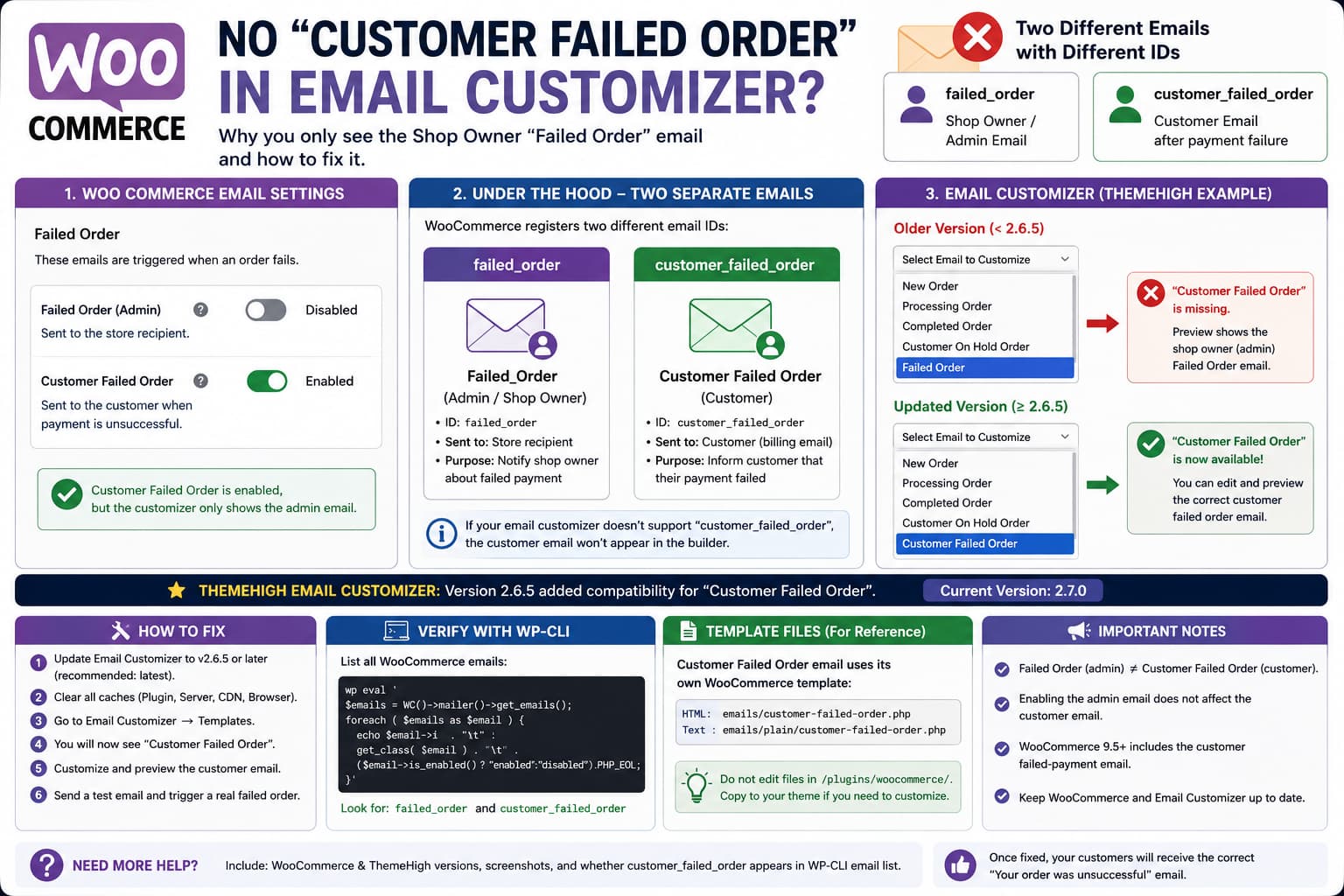
If WooCommerce has Customer Failed Order enabled but your email customizer only lets you edit or preview the shop-owner Failed Order email, the problem may not be your WooCommerce email settings at all.
WooCommerce now has two different Failed Order notifications:
- an administrative Failed Order email sent to the store recipient,
- a Customer Failed Order email sent to the customer after an unsuccessful payment.
WooCommerce’s current documentation explicitly describes both notifications under Failed Order.
Internally, however, they are separate email classes with different IDs.
The customer notification uses:
customer_failed_orderwhile the older administrative notification uses:
failed_orderWooCommerce’s current source confirms that WC_Email_Customer_Failed_Order has the ID customer_failed_order, is marked as a customer email, and uses its own customer-failed-order.php template.
That distinction is the key to this issue.
Why the Customer Failed Order Email May Be Missing
WooCommerce did not always send a failed-payment email directly to customers.
The customer notification was added to WooCommerce in the 9.5 development cycle. WooCommerce described the change as a new customer notification sent when an order payment fails.
Older email-customizer plugins therefore knew only about:
failed_orderwhich was the store-owner notification.
If the email customizer has not been updated to recognize:
customer_failed_orderyou can end up with exactly this behavior:
WooCommerce Settings:

Failed Order — admin
Disabled

Customer Failed Order
Enabled
but inside the customizer:
Failed Order
✓ available

Customer Failed Order
✗ missing
and previewing Failed Order displays the store-owner version.
This Was Specifically Added to ThemeHigh Email Customizer
If the site uses Email Customizer for WooCommerce by ThemeHigh, there is an especially strong version clue.
ThemeHigh’s changelog for version 2.6.5 says that it added compatibility for the new Customer Failed Order email template.
That means versions before 2.6.5 may not recognize the new WooCommerce customer email correctly.
As of August 2026, WordPress.org lists ThemeHigh Email Customizer 2.7.0 as the current public release.
So the first thing to check is:
Plugins
→ Installed Plugins
→ Email Customizer for WooCommerce
If the version is below:
2.6.5update it.
That is much more relevant than disabling the WooCommerce Failed Order email or changing SMTP settings.
Why the Preview Shows the Shop Owner Email
This symptom is also consistent with the two separate WooCommerce email IDs.
The customizer may be previewing:
failed_orderinstead of:
customer_failed_orderThe first one is the administrative email.
The second is the customer notification.
WooCommerce’s customer email class explicitly identifies itself as:
$this->id = 'customer_failed_order';and:
$this->customer_email = true;So if a preview contains admin-oriented content or behaves like the shop-owner Failed Order notification, the customizer is almost certainly loading the wrong WooCommerce email object.
The Customer Email Is a Real WooCommerce Core Email
It is worth confirming that this is not simply another label for the same notification.
The current WooCommerce source defines:
class WC_Email_Customer_Failed_Order extends WC_Emailwith:
$this->id = 'customer_failed_order';
$this->template_html = 'emails/customer-failed-order.php';
and the recipient is obtained from:
$this->object->get_billing_email();Its default subject is equivalent to:
Your order at {site_title} was unsuccessfuland its heading tells the customer that the order was unsuccessful.
That is fundamentally different from the merchant Failed Order notification.
Check Whether WooCommerce Registered Both Emails
You can verify this without depending on the customizer.
If WP-CLI is available, run:
wp eval '
$emails = WC()->mailer()->get_emails();

foreach ( $emails as $email ) {
	echo $email->id . "\t" .
		get_class( $email ) . "\t" .
		( $email->is_enabled() ? "enabled" : "disabled" ) .
		PHP_EOL;
}
'
On a WooCommerce version supporting the customer Failed Order email, you should see entries including:
failed_order
customer_failed_order
customer_on_hold_order
customer_processing_order
customer_completed_order
If you see:
customer_failed_order enabledthen WooCommerce itself knows about the customer notification.
If ThemeHigh’s dropdown still shows only:
Failed Orderthe problem is in the email-customizer integration rather than WooCommerce registration.
Check WooCommerce Email Settings Separately
Go to:
WooCommerce
→ Settings
→ Emails
Confirm the customer notification is enabled.
WooCommerce currently sends two notifications for failed orders: one to the configured store recipient and another to the customer explaining that payment was unsuccessful.
The admin notification does not need to be enabled simply to make the customer notification available.
So this configuration is valid:
Admin Failed Order:
Disabled

Customer Failed Order:
Enabled
Do not enable the admin email merely because the customizer only displays that version.
That would hide the real compatibility problem.
Update the Email Customizer
For ThemeHigh Email Customizer, use at least:
2.6.5because that is the version whose changelog explicitly added compatibility for the Customer Failed Order template.
Prefer the current supported release rather than deliberately installing 2.6.5.
After updating:
- reload wp-admin,
- clear any admin/browser cache,
- open Email Customizer → Templates,
- reopen the email mapping or preview selector,
- look for Customer Failed Order,
- preview it using an existing failed order.
ThemeHigh’s plugin documentation says its test-email workflow lets you choose both an order and an email status from dropdowns, so the Customer Failed Order integration needs to be recognized in those controls as well.
Do Not Confuse “Failed Order” With “Customer Failed Order”
This naming can be confusing because WooCommerce’s Settings screen presents the concept under Failed Order, while integrations often work with the actual internal IDs.
Think of them like this:
failed_order
↓
Store owner / admin notification
and:
customer_failed_order
↓
Customer payment-failure notification
They may have similar names in an interface, but they are not interchangeable.
A customizer that only supports failed_order cannot automatically assume that it should customize customer_failed_order.
Verify the Template Files
WooCommerce’s customer email uses:
woocommerce/templates/emails/customer-failed-order.phpfor HTML and:
woocommerce/templates/emails/plain/customer-failed-order.phpfor plain text.
If the customizer is current but still fails to recognize the customer email, confirm that the WooCommerce installation itself is complete.
Do not edit the files directly in:
/wp-content/plugins/woocommerce/templates/because WooCommerce updates will overwrite those changes.
Check for Theme Template Overrides
Go to:
WooCommerce
→ Status
→ System Status
and inspect the Templates section.
A theme might override:
your-theme/woocommerce/emails/customer-failed-order.phpThis would not normally remove the email from ThemeHigh’s dropdown, but it can affect what the real customer receives after you resolve the customizer issue.
If the override is outdated, compare it with the current WooCommerce template before modifying anything.
Test the Correct Email With a Real Failed Order
The preview is useful, but a real WooCommerce trigger is the final test.
Create a staging/test order with a valid customer email address.
Then move the order into the state required to produce a Failed Order notification.
WooCommerce’s customer email class listens for the Failed Order notification event and sends to the order’s billing email.
Confirm that the received message is customer-oriented.
The expected customer subject is similar to:
Your order at Example Store was unsuccessfulnot a merchant notification telling the shop administrator that an order failed.
If the Customer Email Sends but the Customizer Still Cannot Edit It
This is an important distinction.
You may find:
Actual Customer Failed Order email
✓ sends correctly

ThemeHigh editor
✗ does not list Customer Failed Order
That means WooCommerce itself is working.
The issue is limited to ThemeHigh’s template discovery, mapping, or preview system.
At that point:
- confirm ThemeHigh is 2.6.5 or newer,
- update to the current release,
- test with only WooCommerce and the email customizer active on staging,
- check for JavaScript/PHP errors in the template builder,
- send ThemeHigh support the registered WooCommerce email IDs.
Do not troubleshoot SMTP first if the actual issue is that a template is missing from the builder dropdown.
If customer_failed_order Is Missing From WooCommerce Completely
If the WP-CLI test does not return:
customer_failed_orderfirst check the WooCommerce version.
The customer failed-payment notification was introduced after older WooCommerce releases that only notified merchants about failed orders.
Update WooCommerce using your normal staging and backup process.
Do not manually instantiate:
WC_Email_Customer_Failed_Orderto compensate for an outdated WooCommerce installation.
A Developer-Level Check
You can also temporarily inspect WooCommerce’s registered email objects in PHP:
add_action( 'admin_init', function () {

	if ( ! current_user_can( 'manage_woocommerce' ) ) {
		return;
	}

	$emails = WC()->mailer()->get_emails();

	foreach ( $emails as $email ) {
		error_log(
			sprintf(
				'Woo email: %s | %s',
				$email->id,
				get_class( $email )
			)
		);
	}
} );
Then check:
/wp-content/debug.logYou should find:
Woo email: failed_order
Woo email: customer_failed_order
Remove the debugging snippet after testing.
Why Enabling the Shop Owner Failed Email Is Not the Fix
Suppose the store configuration is intentionally:
Admin Failed Order = OFF
Customer Failed Order = ON
That is perfectly reasonable.
Enabling:
Admin Failed Order = ONmay make the customizer’s existing Failed Order entry appear to work, but it does not add support for:
customer_failed_orderIt simply activates the wrong notification.
The goal is to make the customizer recognize the customer-specific WooCommerce email class.
Most Likely Fix
For a store using ThemeHigh Email Customizer where:
Customer On Hold
✓ available

Processing Order
✓ available

Completed Order
✓ available

Customer Failed Order
✗ missing

Failed Order
✓ shows shop-owner version
the first thing I would check is the ThemeHigh version.
ThemeHigh explicitly added Customer Failed Order compatibility in:
Version 2.6.5If an older build is installed, updating is the most direct fix.
If the current 2.7.0 build is already installed and the problem remains, then it becomes a reproducible ThemeHigh integration issue rather than expected behavior.
What to Send ThemeHigh Support
Provide:
- WooCommerce version
- ThemeHigh Email Customizer version
- WordPress version
- screenshot of WooCommerce → Settings → Emails showing Customer Failed Order enabled
- screenshot of the ThemeHigh email dropdown where it is missing
- confirmation that Failed Order previews the shop-owner version
- output showing
customer_failed_orderregistered inWC()->mailer()->get_emails() - whether the real customer email is successfully sent
The most useful summary is:
WooCommerce registers customer_failed_order correctly,
but ThemeHigh only exposes failed_order in the builder/preview.
That clearly separates a WooCommerce delivery issue from a customizer compatibility issue.
How to Verify the Fix
After updating or fixing the integration:
- Open Email Customizer → Templates.
- Open or create the customer Failed Order template.
- Confirm Customer Failed Order is available in the email mapping.
- Open Preview/Test Email.
- Choose an actual failed order.
- Select the customer Failed Order notification.
- Confirm the preview is customer-facing.
- Send a test email.
- Trigger a real failed-order notification on staging.
- Confirm the customer’s received email matches the customized design.
The final result should be:
Failed Order
→ shop owner/admin version

Customer Failed Order
→ customer version
with each treated as a separate WooCommerce notification.
