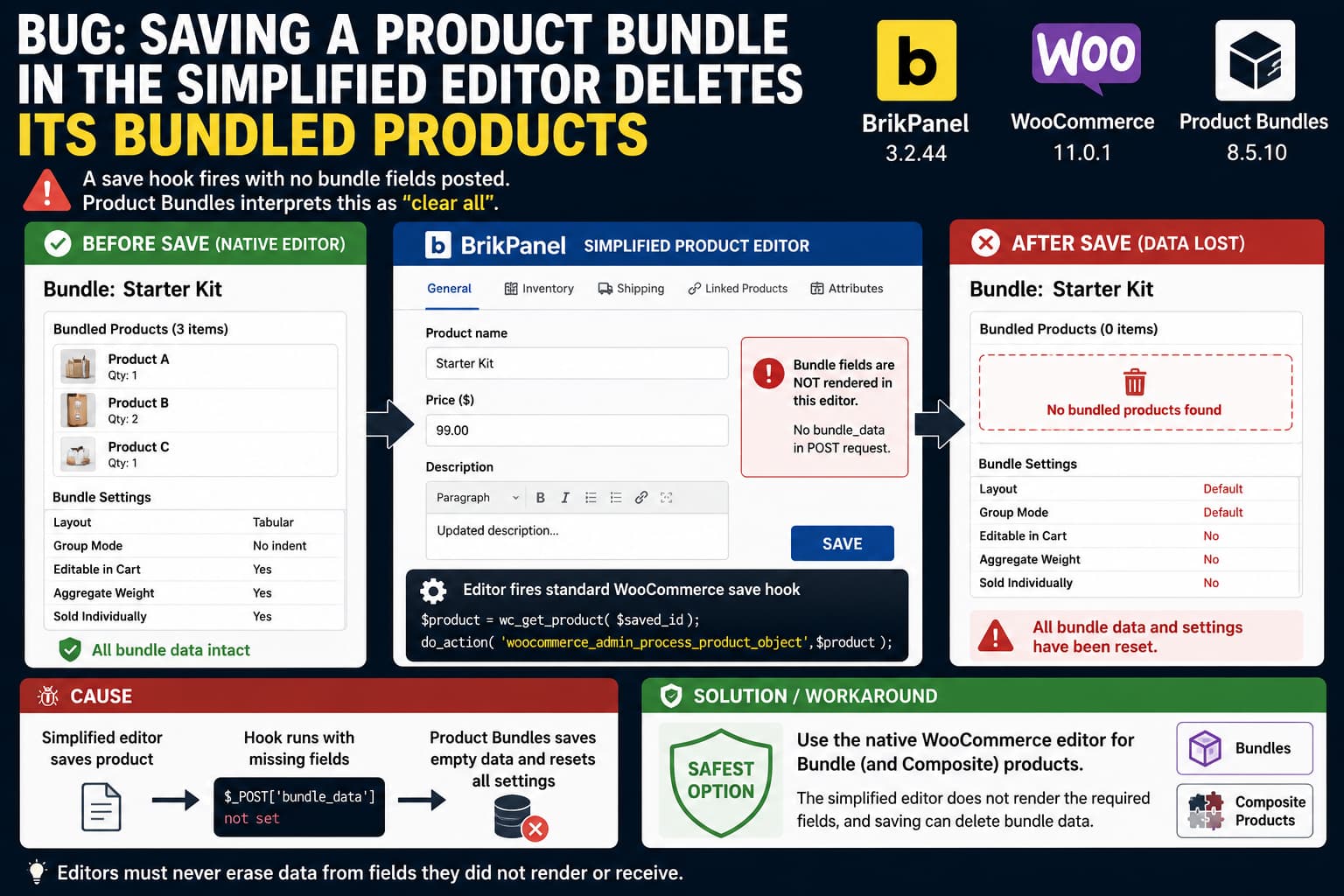
A simplified WooCommerce product editor can become dangerous when it saves a product type that it does not completely understand.
The problem is not necessarily that the editor directly deletes bundle data. A more subtle failure can occur when the editor fires WooCommerce’s normal product-save hooks without submitting the fields belonging to another extension.
A Product Bundles save handler then receives what looks like an ordinary WooCommerce product save, but none of its bundle fields are present.
If the extension interprets “field missing” as “field was intentionally cleared,” saving an otherwise unchanged product can erase its configuration.
This distinction matters:
Field absent from requestdoes not mean the same thing as:
Field submitted with an empty valueAny alternative WooCommerce editor that invokes third-party save handlers must preserve that distinction.
For stores using WooCommerce Product Bundles, the safest approach is to edit Bundle products with WooCommerce’s native product editor until the simplified editor explicitly supports that product type or confirms a fix.
Why This Can Cause Real Data Loss
WooCommerce provides the action:
woocommerce_admin_process_product_objectfor extensions to modify a WC_Product object while an administrator is saving product data.
WooCommerce introduced this hook specifically so extensions can set their own product properties before the object is saved. WooCommerce’s own developer documentation demonstrates third-party extensions attaching save callbacks to it.
The pattern itself is normal:
add_action(
	'woocommerce_admin_process_product_object',
	'my_plugin_save_product_data'
);
The problem appears when a replacement editor does something conceptually similar to this:
$product = wc_get_product( $product_id );

do_action(
	'woocommerce_admin_process_product_object',
	$product
);
without having rendered or submitted all the fields that the hooked extensions expect.
The hook tells every registered callback:
A WooCommerce product is being processed.
It does not automatically tell those callbacks:
Only these particular sections were displayed in this editor.
That missing context can turn an apparently harmless save into destructive behavior.
Product Bundles Stores More Than the Product Title and Price
WooCommerce Product Bundles is not merely a UI layer over a normal WooCommerce product.
A Bundle is its own bundle product type represented by WC_Product_Bundle. WooCommerce’s official Product Bundles documentation shows that it has product-specific properties including:
- aggregate weight
- layout
- group mode
- editable-in-cart behavior
- sold-individually context
- bundle size settings
These values use Product Bundles-specific product metadata.
Even more importantly, the actual bundled-product relationships are not stored as ordinary product post meta.
Product Bundles uses dedicated database tables:
woocommerce_bundled_items
woocommerce_bundled_itemmeta
wc_order_bundle_lookup
The woocommerce_bundled_items table stores the relationship between a Bundle and each bundled product.
That makes an accidental “save empty bundle configuration” operation particularly serious.
This is not simply losing a visible text field.
It can alter the data that defines which products belong to the Bundle.
The Dangerous Save Pattern
Consider an editor that displays only:
Product name
Price
SKU
Stock
Categories
Description
but does not display:
Bundled Products
Bundle layout
Item grouping
Edit in Cart
Aggregate Weight
Sold Individually configuration
Now imagine the user changes only the product description and clicks Save.
The HTTP request may contain something like:
post_title=Starter Kit
regular_price=99
description=Updated description
but no:
bundle_dataor other Product Bundles fields.
A well-defended save routine treats that as:
Bundle section was not submitted.
Leave bundle configuration untouched.
A destructive routine may treat it as:
No bundled products were submitted.
Therefore the bundle contains zero products.
Those are radically different outcomes.
Why This Is More Than a Product Bundles Problem
Product Bundles is a good example because losing the configuration is immediately serious, but the underlying compatibility problem is broader.
Any WooCommerce extension can attach a callback to:
woocommerce_admin_process_product_objectand inspect $_POST.
Examples might include plugins managing:
- manufacturer SKU
- cost
- warranty configuration
- booking options
- subscriptions
- product feeds
- fulfillment data
- product identifiers
- supplier fields
- custom shipping fields
If the callback assumes its field was present on the normal WooCommerce editor, an alternative editor can trigger the same failure.
A vulnerable callback might look like:
function save_manufacturer_sku( $product ) {
	$product->update_meta_data(
		'_manufacturer_sku',
		sanitize_text_field( $_POST['manufacturer_sku'] ?? '' )
	);
}
If the alternative editor never rendered manufacturer_sku, that code converts:
not submittedinto:
save an empty valueA safer pattern is:
function save_manufacturer_sku( $product ) {

	if ( ! isset( $_POST['manufacturer_sku'] ) ) {
		return;
	}

	$product->update_meta_data(
		'_manufacturer_sku',
		sanitize_text_field(
			wp_unslash( $_POST['manufacturer_sku'] )
		)
	);
}
The isset() check distinguishes an absent field from one intentionally submitted by the form.
Third-party extensions should ideally defend themselves this way, but a simplified editor also needs to assume that not every extension does.
BrikPanel Has Already Fixed Similar Missing-Field Save Problems
This is not merely a theoretical concern.
BrikPanel’s own public changelog documents closely related compatibility problems in its simplified product editor.
In version 3.2.29, BrikPanel fixed a problem where WooCommerce’s product-data handler reset upsells, cross-sells, and the product gallery because expected native fields were not present during the simplified-editor save. The same release also fixed descriptions being cleared when their editor section was disabled.
That is effectively the same class of bug:
Field not represented by current form
        ↓
Normal WooCommerce save handler runs
        ↓
Missing field interpreted as empty
        ↓
Existing data is overwritten
Earlier, BrikPanel 3.2.27 added support for surfacing and saving fields that third-party plugins add to WooCommerce’s Product Data panels. Its changelog says the editor can automatically show these fields or allow individual sections to be selected under Additional product data sections.
So BrikPanel is already designed around the problem of preserving third-party product metadata.
Bundle products expose an edge case where that generic compatibility mechanism may not be enough.
Why Bundled Products May Not Appear Under Additional Product Data
Third-party WooCommerce panels are often conditional on product type.
A plugin may register a tab using a class such as:
show_if_bundlemeaning:
Show this panel only when the product type is Bundle.That creates a discovery problem for simplified editors.
If the editor attempts to discover third-party Product Data panels using a fake or temporary Simple Product, any plugin callback that expects a Bundle-specific product object may:
- return no panel,
- incorrectly hide the section, or
- trigger a PHP error.
There is already public evidence of this exact general compatibility problem between BrikPanel’s panel discovery and WooCommerce Composite Products.
A WordPress.org support report showed:
Brikpanel_Product_Editor::collect_custom_tab_meta()
Brikpanel_Product_Editor::collect_wc_product_data_sections()
triggering Composite Products code without the valid product object it expected. BrikPanel released a compatibility fix in response.
BrikPanel’s own changelog similarly explains that its third-party tab detection previously caused Composite Products to fail when its handler expected a real product during Product Data tab discovery.
This is important because Product Bundles and Composite Products are both custom WooCommerce product types whose admin interfaces contain type-specific Product Data sections.
The Safest Workaround Right Now
Until your installed BrikPanel release explicitly confirms that Bundle products are preserved correctly, do not save existing Product Bundle products through the simplified editor.
Use:
Products
→ Edit the Bundle
→ Native WooCommerce product editor
instead.
BrikPanel explicitly describes its simplified editor as opt-in and states that the default WooCommerce product page can still be used.
That native editor is the safest place to edit a Bundle because Product Bundles itself controls both rendering and saving its Bundle-specific fields.
This recommendation applies even if you are only changing:
title
description
category
image
price
A save is still a save.
The risk is triggered by the save process, not by which field you intended to edit.
Back Up Bundle Data Before Testing
Do not experiment with an existing production Bundle that would be difficult to rebuild.
Create a staging copy or full database backup first.
This is particularly important because bundled-product associations live in Product Bundles’ own tables rather than entirely in standard WordPress post meta.
The relevant tables normally include your WordPress database prefix, for example:
wp_woocommerce_bundled_items
wp_woocommerce_bundled_itemmeta
On a multisite or custom-prefix installation the prefix may differ.
Do not manually edit these tables merely as a troubleshooting shortcut.
Product Bundles provides its own data layer for creating, updating and deleting these relationships.
How to Test Whether Your Version Is Safe
Create a disposable Bundle on staging.
Add three clearly identifiable products:
Test Product A
Test Product B
Test Product C
Configure non-default Bundle settings too.
For example:
Layout: Tabular
Item grouping: No indent
Editable in cart: Yes
Aggregate weight: Yes
Record the configuration.
Now open the product using BrikPanel’s simplified editor.
Change only something unrelated, such as:
Short descriptionand save.
Reopen the Bundle using WooCommerce’s native editor.
Confirm all of the following remain unchanged:
Bundled products
Bundled quantities
Variation filters
Discounts
Layout
Group mode
Editable in cart
Aggregate weight
Sold individually behavior
Do the test twice.
Saving an unchanged product is also valuable:
Open
→ Save
→ Reopen in native editor
A safe simplified editor should make that operation effectively idempotent.
It should not change data belonging to sections that were never presented to the administrator.
Check the Database Before and After the Save
Developers can verify the relationship data directly without modifying it.
First obtain the Bundle product ID.
Then query:
SELECT
	bundled_item_id,
	product_id,
	bundle_id,
	menu_order
FROM wp_woocommerce_bundled_items
WHERE bundle_id = 123;
Replace:
123with your actual Bundle product ID and replace wp_ if your site uses another database prefix.
Before saving, you might see:
bundled_item_id | product_id | bundle_id
101             | 501        | 123
102             | 502        | 123
103             | 503        | 123
After a safe save, those rows should remain.
If they disappear immediately after a simplified-editor save, you have direct evidence that the save workflow is removing the Bundle-to-product relationships.
WooCommerce’s Product Bundles documentation confirms that this table is where those associations are stored.
Use SELECT queries for diagnosis.
Do not reconstruct Bundle data with manual INSERT statements unless you fully understand the Product Bundles schema and its associated item metadata.
Developers: Do Not Treat Missing POST Fields as Empty Fields
The defensive rule for extension authors is simple:
if ( ! isset( $_POST['my_plugin_field'] ) ) {
	return;
}
before writing the property.
This is especially important on:
woocommerce_admin_process_product_objectbecause that action can be fired by interfaces other than WooCommerce’s classic product screen.
WooCommerce itself describes this hook as a way for extensions to set product properties during the save process.
A callback should therefore verify that the request actually represents its own fields before overwriting existing values.
For a group of fields, a sentinel value is even better:
<input
	type="hidden"
	name="my_plugin_section_submitted"
	value="1"
>
Then:
if (
	! isset(
		$_POST['my_plugin_section_submitted']
	)
) {
	return;
}
Now the server can distinguish:
Section was not part of this formfrom:
Section was submitted and the user intentionally cleared itThat is a much more reliable contract.
What a Simplified Editor Should Do
There are several architecture-level solutions.
Option 1: Fall Back to WooCommerce for Unsupported Product Types
This is the safest approach.
For:
bundle
composite
booking
subscription
or any product type the editor does not fully understand, redirect the user to WooCommerce’s native editor.
A simplified editor can continue handling:
simple
variable
products while avoiding unsafe partial saves.
Option 2: Discover Product Data Panels Per Product Type
Instead of probing third-party panels using only a Simple Product, instantiate the product type the tab targets.
Conceptually:
Simple product
→ discover show_if_simple sections

Variable product
→ discover show_if_variable sections

Bundle product
→ discover show_if_bundle sections

Composite product
→ discover show_if_composite sections
This is more work but allows a simplified editor to properly expose type-specific extension interfaces.
Option 3: Fire Save Hooks Only for Rendered Sections
The editor could track exactly which third-party Product Data sections were added to the form.
Then it could avoid invoking generic save routines for unsupported sections.
This can be difficult because:
woocommerce_admin_process_product_objectis a global action rather than a section-specific event.
Therefore, a simple:
do_action or don't do_actiondecision may still be too coarse.
Option 4: Submit Explicit Section Sentinels
The editor could reproduce all hidden or identifying fields expected by the native WooCommerce panel.
This works when integration behavior is well understood, but it is fragile if implemented as a generic compatibility system.
The editor would need to know whether:
emptymeans:
delete configurationfor every extension.
A native fallback is generally safer for complex custom product types.
What About WooCommerce Composite Products?
Composite Products deserves the same testing treatment.
Composite Products defines its own:
compositeWooCommerce product type. It also stores important product-specific properties including component configuration and scenario data.
Its documented properties include:
composite_data
scenario_data
layout
editable_in_cart
among others.
It also provides dedicated admin processing filters for component and scenario data.
This does not prove that Composite Products currently loses its components when saved through BrikPanel.
However, it has enough type-specific state that you should not assume it is safe merely because the Product Bundles issue has been identified.
And BrikPanel has already encountered a separate compatibility problem while attempting to enumerate Composite Products’ Product Data interface.
Therefore test Composite Products independently on staging before allowing routine editing through the simplified editor.
A Useful Compatibility Test for Any WooCommerce Product Type
The same test can be applied to:
Bundle
Composite
Booking
Subscription
Gift Card
Membership-related products
Other custom product types
Use this procedure:
- Create the product in its native WooCommerce editor.
- Fill every plugin-specific setting with recognizable non-default values.
- Record those values.
- Open it in the alternative editor.
- Change one ordinary WooCommerce field.
- Save.
- Reopen the native editor.
- Compare every extension-specific field.
The most important additional test is:
Open the alternative editor
→ Change nothing
→ Save
If extension-specific data changes, the editor has a preservation problem.
Similar BrikPanel Bugs Show Why This Test Matters
BrikPanel’s recent changelog gives useful examples.
Version 3.2.29 fixed WooCommerce fields being cleared when the simplified editor invoked a save handler without the native field names present.
Version 3.2.27 added support for third-party Product Data sections and says per-variation third-party fields are preserved during product editing.
Earlier releases also addressed Composite Products errors caused by probing Product Data hooks without the kind of product object another extension expected.
These fixes show why compatibility with WooCommerce product extensions requires more than rendering a few extra input fields.
The rendering context and saving context must agree.
Version Note
At the time this article was verified on August 13, 2026, the public WordPress.org listing showed BrikPanel 3.2.42, tested through WordPress 7.0.3.
If you are testing a newer developer, beta, repository, or not-yet-indexed build, check its changelog for an explicit Product Bundles compatibility fix before assuming the behavior described here still applies.
Do not downgrade a production site solely because the version numbers differ.
Test the actual save behavior on staging.
If Your Bundle Has Already Been Emptied
Stop editing the affected product.
Do not immediately rebuild it if you have a database backup from before the save.
Because Product Bundles stores bundled-item relationships in its dedicated tables, a database-level backup may contain the exact previous configuration.
Restore the site or relevant database to staging first and confirm the Bundle is intact there.
Then determine the least disruptive recovery method for production.
For a store with orders arriving continuously, restoring the entire production database can overwrite newer orders and customer activity, so a full database rollback may be inappropriate.
In that situation, restore to staging and use the intact Bundle as the reference for rebuilding or performing a targeted recovery.
How to Verify the Permanent Fix
A real fix should pass all of these tests:
Open Bundle in simplified editor
→ save with no changes
→ bundled items remain

Change description
→ save
→ bundled items remain

Change price
→ save
→ bundle settings remain

Change a supported third-party section
→ only that section changes

Disable a third-party editor section
→ its existing data remains untouched
Also test multiple Bundle configurations rather than a single product.
For example:
virtual bundle
assembled bundle
editable bundle
individually priced items
variation-filtered items
If Composite Products is installed, run the same preservation test on a Composite product separately.
The fundamental expectation is simple:
A product editor must never erase data belonging to a section it did not render or submit.
