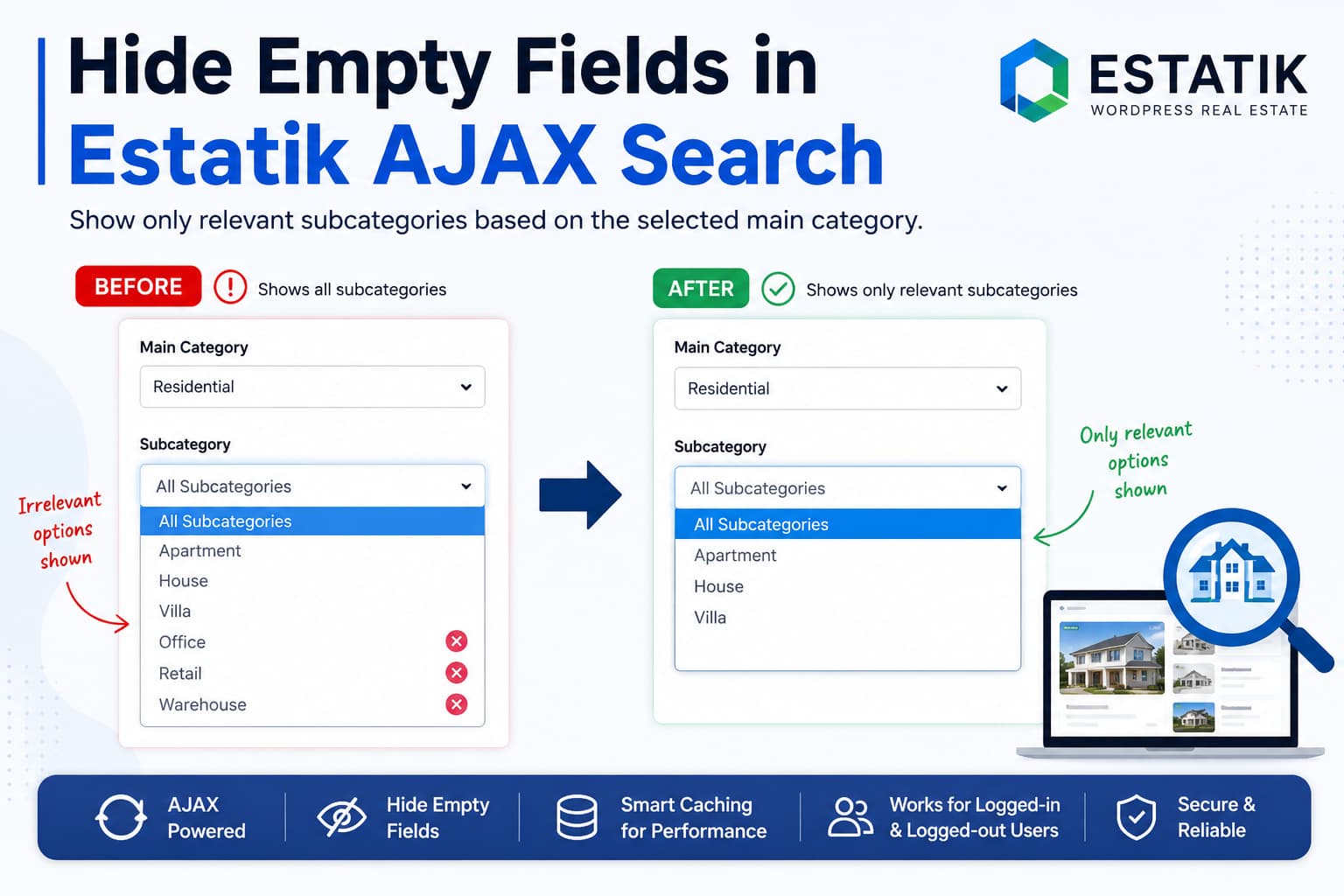
Estatik allows you to add searchable custom fields to the [es_my_listing] search form. However, a common problem appears when two fields are related.
For example, suppose your properties use these filters:
- Main category
- Subcategory
When a visitor selects one main category, Estatik updates the property results through AJAX, but the subcategory dropdown may continue showing every available subcategory. This includes subcategories belonging to other main categories and options that would return no results.
The expected behavior is:
- The visitor selects a main category.
- The subcategory field updates automatically.
- Only subcategories assigned to properties in that main category remain available.
- The subcategory field is hidden when the selected category has no available subcategories.
This guide explains why the problem occurs and provides a complete custom-plugin solution.
The solution was prepared for Estatik 4.x and reviewed against Estatik 4.3.2, which was the current WordPress.org release when this guide was written. Estatik uses the properties custom post type for property listings.
Why Estatik Keeps Showing Unrelated Subcategories
Estatik’s enable_ajax option dynamically refreshes the property list when a search value changes. However, the documented behavior concerns updating the listing results, not recalculating the available options inside one custom field based on another custom field.
This creates two separate processes:
- Estatik filters the properties displayed on the page.
- The original subcategory dropdown options remain unchanged.
Therefore, AJAX may correctly return properties from the selected main category while the form still contains unrelated subcategories.
CSS cannot properly solve this problem. CSS can hide predetermined elements, but it cannot query the WordPress database to determine which subcategories are currently assigned to matching properties.
A dependent AJAX filter is required.
What the Solution Does
The custom plugin below:
- Detects changes to the main-category dropdown.
- Sends the selected value to WordPress through AJAX.
- Checks all published Estatik properties.
- Determines which subcategory values exist under the selected main category.
- Rebuilds the subcategory dropdown with only valid options.
- Preserves the empty “All subcategories” option.
- Clears a previously selected subcategory when it is no longer valid.
- Hides the entire subcategory field when no values are available.
- Supports logged-in and logged-out visitors.
- Reconnects automatically if Estatik replaces the search form during an AJAX refresh.
- Caches the category relationships for better performance.
- Clears the cache whenever a property is saved or deleted.
The code does not modify Estatik itself, which means a normal Estatik update will not overwrite the customization.
Before Adding the Code
Create a staging backup before making changes.
The code contains placeholder field names:
main_category
sub_category
These must be replaced with the actual machine names used by your Estatik custom fields.
Estatik’s Fields Builder allows custom fields to be included in search by enabling Search support. Estatik also uses each field’s machine name in shortcodes and other integrations.
Step 1: Find the Field Machine Names
In WordPress, go to:
Estatik → Fields Builder
Open the main-category field and note its machine name.
Then open the subcategory field and note its machine name.
For example:
Main category machine name: property_group
Subcategory machine name: property_subgroup
Do not use the visible field labels unless they are also the machine names.
A label may be:
Property CategoryWhile its machine name may be:
property_categoryThe machine name is the value needed by the code.
Confirming the Meta Keys
In most installations, the field’s machine name is also its property meta key. Therefore, the configuration would use:
'parent_field'    => 'property_group',
'parent_meta_key' => 'property_group',

'child_field'     => 'property_subgroup',
'child_meta_key'  => 'property_subgroup',
To verify the saved keys through WP-CLI, replace 123 with the ID of a property containing both values:
wp post meta list 123 --format=tableLook for the rows containing the main-category and subcategory values.
The included code also checks several common key variations automatically:
property_group
_property_group
es_property_group
_es_property_group
Step 2: Create the Custom Plugin
Using FTP, your hosting file manager, or SSH, open:
/wp-content/plugins/Create a new folder:
debugnexus-estatik-dependent-filtersInside that folder, create this file:
debugnexus-estatik-dependent-filters.phpPaste the complete code below into the file.
<?php
/**
* Plugin Name: DebugNexus - Estatik Dependent AJAX Filters
* Description: Shows only relevant child-field options after a parent Estatik field is selected.
* Version: 1.0.0
* Author: DebugNexus
*/
if ( ! defined( 'ABSPATH' ) ) {
exit;
}
/**
* Change these four field values to match Estatik Fields Builder.
*/
function dn_estatik_dependent_filter_config() {
return array(
'post_type' => 'properties',
// Main category field.
'parent_field' => 'main_category',
'parent_meta_key' => 'main_category',
// Subcategory field.
'child_field' => 'sub_category',
'child_meta_key' => 'sub_category',
// Hide the complete subcategory field when no options exist.
'hide_when_empty' => true,
// Cache the category relationships for 12 hours.
'cache_seconds' => 12 * HOUR_IN_SECONDS,
);
}
/**
* Generate a different cache key when the field configuration changes.
*/
function dn_estatik_dependent_filter_cache_key() {
$config = dn_estatik_dependent_filter_config();
return 'dn_edf_' . md5(
wp_json_encode(
array(
$config['post_type'],
$config['parent_field'],
$config['parent_meta_key'],
$config['child_field'],
$config['child_meta_key'],
)
)
);
}
/**
* Convert scalar, serialized, or array field data into clean strings.
*/
function dn_estatik_dependent_filter_normalize( $value ) {
$value = maybe_unserialize( $value );
$result = array();
$walk = function ( $item ) use ( &$walk, &$result ) {
if ( is_array( $item ) ) {
foreach ( $item as $nested_item ) {
$walk( $nested_item );
}
return;
}
if ( is_scalar( $item ) ) {
$item = trim( (string) $item );
if ( '' !== $item ) {
$result[] = $item;
}
}
};
$walk( $value );
return array_values( array_unique( $result ) );
}
/**
* Read an Estatik field value.
*
* The configured meta key is checked first. Common machine-name variations
* are checked afterward to improve compatibility between installations.
*/
function dn_estatik_dependent_filter_get_value(
$post_id,
$meta_key,
$machine_name
) {
$candidate_keys = array_unique(
array_filter(
array(
$meta_key,
$machine_name,
'_' . $machine_name,
'es_' . $machine_name,
'_es_' . $machine_name,
)
)
);
foreach ( $candidate_keys as $candidate_key ) {
if ( metadata_exists( 'post', $post_id, $candidate_key ) ) {
return get_post_meta( $post_id, $candidate_key, true );
}
}
return '';
}
/**
* Build an index containing the available child options for every parent.
*/
function dn_estatik_dependent_filter_get_index() {
$cache_key = dn_estatik_dependent_filter_cache_key();
$cached = get_transient( $cache_key );
if ( false !== $cached && is_array( $cached ) ) {
return $cached;
}
$config = dn_estatik_dependent_filter_config();
$property_ids = get_posts(
array(
'post_type' => $config['post_type'],
'post_status' => 'publish',
'posts_per_page' => -1,
'fields' => 'ids',
'no_found_rows' => true,
'update_post_meta_cache' => true,
'update_post_term_cache' => false,
'orderby' => 'ID',
'order' => 'ASC',
)
);
$all_children = array();
$by_parent = array();
foreach ( $property_ids as $property_id ) {
$parent_values = dn_estatik_dependent_filter_normalize(
dn_estatik_dependent_filter_get_value(
$property_id,
$config['parent_meta_key'],
$config['parent_field']
)
);
$child_values = dn_estatik_dependent_filter_normalize(
dn_estatik_dependent_filter_get_value(
$property_id,
$config['child_meta_key'],
$config['child_field']
)
);
foreach ( $child_values as $child_value ) {
$all_children[ $child_value ] = true;
}
foreach ( $parent_values as $parent_value ) {
if ( ! isset( $by_parent[ $parent_value ] ) ) {
$by_parent[ $parent_value ] = array();
}
foreach ( $child_values as $child_value ) {
$by_parent[ $parent_value ][ $child_value ] = true;
}
}
}
$index = array(
'all' => array_keys( $all_children ),
'by_parent' => array(),
);
natcasesort( $index['all'] );
$index['all'] = array_values( $index['all'] );
foreach ( $by_parent as $parent_value => $children ) {
$children = array_keys( $children );
natcasesort( $children );
$index['by_parent'][ $parent_value ] = array_values( $children );
}
set_transient(
$cache_key,
$index,
(int) $config['cache_seconds']
);
return $index;
}
/**
* Return the available child options through AJAX.
*/
function dn_estatik_dependent_filter_ajax() {
check_ajax_referer(
'dn_estatik_dependent_filter',
'nonce'
);
$parent_value = isset( $_POST['parent_value'] )
? sanitize_text_field(
wp_unslash( $_POST['parent_value'] )
)
: '';
$index = dn_estatik_dependent_filter_get_index();
if ( '' === $parent_value ) {
$values = $index['all'];
} else {
$values = isset( $index['by_parent'][ $parent_value ] )
? $index['by_parent'][ $parent_value ]
: array();
}
wp_send_json_success(
array(
'values' => array_values( $values ),
)
);
}
add_action(
'wp_ajax_dn_estatik_child_options',
'dn_estatik_dependent_filter_ajax'
);
add_action(
'wp_ajax_nopriv_dn_estatik_child_options',
'dn_estatik_dependent_filter_ajax'
);
/**
* Clear the cached relationships whenever a property is saved.
*/
function dn_estatik_dependent_filter_clear_cache( $post_id = 0 ) {
if ( $post_id && wp_is_post_revision( $post_id ) ) {
return;
}
delete_transient(
dn_estatik_dependent_filter_cache_key()
);
}
add_action(
'save_post_properties',
'dn_estatik_dependent_filter_clear_cache'
);
/**
* Clear the cache when a property is deleted.
*/
function dn_estatik_dependent_filter_clear_deleted_cache( $post_id ) {
$config = dn_estatik_dependent_filter_config();
if ( $config['post_type'] === get_post_type( $post_id ) ) {
dn_estatik_dependent_filter_clear_cache();
}
}
add_action(
'before_delete_post',
'dn_estatik_dependent_filter_clear_deleted_cache'
);
/**
* Add the browser-side dependent-dropdown behavior.
*/
function dn_estatik_dependent_filter_assets() {
if ( is_admin() ) {
return;
}
$config = dn_estatik_dependent_filter_config();
wp_enqueue_script( 'jquery' );
wp_localize_script(
'jquery',
'DNEstatikDependentFilters',
array(
'ajaxUrl' => admin_url( 'admin-ajax.php' ),
'nonce' => wp_create_nonce(
'dn_estatik_dependent_filter'
),
'parentField' => $config['parent_field'],
'childField' => $config['child_field'],
'hideWhenEmpty' => (bool) $config['hide_when_empty'],
)
);
$script = <<<'JS'
(function ($) {
'use strict';
var settings = window.DNEstatikDependentFilters;
var activeRequest = null;
var observerTimer = null;
if (!settings) {
return;
}
/**
* Escape a value before using it in a CSS selector.
*/
function cssEscape(value) {
if (
window.CSS &&
typeof window.CSS.escape === 'function'
) {
return window.CSS.escape(value);
}
return String(value).replace(
/[^a-zA-Z0-9_-]/g,
'\\$&'
);
}
/**
* Escape a value before using it in an attribute selector.
*/
function attributeEscape(value) {
return String(value).replace(
/(["\\])/g,
'\\$1'
);
}
/**
* Locate an Estatik select by its machine name.
*/
function findSelect(fieldName) {
var escapedAttribute = attributeEscape(fieldName);
var escapedCss = cssEscape(fieldName);
var selectors = [
'select[name="' + escapedAttribute + '"]',
'select[name$="[' + escapedAttribute + ']"]',
'select#' + escapedCss,
'select[data-field="' + escapedAttribute + '"]',
'[data-field="' + escapedAttribute + '"] select',
'[data-machine-name="' + escapedAttribute + '"] select',
'.es-field-' + escapedCss + ' select'
];
var i;
var select;
var allSelects;
var name;
for (i = 0; i < selectors.length; i++) {
select = document.querySelector(
selectors[i]
);
if (select) {
return select;
}
}
allSelects = document.querySelectorAll(
'.es-search-form select, form select'
);
for (i = 0; i < allSelects.length; i++) {
name = allSelects[i].getAttribute('name') || '';
if (
name === fieldName ||
name.slice(-(fieldName.length + 2)) ===
'[' + fieldName + ']'
) {
return allSelects[i];
}
}
return null;
}
/**
* Save the original subcategory options before filtering them.
*/
function saveOriginalOptions(select) {
var options;
if (select.dnOriginalOptions) {
return select.dnOriginalOptions;
}
options = Array.prototype.map.call(
select.options,
function (option) {
return {
value: String(option.value),
text: option.text,
disabled: option.disabled
};
}
);
select.dnOriginalOptions = options;
return options;
}
/**
* Find the wrapper used by the Estatik field.
*/
function getFieldWrapper(select) {
return select.closest(
'.es-field, ' +
'.es-search__field, ' +
'.es-search-form__field, ' +
'.es-field-wrap, ' +
'.es-field__content'
);
}
/**
* Hide the field when no real options remain.
*/
function setFieldVisibility(
select,
hasAvailableOptions
) {
var wrapper = getFieldWrapper(select);
var shouldHide =
settings.hideWhenEmpty &&
!hasAvailableOptions;
if (!wrapper) {
return;
}
if (shouldHide) {
wrapper.setAttribute('hidden', 'hidden');
} else {
wrapper.removeAttribute('hidden');
}
}
/**
* Rebuild the subcategory dropdown using allowed values.
*/
function rebuildChildOptions(
select,
allowedValues
) {
var originals = saveOriginalOptions(select);
var allowed = {};
var currentValue = String(select.value || '');
var fragment = document.createDocumentFragment();
var hasAvailableOptions = false;
var currentIsValid = false;
allowedValues.forEach(function (value) {
allowed[String(value)] = true;
});
originals.forEach(function (item) {
var keep =
item.value === '' ||
allowed[item.value] === true;
var option;
if (!keep) {
return;
}
option = document.createElement('option');
option.value = item.value;
option.text = item.text;
option.disabled = item.disabled;
fragment.appendChild(option);
if (item.value !== '') {
hasAvailableOptions = true;
}
if (item.value === currentValue) {
currentIsValid = true;
}
});
select.innerHTML = '';
select.appendChild(fragment);
select.value = currentIsValid
? currentValue
: '';
select.disabled = false;
setFieldVisibility(
select,
hasAvailableOptions
);
/*
* Clear an invalid old selection and allow Estatik
* to refresh its property results.
*/
if (
!currentIsValid &&
currentValue !== ''
) {
$(select).trigger('change');
} else {
/*
* Refresh the Select2 interface without triggering
* another complete Estatik search.
*/
$(select).trigger('change.select2');
}
}
/**
* Restore every original subcategory when no parent is selected.
*/
function restoreChildOptions(select) {
var originals = saveOriginalOptions(select);
var currentValue = String(select.value || '');
var fragment = document.createDocumentFragment();
var currentExists = false;
originals.forEach(function (item) {
var option = document.createElement('option');
option.value = item.value;
option.text = item.text;
option.disabled = item.disabled;
fragment.appendChild(option);
if (item.value === currentValue) {
currentExists = true;
}
});
select.innerHTML = '';
select.appendChild(fragment);
select.value = currentExists
? currentValue
: '';
select.disabled = false;
setFieldVisibility(
select,
originals.length > 1
);
$(select).trigger('change.select2');
}
/**
* Request the valid subcategories for the selected main category.
*/
function refreshChildField() {
var parent = findSelect(
settings.parentField
);
var child = findSelect(
settings.childField
);
var parentValue;
if (!parent || !child) {
return;
}
saveOriginalOptions(child);
parentValue = String(
parent.value || ''
);
if (
activeRequest &&
typeof activeRequest.abort === 'function'
) {
activeRequest.abort();
}
if (parentValue === '') {
restoreChildOptions(child);
return;
}
child.disabled = true;
activeRequest = $.ajax({
url: settings.ajaxUrl,
type: 'POST',
dataType: 'json',
data: {
action: 'dn_estatik_child_options',
nonce: settings.nonce,
parent_value: parentValue
}
}).done(function (response) {
var currentChild =
findSelect(settings.childField) ||
child;
if (
response &&
response.success &&
response.data &&
Array.isArray(response.data.values)
) {
rebuildChildOptions(
currentChild,
response.data.values
);
}
}).fail(function (xhr, status) {
var currentChild =
findSelect(settings.childField) ||
child;
if (status !== 'abort') {
currentChild.disabled = false;
window.console.error(
'Estatik dependent filter AJAX request failed.',
xhr
);
}
});
}
/**
* Connect the behavior to the current Estatik form.
*/
function bindFields() {
var parent = findSelect(
settings.parentField
);
var child = findSelect(
settings.childField
);
if (!parent || !child) {
return;
}
saveOriginalOptions(child);
if (
parent.getAttribute(
'data-dn-dependent-bound'
) !== '1'
) {
parent.setAttribute(
'data-dn-dependent-bound',
'1'
);
$(parent).on(
'change.dnEstatikDependent',
function () {
window.setTimeout(
refreshChildField,
0
);
}
);
}
if (String(parent.value || '') !== '') {
refreshChildField();
}
}
$(function () {
bindFields();
/*
* Estatik may replace sections of its form during AJAX.
* Reconnect the fields when new form markup appears.
*/
if (
document.body &&
window.MutationObserver
) {
new MutationObserver(function () {
window.clearTimeout(observerTimer);
observerTimer = window.setTimeout(
bindFields,
100
);
}).observe(document.body, {
childList: true,
subtree: true
});
}
});
}(jQuery));
JS;
wp_add_inline_script(
'jquery',
$script,
'after'
);
}
add_action(
'wp_enqueue_scripts',
'dn_estatik_dependent_filter_assets',
20
);The code registers AJAX actions for both authenticated and unauthenticated visitors and verifies the request with a WordPress AJAX nonce. WordPress requires the wp_ajax_nopriv_{$action} hook for logged-out AJAX requests.
Step 3: Enter the Correct Field Names
Near the beginning of the plugin, locate:
'parent_field'    => 'main_category',
'parent_meta_key' => 'main_category',

'child_field'     => 'sub_category',
'child_meta_key'  => 'sub_category',
Replace them with the real field names.
For example:
'parent_field'    => 'property_group',
'parent_meta_key' => 'property_group',

'child_field'     => 'property_subgroup',
'child_meta_key'  => 'property_subgroup',
The parent_field and child_field values identify the search-form elements.
The parent_meta_key and child_meta_key values identify where the property values are stored in WordPress.
They are normally identical, but keeping them separate makes the solution compatible with sites where the visible field machine name and saved metadata key differ.
Step 4: Activate the Plugin
In WordPress, go to:
Plugins → Installed Plugins
Activate:
DebugNexus – Estatik Dependent AJAX Filters
Clear any page cache, object cache, CDN cache, and minified JavaScript cache before testing.
Step 5: Check the Estatik Shortcode
Your [es_my_listing] shortcode must have AJAX search enabled.
A typical example is:
[es_my_listing enable_search="1" enable_ajax="1" main_fields="main_category,sub_category"]Replace the field names in the shortcode with the same machine names entered in the custom plugin.
For example:
[es_my_listing enable_search="1" enable_ajax="1" main_fields="property_group,property_subgroup"]Do not replace a working shortcode unnecessarily. The important requirement is that:
- Both custom fields appear in the search form.
- Search support is enabled for both fields.
- AJAX is enabled for the listing search.
Expected Result
Assume the website has these property relationships:
Residential
    Apartment
    House
    Villa

Commercial
    Office
    Retail
    Warehouse
Before applying the solution, selecting Residential may leave all six subcategories visible.
After applying the solution, selecting Residential displays only:
All subcategories
Apartment
House
Villa
Selecting Commercial displays only:
All subcategories
Office
Retail
Warehouse
When a main category has no properties containing a subcategory, the subcategory field is hidden.
When the visitor clears the main-category filter, all original subcategory options are restored.
How the Code Works
1. It Reads Published Estatik Properties
The plugin retrieves IDs belonging to the properties post type.
Only published properties are included, so options assigned exclusively to drafts or private properties will not appear publicly.
2. It Builds a Relationship Index
The PHP code creates an internal structure similar to:
array(
    'Residential' => array(
        'Apartment',
        'House',
        'Villa',
    ),
    'Commercial' => array(
        'Office',
        'Retail',
        'Warehouse',
    ),
);
This allows WordPress to return only the subcategories related to the selected main-category value.
3. It Caches the Result
The relationship index is stored in a WordPress transient for 12 hours.
This prevents WordPress from scanning every property after every visitor changes the category.
The cache is automatically deleted when a property is:
- Created
- Updated
- Published
- Unpublished and saved
- Deleted
The next AJAX request then rebuilds the relationships using the latest property data.
4. It Rebuilds the Child Dropdown
The JavaScript keeps a copy of the original subcategory options.
After receiving the AJAX response, it reconstructs the dropdown using only:
- The empty placeholder option
- Subcategories returned by WordPress
This is more reliable than applying CSS to unavailable options, especially when Estatik uses Select2 to render its dropdowns.
5. It Handles Estatik AJAX Form Replacement
Some AJAX interfaces replace parts of their HTML after a search.
The included MutationObserver detects newly rendered form markup and reconnects the dependent-filter behavior automatically.
Testing Checklist
Test the solution while logged out as well as while logged into WordPress.
Test 1: No Main Category Selected
Expected result:
- Every original subcategory remains available.
- The subcategory field remains visible.
Test 2: First Main Category Selected
Expected result:
- Only subcategories used by published properties in that category appear.
- Properties update through Estatik AJAX.
Test 3: Second Main Category Selected
Expected result:
- The previous category’s subcategories disappear.
- Only subcategories related to the new category remain.
Test 4: Previously Selected Subcategory Becomes Invalid
Select a main category and one of its subcategories.
Then change the main category.
Expected result:
- The invalid old subcategory is cleared.
- The listing results refresh without the incompatible value.
- The new category’s subcategories appear.
Test 5: Category Without Subcategories
Expected result:
- The subcategory field is hidden.
- No irrelevant empty dropdown remains in the form.
Test 6: Property Is Updated
Assign a new subcategory to a property and save it.
Expected result:
- The plugin cache is cleared automatically.
- The newly assigned subcategory appears during the next search.
Troubleshooting
The Subcategory Field Does Not Change
The most likely cause is an incorrect field machine name.
Inspect the subcategory <select> element in the browser developer tools and check its name, id, classes, and data attributes.
For example:
<select name="property_subgroup">The configuration should contain:
'child_field' => 'property_subgroup',Also confirm that both fields are present in the rendered Estatik form.
The Subcategory Field Disappears for Every Category
This usually means the plugin did not find the saved property values.
Check the property metadata:
wp post meta list 123 --format=tableReplace 123 with a property ID.
Then copy the exact keys into:
'parent_meta_key' => 'actual_parent_key',
'child_meta_key'  => 'actual_child_key',
Save one property afterward to clear the existing cache.
AJAX Returns a 403 or -1
A -1 response normally means the nonce could not be verified.
Clear:
- Page cache
- Server cache
- CDN cache
- JavaScript optimization cache
Some aggressive caching systems may serve an expired nonce inside an old cached page.
Do not permanently disable nonce verification to hide the error.
The AJAX Request Returns Successfully, but No Options Appear
Open the browser developer tools and inspect the AJAX response.
A successful response should look similar to:
{
  "success": true,
  "data": {
    "values": [
      "Apartment",
      "House",
      "Villa"
    ]
  }
}
When the returned array is empty, check:
- The parent meta key
- The child meta key
- The property’s publication status
- The exact values stored in the database
- Whether the property has both fields populated
Values Exist but Do Not Match the Dropdown Options
The stored metadata value must match the HTML <option> value, not only its visible label.
For example:
<option value="villa">Luxury Villa</option>The code expects the stored property value to be:
villaIf the database stores Luxury Villa instead, a custom value-to-label mapping will be required.
The Filters Are Taxonomies, Not Custom Fields
This article’s code is designed for two Estatik custom fields stored as property metadata.
It should not be used unchanged when:
- The parent is a taxonomy term.
- The child is a taxonomy term.
- Both values are parent and child terms in one hierarchical taxonomy.
For true category relationships, querying child terms with get_terms() is more efficient than reading property metadata. The form integration would also need to use term IDs rather than custom-field option values.
The Website Contains Thousands of Properties
The code scans all published property IDs only when the transient cache must be rebuilt. Normal visitor requests then use the cached relationship index.
For a very large property database, consider:
- Extending the cache lifetime.
- Limiting cache rebuilding to a scheduled process.
- Storing category relationships in a hierarchical taxonomy.
- Maintaining a dedicated lookup table.
- Building the relationship index when a property is saved rather than during the first frontend request.
Can This Be Added to functions.php?
Technically, yes. However, a standalone plugin is safer.
Adding the code to a parent theme’s functions.php file creates several risks:
- A theme update may delete the customization.
- A PHP error may disable the active theme.
- Changing themes removes the functionality.
- The search behavior becomes incorrectly tied to the design theme.
A small custom plugin keeps the functionality independent of both the theme and Estatik updates.
Frequently Asked Questions
Does Estatik automatically hide unrelated custom-field values?
Estatik can update listing results through AJAX and can make Fields Builder fields searchable. Its published shortcode documentation does not describe a built-in dependency that recalculates one custom dropdown’s available options from another custom dropdown.
Can CSS hide empty Estatik filter options?
Not dynamically. CSS does not know which property records match the currently selected category. PHP or another database-aware endpoint must calculate the valid options.
Will this solution survive Estatik updates?
The customization is stored in a separate plugin and does not modify Estatik’s files. It should therefore remain after normal plugin updates.
A future Estatik update could change the search-form HTML or data-storage structure. The custom integration should be retested after a major Estatik release.
Does it work for visitors who are not logged in?
Yes. The code registers both the logged-in and logged-out WordPress AJAX actions.
Does it work with Select2 dropdowns?
The code rebuilds the underlying <select> options and then refreshes the Select2 interface.
Will empty subcategory options be hidden?
Yes. Options not assigned to matching published properties are removed from the dropdown.
When no valid option remains, the entire subcategory field wrapper is hidden.
Can the field remain visible but disabled?
Yes. Change:
'hide_when_empty' => true,to:
'hide_when_empty' => false,The dropdown will remain visible without unrelated options.
Final Result
Estatik’s AJAX search can filter the displayed properties without automatically changing every custom-field option in the form.
The custom plugin in this guide adds the missing dependent-filter behavior. After implementation:
- Selecting a main category updates the subcategory field.
- Unrelated subcategories are removed.
- Empty fields are hidden.
- Invalid old selections are cleared.
- Logged-out visitors can use the filter.
- Property changes automatically invalidate the cached relationships.
- Estatik and theme files remain untouched.
This creates a cleaner search experience and prevents visitors from selecting filter combinations that cannot return any properties.
