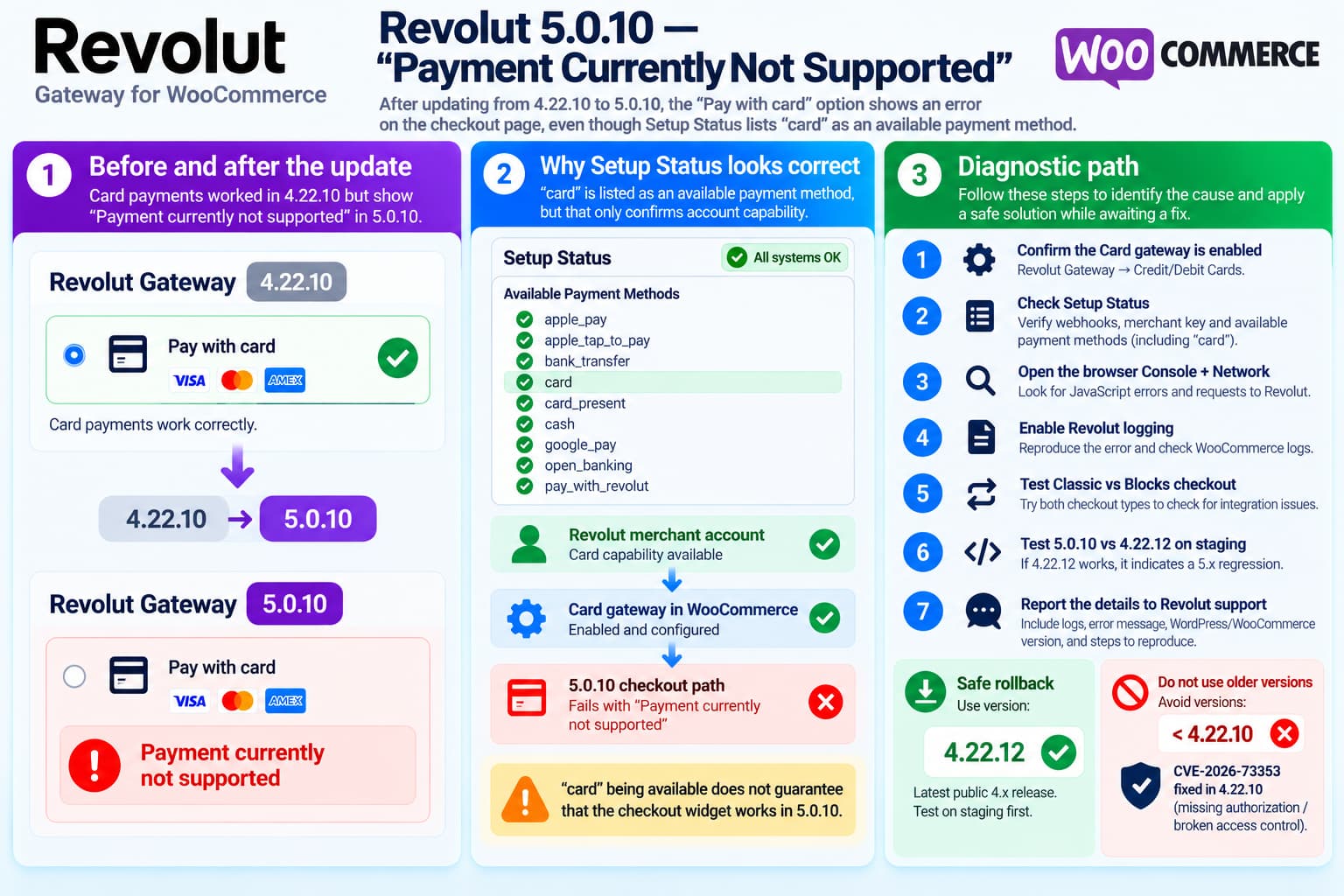
An upgrade of Revolut Gateway for WooCommerce from version 4.22.10 to 5.0.10 can produce an unusual failure:
Pay with card
        ↓
Payment currently not supported
while the Revolut plugin’s Setup Status still reports:
Available Payment Methods

apple_pay
apple_tap_to_pay
bank_transfer
card
card_present
cash
google_pay
open_banking
pay_with_revolut
The presence of:
cardis important.
It means the merchant/account capability check is at least reporting Card as an available payment method.
It does not, however, prove that the card widget, checkout integration, order creation, or payment-session initialization in version 5.0.10 is functioning correctly.
If card payments worked immediately before upgrading from 4.22.10 and stopped immediately after installing 5.0.10, with no account or WooCommerce configuration changes, a 5.0.x regression should be considered a strong possibility.
At present it cannot be confirmed from the public plugin source because Revolut is distributing the 5.x branch through a controlled release channel.
Version 5.x Is Being Rolled Out Outside the Public WordPress.org Release
This is an important detail.
A user recently noticed that WordPress offered:
5.0.8even though WordPress.org still showed:
4.22.10as the latest release.
Revolut support replied:
5.0.8 is the newest version of the plugin. It has not yet been pushed to the WordPress.org repository, we’re rolling it out gradually through a controlled release process.
So receiving a 5.x update through WordPress Admin is not necessarily evidence of a compromised updater.
It is part of Revolut’s controlled rollout.
The complication for troubleshooting is that the code and changelog for the newer controlled release are not currently available through the normal WordPress.org source repository.
As of October 17, 2026, WordPress.org publicly lists 4.22.12 as the latest directory version.
Therefore, the exact 5.0.10 code responsible for:
Payment currently not supportedcannot currently be independently compared with 4.22.10 through the public WordPress repository.
What “Available Payment Methods: card” Actually Tells Us
Revolut’s current documentation says the plugin’s Setup Status includes checks for:
- Payment Webhook
- Address Validation Webhook
- Apple Pay Onboarding
- Merchant Public Key
- Available Payment Methods
- Available Card Brands
Revolut says these items indicate the state of the required integration components.
The Card gateway is configured separately under:
Revolut Gateway → Credit/Debit Cards
and has its own Enable/Disable control.
That means these two facts are not identical:
Available Payment Methods contains "card"and:
The WooCommerce card checkout flow is operational.The first says that Card is advertised as an available merchant payment capability.
The second requires several additional stages to work.
Conceptually:
Merchant capability
card ✓

        ↓

WooCommerce gateway eligibility

        ↓

Card widget initialization

        ↓

Revolut order/payment session

        ↓

Customer card submission

        ↓

Payment
The failure can occur after the capability check has already succeeded.
The Older Public Plugin Code Also Checks for card
The public 4.x implementation of the Credit/Debit Card gateway uses the gateway ID:
revolut_ccand labels it:
Pay with cardIts availability logic explicitly checks for the payment method identifier:
cardin Revolut’s available-payment-method list.
Conceptually, the old check is:
if (
    ! $this->check_currency_support()
    ||
    ! $this->is_payment_method_available( 'card' )
) {
    return false;
}
So an available-method list containing:
cardis exactly what we would expect for an eligible Card account.
That makes the setup screenshot meaningful evidence.
However, it still does not tell us what changed inside the newer 5.0.10 checkout implementation.
Public 4.x Revolut card gateway source mirror
Why Setup Status Can Look Healthy While Checkout Fails
The Card payment flow includes multiple layers.
A simplified flow is:
Revolut account
        ↓
Merchant payment capabilities
        ↓
WooCommerce payment gateway
        ↓
Checkout JavaScript
        ↓
Revolut checkout/card widget
        ↓
Order/payment request
        ↓
Payment authorization
The Setup Status page primarily tests integration configuration.
A checkout error can occur later because of:
- card-widget initialization;
- incorrect payment-method mapping;
- merchant public-key initialization;
- order/session creation;
- currency or amount-specific eligibility;
- WooCommerce Blocks integration;
- JavaScript errors;
- a new 5.x API implementation;
- a regression in the controlled-release build.
So:
Available Payment Methods: cardand:
Payment currently not supportedare not necessarily contradictory.
They can be generated at different stages.
First Check: Confirm the Card Gateway Is Still Enabled
After a major plugin upgrade, first verify that the gateway setting was preserved.
Navigate to:
Plugins → Revolut Gateway for WooCommerce → Settings → Credit/Debit Cards
Confirm:
Enable/Disable: ONRevolut’s official documentation says this setting determines whether Card payments are available at checkout.
Also note the configured widget type:
Card fieldor:
Pop-upDo not change several settings at once while diagnosing the problem.
Record the current value first.
Check Every Setup Status Item
Go to:
Revolut Gateway → API Settings → Setup Status
Check whether each item is green:
Payment Webhook
Address Validation Webhook
Apple Pay Onboarding
Merchant Public Key
Available Payment Methods
Available Card Brands
Revolut’s documentation states that failed items display red and should offer a Retry action.
For the Card gateway, pay particular attention to:
Merchant Public Key
Available Payment Methods
Available Card Brands
If the payment-method list contains card but Merchant Public Key is red, the card widget may still be unable to initialize correctly.
Do Not Reconnect OAuth Immediately
A common reaction is to disconnect Revolut and reconnect the Merchant account.
That should not be the first troubleshooting step.
Reconnecting introduces additional variables involving:
- OAuth credentials;
- webhook registration;
- merchant keys;
- account selection.
There are already recent Revolut support reports involving webhook-registration problems after reconnecting merchant accounts.
If everything was connected and Card worked before upgrading, preserve the existing connection until logs indicate that connectivity is actually the problem.
Check Whether the Error Happens on Classic and Block Checkout
WooCommerce has two significantly different checkout architectures:
Classic Checkoutand:
Checkout BlockThe Revolut plugin supports WooCommerce Blocks as well as classic checkout.
A major version update may affect those integrations differently.
Create a controlled test.
Test A — Current Checkout
Use the site’s normal checkout.
Select:
Pay with cardRecord the result.
Test B — Temporary Classic Checkout
On staging, create a standard checkout page containing:
[woocommerce_checkout]and test Revolut Card there.
Test C — Checkout Block
Test a page using WooCommerce’s Checkout block.
If:
Classic Checkout ✓
Checkout Block ✕
the issue is likely Blocks-specific.
If:
Classic Checkout ✕
Checkout Block ✕
the failure is probably deeper in the 5.0.10 Card implementation.
Check the Browser Console
Open Developer Tools before selecting the Card gateway.
In Chrome:
F12
→ Console
Then reload Checkout and click:
Pay with cardLook for the first red error.
Possible useful indicators include:
Revolut
checkout
card
widget
public key
payment method
unsupported
Do not focus only on the visible:
Payment currently not supportedmessage.
The browser console may reveal the actual failed operation.
Also inspect:
Networkand reproduce the error.
Check Whether a Request Reaches Revolut
This is one of the most valuable distinctions.
If selecting Card generates a network request to Revolut and the response contains:
Payment currently not supportedthen the error is coming from or through the Revolut payment layer.
If no Revolut request occurs at all, the problem may be inside:
WooCommerce
↓
Revolut plugin JavaScript
↓
before API request
A recent independent support report describes card transactions failing before they reached Revolut at all, demonstrating why this distinction matters.
Record:
Request URL
HTTP status
Response body
but remove:
- authorization headers;
- API tokens;
- customer data;
- payment data;
- public/private keys;
before posting logs publicly.
Enable Revolut Logging
Before another payment attempt, enable the plugin’s logging/debug option if available in the 5.0.10 settings.
Then reproduce the issue once.
After the attempt, check:
WooCommerce → Status → Logs
Look for a Revolut source.
The useful sequence is:
Checkout opened
        ↓
Card selected
        ↓
Revolut order/session creation
        ↓
Card widget initialization
        ↓
Failure
The log entry immediately before:
Payment currently not supportedmay identify which layer rejected the transaction.
Test With the Same Currency and a Normal Amount
Card eligibility can depend on transaction context.
Revolut’s Merchant API and WooCommerce plugin evaluate supported payment methods in connection with payment/order data.
Use a simple test order:
One simple product
No coupon
No subscription
Normal positive total
Store's normal currency
Avoid initially testing:
- subscriptions;
- zero-total orders;
- unusual currencies;
- manually created orders;
- saved payment methods;
- mixed carts.
This prevents a separate edge case from disguising the upgrade regression.
Verify the Store Currency
The older public Card implementation separately checks whether WooCommerce’s current currency belongs to its supported card-payment currency list.
Therefore:
card appears in Setup Statusdoes not necessarily override every checkout-specific currency check.
Confirm:
WooCommerce → Settings → General → Currency
and record the currency in the support report.
If the same currency worked under 4.22.10 immediately before the upgrade, however, a sudden unsupported-currency problem would be less likely unless 5.x changed validation behavior.
Test Version 4.22.12 on Staging
Because the failure started after the version change, an A/B version test is extremely valuable.
Do this on staging first.
Test:
5.0.10
→ Payment currently not supported
Then restore the public stable build:
4.22.12and repeat the same checkout with:
- the same Revolut account;
- same product;
- same currency;
- same WooCommerce version;
- same browser;
- same Card setting.
If:
5.0.10 ✕
4.22.12 ✓
the evidence for a 5.x regression becomes very strong.
Why Use 4.22.12 Instead of an Older Version?
The reporter previously used:
4.22.10successfully.
However, WordPress.org now publishes:
4.22.12as the latest public stable version.
Its changelog includes:
4.22.11
Stability improvements

4.22.12
Express checkout/order creation fixes
So if a rollback is necessary, 4.22.12 is the more appropriate public 4.x baseline to test.
Do Not Roll Back Below 4.22.10
This is important.
A security vulnerability affecting versions:
< 4.22.10was published in August 2026.
CVE-2026-73353 concerns missing authorization/broken access control, and 4.22.10 is listed as the fixed version.
Therefore, do not solve a 5.x regression by returning to something like:
4.22.9
4.22.8
4.21.x
The safe rollback boundary is:
4.22.10 or laterand the latest public 4.x build is presently 4.22.12.
Back Up Before Downgrading 5.x
Because 5.x is a major-version branch, do not assume it made no persistent configuration changes.
Before replacing 5.0.10 with 4.22.12:
- back up the database;
- back up the current plugin directory;
- export or screenshot all Revolut settings;
- perform the first downgrade test on staging;
- verify the merchant connection remains intact;
- verify webhooks/settings before taking a real payment.
Do not uninstall the plugin simply to downgrade it unless Revolut specifically instructs you to do so.
Uninstall routines can behave differently from replacing plugin files.
Why the Version Jump Matters
This is not a normal patch update such as:
4.22.10
→
4.22.11
It is:
4.22.10
→
5.0.10
A major version normally indicates substantial internal changes.
We also know from Revolut’s support response that 5.x is being deployed as a controlled release, rather than being simultaneously published to the normal WordPress.org channel.
That means an upgrade-specific failure deserves to be reported as a regression, especially when the older public release remains functional.
Current Public Changelog Does Not Explain 5.0.10
At the time of writing, the public WordPress.org changelog ends at:
4.22.12and therefore does not document what changed in:
5.0.0
through
5.0.10
Consequently, claims such as:
5.0.10 intentionally removed Card supportor:
5.0.10 definitely contains bug Xcannot currently be substantiated from the public source.
The correct description is:
Card stopped working immediately after upgrading to a controlled 5.0.10 release, even though the integration reports
cardas an available payment method. This is consistent with a 5.0.10 checkout regression, but logs and a version A/B test are needed to establish the failing component.
What “Available Payment Methods” Does Prove
The current setup data is still useful.
This:
Available Payment Methods:
...
card
...
argues against the simplest explanation:
Your Revolut Merchant account has no Card capability whatsoever.Revolut’s own documentation defines Available Payment Methods as one of the integration status checks, while Card itself is a separately enabled WooCommerce gateway.
So troubleshooting should focus on why Card becomes unsupported during checkout, rather than assuming the feature is globally absent from the account.
What to Include in a Revolut Support Report
Send Revolut a compact reproducible case:
Plugin:
Revolut Gateway for WooCommerce 5.0.10

Previous version:
4.22.10 — Card payments worked

Public rollback test:
4.22.12 — Works / Fails

WooCommerce version:
WordPress version:
PHP version:

Checkout:
Classic / Blocks

Account:
Business / Revolut Pro

Mode:
Live / Sandbox

Currency:
EUR / GBP / etc.

Credit/Debit Cards:
Enabled

Card widget:
Card Field / Popup

Setup Status:
Payment Webhook:
Address Validation Webhook:
Merchant Public Key:
Available Card Brands:

Available Payment Methods:
apple_pay
apple_tap_to_pay
bank_transfer
card
card_present
cash
google_pay
open_banking
pay_with_revolut

Checkout error:
Payment currently not supported

Browser console:
[first relevant error]
Network request:
[endpoint + HTTP status]
WooCommerce/Revolut log: [relevant redacted entries]
Mention explicitly:
The failure began immediately after
4.22.10 → 5.0.10.
That is much more actionable than reporting only the frontend message.
Recommended Temporary Production Strategy
For a live store, payment reliability is more important than continuing to test a failing Card gateway on customers.
If staging confirms:
5.0.10 ✕
4.22.12 ✓
a reasonable temporary strategy is:
Production
→ back up
→ use public 4.22.12
→ verify one controlled Card transaction
→ keep 5.x automatic update disabled temporarily
→ report regression to Revolut
→ return to 5.x after a confirmed fix
Do not roll back below 4.22.10 because of the known security issue.
If rolling back is not appropriate for the site, temporarily disable the failing Revolut Card gateway and leave another verified payment method available.
Final Diagnosis
The setup status:
Available Payment Methods: ... card ...is evidence that Card capability is being reported for the connected merchant account.
It does not guarantee that the 5.0.10 Card checkout implementation can successfully initialize and process a payment.
Because:
4.22.10 = working
5.0.10 = immediately broken
and the merchant capability still includes:
cardthe version change itself is currently the strongest lead.
The most useful next test is not reconnecting Revolut or changing the customer account.
It is:
Same store + same cart + same account

5.0.10
vs.
4.22.12
on staging, while capturing browser Network/Console output and Revolut logs.
If 4.22.12 restores Card payments under the same conditions, report the problem to Revolut as a 5.0.10 Card checkout regression.
