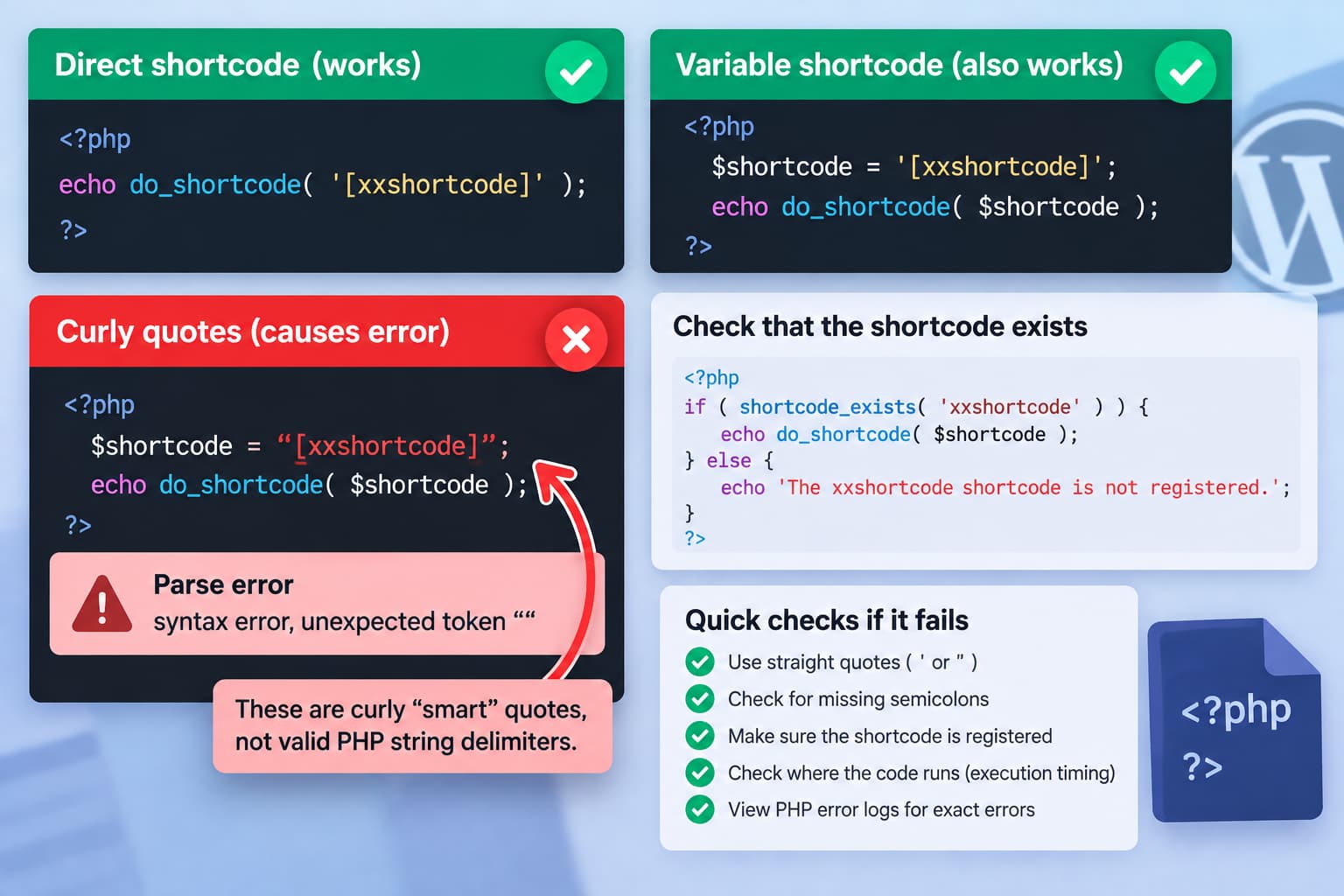
These two WordPress examples should behave the same way:
echo do_shortcode( '[xxshortcode]' );and:
$variableofshortcode = '[xxshortcode]';
echo do_shortcode( $variableofshortcode );
do_shortcode() accepts a string containing shortcode markup. WordPress does not care whether that string was written directly inside the function call or stored in a variable first. The official function signature accepts $content as a string and processes registered shortcodes found inside it.
Therefore, if the first example works while the second crashes, refuses to save, or disables a PHP snippet, the variable itself is almost certainly not the problem. The first things to inspect are the quote characters and PHP syntax.
Check for Curly “Smart” Quotes First
A particularly important detail is the difference between these characters:
"and:
“
”
Likewise:
'is not the same character as typographic quotes such as:
‘
’
PHP strings must use valid PHP string delimiters such as straight single quotes or straight double quotes. The PHP manual defines strings using characters such as:
'text'or:
"text"This is valid:
$variableofshortcode = '[xxshortcode]';

echo do_shortcode( $variableofshortcode );
This is not valid PHP:
$variableofshortcode = “[xxshortcode]”;If those curly quotes exist in the actual PHP snippet rather than only being introduced by a forum or word processor, PHP will not treat them as string delimiters.
That can explain behavior such as:
- the snippet cannot be saved;
- the snippet is automatically disabled;
- WordPress shows a critical error;
- the site produces a PHP parse error.
Retype the quotes directly in your code editor instead of copying them from Microsoft Word, a formatted webpage, email, or another rich-text editor.
Use:
$variableofshortcode = '[xxshortcode]';
echo do_shortcode( $variableofshortcode );
Using single quotes is often convenient for shortcode strings because shortcode attributes commonly contain double quotes.
Why the Variable Version Should Work
WordPress defines do_shortcode() roughly as a processor for arbitrary string content.
Its official signature is:
do_shortcode( string $content, bool $ignore_html = false ): stringThe content passed to it is searched for registered shortcode tags.
These therefore produce the same input:
do_shortcode( '[xxshortcode]' );and:
$code = '[xxshortcode]';
do_shortcode( $code );
In both cases, the value received by do_shortcode() is:
[xxshortcode]Changing a literal string into a variable does not change how WordPress’s shortcode parser works.
That is useful diagnostically: if one version behaves differently, investigate the PHP surrounding the assignment rather than trying to find a special variable-compatible version of do_shortcode().
Use a Minimal Test
On a staging site or inside the same controlled snippet environment, reduce the code to:
$shortcode = '[xxshortcode]';

echo do_shortcode( $shortcode );
Do not add concatenation, attributes, functions, or additional variables yet.
If that code still cannot be saved, it strongly suggests a PHP syntax problem elsewhere in the snippet or a problem with the tool being used to run the PHP.
Pay particular attention to the line immediately before the variable declaration. A missing semicolon or unmatched quote on a previous line can make PHP report the error at the $shortcode line even though that line is valid.
For example:
$message = 'Hello'

$shortcode = '[xxshortcode]';
is broken because the first statement is missing its semicolon.
The shortcode line itself is innocent.
Check Whether the Shortcode Is Registered
If the PHP saves successfully but WordPress prints:
[xxshortcode]instead of rendering it, verify that the shortcode exists at the point where the code runs.
WordPress provides:
shortcode_exists( 'xxshortcode' )for exactly this purpose. It returns whether a shortcode handler with that tag is currently registered.
A useful diagnostic is:
if ( shortcode_exists( 'xxshortcode' ) ) {
    $shortcode = '[xxshortcode]';
    echo do_shortcode( $shortcode );
} else {
    echo 'The xxshortcode shortcode is not registered.';
}
Use this only as a diagnostic if you do not want the fallback message displayed publicly.
If shortcode_exists() returns false on one site but true on another, compare:
- active plugins;
- active theme;
- plugin versions;
- custom plugins;
- mu-plugins;
- where the PHP snippet runs;
- when the shortcode is registered.
WordPress’s Shortcode API requires a handler to be registered through add_shortcode() before WordPress can process the tag.
Execution Timing Can Differ Between Two Sites
Suppose a plugin registers:
add_shortcode( 'xxshortcode', 'my_shortcode_callback' );but your custom PHP runs before that registration occurs.
At that moment:
shortcode_exists( 'xxshortcode' )will return false.
Running the same PHP later in the WordPress request can work normally.
This can happen when the two sites use different:
- themes;
- plugins;
- snippet plugins;
- snippet execution scopes;
- hooks;
- page builders;
- custom templates.
A shortcode that works in a page template does not necessarily prove it is already registered during an earlier hook.
Where practical, run custom rendering code after WordPress and the plugin supplying the shortcode have initialized.
Check the Actual Variable Value
Do not assume that a more complicated variable contains what you think it contains.
For this simple example:
$shortcode = '[xxshortcode]';the value is obvious.
But real code often evolves into something like:
$shortcode = get_option( 'my_shortcode' );or:
$shortcode = get_post_meta( $post_id, 'shortcode', true );At that point, inspect the value.
On a development or staging environment you could temporarily use:
var_dump( $shortcode );For logging without printing it into the page, WordPress debugging can be more useful.
For example:
error_log( print_r( $shortcode, true ) );Check whether the value actually equals:
[xxshortcode]Look for:
- empty values;
- unexpected HTML;
- escaped square brackets;
- leading or trailing characters;
- smart quotes;
- a different shortcode tag.
Do not leave debugging output enabled unnecessarily on a production site.
Enable WordPress Error Logging if the Snippet Crashes
A PHP snippet that causes a site error should be diagnosed from the actual PHP error rather than by guessing.
On a staging environment, WordPress supports:
define( 'WP_DEBUG', true );
define( 'WP_DEBUG_LOG', true );
define( 'WP_DEBUG_DISPLAY', false );
The log is normally written to:
wp-content/debug.logWordPress recommends its debugging facilities for development environments and cautions against leaving debugging enabled on production sites.
If a code-snippet plugin refuses to activate the snippet, it may display the PHP parse error directly instead.
A message such as:
Parse erroror:
unexpected tokenpoints to PHP syntax rather than shortcode parsing.
Shortcodes With Attributes Need Correct Quoting
Variables become particularly useful when dynamically constructing shortcode attributes.
For example:
$product_id = 123;

$shortcode = '[product id="' . $product_id . '"]';

echo do_shortcode( $shortcode );
The outer PHP string uses single quotes while the shortcode attribute contains double quotes.
The resulting value is:
[product id="123"]You can verify it before executing:
echo esc_html( $shortcode );on a development page.
Do not construct a shortcode like this:
$shortcode = "[product id="$product_id"]";because the inner double quotes terminate the PHP string.
A valid double-quoted alternative would require escaping:
$shortcode = "[product id=\"$product_id\"]";PHP’s string rules distinguish between single-quoted and double-quoted strings, including variable interpolation and escaped quote handling.
For readability, concatenation is often clearer:
$shortcode = '[product id="' . $product_id . '"]';Compare the PHP Snippet Tools on Both Sites
If exactly the same valid PHP works on one WordPress installation but the snippet cannot even be saved on another, compare how the PHP is being executed.
One site may use:
- a child theme template;
functions.php;- a Code Snippets-style plugin;
- a custom plugin;
- a page builder’s PHP/code feature.
The other may be using a completely different execution environment.
Some snippet interfaces validate PHP before saving or activate code in a particular scope. Others execute PHP only on specific frontend requests.
That difference can make one installation appear to accept code that another rejects.
However, this valid PHP:
$variableofshortcode = '[xxshortcode]';
echo do_shortcode( $variableofshortcode );
does not require a special WordPress workaround.
If a snippet tool rejects those exact two lines, inspect the reported PHP error and the rest of the snippet.
Compare PHP Versions, but Don’t Expect This Syntax to Be the Cause
It is worth comparing PHP versions between two sites when custom code behaves differently.
However, assigning a string to a variable:
$shortcode = '[xxshortcode]';is basic PHP syntax and is not a new language feature.
Therefore, a normal PHP-version difference should not make this particular statement valid on one modern WordPress server and invalid on another.
A PHP-version difference may instead expose an error elsewhere in:
- the shortcode callback;
- another plugin;
- the theme;
- custom PHP executed by the shortcode.
If do_shortcode() reaches the shortcode callback and that callback contains incompatible PHP, it can appear as though do_shortcode() caused the crash.
The PHP error log will identify the actual file and line.
Do Not Use eval() as a Workaround
There is no need to dynamically execute PHP just because a shortcode is stored in a variable.
Avoid solutions involving:
eval()for this problem.
A shortcode string is data:
$shortcode = '[xxshortcode]';and do_shortcode() is already designed to parse that data.
Using eval() adds security and debugging risks without solving the underlying problem.
Safe Diagnostic Order
For a shortcode that works directly but appears to fail when assigned to a variable, check the problem in this order:
- Replace all curly quotes with straight PHP quotes.
- Test only:
$shortcode = '[xxshortcode]';
echo do_shortcode( $shortcode );- Check the preceding PHP lines for unmatched quotes, parentheses, or missing semicolons.
- Check the exact PHP error produced by the snippet.
- Test:
shortcode_exists( 'xxshortcode' )- Confirm that the plugin or theme providing the shortcode is active.
- Compare where and when the snippet executes on both sites.
- Compare PHP and plugin versions if the shortcode callback itself crashes.
In most cases, there is no special WordPress difference between passing a literal shortcode and passing the same string through a variable. If the two examples genuinely behave differently, the real difference is elsewhere in the PHP source or execution environment.
