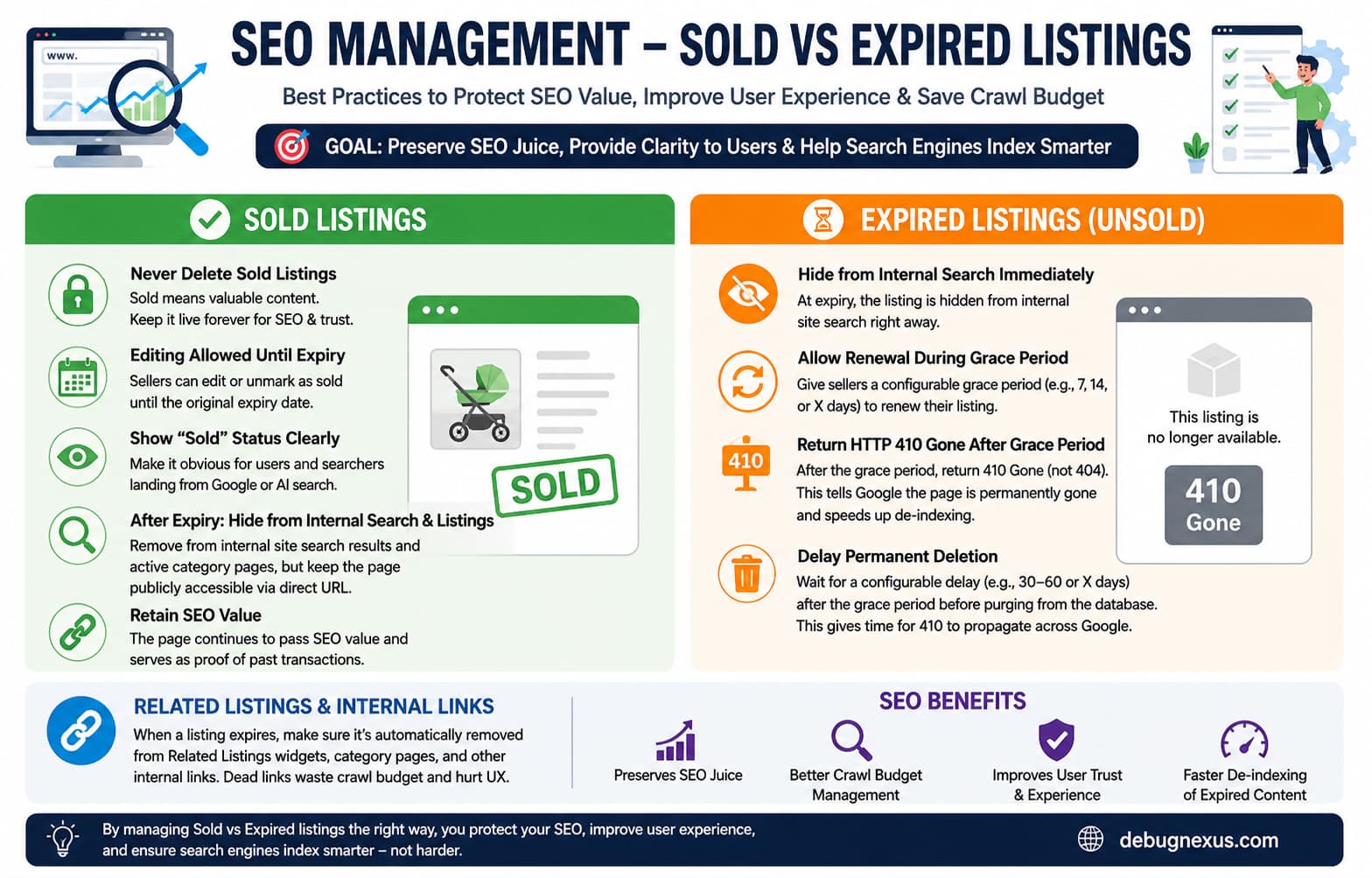
Many WordPress marketplace websites automatically expire and delete listings after a fixed period, such as 30, 60, or 90 days.
This may seem like sensible database maintenance. However, automatically deleting every expired listing can create significant SEO and usability problems.
A listing may already have:
- Organic search rankings
- External backlinks
- Social media shares
- Image search visibility
- User engagement history
- Links from category pages, related listings, or seller profiles
When that listing is deleted, its URL normally starts returning a 404 Not Found response. Any authority or traffic associated with the page may eventually disappear unless the URL has a relevant replacement.
The correct solution is not to keep every listing forever. It is to treat sold listings and expired unsold listings as two different content types.
The Problem With Automatically Deleting Every Listing
Consider a second-hand marketplace built with WordPress, the Classified Listing plugin, and the Classima theme.
Listings remain active for 90 days. After they expire, the plugin eventually deletes them from the database.
This creates several problems.
Valuable sold pages disappear
A sold listing may be one of the marketplace’s strongest pages. It could contain a detailed product description, original photographs, specifications, pricing information, and location details.
Deleting it simply because 90 days have passed removes useful content that search engines and visitors may still value.
Internal links can lead to dead pages
Related-listing widgets, category pages, cached search results, saved favorites, and seller profiles may continue linking to a URL after the listing has expired.
This creates a poor user experience and leaves search engines repeatedly discovering unavailable pages.
Expired listings remain visible for too long
At the opposite extreme, retaining every expired listing as an active result can frustrate users. Visitors may repeatedly click products that can no longer be purchased.
The marketplace therefore needs a lifecycle that separates:
- Active listings
- Sold listings
- Expired listings within a renewal period
- Permanently retired listings
- Purged database records
Recommended Listing Lifecycle
The following status model provides a practical balance between SEO, user experience, and database maintenance.
| Listing state | Direct URL | Internal search | Category pages | Seller editing | Search indexing |
|---|---|---|---|---|---|
| Active | 200 | Visible | Visible | Allowed | Index |
| Sold before expiry | 200 | Visible until original expiry | Visible until original expiry | Allowed until expiry | Index |
| Sold after original expiry | 200 | Hidden | Hidden | Locked | Index |
| Expired within renewal grace period | 200 with expired notice | Hidden | Hidden | Renewal only | Noindex |
| Expired after grace period | 410 | Hidden | Hidden | Disabled | Removed |
| Database record purged | 410 through tombstone record | Hidden | Hidden | Disabled | Removed |
This approach keeps useful sold pages available while quickly removing abandoned unsold listings from the active marketplace.
How Sold Listings Should Be Handled
1. Never automatically delete sold listings
A sold listing should not be treated like an unsuccessful expired listing.
The page may remain useful because it provides:
- Historical price information
- Product specifications
- Evidence that the marketplace has active buyers
- Original images
- Seller transaction history
- A useful landing page for long-tail searches
Current Classified Listing documentation includes a Mark as Sold feature, and the plugin identifies sold listings with the _rtcl_mark_as_sold post meta key.
However, do not assume every old plugin version handles expiry, deletion, internal search, and seller permissions correctly. Test the complete lifecycle on a staging website.
2. Keep the original URL returning HTTP 200
The sold listing should remain publicly accessible at its original URL.
Do not redirect every sold item to:
- The homepage
- A general category
- The marketplace search page
- An unrelated replacement product
A redirect should only be used when another page genuinely satisfies the same user intent.
For example, redirecting a sold red bicycle to a general “Used Toys” category is usually not an equivalent replacement.
3. Display a prominent Sold status
Visitors arriving from Google should immediately understand that the item is no longer available.
A sold page should display:
- A visible “Sold” badge
- A short explanation
- The date it was marked sold, when appropriate
- Similar currently available listings
- A link back to the relevant category
- No active contact or purchase button
A suitable notice would be:
This item has been sold and is no longer available. You can still view its original details or browse similar available listings below.
4. Remove contact and purchase functionality
A sold page can remain indexed without allowing new inquiries.
Disable:
- Contact seller forms
- Add-to-cart buttons
- Buy-now buttons
- Offer submission
- Booking functions
- Phone-number reveal buttons
- Messaging actions related to that listing
Recent versions of Classified Listing describe Mark as Sold as keeping sold items visible for SEO while disabling further communication. Older installations should verify this behavior manually.
5. Allow changes only until the original expiry date
A seller may need to reverse the sold status when:
- The buyer did not pay
- The buyer stopped responding
- Collection failed
- The transaction was cancelled
The seller should therefore be able to unmark the listing as sold until its original expiry date.
After the original expiry date passes:
- Lock normal editing
- Prevent the seller from unmarking the sold status
- Keep administrator access for legal, moderation, or privacy requests
- Preserve the original public page
This prevents sellers from repeatedly reviving old URLs without creating a genuinely new listing.
6. Hide older sold listings from active marketplace results
After the original expiry date, sold listings should stop appearing in:
- Internal search results
- Active category archives
- Location archives
- AJAX search results
- Related listings widgets
- Homepage listing grids
- Featured listing sections
- RSS feeds intended for available items
The direct URL can remain indexable, but the item should no longer compete with available inventory.
Avoid creating orphaned sold pages
Removing a sold listing from every internal location can turn it into an orphan page.
A better solution is to keep limited links through pages such as:
- Recently sold items
- Seller transaction history
- Previously available products
- Historical marketplace archive
These archive pages should not dominate the main navigation, but they can preserve crawlable paths to useful historical content.
How Expired Unsold Listings Should Be Handled
1. Remove the listing from active results immediately
As soon as an unsold listing expires, remove it from all user-facing discovery systems.
This includes:
- WordPress search
- Classified Listing search
- AJAX filters
- Category and location archives
- Related-listing widgets
- Homepage blocks
- Featured listing carousels
- XML sitemaps
The seller can still access the listing from the account dashboard during the renewal period.
2. Provide a configurable renewal grace period
Classified Listing supports renewals and uses the rtcl-expired post status for expired listings. Its renewal process republishes the listing and updates the expiry_date value.
A marketplace should provide a configurable grace period, for example:
- 7 days
- 14 days
- 30 days
During this period:
- The listing remains stored in the database
- The seller can renew it
- It stays hidden from public search and categories
- Its public URL displays an expired notice
- The page uses
noindex, follow
Do not return 410 Gone during a period in which the listing can still be renewed. A 410 response means the resource is intentionally and permanently gone, which conflicts with a temporary renewal window.
3. Return 410 after the grace period
After the renewal deadline passes, the listing is permanently retired.
At this point, its direct URL can return:
HTTP/1.1 410 Gone
X-Robots-Tag: noindex, follow
A useful 410 page can still contain navigation for visitors:
- “This listing is no longer available.”
- A category link
- A marketplace search form
- Similar active listings
The important part is the actual HTTP response header. Displaying the words “Listing removed” while returning HTTP 200 creates a soft 404.
Does 410 Remove a URL Faster Than 404?
A common SEO claim is that 410 Gone always causes faster de-indexing than 404 Not Found.
That should not be presented as a guarantee.
Google has stated that properly removed pages should return either 404 or 410, and its documentation currently treats both as strong signals that the URL should no longer be crawled regularly.
The practical distinction is semantic:
404 Not Foundmeans the resource cannot be found.410 Gonemeans the resource was intentionally and permanently removed.
For a marketplace that deliberately retires a listing after a renewal deadline, 410 communicates the situation more accurately.
4. Keep a tombstone before deleting the database record
Returning a 410 response requires the website to recognize the retired URL.
If the listing is permanently deleted from WordPress immediately, the website will normally lose the information needed to identify its old permalink. The URL will then return a standard 404.
A more reliable architecture is:
- Mark the listing expired.
- Allow the renewal grace period.
- Return 410 after the grace period.
- Wait an additional cleanup period.
- Save the retired URL in a lightweight tombstone table.
- Delete the full listing and its unnecessary metadata.
- Continue returning 410 when the tombstoned URL is requested.
The tombstone record only needs:
- URL path
- A hash of the path
- Retirement date
- Optional original listing ID
- Optional reason for removal
This retains the correct response without keeping all images, custom fields, revisions, and listing metadata forever.
What Should Happen to Related Listings?
Expired and older sold listings should stop appearing inside Related Listings widgets.
This must be tested separately because different components may use different query systems.
A marketplace may have listing queries generated by:
- The main WordPress query
- Classified Listing shortcodes
- Classima theme templates
- Elementor widgets
- Gutenberg blocks
- AJAX Filter Builder
- Custom related-listing code
- Third-party search plugins
- Object or page caching
The Classified Listing plugin provides the rtcl_listing_query_meta_query filter for changing the meta query used for listing data.
Filtering only the main WordPress query may therefore be insufficient. The plugin query, AJAX endpoints, and theme widgets must also be checked.
After implementation, inspect several active listings and confirm that none of their related-item sections link to:
rtcl-expiredlistings- Sold listings beyond their original expiry date
- Deleted URLs
- Tombstoned URLs
Structured Data for Sold Listings
When a sold listing continues using Product or Offer structured data, its availability must be updated.
Use:
"availability": "https://schema.org/SoldOut"Google supports SoldOut as a valid availability value in Product structured data.
Do not leave a sold listing marked as:
"availability": "https://schema.org/InStock"Also make sure that visible page content agrees with the structured data.
The page should not visually say “Sold” while its structured data says “InStock.”
If an SEO plugin or Classified Listing already generates Product schema, modify the existing schema. Do not add a second, conflicting Product object.
WordPress Implementation Example
The following example shows the architecture of a custom lifecycle plugin for Classified Listing.
It assumes the current conventions:
Post type: rtcl_listing
Expired status: rtcl-expired
Sold meta key: _rtcl_mark_as_sold
Expiry meta key: expiry_date
Never-expire meta key: never_expires
Older versions may use different hooks or metadata. Confirm the actual values on staging before using this code on a live marketplace.
Create:
/wp-content/plugins/debugnexus-listing-lifecycle/Inside it, create:
debugnexus-listing-lifecycle.phpAdd the following:
<?php
/**
 * Plugin Name: DebugNexus Listing Lifecycle
 * Description: SEO-friendly sold, expired, renewal, 410 and purge handling for Classified Listing.
 * Version: 1.0.0
 */

defined( 'ABSPATH' ) || exit;

const DN_RTCL_POST_TYPE          = 'rtcl_listing';
const DN_RTCL_EXPIRED_STATUS     = 'rtcl-expired';
const DN_RTCL_SOLD_META          = '_rtcl_mark_as_sold';
const DN_RTCL_EXPIRY_META        = 'expiry_date';
const DN_RTCL_NEVER_EXPIRES_META = 'never_expires';

const DN_RTCL_ORIGINAL_EXPIRY    = '_dn_original_expiry_date';
const DN_RTCL_ORIGINAL_EXPIRY_TS = '_dn_original_expiry_timestamp';
const DN_RTCL_EXPIRED_AT         = '_dn_expired_at';

const DN_RTCL_RENEWAL_GRACE_DAYS = 14;
const DN_RTCL_PURGE_DELAY_DAYS   = 45;

/**
 * Check whether a listing is marked sold.
 */
function dn_rtcl_is_sold( int $listing_id ): bool {
	$value = strtolower(
		trim(
			(string) get_post_meta(
				$listing_id,
				DN_RTCL_SOLD_META,
				true
			)
		)
	);

	return in_array(
		$value,
		array( '1', 'yes', 'true', 'on', 'sold' ),
		true
	);
}

/**
 * Convert a stored listing date into a Unix timestamp.
 */
function dn_rtcl_date_to_timestamp( $date ): int {
	if ( is_numeric( $date ) ) {
		return (int) $date;
	}

	if ( ! is_string( $date ) || '' === trim( $date ) ) {
		return 0;
	}

	try {
		$parsed = new DateTimeImmutable(
			$date,
			wp_timezone()
		);

		return $parsed->getTimestamp();
	} catch ( Exception $exception ) {
		return 0;
	}
}

/**
 * Save the listing's original expiry when it is marked sold.
 *
 * Sold listings are set to never expire inside Classified Listing,
 * while the original expiry is retained in our own metadata.
 */
function dn_rtcl_sync_sold_state(
	$meta_id,
	$listing_id,
	$meta_key,
	$meta_value
): void {
	static $running = false;

	if (
		$running ||
		DN_RTCL_SOLD_META !== $meta_key ||
		DN_RTCL_POST_TYPE !== get_post_type( $listing_id )
	) {
		return;
	}

	$running = true;

	if ( dn_rtcl_is_sold( $listing_id ) ) {
		$original_expiry = get_post_meta(
			$listing_id,
			DN_RTCL_EXPIRY_META,
			true
		);

		if (
			$original_expiry &&
			! get_post_meta(
				$listing_id,
				DN_RTCL_ORIGINAL_EXPIRY,
				true
			)
		) {
			update_post_meta(
				$listing_id,
				DN_RTCL_ORIGINAL_EXPIRY,
				$original_expiry
			);

			update_post_meta(
				$listing_id,
				DN_RTCL_ORIGINAL_EXPIRY_TS,
				dn_rtcl_date_to_timestamp( $original_expiry )
			);
		}

		update_post_meta(
			$listing_id,
			DN_RTCL_NEVER_EXPIRES_META,
			1
		);

		delete_post_meta(
			$listing_id,
			DN_RTCL_EXPIRY_META
		);

		if (
			DN_RTCL_EXPIRED_STATUS === get_post_status( $listing_id )
		) {
			wp_update_post(
				array(
					'ID'          => $listing_id,
					'post_status' => 'publish',
				)
			);
		}
	} else {
		$original_expiry = get_post_meta(
			$listing_id,
			DN_RTCL_ORIGINAL_EXPIRY,
			true
		);

		if ( $original_expiry ) {
			update_post_meta(
				$listing_id,
				DN_RTCL_EXPIRY_META,
				$original_expiry
			);
		}

		delete_post_meta(
			$listing_id,
			DN_RTCL_NEVER_EXPIRES_META
		);
	}

	$running = false;
}

add_action(
	'added_post_meta',
	'dn_rtcl_sync_sold_state',
	10,
	4
);

add_action(
	'updated_post_meta',
	'dn_rtcl_sync_sold_state',
	10,
	4
);

/**
 * Record when an unsold listing enters the expired status.
 */
function dn_rtcl_record_expiry(
	string $new_status,
	string $old_status,
	WP_Post $post
): void {
	if (
		DN_RTCL_POST_TYPE !== $post->post_type ||
		DN_RTCL_EXPIRED_STATUS !== $new_status
	) {
		return;
	}

	if (
		! get_post_meta(
			$post->ID,
			DN_RTCL_EXPIRED_AT,
			true
		)
	) {
		update_post_meta(
			$post->ID,
			DN_RTCL_EXPIRED_AT,
			time()
		);
	}

	/*
	 * A sold listing should remain published.
	 */
	if ( dn_rtcl_is_sold( $post->ID ) ) {
		wp_update_post(
			array(
				'ID'          => $post->ID,
				'post_status' => 'publish',
			)
		);
	}
}

add_action(
	'transition_post_status',
	'dn_rtcl_record_expiry',
	10,
	3
);

/**
 * Prevent a seller from editing a sold listing after its
 * original expiry date. Administrators retain access.
 */
function dn_rtcl_lock_old_sold_listings(
	array $caps,
	string $cap,
	int $user_id,
	array $args
): array {
	if (
		'edit_post' !== $cap ||
		empty( $args[0] ) ||
		user_can( $user_id, 'manage_options' )
	) {
		return $caps;
	}

	$listing_id = (int) $args[0];

	if (
		DN_RTCL_POST_TYPE !== get_post_type( $listing_id ) ||
		! dn_rtcl_is_sold( $listing_id )
	) {
		return $caps;
	}

	$expiry_timestamp = (int) get_post_meta(
		$listing_id,
		DN_RTCL_ORIGINAL_EXPIRY_TS,
		true
	);

	if (
		$expiry_timestamp &&
		time() >= $expiry_timestamp
	) {
		return array( 'do_not_allow' );
	}

	return $caps;
}

add_filter(
	'map_meta_cap',
	'dn_rtcl_lock_old_sold_listings',
	10,
	4
);

/**
 * Protect sold listings from automatic deletion.
 *
 * Administrators can still delete one manually when required
 * for moderation, privacy, or legal reasons.
 */
function dn_rtcl_protect_sold_listing(
	$delete,
	$post,
	$force_delete
) {
	if (
		$post instanceof WP_Post &&
		DN_RTCL_POST_TYPE === $post->post_type &&
		dn_rtcl_is_sold( $post->ID ) &&
		! current_user_can( 'manage_options' )
	) {
		return false;
	}

	return $delete;
}

add_filter(
	'pre_delete_post',
	'dn_rtcl_protect_sold_listing',
	10,
	3
);

/**
 * Remove the plugin's default sold exclusion before applying
 * the custom time-based sold visibility rule.
 */
function dn_rtcl_remove_sold_meta_clauses(
	array $meta_query
): array {
	foreach ( $meta_query as $index => $clause ) {
		if ( 'relation' === $index ) {
			continue;
		}

		if (
			is_array( $clause ) &&
			isset( $clause['key'] ) &&
			DN_RTCL_SOLD_META === $clause['key']
		) {
			unset( $meta_query[ $index ] );
			continue;
		}

		if ( is_array( $clause ) ) {
			$meta_query[ $index ] =
				dn_rtcl_remove_sold_meta_clauses( $clause );
		}
	}

	return $meta_query;
}

/**
 * Show sold listings in internal results only until their
 * original expiry date.
 */
function dn_rtcl_filter_listing_queries(
	array $meta_query,
	$query_object
): array {
	$meta_query = dn_rtcl_remove_sold_meta_clauses(
		$meta_query
	);

	if ( ! isset( $meta_query['relation'] ) ) {
		$meta_query['relation'] = 'AND';
	}

	$meta_query[] = array(
		'relation' => 'OR',

		/*
		 * Normal unsold listings.
		 */
		array(
			'key'     => DN_RTCL_SOLD_META,
			'compare' => 'NOT EXISTS',
		),

		array(
			'key'     => DN_RTCL_SOLD_META,
			'value'   => array( '0', 'no', 'false', '' ),
			'compare' => 'IN',
		),

		/*
		 * Sold listings whose original expiry is still
		 * in the future.
		 */
		array(
			'relation' => 'AND',

			array(
				'key'     => DN_RTCL_SOLD_META,
				'value'   => array(
					'1',
					'yes',
					'true',
					'on',
					'sold',
				),
				'compare' => 'IN',
			),

			array(
				'relation' => 'OR',

				array(
					'key'     =>
						DN_RTCL_ORIGINAL_EXPIRY_TS,
					'compare' => 'NOT EXISTS',
				),

				array(
					'key'     =>
						DN_RTCL_ORIGINAL_EXPIRY_TS,
					'value'   => time(),
					'type'    => 'NUMERIC',
					'compare' => '>',
				),
			),
		),
	);

	return $meta_query;
}

add_filter(
	'rtcl_listing_query_meta_query',
	'dn_rtcl_filter_listing_queries',
	20,
	2
);

/**
 * Let WordPress resolve direct URLs for expired listings.
 *
 * They remain excluded from normal archives because only
 * singular listing requests receive the expired status.
 */
function dn_rtcl_allow_expired_direct_url(
	WP_Query $query
): void {
	if (
		is_admin() ||
		! $query->is_main_query() ||
		! $query->is_singular( DN_RTCL_POST_TYPE )
	) {
		return;
	}

	$query->set(
		'post_status',
		array(
			'publish',
			DN_RTCL_EXPIRED_STATUS,
		)
	);
}

add_action(
	'pre_get_posts',
	'dn_rtcl_allow_expired_direct_url'
);

/**
 * Add noindex to an expired listing during its renewal period.
 */
function dn_rtcl_expired_robots(
	array $robots
): array {
	if (
		is_singular( DN_RTCL_POST_TYPE ) &&
		DN_RTCL_EXPIRED_STATUS === get_post_status()
	) {
		$robots['noindex'] = true;
		$robots['follow']  = true;
	}

	return $robots;
}

add_filter(
	'wp_robots',
	'dn_rtcl_expired_robots'
);

/**
 * Output a simple lifecycle notice while preserving the theme.
 */
function dn_rtcl_render_notice(
	int $status,
	string $title,
	string $message
): void {
	status_header( $status );
	nocache_headers();

	header(
		'X-Robots-Tag: noindex, follow',
		true
	);

	get_header();
	?>
	<main
		class="dn-listing-status-page"
		style="max-width:900px;margin:60px auto;padding:30px;"
	>
		<h1><?php echo esc_html( $title ); ?></h1>

		<p><?php echo esc_html( $message ); ?></p>

		<p>
			<a href="<?php echo esc_url( home_url( '/' ) ); ?>">
				Browse currently available listings
			</a>
		</p>
	</main>
	<?php
	get_footer();
	exit;
}

/**
 * Display either the renewal notice or the permanent 410 page.
 */
function dn_rtcl_handle_expired_listing(): void {
	if (
		! is_singular( DN_RTCL_POST_TYPE ) ||
		DN_RTCL_EXPIRED_STATUS !== get_post_status()
	) {
		return;
	}

	$listing_id = get_queried_object_id();

	$expired_at = (int) get_post_meta(
		$listing_id,
		DN_RTCL_EXPIRED_AT,
		true
	);

	if ( ! $expired_at ) {
		$modified_gmt = get_post_field(
			'post_modified_gmt',
			$listing_id
		);

		$expired_at = $modified_gmt
			? strtotime( $modified_gmt . ' UTC' )
			: time();
	}

	$grace_ends = $expired_at + (
		DN_RTCL_RENEWAL_GRACE_DAYS * DAY_IN_SECONDS
	);

	if ( time() < $grace_ends ) {
		dn_rtcl_render_notice(
			200,
			'This listing has expired',
			'The seller may still renew this listing. It is currently unavailable in marketplace search results.'
		);
	}

	dn_rtcl_render_notice(
		410,
		'This listing is no longer available',
		'The renewal period has ended and this listing has been permanently retired.'
	);
}

add_action(
	'template_redirect',
	'dn_rtcl_handle_expired_listing',
	5
);

/**
 * Return the custom tombstone table name.
 */
function dn_rtcl_tombstone_table(): string {
	global $wpdb;

	return $wpdb->prefix . 'dn_listing_tombstones';
}

/**
 * Create the tombstone table and schedule cleanup.
 */
function dn_rtcl_activate(): void {
	global $wpdb;

	require_once ABSPATH . 'wp-admin/includes/upgrade.php';

	$table_name      = dn_rtcl_tombstone_table();
	$charset_collate = $wpdb->get_charset_collate();

	$sql = "CREATE TABLE {$table_name} (
		path_hash char(64) NOT NULL,
		path text NOT NULL,
		listing_id bigint(20) unsigned NOT NULL DEFAULT 0,
		retired_at bigint(20) unsigned NOT NULL,
		PRIMARY KEY  (path_hash),
		KEY retired_at (retired_at)
	) {$charset_collate};";

	dbDelta( $sql );

	if (
		! wp_next_scheduled(
			'dn_rtcl_daily_cleanup'
		)
	) {
		wp_schedule_event(
			time() + HOUR_IN_SECONDS,
			'daily',
			'dn_rtcl_daily_cleanup'
		);
	}
}

register_activation_hook(
	__FILE__,
	'dn_rtcl_activate'
);

/**
 * Remove the scheduled event when the custom plugin is disabled.
 */
function dn_rtcl_deactivate(): void {
	$timestamp = wp_next_scheduled(
		'dn_rtcl_daily_cleanup'
	);

	if ( $timestamp ) {
		wp_unschedule_event(
			$timestamp,
			'dn_rtcl_daily_cleanup'
		);
	}
}

register_deactivation_hook(
	__FILE__,
	'dn_rtcl_deactivate'
);

/**
 * Normalize a URL path for tombstone matching.
 */
function dn_rtcl_normalize_path(
	string $path
): string {
	$path = rawurldecode( $path );
	$path = '/' . ltrim( $path, '/' );

	return untrailingslashit( $path );
}

/**
 * Delete expired database records after the grace period and
 * purge delay, while retaining a lightweight URL tombstone.
 */
function dn_rtcl_daily_cleanup(): void {
	global $wpdb;

	$cutoff = time() - (
		(
			DN_RTCL_RENEWAL_GRACE_DAYS +
			DN_RTCL_PURGE_DELAY_DAYS
		) * DAY_IN_SECONDS
	);

	$query = new WP_Query(
		array(
			'post_type'      => DN_RTCL_POST_TYPE,
			'post_status'    => DN_RTCL_EXPIRED_STATUS,
			'fields'         => 'ids',
			'posts_per_page' => 100,
			'no_found_rows'  => true,
			'meta_query'     => array(
				array(
					'key'     => DN_RTCL_EXPIRED_AT,
					'value'   => $cutoff,
					'type'    => 'NUMERIC',
					'compare' => '<=',
				),
			),
		)
	);

	foreach ( $query->posts as $listing_id ) {
		if ( dn_rtcl_is_sold( $listing_id ) ) {
			continue;
		}

		$permalink = get_permalink( $listing_id );
		$path      = wp_parse_url(
			$permalink,
			PHP_URL_PATH
		);

		if ( is_string( $path ) && '' !== $path ) {
			$path = dn_rtcl_normalize_path( $path );

			$wpdb->replace(
				dn_rtcl_tombstone_table(),
				array(
					'path_hash'  => hash( 'sha256', $path ),
					'path'       => $path,
					'listing_id' => $listing_id,
					'retired_at' => time(),
				),
				array(
					'%s',
					'%s',
					'%d',
					'%d',
				)
			);
		}

		wp_delete_post(
			$listing_id,
			true
		);
	}
}

add_action(
	'dn_rtcl_daily_cleanup',
	'dn_rtcl_daily_cleanup'
);

/**
 * Continue returning 410 after the full WordPress listing
 * record has been deleted.
 */
function dn_rtcl_handle_tombstone(): void {
	global $wpdb;

	if ( ! is_404() || empty( $_SERVER['REQUEST_URI'] ) ) {
		return;
	}

	$request_path = wp_parse_url(
		wp_unslash( $_SERVER['REQUEST_URI'] ),
		PHP_URL_PATH
	);

	if ( ! is_string( $request_path ) ) {
		return;
	}

	$request_path = dn_rtcl_normalize_path(
		$request_path
	);

	$stored_path = $wpdb->get_var(
		$wpdb->prepare(
			'SELECT path
			FROM ' . dn_rtcl_tombstone_table() . '
			WHERE path_hash = %s
			LIMIT 1',
			hash( 'sha256', $request_path )
		)
	);

	if (
		! is_string( $stored_path ) ||
		$stored_path !== $request_path
	) {
		return;
	}

	dn_rtcl_render_notice(
		410,
		'This listing is no longer available',
		'This listing has been permanently removed. Please browse the marketplace for currently available items.'
	);
}

add_action(
	'template_redirect',
	'dn_rtcl_handle_tombstone',
	1
);
Important Implementation Notes
Test metadata before deployment
On staging, mark a test listing as sold and check its metadata.
With WP-CLI:
wp post meta list LISTING_IDConfirm the actual keys used by the installed plugin version.
Do not deploy the example unchanged when an older version uses different key names.
Existing sold listings need backfilling
The custom original-expiry fields are captured when a listing is marked sold after the custom plugin is activated.
Existing sold listings may require a one-time migration that copies their current expiry dates into:
_dn_original_expiry_date
_dn_original_expiry_timestamp
Existing expired listings also need backfilling
Listings that expired before activation may not contain:
_dn_expired_atPopulate it using the known expiry date or the post modification date before running permanent cleanup.
Do not install this only through functions.php
A theme update, theme switch, or child-theme problem could disable the lifecycle rules.
Use a standalone custom plugin so the behavior remains independent of Classima.
Test the plugin’s own deletion cron
The Classified Listing settings include a “Delete Expired Listings After” option connected to the renewal workflow.
When using a custom lifecycle plugin:
- Disable automatic permanent deletion in the plugin when possible
- Set its deletion period to a very large value if it cannot be disabled
- Confirm sold listings are protected
- Let the custom scheduled cleanup control permanent removal
Running two independent deletion systems can produce inconsistent results.
Sitemap Rules
The XML sitemap should normally contain:
- Active published listings
- Useful sold listings that remain indexable
- Sold archive pages, when maintained
It should exclude:
- Expired renewal pages
- 410 URLs
- Tombstoned URLs
- Internal search results
- Filter parameter URLs
- Empty category archives
Keep self-canonical tags on useful sold listing pages.
Do not canonicalize every sold listing to its category. The category is not a duplicate version of the individual listing.
Should Every Sold Listing Be Retained?
No.
“Sold” does not automatically mean “valuable.”
A sold page may still deserve removal or noindexing when it contains:
- Almost no description
- Duplicate manufacturer text
- Broken or missing images
- Spam
- Personal information
- Exact private addresses
- Inappropriate user-generated content
- No organic impressions, backlinks, or useful historical information
A large marketplace can establish a retention rule.
For example, keep a sold listing indexed when it has at least one of the following:
- Search impressions
- Organic visits
- External backlinks
- A substantial original description
- Original images
- Meaningful specifications
- User reviews
- A useful seller history connection
Low-value sold listings can be noindexed first and eventually retired.
What Not to Do
Do not redirect all expired URLs to the homepage
This creates irrelevant redirects and may be treated as a soft 404.
Do not block expired URLs in robots.txt before Google processes them
If Google cannot crawl the URL, it may not see the noindex, 404, or 410 response.
Do not keep expired listings in active search results
This damages trust and conversion rates.
Do not return HTTP 200 for a permanently removed listing
A designed error page is not enough. The server response must match the page state.
Do not delete the record before saving its URL
Without a tombstone or another URL mapping system, the website cannot reliably continue returning 410 after deletion.
Do not keep personal contact details on historical sold pages
Historical SEO value does not justify retaining unnecessary personal information.
Testing Checklist
Complete all testing on staging before applying the workflow to a live marketplace.
Active listing test
- The page returns 200
- It appears in internal search
- It appears in its category
- It appears in related listings
- It is included in the XML sitemap
- Seller editing works
Newly sold listing test
- The page returns 200
- A Sold badge appears
- Contact and purchase actions are disabled
- It remains indexable
- It can be unmarked before its original expiry
- Structured data uses
SoldOut
Older sold listing test
- The direct URL returns 200
- It remains indexable
- It is removed from active categories
- It is removed from internal search
- It is removed from related listings
- Seller editing is blocked
- Administrator editing remains available
Expired grace-period test
- It disappears from active searches immediately
- The seller sees a renewal option
- The direct URL shows an expired notice
- The URL returns 200
- The page has
noindex, follow - It is excluded from the XML sitemap
Post-grace test
- The URL returns 410
- The response contains
X-Robots-Tag: noindex, follow - The seller can no longer renew
- No internal page links to it
Purge test
- The full WordPress record is deleted after the cleanup delay
- Images and unnecessary metadata are removed according to policy
- The URL remains in the tombstone table
- The old URL continues returning 410
You can verify the response with:
curl -I https://example.com/listing/example-item/Expected permanent-removal response:
HTTP/2 410
x-robots-tag: noindex, follow
Frequently Asked Questions
Do 404 errors damage the entire website?
Normal 404 errors do not automatically reduce the rankings of unrelated pages. However, broken internal links, soft 404s, and a large inventory of low-value URLs can reduce crawling efficiency and create a poor user experience.
Is 410 always better than 404?
No. Google supports both for permanently removed pages. Use 410 when the website intentionally retired a known URL and 404 when the resource simply cannot be found.
Should a sold listing remain in Google?
It can remain indexed when the page still provides unique and useful information. Clearly mark it sold, disable inquiries, update structured data, and link visitors to available alternatives.
Should expired listings use noindex during renewal?
Yes, when they are unavailable to buyers but may still be renewed. After the renewal deadline, return 410 instead.
Should expired listings redirect to their category?
Only when the category or another page is a genuine replacement for the removed page’s intent. Do not redirect every expired listing automatically.
Can expired pages be blocked in robots.txt?
Do not block them before search engines have seen the noindex or removal response. Google must be able to crawl the URL to process those signals.
Do related-listing widgets need separate testing?
Yes. Shortcodes, AJAX filters, Elementor widgets, theme templates, and custom queries may not all use the same WordPress query.
Final Recommendation
The strongest marketplace SEO strategy is not “keep everything” or “delete everything.”
Use a state-based lifecycle:
- Keep active listings fully visible.
- Keep sold listings publicly accessible and clearly marked.
- Allow sold listings to remain active internally only until their original expiry.
- Hide expired unsold listings immediately.
- Provide a configurable renewal grace period.
- Use noindex during that temporary period.
- Return 410 after the renewal deadline.
- Remove all internal links to retired listings.
- Save a lightweight URL tombstone before database deletion.
- Periodically review whether historical sold pages still provide genuine value.
This protects useful content, prevents dead internal links, improves marketplace usability, and gives search engines consistent signals about each listing’s actual status.
