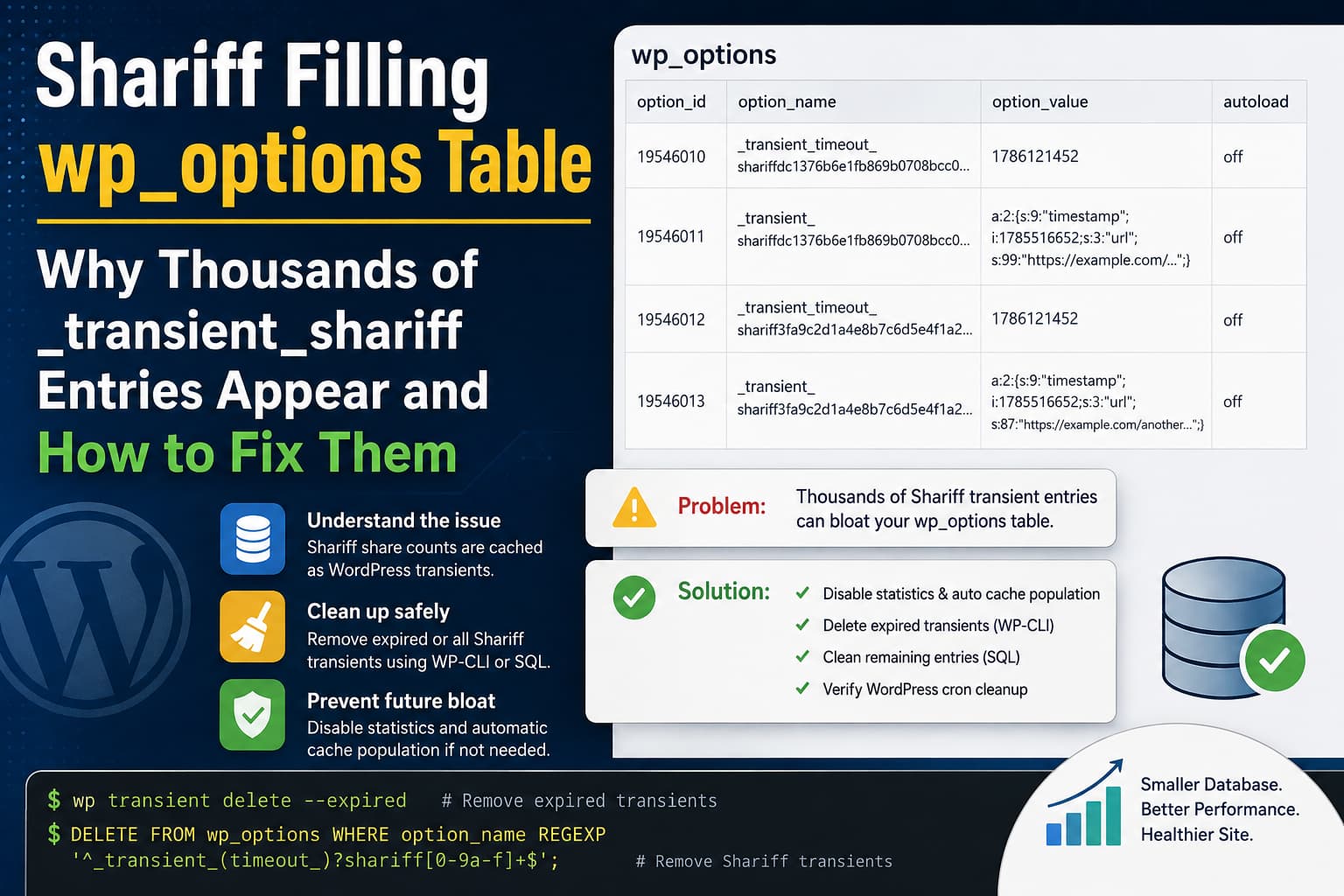
A WordPress administrator inspecting the wp_options database table may discover thousands of entries belonging to the Shariff Wrapper plugin.
Typical rows look similar to this:
_transient_timeout_shariffdc1376b6e1fb869b0708bcc00d8ca095
1786121452

_transient_shariffdc1376b6e1fb869b0708bcc00d8ca095
a:2:{s:9:"timestamp";i:1785516652;s:3:"url";s:99:"https://example.com/...";}
In one reported case, the wp_options table contained approximately 4,500 rows, with around 3,700 belonging to Shariff.
This can look like a plugin malfunction, especially when the option names are cryptic and the database continues growing. However, these entries are usually cached share-count data rather than permanent plugin settings.
The large number of rows can still become a database-management problem, particularly on websites with many posts, pages, URL variations, or a malfunctioning WordPress cron system.
This guide explains:
- Why Shariff creates these entries
- Why they appear in pairs
- Whether they are autoloaded
- How to find expired Shariff transients
- How to remove them safely
- How to prevent the table from filling again
- When the behavior should be reported as a plugin bug
What Are the _transient_shariff Entries?
Shariff Wrapper provides privacy-friendly social sharing buttons. When its share-count or statistics backend is enabled, the plugin can request share information through the WordPress server and cache the result.
The plugin documentation confirms that share counts are requested by the server and cached so that social networks do not receive a request directly from every visitor. Share-count functionality is optional and is not required for the sharing buttons themselves to work.
WordPress plugins commonly store temporary cached information using the Transients API.
A transient is not intended to be permanent data. It is a cached value that can be regenerated when needed. WordPress normally stores transients in the database when no persistent object cache is active.
The serialized Shariff value commonly contains information such as:
timestamp
url
facebook
pinterest
other supported share counts
The random-looking characters after shariff are most likely a hash used to associate the cache with a particular URL.
For example:
shariffdc1376b6e1fb869b0708bcc00d8ca095This allows Shariff to store separate cached data for separate posts and URLs without putting the complete URL inside the option name.
Why Does Every Shariff Transient Appear as Two Rows?
An expiring WordPress transient stored in the database normally uses two option rows.
The first row stores the cached value:
_transient_shariff...The second stores the expiration timestamp:
_transient_timeout_shariff...Therefore, 3,700 Shariff rows do not necessarily represent 3,700 different cached URLs.
If every value has a matching timeout, the table contains approximately:
3,700 database rows ÷ 2 = 1,850 cached URLsThere may be slightly more or fewer actual transients if some value or timeout rows have become orphaned.
Are These Entries Expiring Correctly?
The example values provide an important clue:
Cached timestamp: 1785516652
Timeout value:    1786121452
The difference is:
604,800 secondsThat equals exactly seven days.
This indicates that the example entry was created with an expiration time and was not intended to remain permanently.
The presence of thousands of entries therefore does not automatically prove that Shariff is ignoring expiration times. It may simply mean that the plugin has created a seven-day cache for a large number of URLs.
Are the Shariff Entries Autoloaded?
The reported rows show the autoload value as:
offThat is good.
It means these particular Shariff cache entries are not being loaded automatically during every normal WordPress request.
This significantly reduces their direct effect on frontend page performance compared with thousands of autoloaded options.
However, a large number of non-autoloaded rows can still cause other problems:
- Larger database backups
- Slower database exports and imports
- Increased database storage
- More rows for maintenance tools to inspect
- Longer
wp_optionsoptimization operations - More complicated troubleshooting
- Slower queries that scan a large portion of the options table
- Additional work for database-cleanup plugins
The row count alone is not always a serious performance problem. The total size of the rows and the condition of the relevant indexes also matter.
Why Does Shariff Create So Many Transients?
The most likely cause is a combination of the following Shariff settings:
Statistics
Automatically populate the cache
When statistics are active, Shariff stores share-count results for individual URLs.
When automatic cache population is active, the plugin may prepare the cache for many posts instead of waiting for each page to be visited naturally.
A previous Shariff user experiencing more than 1,000 _transient_shariff entries reported that disabling both the statistics feature and the automatic cache-population option caused most of the rows to disappear over time.
The total number of cache entries can also increase because of:
- A large number of published posts or pages
- WooCommerce products
- Custom post types
- Multilingual versions of the same content
- URLs with different query parameters
- HTTP and HTTPS URL variations
wwwand non-wwwvariations- URLs with or without trailing slashes
- Deleted or redirected content
- Automatically generated archives
- Bots requesting many URL variations
- A cache-prefill process running repeatedly
If the number of Shariff transients is reasonably close to twice the number of public URLs, the behavior may be expected.
If a website has only 100 public pages but Shariff creates several thousand distinct cached URLs, URL variations or repeated cache generation should be investigated.
Step 1: Create a Database Backup
Do not delete options before creating a database backup.
Using WP-CLI:
wp db export before-shariff-cleanup.sqlYou can also create the backup through:
- Your hosting control panel
- phpMyAdmin
- Adminer
- A WordPress backup plugin
- Your server’s automated backup system
Test the cleanup on a staging copy first when the website is important or receives active traffic.
Step 2: Count the Shariff Rows
Open phpMyAdmin, select the WordPress database, and open the SQL tab.
Run:
SELECT
    COUNT(*) AS shariff_rows,
    ROUND(SUM(LENGTH(option_value)) / 1024 / 1024, 2) AS value_size_mb
FROM wp_options
WHERE option_name REGEXP
'^_transient_(timeout_)?shariff[0-9a-f]+$';
This shows:
- The total number of matching rows
- The approximate size of their stored values
Replace wp_options when your website uses a different database prefix.
For example:
abc_options
site1_options
wordpress_options
Do not assume that every website uses the default wp_ prefix.
Step 3: Check How Many Have Expired
Run the following read-only query:
SELECT COUNT(*) AS expired_shariff_timeouts
FROM wp_options
WHERE option_name REGEXP
'^_transient_timeout_shariff[0-9a-f]+$'
AND CAST(option_value AS UNSIGNED) < UNIX_TIMESTAMP();
This counts timeout rows with expiration timestamps earlier than the current server time.
You can inspect a sample with:
SELECT
    option_name,
    option_value AS expiration_timestamp,
    FROM_UNIXTIME(option_value) AS expiration_date,
    autoload
FROM wp_options
WHERE option_name REGEXP
'^_transient_timeout_shariff[0-9a-f]+$'
ORDER BY CAST(option_value AS UNSIGNED) ASC
LIMIT 50;
This helps determine whether the database contains:
- Mostly active cache records
- Mostly expired records
- Old records that should already have been removed
Step 4: Disable Unnecessary Shariff Statistics
When numeric share counts are not required, open the Shariff settings and locate the statistics section.
Depending on the plugin language and version, the settings may be named:
Statistics
Share Counts
Backend
Automatically populate the cache
Automatically fill the cache
Disable:
Statistics
Automatically populate the cache
Then save the settings.
The social sharing buttons should continue working, but numeric share counters, rankings, and related statistical features will no longer be updated. Shariff’s documentation describes share-count collection as an optional feature that must be enabled separately.
Disabling these settings is the most important step. Deleting the database rows without changing the configuration may cause Shariff to create them again.
Step 5: Delete Expired Transients With WP-CLI
The safest general cleanup is to remove only expired transients.
Run:
wp transient delete --expiredWP-CLI officially supports the --expired option and deletes expired transient records from the database.
This command is not limited to Shariff. It removes expired transients belonging to WordPress and other plugins as well.
It does not remove active transients whose expiration time has not arrived.
You can inspect Shariff transients before deleting anything:
wp transient list --search='shariff*' --human-readableWP-CLI supports wildcard searches when listing transient names.
Step 6: Remove Only Expired Shariff Transients With SQL
When you want to remove expired Shariff entries without touching expired transients from other plugins, use a targeted query.
First create a backup, then run:
DELETE value_row, timeout_row
FROM wp_options AS timeout_row
LEFT JOIN wp_options AS value_row
    ON value_row.option_name = CONCAT(
        '_transient_',
        SUBSTRING(
            timeout_row.option_name,
            CHAR_LENGTH('_transient_timeout_') + 1
        )
    )
WHERE timeout_row.option_name REGEXP
'^_transient_timeout_shariff[0-9a-f]+$'
AND CAST(timeout_row.option_value AS UNSIGNED) < UNIX_TIMESTAMP();
This query:
- Finds expired Shariff timeout rows.
- Finds each corresponding value row.
- Deletes both parts of the transient.
- Leaves active Shariff cache entries untouched.
- Leaves unrelated WordPress transients untouched.
Run the earlier count query again after cleanup to confirm the result.
Step 7: Delete All Shariff Transients Immediately
When Shariff statistics have been disabled and you want to remove every existing Shariff cache entry, first preview the rows:
SELECT
    option_id,
    option_name,
    autoload,
    LENGTH(option_value) AS value_bytes
FROM wp_options
WHERE option_name REGEXP
'^_transient_(timeout_)?shariff[0-9a-f]+$'
ORDER BY option_id;
Confirm that the results contain only names beginning with:
_transient_shariff
_transient_timeout_shariff
Then run:
DELETE FROM wp_options
WHERE option_name REGEXP
'^_transient_(timeout_)?shariff[0-9a-f]+$';
This removes both active and expired Shariff transient rows.
Deleting the cache should not delete posts, pages, users, comments, plugin configuration, or permanent social-sharing data.
However, currently cached share counts will be lost and may be requested again if the statistics backend remains enabled.
Step 8: Check WordPress Cron
Modern WordPress includes a function called:
delete_expired_transients()It deletes expired transient values together with their corresponding timeout rows.
WordPress also schedules transient cleanup as a daily cron task.
Check whether the event exists:
wp cron event list | grep delete_expired_transientsYou should see an event named:
delete_expired_transientsRun it manually when necessary:
wp cron event run delete_expired_transientsThen check the Shariff row count again.
Why Scheduled Cleanup May Not Run
WordPress cron is normally triggered by website requests. Cleanup may be delayed when:
- The website receives very little traffic
DISABLE_WP_CRONis enabled- A server cron job was not configured afterward
- Loopback requests are blocked
- A security plugin blocks
wp-cron.php - Basic authentication protects the staging website
- A fatal PHP error interrupts cron execution
- The cron event is missing or corrupted
- The hosting provider disables internal HTTP requests
Check the Site Health screen for loopback or scheduled-event errors:
Tools > Site HealthWP Crontrol can also be used to inspect scheduled events from the WordPress dashboard.
Step 9: Optimize the Table Only When Necessary
Deleting rows does not always immediately reduce the physical database file size.
If wp_options remains unusually large after cleanup, you can optimize the table:
OPTIMIZE TABLE wp_options;Do this only after creating a database backup.
On an InnoDB database, optimization may rebuild the table and temporarily lock or heavily load it. Run it during a low-traffic maintenance period, especially on large websites.
Do not run OPTIMIZE TABLE repeatedly as a routine fix.
What Happens If the Entries Return?
Some Shariff transients returning is expected when share counts remain enabled.
The important question is how quickly they return and how many distinct URLs they represent.
Normal Behavior
The behavior is probably normal when:
- Each public page generates approximately one cached transient
- Every transient has a valid timeout
- Expired rows are removed
- The total size remains modest
- The entries are marked
autoload = off - The row count stabilizes
Possible Problem
Further investigation is needed when:
- Thousands of rows return within a few hours
- New entries continue appearing for nonexistent pages
- The same content is cached under many query-string variations
- Expired entries remain for weeks
- The
delete_expired_transientscron event fails - Cache preloading repeatedly creates duplicate URL variants
- The number of cached URLs greatly exceeds the number of public pages
- Disabling statistics does not stop new entries
Check for URL Variations
Because the cached value contains the original URL, inspect several transient values in phpMyAdmin.
Look for differences such as:
https://example.com/post/
https://example.com/post
https://www.example.com/post/
http://example.com/post/
https://example.com/post/?utm_source=facebook
https://example.com/post/?fbclid=...
https://example.com/post/?replytocom=123
These URLs may point to the same content but produce different cache keys.
Make sure WordPress consistently redirects visitors to one canonical format:
- One HTTPS version
- Either
wwwor non-www - One trailing-slash format
- Correct WordPress Address and Site Address values
- Proper canonical tags
- Redirects that remove unnecessary tracking parameters when appropriate
Do not indiscriminately remove all query parameters. WooCommerce, search pages, filtering plugins, language switchers, and marketing tools may require them.
Would Redis Solve the Problem?
A persistent object cache such as Redis can store WordPress transients outside the wp_options table.
WordPress checks for an external object cache and uses it for transient operations when one is active.
Redis may reduce transient-related database activity, but it should not be installed solely to hide an uncontrolled cache-generation problem.
Use Redis when:
- The hosting environment supports it properly
- The site already benefits from persistent object caching
- Cache groups and eviction are configured correctly
- The website has sufficient traffic or database load to justify it
After enabling Redis, old transient rows already stored in wp_options may still require a one-time cleanup.
Should All WordPress Transients Be Deleted?
Deleting all transients is often technically safe because properly written code should be able to rebuild them.
However, it can still cause temporary side effects:
- Plugins may need to repeat external API requests
- Cached admin data may need to regenerate
- Page generation may temporarily become slower
- Rate-limited APIs may receive many fresh requests
- Some poorly designed plugins may misuse transients for session-like data
For this issue, targeted Shariff cleanup is preferable to:
wp transient delete --allUse the --all option only when you understand its effect across the entire website.
Is This a Shariff Plugin Bug?
Thousands of rows by themselves do not prove that the plugin is broken.
The entries are consistent with WordPress’s transient format, and the provided timestamps show a valid seven-day expiration period.
The behavior becomes more questionable when:
- The cache contains unnecessary URL variations
- Expired entries are not being removed
- Automatic cache population runs too frequently
- Cache growth is effectively unlimited
- Disabling statistics does not stop regeneration
- Deleted content leaves permanent orphaned cache entries
- The plugin does not provide a cache-clear tool
- The plugin continuously repopulates entries that are never used
A useful plugin improvement would be to provide:
- A “Clear Shariff Cache” button
- Scheduled cleanup limited to Shariff transients
- URL normalization before cache keys are generated
- Removal of tracking parameters from cache keys
- Cache deletion when a post is permanently deleted
- Batch limits for automatic cache population
- A cache-size or entry-count indicator
- Clear documentation about expected database growth
An official plugin update would need to come from the Shariff Wrapper maintainers. Until then, disabling unnecessary statistics and performing targeted cleanup is the safest practical solution.
Recommended Final Fix
For most affected websites, use this process:
- Create a complete database backup.
- Update WordPress and Shariff Wrapper.
- Disable Shariff statistics if numeric share counts are not needed.
- Disable automatic cache population.
- Run:
wp transient delete --expired- Check that the
delete_expired_transientscron event is working. - Use the targeted SQL query to remove remaining Shariff transients.
- Monitor
wp_optionsfor several days. - Investigate URL variations if thousands of entries return.
- Optimize the table only if its physical size remains excessive.
Frequently Asked Questions
Why are there two rows for every Shariff transient?
WordPress normally stores an expiring database transient as one value row and one timeout row. This is why the entries appear in pairs.
Does deleting the Shariff transients break the share buttons?
The buttons should continue working. If share-count statistics remain enabled, the plugin may recreate the cache and request fresh counts.
Will deleting the rows remove historical share counts?
It removes the locally cached count data. Counts provided by external social platforms may be requested again, depending on whether those platforms and the plugin still support the relevant count API.
Why do the rows return after deletion?
Shariff recreates the transient when it needs to cache statistics for a URL. Disable statistics and automatic cache population before deleting the entries when you do not need share counts.
Do these entries slow down every page?
The reported entries use autoload = off, so they are not automatically loaded during every request. They can still enlarge the database and affect maintenance, backups, exports, and queries that scan the options table.
Can a database-cleanup plugin remove them?
A database-cleanup plugin may remove expired transients, but it may not prevent Shariff from recreating active cache entries. Change the Shariff settings first.
How many actual transients are represented by 3,700 rows?
Approximately 1,850, assuming each cached value has one matching timeout row.
Should I report this to the plugin developer?
Report it when the number of entries greatly exceeds the number of valid site URLs, expired entries are never cleaned, or the cache continues growing after statistics and automatic population have been disabled.
Final Thoughts
The _transient_shariff and _transient_timeout_shariff rows are not malware or unknown permanent settings. They are temporary cache records created for Shariff’s optional share-count and statistics functionality.
The reported example also contains a valid seven-day timeout, which suggests the cache was created intentionally.
The real issue is usually not that Shariff uses transients. It is that statistics and automatic cache population can create a separate transient for a large number of URLs, while failed or delayed cron cleanup allows expired records to remain in the database.
The most effective solution is to disable unneeded statistics, turn off automatic cache population, remove expired records, verify WordPress cron, and then perform a targeted cleanup of the remaining Shariff entries.
