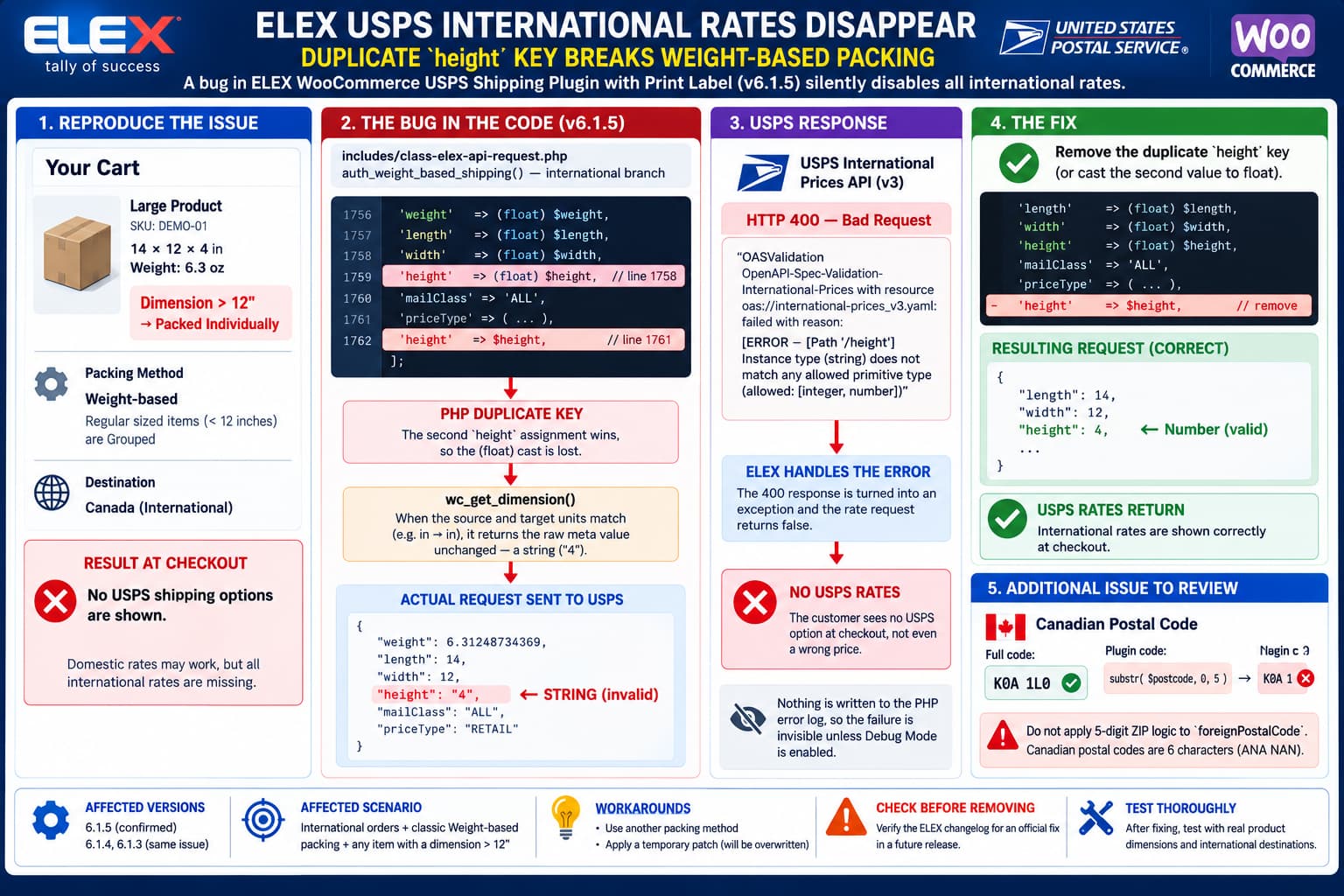
A particularly difficult WooCommerce shipping failure can occur when the ELEX WooCommerce USPS Shipping Plugin with Print Label & Shipment Tracking uses its classic Weight-based packing method for an international order.
The symptom is severe:
Domestic rates may work
International order added
Large product is present
        ↓
USPS returns HTTP 400
        ↓
Plugin aborts the rate request
        ↓
No USPS shipping methods appear at checkout
The underlying problem is not the product’s dimensions, USPS credentials, or an unsupported service.
In ELEX USPS 6.1.5, the international request created in the classic weight-based packing path can define the PHP array key:
'height'twice.
The first assignment casts the value correctly:
'height' => (float) $height,but a later assignment uses the same key without the cast:
'height' => $height,PHP does not keep both values.
When an array literal contains the same key more than once, PHP silently keeps the last value and overwrites the previous one. The PHP manual explicitly documents this behavior.
That means this:
[
    'height' => (float) $height,
    ...
    'height' => $height,
]
effectively becomes:
[
    'height' => $height,
]
If $height is still the string:
"4"the JSON request contains:
"height": "4"rather than:
"height": 4For USPS International Prices, that type difference matters.
Why Only height Becomes a String
At first glance, this seems strange because ELEX obtains the dimensions through WooCommerce’s dimension-conversion function.
The plugin can have values conceptually equivalent to:
$length = wc_get_dimension( $product_length, 'in' );
$width  = wc_get_dimension( $product_width, 'in' );
$height = wc_get_dimension( $product_height, 'in' );
WooCommerce documents wc_get_dimension() as the standard function for converting a dimension to a requested unit.
However, the current WooCommerce implementation contains an important detail.
Unlike wc_get_weight(), which explicitly begins by converting its input to a float, wc_get_dimension() does not immediately cast its input.
It performs arithmetic only when:
source unit ≠ target unitIf WooCommerce’s configured dimension unit is already inches and ELEX asks for inches, the conversion block is skipped and the function returns the original $dimension value.
Product dimensions originate from WordPress/WooCommerce metadata and commonly arrive as strings.
Therefore:
wc_get_dimension( '4', 'in' );when the shop is already configured in inches can effectively remain:
'4'rather than necessarily becoming:
4.0That is why ELEX’s explicit casts are important.
Why Length and Width Still Work
The affected request body effectively contains:
'weight' => (float) $weight,
'length' => (float) $length,
'width'  => (float) $width,
'height' => (float) $height,

'mailClass' => 'ALL',
'priceType' => $price_type,

'height' => $height,
PHP resolves duplicate string keys by retaining the last value.
So the resulting PHP structure becomes equivalent to:
'weight' => (float) $weight,
'length' => (float) $length,
'width'  => (float) $width,
'height' => $height,
The difference therefore survives into json_encode().
PHP’s JSON encoder preserves the underlying scalar type: strings are encoded as JSON strings and numeric values as JSON numbers.
The result can consequently look like:
{
    "weight": 6.31248734369,
    "length": 14,
    "width": 12,
    "height": "4",
    "mailClass": "ALL",
    "priceType": "RETAIL"
}
Notice the quotes around:
"4"That is not equivalent to:
4to a schema-validating API.
Why USPS Rejects the Request
USPS’s current International Prices 3.0 API calculates international postage from characteristics including:
- origin ZIP;
- foreign postal code;
- destination country;
- weight;
- length;
- width;
- height;
- mail class;
- pricing information.
USPS’s own API examples submit dimensions as JSON numbers:
"weight": 4,
"length": 6,
"width": 0.25,
"height": 3
and:
"weight": 1.2,
"length": 6,
"width": 6,
"height": 6
rather than quoted strings.
A strict OpenAPI validator can therefore reject:
"height": "4"because its type is:
stringwhen the permitted schema expects a numeric value.
The resulting failure is an HTTP 400 schema-validation response rather than a normal USPS rate response.
Why the Entire USPS Rate List Disappears
This bug is more damaging than simply producing one incorrect shipping price.
The request is rejected before USPS can calculate the available services.
The plugin’s rate-processing path then treats the API error as a failed request.
Conceptually:
Build international rate request
        ↓
Send request to USPS
        ↓
USPS OpenAPI validation fails
        ↓
HTTP 400
        ↓
ELEX error/exception handling
        ↓
Rate call returns failure
        ↓
No USPS methods added to checkout
Therefore the customer does not see:
Priority Mail International — wrong priceThey can instead see:
No USPS shipping optionat all.
That makes the issue easy to misdiagnose as:
- unsupported destination;
- USPS outage;
- account authentication problem;
- shipping-zone configuration;
- disabled international service;
- bad product weight.
Why the Bug Appears Only With Certain Products
ELEX’s own documentation explains how the classic Weight-based packing method operates.
Items with dimensions no larger than 12 inches are grouped together and quoted primarily using the combined weight.
Items whose length, width, or height exceeds 12 inches are instead packed individually.
Conceptually:
Product A: 8 × 6 × 4
Product B: 10 × 5 × 3
        ↓
Grouped
        ↓
Combined weight sent
But:
Product C: 14 × 12 × 4
        ↓
Dimension > 12"
        ↓
Quoted individually
        ↓
Real dimensions sent to USPS
That individual-package path is where:
length
width
height
become significant.
This explains a confusing symptom pattern:
International cart with small items
→ works

Same destination
+ one product larger than 12"
→ all USPS rates disappear
The destination did not suddenly become invalid.
The larger item caused the request to enter the defective dimension-bearing path.
Why a 0 × 0 × 0 Grouped Package May Hide the Bug
When grouped regular-size items are represented without meaningful package dimensions, the problematic non-zero height value may never become relevant in the same way.
The request may effectively contain dimensions that pass validation, while an individually packed large product exposes the raw metadata-backed dimension.
This explains why a store can use the same:
- USPS account;
- international destination;
- WooCommerce settings;
- product weights;
successfully until one product larger than the 12-inch threshold enters the cart.
The Correct Code Fix
The affected array should contain height exactly once.
The clean fix is:
'weight'    => (float) $weight,
'length'    => (float) $length,
'width'     => (float) $width,
'height'    => (float) $height,
'mailClass' => 'ALL',
'priceType' => $price_type,
and the later duplicate:
'height' => $height,should be removed.
Alternatively, changing the second value to:
'height' => (float) $height,would restore the correct type, but leaving two identical keys in an array literal is poor practice and allows the same class of mistake to return later.
The better fix is:
one key
one value
one explicit numeric cast
Why Casting All Four Package Measurements Is Sensible
Even though the immediate failure concerns height, all USPS numeric request parameters should ideally be normalized immediately before constructing the request.
For example:
$request = [
    'weight' => (float) $weight,
    'length' => (float) $length,
    'width'  => (float) $width,
    'height' => (float) $height,
];
This creates a boundary between:
WordPress/WooCommerce dataand:
external USPS API dataThe external API should not depend on whether a WooCommerce helper happened to perform arithmetic and thereby converted a numeric string into a numeric PHP value.
Why This Is Not Really a WooCommerce Bug
WooCommerce’s documentation describes wc_get_dimension() as returning a converted dimension, and its PHPDoc currently declares a float return.
However, its implementation preserving the original value when no conversion is necessary is not sufficient by itself to break USPS requests.
The ELEX code already anticipates the need for normalization:
(float) $length
(float) $width
(float) $height
The failure occurs because the correctly cast height is subsequently overwritten by a duplicate key.
So the most direct defect is in the ELEX request-building array.
WooCommerce’s behavior merely explains why the overwritten value remains a string rather than coincidentally becoming numeric.
Why Other ELEX Packing Methods Can Work
If another packing implementation creates the international USPS body as:
'length' => (float) $length,
'width'  => (float) $width,
'height' => (float) $height,
without redefining height, the JSON remains valid.
That produces:
"length": 14,
"width": 12,
"height": 4
rather than:
"height": "4"This explains why switching packing algorithms can appear to fix the problem even when:
- products are unchanged;
- USPS credentials are unchanged;
- the destination is unchanged.
The alternative method simply bypasses the defective request-building block.
Temporary Workaround 1: Use Another Packing Method
Until ELEX ships a patch, the safest no-code workaround is to use a packing method that does not enter the affected classic weight-based request path.
ELEX currently documents several parcel-packing strategies, including:
- Pack Items Individually;
- Pack into boxes with weight and dimensions;
- Weight-based;
- Weight-based improved;
- Weight-based Advanced.
A store should test the alternative method against actual packaging requirements before switching production behavior because changing the packing algorithm can change calculated postage.
Do not switch algorithms merely to make rates appear if the resulting packaging model is inaccurate for fulfillment.
Temporary Workaround 2: Patch the Duplicate Key
For an experienced developer who needs an immediate production recovery, removing the duplicate assignment is a very small patch.
Before editing anything:
- Back up the plugin.
- Record the installed ELEX version.
- Make the change on staging.
- enable ELEX Debug Mode.
- repeat the exact international checkout.
- verify the request JSON.
- verify rates against USPS.
The desired request should contain:
"height": 4not:
"height": "4"Remember that editing the ELEX plugin directly is temporary.
The next plugin update can overwrite the change.
Maintain a patch record until ELEX publishes an official fix.
Verify the Fix With Debug Mode
ELEX’s changelog states that its USPS 3.0 integration can expose API request and response information for debugging.
Use a known failing product, for example:
Weight: 6.3 oz
Length: 14 in
Width: 12 in
Height: 4 in
and an international destination.
Before the fix, inspect the JSON for:
"height": "4"After the fix:
"height": 4Then confirm that USPS returns a normal rate response rather than an OpenAPI validation error.
Do Not Test Only the Checkout UI
The checkout result alone is insufficient.
A good regression test should check all three levels.
1. PHP type
Before JSON encoding:
var_dump( $request['height'] );should show something numeric such as:
float(4)rather than:
string(1) "4"2. JSON
The request should show:
"height": 43. USPS result
The International Prices endpoint should return rate data rather than HTTP 400.
Testing all three makes the regression easy to catch automatically.
Add a Regression Test for Duplicate Keys
A static analyzer can detect the underlying programming mistake before runtime.
Tools such as PHPStan explicitly flag duplicate array literal keys because PHP silently overwrites earlier entries.
For example:
[
    'height' => (float) $height,
    'width'  => (float) $width,
    'height' => $height,
]
can be reported as a duplicate-key problem during development.
That would have caught this bug before a USPS request was ever made.
A Unit Test Should Also Verify JSON Types
A regression test could construct a product where dimensions originate as strings:
$length = '14';
$width  = '12';
$height = '4';
Then assert:
$this->assertIsFloat( $request['height'] );and after JSON encoding/decoding:
$this->assertIsFloat( $decoded->height );or otherwise assert that the JSON token is numeric.
This specifically covers the WooCommerce same-unit case that exposes the problem.
Version 6.1.5 Does Not List a Fix Yet
ELEX’s official changelog currently lists 6.1.5, released September 2, 2026.
The published changes are:
- WordPress 7.1 compatibility;
- WooCommerce 11.0 compatibility;
- PHP 8.4 compatibility;
- drag-and-drop ordering for displayed shipping services.
There is no published 6.1.5 fix for the duplicate international height field.
So administrators on 6.1.5 should not assume an update within that same release has already corrected this specific failure.
Check the ELEX changelog before removing any temporary workaround after a future update.
The foreignPostalCode Truncation Deserves a Separate Fix
There is another international-address issue worth auditing independently of the height failure.
If the international request creates:
'foreignPostalCode' => substr( $postcode, 0, 5 ),then every foreign postal code is forcibly truncated to five characters.
That assumption fits U.S. ZIP codes.
It does not fit international postal systems generally.
Canadian Postal Codes Are Six Characters
Canada Post defines a Canadian postal code as six alphanumeric characters in the pattern:
ANA NANfor example:
K0A 1L0Applying:
substr( 'K0A 1L0', 0, 5 )produces:
K0A 1which discards:
L0and leaves an incomplete postal code.
Canada Post explicitly states that the postal code is an integral part of the address and describes the full six-character format.
USPS Does Not Treat Foreign Postal Codes as Five-Digit ZIPs
USPS’s own API examples show foreign postal codes as strings rather than fixed five-digit U.S. ZIPs.
For example, the official USPS API examples include an international request containing a UK-style value:
"foreignPostalCode": "SN96JE"which is six characters even without a space.
That is strong evidence that a universal:
substr( $postcode, 0, 5 )rule is inappropriate for the foreignPostalCode field.
The Postal-Code Bug Is Separate From the Current HTTP 400
Do not confuse the two defects.
If USPS explicitly responds:
Path '/height'
Instance type string
allowed: integer, number
then the immediate rate failure is the height type.
Fixing the Canadian postal code alone would not resolve that particular schema-validation error.
Likewise, once height is fixed, a truncated destination postal code could still:
- reduce rating accuracy;
- cause address/rating validation failures;
- affect destination-specific availability;
- create problems for countries with longer formats.
They should therefore be fixed separately.
Safer Foreign Postal-Code Handling
The plugin should preserve the complete destination postal code unless USPS documentation for a particular endpoint specifies normalization.
A conceptual implementation is:
$foreign_postcode = trim( (string) $postcode );with any USPS-required whitespace or country-specific normalization handled explicitly.
It should not apply U.S. ZIP assumptions to:
foreignPostalCodeglobally.
For Canada, the complete address data should retain the full postal identifier rather than reducing:
K0A 1L0to:
K0A 1How to Reproduce the height Bug Reliably
Use a staging WooCommerce store with:
Weight unit:
oz

Dimension unit:
in

Packing:
Weight-based
Regular sized items (< 12 inches) are grouped
Create a product:
Weight: 6 oz
Length: 14 in
Width: 12 in
Height: 4 in
Use an international shipping address.
ELEX’s documentation confirms that a product larger than 12 inches in any dimension is packed individually under this method.
Enable plugin debugging.
Then inspect the International Prices request.
Broken
{
    "length": 14,
    "width": 12,
    "height": "4"
}
Correct
{
    "length": 14,
    "width": 12,
    "height": 4
}
Test Different WooCommerce Dimension Units Too
The bug is most reliably exposed when:
WooCommerce source unit = USPS target unitbecause no conversion arithmetic occurs.
Therefore test:
Inches → Inches
Most likely to preserve string inputCentimeters → Inches
Arithmetic conversion takes place, which may implicitly make the value numeric before ELEX receives it.
If the problem appears only with same-unit input, that further supports the type-flow diagnosis.
The correct ELEX fix should make both scenarios behave identically because the API request performs an explicit cast at its boundary.
Test All International Packing Strategies After the Patch
A full regression test should cover:
Pack individually
Pack into boxes
Classic Weight-based
Weight-based improved
Weight-based Advanced
with:
small product
large product >12"
multiple quantities
simple product
variable product
and at least:
Canada
United Kingdom
another international destination
The purpose is not merely to confirm that one checkout now displays rates.
It is to ensure every international request produces consistent JSON types.
Test Domestic Rates Separately
The defect is in the international request path.
A passing domestic USPS test does not prove the international integration is healthy.
Keep distinct tests:
US → USand:
US → Canada
US → UK
This is especially important because ELEX supports both domestic and international USPS shipping.
What to Send ELEX Support
A technically useful report should include:
ELEX USPS version:
6.1.5

WooCommerce version:
11.x

WordPress version:
7.1

PHP:
...

Weight unit:
oz

Dimension unit:
in

Packing method:
Weight-based
Regular sized items (<12 inches) grouped

Product:
14 × 12 × 4 in

Destination:
International

Result:
No USPS rates
Then include a sanitized request showing:
"height": "4"and the USPS schema response identifying /height.
Point support to the duplicate height key inside:
includes/class-elex-api-request.php
auth_weight_based_shipping()
international branch
The most useful proposed correction is simply:
 'length' => (float) $length,
 'width'  => (float) $width,
 'height' => (float) $height,
 'mailClass' => 'ALL',
 'priceType' => $price_type,
-'height' => $height,
Also report the separate:
substr( $postcode, 0, 5 )international postal-code concern independently.
Practical Conclusion
The missing international USPS rates are caused by a data-type regression in the ELEX classic weight-based international request path.
The request correctly begins with:
'height' => (float) $heightbut defines height again later without the cast.
PHP silently overwrites duplicate array keys with the last value.
WooCommerce’s current wc_get_dimension() implementation can preserve a numeric-string dimension when the store’s source and target units are identical, because it performs no initial float cast and skips conversion arithmetic in that case.
The resulting PHP string is then serialized by json_encode() as:
"height": "4"rather than:
"height": 4and USPS’s International Prices API expects dimensions to be numeric, as demonstrated by USPS’s official request examples.
For the affected code, the appropriate fix is to remove the duplicate assignment and retain exactly one:
'height' => (float) $height,The bug becomes especially visible under ELEX’s classic Weight-based packing method because ELEX documents that products over 12 inches are packaged individually and therefore send their actual dimensions.
Separately, any universal five-character truncation of foreignPostalCode should also be reviewed. Canada Post defines Canadian codes using all six alphanumeric characters, while USPS itself demonstrates foreign postal-code inputs longer than five characters.
Until an official ELEX release contains the correction, administrators should either use a validated alternative packing method or maintain a documented temporary patch, verify the outgoing JSON in Debug Mode, and retest after every ELEX update.
