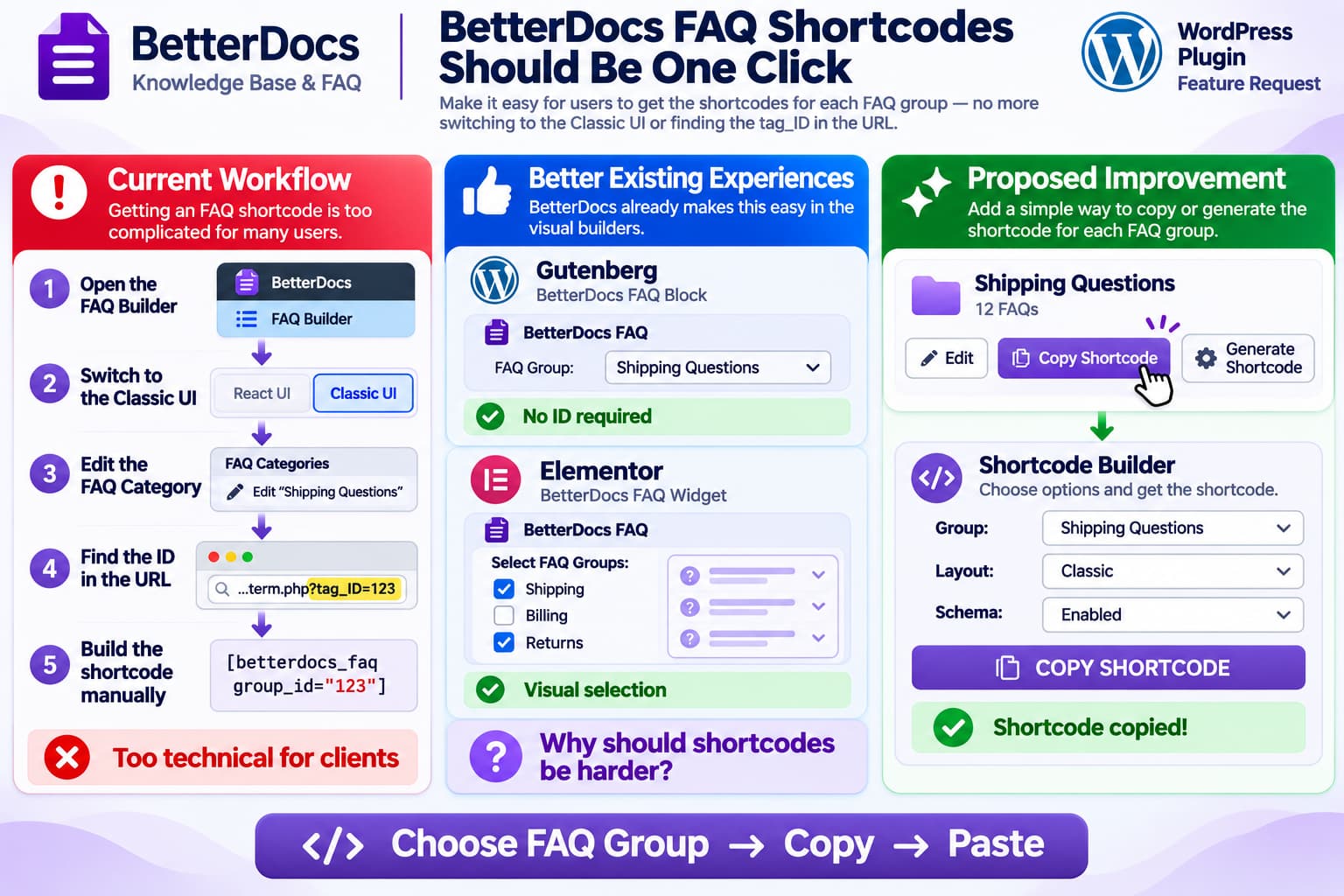
BetterDocs includes a powerful FAQ Builder, but one part of the workflow can still be unnecessarily difficult for non-technical WordPress users:
displaying a specific FAQ group using a shortcode.
A typical workflow may currently require the administrator to:
Open BetterDocs FAQ Builder
        ↓
Switch to the Classic UI
        ↓
Open/edit the FAQ category
        ↓
Inspect the browser URL
        ↓
Find tag_ID=123
        ↓
Copy the numeric ID
        ↓
Manually construct the shortcode
For an experienced WordPress developer, this is manageable.
For a client who simply wants to place a group of FAQs on a page, it is far more technical than it needs to be.
A new WordPress.org support request raises exactly this issue and asks BetterDocs to provide either an easier way to retrieve FAQ shortcodes or a shortcode builder.
Why tag_ID Is Poor User Experience
WordPress taxonomy screens have historically exposed the numeric term ID through URLs such as:
/wp-admin/term.php?taxonomy=...
&tag_ID=123
Developers understand that:
tag_ID=123means:
FAQ Group ID = 123But most content editors should never need to understand this.
A client should not have to know:
- what a taxonomy is;
- what a term ID is;
- what
tag_IDmeans; - where the ID appears in the browser URL;
- how to manually assemble shortcode attributes.
The FAQ Builder already knows which group the user is looking at.
The interface should therefore be able to expose the correct shortcode automatically.
The Current BetterDocs Admin Is Already Modern Enough for This
This request is especially reasonable because BetterDocs has recently modernized its FAQ administration.
BetterDocs 4.6.0 introduced a revamped React-based FAQ Builder, along with redesigned Knowledge Base, Category, Tag and Glossary administration screens.
The current BetterDocs release listed on WordPress.org is 4.9.5.
So the product no longer depends entirely on WordPress’s old taxonomy interface.
That makes the modern FAQ Builder an ideal place to add something as simple as:
FAQ Group: Shipping Questions

[ Copy Shortcode ]
rather than sending users back to the Classic UI to discover an internal numeric identifier.
BetterDocs Already Solves This Problem in Visual Builders
Interestingly, BetterDocs already provides a much easier workflow when users do not use shortcodes.
Elementor
BetterDocs’ Elementor FAQ widget lets the editor:
- drag the BetterDocs FAQ widget onto a page;
- choose the layout;
- select which FAQ groups should appear.
The documentation specifically says users can select the FAQ groups they want to show or hide from the Elementor widget settings.
No tag_ID hunting is required.
Gutenberg / Full Site Editor
BetterDocs also provides an FAQ block that works with WordPress’s block editor and Full Site Editor. Its documentation says FAQ layouts can be selected and configured visually.
BetterDocs 4.9.1 even added an improvement allowing the FAQ block’s group filter to accept bare term IDs, showing that group filtering is an actively maintained part of the current FAQ implementation.
So BetterDocs effectively has two very different user experiences:
Elementor / Gutenberg

Choose FAQ Group:
[ Shipping Questions ▼ ]

Easy ✓
versus:
Shortcode

Open Classic UI
Find tag_ID
Copy number
Construct shortcode manually

Technical ✕
That inconsistency is the real usability problem.
Why Shortcodes Still Matter
It might be tempting to say:
Just use the Gutenberg block or Elementor widget.
That does solve the problem for many sites.
But shortcodes remain useful when:
- using another page builder;
- inserting FAQs into templates;
- working with widgets or theme options;
- placing FAQs inside content fields that accept shortcodes but not blocks;
- creating reusable site sections;
- integrating with legacy WordPress layouts;
- building pages programmatically.
BetterDocs itself continues to support shortcodes throughout the plugin.
Its official shortcode documentation directs users to:
BetterDocs → Settings → Shortcodes
for several documentation-related shortcode types.
The current plugin also continues adding and fixing shortcode functionality. For example, BetterDocs 4.3.8 fixed FAQ schema handling in FAQ shortcodes.
So shortcodes are not merely a legacy feature that can be ignored.
BetterDocs Has Previously Required the FAQ Group ID
An older BetterDocs support response explains that when only particular FAQ groups should appear, users need to set the FAQ group ID for the desired group.
That confirms why users end up looking for the taxonomy term ID.
The functionality exists.
The usability problem is simply that BetterDocs does not make the required identifier obvious enough.
The Simplest Improvement: Add a “Copy Shortcode” Button
The lowest-friction implementation would be a button directly on each FAQ group.
For example:
┌─────────────────────────────────────┐
│ Shipping Questions                  │
│ 12 FAQs                             │
│                                     │
│ [ Edit ] [ Copy Shortcode ]         │
└─────────────────────────────────────┘
Clicking:
Copy Shortcodecould automatically place the valid group shortcode on the clipboard.
The user would then see:
✓ Shortcode copiedNo IDs.
No Classic UI.
No browser URL inspection.
No documentation lookup.
An Even Better Option: A Shortcode Builder
A dedicated builder could offer:
BetterDocs
→ FAQ Builder
→ Generate Shortcode
with controls such as:
FAQ Groups
☑ Shipping Questions
☐ Billing Questions
☑ Returns

Layout
[ Classic ▼ ]

Show Group Titles
[ Yes ▼ ]

FAQ Schema
[ Enabled ▼ ]

Default Expanded
[ None ▼ ]
and then generate:
[generated BetterDocs FAQ shortcode]with:
[ Copy Shortcode ]The important part is not the exact syntax.
The administrator should never have to know the underlying syntax unless they want to.
A Small “Shortcode” Column Could Work Too
Another simple implementation would be a column in the FAQ group list:
| FAQ Group | FAQs | Status | Shortcode |
|---|---|---|---|
| Shipping | 12 | Published | Copy |
| Returns | 8 | Published | Copy |
| Billing | 6 | Published | Copy |
Clicking Copy would generate the correct shortcode using the group’s existing internal ID.
This might be even faster for agencies managing many groups.
BetterDocs Could Reuse Its Existing Group Selector
The most compelling reason this feature should be relatively natural for BetterDocs is that its interfaces already know how to query and display FAQ groups.
The Elementor widget provides a visual FAQ-group selector.
The WordPress FAQ block also supports group selection, and BetterDocs 4.9.1 specifically improved ID handling in that group-filter mechanism.
Conceptually, the shortcode builder could therefore reuse the same selection model:
Existing:

FAQ Block
→ Select Groups
→ Group IDs stored internally
and add:
New:

Shortcode Builder
→ Select Groups
→ Generate shortcode attributes
Users would interact with human-readable group names while BetterDocs handles IDs internally.
Do Not Make Clients Learn Taxonomy IDs
The principle here goes beyond BetterDocs.
Internal database identifiers are implementation details.
A good WordPress administration interface should present:
Shipping Questions
Returns
Product Support
Billing
rather than requiring users to work with:
119
247
382
419
IDs should remain available for developers, APIs and debugging.
They should not be a normal content-management requirement.
Existing Workaround: Use the BetterDocs FAQ Block
For WordPress block-editor sites, the easiest existing workaround is to avoid the shortcode entirely.
Add the BetterDocs FAQ block and configure the FAQ group visually.
BetterDocs’ documentation confirms that its FAQ Builder supports a Full Site Editor-compatible block with different layouts.
This avoids manually finding the group ID.
Existing Workaround: Use the Elementor FAQ Widget
For Elementor sites:
Edit with Elementor
        ↓
Search: BetterDocs FAQ
        ↓
Drag widget onto page
        ↓
Select FAQ Groups
The BetterDocs documentation confirms that the widget provides a visual FAQ-group selector.
For non-technical clients using Elementor, this is significantly easier than manually creating shortcodes.
What About BetterDocs → Settings → Shortcodes?
BetterDocs has a dedicated Shortcodes settings area.
Its current documentation shows shortcuts for components including:
- Category Grid;
- Category Box;
- Category List;
- Search Form;
- Feedback Form.
However, I could not find current BetterDocs documentation showing a comparable FAQ group shortcode generator where a user selects a named FAQ group and clicks Copy.
That is exactly the gap this feature request is trying to address.
The FAQ Builder Has Become Much More User-Friendly
This request also fits the direction BetterDocs has already taken.
Recent releases added:
- a redesigned React FAQ Builder;
- AI-generated FAQ groups;
- WooCommerce Product FAQs;
- rich-text FAQ editing;
- clearer group counts;
- better group filtering.
The remaining manual shortcode workflow feels inconsistent with these improvements.
A user can now ask AI to generate an entire FAQ collection, yet may still need to inspect tag_ID in a URL simply to embed one group through a shortcode.
That is exactly the type of small workflow issue that becomes noticeable once the rest of the interface improves.
Recommended Feature Design
A particularly clean implementation would combine both ideas:
BetterDocs → FAQ Builder

Shipping Questions
14 FAQs

[ Edit ]
[ Copy Shortcode ]
[ Generate Shortcode… ]
Copy Shortcode
Immediately copies the default shortcode for that specific group.
Generate Shortcode
Opens a small modal where advanced options can be chosen.
For example:
FAQ Group
Shipping Questions

Layout
Classic

Schema
On

Group Heading
On

[ Copy Shortcode ]
Beginners get a one-click workflow.
Advanced users still get customization.
It Would Also Help Agencies
The original request comes from an agency-style use case: BetterDocs is being installed for clients who later need to manage the site themselves.
This is where admin usability matters most.
An agency can document:
Open FAQ Builder
Click Copy Shortcode
Paste into page
much more easily than:
Switch to Classic UI
Edit the category
Look at the URL
Find tag_ID
Copy the numeric value
Return to your page
Edit the shortcode attribute
The first workflow is teachable.
The second creates support requests.
Current Status
As of BetterDocs 4.9.5, I could not find a documented FAQ shortcode builder or a per-group Copy Shortcode control in the current BetterDocs documentation or changelog. BetterDocs does, however, provide easier visual FAQ group selection through its Gutenberg/FSE block and Elementor widget.
The WordPress.org feature request asking for an easier shortcode workflow is currently unresolved.
So this appears to be a legitimate usability enhancement request rather than a feature the user has simply overlooked.
Recommended Solution for BetterDocs
The ideal solution would be:
FAQ Group
        ↓
Copy Shortcode
        ↓
Paste
with an optional advanced:
Shortcode Builderfor users who want to configure layouts or multiple groups.
At minimum, BetterDocs should display the FAQ group ID directly in the modern FAQ Builder so nobody has to switch to the Classic taxonomy interface and extract tag_ID from the URL.
Even better, it should hide the numeric ID entirely from normal users and generate the shortcode automatically.
For a plugin whose purpose is to make knowledge bases and FAQs easier to manage, this would be a small feature with a disproportionately large usability benefit.
