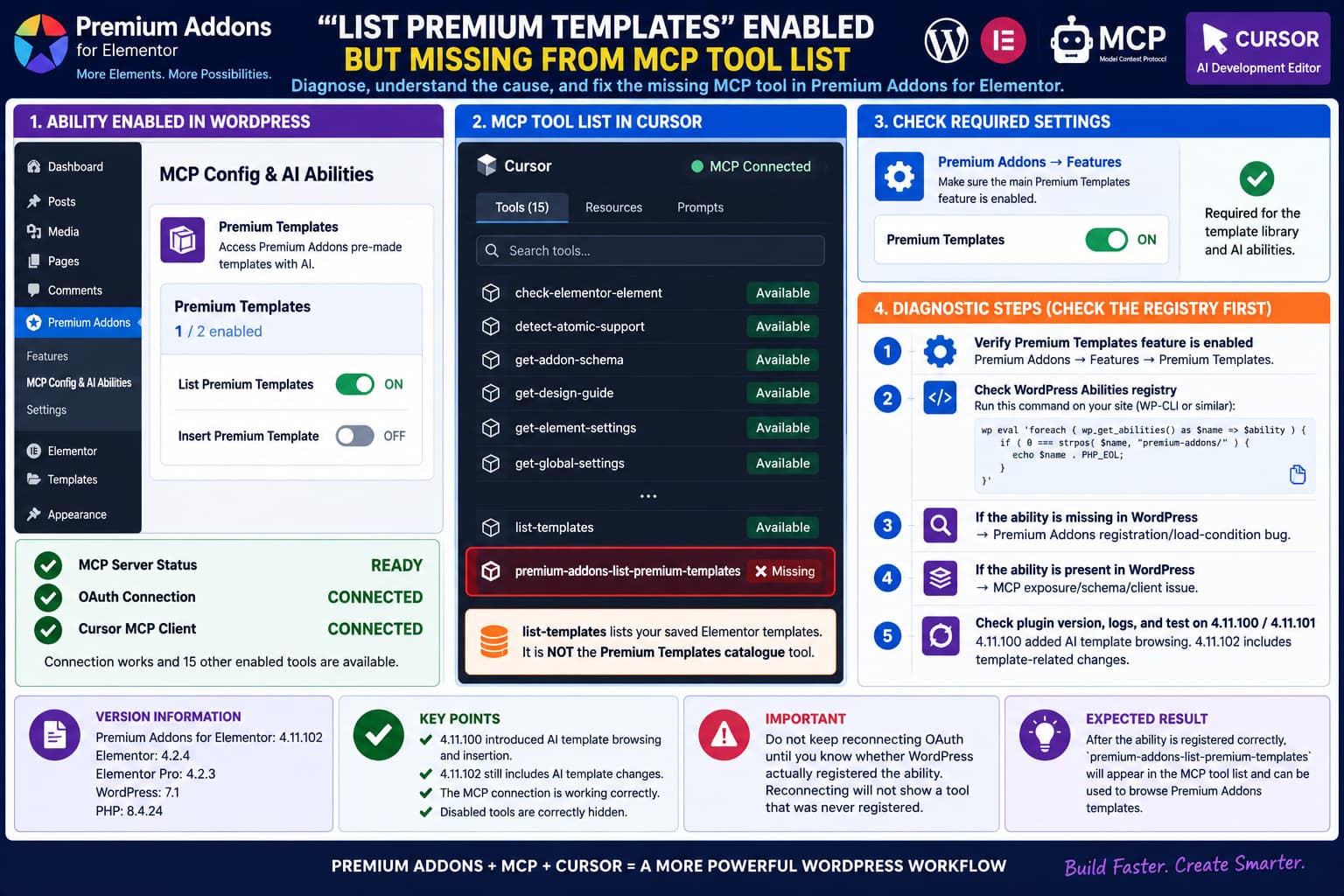
Premium Addons for Elementor can expose its WordPress functionality to AI clients such as Cursor through the WordPress Abilities API and Model Context Protocol.
A confusing failure can occur where:
Premium Addons → MCP Config & AI Abilities

Premium Templates: 1/2 enabled

List Premium Templates: ON
Insert Premium Template: OFF
looks correct in WordPress, but the expected Premium Templates listing tool never appears in the MCP client’s tool list.
Meanwhile:
MCP connection: Ready
OAuth: Successful
Other enabled abilities: Present
Disabled write abilities: Absent
This is a fundamentally different problem from an MCP connection failure.
Premium Addons added AI access to its pre-made templates in version 4.11.100, explicitly stating that AI agents can browse and insert Premium Addons pre-made templates through AI Abilities. Version 4.11.102 is the current release and even includes another AI-template change requiring approval before an agent inserts a pre-made template.
So a functioning 4.11.102 installation with the appropriate template features enabled should at least warrant investigation when the read-only listing ability never registers.
First Understand the Two Different “Template” Tools
Premium Addons exposes ordinary Elementor template functionality separately from its remote Premium Templates catalogue.
An MCP tool named something similar to:
list-templatescan refer to templates already saved inside the local WordPress site’s:
elementor_libraryThat is different from browsing Premium Addons’ pre-designed template library.
The Premium Templates library is the catalogue containing hundreds of pre-built:
- containers;
- sections;
- landing pages;
- widget layouts.
Premium Addons currently advertises more than 580 ready-made templates and specifically added AI-agent browsing/insertion of that catalogue in version 4.11.100.
Therefore:
list-templates availabledoes not prove that:
List Premium Templatesregistered correctly.
They serve different data sources.
Check the Main Premium Templates Feature
There are two layers of configuration that can easily be confused.
Premium Addons has a general Features section containing switches for functionality such as:
Premium Templates
Cross-Domain Copy N' Paste
Duplicator
Its official settings documentation confirms that Premium Templates is a separately enabled plugin feature.
Premium Addons’ own Premium Templates tutorial likewise instructs users to make sure the Premium Templates feature itself is enabled before attempting to use the library.
Therefore check:
Premium Addons → Features → Premium Templates
and make sure:
Premium Templates: ONDo this independently from:
Premium Addons → MCP Config & AI Abilities → Premium Templates
where:
List Premium Templates: ONis configured.
The display:
Premium Templates: 1/2 enabledon the AI Abilities screen means one of that feature group’s AI abilities is enabled.
It should not automatically be interpreted as proof that the underlying Premium Templates library feature is also active.
Test the Premium Templates Library Manually
Before debugging MCP registration, verify the actual template feature.
Open an Elementor page.
Look for the Premium Templates button/icon.
Open it.
Confirm that the template catalogue loads.
Premium Addons documents this as the normal manual workflow:
Elementor Editor
      ↓
Premium Templates
      ↓
Browse catalogue
      ↓
Preview / Insert
If the library does not open
The MCP symptom may be secondary.
Troubleshoot the Premium Templates feature itself first.
Check:
- Premium Templates feature enabled;
- required Premium Addons widgets enabled;
- Elementor working normally;
- remote template library reachable.
Premium Addons also documents widget and Elementor requirements for inserting some templates.
If the library works normally
You now know:
Premium Templates feature ✓
Remote catalogue ✓
Elementor integration ✓
but:
MCP listing ability ✗That makes ability registration the next layer to inspect.
Check the WordPress Abilities Registry Directly
This is the most useful test.
WordPress introduced the Abilities API in version 6.9. Plugins register individual abilities using:
wp_register_ability()and registered abilities can be inspected with:
wp_get_abilities()WordPress officially documents both APIs.
If you have WP-CLI access, run:
wp eval '
foreach ( wp_get_abilities() as $name => $ability ) {
    if ( 0 === strpos( $name, "premium-addons/" ) ) {
        echo $name . PHP_EOL;
    }
}
'
This bypasses Cursor completely.
You are asking WordPress:
Which Premium Addons abilities are actually registered right now?
Look for an ability corresponding to:
premium-addons/list-premium-templatesThe exact MCP-visible name can be transformed by the adapter/client, so the internal WordPress ability name is the important thing to inspect first.
Result A: Premium Templates Ability Is Missing From WordPress
Suppose the output includes:
premium-addons/list-pages
premium-addons/list-templates
premium-addons/get-global-settings
premium-addons/get-page-structure
...
but nothing corresponding to:
list-premium-templatesThat is strong evidence of a Premium Addons ability-registration problem.
At this stage:
Cursor is not the cause
OAuth is not the cause
MCP reconnecting is not the cause
The ability never entered WordPress’s ability registry.
No MCP adapter can expose a tool that was never registered.
Result B: The Ability Exists in WordPress but Not MCP
If the WordPress registry does contain:
premium-addons/list-premium-templatesbut Cursor’s MCP tools/list output does not contain the corresponding tool, the problem moves one layer outward:
WordPress Ability ✓
       ↓
MCP adapter/exposure
       ↓
Cursor tool list ✗
Possible areas then include:
- MCP ability exposure filtering;
- malformed tool schema;
- permission/exposure metadata;
- MCP adapter conversion;
- stale server tool-list state;
- client-side schema rejection.
This distinction is extremely valuable when reporting the bug.
Instead of:
Cursor doesn’t show my tool.
you can report:
The ability is/is not present in
wp_get_abilities().
That tells the developer exactly which layer to investigate.
Why Reauthorizing OAuth Is Unlikely to Be the Fix
Premium Addons currently supports Cursor and other MCP clients through OAuth, and version 4.11.101 specifically fixed two OAuth connection issues:
- the connection window not opening correctly on first load;
- OAuth problems on hosts serving
.well-knownfiles directly.
But if the same OAuth session successfully exposes all the other enabled Premium Addons discovery abilities, then authentication is demonstrably working.
This pattern:
15 enabled read tools → exposed ✓

disabled mutation tools → absent ✓

one enabled Premium Templates tool → absent ✗
is much more consistent with selective ability registration/exposure than with broken OAuth.
Reconnecting Cursor repeatedly is therefore low-value once the WordPress registry has been inspected.
Check for Registration Errors
WordPress requires abilities to be registered specifically during:
wp_abilities_api_initCalling wp_register_ability() at the wrong point causes WordPress to reject the registration and issue a developer warning.
Temporarily enable WordPress logging on the staging site:
define( 'WP_DEBUG', true );
define( 'WP_DEBUG_LOG', true );
define( 'WP_DEBUG_DISPLAY', false );
Reconnect/query MCP once.
Then inspect:
wp-content/debug.logSearch for:
wp_register_ability
Abilities
premium-addons
premium templates
_doing_it_wrong
A registration warning would immediately explain why the dashboard setting says enabled while no corresponding tool exists.
Disable unnecessary debugging after the test.
Version 4.11.92 Is Worth Noting During Developer Investigation
There is an interesting historical change in the Premium Addons codebase.
Version 4.11.92 says:
Improved Premium Templates loading by loading templates classes in the editor only for better performance.
Then version 4.11.100 added AI-agent access to those same pre-made templates.
This does not prove that the current problem is caused by the editor-only loading optimization.
But it is a reasonable area for the plugin developers to inspect.
An MCP request is not an Elementor Editor page load.
If an AI ability registration or callback depends on template-library classes that are still conditionally loaded only inside an editor context, the ability could potentially fail to initialize outside Elementor.
That is a hypothesis, not a confirmed root cause.
It is nevertheless more technically relevant than another OAuth reset.
Verify Plugin Files
Because this is a disposable staging site, also rule out an incomplete plugin update.
With WP-CLI:
wp plugin verify-checksums premium-addons-for-elementorA successful result helps establish that the installed free plugin files match WordPress.org.
If checksum verification fails, reinstall Premium Addons 4.11.102 from WordPress.org before investigating deeper registration logic.
Do not troubleshoot modified or incomplete plugin files as though they represent the official release.
Test 4.11.100 or 4.11.101 on Staging
The Premium Templates AI functionality was introduced in:
4.11.100Version 4.11.102 subsequently changed AI-agent template insertion behavior.
On a disposable staging site, a controlled rollback can help determine whether 4.11.102 introduced the failure.
Premium Addons itself provides version-control/rollback functionality in its settings.
Take a database/files snapshot and test:
4.11.102
→ List Premium Templates missing

4.11.101
→ test again

4.11.100
→ test again
Keep all other settings identical.
If it appears in 4.11.101 but disappears in 4.11.102
You have a very strong 4.11.102 regression report.
If it is missing in all three versions
Look for:
- main Premium Templates feature state;
- ability-registration condition;
- dependency/load-order problem;
- environment-specific issue.
Do not roll back a production site merely for this experiment.
A Pro License Should Not Be Required Just to Have the Templates Feature
Premium Addons documents its Premium Templates library as available to both the Free and Pro versions.
Free templates use free widgets; templates requiring Pro functionality need the corresponding Pro access.
Therefore a missing listing ability itself should not automatically be explained as:
You need Premium Addons Prounless Premium Addons explicitly documents such a restriction for the AI ability.
The public 4.11.100 changelog simply says AI agents can browse and insert Premium Addons pre-made templates through AI Abilities.
WordPress 7.1 Is Not an Unsupported Environment Here
Premium Addons 4.11.102 currently declares:
WordPress required: 6.6+
Tested through: 7.1
PHP required: 7.4+
and version 4.11.102 was released September 3, 2026.
The reported environment:
WordPress 7.1
PHP 8.4
therefore falls inside the plugin’s current advertised compatibility range.
The Abilities API itself has been part of WordPress core since 6.9.
So this should not be dismissed simply as:
WordPress too newor:
Abilities API unavailableespecially when numerous other Premium Addons abilities are already working.
A Useful Minimal Reproduction
The cleanest developer reproduction is:
Fresh/disposable WordPress site

WordPress:
7.1

PHP:
8.4.x

Elementor:
4.2.x

Premium Addons:
4.11.102

Premium Addons → Features:
Premium Templates = ON

MCP Config & AI Abilities:
List Premium Templates = ON
Insert Premium Template = OFF

Connection:
OAuth

Client:
Cursor
Then verify:
1. Premium Templates library opens manually in Elementor.
2. MCP server status = Ready.
3. Other Premium Addons tools are exposed.
4. Disabled mutation tools remain absent.
5. List Premium Templates is absent.
Finally attach the result of:
wp eval '
foreach ( wp_get_abilities() as $name => $ability ) {
    if ( 0 === strpos( $name, "premium-addons/" ) ) {
        echo $name . PHP_EOL;
    }
}
'
That last output is the most valuable diagnostic evidence.
What the Results Mean
The troubleshooting logic is:
List Premium Templates enabled
          ↓
Main Premium Templates feature ON?
       ↙              ↘
     No                Yes
     ↓                  ↓
 Enable it      Does manual library work?
                     ↙          ↘
                   No            Yes
                   ↓              ↓
            Template-library    Check
               problem       wp_get_abilities()
                               ↙        ↘
                          Missing      Present
                            ↓            ↓
                    PA registration   MCP exposure /
                         bug          schema/client
This prevents spending hours debugging the wrong layer.
What to Send Premium Addons Support
A strong bug report should include:
Premium Addons:
4.11.102

WordPress:
7.1

Elementor:
4.2.4

Elementor Pro:
4.2.3

PHP:
8.4.24

MCP client:
Cursor

Authentication:
OAuth

MCP status:
Ready

Premium Templates main Feature:
ON / OFF

Manual Premium Templates library:
Works / Does not work

AI ability:
List Premium Templates = ON
Insert Premium Template = OFF
Then provide:
Registered Premium Addons abilities:
[paste sanitized wp_get_abilities() names]
and:
Cursor MCP tools:
[paste tool names only]
No OAuth token, application password, cookie, nonce or credential is necessary.
Practical Conclusion
Premium Addons 4.11.100 explicitly introduced AI-agent browsing and insertion of its pre-made template library, and 4.11.102 continues to modify that AI-template workflow.
Therefore an enabled List Premium Templates ability that is completely absent from the MCP tools list deserves investigation.
Before labeling it a 4.11.102 regression, confirm the separate:
Premium Addons → Features → Premium Templates
switch is also enabled, because Premium Addons officially requires the Premium Templates feature to be active for its template library.
Then inspect WordPress directly using wp_get_abilities().
If the Premium Templates listing ability is absent from the WordPress registry, the problem is server-side registration inside Premium Addons; Cursor and OAuth are downstream and cannot expose a tool that WordPress never registered.
If the ability exists in wp_get_abilities() but is missing only from MCP tools/list, investigate the MCP adapter, exposure metadata or tool schema instead.
Given that the rest of the enabled Premium Addons abilities are already exposed correctly after fresh OAuth authorization, repeated Cursor reconnections are unlikely to be the useful next step.
The WordPress ability registry is where this issue should be isolated next.
