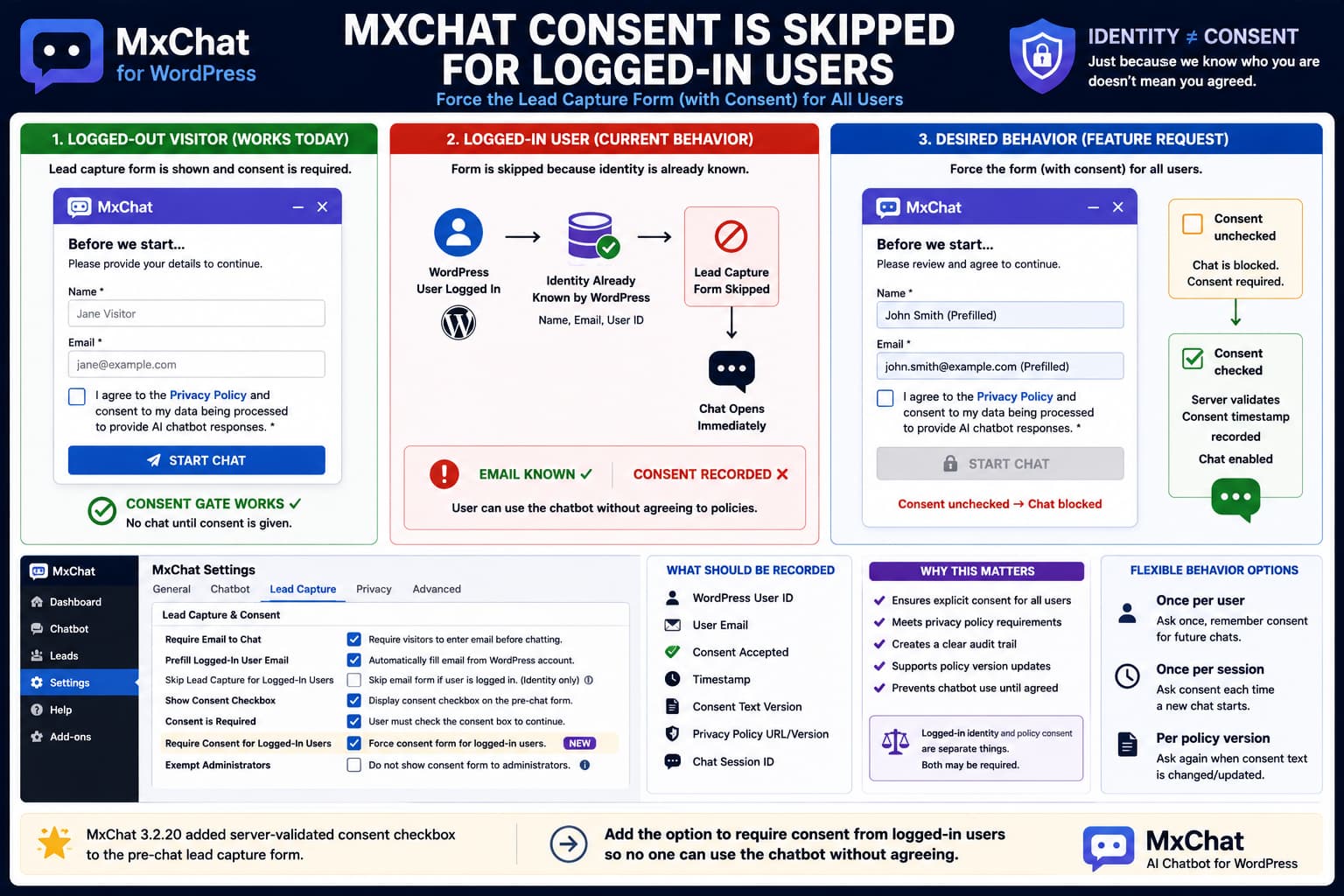
MxChat’s Require Email to Chat feature can place a form in front of the chatbot so anonymous visitors provide their identity before beginning a conversation.
Version 3.2.20 also added an important privacy feature: the pre-chat email form can now display a configurable consent checkbox, make that checkbox required, link to a Privacy Policy, validate the consent server-side, and store a record of the submitted consent.
However, there is an important gap:
Logged-out visitor
        ↓
Lead capture form
        ↓
Required consent checkbox
        ↓
Chat begins
while a logged-in WordPress user may instead experience:
Logged-in user
        ↓
No lead capture form
        ↓
No consent checkbox
        ↓
Chat begins immediately
If the purpose of the form is only to discover the visitor’s email address, skipping it for logged-in users is understandable.
If the form is also being used as a mandatory policy-consent gate, skipping it is a different problem.
Knowing someone’s email address does not establish that they agreed to the chatbot’s current privacy terms.
Why MxChat Can Skip Identity Collection for Logged-In Users
MxChat already has access to WordPress user identity when somebody is authenticated.
Its documentation confirms that logged-in WordPress users can supply the identity associated with a chat session and live-agent handoff without requiring the pre-chat email form. MxChat can use the WordPress account’s user information as one of its identity sources.
Conceptually:
Anonymous visitor
→ MxChat does not know identity
→ ask for name/email

Logged-in WordPress user
→ WordPress already knows identity
→ email collection may be unnecessary
That is sensible from a lead-capture perspective.
But it creates an architectural issue now that the same form also contains privacy consent.
The form is performing two distinct jobs:
1. Identify the visitor
2. Obtain explicit consent
Only the first job becomes unnecessary when a user is logged in.
The second may still be required by the site’s policy.
MxChat 3.2.20 Changed the Meaning of the Pre-Chat Form
Before the current consent feature, Require Email to Chat was fundamentally an identity/lead-capture gate.
MxChat’s FAQ describes the setting as:
MxChat → Settings → Chatbot → Lead Capture → Require Email to Chat
and explains that it forces a visitor to enter an email before starting the conversation.
Version 3.2.20 expanded that flow.
The current changelog states that the pre-chat form can now:
- display a consent checkbox;
- use a custom consent label;
- link to the site’s Privacy Policy;
- make consent mandatory;
- enforce the requirement server-side;
- record whether consent was checked;
- record when it was submitted;
- preserve the exact consent wording;
- expose that information in Leads, CSV exports and privacy exports.
That means the form is no longer merely:
Tell us your emailIt can now mean:
Before using the AI chatbot,
confirm that you agree to the stated policy.
Once it serves that role, bypassing the form for a known WordPress user has different consequences.
Logged In Does Not Mean Consented
A WordPress account tells you facts such as:
User ID
Display name
Email address
Role
It does not automatically tell you:
Has this user agreed to the current chatbot policy?Those are separate states.
For example:
User registered:
January 2025

Chatbot consent wording added:
August 2026
The fact that the user already has an account does not establish that the person accepted a chatbot-specific policy introduced more than a year later.
Similarly, agreement to:
Website account Termsdoes not automatically establish agreement to:
AI chatbot data-processing noticeunless the site’s legal/policy design explicitly makes those the same agreement.
That question depends on the site’s actual policies and applicable law; the plugin itself cannot determine that automatically.
The Current Support Request Is a Feature Request
The current WordPress.org request asks MxChat to provide an option to force the lead form for all users, including logged-in accounts, ideally with the known email address prefilled. The specific concern is making policy agreement mandatory before chatbot access.
At the time of writing, that thread remains unresolved and contains no developer response announcing an existing setting or workaround.
Therefore, there is currently no documented setting such as:
☐ Skip lead form for logged-in usersor:
☐ Require consent from all usersthat can simply be enabled.
This should be treated as an enhancement request rather than telling administrators they overlooked a setting.
The Best Design Is Probably Not “Force Lead Capture”
A setting named:
Force Lead Capture for Logged-In Userswould solve the immediate issue, but it mixes identity collection with consent again.
A cleaner design would separate the behaviors.
For example:
Lead Capture
[x] Require email before chat

Logged-in users
[x] Prefill account email

Consent
[x] Require policy consent before chat
[x] Apply consent requirement to logged-in users
This supports several legitimate site configurations.
Configuration A — Leads only
Guests:
Name + Email required

Logged-in users:
Skip form
Configuration B — Consent for everyone
Guests:
Email + Consent

Logged-in users:
Prefilled Email + Consent
Configuration C — Consent only
Guests:
Consent required

Logged-in users:
Consent required

Email collection:
Not required
Separating these concerns would make the plugin much clearer.
Prefilling the Logged-In Email Makes Sense
If MxChat chooses to display the existing lead form to logged-in users, requiring them to manually type an email already stored in WordPress would add unnecessary friction.
WordPress already exposes the authenticated user’s address through:
wp_get_current_user()->user_emailConceptually, the form could display:
Name
John Smith

Email
john@example.com

☐ I agree to the Privacy Policy and chatbot terms.
The name and email could be prefilled.
Whether the email should be editable is a separate product decision.
For a consent record associated with a WordPress account, using the account email rather than allowing an unrelated address may actually produce a cleaner audit trail.
Do Not Pre-Check the Consent Checkbox
Prefilling an existing email and pre-selecting consent are not equivalent.
This would be reasonable:
Email:
john@example.com
This would undermine the purpose of affirmative consent:
☑ I agree...before the user has acted.
MxChat’s own guidance on lead-capture consent recommends an active, unchecked checkbox rather than preselected consent.
So the desired logged-in workflow should be:
Email → prefilled

Consent → unchecked

Start Chat → disabled/rejected until consent submitted
Server-Side Enforcement Is Essential
Version 3.2.20 specifically states that required consent is enforced server-side.
Any force-for-logged-in-users enhancement needs to preserve that.
It is not sufficient to hide the chat input with JavaScript such as:
checkbox unchecked
→ hide Send button
because a visitor could potentially bypass client-side UI restrictions.
The server should also reject the chat request when the required consent state has not been recorded.
Conceptually:
Chat request
     ↓
Is consent required?
     ↓
Has this session/user provided valid consent?
   ↙                            ↘
 No                              Yes
 ↓                                ↓
Reject                         Process AI request
This is especially important if the stated goal is that users cannot use the chatbot until they agree.
Consent Should Be Recorded Against the User or Session
MxChat 3.2.20 already records consent information from pre-chat captures.
For logged-in users, a robust record could include:
WordPress user ID
User email
Timestamp
Consent accepted: yes
Consent label/version
Session ID
Privacy Policy URL/version if available
Not every site needs every field, but MxChat already records the exact displayed consent label and timestamp, which is a strong foundation.
The important part is that:
User account existsshould not be substituted for:
Consent record existsShould Users Have to Consent Every Time?
That should ideally be configurable.
There are two reasonable models.
Once per user
After the logged-in user agrees:
User #42
Consent version 1
Accepted August 28, 2026
MxChat can skip the consent gate on later chats.
This gives the smoothest user experience.
Once per session
Every new chatbot session requires agreement.
This creates stronger repeated confirmation but more friction.
A third, more sophisticated option would be policy-version consent.
Policy v1 accepted
        ↓
No further prompt

Policy updated to v2
        ↓
Prompt user again
That is often more useful than either “every visit” or “once forever.”
Policy Versioning Would Solve a Future Problem
Imagine an administrator changes:
I agree to the Privacy Policy.to:
I agree that my chatbot messages may be processed
by OpenAI and retained for 30 days.
A user who accepted the first wording has not necessarily interacted with the second wording.
MxChat already stores the exact consent label shown at capture time.
That means the plugin is already close to supporting version-aware consent.
A future implementation could hash or version the consent text:
Consent text v1
→ user accepted

Admin edits consent text
→ becomes v2

Next chat
→ consent required again
That would be considerably stronger than a permanent boolean:
user_consented = trueWhat About Administrators?
A force-for-all-users feature should explicitly decide what happens to WordPress administrators.
There are two defensible approaches.
Literally everyone
Subscriber → gate
Customer   → gate
Editor     → gate
Admin      → gate
This most closely matches:
Force for all usersExempt administrators
This can make testing and site administration easier.
For example:
[x] Require consent for logged-in users
[x] Exempt administrators
The plugin should not silently assume one policy.
The administrator should be able to decide.
MxChat Already Distinguishes Logged-In Users Elsewhere
This type of option would fit the plugin’s existing architecture.
MxChat already distinguishes between:
Guests
Logged-in users
Specific WordPress roles
for features such as chatbot access and rate limits. Its current WordPress.org documentation explicitly states that chatbot access can be restricted by logged-in status and role.
So adding a logged-in-user condition to the consent gate would be consistent with behavior MxChat already handles elsewhere.
The Forms Add-On Is Not an Exact Replacement
MxChat’s Forms add-on can display custom forms during a conversation.
The FAQ describes a workaround where a form can be configured to:
Trigger After X Messages = 1and:
Block chat until submittedto collect consent.
That can be useful for many sites.
But it is not equivalent to the requested behavior.
The sequence becomes:
User sends first message
        ↓
Form appears
        ↓
Conversation blocked
The requested behavior is:
Form appears
        ↓
User consents
        ↓
First chatbot message is allowed
If the site’s requirement is that no chatbot interaction or AI processing occur before agreement, an after-first-message form is too late.
The core pre-chat gate is the appropriate architectural location.
Do Not Try to Solve This With a Response Filter
MxChat documents message filters such as:
mxchat_filter_messageand client-side customMxChatFilter() for modifying prompts or responses.
Those hooks are useful for:
- adding context;
- changing response text;
- personalized messages;
- disclaimers.
They are not documented as pre-chat authorization/consent hooks.
Using a response filter to append:
By continuing you agree...would also not create an affirmative checkbox-based consent record.
The current public hooks documentation does not expose a documented hook specifically for forcing the core pre-chat gate onto logged-in users.
So a custom snippet should not be invented without reviewing the exact current MxChat frontend and server-side lead-capture implementation.
How to Verify the Current Behavior
A clean test requires two browser sessions.
Test 1 — Logged out
- Enable Require Email to Chat.
- Enable the new required consent checkbox.
- Open an incognito/private browser.
- Open the chatbot.
Expected:
Lead capture form appears
Consent required
Try submitting without checking consent.
Version 3.2.20 should reject the submission server-side when the checkbox is configured as required.
Test 2 — Logged in
- Log into WordPress as a normal Subscriber/Customer account.
- Open the same frontend page.
- Start the chatbot.
If the form is skipped and chat begins directly, the reported behavior is reproduced.
Do not use only an Administrator account when testing because future implementations might deliberately exempt admins.
Test More Than One Role
If submitting a reproducible feature request, test:
Administrator
Editor
Subscriber
WooCommerce Customer
Logged-out visitor
Record which roles see the pre-chat form.
The desired behavior should also be stated precisely.
For example:
Setting:
Require consent for all users = ON

Expected:
Every role sees consent before the first message.

Logged-in users:
Name/email prefilled from WordPress account.

Consent:
Always unchecked until actively accepted.
That is much easier for a developer to implement than simply saying:
The form does not show while logged in.
Current Version and Status
As of August 28, 2026, the current public MxChat changelog lists version:
3.2.20This release introduced the pre-chat consent checkbox and server-side consent validation.
The request to force the form for logged-in users was posted afterward and remains unresolved at the time of writing.
Therefore, there is currently no evidence that version 3.2.20 contains a configuration option that solves the logged-in bypass.
What MxChat Should Add
The cleanest implementation would be two separate controls.
For example:
Lead Capture

[x] Require email to chat

Logged-In Users
[ ] Skip lead capture when user identity is already known
and separately:
Consent

[x] Show consent checkbox
[x] Consent is required
[x] Require consent from logged-in users
When the user is authenticated:
Name  → prefilled
Email → prefilled
Consent → unchecked
Then prevent both ordinary and streaming chat requests until server-side consent validation succeeds.
Optionally add:
[ ] Remember consent
[ ] Ask again when consent text changes
[ ] Exempt administrators
That would cover both lead-generation use cases and sites using the pre-chat form as a genuine policy gate.
Practical Conclusion
There is a logical reason MxChat may skip its lead-capture form for logged-in users: WordPress already provides their identity, and MxChat explicitly uses logged-in accounts as one source of name/email information.
But version 3.2.20 changed the role of that form by adding a required, server-validated consent checkbox.
Once the form is also the mechanism for recording agreement to chatbot policies, skipping it solely because the user’s email is already known creates a gap:
Identity known ≠ Consent recordedThe best fix is not simply to collect the same email twice. MxChat should provide a dedicated Require consent for logged-in users option, prefill their WordPress identity, keep the checkbox unchecked, and block the first chat request until consent has been accepted and recorded.
Until MxChat exposes such a control, the current core pre-chat consent feature should not be assumed to enforce consent across authenticated users simply because it is enabled for anonymous visitors.
