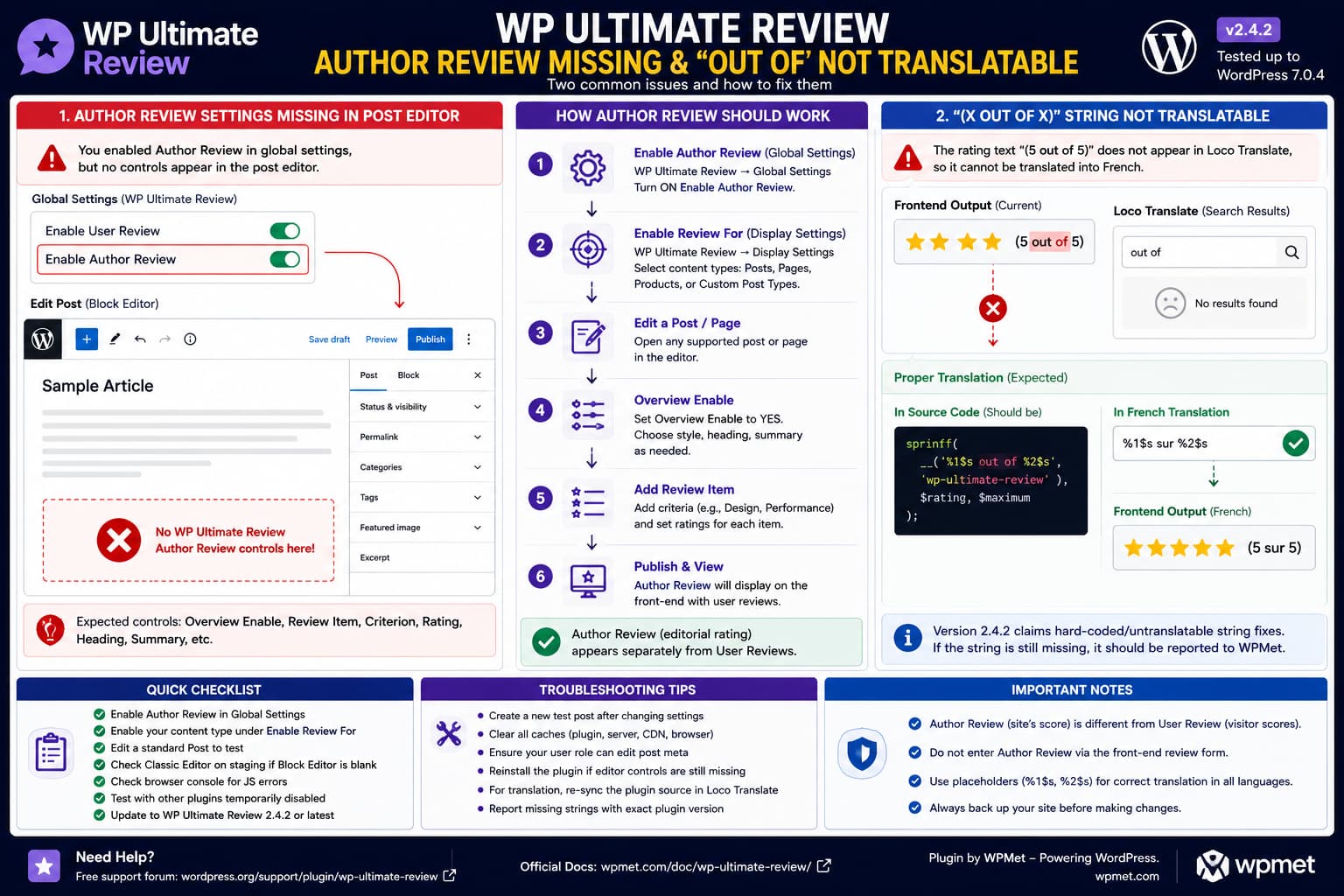
If WP Ultimate Review allows visitors to submit User Reviews but provides no way to enter an Author Review from the WordPress post editor, enabling “Author Review” globally is not supposed to be the end of the setup.
According to WPMet’s own documentation, editing an individual supported post or page should expose review-specific controls including Overview Enable, review style, heading, summary, and Review Item fields where the author can enter review criteria and ratings.
Therefore, if those controls are completely absent from the editor, the first task is to determine why the plugin’s post-level review interface is not being registered or displayed.
There is also a second, separate issue with localization. The current plugin advertises rating output such as “4.5 out of 5,” and versions 2.4.1 and 2.4.2 specifically claim fixes for hard-coded and untranslatable strings. If (5 out of 5) still does not appear in Loco Translate after synchronizing the current source, that particular output may still be missing from the plugin’s gettext catalog or may be assembled dynamically from untranslated fragments.
How Author Review Is Supposed to Work
WP Ultimate Review separates User Review and Author Review.
User Review allows visitors to submit ratings from the front end.
Author Review allows the post/page author to provide the site’s own editorial assessment.
The plugin’s global settings explicitly describe:
Enable User Review
→ Visitors can submit reviews

Enable Author Review
→ Post/page author can showcase a review/rating
But the actual author score is configured at the individual content level.
WPMet documents the expected workflow as:
Edit a post or page
        ↓
Find WP Ultimate Review settings
        ↓
Overview Enable = Yes
        ↓
Add Review Item
        ↓
Enter criterion + rating
        ↓
Update/Publish
        ↓
Author Review appears on front end
So if Overview Enable and Review Item never appear, the problem exists before any author score can be entered.
First Check “Enable Review For”
Go to the WP Ultimate Review display settings.
Find:
Enable Review For
This setting controls which content types receive the review system.
WPMet documents that it can include:
- Posts
- Pages
- Products
- supported custom post types
If you are editing a normal blog post, make sure Posts is enabled.
For a page, enable Pages.
For a custom post type, make sure that specific post type is selected.
This matters because:
Enable Author Review = Yesdoes not necessarily mean:
Enable review interface on every post typeThe global Author Review switch enables the feature, while the display configuration determines where the review system applies.
Test With a Normal WordPress Post
Before troubleshooting a custom post type, create a temporary standard WordPress post.
Go to:
Posts → Add New
Check whether the WP Ultimate Review controls appear there.
If they appear on Posts but not on your custom content type, investigate:
Enable Review Forand the custom post type’s editor support.
WP Ultimate Review added selectable custom-post-type support as far back as version 1.2.2, so supported custom types are intended to work when properly enabled.
If the controls are missing even on an ordinary Post, the issue is broader than custom-post-type configuration.
Where to Look in the Block Editor
WP Ultimate Review historically uses post-level editor settings rather than requiring the author score to be submitted through the public review form.
Scroll below the main editor content and inspect the full editing screen.
Also open the editor’s preferences/options and check whether any review-related panel has been hidden.
The exact placement can vary with WordPress/editor versions.
You are looking for controls resembling:
Overview Enable

Review Graph Style

Heading

Summary Enable

Review Item
    Criterion
    Rating

Add Item
These names come directly from WPMet’s documented post/page workflow.
If none of those exist anywhere in the editor, do not create the author rating as a front-end User Review. They represent different review sources.
Check the Plugin Version
At the time of writing, WordPress.org lists:
WP Ultimate Review: 2.4.2
Released: August 9, 2026
Version 2.4.2 contains:
Fixed: Hard-coded and untranslatable strings.Version 2.4.1, released immediately before it, similarly says:
Fixed: Replaced hard-coded strings with translatable text.Back up the site and update if you are using an older version.
This is especially important for the translation issue.
Do not troubleshoot an untranslated string on 2.3.x without first testing the release that explicitly claims localization fixes.
WordPress 7.1 Is Worth Testing Separately
There is an additional compatibility detail.
WP Ultimate Review 2.4.2 is currently listed as tested through:
WordPress 7.0.4rather than WordPress 7.1.
That does not prove WordPress 7.1 breaks the author-review editor.
However, if the missing editor controls occur on WordPress 7.1, perform a controlled staging test because the plugin’s public compatibility metadata has not yet caught up with that core release.
This is especially relevant because WP Ultimate Review has had editor/metabox fixes before.
Its changelog includes:
2.3.4
Fixed: Warning notice on block editor
and earlier:
2.0.1
Fixed: Meta box content issue
That history makes an editor-specific regression plausible enough to investigate, though it does not prove one exists in 2.4.2.
Test the Classic Editor on Staging
If the controls are absent only in the Block Editor, temporarily test the same post using Classic Editor on a staging copy.
The result can isolate the problem quickly.
If:
Classic Editor
→ Author Review metabox appears
but:
Block Editor
→ Author Review controls missing
you have identified a Gutenberg/editor compatibility problem.
If the controls are missing in both editors, investigate plugin configuration, post-type support, plugin files, and conflicts instead.
Do not permanently switch an established production workflow to Classic Editor simply to mask a plugin bug.
Use the test diagnostically.
Check for a JavaScript Error in the Editor
Open the affected WordPress post editor.
Then open:
Developer Tools → Console
Reload the editor.
Look for errors involving:
wp-ultimate-review
ultimate-review
metabox
React
Uncaught TypeError
Uncaught ReferenceError
A JavaScript error can stop an editor component from rendering while leaving the plugin’s front-end User Review functionality completely operational.
That would explain this combination:
Front-end User Review ✓

Global settings ✓

Post-editor Author Review interface ✗
Capture the first relevant JavaScript error rather than only the later cascade of errors.
Test for an Editor Plugin Conflict
On staging, keep WP Ultimate Review active and temporarily disable other plugins that substantially modify the editor.
Pay particular attention to:
page builders
Gutenberg extensions
custom-field plugins
admin UI plugins
role/capability plugins
editor optimization plugins
security plugins that modify admin scripts
Reload the post editor after each meaningful test.
If the author-review panel returns, reactivate plugins in small groups until the conflict returns.
Do not perform broad plugin deactivation on a live production site unless you understand the consequences.
Reinstall WP Ultimate Review if Its Admin Files May Be Incomplete
If the plugin settings work but the post-level interface is missing on every supported content type, a failed or incomplete plugin update is another possibility.
Take a backup first.
Then reinstall the current WP Ultimate Review package from WordPress.org.
Do not delete its database data manually.
Replacing plugin program files and deleting saved review configuration are different actions.
After reinstalling:
- enable Author Review;
- enable Posts under Enable Review For;
- create a fresh test post;
- check for Overview Enable and Review Item.
If the interface returns on a new post, revisit the affected existing content afterward.
The Translation Issue Is Separate
The missing:
(5 out of 5)translation should not be confused with the missing Author Review editor.
One is an admin/editor registration problem.
The other is a localization/string-extraction problem.
Treat them independently.
WP Ultimate Review explicitly advertises the author-average output in the form:
(4.5 out of 5)So “out of” is clearly user-visible plugin output and should be internationalized if the plugin is intended to support localization.
Synchronize Loco Translate Before Concluding the String Is Missing
After upgrading to WP Ultimate Review 2.4.2, open:
Loco Translate → Plugins → WP Ultimate Review → French
Use Loco’s synchronization/source-scan function so the translation catalog reflects the current plugin code.
Then search separately for:
out ofand:
outDo not search only for the final runtime text:
5 out of 5A correctly internationalized implementation would normally use placeholders.
For example, source code could conceptually contain:
sprintf(
    __( '%1$s out of %2$s', 'wp-ultimate-review' ),
    $rating,
    $maximum
);
In that case Loco Translate would expose:
%1$s out of %2$srather than:
5 out of 5The French translation could then preserve placeholder positions:
%1$s sur %2$sThat code is an example of how the plugin should expose a dynamic rating string. It is not a claim about the exact current implementation.
If “Out of” Still Does Not Appear After Synchronizing
If version 2.4.2 is installed and a fresh source scan still cannot find any relevant string, the rating output may still be:
- hard-coded;
- generated in JavaScript without proper localization;
- assembled from untranslated fragments;
- generated by a template excluded from the translation catalog;
- constructed dynamically in a way gettext cannot extract.
For example, code resembling:
echo '(' . $rating . ' out of ' . $maximum . ')';would be problematic because:
out ofhas not been passed through a WordPress translation function.
Likewise, JavaScript code such as:
`${rating} out of ${maximum}`will not become translatable merely because a PHP .pot file exists.
The developer must internationalize the actual output layer.
Version 2.4.2 Makes This Especially Worth Reporting
The current changelog specifically says:
2.4.1
Replaced hard-coded strings with translatable text

2.4.2
Fixed hard-coded and untranslatable strings
Therefore, if (x out of x) remains absent from the translation source in 2.4.2, the strongest bug report is not simply:
Loco Translate does not work.
It is:
This specific front-end string is still missing from the gettext catalog after the plugin’s hard-coded-string fixes.
That gives the developer a precise regression/omission to inspect.
Do Not Edit the Plugin Translation Directly in PHP
If you locate:
out ofinside the plugin source, it may be tempting to replace it manually with:
surDo not use that as the permanent solution.
A future plugin update will overwrite the edit.
It would also hard-code French into an otherwise multilingual plugin.
The correct solution is for the plugin to expose the complete dynamic phrase through WordPress’s internationalization API.
Why Translating Only “Out of” Is Not Ideal
For dynamic messages, translating a complete phrase is usually safer than translating isolated words.
This:
__( 'out of', 'wp-ultimate-review' )may work for French, but word order varies between languages.
A better translation unit is conceptually:
%1$s out of %2$sThis lets translators move both placeholders if their language requires different grammar.
WordPress’s internationalization documentation recommends using placeholders with formatted translatable strings when dynamic values are inserted into human-readable text.
How to Verify Author Review Once the Editor Controls Return
Create a temporary post.
Enable:
Overview Enable: YesAdd two criteria, for example:
Writing Quality: 4.5
Accuracy: 5
Add any heading or summary required by your layout.
Update the post.
Then open it logged out or in a private browser.
Verify that the Author Review appears separately from visitor reviews.
If the global setting:
Enable Author Averageis active, verify the author average as well.
The plugin specifically advertises separate Author Review and User Review functionality, so one should not overwrite the other.
Useful Reproduction Test for the Developer
For the missing author controls, provide:
WP Ultimate Review: 2.4.2
WordPress:
PHP:
Editor: Block / Classic

Global Settings:
Enable Author Review = ON

Display Settings:
Enable Review For → Posts = ON

Result:
User Review form appears on frontend.
No Overview Enable / Review Item controls
appear when editing a standard WordPress Post.
Also state whether the controls appear under Classic Editor.
For the translation problem, provide:
WP Ultimate Review: 2.4.2
Translation tool: Loco Translate
Language: French

Catalog synchronized from current plugin source.

Missing front-end string:
(5 out of 5)

Search for:
"out of"
"%s out of %s"
"%1$s out of %2$s"

Result:
No corresponding translatable source string.
That gives WPMet two reproducible issues rather than one broad request.
Current Status
The current WordPress.org support report containing these two exact issues is still unresolved at the time of writing.
WP Ultimate Review’s documentation clearly says that post/page editing should provide Overview Enable and Review Item controls, so their complete absence is not the documented Author Review workflow.
Likewise, version 2.4.2 explicitly claims to fix hard-coded and untranslatable strings. If the rating expression still cannot be found after synchronizing Loco Translate against 2.4.2, that particular output should be reported as a remaining localization omission.
The safest troubleshooting order is therefore:
- Update to WP Ultimate Review 2.4.2.
- Enable Author Review globally.
- Enable the affected post type under Enable Review For.
- Test a new standard WordPress Post.
- Check for Overview Enable and Review Item.
- Test Classic Editor on staging if the Block Editor remains empty.
- Check editor JavaScript errors and plugin conflicts.
- Synchronize the current translation source in Loco Translate.
- Search for the dynamic “out of” format and placeholders.
- Report whichever behavior remains reproducible to WPMet.
